onnx
14 TopicsBuild an Offline Hybrid RAG Stack with ONNX and Foundry Local
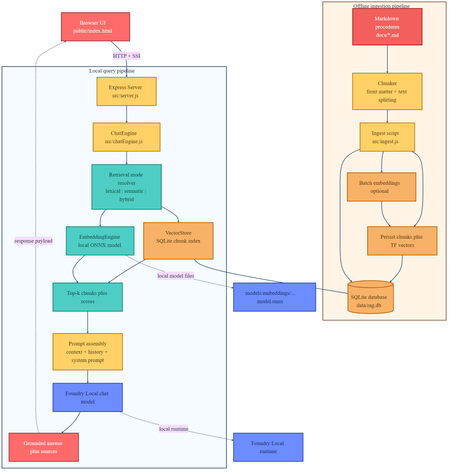
If you are building local AI applications, basic retrieval augmented generation is often only the starting point. This sample shows a more practical pattern: combine lexical retrieval, ONNX based semantic embeddings, and a Foundry Local chat model so the assistant stays grounded, remains offline, and degrades cleanly when the semantic path is unavailable. Why this sample is worth studying Many local RAG samples rely on a single retrieval strategy. That is usually enough for a proof of concept, but it breaks down quickly in production. Exact keywords, acronyms, and document codes behave differently from natural language questions and paraphrased requests. This repository keeps the original lexical retrieval path, adds local ONNX embeddings for semantic search, and fuses both signals in a hybrid ranking mode. The generation step runs through Foundry Local, so the entire assistant can remain on device. Lexical mode handles exact terms and structured vocabulary. Semantic mode handles paraphrases and more natural language phrasing. Hybrid mode combines both and is usually the best default. Lexical fallback protects the user experience if the embedding pipeline cannot start. Architectural overview The sample has two main flows: an offline ingestion pipeline and a local query pipeline. The architecture splits cleanly into offline ingestion at the top and runtime query handling at the bottom. Offline ingestion pipeline Read Markdown files from docs/ . Parse front matter and split each document into overlapping chunks. Generate dense embeddings when the ONNX model is available. Store chunks in SQLite with both sparse lexical features and optional dense vectors. Local query pipeline The browser posts a question to the Express API. ChatEngine resolves the requested retrieval mode. VectorStore retrieves lexical, semantic, or hybrid results. The prompt is assembled with the retrieved context and sent to a Foundry Local chat model. The answer is returned with source references and retrieval metadata. The sequence diagram shows the difference between lexical retrieval and hybrid retrieval. In hybrid mode, the query is embedded first, then lexical and semantic scores are fused before prompt assembly. Repository structure and core components The implementation is compact and readable. The main files to understand are listed below. src/config.js : retrieval defaults, paths, and model settings. src/embeddingEngine.js : local ONNX embedding generation through Transformers.js. src/vectorStore.js : SQLite storage plus lexical, semantic, and hybrid ranking. src/chatEngine.js : retrieval mode resolution, prompt assembly, and Foundry Local model execution. src/ingest.js : document ingestion and embedding generation during indexing. src/server.js : REST endpoints, streaming endpoints, upload support, and health reporting. Getting started To run the sample, you need Node.js 20 or newer, Foundry Local, and a local ONNX embedding model. The default model path is models/embeddings/bge-small-en-v1.5 . cd c:\Users\leestott\local-hybrid-retrival-onnx npm install huggingface-cli download BAAI/bge-small-en-v1.5 --local-dir models/embeddings/bge-small-en-v1.5 npm run ingest npm start Ingestion writes the local SQLite database to data/rag.db . If the embedding model is available, each chunk gets a dense vector as well as lexical features. If the embedding model is missing, ingestion still succeeds and the application remains usable in lexical mode. Best practice: local AI applications should treat model files, SQLite data, and native runtime compatibility as part of the deployable system, not as optional developer conveniences. Code walkthrough 1. Retrieval configuration The sample makes its retrieval behaviour explicit in configuration. That is useful for testing and for operator visibility. export const config = { model: "phi-3.5-mini", docsDir: path.join(ROOT, "docs"), dbPath: path.join(ROOT, "data", "rag.db"), chunkSize: 200, chunkOverlap: 25, topK: 3, retrievalMode: process.env.RETRIEVAL_MODE || "hybrid", retrievalModes: ["lexical", "semantic", "hybrid"], fallbackRetrievalMode: "lexical", retrievalWeights: { lexical: 0.45, semantic: 0.55, }, }; Those defaults tell you a lot about the intended operating profile. Chunks are small, the number of returned chunks is low, and the fallback path is explicit. 2. Local ONNX embeddings The embedding engine disables remote model loading and only uses local files. That matters for privacy, repeatability, and air gapped operation. env.allowLocalModels = true; env.allowRemoteModels = false; this.extractor = await pipeline("feature-extraction", resolvedPath, { local_files_only: true, }); const output = await this.extractor(text, { pooling: "mean", normalize: true, }); The mean pooling and normalisation step make the vectors suitable for cosine similarity based ranking. 3. Hybrid storage and ranking in SQLite Instead of adding a separate vector database, the sample stores lexical and semantic representations in the same SQLite table. That keeps the local footprint low and the implementation easy to debug. searchHybrid(query, queryEmbedding, topK = 5, weights = { lexical: 0.45, semantic: 0.55 }) { const lexicalResults = this.searchLexical(query, topK * 3); const semanticResults = this.searchSemantic(queryEmbedding, topK * 3); if (semanticResults.length === 0) { return lexicalResults.slice(0, topK).map((row) => ({ ...row, retrievalMode: "lexical", })); } const fused = [...combined.values()].map((row) => ({ ...row, score: (row.lexicalScore * lexicalWeight) + (row.semanticScore * semanticWeight), })); fused.sort((a, b) => b.score - a.score); return fused.slice(0, topK); } The important point is not just the weighted fusion. It is the fallback behaviour. If semantic retrieval cannot provide results, the user still gets lexical grounding instead of an empty context window. 4. Retrieval mode resolution in ChatEngine ChatEngine keeps the runtime behaviour predictable. It validates the requested mode and falls back to lexical search when semantic retrieval is unavailable. resolveRetrievalMode(requestedMode) { const desiredMode = config.retrievalModes.includes(requestedMode) ? requestedMode : config.retrievalMode; if ((desiredMode === "semantic" || desiredMode === "hybrid") && !this.semanticAvailable) { return config.fallbackRetrievalMode; } return desiredMode; } This is a sensible production design because local runtime failures are common. Missing model files or native dependency mismatches should reduce quality, not crash the entire assistant. 5. Foundry Local model management The sample uses FoundryLocalManager to discover, download, cache, and load the configured chat model. const manager = FoundryLocalManager.create({ appName: "gas-field-local-rag" }); const catalog = manager.catalog; this.model = await catalog.getModel(config.model); if (!this.model.isCached) { await this.model.download((progress) => { const pct = Math.round(progress * 100); this._emitStatus("download", `Downloading ${this.modelAlias}... ${pct}%`, progress); }); } await this.model.load(); this.chatClient = this.model.createChatClient(); this.chatClient.settings.temperature = 0.1; This gives the app a better local startup experience. The server can expose a status stream while the model initialises in the background. User experience and screenshots The client is intentionally simple, which makes it useful during evaluation. You can switch retrieval mode, test questions quickly, and inspect the retrieved sources. The landing page exposes retrieval mode directly in the UI. That makes it easy to compare lexical, semantic, and hybrid behaviour during testing. The sources panel shows grounding evidence and retrieval scores, which is useful when validating whether better answers are coming from better retrieval or just model phrasing. Best practices for ONNX RAG and Foundry Local Keep lexical fallback alive. Exact identifiers and runtime failures both make this necessary. Persist sparse and dense features together where possible. It simplifies debugging and operational reasoning. Use small chunks and conservative topK values for local context budgets. Expose health and status endpoints so users can see when the model is still loading or embeddings are unavailable. Test retrieval quality separately from generation quality. Pin and validate native runtime dependencies, especially ONNX Runtime, before tuning prompts. Practical warning: this repository already shows why runtime validation matters. A local app can ingest documents successfully and still fail at model initialisation if the native runtime stack is misaligned. How this compares with RAG and CAG The strongest value in this sample comes from where it sits between a basic local RAG baseline and a curated CAG design. Dimension Classic local RAG This hybrid ONNX RAG sample CAG Context assembly Retrieve chunks at query time, often lexically, then inject them into the prompt. Retrieve chunks at query time with lexical, semantic, or fused scoring, then inject the strongest results into the prompt. Use a prepared or cached context pack instead of fresh retrieval for every request. Main strength Easy to implement and easy to explain. Better recall for paraphrases without giving up exact match behaviour or offline execution. Predictable prompts and low query time overhead. Main weakness Misses synonyms and natural language reformulations. More moving parts, larger local asset footprint, and native runtime compatibility to manage. Coverage depends on curation quality and goes stale more easily. Failure behaviour Weak retrieval leads to weak grounding. Semantic failure can degrade to lexical retrieval if designed properly, which this sample does. Prepared context can be too narrow for new or unexpected questions. Best fit Simple local assistants and proof of concept systems. Offline copilots and technical assistants that need stronger recall across varied phrasing. Stable workflows with tightly bounded, curated knowledge. Samples Related samples: - Foundry Local RAG - https://github.com/leestott/local-rag - Foundry Local CAG - https://github.com/leestott/local-cag - Foundry Local hybrid-retrival-onnx https://github.com/leestott/local-hybrid-retrival-onnx Specific benefits of this hybrid approach over classic RAG It captures paraphrased questions that lexical search would often miss. It still preserves exact match performance for codes, terms, and product names. It gives operators a controlled degradation path when the semantic stack is unavailable. It stays local and inspectable without introducing a separate hosted vector service. Specific differences from CAG CAG shifts effort into context curation before the request. This sample retrieves evidence dynamically at runtime. CAG can be faster for fixed workflows, but it is usually less flexible when the document set changes. This hybrid RAG design is better suited to open ended knowledge search and growing document collections. What to validate before shipping Measure retrieval quality in each mode using exact term, acronym, and paraphrase queries. Check that sources shown in the UI reflect genuinely distinct evidence, not repeated chunks. Confirm the application remains usable when semantic retrieval is unavailable. Verify ONNX Runtime compatibility on the real target machines, not only on the development laptop. Test model download, cache, and startup behaviour with a clean environment. Final take For developers getting started with ONNX RAG and Foundry Local, this sample is a good technical reference because it demonstrates a realistic local architecture rather than a minimal demo. It shows how to build a grounded assistant that remains offline, supports multiple retrieval modes, and fails gracefully. Compared with classic local RAG, the hybrid design provides better recall and better resilience. Compared with CAG, it remains more flexible for changing document sets and less dependent on pre curated context packs. If you want a practical starting point for offline grounded AI on developer workstations or edge devices, this is the most balanced pattern in the repository set.543Views0likes0CommentsMicrosoft Olive & Olive Recipes: A Practical Guide to Model Optimization for Real-World Deployment
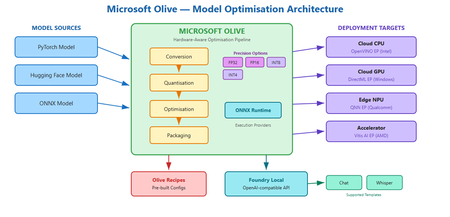
Why your model runs great on your laptop but fails in the real world You have trained a model. It scores well on your test set. It runs fine on your development machine with a beefy GPU. Then someone asks you to deploy it to a customer's edge device, a cloud endpoint with a latency budget, or a laptop with no discrete GPU at all. Suddenly the model is too large, too slow, or simply incompatible with the target runtime. You start searching for quantisation scripts, conversion tools, and hardware-specific compiler flags. Each target needs a different recipe, and the optimisation steps interact in ways that are hard to predict. This is the deployment gap. It is not a knowledge gap; it is a tooling gap. And it is exactly the problem that Microsoft Olive is designed to close. What is Olive? Olive is an easy-to-use, hardware-aware model optimisation toolchain that composes techniques across model compression, optimisation, and compilation. Rather than asking you to string together separate conversion scripts, quantisation utilities, and compiler passes by hand, Olive lets you describe what you have and what you need, then handles the pipeline. In practical terms, Olive takes a model source, such as a PyTorch model or an ONNX model (and other supported formats), plus a configuration that describes your production requirements and target hardware accelerator. It then runs the appropriate optimisation passes and produces a deployment-ready artefact. You can think of it as a build system for model optimisation: you declare the intent, and Olive figures out the steps. Official repo: github.com/microsoft/olive Documentation: microsoft.github.io/Olive Key advantages: why Olive matters for your workflow A. Optimise once, deploy across many targets One of the hardest parts of deploying models in production is that "production" is not one thing. Your model might need to run on a cloud GPU, an edge CPU, or a Windows device with an NPU. Each target has different memory constraints, instruction sets, and runtime expectations. Olive supports targeting CPU, GPU, and NPU through its optimisation workflow. This means a single toolchain can produce optimised artefacts for multiple deployment targets, expanding the number of platforms you can serve without maintaining separate optimisation scripts for each one. The conceptual workflow is straightforward: Olive can download, convert, quantise, and optimise a model using an auto-optimisation style approach where you specify the target device (cpu, gpu, or npu). This keeps the developer experience consistent even as the underlying optimisation strategy changes per target. B. ONNX as the portability layer If you have heard of ONNX but have not used it in anger, here is why it matters: ONNX gives your model a common representation that multiple runtimes understand. Instead of being locked to one framework's inference path, an ONNX model can run through ONNX Runtime and take advantage of whatever hardware is available. Olive supports ONNX conversion and optimisation, and can generate a deployment-ready model package along with sample inference code in languages like C#, C++, or Python. That package is not just the model weights; it includes the configuration and code needed to load and run the model on the target platform. For students and early-career engineers, this is a meaningful capability: you can train in PyTorch (the ecosystem you already know) and deploy through ONNX Runtime (the ecosystem your production environment needs). C. Hardware-specific acceleration and execution providers When Olive targets a specific device, it does not just convert the model format. It optimises for the execution provider (EP) that will actually run the model on that hardware. Execution providers are the bridge between the ONNX Runtime and the underlying accelerator. Olive can optimise for a range of execution providers, including: Vitis AI EP (AMD) – for AMD accelerator hardware OpenVINO EP (Intel) – for Intel CPUs, integrated GPUs, and VPUs QNN EP (Qualcomm) – for Qualcomm NPUs and SoCs DirectML EP (Windows) – for broad GPU support on Windows devices Why does EP targeting matter? Because the difference between a generic model and one optimised for a specific execution provider can be significant in terms of latency, throughput, and power efficiency. On battery-powered devices especially, the right EP optimisation can be the difference between a model that is practical and one that drains the battery in minutes. D. Quantisation and precision options Quantisation is one of the most powerful levers you have for making models smaller and faster. The core idea is reducing the numerical precision of model weights and activations: FP32 (32-bit floating point) – full precision, largest model size, highest fidelity FP16 (16-bit floating point) – roughly half the memory, usually minimal quality loss for most tasks INT8 (8-bit integer) – significant size and speed gains, moderate risk of quality degradation depending on the model INT4 (4-bit integer) – aggressive compression for the most constrained deployment scenarios Think of these as a spectrum. As you move from FP32 towards INT4, models get smaller and faster, but you trade away some numerical fidelity. The practical question is always: how much quality can I afford to lose for this use case? Practical heuristics for choosing precision: FP16 is often a safe default for GPU deployment. In practice, you might start here and only go lower if you need to. INT8 is a strong choice for CPU-based inference where memory and compute are constrained but accuracy requirements are still high (e.g., classification, embeddings, many NLP tasks). INT4 is worth exploring when you are deploying large language models to edge or consumer devices and need aggressive size reduction. Expect to validate quality carefully, as some tasks and model architectures tolerate INT4 better than others. Olive handles the mechanics of applying these quantisation passes as part of the optimisation pipeline, so you do not need to write custom quantisation scripts from scratch. Showcase: model conversion stories To make this concrete, here are three plausible optimisation scenarios that illustrate how Olive fits into real workflows. Story 1: PyTorch classification model → ONNX → quantised for cloud CPU inference Starting point: A PyTorch image classification model fine-tuned on a domain-specific dataset. Target hardware: Cloud CPU instances (no GPU budget for inference). Optimisation intent: Reduce latency and cost by quantising to INT8 whilst keeping accuracy within acceptable bounds. Output: An ONNX model optimised for CPU execution, packaged with configuration and sample inference code ready for deployment behind an API endpoint. Story 2: Hugging Face language model → optimised for edge NPU Starting point: A Hugging Face transformer model used for text summarisation. Target hardware: A laptop with an integrated NPU (e.g., a Qualcomm-based device). Optimisation intent: Shrink the model to INT4 to fit within NPU memory limits, and optimise for the QNN execution provider to leverage the neural processing unit. Output: A quantised ONNX model configured for QNN EP, with packaging that includes the model, runtime configuration, and sample code for local inference. Story 3: Same model, two targets – GPU vs. NPU Starting point: A single PyTorch generative model used for content drafting. Target hardware: (A) Cloud GPU for batch processing, (B) On-device NPU for interactive use. Optimisation intent: For GPU, optimise at FP16 for throughput. For NPU, quantise to INT4 for size and power efficiency. Output: Two separate optimised packages from the same source model, one targeting DirectML EP for GPU, one targeting QNN EP for NPU, each with appropriate precision, runtime configuration, and sample inference code. In each case, Olive handles the multi-step pipeline: conversion, optimisation passes, quantisation, and packaging. The developer's job is to define the target and validate the output quality. Introducing Olive Recipes If you are new to model optimisation, staring at a blank configuration file can be intimidating. That is where Olive Recipes comes in. The Olive Recipes repository complements Olive by providing recipes that demonstrate features and use cases. You can use them as a reference for optimising publicly available models or adapt them for your own proprietary models. The repository also includes a selection of ONNX-optimised models that you can study or use as starting points. Think of recipes as worked examples: each one shows a complete optimisation pipeline for a specific scenario, including the configuration, the target hardware, and the expected output. Instead of reinventing the pipeline from scratch, you can find a recipe close to your use case and modify it. For students especially, recipes are a fast way to learn what good optimisation configurations look like in practice. Taking it further: adding custom models to Foundry Local Once you have optimised a model with Olive, you may want to serve it locally for development, testing, or fully offline use. Foundry Local is a lightweight runtime that downloads, manages, and serves language models entirely on-device via an OpenAI-compatible API, with no cloud dependency and no API keys required. Important: Foundry Local only supports specific model templates. At present, these are the chat template (for conversational and text-generation models) and the whisper template (for speech-to-text models based on the Whisper architecture). If your model does not fit one of these two templates, it cannot currently be loaded into Foundry Local. Compiling a Hugging Face model for Foundry Local If your optimised model uses a supported architecture, you can compile it from Hugging Face for use with Foundry Local. The high-level process is: Choose a compatible Hugging Face model. The model must match one of Foundry Local's supported templates (chat or whisper). For chat models, this typically means decoder-only transformer architectures that support the standard chat format. Use Olive to convert and optimise. Olive handles the conversion from the Hugging Face source format into an ONNX-based, quantised artefact that Foundry Local can serve. This is where your Olive skills directly apply. Register the model with Foundry Local. Once compiled, you register the model so that Foundry Local's catalogue recognises it and can serve it through the local API. For the full step-by-step guide, including exact commands and configuration details, refer to the official documentation: How to compile Hugging Face models for Foundry Local. For a hands-on lab that walks through the complete workflow, see Foundry Local Lab, specifically Lab 10 which covers bringing custom models into Foundry Local. Why does this matter? The combination of Olive and Foundry Local gives you a complete local workflow: optimise your model with Olive, then serve it with Foundry Local for rapid iteration, privacy-sensitive workloads, or environments without internet connectivity. Because Foundry Local exposes an OpenAI-compatible API, your application code can switch between local and cloud inference with minimal changes. Keep in mind the template constraint. If you are planning to bring a custom model into Foundry Local, verify early that it fits the chat or whisper template. Attempting to load an unsupported architecture will not work, regardless of how well the model has been optimised. Contributing: how to get involved The Olive ecosystem is open source, and contributions are welcome. There are two main ways to contribute: A. Contributing recipes If you have built an optimisation pipeline that works well for a specific model, hardware target, or use case, consider contributing it as a recipe. Recipes are repeatable pipeline configurations that others can learn from and adapt. B. Sharing optimised model outputs and configurations If you have produced an optimised model that might be useful to others, sharing the optimisation configuration and methodology (and, where licensing permits, the model itself) helps the community build on proven approaches rather than starting from zero. Contribution checklist Reproducibility: Can someone else run your recipe or configuration and get comparable results? Licensing: Are the base model weights, datasets, and any dependencies properly licensed for sharing? Hardware target documented: Have you specified which device and execution provider the optimisation targets? Runtime documented: Have you noted the ONNX Runtime version and any EP-specific requirements? Quality validation: Have you included at least a basic accuracy or quality check for the optimised output? If you are a student or early-career developer, contributing a recipe is a great way to build portfolio evidence that you understand real deployment concerns, not just training. Try it yourself: a minimal workflow Here is a conceptual walkthrough of the optimisation workflow using Olive. The idea is to make the mental model concrete. For exact CLI flags and options, refer to the official Olive documentation. Choose a model source. Start with a PyTorch or Hugging Face model you want to optimise. This is your input. Choose a target device. Decide where the model will run: cpu , gpu , or npu . Choose an execution provider. Pick the EP that matches your hardware, for example DirectML for Windows GPU, QNN for Qualcomm NPU, or OpenVINO for Intel. Choose a precision. Select the quantisation level: fp16 , int8 , or int4 , based on your size, speed, and quality requirements. Run the optimisation. Olive will convert, quantise, optimise, and package the model for your target. The output is a deployment-ready artefact with model files, configuration, and sample inference code. A conceptual command might look like this: # Conceptual example – refer to official docs for exact syntax olive auto-opt --model-id my-model --device cpu --provider onnxruntime --precision int8 After optimisation, validate the output. Run your evaluation benchmark on the optimised model and compare quality, latency, and model size against the original. If INT8 drops quality below your threshold, try FP16. If the model is still too large for your device, explore INT4. Iteration is expected. Key takeaways Olive bridges training and deployment by providing a single, hardware-aware optimisation toolchain that handles conversion, quantisation, optimisation, and packaging. One source model, many targets: Olive lets you optimise the same model for CPU, GPU, and NPU, expanding your deployment reach without maintaining separate pipelines. ONNX is the portability layer that decouples your training framework from your inference runtime, and Olive leverages it to generate deployment-ready packages. Precision is a design choice: FP16, INT8, and INT4 each serve different deployment constraints. Start conservative, measure quality, and compress further only when needed. Olive Recipes are your starting point: Do not build optimisation pipelines from scratch when worked examples exist. Learn from recipes, adapt them, and contribute your own. Foundry Local extends the workflow: Once your model is optimised, Foundry Local can serve it on-device via a standard API, but only if it fits a supported template (chat or whisper). Resources Microsoft Olive – GitHub repository Olive documentation Olive Recipes – GitHub repository How to compile Hugging Face models for Foundry Local Foundry Local Lab – hands-on labs (see Lab 10 for custom models) Foundry Local documentation572Views0likes0CommentsDeploying Custom Models with Microsoft Olive and Foundry Local
Over the past few weeks, we've been on quite a journey together. We started by exploring what makes Phi-4 and small language models so compelling, then got our hands dirty running models locally with Foundry Local. We leveled up with function calling, and most recently built a complete multi-agent quiz application with an orchestrator coordinating specialist agents. Our quiz app works great locally, but it relies on Foundry Local's catalog models — pre-optimized and ready to go. What happens when you want to deploy a model that isn't in the catalog? Maybe you've fine-tuned a model on domain-specific quiz data, or a new model just dropped on Hugging Face that you want to use. Today we'll take a model from Hugging Face, optimize it with Microsoft Olive, register it with Foundry Local, and run our quiz app against it. The same workflow applies to any model you might fine-tune for your specific use case. Understanding Deployment Options Before we dive in, let's understand the landscape of deployment options for SLM applications. There are several routes to deploying SLM applications depending on your target environment. The Three Main Paths vLLM is the industry standard for cloud deployments — containerized, scalable, handles many concurrent users. Great for Azure VMs or Kubernetes. Ollama offers a middle ground — simpler than vLLM but still provides Docker support for easy sharing and deployment. Foundry Local + Olive is Microsoft's edge-first approach. Optimize your model with Olive, serve with Foundry Local or a custom server. Perfect for on-premise, offline, or privacy-focused deployments. In keeping with the edge-first theme that's run through this series, we'll focus on the Foundry Local path. We'll use Qwen 2.5-0.5B-Instruct — small enough to optimize quickly and demonstrate the full workflow. Think of it as a stand-in for a model you've fine-tuned on your own quiz data. Prerequisites You'll need: Foundry Local version 0.8.117 or later Python 3.10+ for the quiz app (the foundry-local-sdk requires it) A separate Python 3.9 environment for Olive (Olive 0.9.x has this requirement) The quiz app from the previous article Having two Python versions might seem odd, but it mirrors a common real-world setup: you optimize models in one environment and serve them in another. The optimization is a one-time step. Installing Olive Dependencies In your Python 3.9 environment: pip install olive-ai onnxruntime onnxruntime-genai pip install transformers>=4.45.0,<5.0.0 Important: Olive is not compatible with Transformers 5.x. You must use version 4.x. Model Optimization with Olive Microsoft Olive is the bridge between a Hugging Face model and something Foundry Local can serve. It handles ONNX conversion, graph optimization, and quantization in a single command. Understanding Quantization Quantization reduces model size by converting weights from high-precision floating point to lower-precision integers: Precision Size Reduction Quality Best For FP32 Baseline Best Development, debugging FP16 50% smaller Excellent GPU inference with plenty of VRAM INT8 75% smaller Very Good Balanced production INT4 87.5% smaller Good Edge devices, resource-constrained We'll use INT4 to demonstrate the maximum compression. For production with better quality, consider INT8 — simply change --precision int4 to --precision int8 in the commands below. Running the Optimization The optimization script at scripts/optimize_model.py handles two things: downloading the model locally (to avoid authentication issues), then running Olive. The download step is important. The ONNX Runtime GenAI model builder internally requests HuggingFace authentication even for public models. Rather than configuring tokens, we download the model first with token=False, then point Olive at the local path: from huggingface_hub import snapshot_download local_path = snapshot_download("Qwen/Qwen2.5-0.5B-Instruct", token=False) Then the Olive command runs against the local copy: cmd = [ sys.executable, "-m", "olive", "auto-opt", "--model_name_or_path", local_path, "--trust_remote_code", "--output_path", "models/qwen2.5-0.5b-int4", "--device", "cpu", "--provider", "CPUExecutionProvider", "--precision", "int4", "--use_model_builder", "--use_ort_genai", "--log_level", "1", ] Key flags: --precision int4 quantizes weights to 4-bit integers, --use_model_builder reads each transformer layer and exports it to ONNX, and --use_ort_genai outputs in the format Foundry Local consumes. Run it: python scripts/optimize_model.py This process takes about a minute. When complete, you'll see the output directory structure. models/qwen2.5-0.5b-int4/model/ ├── model.onnx # ONNX graph (162 KB) ├── model.onnx.data # Quantized INT4 weights (823 MB) ├── genai_config.json # ONNX Runtime GenAI config ├── tokenizer.json # Tokenizer vocabulary (11 MB) ├── vocab.json # Token-to-ID map (2.7 MB) ├── merges.txt # BPE merges (1.6 MB) ├── tokenizer_config.json ├── config.json ├── generation_config.json ├── special_tokens_map.json └── added_tokens.json Total size: approximately 838MB — a significant reduction from the original, while maintaining usable quality for structured tasks like quiz generation. Registering with Foundry Local With the model optimized, we need to register it with Foundry Local. Unlike cloud model registries, there's no CLI command — you place files in the right directory and Foundry discovers them automatically. Foundry's Model Registry foundry cache cd # Windows: C:\Users\<username>\.foundry\cache\ # macOS/Linux: ~/.foundry/cache/ Foundry organizes models by publisher: .foundry/cache/models/ ├── foundry.modelinfo.json ← catalog of official models ├── Microsoft/ ← pre-optimized Microsoft models │ ├── qwen2.5-7b-instruct-cuda-gpu-4/ │ ├── Phi-4-cuda-gpu-1/ │ └── ... └── Custom/ ← your models go here The Registration Script The script at scripts/register_model.sh does two things: copies all model files into the Foundry cache, and creates the inference_model.json configuration file. The critical file is inference_model.json — without it, Foundry won't recognize your model: { "Name": "qwen-quiz-int4", "PromptTemplate": { "system": "<|im_start|>system\n{Content}<|im_end|>", "user": "<|im_start|>user\n{Content}<|im_end|>", "assistant": "<|im_start|>assistant\n{Content}<|im_end|>", "prompt": "<|im_start|>user\n{Content}<|im_end|>\n<|im_start|>assistant" } } The PromptTemplate defines the ChatML format that Qwen 2.5 expects. The {Content} placeholder is where Foundry injects the actual message content at runtime. If you were deploying a Llama or Phi model, you'd use their respective prompt templates. Run the registration: scripts/register_model.sh Verify Registration foundry cache ls Test the Model foundry model run qwen-quiz-int4 The model loads via ONNX Runtime on CPU. Try a simple prompt to verify it responds. Integrating with the Quiz App Here's where things get interesting. The application-level change is one line in utils/foundry_client.py: # Before: DEFAULT_MODEL_ALIAS = "qwen2.5-7b-instruct-cuda-gpu" # After: DEFAULT_MODEL_ALIAS = "qwen-quiz-int4" But that one line raised some issues worth understanding. Issue 1: The SDK Can't See Custom Models The Foundry Local Python SDK resolves models by looking them up in the official catalog — a JSON file of Microsoft-published models. Custom models in the Custom/ directory aren't in that catalog. So FoundryLocalManager("qwen-quiz-int4") throws a "model not found" error, despite foundry cache ls and foundry model run both working perfectly. The fix in foundry_client.py is a dual code path. It tries the SDK first (works for catalog models), and when that fails with a "not found in catalog" error, it falls back to discovering the running service endpoint directly: def _discover_endpoint(): """Discover running Foundry service endpoint via CLI.""" result = subprocess.run( ["foundry", "service", "status"], capture_output=True, text=True, timeout=10 ) match = re.search(r"(http://\S+?)(?:/openai)?/status", result.stdout) if not match: raise ConnectionError( "Foundry service is not running.\n" f"Start it with: foundry model run {DEFAULT_MODEL_ALIAS}" ) return match.group(1) The workflow becomes two terminals: Terminal 1: foundry model run qwen-quiz-int4 Terminal 2: python main.py The client auto-discovers the endpoint and connects. For catalog models, the existing FoundryLocalManager path works unchanged. Issue 2: Tool Calling Format For catalog models, Foundry's server-side middleware intercepts <tool_call> tags in the model's output and converts them into structured tool_calls objects in the API response. This is configured via metadata in foundry.modelinfo.json. For custom models, those metadata fields aren't recognized — Foundry ignores them in inference_model.json. The <tool_call> tags pass through as raw text in response.choices[0].message.content. Since our custom model outputs the exact same <tool_call> format, we added a small fallback parser in agents/base_agent.py — the same pattern we explored in our function calling article. After each model response, if tool_calls is None, we scan the content for tags: def _parse_text_tool_calls(content: str) -> list: """Parse <tool_call>...</tool_call> tags from model output.""" blocks = re.findall(r"<tool_call>\s*(\{.*?\})\s*</tool_call>", content, re.DOTALL) calls = [] for block in blocks: try: data = json.loads(block) calls.append(_TextToolCall(data["name"], json.dumps(data.get("arguments", {})))) except (json.JSONDecodeError, KeyError): continue return calls The model's behavior is identical; only the parsing location changes — from server-side (Foundry middleware) to client-side (our code). Part 7: Testing the Deployment With the model running in one terminal, start the quiz app in another: Terminal 1: foundry model run qwen-quiz-int4 Terminal 2: cd multi_agents_slm && python main.py Now test the full flow. Generate a quiz: Test the Full Flow Generate a quiz: Example output: The orchestrator successfully calls the generate_new_quiz tool, and the QuizGeneratorAgent produces well-structured quiz JSON. Model Limitations The 0.5B INT4 model occasionally struggles with complex reasoning or basic arithmetic. This is expected from such a small, heavily quantized model. For production use cases requiring higher accuracy, use Qwen 2.5-1.5B or Qwen 2.5-7B for better quality, or use INT8 quantization instead of INT4. The deployment workflow remains identical — just change the model name and precision in the optimization script. What You've Accomplished Take a moment to appreciate the complete journey across this series: Article What You Learned 1. Phi-4 Introduction Why SLMs matter, performance vs size tradeoffs 2. Running Locally Foundry Local setup, basic inference 3. Function Calling Tool use, external API integration 4. Multi-Agent Systems Orchestration, specialist agents 5. Deployment Olive optimization, Foundry Local registration, custom model deployment You now have end-to-end skills for building production SLM applications: understanding the landscape, local development with Foundry Local, agentic applications with function calling, multi-agent architectures, model optimization with Olive, and deploying custom models to the edge. Where to Go From Here The logical next step is fine-tuning for your domain. Medical quiz tutors trained on USMLE questions, legal assistants trained on case law, company onboarding bots trained on internal documentation — use the same Olive workflow to optimize and deploy your fine-tuned model. The same ONNX model we registered with Foundry Local could also run on mobile devices via ONNX Runtime Mobile, or be containerized for server-side edge deployment. The full source code, including the optimization and registration scripts, is available in the GitHub repository. Resources: Microsoft Olive — Model optimization toolkit Foundry Local Documentation — Setup and CLI reference Compiling Hugging Face models for Foundry Local — Official guide ONNX Runtime GenAI — Powers Foundry Local's inference Edge AI for Beginners — Microsoft's 8-module Edge AI curriculum Quiz App Source Code — Full repository with deployment scripts This series has been a joy to write. I'd love to see what you build — share your projects in the comments, and don't hesitate to open issues on the GitHub repo if you encounter challenges. Until next time — keep building, keep optimizing, and keep pushing what's possible with local AI.950Views0likes0CommentsUsing Advanced Reasoning Model on EdgeAI Part 1 - Quantization, Conversion, Performance
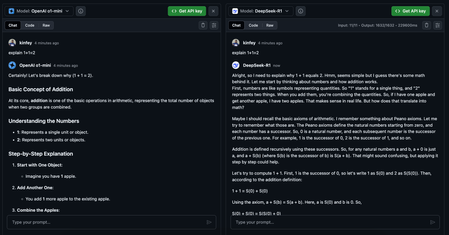
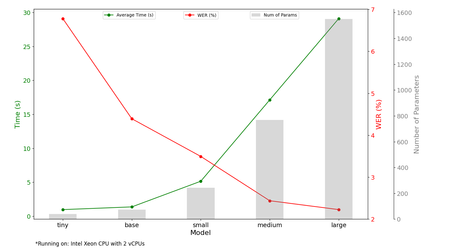
DeepSeek-R1 is very popular, and it can achieve the same capabilities as OpenAI o1 in advanced reasoning. Microsoft has also added DeepSeek-R1 models to Azure AI Foundry and GitHub Models. We can compare DeepSeek-R1 ith other available models through GitHub Models Playground Note This series revolves around deployment of SLMs to Edge Devices 'Edge AI' we will focus on the deployment advanced reasoning models, with different application scenarios. You can learn more in the following session AI Tour BRK453. In this experiement we want to deploy advanced reasoning models to the edge, so that they can run on edge devices with limited computing power and offline environments. At this time, the recommendation is to use the traditional ONNX model . We can use Microsoft Olive to convert the DeepSeek-R1 Distrill model. Getting started with Microsoft Olive is very straightforward. Install the Microsoft Olive library through the command line and Python 3.10+ (recommended) pip install olive-ai The DeepSeek-R1 Distrill model series has different parameters such as 1.5B, 7B, 8B, 14B, 32B, 70B, etc. This article is mainly based on the 1.5B, 7B, and 14B models (so a Small Language Model). CPU Inference Let's discuss 1.5B and 7B, which are models with lower parameter. We can directly use the CPU as computing for inference to test the effect (hardware environment Azure DevBox, AMD EPYC 7763 64-Core + 64GB Memory + 2T SSD) Quantization conversion olive auto-opt --model_name_or_path <Your DeepSeek-R1-Distill-Qwen-1.5B/7B local location> --output_path <Your Convert ONNX INT4 Model local location> --device cpu --provider CPUExecutionProvider --precision int4 --use_model_builder --log_level 1 You can download it directly from my Hugging face Repo (Note: This model is for testing and has not been fully tested by AI Content Safety or provided as an Offical Model) DeepSeek-R1-Distill-Qwen-1.5B-ONNX-INT4-CPU DeepSeek-R1-Distill-Qwen-7B-ONNX-INT4-CPU Running with ONNX Runtime GenAI Install ONNX Runtime GenAI and ONNX Runtime CPU support libraries pip install onnxruntime-genai pip install onnxruntime Sample Code https://github.com/kinfey/EdgeAIForAdvancedReasoning/blob/main/notebook/demo-1.5b.ipynb https://github.com/kinfey/EdgeAIForAdvancedReasoning/blob/main/notebook/demo-7b.ipynb Performance comparison 1.5B vs 7B We compare two different inference scenarios explain 1+1=2 1.5B quantized ONNX model memory occupied, time consumption and number of tokens generated: 7B quantized ONNX model memory occupied, time consumption and number of tokens generated 2. Find all pairwise different isomorphism groups with order 147 and no elements with order 49 1.5B quantized ONNX model memory occupied, time consumption and number of tokens generated: 7B quantized ONNX model memory occupied, time consumption and number of tokens generated Results of the numbers Through the test, we can see that the 1.5B model of DeepSeek is more suitable for use on CPU inference and can be deployed on traditional PCs or IoT devices. As for 7B, although it has better inference, it is not very effective on CPU operation. GPU Inference It is ideal if we have a GPU on the edge device. We can quantize and convert it to an ONNX model for CPU inference through Microsoft Olive. Of course, it can also be converted to a model for GPU inference. Here I take the 14B DeepSeek-R1-Distill-Qwen-14B as an example and make an inference comparison with Microsoft's Phi-4-14B Quantization conversion olive auto-opt --model_name_or_path <Your Phi-4-14B or DeepSeek-R1-Distill-Qwen-14B local path > --output_path <Your converted Phi-4-14B or DeepSeek-R1-Distill-Qwen-14B local path > --device gpu --provider CUDAExecutionProvider --precision int4 --use_model_builder --log_level 1 You can download it directly from my Hugging face Repo (Note: This model is for testing and has not been fully tested by AI Content Safety and not an Official Model) DeepSeek-R1-Distill-Qwen-14B-ONNX-INT4-GPU Phi-4-14B-ONNX-INT4-GPU Running with ONNX Runtime GenAI CUDA Install ONNX Runtime GenAI and ONNX Runtime GPU support libraries pip install onnxruntime-genai-cuda pip install onnxruntime-gpu Compare the results in the GPU environment with Gradio It is recommended to use a GPU with more than 8G memory To increase the comparison of the results, we compare it with Phi-4-14B-ONNX-INT4-GPU and DeepSeek-R1-Distill-Qwen-14B-ONNX-INT4-GPU to see the different results. We also show we use OpenAI o1-mini (it is recommended to use o1-mini through GitHub Models), Sample Code https://github.com/kinfey/EdgeAIForAdvancedReasoning/blob/main/notebook/Performance_AdvancedReasoning_ONNX_CPU.ipynb You can test any prompt on Gradio to compare the results of Phi-4-14B-ONNX-INT4-GPU, DeepSeek-R1-Distill-Qwen-14B-ONNX-INT4-GPU and OpenAI o1 mini. DeepSeek-R1 reduces the cost of inference models and produces more instructive results on professional problems, but Phi-4-14B also has advantages in reasoning and uses lower computing power to complete inference. As for OpenAI o1 mini, it is more comprehensive and can touch all problems. If you want to deploy to Edge Device, Phi-4-14B and quantized DeepSeek-R1 are good choices for you. This blog is just a simple test and the first in this series. Please share your feedback and continue the discussion in the Microsoft AI Discord Channel. Feel free to me a message or comment. We look forward to sharing more around the opportunity of EdgeAI and more content in this series. Resource DeepSeek-R1 in GitHub Models https://github.com/marketplace/models/azureml-deepseek/DeepSeek-R1 DeepSeek-R1 in Azure AI Foundry https://ai.azure.com/explore/models/DeepSeek-R1/version/1/registry/azureml-deepseek Phi-4-14B in Hugging face https://huggingface.co/microsoft/phi-4 Learn about Microsoft Olive https://github.com/microsoft/olive Learn about ONNX Runtime GenAI https://github.com/microsoft/onnxruntime-genai Microsoft AI Discord Channel BRK453 Exploring cutting-edge models: LLMs, SLMs, local development and more https://aka.ms/aitour/brk4531.2KViews0likes0CommentsONNX and NPU Acceleration for Speech on ARM
This project is from Students at University College London and explores the benefits of ONNX and NPU accelerators in accelerating the inference of Whisper models and developing a local Whisper model leveraging these techniques for ARM-based systems.2.9KViews0likes0Comments
Running Phi-3-vision via ONNX on Jetson Platform
Unlock the potential of NVIDIA's Jetson platform by running the Phi-3-vision model in ONNX format. Dive into the seamless process of compiling onnxruntime-genai, setting up the environment, and executing high-performance inference tasks on low-power devices like Jetson Orin Nano. Discover how to utilize quantized models efficiently, enabling robust image and text dialogue tasks, all while keeping your GPU workload-optimized. Whether you’re working with FP16 or Int 4 models, this guide will walk you through each step, ensuring you harness the full capabilities of edge AI on Jetson.7.7KViews2likes18CommentsUse WebGPU + ONNX Runtime Web + Transformer.js to build RAG applications by Phi-3-mini
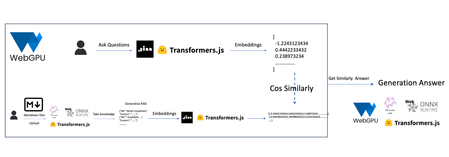
Learn how to harness the power of WebGPU, ONNX Runtime, and Web Transformer.js to create cutting-edge Retrieval-Augmented Generation (RAG) models. Dive into this technical guide and build intelligent applications that combine retrieval and generation seamlessly.9.8KViews2likes0CommentsGetting Started Using Phi-3-mini-4k-instruct-onnx for Text Generation with NLP Techniques
In this tutorial, we'll cover how to use the Phi-3 mini models for text generation using NLP techniques. Whether you're a beginner or an experienced AI developer, you'll learn how to download and run these powerful tools on your own computer. From setting up the Python environment to generating responses with the generate() API, we'll provide clear instructions and code examples throughout the tutorial. So, let's get started and see what the Phi-3 mini models can do!12KViews1like1Comment