onedrive sharing
103 TopicsSimple, Smart, and Secure: The next step in sharing files in Microsoft 365
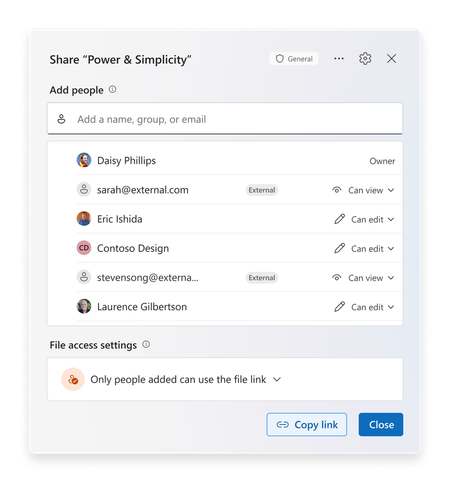
Today at the Microsoft 365 Community Conference, we announced the next generation of sharing for Microsoft 365. Not just an experience refresh, this year we are improving the underlying model that enables collaboration within oM365. We are making it simpler to use, more intelligent, and ensuring that users can keep their content secure by default. In 2011, the cloud revolutionized collaboration and SharePoint Online launched with direct permissioning to enable sharing. Three years later, the on-going cloud transformation led to the invention of “link-based sharing” to allow users to forward and share URLs that grant access within defined, yet secure scopes. Over the last decade, collaboration flourished with over 1.2 Billon people using the share dialog in M365 per month. But as we look ahead, we see new demands emerging to meet the needs of collaborative, agentic workplaces. We are excited to give you a walkthrough of the third generation of sharing in Microsoft 365 and introduce the hero link, the power behind the next decade of collaboration. Meet the hero link The next generation of sharing makes you the hero of collaboration! Each file gets a single hero link which controls all access to the file. Whether you’re clicking “Copy Link”, sending an e-mail, or yes, even copying the URL out of the address bar, it’s all the hero link! This removes the need to create, delete, and manage multiple links on your files, creating a vastly simpler experience. Sharing files with your company has never been easier: simply update the hero link and anyone with the link in your company will get access. Need to lock down a file? Change the link to only allow access for people you directly add, keeping your files secured. We know that users don’t always check file permissions before they send out a link, which can lead to frustrating “Access Denied” page. With hero links, users are empowered to update the link that they already sent, enabling them to quickly increase or decrease the scope of the hero link to match their needs. Secure by default Every hero link starts by working for only the people who have already been added to the document. As users embark on their collaboration journey, they can add more people and teams directly to the document or update the hero link as needed to broaden access. For files that are shared externally, the new share experience explicitly tags external users and guests to make sure they stand out and can be managed appropriately. Administrators will be able to change this default on a per-site collection or OneDrive basis, as needed. With the next generation of sharing, users can further secure their content by controlling who can add people or update access of the file or folder, which gives users the granular control they need to protect their most important content. At a glance access The next generation of sharing requires easy understanding of not only who has access to a file, but how they have access. The Share Dialog and Manage Access experiences are now unified into a single, powerful interface, ensuring users can see and manage their documents and folders with effortless precision. Updates to permissions now appear in real-time, giving users confidence and real-time feedback as they share! With this new sharing model, you can now update permissions in bulk. It is now easier than ever to change or remove permissions for multiple people in a single session. Changes appear instantly, helping you stay in control! If a user wants additional granularity, they can even create additional sharing links to be used for specific purposes. These links can even be named, to help users track and assign them to specific tasks. Copilot + Sharing Save time for your coworkers and keep your team up to speed by using Copilot when you share. With a single click, generate a summary of your document that will be included in the notification mail. Recipients can now understand what the file is about, without needing to open it and read the content. This is a great way to save time and help get your collaborators up to speed! Choose when you notify Have you ever had those days where your notifications are going crazy from teammates adding you to files? We hear your frustration-and we are happy to tell you that you can now choose whether to send an e-mail notification or not when you add people to your file. This update puts you in control of how you share and notify teammates – simply check the box or not based on your preference! This control is critical when you’re bringing a colleague up to speed on multiple documents, or just want to make sure that your file is shared correctly before incorporating into a SharePoint News Post or Amplify! Looking Ahead This new sharing experience and model will be rolling in late 2025! You can track the latest timelines and updates via the Microsoft 365 Message Center or the Microsoft 365 Roadmap (ID: 492622). We know change management is top of mind with any product change, and especially one’s as critical to your organization as collaboration.In addition to the standard updates at Microsoft Docs, we’ll also be uploading how to videos for end users and IT Pros to the Microsoft Community Learning YouTube Channel, walking through the changes in depth on the Sync Up Podcast and in the OneDrive Customer Office Hours. We’re excited to share the future with you! Frequently Asked Questions We know how important collaboration is to your organization! Here are answers to a few of the common questions we’ve heard! If you have others, let us know in the comments below! Q - What do I need to do to prepare for this change? A – For now, keep an eye on the roadmap id and Message Center for more information! As we get closer to release, we’ll ensure you have the content you need to update and prepare your users, admins and security teams. Q - What happens to my existing collaboration experience? A – Nothing! The new sharing model is fully backwards compatible. All the links and permissions you have today will continue to work and will show up in the “Other Links” section of the dialog! Q - Where will this change happen? A - Everywhere! OneDrive powers the sharing experience across 64 apps in M365. This change will be updated consistently across the entire ecosystem.39KViews18likes48CommentsSave the Date: Join us October 20 for the OneDrive + Copilot Digital Event
Files and photos are at the center of how we work, create, and collaborate. As AI and Copilot transform the way we use content, OneDrive is evolving for this era - helping people get more from their files with Copilot, delivering a faster and more dependable core file experience, making collaboration effortless, and creating new ways to discover, enjoy, and share photos and videos. So, join us on October 20 for the 4th Annual OneDrive + Copilot Digital Event, a free online experience showcasing the latest innovations across OneDrive and Copilot. ✨ Hear directly from Jeff Teper, Executive Vice President of Microsoft Apps and Agents, Adam Harmetz, Corporate Vice President of Product, OneDrive and SharePoint, and Arwa Tyebkhan, Head of Product, OneDrive, alongside product leaders, engineers, and experts from across the OneDrive team as they share the latest innovations, demonstrating how AI is transforming the way people work with files and content. 💡 You'll see real product demos, hearing from the people building the product, and get a closer look at the experiences that will help you get the most out of OneDrive and Microsoft 365. 🗣️ Following the broadcast, you are invited to join our live Q&A with members of the OneDrive team and get answers directly from the experts behind the product. Event Details Event: OneDrive + Copilot - Your file system and photo solution for the AI Era Date: October 20, 2026, 9:00 AM PST Cost: Free Format: Digital event followed by a live Q&A Register here: https://aka.ms/OneDriveEvent Join the AMA Live: https://aka.ms/OneDriveEventonMTC This event is open to everyone – whether you’re an IT professional, a knowledge worker, or a fan who uses OneDrive to relive your favorite memories! Register today and join us to see what's next for OneDrive in the Copilot and AI era. See you there!2.9KViews3likes1CommentNOW ON DEMAND | OneDrive Office Hours | November 2024 |
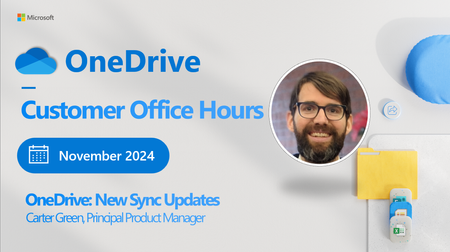
Are you ready to connect with OneDrive product makers this month? We’re gearing up for the next call. Join the OneDrive product team live each month on our monthly OneDrive Customer Office Hours to hear what's top of mind, get insights into roadmap updates, and dig into a special topic. Each call includes live Q&A where you'll have a chance to ask the OneDrive product team any question about OneDrive - The home of your files. 😎 Use this Teams link to register and join live: aka.ms/OneDriveOfficeHours. Each call is recorded and made available on demand shortly after. Our next call is Wednesday, November 20th, 2024, 8:00am - 9:00am PDT. This month's special topic: “New OneDrive Sync Updates" with Carter Green, Principal Product Manager on the Microsoft team. Our goal is to simplify the way you create and access the files you need, get the information you are looking for, and manage your tasks efficiently. We can't wait to share, listen, and engage - monthly! Anyone can join this one-hour webinar to ask us questions, share feedback, and learn more about the features we’re releasing soon and our roadmap. Note: Our monthly public calls are not an official support tool. To open support tickets, go to see Get support for Microsoft 365; distinct support for educators and education customers is available, too. Stay up to date on Microsoft OneDrive adoption on adoption.microsoft.com. Join our community to catch all news and insights from the OneDrive community blog. And follow us on Twitter: @OneDrive. Thank you for your interest in making your voice heard and taking your knowledge and depth of OneDrive to the next level. You can ask questions and provide feedback in the event Comments below and we will do our best to address what we can during the call. 😎 Register and join live: aka.ms/OneDriveOfficeHours. See you there, Rob Nunez (Product Marketing Manager – Microsoft)1.8KViews0likes0CommentsNOW ON DEMAND| OneDrive Office Hours | March 2025
Join the OneDrive product team live each month on our monthly OneDrive Customer Office Hours to hear what's top of mind, get insights into roadmap updates, and dig into a special topic. Each call includes live Q&A where you'll have a chance to ask the OneDrive product team any question about OneDrive - The home of your files. 😎 Use these links to: Register and join live: aka.ms/OneDriveOfficeHours. Save the calendar invite so you never miss a call-https://aka.ms/OfficeHoursCalendar Each call is recorded and made available on demand shortly after. Our next call is Wednesday, March 12th, 2025, 8:00am - 9:00am PDT. This month's special topic: "Unlicensed User Accounts" with the Trent Green. We have heard your feedback and are doing a follow up session tied to this topic. We will have our product teams on call ready to answer your questions. Our goal is to simplify the way you create and access the files you need, get the information you are looking for, and manage your tasks efficiently. We can't wait to share, listen, and engage - monthly! Anyone can join this one-hour webinar to ask us questions, share feedback, and learn more about the features we’re releasing soon and our roadmap. Note: Our monthly public calls are not an official support tool. To open support tickets, go to see Get support for Microsoft 365; distinct support for educators and education customers is available, too. Stay up to date on Microsoft OneDrive adoption on adoption.microsoft.com. Join our community to catch all news and insights from the OneDrive community blog. And follow us on Twitter: @OneDrive. Thank you for your interest in making your voice heard and taking your knowledge and depth of OneDrive to the next level. You can ask questions and provide feedback in the event Comments below and we will do our best to address what we can during the call. 😎 Register and join live: aka.ms/OneDriveOfficeHours.981Views0likes1CommentOneDrive Office Hours | April 2025
Join the OneDrive product team live each month on our monthly OneDrive Customer Office Hours to hear what's top of mind, get insights into roadmap updates, and dig into a special topic. Each call includes live Q&A where you'll have a chance to ask the OneDrive product team any question about OneDrive - The home of your files. New way to register and watch on-demand! We heard your feedback, and we now have a single destination for all of your Office Hours content. From registration, to watching our previous sessions, you can find it all on our new homepage: Go to : aka.ms/OneDriveOfficeHours to see upcoming session to register, and rewatch previous topics! Save the calendar invite so you never miss a call-https://aka.ms/OfficeHoursCalendar Each call is recorded and made available on demand shortly after. Get ready for our next call Our next call is Wednesday, April 16th, 2025, 8:00am - 9:00am PDT. This month's special topic: "Known Folder Move (KFM): Successful Sync Deployment" with the Kayla Ngan. We will have our product teams on call ready to answer your questions. Our goal is to simplify the way you create and access the files you need, get the information you are looking for, and manage your tasks efficiently. We can't wait to share, listen, and engage - monthly! Anyone can join this one-hour webinar to ask us questions, share feedback, and learn more about the features we’re releasing soon and our roadmap. Note: Our monthly public calls are not an official support tool. To open support tickets, go to see Get support for Microsoft 365; distinct support for educators and education customers is available, too. Stay up to date on Microsoft OneDrive adoption on adoption.microsoft.com. Join our community to catch all news and insights from the OneDrive community blog. And follow us on Twitter: @OneDrive. Thank you for your interest in making your voice heard and taking your knowledge and depth of OneDrive to the next level. You can ask questions and provide feedback in the event Comments below and we will do our best to address what we can during the call. 😎 Register and join live: aka.ms/OneDriveOfficeHours.852Views0likes0CommentsNOW ON DEMAND | OneDrive Office Hours | May 2025
Are you ready to connect with OneDrive product makers this month? We’re gearing up for the next call. Join the OneDrive product team live each month on our monthly OneDrive Customer Office Hours to hear what's top of mind, get insights into roadmap updates, and dig into a special topic. Each call includes live Q&A where you'll have a chance to ask the OneDrive product team any question about OneDrive - The home of your files. New way to register and watch on-demand! We heard your feedback, and we now have a single destination for all of your Office Hours content. From registration, to watching our previous sessions, you can find it all on our new homepage: Go to: aka.ms/OneDriveOfficeHours to see upcoming session to register, and rewatch previous topics! Save the calendar invite so you never miss a call-https://aka.ms/OfficeHoursCalendar Each call is recorded and made available on demand shortly after. Get ready for our next call Our next call is Wednesday, May 21st, 2025, 8:00am - 9:00am PDT. This month's special topic: "Microsoft 365 Conference Recap & News" with the OneDrive team. We will have our product teams on call ready to answer your questions. Our goal is to simplify the way you create and access the files you need, get the information you are looking for, and manage your tasks efficiently. We can't wait to share, listen, and engage - monthly! Anyone can join this one-hour webinar to ask us questions, share feedback, and learn more about the features we’re releasing soon and our roadmap. Note: Our monthly public calls are not an official support tool. To open support tickets, go to see Get support for Microsoft 365; distinct support for educators and education customers is available, too. Stay up to date on Microsoft OneDrive adoption on adoption.microsoft.com. Join our community to catch all news and insights from the OneDrive community blog. And follow us on Twitter: @OneDrive. Thank you for your interest in making your voice heard and taking your knowledge and depth of OneDrive to the next level. You can ask questions and provide feedback in the event Comments below and we will do our best to address what we can during the call. 😎 Register and join live: aka.ms/OneDriveOfficeHours.1.5KViews1like2CommentsNOW ON DEMAND| OneDrive Office Hours | September 2025
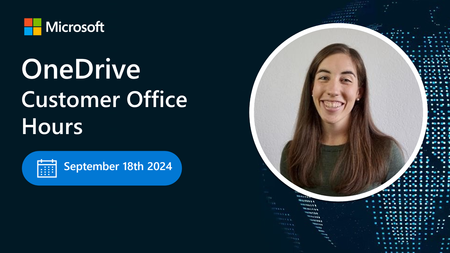
Join the OneDrive product team live each month on our monthly OneDrive Customer Office Hours to hear what's top of mind, get insights into roadmap updates, and dig into a special topic. Each call includes live Q&A where you'll have a chance to ask the OneDrive product team any question about OneDrive - The home of your files.1.3KViews0likes3CommentsOneDrive Office Hours | December 2025
Join the OneDrive product team live each month on our monthly OneDrive Customer Office Hours to hear what's top of mind, get insights into roadmap updates, and dig into a special topic. Each call includes live Q&A where you'll have a chance to ask the OneDrive product team any question about OneDrive - The home of your files.1KViews0likes2CommentsNOW ON DEMAND | OneDrive Office Hours | January 2026
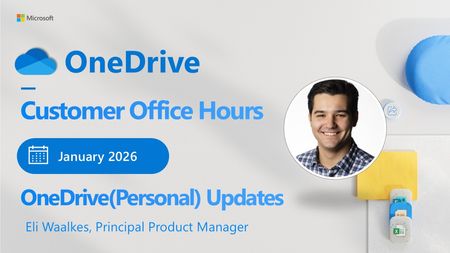
There’s no better way to start the new year than listening, learning, and taking action! OneDrive Consumer Office Hours are back this January, creating space for open conversation around the latest updates and how they support the way you use your files every day. In this month’s session, we’ll walk through what’s new and open the floor for questions, feedback, and shared experiences.898Views0likes7Comments