office add-ins deployment
44 Topics
The Office JS range.formulas API should preserve the leading single quote.
We have an Excel add-in used in both Excel O365 Desktop and Excel O365 Web. Our add-in processes formulas in cells, including custom functions, and sometimes needs to remove prepended namespaces. The relevant code is: const range = context.workbook.getSelectedRange(); range.load("formulas"); await context.sync(); console.log('The range formulas', range.formulas); const newFormulas = range.formulas; range.formulas = newFormulas; Problem: Some users enter informational strings in cells that resemble formulas like '=AVERAGE([cell start]:[cell end]) To ensure excel treats these as plain text, they start the entry with a single quote ('). Excel correctly stores these as strings and does not throw any formula error. However, when we use the Office JS API to read and reapply these values, the leading single quote is stripped. The API returns: '=AVERAGE([cell start]:[cell end])' When we attempt to set this value back using range.formulas = newFormulas, excel throws the following error: RichApi.Error: The argument is invalid or missing or has an incorrect format. at new n (excel-web-16.00.js:25:328325) at i.processRequestExecutorResponseMessage (excel-web-16.00.js:25:393560) at excel-web-16.00.js:25:391621 The Office JS API does not preserve the leading single quote, so Excel interprets the value as a formula, which is invalid in this context. This behavior is inconsistent with Excel’s native handling, where the single quote ensures the value is treated as text.
Provide an Official Offline Distribution Method for Office.js (Alternative to CDN)
According to the Microsoft documentation on accessing the Office JavaScript API library (https://learn.microsoft.com/en-us/office/dev/add-ins/develop/understand-the-javascript-api-for-office#access-the-office-javascript-api-library), the only official way to include Office.js in Office Add-ins is to load it from the CDN. While this works well for most scenarios, it creates a significant limitation for organizations that operate in offline or highly restricted network environments where external CDNs are not accessible. Previously, the BANNEDUSERNAME/office-js npm package (https://www.npmjs.com/package/%40microsoft/office-js) allowed developers to bundle Office.js with their add-ins, making offline deployments possible. Since this package has been deprecated, there is no longer an officially supported way to distribute Office.js in these environments. I would like to request one of the following: Bring back an officially supported npm package for Office.js. Provide another supported mechanism for bundling or self-hosting Office.js in offline environments. Publish official guidance for deploying Office Add-ins in air-gapped or disconnected networks. Supporting offline deployments would enable organizations with strict security requirements—such as government agencies, defense organizations, healthcare providers, and enterprises with isolated networks—to continue developing and deploying Office Add-ins using supported Microsoft solutions. This would greatly improve the developer experience and make the Microsoft 365 Office Add-ins platform accessible to a broader range of enterprise customers.292Views11likes1Comment
Native staged/canary rollout for Office Add-in manifests (Centralized Deployment/Integrated Apps)
Summary There is no supported way to roll out an Office Add-in manifest change to a small percentage or ring of users first, monitor health, and automatically roll back on failure. A manifest-level regression reaches 100% of a tenant at once, and rollback is a slow manual re-deploy. We request native staged/canary rollout for add-in manifests, matching capabilities Microsoft already ships for other products. Category Feature request / platform capability gap — Add-in deployment & management (Centralized Deployment / Integrated Apps in the M365 admin center; also relevant to Microsoft Marketplace). This is a deployment-platform gap, not an Office.js client-API defect. Applies to Outlook add-in using event-based activation (OnMessageSend / Smart Alerts). Both the add-in-only (XML) manifest and the unified manifest for Microsoft 365. Distribution via Centralized Deployment / Integrated Apps and via Marketplace. Motivation (real scenario) We ship a security/compliance add-in (event-based, OnMessageSend Smart Alerts) to enterprises with thousands of mailboxes. Today, any manifest-level change — a new/changed event, requirement set, add-in command, endpoint, permission, or scope — is delivered to the entire tenant simultaneously. There is no supported mechanism to: expose the new manifest version to a small % or pilot ring first, watch activation/error telemetry, and automatically halt and roll back if health degrades. Blast radius is the whole tenant; rollback means manually re-deploying the previous manifest, which propagates slowly (24–72h ribbon propagation; event configuration is cached locally and syncs asynchronously). Microsoft's own https://learn.microsoft.com/office/dev/add-ins/resources/resources-office-add-in-known-issues — where an event-based-activation change caused Smart Alerts add-ins to block users from sending mail, requiring multiple restarts to recover — illustrates exactly the blast radius and recovery latency that a staged rollout would contain. What's missing (specifics) No percentage-based or ring-based rollout for a manifest version. Centralized Deployment assignment is manual and coarse — Everyone / specific users / groups only (https://learn.microsoft.com/microsoft-365/admin/manage/manage-deployment-of-add-ins). No telemetry-gated automatic promotion between stages. No one-click halt / automatic rollback to the previous manifest version. Changes to Events / permissions / scopes force admin re-consent and block users until granted (https://learn.microsoft.com/office/dev/add-ins/testing/testing-and-troubleshooting#add-in-wont-upgrade), so even manual group-phasing is disruptive for event-based add-ins. Marketplace updates are all-or-nothing and auto-propagate. What we've tried, and why it's insufficient Manual group-based phased assignment (Microsoft's documented "recommended rollout strategy"): no percentages, no automated health gating, no automated rollback; still forces re-consent for event/permission changes. Two parallel add-in registrations (pilot vs. prod): produces duplicate ribbon UI and doubles admin overhead, and for event-based add-ins both registrations fire on the same event — unacceptable. Web-layer feature flags on our own CDN: works well for code-only changes, but cannot canary anything that lives in the manifest (events, requirement sets, commands, endpoints, permissions). Requested capability Native staged rollout for add-in manifest versions in Centralized Deployment / Integrated Apps: Define rings or percentages (or a pilot group) for a new manifest version. Promote / expand scope in steps; automatic health signals (activation failures, JS errors, event-handler failures) that gate promotion. One-click halt and automatic rollback to the previous manifest version. Programmatic support (PowerShell / Microsoft Graph) so this integrates with CI/CD. Precedent — Microsoft already ships this pattern elsewhere Office Add-ins are the conspicuous gap. Comparable staged/canary rollout already exists for: Microsoft 365 Copilot connectors — "staged rollout" to a limited audience (up to 100 users / 15 groups): https://learn.microsoft.com/microsoft-365/copilot/connectors/staged-rollout Microsoft Store apps — "gradual package rollout" (percentage-based, with halt/finalize): https://learn.microsoft.com/windows/apps/publish/gradual-package-rollout Microsoft Entra ID — cloud-auth "Staged Rollout" (group-scoped): https://learn.microsoft.com/entra/identity/hybrid/connect/how-to-connect-staged-rollout OneDrive sync app — multi-ring rollout with telemetry-gated suspend: https://learn.microsoft.com/sharepoint/sync-client-update-process Impact / who benefits Every ISV shipping security/compliance/productivity add-ins, and every enterprise admin using Centralized Deployment. Reduces tenant-wide outages from add-in updates and enables safe CI/CD for add-ins. Environment Clients: Outlook on Windows (classic + new), Outlook on the web, Outlook on Mac. Requirement sets: 1.15. Questions for Microsoft Is native staged/canary rollout for add-in manifests on the roadmap? Is there any supported way today to (a) roll out a manifest change to a subset of users with automated rollback, and (b) canary an event-based / OnMessageSend manifest change without an org-wide re-consent that blocks users? If not supported today, please treat this as a feature request and point us to the correct intake (aka.ms/m365dev-suggestions or other).
No programmatic way to pin the task pane for users
Your Environment Platform: PC desktop, Mac, Office on the web Host: Outlook Office version number: All supported versions Operating System: Windows, macOS Expected behavior The Office JS API should provide a programmatic mechanism to pin the task pane on behalf of the user — for example, via a manifest setting or a runtime API call — so that the task pane remains open and pinned without requiring manual action from each user. Current behavior There is no programmatic way to pin the task pane for users. Users must pin it manually via the UI. This results in an inconsistent experience, particularly for enterprise deployments where we need to ensure the add-in remains accessible without relying on individual user action. Context We need the task pane to remain pinned for all users automatically upon install or first launch. The current lack of a programmatic pin mechanism creates friction and support overhead, as users frequently close the task pane and do not know how to re-pin it. We are looking for either an existing API we may have missed, or confirmation that this is a platform gap so we can raise a feature request through the appropriate channel.
Ability to disable Copilot Agent / Edit functionality on a sheet + Copilot events
We developed an Excel addon which intercepts certain Excel events - sorting of Excel tables, editing cells, etc. on special add-on managed sheets. This functionality is broken when Copilot Agent/Edit starts modifying the sheet. Would it be possible to disable Copilot Agent/Edit mode on particular sheets in full and to provide rich API to intercept Copilot's actions?
Feature Request for Enhanced Outlook Add-in Surfaces
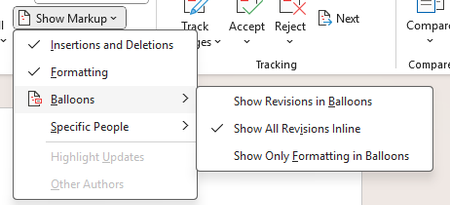
Feature Request for Enhanced Outlook Add-in Surfaces Request Title: Expandable/Pop-out Outlook Add-ins with Inline Compose/Reply Integration Products/Platforms: Microsoft Outlook Add-ins (Office.js) across Classic Outlook for Windows, New Outlook for Windows, Outlook for Mac, and Outlook on the web (OWA) Request Type: New extensibility capabilities / UI host surfaces for Outlook add-ins Priority: High (end-user productivity + adoption + enterprise usability) Background We use an Outlook add-in to integrate additional productivity tools into the email workflow to help users save time, reduce context switching, and improve execution quality. This is a core enablement pattern for enterprise users who spend significant time in Outlook. Today, our add-in runs primarily in the task pane, which has notable limitations in flexibility and available space. The current experience is increasingly cluttered and not user-friendly, especially for workflows that require richer UI, multiple steps, or contextual data. Additionally, the add-in is not seamlessly integrated into the new message compose and reply experience (i.e., the workflow is not inline with the compose/reply window), which limits usability for scenarios that must occur at the moment a user is authoring a message. Problem Statement Current task pane constraints lead to: Limited UI real estate (narrow layout, heavy scrolling, cramped forms, poor readability) No user-friendly expand/enlarge options to fit different workflows and screen sizes Reduced usability during compose/reply, where users need the tool inline with message authoring Lower adoption and productivity because the add-in experience feels disconnected and cumbersome In practice, users need more space and tighter integration at the exact point of work (compose/reply), without leaving Outlook or juggling multiple windows. Requested Features We request Microsoft to support the following add-in UI capabilities, ideally consistently across Classic Windows, New Outlook, and OWA: A) Expandable / Resizable Task Pane Allow users to resize/expand the add-in pane (wider layout; optional full-height behavior) Support a compact vs expanded mode with user preference persistence Outcome: Richer workflows become usable without redesigning into cramped layouts. B) Pop-out Add-in Experience Provide a supported pop-out window for the add-in (while maintaining context to the current item) Ensure pop-out works smoothly with enterprise policies and does not break the add-in lifecycle Outcome: Users can work with complex UI without sacrificing mail reading/authoring space. C) Inline Add-in Integration with Compose and Reply Enable add-in UI to appear inline within the compose/reply window (not just as a separate side pane) Support contextual actions/data entry during authoring (e.g., insert content, validate, attach artifacts, update records) Ensure consistent behavior for new compose and reply experiences Outcome: The tool is available at the moment users need it while writing responses, driving adoption and reducing errors. D) Add-in as a Mail Tab Provide a supported extension point for an add-in to appear as a tab in Mail, similar to “Focused/Other” Tab hosts a larger workspace for add-in workflows (e.g., triage/queue/workbench views) Outcome: A first-class workspace in Mail for workflows that don’t fit the task pane model. Key Enterprise Use Cases Multi-step workflows triggered from emails (triage, intake, approvals, routing) Rich forms and guided actions that are impractical in a narrow pane Compose/reply-time actions: insert approved templates/snippets, validate recipients/content, capture metadata, create/update tasks/records Dedicated mail workbench views via a tab for operational roles Acceptance Criteria Cross-client consistency: Classic Windows, New Outlook, and OWA supported with minimal divergence Next Steps for Microsoft Confirm roadmap/feasibility for: expandable task pane, add-in pop-out, inline compose/reply surface, and mail tab surface Provide recommended implementation model/APIs and opportunities for preview/early access for enterprise validation Screenshots for ReferenceExpose Revision Display Mode (Inline vs. Balloons) via Office.js
Currently, Office.js does not provide an API to retrieve the revision display mode used by Microsoft Word (inline or balloons) when change tracking is enabled. It would be highly valuable to expose this information through the Word JavaScript API, allowing add-ins to detect how tracked changes are displayed and adapt their behavior accordingly. This would enable more reliable handling of scenarios when change tracking is active. Use Case Add-ins that work with tracked changes need to understand whether revisions are shown inline or in balloons to ensure correct document manipulation and a consistent user experience across platforms (PC, Mac, iOS, and Office on the web).German Excel Support Pages – Surprised by Multiple Errors
Dear Microsoft Community, While studying the financial functions in Excel, I was surprised to notice that several German-language support pages contain errors — such as incorrect translations, English function names, non-working example formulas, wrong results, and some spelling mistakes. I enjoy working with this material and would be happy to assist in reviewing and correcting these pages on a paid, freelance basis. I realize this may not be the exact place for such an offer, so I would greatly appreciate it if someone could point me to the right contact person or department at Microsoft. Thank you very much for your help! Theo109Views0likes0CommentsBring the new font options to Word for iPad
The https://learn.microsoft.com/en-us/javascript/api/requirement-sets/word/word-api-desktop-1.3-requirement-set?view=word-js-desktop-1.3 has introduced various useful options in the Font class, like: AllCaps Borders Kerning Scaling Underline color And many more. However, it's a pity that the WordApiDesktop 1.3 is supported only on Windows and macOS, while the previous two WordApiDesktop were also supported on iPadOS. While I would love to see all the new additions of the WordApiDesktop 1.3 to the iPad version, at least adding the new font properties would be really useful to improve text customization.Identify multiple embedded instance of the same add-in in a file as one
Summary By default, when a file is opened in Excel with a JS add-in installed and then saved, the JS add-in is automatically embedded in the file. In the current design all embedded add-ins will be attempted to load when the file is opened even if the embedded add-ins are the same. As a result, when these files are shared with other users who already have the same JS add-in installed with a different version or deployment method, Excel displays two instances of the same add-in in the tabs, or occasionally shows an error in the task pane if the version it is embedded is an older one. We first became aware of this issue when a user reported seeing our JS add-in appear twice in the ribbon, which led to confusion. Upon inspecting the affected file’s XML web extensions, we identified two versions of the same add-in embedded: one deployed via OMEX and another via exCatalog. After further investigation and filing a ticket with Microsoft Support, it was confirmed that this behavior is by design under the current implementation. Why This Matters While we understand that this behavior is expected by design, it remains problematic for users—it can cause confusion and potential issues with custom functions or with the add-in itself. Also, it is not clear for As of the moment there are no easy workaround for users to remove the duplicate/additional instance of the same JS add-in embedded in the file, this will also need to be done for every file that is suffering from this issue (has multiple instance of the same add-in embedded in the file w/ different version/deployment method). Proposed Change/s Update current design to be able to identify if the embedded adds-in is the same through checking and comparing a unique id so even if they have different deployment/version tags it will not be loaded/attempted to be loaded in the task pane. Alternatives Considered Provide an option in Officejs API to prevent embedding/referencing add-in in a file Benefits Prevents users from seeing the same add-in appear twice in the file Eliminate propagating errors in the task pane from trying to render the same add-in with the old version tag [Alternative considered] Allow users/dev to be able to control which add-in gets embedded in the file217Views8likes2Comments