ntp
17 Topics
Secure Time Seeding / W32Time Large Time Correction Issue
Hello everyone, I’m investigating an unusual time synchronization issue with Windows 10 IoT Enterprise LTSC involving W32Time and Secure Time Seeding (STS) in a closed network, and I’d appreciate any guidance or insights from the community. In our environment, time.windows.com resolves to our internal IP/NTP server. The server receives NTP requests and returns a valid response with the correct time. Network monitoring confirms that both the request and response are working correctly. However, we observed an unusual behavior: If the system clock is set to 2035 or earlier, W32Time successfully corrects the time. If the system clock is set to a much later date, such as 2056, W32Time receives the correct NTP response but does not update the system clock. This behavior has been observed in both open and closed networks. We have already tried: Configuring MaxPosPhaseCorrection and MaxNegPhaseCorrection to 0xFFFFFFFF. Enabling UtilizeSslTimeData = 1. Unregistering/registering W32Time. Stopping/starting the Windows Time Service. Reconfiguring the NTP peer. Running w32tm /resync. Verifying NTP traffic and responses using network monitoring. We are also trying to understand how Secure Time Seeding (STS) works in this scenario. On an open network, STS appears to obtain and cache trusted time, which may help Windows recover time while offline. However, in our closed network, where time.windows.com resolves to our internal NTP server, STS does not appear to establish trusted time in the same way. Questions: Is there a W32Time or Secure Time Seeding limitation that prevents very large time corrections, even when MaxPosPhaseCorrection and MaxNegPhaseCorrection allow them? Why does synchronization work at 2035 or earlier but fail around 2056? Is the 2035/2056 behavior related to timestamp validation, NTP, STS, certificates, or another Windows limitation? Does STS require Microsoft's actual time infrastructure, or can an internal NTP server participate? Does resolving time.windows.com to an internal IP prevent STS from establishing a trusted timestamp? Is there a supported configuration on Windows 10 IoT Enterprise LTSC to treat an internal NTP server as a trusted time source? Are there specific W32Time event logs, registry settings, Group Policies, or diagnostics we should check when an NTP response is received but not applied? Accurate and trustworthy time is critical because timestamps are used for offline operations. Any guidance on whether this is caused by W32Time large-offset handling, Secure Time Seeding, timestamp validation, or an interaction between these components would be greatly appreciated.499Views0likes4Comments[Done] Add a "Search by voice" option in the new tab page
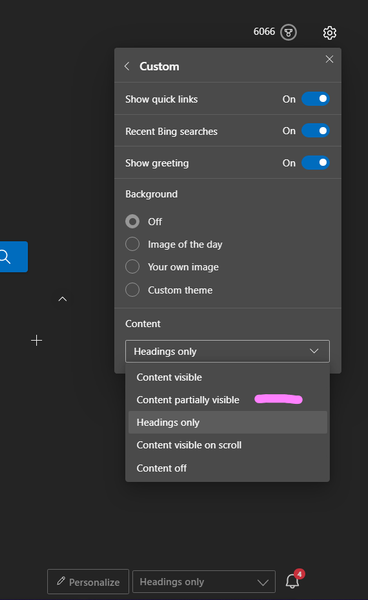
There needs to be an option in the new tab page in Edge to initiate a web search using voice and picture (reverse image search), instead of having to go to the Bing and then click on the microphone icon, Or going to Bing images and doing the reverse search.7.6KViews2likes21Comments
Radius certificate question
I have set-up a NPS Radius server. I want to manually do an export of a certificate, and import it on a private laptop of an employee to get rid of the warning of an untrusted connection. This is what I have done: - On another server than my DC I installed AD CA, and gave it the name for example “Test CA” - Made a copy of the RAS and IAS server template and name it 'Radius template' - Then I published the template with ‘certificate template to isue’ - On my domain controller where NPS is installed, I see that in the ‘trusted root certification authorities’ the certificate “Test CA” is present. - Still on my DC, in the ‘personal certificate folder’ I created a new certificate based on the template (Radius template) and I see the a certificate on my DC with the name ‘dcname.domain.be’. This is issued by ‘Test CA’ and has server authentication and client authentication. - On my NPS server, in ‘network policies’ I changed the PEAP authentication method to use the created certificate (dcname.domain.be). - I exported the Root certificate “Test CA” and imported that on another, non-domain joined laptop (in the ‘trusted root certification authorities’ folder). If I try to connect to the WiFi netwerk, I still get a warning that the connection is not trusted. On my smartphone the same problem. If I ignore the warning, everything works. I know you can have a public CA certificate, but my local domain is .local. First I want to solve the above.1.7KViews1like0CommentsNew Feature: New Tab Page (NTP) weather, greeting message and option
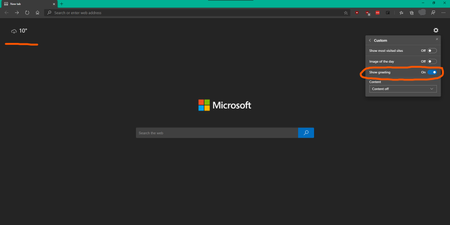
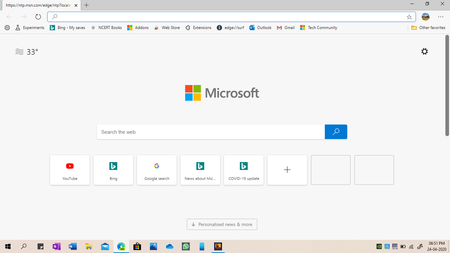
Another New Feature in Edge insider Version 81.0.367.0 (Official build) canary (64-bit) the New Tab Page (NTP) has got new stuff added to it. Showing greetings based on user's Time (Good morning/Good evening/ Good night) Showing weather and temperature based on user's location (Celsius and Fahrenheit units based on user's regional preferences) * it appears on all NTP layouts, I only chose custom to remove distractions from the screenshot ** If you click on the weather and temperature, you will be taken to the MSN weather where you can see more details and forecasts.4.7KViews3likes2Comments
Bug: Wrong New Tab title is shown
The New Tab page has the title "New Tab". However, sometimes when I launch the browser, the first New Tab that opens has the wrong title on the title bar, as can be seen in the attached picture. This isn't a new issue. I have been experiencing this quite often since long, and have been waiting for a fix. I'm using Edge Dev Version 84.0.488.1.1.8KViews1like1CommentWhen the list of countries in the New tab page gets completed?
The list has been incomplete for a while so i was wondering when the rest of the countries will be added there are only 60 countries on the list and there are 200 countries in the world. it's not just for language but also more importantly for News sources3.1KViews5likes12CommentsNew feature: change language and Locale of the NTP contents Version 81.0.387
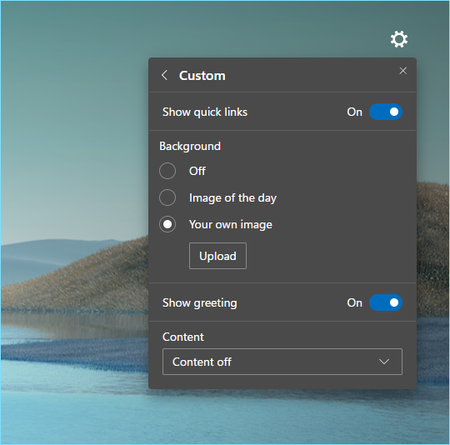
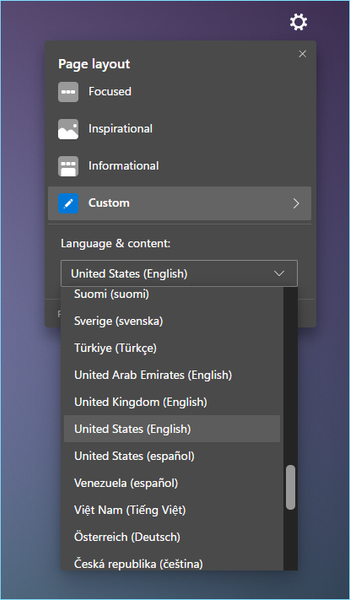
I noticed we got this new option in the latest Edge insider Version 81.0.387.0 (Official build) canary (64-bit) the ability to change the location and languages for news content on the new tab page NTP as it was planned for January There are cases where Edge wouldn't be able to detect the actual location so this should take care of it.5.8KViews4likes6Comments