node js
8 TopicsUnlocking AI-Driven Data Access: Azure Database for MySQL Support via the Azure MCP Server
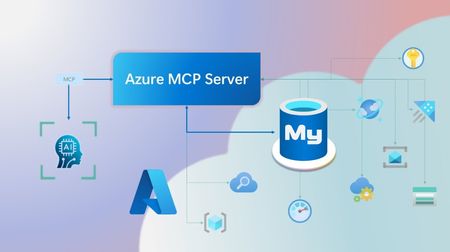
Step into a new era of data-driven intelligence with the fusion of Azure MCP Server and Azure Database for MySQL, where your MySQL data is no longer just stored, but instantly conversational, intelligent and action-ready. By harnessing the open-standard Model Context Protocol (MCP), your AI agents can now query, analyze and automate in natural language, accessing tables, surfacing insights and acting on your MySQL-driven business logic as easily as chatting with a colleague. It’s like giving your data a voice and your applications a brain, all within Azure’s trusted cloud platform. We are excited to announce that we have added support for Azure Database for MySQL in Azure MCP Server. The Azure MCP Server leverages the Model Context Protocol (MCP) to allow AI agents to seamlessly interact with various Azure services to perform context-aware operations such as querying databases and managing cloud resources. Building on this foundation, the Azure MCP Server now offers a set of tools that AI agents and apps can invoke to interact with Azure Database for MySQL - enabling them to list and query databases, retrieve schema details of tables, and access server configurations and parameters. These capabilities are delivered through the same standardized interface used for other Azure services, making it easier to the adopt the MCP standard for leveraging AI to work with your business data and operations across the Azure ecosystem. Before we delve into these new tools and explore how to get started with them, let’s take a moment to refresh our understanding of MCP and the Azure MCP Server - what they are, how they work, and why they matter. MCP architecture and key components The Model Context Protocol (MCP) is an emerging open protocol designed to integrate AI models with external data sources and services in a scalable, standardized, and secure manner. MCP dictates a client-server architecture with four key components: MCP Host, MCP Client, MCP Server and external data sources, services and APIs that provide the data context required to enhance AI models. To explain briefly, an MCP Host (AI apps and agents) includes an MCP client component that connects to one or more MCP Servers. These servers are lightweight programs that securely interface with external data sources, services and APIs and exposes them to MCP clients in the form of standardized capabilities called tools, resources and prompts. Learn more: MCP Documentation What is Azure MCP Server? Azure offers a multitude of cloud services that help developers build robust applications and AI solutions to address business needs. The Azure MCP Server aims to expose these powerful services for agentic usage, allowing AI systems to perform operations that are context-aware of your Azure resources and your business data within them, while ensuring adherence to the Model Context Protocol. It supports a wide range of Azure services and tools including Azure AI Search, Azure Cosmos DB, Azure Storage, Azure Monitor, Azure CLI and Developer CLI extensions. This means that you can empower AI agents, apps and tools to: Explore your Azure resources, such as listing and retrieving details on your Azure subscriptions, resource groups, services, databases, and tables. Search, query and analyze your data and logs. Execute CLI and Azure Developer CLI commands directly, and more! Learn more: Azure MCP Server GitHub Repository Introducing new Azure MCP Server tools to interact with Azure Database for MySQL The Azure MCP Server now includes the following tools that allow AI agents to interact with Azure Database for MySQL and your valuable business data residing in these servers, in accordance with the MCP standard: Tool Description Example Prompts azmcp_mysql_server_list List all MySQL servers in a subscription & resource group "List MySQL servers in resource group 'prod-rg'." "Show MySQL servers in region 'eastus'." azmcp_mysql_server_config_get Retrieve the configuration of a MySQL server "What is the backup retention period for server 'my-mysql-server'?" "Show storage allocation for server 'my-mysql-server'." azmcp_mysql_server_param_get Retrieve a specific parameter of a MySQL server "Is slow_query_log enabled on server my-mysql-server?" "Get innodb_buffer_pool_size for server my-mysql-server." azmcp_mysql_server_param_set Set a specific parameter of a MySQL server to a specific value "Set max_connections to 500 on server my-mysql-server." "Set wait_timeout to 300 on server my-mysql-server." azmcp_mysql_table_list List all tables in a MySQL database "List tables starting with 'tmp_' in database 'appdb'." "How many tables are in database 'analytics'?" azmcp_mysql_table_schema_get Get the schema of a specific table in a MySQL database "Show indexes for table 'transactions' in database 'billing'." "What is the primary key for table 'users' in database 'auth'?" azmcp_mysql_database_query Executes a SELECT query on a MySQL Database. The query must start with SELECT and cannot contain any destructive SQL operations for security reasons. “How many orders were placed in the last 30 days in the salesdb.orders table?” “Show the number of new users signed up in the last week in appdb.users grouped by day.” These interactions are secured using Microsoft Entra authentication, which enables seamless, identity-based access to Azure Database for MySQL - eliminating the need for password storage and enhancing overall security. How are these new tools in the Azure MCP Server different from the standalone MCP Server for Azure Database for MySQL? We have integrated the key capabilities of the Azure Database for MySQL MCP server into the Azure MCP Server, making it easier to connect your agentic apps not only to Azure Database for MySQL but also to other Azure services through one unified and secure interface! How to get started Installing and running the Azure MCP Server is quick and easy! Use GitHub Copilot in Visual Studio Code to gain meaningful insights from your business data in Azure Database for MySQL. Pre-requisites Install Visual Studio Code. Install GitHub Copilot and GitHub Copilot Chat extensions. An Azure Database for MySQL with Microsoft Entra authentication enabled. Ensure that the MCP Server is installed on a system with network connectivity and credentials to connect to Azure Database for MySQL. Installation and Testing Please use this guide for installation: Azure MCP Server Installation Guide Try the following prompts with your Azure Database for MySQL: Azure Database for MySQL tools for Azure MCP Server Try it out and share your feedback! Start using Azure MCP Server with the MySQL tools today and let our cloud services become your AI agent’s most powerful ally. We’re counting on your feedback - every comment, suggestion, or bug-report helps us build better tools together. Stay tuned: more features and capabilities are on the horizon! Feel free to comment below or write to us with your feedback and queries at AskAzureDBforMySQL@service.microsoft.com.510Views3likes0CommentsCreate your own QA RAG Chatbot with LangChain.js + Azure OpenAI Service
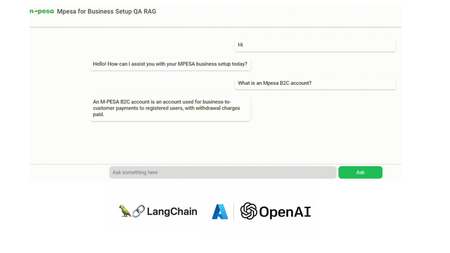
Demo: Mpesa for Business Setup QA RAG Application In this tutorial we are going to build a Question-Answering RAG Chat Web App. We utilize Node.js and HTML, CSS, JS. We also incorporate Langchain.js + Azure OpenAI + MongoDB Vector Store (MongoDB Search Index). Get a quick look below. Note: Documents and illustrations shared here are for demo purposes only and Microsoft or its products are not part of Mpesa. The content demonstrated here should be used for educational purposes only. Additionally, all views shared here are solely mine. What you will need: An active Azure subscription, get Azure for Student for free or get started with Azure for 12 months free. VS Code Basic knowledge in JavaScript (not a must) Access to Azure OpenAI, click here if you don't have access. Create a MongoDB account (You can also use Azure Cosmos DB vector store) Setting Up the Project In order to build this project, you will have to fork this repository and clone it. GitHub Repository link: https://github.com/tiprock-network/azure-qa-rag-mpesa . Follow the steps highlighted in the README.md to setup the project under Setting Up the Node.js Application. Create Resources that you Need In order to do this, you will need to have Azure CLI or Azure Developer CLI installed in your computer. Go ahead and follow the steps indicated in the README.md to create Azure resources under Azure Resources Set Up with Azure CLI. You might want to use Azure CLI to login in differently use a code. Here's how you can do this. Instead of using az login. You can do az login --use-code-device OR you would prefer using Azure Developer CLI and execute this command instead azd auth login --use-device-code Remember to update the .env file with the values you have used to name Azure OpenAI instance, Azure models and even the API Keys you have obtained while creating your resources. Setting Up MongoDB After accessing you MongoDB account get the URI link to your database and add it to the .env file along with your database name and vector store collection name you specified while creating your indexes for a vector search. Running the Project In order to run this Node.js project you will need to start the project using the following command. npm run dev The Vector Store The vector store used in this project is MongoDB store where the word embeddings were stored in MongoDB. From the embeddings model instance we created on Azure AI Foundry we are able to create embeddings that can be stored in a vector store. The following code below shows our embeddings model instance. //create new embedding model instance const azOpenEmbedding = new AzureOpenAIEmbeddings({ azureADTokenProvider, azureOpenAIApiInstanceName: process.env.AZURE_OPENAI_API_INSTANCE_NAME, azureOpenAIApiEmbeddingsDeploymentName: process.env.AZURE_OPENAI_API_DEPLOYMENT_EMBEDDING_NAME, azureOpenAIApiVersion: process.env.AZURE_OPENAI_API_VERSION, azureOpenAIBasePath: "https://eastus2.api.cognitive.microsoft.com/openai/deployments" }); The code in uploadDoc.js offers a simple way to do embeddings and store them to MongoDB. In this approach the text from the documents is loaded using the PDFLoader from Langchain community. The following code demonstrates how the embeddings are stored in the vector store. // Call the function and handle the result with await const storeToCosmosVectorStore = async () => { try { const documents = await returnSplittedContent() //create store instance const store = await MongoDBAtlasVectorSearch.fromDocuments( documents, azOpenEmbedding, { collection: vectorCollection, indexName: "myrag_index", textKey: "text", embeddingKey: "embedding", } ) if(!store){ console.log('Something wrong happened while creating store or getting store!') return false } console.log('Done creating/getting and uploading to store.') return true } catch (e) { console.log(`This error occurred: ${e}`) return false } } In this setup, Question Answering (QA) is achieved by integrating Azure OpenAI’s GPT-4o with MongoDB Vector Search through LangChain.js. The system processes user queries via an LLM (Large Language Model), which retrieves relevant information from a vectorized database, ensuring contextual and accurate responses. Azure OpenAI Embeddings convert text into dense vector representations, enabling semantic search within MongoDB. The LangChain RunnableSequence structures the retrieval and response generation workflow, while the StringOutputParser ensures proper text formatting. The most relevant code snippets to include are: AzureChatOpenAI instantiation, MongoDB connection setup, and the API endpoint handling QA queries using vector search and embeddings. There are some code snippets below to explain major parts of the code. Azure AI Chat Completion Model This is the model used in this implementation of RAG, where we use it as the model for chat completion. Below is a code snippet for it. const llm = new AzureChatOpenAI({ azTokenProvider, azureOpenAIApiInstanceName: process.env.AZURE_OPENAI_API_INSTANCE_NAME, azureOpenAIApiDeploymentName: process.env.AZURE_OPENAI_API_DEPLOYMENT_NAME, azureOpenAIApiVersion: process.env.AZURE_OPENAI_API_VERSION }) Using a Runnable Sequence to give out Chat Output This shows how a runnable sequence can be used to give out a response given the particular output format/ output parser added on to the chain. //Stream response app.post(`${process.env.BASE_URL}/az-openai/runnable-sequence/stream/chat`, async (req,res) => { //check for human message const { chatMsg } = req.body if(!chatMsg) return res.status(201).json({ message:'Hey, you didn\'t send anything.' }) //put the code in an error-handler try{ //create a prompt template format template const prompt = ChatPromptTemplate.fromMessages( [ ["system", `You are a French-to-English translator that detects if a message isn't in French. If it's not, you respond, "This is not French." Otherwise, you translate it to English.`], ["human", `${chatMsg}`] ] ) //runnable chain const chain = RunnableSequence.from([prompt, llm, outPutParser]) //chain result let result_stream = await chain.stream() //set response headers res.setHeader('Content-Type','application/json') res.setHeader('Transfer-Encoding','chunked') //create readable stream const readable = Readable.from(result_stream) res.status(201).write(`{"message": "Successful translation.", "response": "`); readable.on('data', (chunk) => { // Convert chunk to string and write it res.write(`${chunk}`); }); readable.on('end', () => { // Close the JSON response properly res.write('" }'); res.end(); }); readable.on('error', (err) => { console.error("Stream error:", err); res.status(500).json({ message: "Translation failed.", error: err.message }); }); }catch(e){ //deliver a 500 error response return res.status(500).json( { message:'Failed to send request.', error:e } ) } }) To run the front end of the code, go to your BASE_URL with the port given. This enables you to run the chatbot above and achieve similar results. The chatbot is basically HTML+CSS+JS. Where JavaScript is mainly used with fetch API to get a response. Thanks for reading. I hope you play around with the code and learn some new things. Additional Reads Introduction to LangChain.js Create an FAQ Bot on Azure Build a basic chat app in Python using Azure AI Foundry SDK751Views0likes0Comments
Code changes done in spfx react webpart doesn't reflect when tested using hosted workbench
Hi All, I have downloaded the spfx react webpart code from our team's GitHub repository and extracted into the location in my local machine , where Node JS [v10.24.1]and SharePoint generator [v1.11.0] are installed. I tested the code by running "gulp serve" and it works properly in hosted workbench. But when I make changes in the code, even the text output changes, then save it and test it similarly in Hosted workbench , by running "gulp build " and then " gulp serve" , I can't see the changes in the same webpart in the hosted workbench. My teammate tried the same process in her local machine, but in her case, it worked and changes were reflecting. Can anyone help me understand why this issue might be happening in my case? and how it can be resolved?868Views0likes0Comments
Microsoft Teams, Mobile DevOps, And More On This Friday Five
First published on MSDN on Jan 19, 2018 Microsoft 365 Day 35: Why Teams Is The User Adoption CatalystTracy van der Schyff is an energetic, hyperactive adrenaline junkie who sees challenges as opportunities, and thrives on improving processes, environments and the general quality of life574Views0likes0CommentsHow to build a user interactive bot with Microsoft Bot Framework
First published on MSDN on Oct 28, 2017 Guest blog by Shu Ishida Microsoft Student Partner at Oxford University About meMy name is Shu Ishida, and I am a third year engineering student at the University of Oxford.4.6KViews0likes0CommentsBuilding an Assignment Bot with Microsoft Bot Framework
First published on MSDN on Oct 12, 2017 Guest blog by Wang (Leonard) Ge Microsoft Student Partner at Imperial College London About meHello! My name is Leonard I’m a 2nd year student, studying Computer Science Engineering at Imperial College London My interest areas mainly include front end development, Here is my LinkedIn profile https://www.983Views0likes0Comments