new
85 TopicsMicrosoft Edge has got a new feature to magnify images on the web
This feature allows you to right-click on any image on the web and select an option to magnify it. The image will be opened in full size and its Alt text will be displayed under it. I personally like this feature because before this i would right-click on the image and open it in a new tab. To try out this new feature simply head to this release page in my GitHub repository, install Edge Canary channel and then follow the instructions in there: https://github.com/HotCakeX/MSEdgeFeatures/releases/tag/120.0.2198.0 Video demo: https://youtu.be/N3L6QwdIaPM3.1KViews1like2CommentsEdgePhoto | New feature introduced in Microsoft Edge canary version 116.0.1934.0
This feature allows Edge to become a Photo viewer app. This is the initial appearance of the feature so things aren't even finished yet, just gives you an idea of what is coming. More info about Edge features in my GitHub repository: https://github.com/HotCakeX/MSEdgeFeatures Video demo: https://www.youtube.com/watch?v=tkAdafp9VRM3.3KViews1like0CommentsNew Feature | Automatic HTTPS switching added to Edge browser
Automatic HTTPS Enables support for Automatic HTTPS, which switches connections to websites from HTTP to HTTPS. The feature can then be turned on/off or further configured at edge://settings/privacy. – Mac, Windows, Linux #edge-automatic-https Microsoft Edge Version 92.0.877.0 (Official build) canary (64-bit) edge://flags/#edge-automatic-https2.4KViews4likes0CommentsNew behavior for Vertical Tabs button on Edge canary
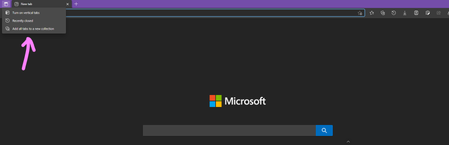
previously clicking on vertical tabs button would immediately switch between horizontal/vertical tab strips. now when you click on it, not right-click, but regular left-click, you get 3 options: Turn on Vertical tabs Recently closed (which opens history flyout and shows you recently closed tabs) Add all tabs to a new Collection Microsoft Edge Version 91.0.862.0 (Official build) canary (64-bit) CFR Also, it's no longer called vertical tabs button in Edge settings, now called tab actions menu1.6KViews1like2CommentsEdge adds ClearType text rendering | Microsoft's own font rendering technology
Microsoft Edge Version 91.0.862.0 (Official build) canary (64-bit) comes with this new feature flag: Enhance text contrast Renders text using the same contrast and gamma settings that are used elsewhere in Windows. Run the ClearType Text Tuner to adjust the contrast and gamma settings for your monitor. – Windows #edge-enhance-text-contrast edge://flags/#edge-enhance-text-contrast13KViews6likes18Comments