network
76 TopicsDesigning Azure Networks That Scale: From Small Deployments to Enterprise-Grade
Hello Folks! If you have ever spent a long afternoon untangling overlapping CIDR ranges, chasing down a broken VNet peering, or trying to remember which UDR points to which firewall, this MAIS 2026 session is going to feel uncomfortably familiar. Jon Ormond (Principal PM, Azure Networking) brought along Jay Li and Jeff Lovett from the Azure Networking team to walk through what actually happens when an Azure network grows from a handful of VNets into a real enterprise estate, and where most teams hit the wall. The headline they kept coming back to is simple. Azure networks do not usually fail because they were built wrong on day one. They fail because they did not evolve fast enough. Scale is not a smooth ramp. It is a step function, and every step adds an order of magnitude of complexity. Why IT Pros Should Care You may be running three VNets today. That is fine. But the day a second team shows up, or you cross into a second region, or somebody asks for hybrid connectivity to the datacenter, your operating model changes whether you planned for it or not. The session is built around two pivots every growing Azure environment hits: Management and control inside Azure (VNets, peerings, routes, security rules). Connectivity and hybrid (VPN, ExpressRoute, Virtual WAN, reliability). Both of those break quietly. By the time you notice, you are already firefighting drift, broken peerings, or unpredictable latency from on-prem. Bottom line, here is what you take away: Design for the next stage, not the one you are in. Put the management layer in before complexity outpaces manual effort. Treat reliability as a design choice, not an afterthought. Start Small, Plan to Grow One VNet, one subnet, one workload. Nothing wrong with that. You can manage it with the portal, a spreadsheet for CIDR tracking, and a calm heart. The problem is that the jump from “one VNet” to “a few VNets across teams” is not gradual. As soon as you have a second team that needs isolation, you are into hub and spoke territory. Ten spokes feels manageable. Fifty spokes across multiple subscriptions does not. And by the time you hit a hundred, the spreadsheet is a liability. Jay made the case that the smartest move at small scale is not to stay manual until it hurts. It is to put Azure Virtual Network Manager (AVNM) in early, even if you only have three VNets. AVNM lets you declare intent once and let the platform handle the rest: IP address management (IPAM) so new spokes get non-overlapping CIDRs automatically. Network groups with tag-based dynamic membership so VNets land in the right group the moment they exist. Connectivity (hub and spoke or mesh) without hand-built peerings. Security admin rules pushed centrally across the estate. Routing intent so traffic flows through the right firewall by default. The honest tradeoff: AVNM is one more thing to learn and operate, and it adds cost. The counter-question Jay kept asking is, “What is the cost of drift?” One overlapping CIDR or one missing UDR at 100 VNets can cascade into an outage that takes days to unwind. That is the real tradeoff. Mid-Stage Patterns: Hub and Spoke, Peering, and the First Cracks The hub and spoke topology is the workhorse of Azure networking and the pattern the Cloud Adoption Framework recommends for most enterprises. It centralises shared services (firewall, DNS, ExpressRoute and VPN gateways, Private DNS zones) in a hub VNet, and connects spoke VNets through peerings. Where teams get into trouble at this stage: Peering sprawl. Every new spoke needs a peering, sometimes two if you want transitive paths. Doing this by hand across subscriptions is where human error lives. Route table drift. UDRs copied from spoke to spoke get out of sync. One spoke routes through the firewall, another bypasses it. Now you have a compliance problem. Security rule drift. NSGs and security policies start as a copy paste exercise and end as a forensic exercise. CIDR collisions. “Just give me a /24” turns into a multi day investigation when the new spoke overlaps with on-prem. Jay’s point on this was sharp. The mistake is not the topology. Hub and spoke is the right pattern. The mistake is staying manual on top of it. AVNM network groups let you say, “any VNet tagged environment=production joins the production group, gets the production security baseline, peers to the production hub, and inherits the routing intent that sends east-west traffic through the firewall.” No tickets, no copy paste, no drift. If you are already deployed via Azure Landing Zones (ALZ) with Bicep or Terraform, AVNM is not a replacement, it is another construct in your template. As Jon put it in the chat, it is “just another object” in your ALZ, and the two layers work together rather than competing. Enterprise Scale: Virtual WAN, Segmentation, and Governance At some point hub and spoke stops scaling cleanly. You start adding regions. Branch offices show up. You need SD-WAN integration, more than 30 IPsec tunnels, or transitive routing between VPN and ExpressRoute. That is when Microsoft pushes you toward Azure Virtual WAN. Virtual WAN is a Microsoft managed global transit network. You deploy regional virtual hubs and connect everything (Azure VNets, branches, remote users, ExpressRoute circuits) into them with consistent routing and security. The trade up is real: Any to any connectivity by default. Hub to hub mesh is built in. Routing intent and policies for centralised internet egress and east-west inspection through Azure Firewall or a partner NVA in a secured hub. Branch scale. Tens or hundreds of sites stop being a custom integration project. Operational simplification. Microsoft owns the hub control plane so you stop babysitting peerings. For hybrid connectivity itself, Jeff walked the curve every customer travels: VPN Gateway is the on-ramp. Cheap, fast to stand up, good enough until public internet latency, throughput, or regulatory requirements force a change. ExpressRoute circuits give you dedicated bandwidth from 50 Mbps to 100+ Gbps, with predictable performance and over 200 service providers worldwide. Scalable ExpressRoute virtual network gateways grow and shrink with usage, so you deploy once and stop re-architecting every time traffic changes. ExpressRoute Metro is the headliner. Same price as a standard circuit, but the redundant device lives in a second, physically distinct co-location facility across town. Building fire, flood, or power outage in one site, and your traffic keeps flowing. Multiple circuits are still on the table when “this cannot fail” actually means it cannot fail. Honest tradeoff on Virtual WAN: it is opinionated, Microsoft managed, and you give up some of the granular control you have in a customer managed hub. For most enterprises that is a win. For the few with very specific routing requirements or heavy NVA investments, traditional hub and spoke with Azure Route Server can still be the right call. The CAF guidance lays this out in detail. Getting Started If you take one thing from this session, take this. Design for the next stage. Three concrete moves: Stand up AVNM now, even at small scale. Declare your intent for IPAM, connectivity, security, and routing once. Let new VNets inherit it. Pick your topology with eyes open. Hub and spoke for customer managed control, Virtual WAN for Microsoft managed global transit at scale. The CAF decision tree is the right starting point. Plan hybrid for failure, not for the sunny day. ExpressRoute with Metro by default. Multiple circuits for the workloads that genuinely cannot go down. Test the failover. Resources Azure Virtual Network Manager overview Azure ExpressRoute introduction About ExpressRoute virtual network gateways About Azure VPN Gateway About Azure Virtual WAN Hub-spoke network topology in Azure Define an Azure network topology (Cloud Adoption Framework) Virtual WAN network topology in an Azure landing zone Watch the Rest of the Summit This was one of many great sessions at the Microsoft Azure Infra Summit 2026. If you want to catch the keynotes, the deep dives on storage and AKS, and everything in between, the full playlist is here: Microsoft Azure Infra Summit 2026 Playlist Big thanks to Jon Ormond for moderating, and to Jay Li and Jeff Lovett for the practical, no-fluff walk through what actually breaks at scale and how to design ahead of it. Cheers! Pierre Roman830Views0likes0Comments
Microsoft Foundry External MCP Server Traffic Routing via Corporate Firewall
The customer would like to confirm whether traffic from an Azure AI Foundry agent to an external MCP server can be routed through a corporate firewall and whether this scenario is officially supported. To validate this scenario, I configured the following in my lab: Deployed an Azure AI Foundry resource using the Standard Agent Service with network injection. Created a dedicated subnet for the Foundry Agent Service and delegated it to Microsoft.App/environments. Associated a route table with the Foundry Agent subnet to route outbound traffic through Azure Firewall. Configured the required application and network rules on Azure Firewall. The Foundry agent is able to successfully retrieve data from the external MCP server. However, no corresponding traffic is visible in the Azure Firewall logs. Could you please confirm whether outbound traffic from the Foundry agent to an external MCP server can be routed through Azure Firewall or a corporate firewall? Also, is this routing scenario officially supported? Appreciate your support!
Win11 25905.1000 Network Fault
My computer has a network connection rate of 10Mbps every time I turn it on, but I have a broadband of 100Mbps. At this point, I only need to disable the network card and then enable it, and the speed will be restored. It has been ruled out that there is a problem with the operator or network cable. Is it a system issue? And how can I solve it?898Views1like1Comment
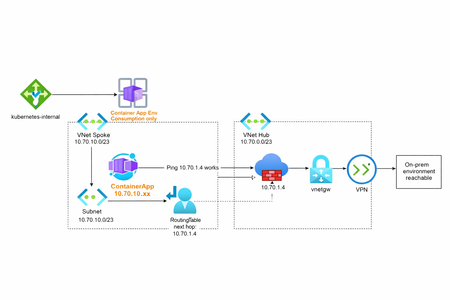
Container Apps Environment Networking (Consumption)
AI workloads are no longer just about models, they’re about how those models connect. On Azure, many teams are running inference APIs, background processors, and event-driven AI components on Azure Container Apps Environments (CAE). CAE fits AI workloads well: it scales fast, scales to zero, and removes Kubernetes overhead. But once AI services need to securely reach private data sources, on-prem systems, vector databases, or external AI services, networking becomes the real design challenge. I’ve written a short, practical deep dive on how Consumption-based vs Workload-profile Container Environments behave from a networking perspective, what works, what doesn’t, and why it matters for modern AI platforms. 👉 Read the full article here: https://vakhsha.com/blog.html?post=blog-06377Views0likes1Comment
Should I use Windows 7?
Hi, I am fed up with the rubbish on Win11 and (less) on Win10 especially with telemetry and broken windoes images. So, I am really considering installing Win 7 on a PC I use as a file server. I know Win 7 does not receive any security updated but I was wondering if a good antivirus with firewall should be enough.343Views0likes1CommentCloudNetDraw – Instantly generate Azure network diagrams
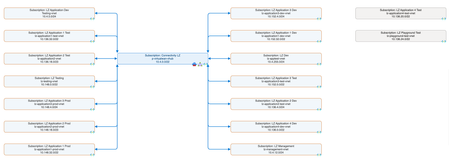
Hi everyone, I wanted to share a tool I’ve built that might help some of you who regularly document or review Azure network topologies. CloudNetDraw is a free tool that generates Azure network diagrams (HLD and MLD) directly from your environment. It supports both user login and service principals — or you can self-host it. What it does: Visualizes hub and spoke topology Shows all subnets with CIDRs Highlights NSG and UDR presence Exports editable Draw.io files Hosted version available, or deploy it yourself Open source on GitHub Try it here: https://www.cloudnetdraw.com GitHub repo: https://github.com/krhatland/cloudnet-draw Privacy & Security: CloudNetDraw does not collect any information about your network resources or environment. Drawings are generated in memory and deleted immediately after use. We do not store, access, or analyze your topology data. Would love to hear your thoughts or suggestions! Thanks, Kristoffer3.4KViews2likes2CommentsPacketMind: My Take on Building a Smarter DPI Tool with Azure AI
Just wanted to share a small but meaningful project I recently put together PacketMind. It’s a lightweight Deep Packet Inspection (DPI) tool designed to help detect suspicious network traffic using Azure’s AI capabilities. And, honestly, this project is a personal experiment that stemmed from one simple thought: Why does DPI always have to be bulky, expensive, and stuck in legacy systems? I mean, think about it. Most of the time, we have to jump through hoops just to get basic packet inspection features, let alone advanced AI-powered traffic analysis. So I figured – let’s see how far we can go by combining Azure’s language models with some good old packet sniffing on Linux. What’s Next? Let’s be honest – PacketMind is an early prototype. There’s a lot I’d love to add: - GUI Interface for easier use - Custom Model Integration (right now it’s tied to a specific Azure model) - More Protocol Support – think beyond HTTP/S - Alerting Features – maybe even Slack/Discord hooks But for now, I’m keeping it simple and focusing on making the core functionality solid. Why Share This? You know, I could’ve just kept this as a side project on my machine, but sharing is part of the fun. If even one person finds PacketMind useful or gets inspired to build something similar, I’ll consider it a win. So, if you’re into networking, AI, or just like to mess with packet data for fun – check it out. Fork it, test it, break it, and let me know how you’d make it better. Here’s the repo: https://github.com/DrHazemAli/packetmind Would love to hear your thoughts, suggestions, or just a thumbs up if you think it’s cool. Cheers!216Views1like0Comments
WiFi in Win11 issues in .3915
So i'm going crazy here and don't know where to go next, to Microsoft support or my internet provider... I've happily had Hyper-V on my Windows 11 Insider and some VMs i use for delivering trainings. Few days ago i noticed i no longer can connect to the internet on the VMs. Existing VMs, new VMs, VMs with past snapshots applied, etc.... no internet on the VMs, period. I tried creating new switches several times and nothing helps. However, although i don't need internet to deliver the trainings, when doing so at the university, i always use my host/laptop's internal card with a SIM in it and have no issues whatsoever with the internet in VMs. The SIM i have is from the same provider as my home cable is from. I just turned off my WiFi and connected the cellular network. Boom! VMs instantly have internet access. Turning on WiFi -> no internet again. So at this point i'm kind of stuck and not sure where to go for help. Obviously there is nothing wrong with my Windows OS in general, but there is an issue with the WiFi. On the host, i have no issues with the WiFi, internet is fine and working properly. I'm shutting down my laptop every night, so "restarting" did not fix it. Should i try resetting my router or go to Microsoft Windows support first? I think going to the internet provider has no benefit now, as they will blame the OS. Any thoughts?582Views0likes3Comments