natural language processing
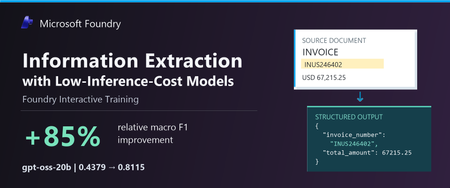
57 TopicsInformation Extraction with Low-Inference-Cost Models: 85% F1 Gain via Foundry Interactive Training
Authors: Shih-Yao Lin, Apurva Saksena The task: turn documents into structured data Many business workflows need to turn documents into structured data. The model must find the right values, capture the requested records, and return output the next system can use. Long documents and repeated tables make this harder. We tested gpt-oss-20b and gpt-oss-120b to explore lower-cost alternatives to frontier models. In our baseline tests, both fell short on field coverage. gpt-oss-20b also declined the task or returned unparseable output. We wanted to see whether task-specific fine-tuning could improve these results. In Figure 1, we show an invoice that we held out from training. We can quickly spot the invoice number, customer, due date, and balance, but our application must map those values to the correct schema fields, preserve all 37 line items, and return complete, valid JSON. A wrong or missing value can trigger downstream errors or manual review, while invalid JSON can break the workflow altogether. We used schema-guided extraction. We gave the model document text and a JSON Schema defining the required fields, then asked it to return one JSON object. Our grader compared normalized field-path/value pairs with the expected answer, counting repeated occurrences. We measure precision as the share of extracted pairs that match the expected answer, and recall as the share of expected pairs we recover correctly. We use F1 to combine the two into one score, using their harmonic mean. F1 ranges from 0 to 1, with higher scores indicating better extraction. A wrong value hurts precision and can also hurt recall if the expected value remains unmatched. A missing value hurts recall. What changed after fine-tuning We evaluated the base and fine-tuned versions of gpt-oss-20b and gpt-oss-120b on the same 20 documents. Both improved their extraction F1. gpt-oss-20b rose from 0.4379 to 0.8115, and gpt-oss-120b rose from 0.6816 to 0.8573. gpt-oss-20b made the larger gain, with an 85.3% relative improvement after 100 GRPO steps. Fine-tuned gpt-oss-120b finished with the higher F1. Fine-tuning helped both models, but the size of the improvement differed. We also evaluated GPT-5.5, GPT-5.6-sol, and GPT-6-sol as reference models. They scored 0.9760, 0.9766, and 0.9764, respectively—still higher than our fine-tuned models. gpt-oss-20b reached 83.1% of GPT-5.6-sol’s reference F1. This is a substantial improvement for gpt-oss-20b and a promising starting point for further task-specific tuning. Our base and tuned scores are averaged across repeated evaluations, while the reference models used a different single-pass protocol. These reference scores provide useful context for the progress we made, with the evaluation differences noted above. These improvements make lower inference-cost base models worth a closer look. Table 1 compares published Azure inference prices. The pricing comparison is intended to provide inference-cost context only and should not be interpreted as a complete total-cost-of-ownership analysis, which would also include training, hosting, retries, and operational costs. Table 1. Extraction macro F1 and published Azure inference prices (USD per 1M tokens); GPT-5.5, GPT-5.6-sol, and GPT-6-sol are included as frontier-model references Model Macro F1 Azure input / 1M Azure output / 1M gpt-oss-20b 0.8115 $0.07 $0.30 gpt-oss-120b 0.8573 $0.15 $0.60 GPT-5.6-sol 0.9766 $4.00 $20.00 GPT-5.5 0.9760 $5.00 $30.00 GPT-6-sol 0.9764 $2.00 $10.00 Notes: Prices checked October 9, 2026, in USD; input rates are uncached. gpt-oss-20b prices are published fine-tuned inference rates for Regional deployments. gpt-oss-120b prices are base-model rates; its fine-tuned rates remain unconfirmed. Frontier prices use Global Standard pricing, with the short-context tier for GPT-5.6-sol and GPT-6-sol. These rates do not represent measured deployment costs for our experimental checkpoints. Token rates exclude training and hosting costs. F1 scores come from fine-tuned checkpoints for the two gpt-oss models and reference runs for the frontier models. All use the same 20 documents, but tuned scores average repeated evaluations while frontier references use a different single-pass protocol. We observed more parseable output and higher coverage We looked through gpt-oss-20b’s responses and found examples where it declined the task or said it could not finish. We tracked this with a “refusal-wording rate”: the share of responses where our grader detected an apology or cannot-complete language. This measures wording, not whether the model made a safety refusal. We tracked JSON parseability and field coverage separately, although these problems can overlap. After fine-tuning, the refusal-wording rate (Refusals) fell from 25% to zero; JSON parseability (Valid JSON) rose from 63.8% to 98.8%, and coverage rose from 47.1% to 94.9%. Valid JSON means our grader could read the response as an object or array. Coverage compares the number of predicted field/value pairs with the expected count, capped at 100%. Wrong or extra pairs can raise coverage, so we read it alongside F1 rather than treat it as a measure of correctness. Extraction quality and output behavior before and after fine-tuning on the same 20 documents. Bars show means across repeated evaluations. “Valid JSON” measures JSON parseability, not schema compliance or value correctness. “Refusal rate” measures detected refusal wording, not safety refusals. Higher is better except for refusal rate. Figure 4 shows how these measures changed during training. We repeated the full training run with a second seed. It reached 0.8101 F1, close to the headline run’s 0.8115. We ran four temperature-0 evaluations for each seed. Across all eight post-training evaluations, our grader detected no refusal wording. What we learned from the model comparison We saw different starting points and different gains between the two models. gpt-oss-20b had clearer output problems before training: it sometimes declined the task, returned unparseable JSON, or missed required information. After fine-tuning, we saw improvements in extraction F1, JSON parseability, and field coverage, along with less refusal wording. gpt-oss-120b started with fewer format problems. We detected no refusal wording, and 96.3% of its baseline responses were parseable JSON. But parseable output did not mean complete or correct extraction. After fine-tuning, its field coverage rose from 74.1% to 94.1%, and its F1 rose from 0.6816 to 0.8573. gpt-oss-20b made the larger F1 gain, while fine-tuned gpt-oss-120b finished with the higher F1. For us, the lesson is to measure the problem first. Try simpler, lower-cost changes, such as prompting, before committing to training. Then consider fine-tuning when your grader can reward the improvements your application needs. How we trained with Foundry Interactive Training We used the Foundry Interactive Training API [1] with 17 training documents, expected structured answers, and a Python grader. We followed the cookbook to connect our grader to Foundry’s managed generation and training operations. We ran 100 group relative policy optimization, or GRPO, steps and saved checkpoints for evaluation. For each document, we had gpt-oss-20b generates eight candidate answers. Our grader awarded partial credit for correct values and penalized invalid JSON. GRPO used the candidates’ relative scores to reinforce better answers. We used the expected answers only for grading. We did not include them in the inputs we gave the model during reinforcement training. The model had to produce its own answers, and the grader supplied the feedback. 5. Customers define the application outcome and quality bar; Foundry Interactive Training runs the post-training loop in Microsoft Foundry. How customers can use Foundry Interactive Training To try this approach, bring four ingredients: a supported base model, examples from your workload, expected outcomes, or another way to check the answers, and a Python grader. Your grader should measure what matters to the application—not just whether an answer looks convincing. To prepare your extraction data and establish a baseline, start with the ExtractBench text-evaluation sample. It includes data preparation, an extraction grader, and evaluation of F1, refusal wording, JSON parseability, and field coverage. The sample covers preparation and evaluation only; follow the onboarding cookbook below for training. Get connected. Request access to the Microsoft Foundry Interactive Training public preview [2] and connect the onboarding cookbook [3][4] to an assigned Foundry project. Separate your data. Build training, validation, and final test sets. Use validation data to choose checkpoints. Keep the final test set for an independent check, with new sources and document structures where possible. Build your grader. Implement a grader that rewards the desired outcome. For our extraction task, we checked normalized field-path/value pairs and penalized unparseable JSON. Run a bounded experiment. Set a training budget, inspect the training signal, and compare saved checkpoints on the validation set. Once you choose a checkpoint, evaluate it on the untouched final test set. Evaluate and prepare for deployment. Use session sampling to test your LoRA adapter on held-out prompts and compare it with the baseline. Save checkpoints so you can continue experimenting. Before using the model in an application, confirm the supported deployment path, model compatibility, and serving costs. Takeaway With Foundry Interactive Training, we improved extraction F1 for both gpt-oss-20b and gpt-oss-120b. We brought our task examples and a Python grader, and Foundry managed the generation and training loop. gpt-oss-20b made the larger gain, while fine-tuned gpt-oss-120b reached the higher F1. We did not match the frontier references, but our results show why task-specific fine-tuning is worth exploring before switching to a higher-priced model. The final choice should depend on independently tested quality and the full cost of deployment. Reference [1] https://github.com/microsoft-foundry/fine-tuning [2] What is interactive training (preview) in Microsoft Foundry? - Microsoft Foundry | Microsoft Learn [3] Interactive Training - Public Preview Intake Form [4] https://github.com/microsoft-foundry/fine-tuning/tree/main/interactive_training How to Cite If you find this work useful, please consider citing this article: MISC{lin2026informationextraction, title = {Information Extraction with Low-Inference-Cost Models: 85\% {F1} Gain via {Foundry Interactive Training}}, author = {Lin, Shih-Yao and Saksena, Apurva}, year = {2026}, howpublished = {Microsoft Azure AI Foundry Blog}, url = {https://techcommunity.microsoft.com/blog/azure-ai-foundry-blog/information-extraction-with-low-inference-cost-models-85-f1-gain-via-foundry-int/4563661} }623Views0likes0Comments
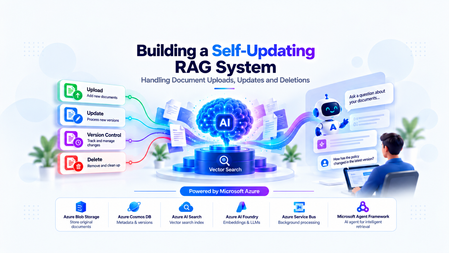
Building a Self-Updating RAG System: Handling Document Uploads, Updates and Deletions
The Hidden Challenge of Production RAG Imagine your organization has deployed an AI assistant to answer questions about employee policies. An employee asks, “How many days of annual leave am I entitled to?” The assistant responds confidently: “15 days.” There is just one problem. The company updated its policy last week. Employees are now entitled to 20 days. The updated PDF was uploaded successfully. The storage service is healthy. The search index is responding. The language model is generating answers without errors. Yet the answer is wrong. This is a different kind of production failure. Nothing appears to be broken at the infrastructure level. The failure lies in the relationship between the source document and the information the AI retrieves. Retrieval-Augmented Generation (RAG) systems depend on external knowledge to ground their responses. But that knowledge is not static. Policies change, contracts get revised, product documentation evolves, and outdated documents are removed. When the underlying documents change, the associated chunks, embeddings, metadata, and search-index entries must be managed accordingly. Otherwise, the system can continue generating plausible answers from information that is no longer valid. Building a RAG pipeline is a retrieval problem. Keeping it correct as data changes is a data lifecycle engineering problem. In this article, we will design a self-updating RAG system that handles document creation, updates, and deletion while addressing asynchronous processing, version consistency, failed jobs, and stale retrieval results. The goal is not simply to index documents automatically. It is to make sure that the right version of the right document is available to the right user when a query is executed. Understand the Problem Before Designing the Architecture A basic RAG pipeline is relatively straightforward: Load a document. Extract its text. Split the text into smaller chunks. Generate an embedding for each chunk. Store the chunks and embeddings in a searchable index. Retrieve relevant chunks when a user asks a question. Pass the retrieved context to a language model to generate an answer. This works well when the document collection is relatively static. The difficulty begins when the source data changes after indexing. Consider three common scenarios. Scenario A: A document is uploaded A new policy is added to the knowledge base. The system must process it and make its content searchable. Until indexing finishes, the document may not be available to the chatbot. Scenario B: A document is updated The original policy allows 15 days of annual leave. A revised policy allows 20 days. If the new version is indexed without correctly deactivating the old version, both versions may appear in search results. The language model may then select the wrong passage or combine conflicting information. Scenario C: A document is deleted An administrator removes a document from the application. However, deleting the original PDF from storage does not automatically delete the corresponding records from Azure AI Search. The content may remain searchable until its indexed chunks are removed. Azure AI Search document deletion itself can also take time to be reflected in index statistics. Microsoft Learn: Delete documents in Azure AI Search These scenarios reveal an important design principle: The source document, its metadata, the background processing jobs, and the search index must be treated as parts of one logical lifecycle—even though they are separate systems. We need a design that can handle failures between these systems without exposing outdated or unauthorized content. Design the System Around Clear Responsibilities Rather than making the upload API responsible for every operation, we can separate the system into a document management path, an asynchronous processing path, and a query path. The Proposed Architecture The design uses the following components: Component Responsibility Azure Blob Storage Stores the original document files Azure Cosmos DB Maintains document metadata, versions, and lifecycle state Azure Service Bus Queues ingestion and deletion jobs Background worker Extracts text, creates chunks, generates embeddings, and updates the index Microsoft Foundry Provides the models used for embedding generation and response generation Azure AI Search Stores searchable document chunks, metadata, and vectors FastAPI Exposes document management and chat APIs Microsoft Agent Framework Supports agentic query workflows when multi-step reasoning or tool use is required The background worker can be implemented as a separate Python service or another suitable compute component. It does not have to be part of the FastAPI process. Why separate these responsibilities? Suppose a user uploads a 100-page contract. The application may need to extract text, split thousands of characters into chunks, generate embeddings, and send multiple indexing requests. Performing all of that synchronously inside the upload request increases latency and makes the API vulnerable to timeouts. Instead, FastAPI accepts the request, persists the document and its metadata, and arranges for the work to be processed asynchronously. The worker performs the expensive operations independently. This allows ingestion to scale separately from query traffic and makes retries easier to manage. The query path remains separate: it retrieves eligible, relevant chunks and uses them to ground the model's response. Establish a source of truth Azure Cosmos DB should hold the authoritative lifecycle metadata in this design. Azure AI Search is the retrieval index, not the authority on whether a document is currently active. For example, a document record might look like this: { "id": "policy-123", "documentId": "policy-123", "currentVersion": 2, "indexedVersion": 1, "status": "PROCESSING", "blobPath": "policies/leave-policy.pdf" } Here, version 2 is the desired version, but version 1 is still the last successfully indexed version. The application must not assume that the latest upload has already become searchable simply because the metadata record has been updated. This distinction between the desired version and the indexed version is central to reliable lifecycle management. Implementing Document Uploads A reliable upload operation involves more than storing a file and sending a message to a queue. It must establish a durable record of the document, identify the version being processed, and ensure that background processing can be retried safely. Step 1: Accept and persist the document When a client uploads a document, FastAPI validates the request, checks the user's permissions, and stores the original file in Azure Blob Storage. The application then creates or updates the document metadata in Cosmos DB. At this stage, the document can be marked as PROCESSING until the ingestion pipeline completes. Step 2: Schedule background processing The system creates an ingestion job containing enough information for the worker to locate the source and determine exactly which version to process. For example: { "operationId": "op-789", "operation": "INGEST", "documentId": "policy-123", "documentVersion": 2, "blobPath": "policies/leave-policy-v2.pdf" } The worker should process the specified version rather than blindly reading whatever file happens to exist at a mutable storage path. For systems that overwrite the same blob path, use blob versioning, an immutable version-specific path, or another mechanism that ensures the worker reads the intended content. Step 3: Extract, chunk, and embed The worker downloads the appropriate document and extracts its text. The extracted text is divided into chunks. Each chunk should carry identifiers that connect it to its parent document and version. For example: { "id": "policy-123-v2-chunk-001", "documentId": "policy-123", "documentVersion": 2, "chunkNumber": 1, "content": "Employees are entitled to 20 days of annual leave." } The worker generates an embedding for each chunk and writes the chunk, its metadata, and its vector to Azure AI Search. The exact index schema depends on the retrieval strategy, embedding dimensions, filtering requirements, and whether hybrid search is used. Step 4: Mark the version as indexed After the worker confirms that all required indexing operations succeeded, it updates the document metadata to record the indexed version and processing status. For example: { "id": "policy-123", "currentVersion": 2, "indexedVersion": 2, "status": "ACTIVE" } This update must be conditional on the document still being at version 2. If a newer version has already been uploaded, the older job must not mark itself as the current version. Why idempotency matters Distributed systems can deliver the same job more than once. A worker may finish indexing but fail before acknowledging the queue message. The message can then be delivered again. If every attempt creates new chunk IDs, duplicate content may accumulate in the index. A practical solution is to derive chunk IDs deterministically from the document ID, version, and chunk identifier. Reprocessing the same version then targets the same index records instead of creating a new set each time. This does not eliminate every failure mode, but it makes repeated indexing much safer. Azure Service Bus supports duplicate detection for eligible tiers, but queue-level duplicate detection is not a substitute for idempotent worker logic. Microsoft Learn: Duplicate detection Updating Documents Without Serving Stale Content Document updates are the most interesting part of the lifecycle because they introduce a consistency problem. Imagine the current leave policy is version 1, allowing 15 days. An administrator uploads version 2, allowing 20 days. The worker starts processing version 2, but embedding generation takes time. Meanwhile, users continue querying the application. What should those users see? There are two common strategies. The right choice depends on whether the system prioritizes availability or strict freshness. Strategy A: Make the new version active after indexing succeeds In this approach, the existing active version remains available while the new version is processed. The workflow is: Create version 2 and mark it as processing. Extract text and generate embeddings for version 2. Index all required version 2 chunks. Verify indexing success. Atomically update the authoritative metadata to make version 2 active. Clean up version 1's indexed chunks asynchronously. This minimizes the time during which the document is unavailable. However, it means that version 1 can remain available while version 2 is being processed. That may be acceptable for some knowledge bases but inappropriate for policies that must become effective immediately. Strategy B: Disable the old version as soon as an update is accepted For high-sensitivity documents, the application can immediately mark the old version as ineligible for retrieval. It then processes the new version and activates it only after successful indexing. The trade-off is that the document may temporarily have no eligible version. The application should return a clear message or use an approved fallback rather than silently serving obsolete information. Prevent old jobs from overwriting new versions Consider this sequence: Version 2 starts processing. Version 3 is uploaded before version 2 finishes. Version 3 finishes indexing first. Version 2 finishes later and attempts to update the metadata. Without version checks, the late version 2 job could incorrectly reactivate stale content. The worker must therefore use conditional updates or optimistic concurrency checks against the authoritative document version. A job may complete its indexing work, but it must not activate its version unless it is still eligible to do so. Handle the lack of a cross-service transaction Cosmos DB and Azure AI Search do not participate in a single distributed transaction in this architecture. A metadata update can succeed while an indexing request fails. An indexing request can succeed while the subsequent metadata update fails. The system should account for these partial failures using: Explicit lifecycle states. Conditional version updates. Retryable and idempotent operations. Periodic reconciliation between metadata and indexed records. The important engineering principle is to make incomplete operations detectable and recoverable, rather than assuming every multi-step workflow succeeds atomically. Deleting Documents Safely Deletion requires special treatment because removing a document from the source does not automatically remove its indexed content. More importantly, waiting for physical index cleanup before preventing retrieval creates a window in which content that should no longer be available may still be returned. Step 1: Make the document ineligible for retrieval When an authorized deletion request arrives, the application updates the authoritative metadata to indicate that the document is being deleted or has been logically deleted. The retrieval path must check that status before using retrieved content. For sensitive documents, this check must happen before the content is added to the LLM context. Merely hiding a document in the user interface is insufficient. Step 2: Schedule physical cleanup The application enqueues a deletion job that identifies the document and all indexed records associated with it. The worker queries or otherwise identifies the corresponding chunk keys and deletes those records from Azure AI Search. The deletion operation should be idempotent. Retrying a deletion for an already-removed chunk should not cause the workflow to fail unnecessarily. Step 3: Verify cleanup The worker checks whether the targeted records have been removed and records the cleanup result. If an operation fails, the job should be retried according to a defined policy. Jobs that continue failing should be sent to a dead-letter queue for investigation and controlled recovery. Azure AI Search supports deleting indexed documents by their document keys. Its documentation also describes how to verify deletion and why index statistics may not update immediately. Microsoft Learn: Delete documents A simplified FastAPI deletion endpoint The following example illustrates the API boundary. The helper functions represent application-specific implementations. from fastapi import FastAPI, HTTPException app = FastAPI() @app.delete("/documents/{document_id}") async def delete_document(document_id: str): document = await get_document_metadata(document_id) if document is None: raise HTTPException( status_code=404, detail="Document not found" ) # Must enforce authorization and use a # concurrency-safe lifecycle transition. await mark_document_deleting(document_id) # The job must be published reliably. await enqueue_deletion_job( document_id=document_id, document_version=document["currentVersion"] ) return { "documentId": document_id, "status": "DELETING" } This is an illustrative example, not a complete production implementation. In particular, the metadata transition and message publication must be coordinated reliably. One approach is the transactional outbox pattern: write the lifecycle change and an outbox event in the same Cosmos DB transactional batch when the data model and partitioning allow it, then publish the event asynchronously. The publisher can retry without losing the intent to schedule cleanup. Deletion must also account for in-flight queries Suppose a query retrieves a document's chunks just before the deletion request is processed. The query might still hold those chunks in memory even after the document is marked deleted. For stricter deletion guarantees, the application needs a defined policy for in-flight requests, cache invalidation, and authorization checks immediately before content is sent to the model. If the requirement is that no response may contain content after a deletion takes effect, that guarantee must explicitly cover requests already in progress. Physical cleanup and retrieval eligibility are separate responsibilities. Both matter. Coordinate Lifecycle Changes Reliably Once ingestion and deletion run asynchronously, the queue becomes part of the system's correctness model. A production worker should not assume that each message is delivered exactly once or that messages for a particular document always finish in order. Design for at-least-once processing A practical worker lifecycle is: Receive a message using a lock-based delivery mode. Validate the document ID, version, and operation. Check whether the operation is still eligible to run. Perform idempotent indexing or deletion. Update lifecycle metadata conditionally. Acknowledge the message only after successful processing. If the worker fails before acknowledging the message, the message may be delivered again. That is expected behavior and should be handled by the design. Add retry and dead-letter policies Not all failures should be treated equally. Transient network errors or throttling may succeed after a delay. Invalid documents, unsupported file formats, and persistent schema mismatches may require manual investigation. The system should use bounded retries with appropriate backoff, record meaningful failure details, and route repeatedly failing messages to a dead-letter queue. Use reconciliation as a safety net Even with retries, the system needs a way to detect inconsistencies that escaped the normal workflow. A reconciliation job can compare authoritative metadata against indexed document versions and lifecycle states. It can identify cases such as: A document marked active whose current version is not fully indexed. Chunks belonging to an obsolete version. Search records for a logically deleted document. An operation that remained in a processing state beyond its expected duration. Reconciliation should repair only states it can safely determine. It should not reactivate a version simply because its chunks exist in the index. For applications using Azure Cosmos DB change feed, document metadata changes can also drive incremental background processing. The change feed captures inserts and updates in its standard latest-version mode; capturing deletions requires selecting and configuring an appropriate supported mode or using explicit lifecycle events. Microsoft Learn: Cosmos DB change feed Where Microsoft Agent Framework Fits A common mistake is to assume that every part of an agentic RAG application should be implemented as an AI agent. Document uploads, version transitions, embedding generation, and index deletion are predictable operations with explicit success and failure conditions. These are generally best implemented with conventional application logic and background workers. Microsoft Agent Framework becomes useful when the query itself requires multi-step reasoning, tool selection, or orchestration. For example, a user might ask: “Compare the current leave policy with the previous version and explain the changes that affect employees.” An agent could use approved tools to retrieve the current policy and the permitted historical version, compare the relevant passages, and generate an evidence-based explanation. The application must still control which documents and versions are eligible for retrieval. The agent should not independently decide whether a deleted document is authorized for use. This distinction is important: deterministic workflows protect data integrity; agentic workflows help solve tasks that benefit from reasoning and tool use. Microsoft Agent Framework provides both agent and workflow capabilities, allowing developers to choose an appropriate orchestration model for the task. Microsoft Agent Framework documentation Production Readiness: What Should We Measure? A pipeline that successfully indexes a document once is not necessarily production-ready. The system needs observable lifecycle states and measurable recovery behavior. Area What to validate Ingestion Can a failed upload or indexing job be retried safely? Idempotency Does processing the same document version twice create duplicate records? Version consistency Can a delayed job reactivate an older version? Deletion Can logically deleted content enter the LLM context? Authorization Are tenant and document-level permissions enforced during retrieval? Recovery Can reconciliation detect and repair partial failures? Observability Can operators identify stuck jobs, indexing failures, and cleanup delays? Performance How long does it take for an accepted update to become searchable? Useful operational metrics include ingestion success rate, queue age, indexing latency, retry counts, dead-letter queue depth, time spent in each lifecycle state, and deletion cleanup latency. Also test race conditions deliberately. Upload a new version while an earlier job is still running. Delete a document while a query is in flight. Simulate an indexing failure after metadata has been updated. Restart a worker after it has indexed content but before it acknowledges the message. These tests expose the problems that a happy-path demonstration will not reveal. Bringing It All Together Keeping a RAG system accurate is not simply a matter of re-running embeddings whenever a file changes. It requires a deliberate lifecycle design that connects source documents, versioned metadata, asynchronous processing, search-index operations, and retrieval-time authorization. Azure Blob Storage can preserve the source documents, Cosmos DB can track authoritative lifecycle state, Service Bus can distribute background work, and Azure AI Search can provide retrieval. Microsoft Foundry supplies the models, while Microsoft Agent Framework can support the parts of the application that genuinely benefit from agentic orchestration. The architecture becomes reliable when it assumes that failures will happen: messages may be repeated, jobs may finish out of order, index operations may partially succeed, and cleanup may take time. Version checks, idempotent operations, explicit lifecycle states, reliable event publication, and reconciliation turn those failure modes into manageable engineering problems. The objective is not merely to keep the index populated. It is to ensure that every answer is grounded in information that is current, eligible, and authorized for the user who asked the question. Further Reading Azure AI Search: Delete documents Azure Cosmos DB: Change feed Azure Service Bus: Duplicate detection Microsoft Agent Framework I'd be interested to hear from engineers building production RAG systems: how do you coordinate document updates and deletions across your source of truth and search index?805Views5likes2CommentsResponsible Synthetic Data Creation for Fine-Tuning with RAFT Distillation
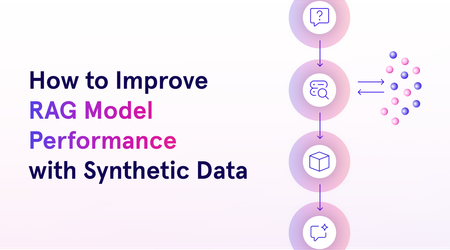
This blog will explore the process of crafting responsible synthetic data, evaluating it, and using it for fine-tuning models. We’ll also dive into Azure AI’s RAFT distillation recipe, a novel approach to generating synthetic datasets using Meta’s Llama 3.1 model and UC Berkeley’s Gorilla project.2.5KViews2likes0Comments
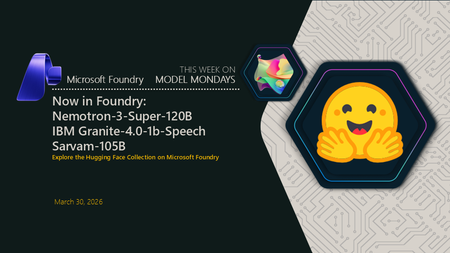
Now in Foundry: NVIDIA Nemotron-3-Super-120B-A12B, IBM Granite-4.0-1b-Speech, and Sarvam-105B
This week's Model Mondays edition highlights three models now available in Hugging Face collection on Microsoft Foundry: NVIDIA's Nemotron-3-Super-120B-A12B, a hybrid Latent Mixture-of-Experts (MOE) model with 12B active parameters and context handling up to 1 million tokens; IBM Granite's Granite-4.0-1b-Speech, a compact Automatic Speech Recognition (ASR) and Automatic Speech Translation (AST) model that achieves a 5.52% average Word Error Rate (WER) at 280× real-time speed with runtime keyword biasing for domain adaptation; and Sarvam's Sarvam-105B, a 105B Mixture-of-Experts (MoE) model with 10.3B active parameters optimized for complex reasoning and 22 Indian languages, with comparable agentic performance compared to other larger proprietary models on web search and task-planning benchmarks. Models of the week NVIDIA Nemotron-3-Super-120B-A12B Model Specs Parameters / size: 120B total with 12B active Context length: Up to 1M tokens Primary task: Text generation (reasoning, agentic workflows, long-context tasks, tool use, RAG) Why it's interesting (Spotlight) Hybrid Latent MoE architecture with selective attention: Nemotron-3-Super combines interleaved Mamba-2 state-space layers and sparse MoE layers with a select number of full attention layers—a design called Latent MoE. Tokens are routed into a smaller latent space for computation, which improves accuracy per parameter while keeping only 12B parameters active at inference time. Multi-Token Prediction (MTP) heads where the model simultaneously predicts multiple upcoming tokens during training enable native speculative decoding, reducing time-to-first-token on long outputs without a separate draft model. Configurable reasoning mode: The model supports toggling extended chain-of-thought reasoning on or off via the chat template flag enable_thinking. This lets developers suppress the reasoning trace for latency-sensitive tasks while keeping it available for high-stakes or multi-step agentic use cases without loading a separate model. Sustained 1M-token context reliability: On RULER, the standard long-context evaluation suite, Nemotron-3-Super achieves 91.75% at 1M tokens. This makes it practical for full-document retrieval-augmented generation (RAG), long-form code analysis, and extended agentic sessions without chunking or windowing strategies. Try it Use cases Best practices Ultra‑long document ingestion & consolidation (e.g., end‑to‑end review of massive specs, logs, or multi‑volume manuals without chunking) Use the native 1M‑token context to avoid windowing strategies; feed full corpora in one pass to reduce stitching errors. Prefer default decoding for general analysis (NVIDIA recommends temperature≈1.0, top_p≈0.95) before tuning; this aligns with the model’s training and MTP‑optimized generation path. Leverage MTP for throughput (multi‑token prediction improves output speed on long outputs), making single‑pass synthesis practical at scale. Latency‑sensitive chat & tool‑calling at scale (e.g., high‑volume enterprise assistants where response time matters) Toggle reasoning traces intentionally via the chat template (enable_thinking on/off): turn off for low‑latency interactions; on for harder prompts where accuracy benefits from explicit reasoning. Use model‑recommended sampling for tool calls (many guides tighten temperature for tool use) to improve determinism while keeping top_p near 0.95. Rely on the LatentMoE + MTP design to sustain high tokens/sec under load instead of adding a draft model for speculative decoding. IBM Granite-4.0-1b-Speech Model Specs Parameters / size: ~1B Context length: 128K tokens (LLM backbone; audio processed per utterance through the speech encoder) Primary task: Multilingual Automatic Speech Recognition (ASR) and bidirectional Automatic Speech Translation (AST) Why it's interesting (Spotlight) Compact ASR with speculative decoding at near-real-time speed: At roughly 1B parameters, Granite-4.0-1b-Speech achieves a 5.52% average WER across eight English benchmarks at 280× real-time speed (RTFx—the ratio of audio duration processed to wall-clock time) on the Open ASR Leaderboard. Runtime keyword biasing for domain adaptation without fine-tuning: Granite-4.0-1b-Speech accepts a runtime keyword list—proper nouns, brand names, technical terms, acronyms—that adjusts decoding probabilities toward those terms. This allows domain-specific vocabulary to be injected at inference time rather than requiring a fine-tuning run, practical for legal transcription, medical dictation, or financial meeting notes where terminology changes across clients. Bidirectional speech translation across 6 languages in one model: Beyond ASR, the model supports translation both to and from English for French, German, Spanish, Portuguese, and Japanese, plus English-to-Italian and English-to-Mandarin. A single deployed endpoint handles ASR and AST tasks without routing audio to separate models, reducing infrastructure surface area. Try it Test the model in the Hugging Face space before deploying in Foundry here: Sarvam’s Sarvam-105B Model Specs Parameters / size: 105B total with 10.3B active (Mixture of Experts, BF16) Context length: 128K tokens (with YaRN-based long-context extrapolation, scale factor 40) Primary task: Text generation (reasoning, coding, agentic tasks, Indian language understanding) Why it's interesting (Spotlight) Broad Indian language coverage at scale: Sarvam-105B supports English and 22 Indian languages—Hindi, Bengali, Tamil, Telugu, Marathi, Gujarati, Kannada, Malayalam, Punjabi, Odia, Assamese, Urdu, Sanskrit, Maithili, Dogri, Manipuri, Santali, Kashmiri, Nepali, Sindhi, Konkani, and Tibetan—the broadest open-model coverage for this language set at this parameter range. Training explicitly prioritized the Indian context, resulting in reported state-of-the-art performance across these languages for models of comparable size. Strong agentic and web-search performance: Sarvam-105B scores 49.5% on BrowseComp (web research benchmark with search tool access)—substantially above GLM-4.5-Air (21.3%) and Qwen3-Next-80B-A3B-Thinking (38.0%). It also achieves 68.3% average on τ² Bench (multi-domain task-planning benchmark), above GPT-OSS-120B (65.8%) and GLM-4.5-Air (53.2%). This reflects training emphasis on multi-step agentic workflows in addition to standard reasoning. Try it Use cases Best practices Agentic web research & technical troubleshooting (multi-step reasoning, planning, troubleshooting) Use longer context when needed: the model is designed for long-context workflows (up to 128K context with YaRN-based extrapolation noted). Start from the model’s baseline decoding settings (as shown in the model’s sample usage) and adjust for your task: temperature ~0.8, top_p ~0.95, repetition_penalty ~1.0, and set an explicit max_new_tokens (sample shows 2048). Suggestion (general, not stated verbatim in the sources): For agentic tasks, keep the prompt structured (goal → constraints → tools available → required output format), and ask for a short plan + final answer to reduce wandering. Multilingual (Indic) customer support & content generation (English + 22 Indian languages; native-script / romanized / code-mixed inputs) Be explicit about the language/script you want back (e.g., Hindi in Devanagari vs romanized Hinglish), since training emphasized Indian languages and code-mixed/romanized inputs. Provide in-language examples (a short “good response” example in the target language/script) to anchor tone and terminology. (Suggestion—general best practice; not stated verbatim in sources.) Use the model’s baseline generation settings first (sample decoding params) and then tighten creativity for support use cases (e.g., lower temperature) if you see variability. Getting started You can deploy open-source Hugging Face models directly in Microsoft Foundry by browsing the Hugging Face collection in the Foundry model catalog and deploying to managed endpoints in just a few clicks. Or start from the Hugging Face Hub and choose the "Deploy on Microsoft Foundry" option, which brings you straight into Foundry. Learn how to discover models and deploy them using Microsoft Foundry here: Follow along the Model Mondays series and access the GitHub to stay up to date on the latest Read Hugging Face on Azure docs Learn about one-click deployments from the Hugging Face Hub on Microsoft Foundry Explore models in Microsoft Foundry816Views0likes0Comments
Introducing Phi-4-Reasoning-Vision to Microsoft Foundry
Vision reasoning models unlock a critical capability for developers: the ability to move beyond passive perception toward systems that can understand, reason over, and act on visual information. Instead of treating images, diagrams, documents, or UI screens as unstructured inputs, vision reasoning models enable developers to build applications that can interpret visual structure, connect it with textual context, and perform multi-step reasoning to reach actionable conclusions. Today, we are excited to announce Phi-4-Reasoning-Vision-15B is available in Microsoft Foundry and Hugging Face. This model brings high‑fidelity vision to the reasoning‑focused Phi‑4 family, extending small language models (SLMs) beyond perception into structured, multi‑step visual reasoning for agents, analytical tools, and scientific workflows. What’s new? The Phi model family has advanced toward combining efficient visual understanding with strong reasoning in small language models. Earlier Phi‑4 models demonstrated reliable perception and grounding across images and text, while later iterations introduced structured reasoning to improve performance on complex tasks. Phi‑4‑reasoning-vision-15B brings these threads together, pairing high‑resolution visual perception with selective, task‑aware reasoning. As a result, the model can reason deeply when needed while remaining fast and efficient for perception‑focused scenarios—making it well suited for interactive, real‑world applications. Key capabilities Reasoning behavior is explicitly enabled via prompting: Developers can explicitly enable or disable reasoning to balance latency and accuracy at runtime. Optimized for vision reasoning and can be used for: diagram-based math, document, chart, and table understanding, GUI interpretations and grounding for agent scenarios to interpret screens and actions, Computer-use agent scenarios, and General image chat and answering questions Benchmarks The following results summarize Phi-4-reasoning-vision-15B performance across a set of established multimodal reasoning, mathematics, and computer use benchmarks. The following benchmarks are the result of internal evaluations. Benchmark Phi-4-reasoning-vision-15B Phi-4-reasoning-vision-15B – force no think Phi-4-mm-instruct Kimi-VL-A3B-Instruct gemma-3-12b-it Qwen3-VL-8B-Instruct-4K Qwen3-VL-8B-Instruct-32K Qwen3-VL-32B-Instruct-4K Qwen3-VL-32B-Instruct-32K AI2D _TEST 84.8 84.7 68.6 84.6 80.4 82.7 83 84.8 85 ChartQA _TEST 83.3 76.5 23.5 87 39 83.1 83.2 84.3 84 HallusionBench 64.4 63.1 56 65.2 65.3 73.5 74.1 74.4 74.9 MathVerse _MINI 44.9 43.8 32.4 41.7 29.8 54.5 57.4 64.2 64.2 MathVision _MINI 36.2 34.2 20 28.3 31.9 45.7 50 54.3 60.5 MathVista _MINI 75.2 68.7 50.5 67.1 57.4 77.1 76.4 82.5 81.8 MMMU _VAL 54.3 52 42.3 52 50 60.7 64.6 68.6 70.6 MMStar 64.5 63.3 45.9 60 59.4 68.9 69.9 73.7 74.3 OCRBench 76 75.6 62.6 86.5 75.3 89.2 90 88.5 88.5 ScreenSpot _v2 88.2 88.3 28.5 89.8 3.5 91.5 91.5 93.7 93.9 Table 1: Accuracy comparisons relative to popular open-weight, non-thinking models Benchmark Phi-4-reasoning-vision-15B Phi-4-reasoning-vision-15B - force thinking Kimi-VL-A3B-Thinking gemma-3-12b-it Qwen3-VL-8B-Thinking-4K Qwen3-VL-8B-Thinking-40K Qwen3-VL-32B-Thiking-4K Qwen3-VL-32B-Thinking-40K AI2D_TEST 84.8 79.7 81.2 80.4 83.5 83.9 86.9 87.2 ChartQA _TEST 83.3 82.9 73.3 39 78 78.6 78.5 79.1 HallusionBench 64.4 63.9 70.6 65.3 71.6 73 76.4 76.6 MathVerse _MINI 44.9 53.1 61 29.8 67.3 73.3 78.3 78.2 MathVision _MINI 36.2 36.2 50.3 31.9 43.1 50.7 60.9 58.6 MathVista _MINI 75.2 74.1 78.6 57.4 77.7 79.5 83.9 83.8 MMMU _VAL 54.3 55 60.2 50 59.3 65.3 72 72.2 MMStar 64.5 63.9 69.6 59.4 69.3 72.3 75.5 75.7 OCRBench 76 73.7 79.9 75.3 81.2 82 83.7 85 ScreenSpot _v2 88.2 88.1 81.8 3.5 93.3 92.7 83.1 83.1 Table 2: Accuracy comparisons relative to popular open-weight, thinking models All results were obtained using a consistent evaluation setup and prompts across models; numbers are provided for comparison and analysis rather than as leaderboard claims. For more information regarding benchmarks and evaluations, please read the technical paper on the Microsoft Research hub. Suggested use cases and applications Phi‑4‑Reasoning-Vision-15B supports applications that require both high‑fidelity visual perception and structured inference. Two representative scenarios include scientific and mathematical reasoning over visual inputs, and computer‑using agents (CUAs) that operate directly on graphical user interfaces. In both cases, the model provides grounded visual understanding paired with controllable, low‑latency reasoning suitable for interactive systems. Computer use agents in retail scenarios For computer use agents, Phi‑4‑Reasoning-Vision-15B provides the perception and grounding layer required to understand and act within live ecommerce interfaces. For example, in an online shopping experience, the model interprets screen content—products, prices, filters, promotions, buttons, and cart state—and produces grounded observations that agentic models like Fara-7B can use to select actions. Its compact size and low latency inference make it well suited for CUA workflows and agentic applications. Visual reasoning for education Another practical use of visual reasoning models is education. A developer could build a K‑12 tutoring app with Phi‑4‑Reasoning‑Vision‑15B where students upload photos of worksheets, charts, or diagrams to get guided help—not answers. The model can understand the visual content, identify where the student went wrong, and explain the correct steps clearly. Over time, the app can adapt by serving new examples matched to the student’s learning level, turning visual problem‑solving into a personalized learning experience. Microsoft Responsible AI principles At Microsoft, our mission to empower people and organizations remains constant—especially in the age of AI, where the potential for human achievement is greater than ever. We recognize that trust is foundational to AI adoption, and earning that trust requires a commitment to transparency, safety, and accountability. As with other Phi models, Phi-4-Reasoning-Vision-15B was developed with safety as a core consideration throughout training and evaluation. The model was trained on a mixture of public safety datasets and internally generated examples designed to elicit behaviors the model should appropriately refuse, in alignment with Microsoft’s Responsible AI Principles. These safety focused training signals help the model recognize and decline requests that fall outside intended or acceptable use. Additional details on the model’s safety considerations, evaluation approach, and known limitations are provided in the accompanying technical blog and model card. Getting started Start using Phi‑4‑Reasoning-Vision-15B in Microsoft Foundry today. Microsoft Foundry provides a unified environment for model discovery, evaluation, and deployment, making it straightforward to move from initial experimentation to production use while applying appropriate safety and governance practices. Deploy the new model on Microsoft Foundry. Learn more about the Phi family on Foundry Labs and in the Phi Cookbook Connect to the Microsoft Developer Community on Discord Read the technical paper on Microsoft Research Read more use cases on the Educators Developer blog2.2KViews0likes0CommentsNow in Foundry: Qwen3.5 Medium Model Series
This week's spotlight focuses on the Qwen3.5 Medium Model Series, now available in Microsoft Foundry. All three models are Vision Language Models (VLMs) built with early-fusion multimodal training, a 262K native context window, and support for 201 languages, released under Apache 2.0. They range from a 27B dense model optimized for latency-sensitive deployments to a 122B sparse Mixture-of-Experts (MoE) model that activates only 10B parameters per inference call, delivering frontier-class multimodal performance at lower inference cost. Models of the week What the Qwen3.5 Medium Model Series brings Before looking at each model individually, three architectural advances apply to all three and are worth understanding: Unified Vision-Language training (early fusion): Rather than attaching a separate vision encoder to a text model as an afterthought, Qwen3.5 trains on text and image tokens together from the beginning. This can enable stronger reasoning over diagrams, charts, and documents compared to prior Qwen3-VL models, which used a separate vision pipeline. Gated Delta Networks: A novel linear attention mechanism that replaces standard self-attention in most transformer layers. Combined with sparse MoE routing in the two larger models, this hybrid can deliver high-throughput inference at lower latency than equivalent dense architectures. Scalable RL across agent environments: Post-training uses reinforcement learning scaled across large multi-agent environments, contributing to strong performance on instruction-following and agentic task benchmarks. On vision-language reasoning tasks like MMMU and MathVista, these are models small enough to run on local hardware, yet competitive with large, frontier models on multimodal benchmarks. Qwen3.5-27B Model Specs Parameters / size: 27B (dense) Context length: 262,144 tokens Primary task: Vision Language Model (image-text-to-text) Why it's interesting (Spotlight) The dense baseline of the family: Unlike its MoE siblings, Qwen3.5-27B activates all 27B parameters on every forward pass. This gives it predictable, consistent latency per token—an important property for real-time applications and latency-sensitive deployments where MoE routing variability is a concern. Instruction-following leader across the family: Scores 95.0 on IFEval, the highest in the family (vs 93.4 for 122B-A10B and 91.9 for 35B-A3B), and 76.5 on IFBench—making it the strongest choice for structured-output tasks, complex multi-step instruction chains, and agent scaffolds that rely on precise format compliance. Try it You're building a visual quality inspection system for a circuit board manufacturer. Deploy Qwen3.5-27B in Microsoft Foundry to process images captured by a production line camera. Manufacturing sample prompt: Given an image of a printed circuit board (PCB), identify visible defects such as solder bridges, missing components, or misaligned pads. Return a JSON object with defect type, approximate board location, and severity (low / medium / high). Flag any board containing at least one high-severity defect for immediate rework routing. Qwen3.5-35B-A3B Model Specs Parameters / size: 35B total, 3B activated per forward pass (MoE) Context length: 262,144 tokens Primary task: Vision Language Model (image-text-to-text) Why it's interesting (Spotlight) The throughput-optimized pick: With only 3B parameters active per token despite a 35B parameter pool, this model delivers performance close to much larger dense models at substantially lower inference cost. 256-expert MoE routing at compact scale: Routes each token through 8 of 256 routed experts plus 1 shared expert. This breadth of specialization at a scale that only activates 3B parameters makes the 35B-A3B well-suited for high-throughput serving scenarios where cost per inference matters. Try it You're building a contract review assistant for an in-house legal team at a multinational company. Deploy Qwen3.5-35B-A3B in Microsoft Foundry to process scanned contract pages provided as images. Legal document sample prompt: Given a page from a commercial services agreement, extract all defined terms, identify obligation and liability clauses, and flag any termination conditions that deviate from standard commercial practice. Return a structured summary with clause type, section reference, and a one-sentence plain-language explanation of each flagged item. Qwen3.5-122B-A10B Model Specs Parameters / size: 122B total, 10B activated per forward pass (MoE) Context length: 262,144 tokens Primary task: Vision Language Model (image-text-to-text) Why it's interesting (Spotlight) Highest capability in the family: Leads across most benchmarks—76.9 on MMMU-Pro, 83.9 on MMMU, and 86.7 on MMLU-Pro. It also leads the family on SuperGPQA at 67.1 and MMLU-Redux at 94.0, reflecting stronger expert-level knowledge depth. Vision + language reasoning at scale: With the largest routing pool (256 experts, 8 routed + 1 shared) and 10B active parameters, this model handles the most demanding multimodal tasks in the family—long-document analysis over images, multi-step visual reasoning, and complex cross-modal instruction following at extended context lengths. Try it You're building an earnings research assistant for an investment team. Deploy Qwen3.5-122B-A10B in Microsoft Foundry to analyze earnings presentation slides submitted as images. Financial research sample prompt: Given a slide containing a combination of charts, tables, and management commentary, extract key financial metrics (revenue, EBITDA, year-over-year growth), interpret the trend shown in any charts, and generate a two-paragraph analyst summary suitable for a morning briefing. Flag any metrics that deviate materially from prior-quarter guidance and indicate the direction of the deviation. Getting started You can deploy open-source Hugging Face models directly in Microsoft Foundry by browsing the Hugging Face collection in the Foundry model catalog and deploying to managed endpoints in just a few clicks. You can also start from the Hugging Face Hub. First, select any supported model and then choose "Deploy on Microsoft Foundry", which brings you straight into Azure with secure, scalable inference already configured. Learn how to discover models and deploy them using Microsoft Foundry documentation. Follow along the Model Mondays series and access the GitHub to stay up to date on the latest Read Hugging Face on Azure docs Learn about one-click deployments from the Hugging Face Hub on Microsoft Foundry Explore models in Microsoft Foundry3.6KViews0likes0CommentsWhat’s trending on Hugging Face: PubMedBERT Base Embeddings, Paraphrase Multilingual MiniLM, BGE-M3
The embedding model landscape has evolved beyond one-size-fits-all solutions. Today’s developers navigate a set of deliberate trade‑offs: domain specialization to improve accuracy in vertical applications, multilingual capabilities to support global use cases, and retrieval strategies that optimize performance at scale. Once a model demonstrates strong semantic performance, predictable behavior, and broad community support, it often becomes a trusted reference baseline that developers build around and deploy with confidence. This week, we’re not spotlighting models that are new to Microsoft Foundry. Instead, we’re turning our attention to models that have managed to stay relevant in a rapidly expanding sea of options. This week's Model Monday's edition highlights three Hugging Face models including NeuML's PubMedBERT Base Embeddings for domain-specific medical text understanding, Sentence Transformers' Paraphrase Multilingual MiniLM for lightweight cross-lingual semantic similarity, and BAAI's BGE-M3 for multi-functional long-context retrieval across 100+ languages. Models of the week NeuML: PubMedBERT Base Embeddings Model Specs Parameters / size: 109M Context length: 512 tokens Primary task: Embeddings (medical domain) Why it's interesting Domain-specific performance gains: Fine-tuned on PubMed title-abstract pairs, achieving 95.62% average Pearson correlation across medical benchmarks—outperforming general-purpose models like gte-base (95.37%), bge-base-en-v1.5 (93.78%), and all-MiniLM-L6-v2 (93.46%) on medical literature tasks Production-validated for medical RAG: With 141K downloads and deployment in 30+ medical AI applications, this model demonstrates consistent real-world performance for clinical research, drug discovery, and biomedical semantic search pipelines Built on Microsoft's BiomedNLP foundation: Extends BioMed BERT family with sentence-transformers mean pooling, creating 768-dimensional embeddings optimized for medical literature clustering and retrieval Try it Clinical research sample prompt: Industry specific sample prompt: You're building a clinical decision support system for oncology. Deploy PubMedBERT Base Embeddings in Microsoft Foundry to index 50,000 recent cancer research abstracts from PubMed. A physician queries: "What are the cardiotoxicity risks of combining checkpoint inhibitors with anthracycline chemotherapy in elderly patients?" Embed the query, retrieve the top 10 most semantically similar abstracts using cosine similarity, and return citations with PubMed IDs for evidence-based treatment planning. Sentence Transformers: Paraphrase Multilingual MiniLM L12 v2 Model Specs Parameters / size: 117M Context length: 128 tokens Primary task: Embeddings (multilingual, sentence similarity) Why it's interesting Multilingual adoption: Supports 50+ languages including Arabic, Chinese, Hebrew, Hindi, Japanese, Korean, Russian, Thai, and Vietnamese—with 18.4 million downloads last month demonstrating production-scale validation across global deployments Compact architecture for edge deployment: At 117M parameters producing 384-dimensional embeddings, this model balances multilingual coverage with inference efficiency, making it ideal for resource-constrained environments or high-throughput applications Sentence-BERT foundation: Based on the influential Sentence-BERT paper (Reimers & Gurevych, 2019), using siamese BERT networks with mean pooling to create semantically meaningful sentence embeddings for clustering, paraphrase detection, and cross-lingual search Community-proven versatility: With 299 fine-tuned variants and 100+ Spaces implementations, this model serves as a peer reviewed starting point for multilingual semantic similarity tasks, from customer support ticket routing to cross-lingual document retrieval Try it E-commerce sample prompt: You're building a global customer support platform for an e-commerce company operating in 30 countries. Deploy Paraphrase Multilingual MiniLM in Microsoft Foundry to process incoming support tickets in English, Spanish, French, German, Portuguese, Japanese, and Korean. Embed each ticket as a 384-dimensional vector and cluster by semantic similarity to automatically route issues to specialized teams (payment, shipping, returns, technical). Flag duplicate tickets with cosine similarity > 0.85 to prevent redundant responses. BAAI: BGE-M3 Model Specs Parameters / size: ~560M Context length: 8192 tokens Primary task: Embeddings (multi-functional: dense, sparse, multi-vector) Why it's interesting Three retrieval modes in one model: Uniquely supports dense retrieval (1024-dim embeddings), sparse retrieval (lexical matching like BM25), and multi-vector retrieval (ColBERT-style fine-grained matching)—enabling hybrid search pipelines without maintaining separate models or indexes Exceptional long-context capability: 8192-token context window handles full documents, legal contracts, research papers, and lengthy technical content—validated on MLDR (13-language document retrieval) and NarrativeQA (long-form question answering) benchmarks Multilingual dominance: Outperforms OpenAI embeddings on MIRACL multilingual retrieval across 13+ languages and demonstrates strong zero-shot cross-lingual transfer on MKQA. Try it Legal document search sample prompt: You're building a legal document search system for a multinational law firm. Deploy BGE-M3 in Microsoft Foundry to index 5,000 full-length commercial contracts (average 6,000 tokens each) in English, French, German, and Spanish. A lawyer queries: "Find all force majeure clauses that exclude liability for pandemics or global health emergencies." Use hybrid retrieval: (1) dense embeddings for semantic similarity to capture concept variations like "Act of God" or "unforeseen circumstances", (2) sparse retrieval for exact keyword matches on "force majeure", "pandemic", "health emergency". Combine scores with weighted sum (0.6 dense + 0.4 sparse) and return top 15 contract sections with clause numbers and jurisdiction metadata. Getting started You can deploy open-source Hugging Face models directly in Microsoft Foundry by browsing the Hugging Face collection in the Foundry model catalog and deploying to managed endpoints in just a few clicks. You can also start from the Hugging Face Hub. First, select any supported model and then choose "Deploy on Microsoft Foundry", which brings you straight into Azure with secure, scalable inference already configured. Learn how to discover models and deploy them using Microsoft Foundry documentation. Follow along the Model Mondays series and access the GitHub to stay up to date on the latest Read Hugging Face on Azure docs Learn about one-click deployments from the Hugging Face Hub on Microsoft Foundry Explore models in Microsoft Foundry1.2KViews0likes0CommentsNow in Foundry: Qwen3-Coder-Next, Qwen3-ASR-1.7B, Z-Image
This week's spotlight features three models from that demonstrate enterprise-grade AI across the full scope of modalities. From low latency coding agents to state-of-the-art multilingual speech recognition and foundation-quality image generation, these models showcase the breadth of innovation happening in open-source AI. Each model balances performance with practical deployment considerations, making them viable for production systems while pushing the boundaries of what's possible in their respective domains. This week's Model Mondays edition highlights Qwen3-Coder-Next, an 80B MoE model that activates only 3B parameters while delivering coding agent capabilities with 256k context; Qwen3-ASR-1.7B, which achieves state-of-the-art accuracy across 52 languages and dialects; and Z-Image from Tongyi-MAI, an undistilled text-to-image foundation model with full Classifier-Free Guidance support for professional creative workflows. Models of the week Qwen: Qwen3-Coder-Next Model Specs Parameters / size: 80B total (3B activated) Context length: 262,144 tokens Primary task: Text generation (coding agents, tool use) Why it's interesting Extreme efficiency: Activates only 3B of 80B parameters while delivering performance comparable to models with 10-20x more active parameters, making advanced coding agents viable for local deployment on consumer hardware Built for agentic workflows: Excels at long-horizon reasoning, complex tool usage, and recovering from execution failures, a critical capability for autonomous development that go beyond simple code completion Benchmarks: Competitive performance with significantly larger models on SWE-bench and coding benchmarks (Technical Report) Try it Use Case Prompt Pattern Code generation with tool use Provide task context, available tools, and execution environment details Long-context refactoring Include full codebase context within 256k window with specific refactoring goals Autonomous debugging Present error logs, stack traces, and relevant code with failure recovery instructions Multi-file code synthesis Describe architecture requirements and file structure expectations Financial services sample prompt: You are a coding agent for a fintech platform. Implement a transaction reconciliation service that processes batches of transactions, detects discrepancies between internal records and bank statements, and generates audit reports. Use the provided database connection tool, logging utility, and alert system. Handle edge cases including partial matches, timing differences, and duplicate transactions. Include unit tests with 90%+ coverage. Qwen: Qwen3-ASR-1.7B Model Specs Parameters / size: 1.7B Context length: 256 tokens (default), configurable up to 4096 Primary task: Automatic speech recognition (multilingual) Why it's interesting All-in-one multilingual capability: Single 1.7B model handles language identification plus speech recognition for 30 languages, 22 Chinese dialects, and English accents from multiple regions—eliminating the need to manage separate models per language Specialized audio versatility: Transcribes not just clean speech but singing voice, songs with background music, and extended audio files, expanding use cases beyond traditional ASR to entertainment and media workflows State-of-the-art accuracy: Outperforms GPT-4o, Gemini-2.5, and Whisper-large-v3 across multiple benchmarks. English: Tedlium 4.50 WER vs 7.69/6.15/6.84; Chinese: WenetSpeech 4.97/5.88 WER vs 15.30/14.43/9.86 (Technical Paper) Language ID included: 97.9% average accuracy across benchmark datasets for automatic language identification, eliminating the need for separate language detection pipelines Try it Use Case Prompt Pattern Multilingual transcription Send audio files via API with automatic language detection Call center analytics Process customer service recordings to extract transcripts and identify languages Content moderation Transcribe user-generated audio content across multiple languages Meeting transcription Convert multilingual meeting recordings to text for documentation Customer support sample prompt: Deploy Qwen3-ASR-1.7B to a Microsoft Foundry endpoint and transcribe multilingual customer service calls. Send audio files via API to automatically detect the language (from 52 supported options including 30 languages and 22 Chinese dialects) and generate accurate transcripts. Process calls from customers speaking English, Spanish, Mandarin, Cantonese, Arabic, French, and other languages without managing separate models per language. Use transcripts for quality assurance, compliance monitoring, and customer sentiment analysis. Tongyi-MAI: Z-Image Model Specs Parameters / size: 6B Context length: N/A (text-to-image) Primary task: Text-to-image generation Why it's interesting Undistilled foundation model: Full-capacity base without distillation preserves complete training signal with Classifier-Free Guidance support (a technique that improves prompt adherence and output quality), enabling complex prompt engineering and negative prompting that distilled models cannot achieve High output diversity: Generates distinct character identities in multi-person scenes with varied compositions, facial features, and lighting, critical for creative applications requiring visual variety rather than consistency Aesthetic versatility: Handles diverse visual styles from hyper-realistic photography to anime and stylized illustrations within a single model, supporting resolutions from 512×512 to 2048×2048 at any aspect ratio with 28-50 inference steps (Technical Paper) Try it Use Case Prompt Pattern Multilingual transcription Send audio files via API with automatic language detection Call center analytics Process customer service recordings to extract transcripts and identify languages Content moderation Transcribe user-generated audio content across multiple languages Meeting transcription Convert multilingual meeting recordings to text for documentation E-commerce sample prompt: Professional product photography of a modern ergonomic office chair in a bright Scandinavian-style home office. Natural window lighting from left, clean white desk with laptop and succulent plant, light oak hardwood floor. Chair positioned at 45-degree angle showing design details. Photorealistic, commercial photography, sharp focus, 85mm lens, f/2.8, soft shadows. Getting started You can deploy open‑source Hugging Face models directly in Microsoft Foundry by browsing the Hugging Face collection in the Foundry model catalog and deploying to managed endpoints in just a few clicks. You can also start from the Hugging Face Hub. First, select any supported model and then choose "Deploy on Microsoft Foundry", which brings you straight into Azure with secure, scalable inference already configured. Learn how to discover models and deploy them using Microsoft Foundry documentation. Follow along the Model Mondays series and access the GitHub to stay up to date on the latest Read Hugging Face on Azure docs Learn about one-click deployments from the Hugging Face Hub on Microsoft Foundry Explore models in Microsoft Foundry1.6KViews0likes0CommentsWhat is trending in Hugging Face on Microsoft Foundry? Feb, 2, 2026
Open‑source AI is moving fast, with important breakthroughs in reasoning, agentic systems, multimodality, and efficiency emerging every day. Hugging Face has been a leading platform where researchers, startups, and developers share and discover new models. Microsoft Foundry brings these trending Hugging Face models into a production‑ready experience, where developers can explore, evaluate, and deploy them within their Azure environment. Our weekly Model Monday’s series highlights Hugging Face models available in Foundry, focusing on what matters most to developers: why a model is interesting, where it fits, and how to put it to work quickly. This week’s Model Mondays edition highlights three Hugging Face models, including a powerful Mixture-of-Experts model from Z. AI designed for lightweight deployment, Meta’s unified foundation model for image and video segmentation, and MiniMax’s latest open-source agentic model optimized for complex workflows. Models of the week Z.AI’s GLM-4.7-flash Model Basics Model name: zai-org/GLM-4.7-Flash Parameters / size: 30B total -3B active Default settings: 131,072 max new tokens Primary task: Agentic, Reasoning and Coding Why this model matters Why it’s interesting: It utilizes a Mixture-of-Experts (MoE) architecture (30B total parameters and 3B active parameters) to offer a new option for lightweight deployment. It demonstrates strong performance on logic and reasoning benchmarks, outperforming similar sized models like gpt-oss-20b on AIME 25 and GPQA benchmarks. It supports advanced inference features like "Preserved Thinking" mode for multi-turn agentic tasks. Best‑fit use cases: Lightweight local deployment, multi-turn agentic tasks, and logical reasoning applications. What’s notable: From the Foundry catalog, users can deploy on a A100 instance or unsloth/GLM-4.7-Flash-GGUF on a CPU. ource SOTA scores among models of comparable size. Additionally, compared to similarly sized models, GLM-4.7-Flash demonstrates superior frontend and backend development capabilities. Click to see more: https://docs.z.ai Try it Use case Best‑practice prompt pattern Agentic coding (multi‑step repo work, debugging, refactoring) Treat the model as an autonomous coding agent, not a snippet generator. Explicitly require task decomposition and step‑by‑step execution, then a single consolidated result. Long‑context agent workflows (local or low‑cost autonomous agents) Call out long‑horizon consistency and context preservation. Instruct the model to retain earlier assumptions and decisions across turns. Now that you know GLM‑4.7‑Flash works best when you give it a clear goal and let it reason through a bounded task, here’s an example prompt that a product or engineering team might use to identify risks and propose mitigations: You are a software reliability analyst for a mid‑scale SaaS platform. Review recent incident reports, production logs, and customer issues to uncover edge‑case failures outside normal usage (e.g., rare inputs, boundary conditions, timing/concurrency issues, config drift, or unexpected feature interactions). Prioritize low‑frequency, high‑impact risks that standard testing misses. Recommend minimal, low‑cost fixes (validation, guardrails, fallback logic, or documentation). Deliver a concise executive summary with sections: Observed Edge Cases, Root Causes, User Impact, Recommended Lightweight Fixes, and Validation Steps. Meta's Segment Anything 3 (SAM3) Model Basics Model name: facebook/sam3 Parameters / size: 0.9B Primary task: Mask Generation, Promptable Concept Segmentation (PCS) Why this model matters Why it’s interesting: It handles a vastly larger set of open-vocabulary prompts than SAM 2, and unifies image and video segmentation capabilities. It includes a "SAM 3 Tracker" mode that acts as a drop-in replacement for SAM 2 workflows with improved performance. Best‑fit use cases: Open-vocabulary object detection, video object tracking, and automatic mask generation What’s notable: Introduces Promptable Concept Segmentation (PCS), allowing users to find all matching objects (e.g., "dial") via text prompt rather than just single instances. Try it This model enables users to identify specific objects within video footage and isolate them over extended periods. With just one line of code, it is possible to detect multiple similar objects simultaneously. The accompanying GIF demonstrates how SAM3 efficiently highlights players wearing white on the field as they appear and disappear from view. Additional examples are available at the following repository: https://github.com/facebookresearch/sam3/blob/main/assets/player.gif Use case Best‑practice prompt pattern Agentic coding (multi‑step repo work, debugging, refactoring) Treat SAM 3 as a concept detector, not an interactive click tool. Use short, concrete noun‑phrase concept prompts instead of describing the scene or asking questions. Example prompt: “yellow school bus” or “shipping containers”. Avoid verbs or full sentences. Video segmentation + object tracking Specify the same concept prompt once, then apply it across the video sequence. Do not restate the prompt per frame. Let the model maintain identity continuity. Example: “person wearing a red jersey”. Hard‑to‑name or visually subtle objects Use exemplar‑based prompts (image region or box) when text alone is ambiguous. Optionally combine positive and negative exemplars to refine the concept. Avoid over‑constraining with long descriptions. Using the GIF above as a leading example, here is a prompt that shows how SAM 3 turns raw sports footage into structured, reusable data. By identifying and tracking players based on visual concepts like jersey color so that sports leagues can turn tracked data into interactive experiences where automated player identification can relay stats, fun facts, etc when built into a larger application. Here is a prompt that will allow you to start identifying specific players across video: Act as a sports analytics operator analyzing football match footage. Segment and track all football players wearing blue jerseys across the video. Generate pixel‑accurate segmentation masks for each player and assign persistent instance IDs that remain stable during camera movement, zoom, and player occlusion. Exclude referees, opposing team jerseys, sidelines, and crowd. Output frame‑level masks and tracking metadata suitable for overlays, player statistics, and downstream analytics pipelines. MiniMax AI's MiniMax-M2.1 Model Basics Model name: MiniMaxAI/MiniMax-M2.1 Parameters / size: 229B-10B Active Default settings: 200,000 max new tokens Primary task: Agentic and Coding Why this model matters Why it’s interesting: It is optimized for robustness in coding, tool use, and long-horizon planning, outperforming Claude Sonnet 4.5 in multilingual scenarios. It excels in full-stack application development, capable of architecting apps "from zero to one”. Previous coding models focused on Python optimization, M2.1 brings enhanced capabilities in Rust, Java, Golang, C++, Kotlin, Objective-C, TypeScript, JavaScript, and other languages. The model delivers exceptional stability across various coding agent frameworks. Best‑fit use cases: Lightweight local deployment, multi-turn agentic tasks, and logical reasoning applications. What’s notable: The release of open-source weights for M2.1 delivers a massive leap over M2 on software engineering leaderboards. https://www.minimax.io/ Try it Use case Best‑practice prompt pattern End‑to‑end agentic coding (multi‑file edits, run‑fix loops) Treat the model as an autonomous coding agent, not a snippet generator. Explicitly require task decomposition and step‑by‑step execution, then a single consolidated result. Long‑horizon tool‑using agents (shell, browser, Python) Explicitly request stepwise planning and sequential tool use. M2.1’s interleaved thinking and improved instruction‑constraint handling are designed for complex, multi‑step analytical tasks that require evidence tracking and coherent synthesis, not conversational back‑and‑forth. Long‑context reasoning & analysis (large documents / logs) Declare the scope and desired output structure up front. MiniMax‑M2.1 performs best when the objective and final artifact are clear, allowing it to manage long context and maintain coherence. Because MiniMax‑M2.1 is designed to act as a long‑horizon analytical agent, it shines when you give it a clear end goal and let it work through large volumes of information—here’s a prompt a risk or compliance team could use in practice: You are a financial risk analysis agent. Analyze the following transaction logs and compliance policy documents to identify potential regulatory violations and systemic risk patterns. Plan your approach before executing. Work through the data step by step, referencing evidence where relevant. Deliver a final report with the following sections: Key Risk Patterns Identified, Supporting Evidence, Potential Regulatory Impact, Recommended Mitigations. Your response should be a complete, executive-ready report, not a conversational draft. Getting started You can deploy open‑source Hugging Face models directly in Microsoft Foundry by browsing the Hugging Face collection in the Foundry model catalog and deploying to managed endpoints in just a few clicks. You can also start from the Hugging Face Hub. First, select any supported model and then choose "Deploy on Microsoft Foundry", which brings you straight into Azure with secure, scalable inference already configured. Learn how to discover models and deploy them using Microsoft Foundry documentation. Follow along the Model Mondays series and access the GitHub to stay up to date on the latest Read Hugging Face on Azure docs Learn about one-click deployments from the Hugging Face Hub on Microsoft Foundry Explore models in Microsoft Foundry2KViews0likes0Comments
OptiMind: A small language model with optimization expertise
Turning a real world decision problem into a solver ready optimization model can take days—sometimes weeks—even for experienced teams. The hardest part is often not solving the problem; it’s translating business intent into precise mathematical objectives, constraints, and variables. OptiMind is designed to try and remove that bottleneck. This optimization‑aware language model translates natural‑language problem descriptions into solver‑ready mathematical formulations, can help organizations move from ideas to decisions faster. Now available through public preview as an experimental model through Microsoft Foundry, OptiMind targets one of the more expertise‑intensive steps in modern optimization workflows. Addressing the Optimization Bottleneck Mathematical optimization underpins many enterprise‑critical decisions—from designing supply chains and scheduling workforces to structuring financial portfolios and deploying networks. While today’s solvers can handle enormous and complex problem instances, formulating those problems remains a major obstacle. Defining objectives, constraints, and decision variables is an expertise‑driven process that often takes days or weeks, even when the underlying business problem is well understood. OptiMind tries to address this gap by automating and accelerating formulation. Developed by Microsoft Research, OptiMind transforms what was once a slow, error‑prone modeling task into a streamlined, repeatable step—freeing teams to focus on decision quality rather than syntax. What makes OptiMind different? OptiMind is not just as a language model, but as a specialized system built for real-world optimization tasks. Unlike general-purpose large language models adapted for optimization through prompting, OptiMind is purpose-built for mixed integer linear programming (MILP), and its design reflects this singular focus. At inference time, OptiMind follows a multi‑stage process: Problem classification (e.g., scheduling, routing, network design) Hint retrieval tailored to the identified problem class Solution generation in solver‑compatible formats such as GurobiPy Optional self‑correction, where multiple candidate formulations are generated and validated This design can improve reliability without relying on agentic orchestration or multiple large models. In internal evaluations on cleaned public benchmarks—including IndustryOR, Mamo‑Complex, and OptMATH—OptiMind demonstrated higher formulation accuracy than similarly sized open models and competitive performance relative to significantly larger systems. OptiMind improved accuracy by approximately 10 percent over the base model. In comparison to open-source models under 32 billion parameters, OptiMind was also found to match or exceed performance benchmarks. For more information on the model, please read the official research blog or the technical paper for OptiMind. Practical use cases: Unlocking efficiency across domains OptiMind is especially valuable where modeling effort—not solver capability—is the primary bottleneck. Typical use cases include: Supply Chain Network Design: Faster formulation of multi‑period network models and logistics flows Manufacturing and Workforce Scheduling: Easier capacity planning under complex operational constraints Logistics and Routing Optimization: Rapid modeling that captures real‑world constraints and variability Financial Portfolio Optimization: More efficient exploration of portfolios under regulatory and market constraints By reducing the time and expertise required to move from problem description to validated model, OptiMind helps teams reach actionable decisions faster and with greater confidence. Getting started OptiMind is available today as an experimental model, and Microsoft Research welcomes feedback from practitioners and enterprise teams. Next steps: Explore the research details: Read more about the model on Foundry Labs and the technical paper on arXiv Try the model: Access OptiMind through Microsoft Foundry Test sample code: Available in the OptiMind GitHub repository Take the next step in optimization innovation with OptiMind—empowering faster, more accurate, and cost-effective problem solving for the future of decision intelligence.2KViews0likes0Comments