mysql
51 TopicsProvisioning Azure Database for MySQL - Single Server from AKS
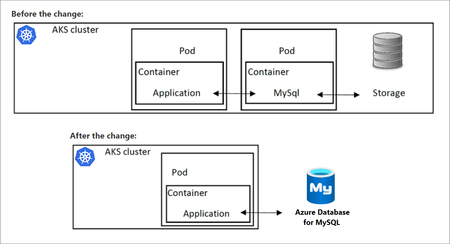
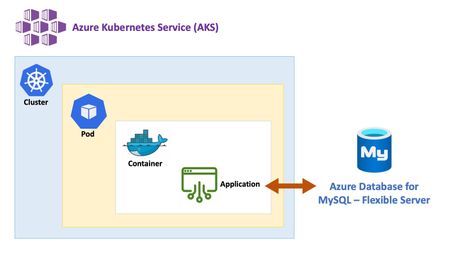
To gain the benefits of using a MySQL database in a Kubernetes application, a common strategy is to provision the database in a container running in a pod. In doing so, the database will use the cluster resources. Accessing the database from other pods in the same AKS cluster running client apps is possible via Kubernetes networking. However, if for some reason cluster resources become unavailable, both the application and the database will be unavailable, as both rely on cluster health. To address this issue, you can substitute the local database in AKS with Azure Database for MySQL, which will separate the database from the AKS cluster.14KViews9likes0CommentsAzure Database for MySQL bindings for Azure Functions (Public Preview)
The Azure Database for MySQL bindings for Azure Functions is now available in Public Preview! These newly released input and output bindings enable seamless integration with Azure Functions, allowing developers and organizations to build at-scale event-driven applications and serverless APIs that integrate with MySQL, using programming languages of their choice, including C#, Java, JavaScript, Python, and PowerShell. This integration significantly speeds up application development time by reducing the need for complex code to read and write from the database.
Microsoft Azure innovation powers leading price-performance for MySQL database in the cloud
As part of our commitment to ensuring that Microsoft Azure is the best place to run MySQL workloads, Microsoft is excited to announce that Azure Database for MySQL - Flexible Server just achieved a new, faster performance benchmark.7.6KViews5likes0CommentsTips and Tricks in using mysqldump and mysql restore to Azure Database for MySQL
While importing data into Azure Database for MySQL, errors may occur. This blog will walk through common issues that you may face and how to resolve it. Access denied; you need (at least one of) the SUPER privilege(s) for this operation: Error ERROR 1227 (42000) at line 101: Access denied; you need (at least one of) the SUPER privilege(s) for this operation Operation failed with exitcode 1 Issue Importing a dump file that contains definers will result in the above error. As all of us know, only super users can perform and create definers in other schemas. Azure Database for MySQL is a managed PaaS solution and SUPER privileges is restricted. Solution Either replace the definers with the name of the admin user that is running the import process or remove it. The admin user can grant privileges to create or execute procedures by running GRANT command as in the following examples: GRANT CREATE ROUTINE ON mydb.* TO 'someuser'@'somehost'; GRANT EXECUTE ON PROCEDURE mydb.myproc TO 'someuser'@'somehost'; Example: Before: DELIMITER ;; /*!50003 CREATE*/ /*!50017 DEFINER=`root`@`127.0.0.1`*/ /*!50003 …… DELIMITER ; After: DELIMITER ;; /*!50003 CREATE*/ /*!50017 DEFINER=`AdminUserName`@`ServerName`*/ /*!50003 …… DELIMITER ; importing triggers while binary logging is enabled: Error ERROR 1419 (HY000) at line 101: You do not have the SUPER privilege and binary logging is enabled (you *might* want to use the less safe log_bin_trust_function_creators variable) Operation failed with exitcode 1 Issue Importing a dump file that contains triggers will result in the above error if binary logging is enabled. Solution To mitigate the issue, you need to enable the parameter “log_bin_trust_function_creators” from Azure portal parameters blade. storage engine not supported: Error ERROR 1030 (HY000) at line 114: Got error 1 from storage engine Operation failed with exitcode 1 Issue You will see the above error when you use a storage engine other than InnoDB and MEMORY. Read more on support engine types here: Storage engine support Solution Before the import process make sure that you are using a supported engine type; InnoDB and MEMORY are the only supported engine types in Azure Database for MySQL. If you dumped the data from a different engine type, edit the file and replace the storage engine. For example, exchange ENGINE=MYISAM with ENGINE=InnoDB. Note: You can always dump the schema first using the command: mysqldump --no-data option, and then dump the data using option: mysqldump --no-create-info option Example : Before: CREATE TABLE `MyTable` ( `ID` bigint(20) NOT NULL AUTO_INCREMENT, `DeviceID` varchar(50) NOT NULL, PRIMARY KEY (`ID`) ) ENGINE=MyISAM DEFAULT CHARSET=utf8; After: CREATE TABLE `MyTable` ( `ID` bigint(20) NOT NULL AUTO_INCREMENT, `DeviceID` varchar(50) NOT NULL, PRIMARY KEY (`ID`) ) ENGINE=InnoDB DEFAULT CHARSET=utf8; InnoDB storage engine row format: Error ERROR 1031 (HY000) at line 114: Table storage engine for 'mytable' doesn't have this option Operation failed with exitcode 1 Issue In Azure Database for MySQL, four row format options are supported: DYNAMIC, COMPACT and REDUNDANT, the COMPRESSED row format is supported under certain conditions. Solution We support compressed format on General Purpose or Memory Optimized. Customer needs to enable the parameter “innodb_file_per_table” from Azure portal parameters blade, and key_block_size must be 8 or greater than 8. In default, key_block_size is 8. Please visit the Performance considerations guide for best practices while migrating into Azure Database for MySQL. Thank You !14KViews4likes2CommentsInvestigating connection issues with Azure Database for MySQL
This article lists the most common connection issues that users may encounter, together with suggestions and recommended solutions for addressing those issues. This detail applies specifically to the Azure Database for MySQL Single Server deployment model.17KViews4likes0CommentsExport and import MySQL users and privileges to Azure Database for MySQL
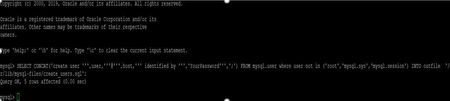
In Azure Database for MySQL, “mysql.user” table is a read-only table, to migrate your mysql.user table you can use the following command to script out the users table content before migration: Generate create user statements: Before going to generate the scripts , we need to check the variable secure_file_priv on your database which limit the directories where you can load or writing files to : mysql> SHOW VARIABLES LIKE "secure_file_priv"; +------------------+-----------------------+ | Variable_name | Value | +------------------+-----------------------+ | secure_file_priv | /var/lib/mysql-files/ | +------------------+-----------------------+ After checking the path, now you can generate the create users from your database: Option 1: mysql> SELECT CONCAT('create user ''',user,'''@''',host,''' identified by ''','YourPassword''',';') FROM mysql.user where user not in ('root','mysql.sys','mysql.session') INTO outfile '/var/lib/mysql-files/create_users.sql'; The generated file contents will look like: create user 'myuser1'@'%' identified by 'YourPassword'; create user 'myuser2'@'%' identified by 'YourPassword'; create user 'myuser3'@'%' identified by 'YourPassword'; create user 'myuser4'@'%' identified by 'YourPassword'; create user 'replication_user'@'%' identified by 'YourPassword'; modify the password above based on your requirements and run the above generated create user statements on Azure database for MySQL. option 2: if you are not aware of the passwords in your database and you want to let the password change on the client side , you can generate a user creation script with temporary password and expired option: SELECT CONCAT('create user ''',user,'''@''',host,''' identified by ''','Temp@123''', ' password expire',';') FROM mysql.user where user not in ('root','mysql.sys','mysql.session') INTO outfile '/var/lib/mysql-files/create_users.sql'; The generated file contents will look like: create user 'myuser1'@'%' identified by 'Temp@123' password expire; create user 'myuser2'@'%' identified by 'Temp@123' password expire; create user 'myuser3'@'%' identified by 'Temp@123' password expire; create user 'myuser4'@'%' identified by 'Temp@123' password expire; create user 'replication_user'@'%' identified by 'Temp@123' password expire; run the above generated create user statements on Azure Database for MySQL. after the user logged in to the database with that temp password , and tried to run any query the user will be notified that he must change the password before running any query , and the user can use “set password = ‘newpassword’ ” statement to reset the password: mysql> select 1; ERROR 1820 (HY000): You must reset your password using ALTER USER statement before executing this statement. mysql> mysql> set password = 'Mysql@1234'; Query OK, 0 rows affected (0.01 sec) mysql> select 1; +---+ | 1 | +---+ | 1 | +---+ 1 row in set (0.00 sec) Export users’ privileges: To export the user privileges, you can run the below query: SELECT CONCAT('SHOW GRANTS FOR ''',user,'''@''',host,''';') FROM mysql.user where user not in ('root','mysql.sys','mysql.session') INTO outfile '/var/lib/mysql-files/user_grants.sql'; The generated file will look like: SHOW GRANTS FOR 'myuser1'@'%'; SHOW GRANTS FOR 'myuser2'@'%'; SHOW GRANTS FOR 'myuser3'@'%'; SHOW GRANTS FOR 'myuser4'@'%'; SHOW GRANTS FOR 'myuser5'@'%'; SHOW GRANTS FOR 'replication_user'@'%'; You can source the generated file to get the required commands , before sourcing the file to generate a ready contents of command lines , connect to your local database with options -Ns to remove the headers from the output: mysql -Ns -h root -p mysql> source /var/lib/mysql-files/user_grants.sql GRANT USAGE ON *.* TO 'myuser1'@'%' GRANT USAGE ON *.* TO 'myuser2'@'%' GRANT USAGE ON *.* TO 'myuser3'@'%' GRANT USAGE ON *.* TO 'myuser4'@'%' GRANT USAGE ON *.* TO 'myuser5'@'%' GRANT REPLICATION SLAVE, REPLICATION CLIENT ON *.* TO 'replication_user'@'%' Connect to your Azure database for MySQL and run the above generated commands: mysql -h ServerName.mysql.database.azure.com -u username@servername -p mysql> GRANT USAGE ON *.* TO 'myuser1'@'%'; GRANT USAGE ON *.* TO 'myuser3'@'%'; GRANT USAGE ON *.* TO 'myuser4'@'%'; GRANT USAGE ON *.* TO 'myuser5'@'%'; GRANT REPLICATION SLAVE, REPLICATION CLIENT ON *.* TO 'replication_user'@'%';Query OK, 0 rows affected (0.03 sec) mysql> GRANT USAGE ON *.* TO 'myuser2'@'%'; Query OK, 0 rows affected (0.02 sec) mysql> GRANT USAGE ON *.* TO 'myuser3'@'%'; Query OK, 0 rows affected (0.02 sec) mysql> GRANT USAGE ON *.* TO 'myuser4'@'%'; Query OK, 0 rows affected (0.04 sec) mysql> GRANT USAGE ON *.* TO 'myuser5'@'%'; Query OK, 0 rows affected (0.02 sec) mysql> GRANT REPLICATION SLAVE, REPLICATION CLIENT ON *.* TO 'replication_user'@'%'; Query OK, 0 rows affected (0.02 sec) Please note that select into outfile is not supported in Azure Database for MySQL. Instead, use the Create users and Create privilege queries below and run them from workbench and copy the outputs: Example: Create users: SELECT CONCAT('create user ''',user,'''@''',host,''' identified by ''','YourPassword''',';') FROM mysql.user where user not in ('root','mysql.sys','mysql.session'); Create Privileges: SELECT CONCAT('SHOW GRANTS FOR ''',user,'''@''',host,''';') FROM mysql.user where user not in ('root','mysql.sys','mysql.session'); And run the generated commands: SHOW GRANTS FOR 'myuser1'@'%'; SHOW GRANTS FOR 'myuser2'@'%'; SHOW GRANTS FOR 'myuser3'@'%'; SHOW GRANTS FOR 'myuser4'@'%'; SHOW GRANTS FOR 'myuser5'@'%'; SHOW GRANTS FOR 'replication_user'@'%'; Please visit the Performance considerations guide for best practices while migrating into Azure Database for MySQL. Thank You !11KViews3likes0CommentsUnlocking AI-Driven Data Access: Azure Database for MySQL Support via the Azure MCP Server
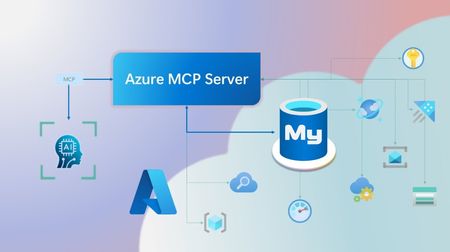
Step into a new era of data-driven intelligence with the fusion of Azure MCP Server and Azure Database for MySQL, where your MySQL data is no longer just stored, but instantly conversational, intelligent and action-ready. By harnessing the open-standard Model Context Protocol (MCP), your AI agents can now query, analyze and automate in natural language, accessing tables, surfacing insights and acting on your MySQL-driven business logic as easily as chatting with a colleague. It’s like giving your data a voice and your applications a brain, all within Azure’s trusted cloud platform. We are excited to announce that we have added support for Azure Database for MySQL in Azure MCP Server. The Azure MCP Server leverages the Model Context Protocol (MCP) to allow AI agents to seamlessly interact with various Azure services to perform context-aware operations such as querying databases and managing cloud resources. Building on this foundation, the Azure MCP Server now offers a set of tools that AI agents and apps can invoke to interact with Azure Database for MySQL - enabling them to list and query databases, retrieve schema details of tables, and access server configurations and parameters. These capabilities are delivered through the same standardized interface used for other Azure services, making it easier to the adopt the MCP standard for leveraging AI to work with your business data and operations across the Azure ecosystem. Before we delve into these new tools and explore how to get started with them, let’s take a moment to refresh our understanding of MCP and the Azure MCP Server - what they are, how they work, and why they matter. MCP architecture and key components The Model Context Protocol (MCP) is an emerging open protocol designed to integrate AI models with external data sources and services in a scalable, standardized, and secure manner. MCP dictates a client-server architecture with four key components: MCP Host, MCP Client, MCP Server and external data sources, services and APIs that provide the data context required to enhance AI models. To explain briefly, an MCP Host (AI apps and agents) includes an MCP client component that connects to one or more MCP Servers. These servers are lightweight programs that securely interface with external data sources, services and APIs and exposes them to MCP clients in the form of standardized capabilities called tools, resources and prompts. Learn more: MCP Documentation What is Azure MCP Server? Azure offers a multitude of cloud services that help developers build robust applications and AI solutions to address business needs. The Azure MCP Server aims to expose these powerful services for agentic usage, allowing AI systems to perform operations that are context-aware of your Azure resources and your business data within them, while ensuring adherence to the Model Context Protocol. It supports a wide range of Azure services and tools including Azure AI Search, Azure Cosmos DB, Azure Storage, Azure Monitor, Azure CLI and Developer CLI extensions. This means that you can empower AI agents, apps and tools to: Explore your Azure resources, such as listing and retrieving details on your Azure subscriptions, resource groups, services, databases, and tables. Search, query and analyze your data and logs. Execute CLI and Azure Developer CLI commands directly, and more! Learn more: Azure MCP Server GitHub Repository Introducing new Azure MCP Server tools to interact with Azure Database for MySQL The Azure MCP Server now includes the following tools that allow AI agents to interact with Azure Database for MySQL and your valuable business data residing in these servers, in accordance with the MCP standard: Tool Description Example Prompts azmcp_mysql_server_list List all MySQL servers in a subscription & resource group "List MySQL servers in resource group 'prod-rg'." "Show MySQL servers in region 'eastus'." azmcp_mysql_server_config_get Retrieve the configuration of a MySQL server "What is the backup retention period for server 'my-mysql-server'?" "Show storage allocation for server 'my-mysql-server'." azmcp_mysql_server_param_get Retrieve a specific parameter of a MySQL server "Is slow_query_log enabled on server my-mysql-server?" "Get innodb_buffer_pool_size for server my-mysql-server." azmcp_mysql_server_param_set Set a specific parameter of a MySQL server to a specific value "Set max_connections to 500 on server my-mysql-server." "Set wait_timeout to 300 on server my-mysql-server." azmcp_mysql_table_list List all tables in a MySQL database "List tables starting with 'tmp_' in database 'appdb'." "How many tables are in database 'analytics'?" azmcp_mysql_table_schema_get Get the schema of a specific table in a MySQL database "Show indexes for table 'transactions' in database 'billing'." "What is the primary key for table 'users' in database 'auth'?" azmcp_mysql_database_query Executes a SELECT query on a MySQL Database. The query must start with SELECT and cannot contain any destructive SQL operations for security reasons. “How many orders were placed in the last 30 days in the salesdb.orders table?” “Show the number of new users signed up in the last week in appdb.users grouped by day.” These interactions are secured using Microsoft Entra authentication, which enables seamless, identity-based access to Azure Database for MySQL - eliminating the need for password storage and enhancing overall security. How are these new tools in the Azure MCP Server different from the standalone MCP Server for Azure Database for MySQL? We have integrated the key capabilities of the Azure Database for MySQL MCP server into the Azure MCP Server, making it easier to connect your agentic apps not only to Azure Database for MySQL but also to other Azure services through one unified and secure interface! How to get started Installing and running the Azure MCP Server is quick and easy! Use GitHub Copilot in Visual Studio Code to gain meaningful insights from your business data in Azure Database for MySQL. Pre-requisites Install Visual Studio Code. Install GitHub Copilot and GitHub Copilot Chat extensions. An Azure Database for MySQL with Microsoft Entra authentication enabled. Ensure that the MCP Server is installed on a system with network connectivity and credentials to connect to Azure Database for MySQL. Installation and Testing Please use this guide for installation: Azure MCP Server Installation Guide Try the following prompts with your Azure Database for MySQL: Azure Database for MySQL tools for Azure MCP Server Try it out and share your feedback! Start using Azure MCP Server with the MySQL tools today and let our cloud services become your AI agent’s most powerful ally. We’re counting on your feedback - every comment, suggestion, or bug-report helps us build better tools together. Stay tuned: more features and capabilities are on the horizon! Feel free to comment below or write to us with your feedback and queries at AskAzureDBforMySQL@service.microsoft.com.586Views3likes0Comments