multiple secondaries
1 TopicMultiple secondaries for Azure SQL Database failover groups (Public Preview)
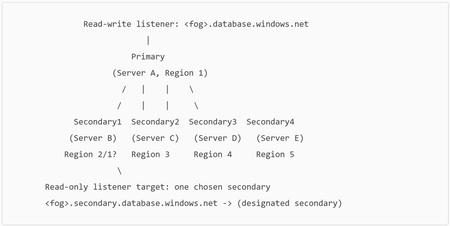
Azure SQL Database failover groups are a business continuity capability that helps you manage geo-replication and coordinated failover of one or more databases from a primary Azure SQL logical server to a secondary logical server in another region. A key benefit is automatic endpoint redirection: your application can keep using the same listener endpoints, and connections are routed to the current primary after a geo-failover. Until recently, an Azure SQL Database failover group supported only one secondary server. Microsoft has now announced public preview support for up to four secondaries per failover group—unlocking more flexible DR designs, regional read scale-out patterns, and richer HA/BC architectures. Why this matters: the “one-secondary” constraint is gone Traditional failover group topologies were straightforward: one primary ↔ one secondary. That model is great for many DR plans, but it can be limiting when you want to: Distribute read-only workloads across multiple regions, Maintain multiple failover targets for broader regional resilience, Support complex compliance or geo-distribution requirements, or Migrate regions without sacrificing existing protection. With multiple secondaries, you can now design a failover group that better matches how globally distributed applications actually run—while still benefiting from the simplicity of the failover group abstraction and stable listener endpoints. What’s new in Public Preview With this enhancement, you can now: Create up to four secondary servers for a single failover group. Place these secondaries in the same or different Azure regions (with important guidance for read-only routing—covered below). Choose which secondary should receive traffic for the read-only listener endpoint (<fog-name>.secondary.database.windows.net). Fail over to any secondary (planned or forced), giving you more operational flexibility during incidents or DR drills. Supported service tiers for multiple secondaries (per the announcement): Standard, General Purpose, Premium, Business Critical, and Hyperscale. Core concept refresher: listener endpoints (and why they’re central) Failover groups expose two stable DNS-based listener endpoints: Read-write listener: <fog-name>.database.windows.net Read-only listener: <fog-name>.secondary.database.windows.net These endpoints are DNS CNAME records created when the failover group is created. After failover, DNS updates redirect the listener(s) to the new role holder. A few practical details that matter in real operations: The Learn documentation notes the DNS TTL is 30 seconds for primary and secondary listener records, which influences how quickly clients pick up endpoint changes (subject to client-side DNS caching behavior). For read-only workloads, it’s recommended to indicate read intent in the connection string using ApplicationIntent=ReadOnly. By default, failover of the read-only listener is disabled (to avoid impacting primary performance when the secondary is offline), which can be a key consideration for read-only availability expectations. Architecture: one failover group, up to four secondaries Here’s a simple way to visualize the topology: With multiple secondaries, you designate one secondary as the read-only listener endpoint target. All read-only listener traffic routes to that chosen secondary. If a failover group has only one secondary, the read-only endpoint defaults to it. How to get started (Azure portal) Creating the initial failover group is unchanged. To add additional secondaries, the announcement outlines these portal steps: Go to your Azure SQL logical server in the Azure portal. Open Failover groups under Data management. Select your existing failover group. Click Add server to add another secondary server. In the side panel, select: The secondary server to add, and The read-only listener endpoint target (a dropdown that lists existing and newly added secondaries). Click Select, then Save to apply the configuration—seeding begins for databases in the group to the new secondary. Important note from the announcement: if you intend to serve read workloads via the read-only listener, the designated read-only target should not be in the same region as the primary. PowerShell examples (create / modify / fail over) The announcement provides PowerShell examples to create and update a failover group with multiple secondaries: Create a failover group with multiple secondaries New-AzSqlDatabaseFailoverGroup ` -ResourceGroupName "myrg" ` -ServerName "primaryserver" ` -PartnerServerName "secondaryserver1" ` -FailoverGroupName "myfailovergroup" ` -FailoverPolicy "Manual" ` -PartnerServerList @("secondary_uri_1","secondary_uri_2","secondary_uri_3","secondary_uri_4") ` -ReadOnlyEndpointTargetServer "secondary_uri_1" The secondary_uri_n values are Azure resource IDs in the form: /subscriptions/<sub>/resourceGroups/<rg>/providers/Microsoft.Sql/servers/<server> Add/replace the secondary server list on an existing failover group Set-AzSqlDatabaseFailoverGroup ` -ResourceGroupName "myrg" ` -ServerName "primaryserver" ` -FailoverGroupName "myfailovergroup" ` -FailoverPolicy "Manual" ` -PartnerServerList @("secondary_uri_1","secondary_uri_2","secondary_uri_3","secondary_uri_4") ` -ReadOnlyEndpointTargetServer "secondary_uri_1" Perform a failover Use Switch-AzSqlDatabaseFailoverGroup (example shown in the announcement): Switch-AzSqlDatabaseFailoverGroup ` -ResourceGroupName "myrg" ` -ServerName "secondaryserver1" ` -FailoverGroupName "myfailovergroup" Planned vs. forced failover (operational clarity) The preview announcement highlights portal actions for: Failover (planned / synchronized) Forced failover (unplanned / potential data loss) The Learn documentation further clarifies that Failover performs full synchronization (no data loss) and requires the primary to be accessible, while Forced failover can result in data loss because replication is asynchronous and doesn’t wait for final propagation. Limitations and notes (preview behavior) From the announcement: Up to four secondaries per failover group. Each secondary must be on a different logical server than the primary. Secondaries can be in the same or different regions. The read-only listener endpoint target should be in a different region from the primary if you want to use the read-only listener for read workloads. Failover group name must be globally unique within .database.windows.net. Chaining (geo-replica of a geo-replica) isn’t supported. Backup storage redundancy and zone redundancy inheritance behaviors vary by tier; the announcement calls out: For non-Hyperscale, zone redundancy isn’t enabled by default on secondaries (enable after creation). For Hyperscale, secondaries inherit HA settings from their respective primaries. Best practices (practical guidance) The announcement and documentation recommend several patterns worth emphasizing: Prefer paired regions when feasible for better performance than unpaired regions. Test regularly using planned failovers (DR drills) so you validate your end-to-end plan. Monitor replication lag to ensure your RPO expectations are being met. Keep failover group scope reasonable (number of databases impacts failover duration; the documentation advises limiting databases per group and using multiple groups if needed). Use the right endpoint for the right workload: Writes → <fog-name>.database.windows.net (read-write listener) Reads → <fog-name>.secondary.database.windows.net (read-only listener) Monitoring example: sys.dm_geo_replication_link_status The DMV sys.dm_geo_replication_link_status returns a row per replication link and includes fields like partner_server, partner_database, last_replication, and replication_lag_sec, which you can use to track replication health. A simple query (run in the user database participating in geo-replication) is: SELECT partner_server, partner_database, last_replication, replication_lag_sec FROM sys.dm_geo_replication_link_status; (These columns and their meanings are documented in the DMV reference.) Closing thoughts Multiple secondaries for Azure SQL Database failover groups is a meaningful step forward for customers running globally distributed applications. It combines the operational simplicity of failover groups—stable listener endpoints and coordinated failover—with added architectural freedom: more DR targets, more read scale-out options, and smoother migration pathways. If you’re already using failover groups today, this preview is a great opportunity to revisit your topology and ask: Where would additional geo-secondaries reduce risk or improve performance for my read-heavy workloads? If you’re designing new, this capability expands what “good” looks like for resilient, regionally distributed data tiers. Learn more (official resources) Multiple secondaries for failover groups is now in public preview Failover groups overview & best practices (Azure SQL Database) Configure a failover group (Azure SQL Database) sys.dm_geo_replication_link_status DMV reference528Views0likes0Comments