ms build
9 Topics
How to install android apps on the computer by downloading apk files form internet in window 11?
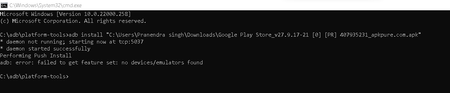
I know how to install android apps in computer but there is a problem disturbing me. It can only be done in window 11. Steps to do it-download windows subsystem for android form Microsoft store>Open windows subsystem for android>turn on developer mod>get the Ip address below the developer mode settings or the Ip address in the developer mode turn on off>Turn on Visualization Technology form your BIOS>download SKD platform tools -https://developer.android.com/studio/releases/platform-tools >go to your download folder and extract this developer file and name it as adb and save it>open the adb folder>open platform tools>click the tab at the top bottom where it shows the file location>type cmd>type adb connect and the IP address you got>it will connect but it will show you that it is not connected>keep typing adb connect and your IP address and it will show already to connected to this and this>download a apk file and open the cmd again form the same process of platform tools>go to download folder>cops as path of the apk file>go to cmd>type adb install and paste the path of the apk> it should get installed but the problem showing is adb: error.3.2KViews0likes3CommentsMSB4011 warnings
Got a project with 2 of these warnings and it seems there's nothing I can do in VS to fix these. Where does it come from and how to solve it ? All I see when showing all files is a Imports folder with subfolders that seems to be links and there's nothing I can do with them in this project. The weird part is that from 12 projects in my solutions only this project exhibit this issue. I wish I could remove these warnings or know how to fix them Severity Code Description Project File Line Suppression State Warning MSB4011 "C:\Program Files\dotnet\sdk\8.0.100\Sdks\Microsoft.NET.Sdk.Publish\Sdk\Sdk.props" cannot be imported again. It was already imported at "C:\Program Files\dotnet\sdk\8.0.100\Sdks\Microsoft.NET.Sdk.Worker\targets\Microsoft.NET.Sdk.Worker.props (50,3)". This is most likely a build authoring error. This subsequent import will be ignored. waInvoiceSystem 1 Severity Code Description Project File Line Suppression State Warning MSB4011 "C:\Program Files\dotnet\sdk\8.0.100\Sdks\Microsoft.NET.Sdk.Publish\Sdk\Sdk.targets" cannot be imported again. It was already imported at "C:\Program Files\dotnet\sdk\8.0.100\Sdks\Microsoft.NET.Sdk.Worker\targets\Microsoft.NET.Sdk.Worker.targets (24,3)". This is most likely a build authoring error. This subsequent import will be ignored. waInvoiceSystem 1Solved1.9KViews0likes3Comments“Sqlyog远程连接Linux失败(错误:1251)”,已解决。
软件设施:Windows MySQL 5.7 Linux MySQL8 远程连接工具:finashell 问题:使用Navicat时可以进行远程连接,当使用Sqlyog时报错:1251。 解决步骤:打开finashell 连接 mysql -uroot -p 进入mysql。 显示“%validate%”等变量; 指令调出 #查看密码策略# 设置全局validate_password.policy=0; 指令调出#设置密码策略,设置为弱口令# ALTER USER 'root'@'%' 用 'new_password mysql_native_password标识(输入新设置密码)'; 重新使用Sqlyog连接,成功。 附言:操作之前,本人Linux主机上已自定义设置了密码,最后一步操作时可以输入原自定义密码作为新密码。1.7KViews1like0Comments
PowerPivot Excel Odata - No Saving of Password and User ID
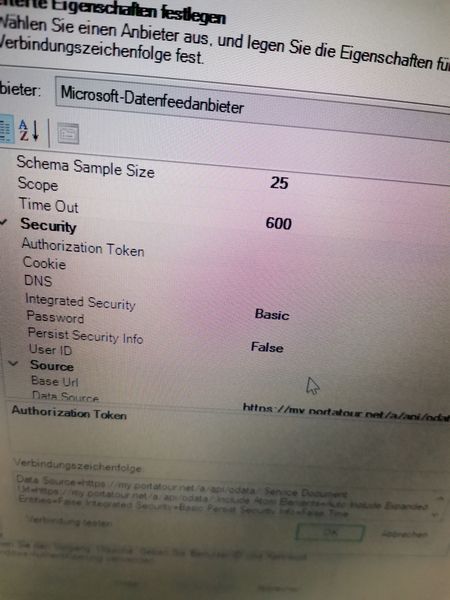
Hey guys, I want to work with PowerPivot in excel and I got an URL with Odata from my company. So I came to this Point here when I click on advanced : (Screenshot is in german) Here I should change integrated security on "BASIC" and then just enter password and username. When I do this and clicking ok, it is not saving these details of user id and password and then because of this I got no connection and can not go on further. I did this several times but It never saves the entered information. I also entered the right url and in this little window the test connection is successfull. but again, when i click on ok and try to test it, it says i have to enter user id and password.1.5KViews0likes1Comment
Port 22 closed by your ip address remotely
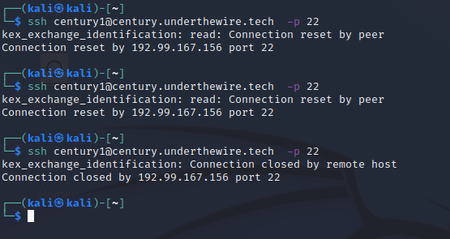
Hi There I send this message to the manger people in the company here. I experiencing a problem that I need your help I was using Linux and one of my assignments require to connect to the port 22 on ssh protocol to log in on a remote url game but it was always closed by remote controle from you ip address. Please let the admin know and fix this problem for me..it is urgent need. I am using VMware of Linux Thanks1.3KViews0likes0Comments
Visio access
Hi I am sure I don't belong here with you clever lot but this is where Microsoft have pointed me. I am unable to find out how to place a Visio icon on my desktop and also I am unable to log into Visio when I eventually find it. I know I have subscribed to the Visio Plan 2 as I have emails confirming this.735Views0likes0CommentsProblembericht für Microsoft (WebView2 + Access)
Titel: Access WebView2‑Integration scheitert trotz aktueller Office‑Version und installierter Runtime (COM‑Registrierung fehlt) Text: Ich teste die WebView2‑Integration in Microsoft Access (Microsoft 365, Current Channel Preview). System: Windows 11, Office Version 2609 (Build 16.0.20430.20032), WebView2 Runtime Evergreen installiert. Trotz korrekter Installation erkennt Access das WebView2‑Steuerelement nicht. Die Diagnose zeigt: WebView2 Runtime: installiert COM‑Objekt Microsoft.Web.WebView2: nicht registriert Registry‑Pfad HKEY_CLASSES_ROOT\Microsoft.Web.WebView2: nicht vorhanden Access‑Steuerelement: nicht sichtbar Alle Reparaturversuche (Evergreen Installer, Winget, Windows‑Apps, Office‑Update, Edge‑Reparatur) bleiben ohne Wirkung. Die Runtime scheint als Store‑App‑Runtime installiert zu sein, die keine klassischen COM‑Klassen erzeugt. Access benötigt jedoch zwingend die Desktop‑Runtime mit vollständiger COM‑Registrierung. Fragen an Microsoft: Warum registriert die WebView2‑Runtime auf manchen Systemen keine COM‑Klassen? Warum erkennt Access die Store‑Runtime nicht, obwohl sie technisch vorhanden ist? Wie erzwingt man die Installation der Desktop‑Runtime, die Access benötigt? Gibt es bekannte Konflikte zwischen Store‑Runtime und Office‑WebView2‑Integration? Welche Office‑Builds und Kanäle aktivieren die WebView2‑COM‑Interop zuverlässig? Ich bitte um eine offizielle, eindeutige Anleitung, wie man sicherstellt, dass Access die WebView2‑Runtime korrekt erkennt.199Views0likes1Comment
The 22 identity settings I check on every Entra tenant and the five people usually miss
We spent the past year building automated Microsoft 365 posture assessment. Most of that year went into deciding what was worth checking — reading the CIS Microsoft 365 Benchmark, the CISA SCuBA baselines and a dozen compliance frameworks, then testing each setting against real tenants to see whether it could be read at all. These five came up again and again. Not obscure settings — just ones that are not on most checklists. **1. Break glass accounts** Do they exist, and are they excluded from the policies that would lock you out? A Conditional Access policy requiring compliant devices, with no exclusion and no emergency account, is a tenant you can lock yourself out of permanently. **2. Legacy per-user MFA alongside the Authentication Methods policy** The migration gets started and not finished. Both active at once produces behaviour nobody intends, and it is invisible unless you look in both places. **3. App registration restrictions** Default is that any user can register an application in your tenant. A standing permission grant nobody approved, on an object nobody owns, that will never appear in an offboarding process. **4. Cross-tenant access settings** Default is open. It governs which other Microsoft tenants your users and theirs can reach, and most organisations have never opened the blade. **5. Access reviews** Unconfigured in most tenants. Which means privileged role membership is whatever accumulated over the years, not whatever was last approved. **One thing we learned the hard way** Some settings cannot be read programmatically at all. Entra Password Protection's custom banned password list is portal-only, as are diagnostic settings — whether sign-in and audit logs are exported anywhere. We name those in the report with the reason rather than scoring them as passing, because a tool that quietly marks unreadable controls green gives you a better number and a report that is wrong. **The rest of the identity list** MFA enforcement, Conditional Access coverage and gaps, legacy auth, SSPR, permanent Global Administrator assignments, guest permissions, Entra Password Protection, user and sign-in risk policies, PIM activation requirements, PIM security alerts, named locations, B2B domain restrictions, hybrid sync health, Windows Hello for Business, session controls, Entitlement Management. Twenty-two in total, and 93 across the whole tenant. These are the identity controls in Kyvoi, which assesses a tenant read-only and maps each finding to the compliance clauses it affects. Free trial on both: Assessment https://marketplace.microsoft.com/en-us/product/saas/7081328.kyvoi-assessment?tab=Overview Continuous monitoring https://marketplace.microsoft.com/en-us/product/saas/7081328.kyvoi-monitoring?tab=Overview Full control list at kyvoi.com/features. What else belongs on the list?34Views0likes0Comments