model-optimization
7 TopicsInformation Extraction with Low-Inference-Cost Models: 85% F1 Gain via Foundry Interactive Training
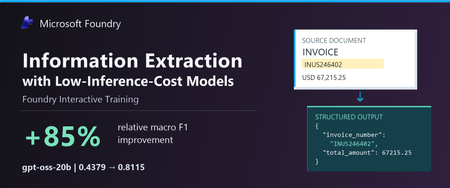
The task: turn documents into structured data Many business workflows need to turn documents into structured data. The model must find the right values, capture the requested records, and return output the next system can use. Long documents and repeated tables make this harder. We tested gpt-oss-20b and gpt-oss-120b to explore lower-cost alternatives to frontier models. In our baseline tests, both fell short on field coverage. gpt-oss-20b also declined the task or returned unparseable output. We wanted to see whether task-specific fine-tuning could improve these results. In Figure 1, we show an invoice that we held out from training. We can quickly spot the invoice number, customer, due date, and balance, but our application must map those values to the correct schema fields, preserve all 37 line items, and return complete, valid JSON. A wrong or missing value can trigger downstream errors or manual review, while invalid JSON can break the workflow altogether. We used schema-guided extraction. We gave the model document text and a JSON Schema defining the required fields, then asked it to return one JSON object. Our grader compared normalized field-path/value pairs with the expected answer, counting repeated occurrences. We measure precision as the share of extracted pairs that match the expected answer, and recall as the share of expected pairs we recover correctly. We use F1 to combine the two into one score, using their harmonic mean. F1 ranges from 0 to 1, with higher scores indicating better extraction. A wrong value hurts precision and can also hurt recall if the expected value remains unmatched. A missing value hurts recall. What changed after fine-tuning We evaluated the base and fine-tuned versions of gpt-oss-20b and gpt-oss-120b on the same 20 documents. Both improved their extraction F1. gpt-oss-20b rose from 0.4379 to 0.8115, and gpt-oss-120b rose from 0.6816 to 0.8573. gpt-oss-20b made the larger gain, with an 85.3% relative improvement after 100 GRPO steps. Fine-tuned gpt-oss-120b finished with the higher F1. Fine-tuning helped both models, but the size of the improvement differed. We also evaluated GPT-5.5, GPT-5.6-sol, and GPT-6-sol as reference models. They scored 0.9760, 0.9766, and 0.9764, respectively—still higher than our fine-tuned models. gpt-oss-20b reached 83.1% of GPT-5.6-sol’s reference F1. This is a substantial improvement for gpt-oss-20b and a promising starting point for further task-specific tuning. Our base and tuned scores are averaged across repeated evaluations, while the reference models used a different single-pass protocol. These reference scores provide useful context for the progress we made, with the evaluation differences noted above. These improvements make lower inference-cost base models worth a closer look. Table 1 compares published Azure inference prices. The pricing comparison is intended to provide inference-cost context only and should not be interpreted as a complete total-cost-of-ownership analysis, which would also include training, hosting, retries, and operational costs. Table 1. Extraction macro F1 and published Azure inference prices (USD per 1M tokens); GPT-5.5, GPT-5.6-sol, and GPT-6-sol are included as frontier-model references Model Macro F1 Azure input / 1M Azure output / 1M gpt-oss-20b 0.8115 $0.07 $0.30 gpt-oss-120b 0.8573 $0.15 $0.60 GPT-5.6-sol 0.9766 $4.00 $20.00 GPT-5.5 0.9760 $5.00 $30.00 GPT-6-sol 0.9764 $2.00 $10.00 Notes: Prices checked October 9, 2026, in USD; input rates are uncached. gpt-oss-20b prices are published fine-tuned inference rates for Regional deployments. gpt-oss-120b prices are base-model rates; its fine-tuned rates remain unconfirmed. Frontier prices use Global Standard pricing, with the short-context tier for GPT-5.6-sol and GPT-6-sol. These rates do not represent measured deployment costs for our experimental checkpoints. Token rates exclude training and hosting costs. F1 scores come from fine-tuned checkpoints for the two gpt-oss models and reference runs for the frontier models. All use the same 20 documents, but tuned scores average repeated evaluations while frontier references use a different single-pass protocol. We observed more parseable output and higher coverage We looked through gpt-oss-20b’s responses and found examples where it declined the task or said it could not finish. We tracked this with a “refusal-wording rate”: the share of responses where our grader detected an apology or cannot-complete language. This measures wording, not whether the model made a safety refusal. We tracked JSON parseability and field coverage separately, although these problems can overlap. After fine-tuning, the refusal-wording rate (Refusals) fell from 25% to zero; JSON parseability (Valid JSON) rose from 63.8% to 98.8%, and coverage rose from 47.1% to 94.9%. Valid JSON means our grader could read the response as an object or array. Coverage compares the number of predicted field/value pairs with the expected count, capped at 100%. Wrong or extra pairs can raise coverage, so we read it alongside F1 rather than treat it as a measure of correctness. Extraction quality and output behavior before and after fine-tuning on the same 20 documents. Bars show means across repeated evaluations. “Valid JSON” measures JSON parseability, not schema compliance or value correctness. “Refusal rate” measures detected refusal wording, not safety refusals. Higher is better except for refusal rate. Figure 4 shows how these measures changed during training. We repeated the full training run with a second seed. It reached 0.8101 F1, close to the headline run’s 0.8115. We ran four temperature-0 evaluations for each seed. Across all eight post-training evaluations, our grader detected no refusal wording. What we learned from the model comparison We saw different starting points and different gains between the two models. gpt-oss-20b had clearer output problems before training: it sometimes declined the task, returned unparseable JSON, or missed required information. After fine-tuning, we saw improvements in extraction F1, JSON parseability, and field coverage, along with less refusal wording. gpt-oss-120b started with fewer format problems. We detected no refusal wording, and 96.3% of its baseline responses were parseable JSON. But parseable output did not mean complete or correct extraction. After fine-tuning, its field coverage rose from 74.1% to 94.1%, and its F1 rose from 0.6816 to 0.8573. gpt-oss-20b made the larger F1 gain, while fine-tuned gpt-oss-120b finished with the higher F1. For us, the lesson is to measure the problem first. Try simpler, lower-cost changes, such as prompting, before committing to training. Then consider fine-tuning when your grader can reward the improvements your application needs. How we trained with Foundry Interactive Training We used the Foundry Interactive Training API [1] with 17 training documents, expected structured answers, and a Python grader. We followed the cookbook to connect our grader to Foundry’s managed generation and training operations. We ran 100 group relative policy optimization, or GRPO, steps and saved checkpoints for evaluation. For each document, we had gpt-oss-20b generates eight candidate answers. Our grader awarded partial credit for correct values and penalized invalid JSON. GRPO used the candidates’ relative scores to reinforce better answers. We used the expected answers only for grading. We did not include them in the inputs we gave the model during reinforcement training. The model had to produce its own answers, and the grader supplied the feedback. 5. Customers define the application outcome and quality bar; Foundry Interactive Training runs the post-training loop in Microsoft Foundry. How customers can use Foundry Interactive Training To try this approach, bring four ingredients: a supported base model, examples from your workload, expected outcomes, or another way to check the answers, and a Python grader. Your grader should measure what matters to the application—not just whether an answer looks convincing. Get connected. Request access to the Microsoft Foundry Interactive Training public preview [2] and connect the onboarding cookbook [3][4] to an assigned Foundry project. Separate your data. Build training, validation, and final test sets. Use validation data to choose checkpoints. Keep the final test set for an independent check, with new sources and document structures where possible. Build your grader. Implement a grader that rewards the desired outcome. For our extraction task, we checked normalized field-path/value pairs and penalized unparseable JSON. Run a bounded experiment. Set a training budget, inspect the training signal, and compare saved checkpoints on the validation set. Once you choose a checkpoint, evaluate it on the untouched final test set. Evaluate and prepare for deployment. Use session sampling to test your LoRA adapter on held-out prompts and compare it with the baseline. Save checkpoints so you can continue experimenting. Before using the model in an application, confirm the supported deployment path, model compatibility, and serving costs. Takeaway With Foundry Interactive Training, we improved extraction F1 for both gpt-oss-20b and gpt-oss-120b. We brought our task examples and a Python grader, and Foundry managed the generation and training loop. gpt-oss-20b made the larger gain, while fine-tuned gpt-oss-120b reached the higher F1. We did not match the frontier references, but our results show why task-specific fine-tuning is worth exploring before switching to a higher-priced model. The final choice should depend on independently tested quality and the full cost of deployment. Reference [1] https://github.com/microsoft-foundry/fine-tuning [2] What is interactive training (preview) in Microsoft Foundry? - Microsoft Foundry | Microsoft Learn [3] Interactive Training - Public Preview Intake Form [4] https://github.com/microsoft-foundry/fine-tuning/tree/main/interactive_training299Views0likes0CommentsModel Migration Process on Microsoft Foundry and Azure OpenAI
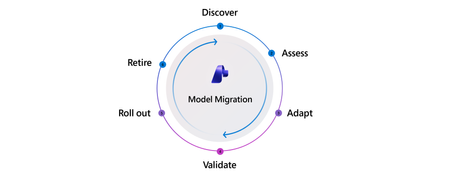
Every app built on an LLM will eventually move to a new model. The model you shipped may be retired, or a newer model may offer better quality, cost, or performance. Changing a model name in code from a retiring model such as gpt-4o to a newer one such as gpt-5.1 may take one line. That line hides a much larger migration. Model failures are often silent to the systems using the model and loud to users. Nothing crashes. Error rates stay flat. Every dashboard says the migration went fine. Meanwhile, responses change shape, summaries become longer and more hedged, JSON fields disappear, and tool calls fire in a different order. Users notice. Support queues grow. Downstream code that depended on the old behavior starts to break. A successful migration preserves the application's behavior or improves it in measurable ways. That requires a repeatable process to detect drift, adapt safely, and prove quality before broad rollout. The model migration process has six phases: Discover → Assess → Adapt → Validate → Roll out → Retire. This article explains what each phase looks like, which Microsoft Foundry tools support it today—including Azure OpenAI capabilities—and where teams still need to build around the platform. It then applies the process to a retail shopping assistant and points to additional resources in Go deeper at the end of this post! Why migrate now Every model has a retirement date. On Microsoft Foundry, generally available models typically ship with a retirement date about 18 months out, and older model families are actively replaced. For example, the model lifecycle and retirement schedule lists gpt-4o (2024-05-13) as retiring on October 1, 2026, with gpt-5.1 as its replacement. What happens at retirement depends on how you buy capacity: Standard, Global Standard, and Data Zone Standard (pay-as-you-go) deployments are auto-upgraded on a rolling, region-by-region schedule. You control the timing with versionUpgradeOption set to one of: OnceNewDefaultVersionAvailable, OnceCurrentVersionExpired, or NoAutoUpgrade. NoAutoUpgrade means the deployment stops working at retirement. Priority Processing follows the same path. Provisioned (PTU) deployments are not auto-upgraded. You migrate them yourself, either in-place (traffic moves over a 20–30 minute window with no downtime) or side-by-side (stand up the new deployment, test, shift traffic, delete the old one). Batch deployments follow the side-by-side path: deploy the new model, resubmit jobs, retire the old deployment. The developer problem is the same in every case: traffic eventually reaches a different model, but the platform cannot tell you whether the application still behaves as it did before. A responding endpoint does not prove that the app behaves correctly. A new model can change formatting, tone, tool-calling behavior, or JSON shape in ways that quietly break downstream code. When should I migrate? Start before the retirement date. Automatic upgrade handles the traffic transition for eligible deployments, but the team still owns behavioral validation. Provisioned deployments also require a manual migration. Microsoft typically makes a replacement available in Global Standard about 90 days before retirement, in provisioned regions about 30 days before retirement, and in standard regions about two weeks before retirement. That gives you time to evaluate the new model on your own terms. Retirement dates cannot be extended. You also do not need a deprecation notice to begin. If a newer model may improve quality, speed, or cost, run it through the process now. Waiting turns the switchover into a slow train wreck: responses drift, parsing becomes brittle, support tickets accumulate, and the team ends up debugging a model it did not choose on a date it did not pick. A deliberate migration makes the retirement date a formality and creates a process the team can reuse. Who this is for This process fits teams that own an LLM-powered feature inside a larger application and run migrations deliberately. It also applies to AI-native platform teams that centrally manage models for other application teams. The phases remain the same, though platform teams may run them faster and in parallel rather than in sequence. Fine-tuned workloads are out of scope here because they cannot be upgraded automatically, have separate training and deployment retirement schedules, and turn the Adapt phase into a distillation or retraining exercise rather than primarily prompt work. The six phases Phase Definition What success looks like Discover Learn that a model change is coming or needed. The team receives a timely, structured signal with the deprecation date, replacement model, and migration window. Assess Choose a target model and confirm that it is operationally available. The team understands the candidates and confirms capacity, region, and SKU before tuning starts. Adapt Replay the current workload on the new model, diagnose changes, and update prompts, parameters, tool definitions, output schemas, and calling code. The team runs side-by-side replay against real or representative traffic, can see the behavioral differences, and records every change. Validate Run the adapted workload against a quality rubric and decide whether it is safe to ship. The team has an evaluation suite that is affordable to run and trusted by application owners and reviewers. Roll out Promote the model through staged production exposure, monitor live behavior, and commit or roll back. Canary or weighted routing is in place, live quality is measured alongside latency and errors, and rollback remains possible. Retire Decommission the old deployment, free capacity, archive evaluation artifacts, and update internal documentation. The old SKU is gone, the deployment count falls, and the team carries what it learned into the next migration. Foundry tools at a glance Microsoft Foundry provide tools for each phase of the Model Migration Process. Phase Microsoft Foundry feature (including Azure OpenAI) Documentation Discover Model retirement schedule, lifecycle policy, Service Health alerts, and Models API lifecycleStatus Model retirement schedule Lifecycle policy Assess Model leaderboards and benchmarks for quality, safety, cost, throughput, and latency; trade-off charts; side-by-side comparison; suggested replacements Model leaderboards and benchmarks Side-by-side compare Adapt Prompt Optimizer in the Foundry Agent playground; agent optimization; simulator for synthetic data Prompt Optimizer Agent optimization Simulator Validate Azure AI Evaluation SDK with 30+ evaluators, LLM-as-judge, graders, and the portal evaluation wizard Azure AI Evaluation SDK Portal evaluation Roll out Automatic upgrade and versionUpgradeOption; provisioned in-place or side-by-side migration; continuous evaluation; Azure Monitor alerts Auto-upgrade with versionUpgradeOption Continuous evaluation Retire Models API to confirm 410 Gone; observability dashboard to track deployment count Models API Observability dashboard Breakdown of each phase 0. Prepare the test dataset Before starting the six phases, build a set of representative inputs, expected outputs, and agreed success criteria. This dataset gates the middle of the lifecycle: Adapt needs inputs for replay, and Validate needs ground truth and scoring criteria. Step 0 describes the workload rather than the candidate model, so it can begin during Discover, before the team selects a target. Build the dataset from captured production traffic or domain examples in .csv or .jsonl. If representative data is not available, use the simulator to generate synthetic inputs. Two practices determine whether this work pays off: Instrument capture before you need it. Production content capture is opt-in and never retroactive. Log prompts, responses, latency, and token counts now so the team has traffic to evaluate later. Freeze the dataset. Keep inputs, ground truths, and success criteria fixed throughout the migration. If they change, source and target results are no longer comparable. You also need an inventory of the model deployments your workload uses, including their deployment types (Standard, Provisioned, or Batch). For each source model, note its retirement date and suggested replacement from the Model retirement schedule. 1. Discover Discover begins when something forces the team to consider a model change: a deprecation notice, a new generally available model, a cost or latency problem, or a capability gap. The phase ends with a decision to begin migration or stay on the current model if it remains stable, performs well, and is not approaching retirement. Foundry tools. The model lifecycle and retirement schedule publishes retirement dates and suggested replacements. The Azure OpenAI model retirements documentation explains notification timing, including at least 60 days for generally available model retirements and at least 30 days for preview model retirements. It also explains how to configure Azure Service Health advisories and use the Models API for programmatic lifecycleStatus and deprecation checks. Those APIs provide the foundation for an internal discovery system. Where it breaks. Customers may learn about a retirement through email, a service health alert, or a production error. By the time the right team sees the signal, it may already be deep into the deprecation window and heading toward retirement. What your team provides. The schedule and Models API expose the data through a stable contract. Mature enterprises may add a thin notification layer that routes it to the right owners. 2. Assess The team chooses a candidate target model and confirms that it is usable: the correct region and SKU, enough quota, and availability alongside the current model so rollback remains possible. Assess also includes projecting monthly cost against historical traffic. Pricing structures change between model generations through reasoning tokens, cached input, structured-output overhead, and other factors. Those changes can move unit economics by 2x or more. For regulated workloads, compliance requirements such as BAA, FedRAMP, and regional Standard versus Global Standard availability may narrow the candidate list before quality testing begins. Foundry tools. Start with the replacement suggested in the retirement schedule, then build a shortlist with model benchmarks, which compare quality, safety, cost, throughput, and latency. Use trade-off charts such as quality versus cost and the side-by-side model comparison for up to three models. Compare context windows, feature support such as function calling, structured output, and vision, and available endpoints. Confirm SKU, region, quota, and upgrade mechanics in the model retirements documentation. Where it breaks. Teams face several plausible candidates, such as gpt-5.1, gpt-5.2, and a nano variant, without clear positioning between them. A selected model may be unavailable in the required region or SKU, a constraint that sometimes appears only after planning is underway. Historical traffic may also show that the new model costs substantially more, forcing an unplanned budget decision. What your team provides. Public benchmarks should filter the candidate list, not make the final decision. Confirm the shortlist against the team's own workload. Build the monthly cost view from token logs and current pricing. 3. Adapt Adapt is often the most time-consuming phase for embedded and product-facing workloads. Validate may take longer for regulated workloads. First, replay the existing workload on the new model without changing it. This isolates changes caused by the model. Diagnose shifts in verbosity, reasoning depth, structured-output adherence, tool-call shape, and latency. Then update the application until it recovers or improves on the previous behavior. Prompt editing is only one part of Adapt. A migration often changes four other surfaces: Parameters. temperature, top_p, max_tokens, and reasoning-effort controls may not map directly between generations. Some are unsupported by newer model families. Tool definitions. Argument names, descriptions, and required fields that reliably guided the old model may need clearer wording or tighter constraints. Output schemas. Structured-output behavior changes between models. A schema the old model followed loosely may need explicit constraints, or the new model may finally enforce it. Calling code. API and SDK differences, including Chat Completions versus Responses, streaming formats, and new or renamed request fields, can require code changes. Downstream parsers may also assume the old response shape. For agentic and workflow workloads, schema and tool-call changes can outweigh prompt changes. Foundry tools. Prompt Optimizer is available through the Optimize button below the system instructions field in the Agent playground. It restructures instructions, explains each change by paragraph, and supports iteration. For example, a team can add a constraint such as "keep the JSON schema exactly" and optimize again. It is a fast first pass for a prompt that would otherwise be rewritten by hand. For agent workloads, agent optimization tunes instructions, tools, and model selection together. Prompt Optimizer and agent optimization are available in Microsoft Foundry, not Azure OpenAI. When production data is unavailable, the simulator can generate synthetic and adversarial inputs. Where it breaks. Most migration time is spent in a manual diagnosis loop. Teams rerun prompts by hand, compare outputs by eye, and rarely record what changed or why. For agent builders, chat benchmarks may miss tool-call regressions such as extra fields, renamed arguments, or changed call sequences. Those problems appear only when the team replays real agent traces. Plan for three constraints: Start with the optimizers, then verify their output. They apply general practices in a single pass rather than fitting changes to the team's dataset. They tune instruction text, not tool definitions or output schemas. Copy the original prompt first because there is no version history, then evaluate the optimized prompt against the frozen dataset. Expect more manual work when moving between providers or model families. There is no "optimize for target model X" flow. Moving from one family to another, such as OpenAI to Claude, still requires deliberate prompt and schema translation. Record traffic before you need it. Replay is only as useful as the captured data. Existing traces are available as an evaluation source for agents today, while content capture is opt-in and never retroactive. Log prompts, responses, latency, and tokens now to prepare for the next Adapt phase. 4. Validate Run the adapted workload against a quality rubric on the frozen dataset. The rubric may combine rules, LLM-as-judge evaluation, human review, existing user-feedback signals, or a domain-specific scoring framework. Examples include a clinical summarization rubric for healthcare or a tool-call sequencing assertion for agents. Validation produces a pass-or-fail decision for production exposure. AI-native teams may run the same signal continuously on every commit rather than treating it as a one-time gate. The dataset is a dependency for both Adapt and Validate. Build and freeze it early, around Assess, even though its primary purpose belongs to this phase. Validation then has two touchpoints: Before Adapt, freeze the dataset and success criteria, then run the current model to establish the source baseline. After Adapt, run the target model against the same dataset and evaluators, compare it with the source baseline, and make the release decision. Prepare the evaluation runner early and apply the gate after Adapt. Both steps belong to Validate. Foundry tools. The Azure AI Evaluation SDK, installed with pip install azure-ai-evaluation, includes more than 30 evaluators. They cover grounding, relevance, retrieval, coherence, fluency, question answering, reference-based similarity, F1, BLEU, ROUGE, safety, agent behavior, and Azure OpenAI graders. Teams can also build custom LLM-as-judge evaluators for task-specific rubrics. The portal evaluation flow runs the same evaluators against model, agent, dataset, and trace targets. Run identical evaluators against source and target outputs on the frozen dataset so the results remain comparable. Measure the three dimensions used for sign-off: Quality: evaluator results Latency: leaderboard time to first token and throughput, plus operational latency from the workload Cost: (input tokens × input price) + (output tokens × output price) Where it breaks. Most teams do not have an evaluation suite. Teams that do often built it themselves and may not use platform evaluation tools. Regulated workloads add mandatory human review, which can become the bottleneck. For those teams, migrations often stall in Validate rather than Adapt. What your team provides. The evaluators are ready to run, but model workloads still require teams to curate a domain-relevant test set from production traffic. That is why Phase 0 pays for itself. 5. Roll out Promote the validated configuration in stages: non-production, then a canary or weighted percentage of production traffic, followed by broader exposure. Compare live latency, errors, and quality signals with the pre-migration baseline, then commit or roll back. Some workloads cannot expose a new model to customer traffic during testing, including flows involving protected health information or financial transactions. Use shadow or mirror mode instead: run the new model offline against production inputs and compare its outputs with the old model without affecting users. Foundry tools. Migration mechanics depend on the deployment SKU: Standard, Global Standard, and Data Zone Standard deployments upgrade automatically on a rolling schedule. Control timing with versionUpgradeOption: OnceNewDefaultVersionAvailable, OnceCurrentVersionExpired, or NoAutoUpgrade. Priority Processing follows the same path. Provisioned, Global Provisioned, and Data Zone Provisioned deployments migrate manually, either in place during a 20-to-30-minute Azure-managed traffic transition or through side-by-side deployments. Batch deployments migrate side by side. Deploy the new model, resubmit jobs, then retire the old deployment. Fine-tuned deployments do not upgrade automatically. They follow separate training and deployment retirement schedules, so plan retraining or distillation early. See the model retirements documentation for deployment-specific guidance. Use continuous evaluation to score a sample of production traffic in the Foundry Observability dashboard. Connect evaluation results to traces for root-cause analysis and configure Azure Monitor alerts for quality regressions. Where it breaks. Offline evaluation can miss production quality and latency regressions. Rollback decisions may also be forced by deprecation deadlines rather than evidence. What your team provides. Teams implement weighted routing between deployments in their application or gateway layer. They must also choose how long to keep the old deployment warm for rollback. Embedded copilot teams often target about 30 days. Design both mechanisms once and reuse them for future migrations. 6. Retire Retire is easy to forget. Decommission the old deployment, free its capacity, archive evaluation artifacts, update internal documentation, and communicate the change to downstream owners. That may include customer-facing documentation, marketing pages, support runbooks, and audit logs. Regulated workloads may need to retain artifacts for years. Retirement is also a governance step. Foundry tools. Use the Models API to confirm that the old version is retired through lifecycleStatus or 410 Gone. Use the observability dashboard to confirm that the active deployment count falls. Add useful production traces to the golden dataset so the next migration starts with better evidence. Where it breaks. Teams skip the phase. Zombie deployments accumulate, leaving teams with structural debris from migrations they never finished. What your team provides. The observability dashboard shows deployment count, but the team must decide which deployments still carry traffic. Create an explicit retirement ticket rather than relying on someone to remember. Embedded copilot teams also need to update public claims such as "powered by gpt-4o" after the model changes. Worked example: Zava's Shopping Assistant migrates from gpt-4o mini to gpt-5.x Zava is a fictional retailer used as a stand-in for a real customer story. The example reflects patterns observed in customer-facing embedded AI workloads. Zava's Shopping Assistant is one of the company's largest LLM workloads. It has two LLM stages: Per-review insight extraction identifies sentiment, attribute mentions, and defect signals across thousands of product reviews. Product-level summaries present those findings to shoppers on the product page. Together, the two stages account for a meaningful share of Zava's token volume. Discover Zava's central AI Platform team made gpt-5.x models available internally and notified feature teams. The Shopping Assistant team learned about the models through that channel and received a target migration window before gpt-4o mini's deprecation. Zava has an internal discovery layer built on the retirement schedule and Models API. Microsoft provides the underlying data, while Zava routes the signal to application owners. Assess The team compared gpt-5.4 nano, which offered lower latency and cost, with gpt-5.1 and gpt-5.2 using leaderboard trade-off charts. Selection remained difficult because of the rapid release cadence, unclear positioning between variants, and the lack of a behavioral benchmark for product question-and-answer workloads. Capacity planning required coordination with the AI Platform team. Both gpt-4o mini and the gpt-5.x candidate needed to remain available in the same regions so the team could roll back. Adapt The team ran its existing Shopping Assistant prompts against gpt-5.4 nano using a sanitized traffic sample. Customer queries were scrubbed of personally identifiable information before replay. The behavioral comparison found three problems: Summaries used more hedged language and sometimes contradicted the underlying review evidence, creating a shopper-trust risk. Insight counts varied across runs. The model sometimes extracted substantially more or fewer attribute mentions than gpt-4o mini, affecting downstream filtering. Latency varied more than expected on the synchronous product-page path. Prompt Optimizer helped restructure the summary prompt, but the team still diagnosed the differences manually. It built its own replay system and behavioral comparison on top of captured traffic. Reengineering took weeks and extended beyond prompts: parameters and downstream parsing for the insight-extraction output also changed. Validate The team scored outputs with Zava's Product Answer Quality (PAQ) rubric. Its nine criteria cover factual grounding, attribute accuracy, tone, and refusal behavior for questions outside the catalog. Zava implemented the rubric as custom evaluators in the Azure AI Evaluation SDK. Initial evaluations used unchanged prompts to isolate model behavior. The team reran them after each prompt change. Zava's QA team also completed a manual review, which the company requires for every new model used in a customer-facing workflow. The per-review insight extraction stage still has no automated evaluation, a gap the team has accepted for now. Roll out The validated configuration moved to non-production and then through staged exposure: employees first, followed by a small percentage of shoppers. The canary exposed latency regressions that offline evaluation had missed. The team rolled back the latency-sensitive synchronous product-page path while keeping the offline pregeneration path on the new model. Retire Retirement is not complete. The gpt-4o mini deployment remains warm for rollback. The team must resolve the synchronous-path latency regression before retiring it, which sends that code path back to Adapt. This split state is common. Retire can lag Roll out by weeks or months, and the old deployment remains visible in deployment-sprawl data. Lessons from the example Adapt consumed most of the schedule. Replay tooling, behavioral comparison, and prompt reengineering are the clearest opportunities for Microsoft to shorten migrations. Validate worked because Zava had invested in it. Most customers do not have an equivalent to PAQ. Making domain-specific evaluations cheaper to build would improve confidence in this phase. The migration is partially live and partially rolled back. The process must support split-state workloads rather than assuming a binary switch from old model to new. How to use this process The six phases can serve as a checklist and an interview script for teams creating or auditing a migration process. Documentation and process: Lead with the six phases. Most teams recognize them immediately. Investment priorities: Start with Adapt and Validate. Across customer stories, those phases consume the most time and confidence. Interviews and postmortems: For each phase, ask whether it happens, who owns it, which tool the team uses, where it failed last time, and what evidence would increase confidence. Metrics: Discover and Retire are the easiest phases to instrument through measures such as announcement reach and active deployment count. Adapt and Validate require purpose-built telemetry that most teams do not yet have. Go deeper Two companion resources turn the process into concrete implementation steps: Microsoft Learn guide: This article follows the six phases through identifying affected deployments, preparing a test dataset, adapting prompts, evaluating source and target models, and rolling out by deployment type. Foundry Models Accelerator: This community toolkit includes a deployment-inventory scanner, a feasibility and assessment playbook, code and API migration audit scripts, an A/B evaluation runner with golden datasets, and rollout guidance. It follows the same six-phase process. The Foundry Models Accelerator is a community-built toolkit provided as-is under the MIT License. It falls outside Microsoft Support. Always verify model availability and retirement dates against official documentation. Additionally, check out the Foundry Forgebook which hosts a plethora of recipes that walk through the required code changes to migrate from different source to target models, even across model families. The goal of a model migration is to change the model without changing your application’s behavior, or to change it measurably for the better. Lead with the six phases, invest first in Adapt and Validate phases, and treat the Retire phase as a governance step.945Views0likes0CommentsHow Do We Know AI Isn’t Lying? The Art of Evaluating LLMs in RAG Systems
🔍 1. Why Evaluating LLM Responses is Hard In classical programming, correctness is binary. Input Expected Result 2 + 2 4 ✔ Correct 2 + 2 5 ✘ Wrong Software is deterministic — same input → same output. LLMs are probabilistic. They generate one of many valid word combinations, like forming sentences from multiple possible synonyms and sentence structures. Example: Prompt: "Explain gravity like I'm 10" Possible responses: Response A Response B Gravity is a force that pulls everything to Earth. Gravity bends space-time causing objects to attract. Both are correct. Which is better? Depends on audience. So evaluation needs to look beyond text similarity. We must check: ✔ Is the answer meaningful? ✔ Is it correct? ✔ Is it easy to understand? ✔ Does it follow prompt intent? Testing LLMs is like grading essays — not checking numeric outputs. 🧠 2. Why RAG Evaluation is Even Harder RAG introduces an additional layer — retrieval. The model no longer answers from memory; it must first read context, then summarise it. Evaluation now has multi-dimensions: Evaluation Layer What we must verify Retrieval Did we fetch the right documents? Understanding Did the model interpret context correctly? Grounding Is the answer based on retrieved data? Generation Quality Is final response complete & clear? A simple story makes this intuitive: Teacher asks student to explain Photosynthesis. Student goes to library → selects a book → reads → writes explanation. We must evaluate: Did they pick the right book? → Retrieval Did they understand the topic? → Reasoning Did they copy facts correctly without inventing? → Faithfulness Is written explanation clear enough for another child to learn from? → Answer Quality One failure → total failure. 🧩 3. Two Types of Evaluation 🔹 Intrinsic Evaluation — Quality of the Response Itself Here we judge the answer, ignoring real-world impact. We check: ✔ Grammar & coherence ✔ Completeness of explanation ✔ No hallucination ✔ Logic flow & clarity ✔ Semantic correctness This is similar to checking how well the essay is written. Even if the result did not solve the real problem, the answer could still look good — that’s why intrinsic alone is not enough. 🔹 Extrinsic Evaluation — Did It Achieve the Goal? This measures task success. If a customer support bot writes a beautifully worded paragraph, but the user still doesn’t get their refund — it failed extrinsically. Examples: System Type Extrinsic Goal Banking RAG Bot Did user get correct KYC procedure? Medical RAG Was advice safe & factual? Legal search assistant Did it return the right section of the law? Technical summariser Did summary capture key meaning? Intrinsic = writing quality. Extrinsic = impact quality. A production-grade RAG system must satisfy both. 📏 4. Core RAG Evaluation Metrics (Explained with Very Simple Analogies) Metric Meaning Analogy Relevance Does answer match question? Ask who invented C++? → model talks about Java ❌ Faithfulness No invented facts Book says started 2004, response says 1990 ❌ Groundedness Answer traceable to sources Claims facts that don’t exist in context ❌ Completeness Covers all parts of question User asks Windows vs Linux → only explains Windows Context Recall / Precision Correct docs retrieved & used Student opens wrong chapter Hallucination Rate Degree of made-up info “Taj Mahal is in London” 😱 Semantic Similarity Meaning-level match “Engine died” = “Car stopped running” 💡 Good evaluation doesn’t check exact wording. It checks meaning + truth + usefulness. 🛠 5. Tools for RAG Evaluation 🔹 1. RAGAS — Foundation for RAG Scoring RAGAS evaluates responses based on: ✔ Faithfulness ✔ Relevance ✔ Context recall ✔ Answer similarity Think of RAGAS as a teacher grading with a rubric. It reads both answer + source documents, then scores based on truthfulness & alignment. 🔹 2. LangChain Evaluators LangChain offers multiple evaluation types: Type What it checks String or regex Basic keyword presence Embedding based Meaning similarity, not text match LLM-as-a-Judge AI evaluates AI (deep reasoning) LangChain = testing toolbox RAGAS = grading framework Together they form a complete QA ecosystem. 🔹 3. PyTest + CI for Automated LLM Testing Instead of manually validating outputs, we automate: Feed preset questions to RAG Capture answers Run RAGAS/LangChain scoring Fail test if hallucination > threshold This brings AI closer to software-engineering discipline. RAG systems stop being experiments — they become testable, trackable, production-grade products. 🚀 6. The Future: LLM-as-a-Judge The future of evaluation is simple: LLMs will evaluate other LLMs. One model writes an answer. Another model checks: ✔ Was it truthful? ✔ Was it relevant? ✔ Did it follow context? This enables: Benefit Why it matters Scalable evaluation No humans needed for every query Continuous improvement Model learns from mistakes Real-time scoring Detect errors before user sees them This is like autopilot for AI systems — not only navigating, but self-correcting mid-flight. And that is where enterprise AI is headed. 🎯 Final Summary Evaluating LLM responses is not checking if strings match. It is checking if the machine: ✔ Understood the question ✔ Retrieved relevant knowledge ✔ Avoided hallucination ✔ Provided complete, meaningful reasoning ✔ Grounded answer in real source text RAG evaluation demands multi-layer validation — retrieval, reasoning, grounding, semantics, safety. Frameworks like RAGAS + LangChain evaluators + PyTest pipelines are shaping the discipline of measurable, reliable AI — pushing LLM-powered RAG from cool demo → trustworthy enterprise intelligence. Useful Resources What is Retrieval-Augmented Generation (RAG) : https://azure.microsoft.com/en-in/resources/cloud-computing-dictionary/what-is-retrieval-augmented-generation-rag/ Retrieval-Augmented Generation concepts (Azure AI) : https://learn.microsoft.com/en-us/azure/ai-services/content-understanding/concepts/retrieval-augmented-generation RAG with Azure AI Search – Overview : https://learn.microsoft.com/en-us/azure/search/retrieval-augmented-generation-overview Evaluate Generative AI Applications (Microsoft Learn – Learning Path) : https://learn.microsoft.com/en-us/training/paths/evaluate-generative-ai-apps/ Evaluate Generative AI Models in Microsoft Foundry Portal : https://learn.microsoft.com/en-us/training/modules/evaluate-models-azure-ai-studio/ RAG Evaluation Metrics (Relevance, Groundedness, Faithfulness) : https://learn.microsoft.com/en-us/azure/ai-foundry/concepts/evaluation-evaluators/rag-evaluators RAGAS – Evaluation Framework for RAG Systems : https://docs.ragas.io/865Views0likes0CommentsNow in Foundry: Qwen3-Coder-Next, Qwen3-ASR-1.7B, Z-Image
This week's spotlight features three models from that demonstrate enterprise-grade AI across the full scope of modalities. From low latency coding agents to state-of-the-art multilingual speech recognition and foundation-quality image generation, these models showcase the breadth of innovation happening in open-source AI. Each model balances performance with practical deployment considerations, making them viable for production systems while pushing the boundaries of what's possible in their respective domains. This week's Model Mondays edition highlights Qwen3-Coder-Next, an 80B MoE model that activates only 3B parameters while delivering coding agent capabilities with 256k context; Qwen3-ASR-1.7B, which achieves state-of-the-art accuracy across 52 languages and dialects; and Z-Image from Tongyi-MAI, an undistilled text-to-image foundation model with full Classifier-Free Guidance support for professional creative workflows. Models of the week Qwen: Qwen3-Coder-Next Model Specs Parameters / size: 80B total (3B activated) Context length: 262,144 tokens Primary task: Text generation (coding agents, tool use) Why it's interesting Extreme efficiency: Activates only 3B of 80B parameters while delivering performance comparable to models with 10-20x more active parameters, making advanced coding agents viable for local deployment on consumer hardware Built for agentic workflows: Excels at long-horizon reasoning, complex tool usage, and recovering from execution failures, a critical capability for autonomous development that go beyond simple code completion Benchmarks: Competitive performance with significantly larger models on SWE-bench and coding benchmarks (Technical Report) Try it Use Case Prompt Pattern Code generation with tool use Provide task context, available tools, and execution environment details Long-context refactoring Include full codebase context within 256k window with specific refactoring goals Autonomous debugging Present error logs, stack traces, and relevant code with failure recovery instructions Multi-file code synthesis Describe architecture requirements and file structure expectations Financial services sample prompt: You are a coding agent for a fintech platform. Implement a transaction reconciliation service that processes batches of transactions, detects discrepancies between internal records and bank statements, and generates audit reports. Use the provided database connection tool, logging utility, and alert system. Handle edge cases including partial matches, timing differences, and duplicate transactions. Include unit tests with 90%+ coverage. Qwen: Qwen3-ASR-1.7B Model Specs Parameters / size: 1.7B Context length: 256 tokens (default), configurable up to 4096 Primary task: Automatic speech recognition (multilingual) Why it's interesting All-in-one multilingual capability: Single 1.7B model handles language identification plus speech recognition for 30 languages, 22 Chinese dialects, and English accents from multiple regions—eliminating the need to manage separate models per language Specialized audio versatility: Transcribes not just clean speech but singing voice, songs with background music, and extended audio files, expanding use cases beyond traditional ASR to entertainment and media workflows State-of-the-art accuracy: Outperforms GPT-4o, Gemini-2.5, and Whisper-large-v3 across multiple benchmarks. English: Tedlium 4.50 WER vs 7.69/6.15/6.84; Chinese: WenetSpeech 4.97/5.88 WER vs 15.30/14.43/9.86 (Technical Paper) Language ID included: 97.9% average accuracy across benchmark datasets for automatic language identification, eliminating the need for separate language detection pipelines Try it Use Case Prompt Pattern Multilingual transcription Send audio files via API with automatic language detection Call center analytics Process customer service recordings to extract transcripts and identify languages Content moderation Transcribe user-generated audio content across multiple languages Meeting transcription Convert multilingual meeting recordings to text for documentation Customer support sample prompt: Deploy Qwen3-ASR-1.7B to a Microsoft Foundry endpoint and transcribe multilingual customer service calls. Send audio files via API to automatically detect the language (from 52 supported options including 30 languages and 22 Chinese dialects) and generate accurate transcripts. Process calls from customers speaking English, Spanish, Mandarin, Cantonese, Arabic, French, and other languages without managing separate models per language. Use transcripts for quality assurance, compliance monitoring, and customer sentiment analysis. Tongyi-MAI: Z-Image Model Specs Parameters / size: 6B Context length: N/A (text-to-image) Primary task: Text-to-image generation Why it's interesting Undistilled foundation model: Full-capacity base without distillation preserves complete training signal with Classifier-Free Guidance support (a technique that improves prompt adherence and output quality), enabling complex prompt engineering and negative prompting that distilled models cannot achieve High output diversity: Generates distinct character identities in multi-person scenes with varied compositions, facial features, and lighting, critical for creative applications requiring visual variety rather than consistency Aesthetic versatility: Handles diverse visual styles from hyper-realistic photography to anime and stylized illustrations within a single model, supporting resolutions from 512×512 to 2048×2048 at any aspect ratio with 28-50 inference steps (Technical Paper) Try it Use Case Prompt Pattern Multilingual transcription Send audio files via API with automatic language detection Call center analytics Process customer service recordings to extract transcripts and identify languages Content moderation Transcribe user-generated audio content across multiple languages Meeting transcription Convert multilingual meeting recordings to text for documentation E-commerce sample prompt: Professional product photography of a modern ergonomic office chair in a bright Scandinavian-style home office. Natural window lighting from left, clean white desk with laptop and succulent plant, light oak hardwood floor. Chair positioned at 45-degree angle showing design details. Photorealistic, commercial photography, sharp focus, 85mm lens, f/2.8, soft shadows. Getting started You can deploy open‑source Hugging Face models directly in Microsoft Foundry by browsing the Hugging Face collection in the Foundry model catalog and deploying to managed endpoints in just a few clicks. You can also start from the Hugging Face Hub. First, select any supported model and then choose "Deploy on Microsoft Foundry", which brings you straight into Azure with secure, scalable inference already configured. Learn how to discover models and deploy them using Microsoft Foundry documentation. Follow along the Model Mondays series and access the GitHub to stay up to date on the latest Read Hugging Face on Azure docs Learn about one-click deployments from the Hugging Face Hub on Microsoft Foundry Explore models in Microsoft Foundry1.5KViews0likes0Comments
OptiMind: A small language model with optimization expertise
Turning a real world decision problem into a solver ready optimization model can take days—sometimes weeks—even for experienced teams. The hardest part is often not solving the problem; it’s translating business intent into precise mathematical objectives, constraints, and variables. OptiMind is designed to try and remove that bottleneck. This optimization‑aware language model translates natural‑language problem descriptions into solver‑ready mathematical formulations, can help organizations move from ideas to decisions faster. Now available through public preview as an experimental model through Microsoft Foundry, OptiMind targets one of the more expertise‑intensive steps in modern optimization workflows. Addressing the Optimization Bottleneck Mathematical optimization underpins many enterprise‑critical decisions—from designing supply chains and scheduling workforces to structuring financial portfolios and deploying networks. While today’s solvers can handle enormous and complex problem instances, formulating those problems remains a major obstacle. Defining objectives, constraints, and decision variables is an expertise‑driven process that often takes days or weeks, even when the underlying business problem is well understood. OptiMind tries to address this gap by automating and accelerating formulation. Developed by Microsoft Research, OptiMind transforms what was once a slow, error‑prone modeling task into a streamlined, repeatable step—freeing teams to focus on decision quality rather than syntax. What makes OptiMind different? OptiMind is not just as a language model, but as a specialized system built for real-world optimization tasks. Unlike general-purpose large language models adapted for optimization through prompting, OptiMind is purpose-built for mixed integer linear programming (MILP), and its design reflects this singular focus. At inference time, OptiMind follows a multi‑stage process: Problem classification (e.g., scheduling, routing, network design) Hint retrieval tailored to the identified problem class Solution generation in solver‑compatible formats such as GurobiPy Optional self‑correction, where multiple candidate formulations are generated and validated This design can improve reliability without relying on agentic orchestration or multiple large models. In internal evaluations on cleaned public benchmarks—including IndustryOR, Mamo‑Complex, and OptMATH—OptiMind demonstrated higher formulation accuracy than similarly sized open models and competitive performance relative to significantly larger systems. OptiMind improved accuracy by approximately 10 percent over the base model. In comparison to open-source models under 32 billion parameters, OptiMind was also found to match or exceed performance benchmarks. For more information on the model, please read the official research blog or the technical paper for OptiMind. Practical use cases: Unlocking efficiency across domains OptiMind is especially valuable where modeling effort—not solver capability—is the primary bottleneck. Typical use cases include: Supply Chain Network Design: Faster formulation of multi‑period network models and logistics flows Manufacturing and Workforce Scheduling: Easier capacity planning under complex operational constraints Logistics and Routing Optimization: Rapid modeling that captures real‑world constraints and variability Financial Portfolio Optimization: More efficient exploration of portfolios under regulatory and market constraints By reducing the time and expertise required to move from problem description to validated model, OptiMind helps teams reach actionable decisions faster and with greater confidence. Getting started OptiMind is available today as an experimental model, and Microsoft Research welcomes feedback from practitioners and enterprise teams. Next steps: Explore the research details: Read more about the model on Foundry Labs and the technical paper on arXiv Try the model: Access OptiMind through Microsoft Foundry Test sample code: Available in the OptiMind GitHub repository Take the next step in optimization innovation with OptiMind—empowering faster, more accurate, and cost-effective problem solving for the future of decision intelligence.2KViews0likes0CommentsUnlocking Efficient and Secure AI for Android with Foundry Local
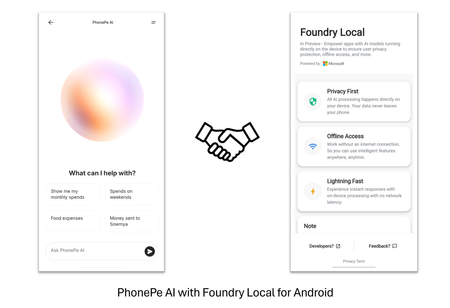
The ability to run advanced AI models directly on smartphones is transforming the mobile landscape. Foundry Local for Android simplifies the integration of generative AI models, allowing teams to deliver sophisticated, secure, and low-latency AI experiences natively on mobile devices. This post highlights Foundry Local for Android as a compelling solution for Android developers, helping them efficiently build and deploy powerful on-device AI capabilities within their applications. The Challenges of Deploying AI on Mobile Devices On-device AI offers the promise of offline capabilities, enhanced privacy, and low-latency processing. However, implementing these capabilities on mobile devices introduces several technical obstacles: Limited computing and storage: Mobile devices operate with constrained processing power and storage compared to traditional PCs. Even the most compact language models can occupy significant space and demand substantial computational resources. Efficient solutions for model and runtime optimization are critical for successful deployment. Concerns about the app size: Integrating large AI models and libraries can dramatically increase application size, reducing install rates and degrading other app features. It remains a challenge to provide advanced AI capabilities while keeping the application compact and efficient. Complexity of development and integration: Most mobile development teams are not specialized in machine learning. The process of adapting, optimizing, and deploying models for mobile inference can be resource intensive. Streamlined APIs and pre-optimized models simplify integration and accelerate time to market. Introducing Foundry Local for Android Foundry Local is designed as a comprehensive on-device AI solution, featuring pre-optimized models, a cross-platform inference engine, and intuitive APIs for seamless integration. Initially announced at //Build 2025 with support for Windows and MacOS desktops, Foundry Local now extends its capabilities to Android in private preview. You can sign up for the private preview https://aka.ms/foundrylocal-androidprp for early evaluation and feedback. To meet the demands of production deployments, Foundry Local for Android is architected as a dedicated Android app paired with an SDK. The app manages model distribution, hosts the AI runtime, and operates as a specialized background service. Client applications interface with this service using a lightweight Foundry Local Android SDK, ensuring minimal overhead and streamlined connectivity. One Model, Multiple Apps: Foundry Local centralizes model management, ensuring that if multiple applications utilize the same model in Foundry Local, it is downloaded and stored only once. This approach optimizes storage and streamlines resource usage. Minimal App Footprint: Client applications are freed from embedding bulky machine learning libraries and models. This avoids ballooning app size and memory usage. Run Separately from Client Apps: The Foundry Local operates independently of client applications. Developers benefit from continuous enhancements without the need for frequent app releases. Customer Story: PhonePe PhonePe, one of India's largest consumer payments platforms that enables access to payments and financial services to hundreds of millions of people across the country. With Foundry Local, PhonePe is enabling AI that allows their users to gain deeper insights into their transactions and payments behavior directly on their mobile device. And because inferencing happens locally, all data stays private and secure. This collaboration addresses PhonePe's key priority of delivering an AI experience that upholds privacy. Foundry Local enables PhonePe to differentiate their app experience in a competitive market using AI while ensuring compliance with privacy commitments. Explore their journey here: PhonePe Product Showcase at Microsoft Ignite 2025 Call to Action Foundry Local equips Android apps with on-device AI, supporting the development of smarter applications for the future. Developers are able to build efficient and secure AI capabilities into their apps, even without extensive expertise in artificial intelligence. See more about Foundry Local in action in this episode of Microsoft Mechanics: https://aka.ms/FL_IGNITE_MSMechanics We look forward to seeing you light up AI capabilities in your Android app with Foundry Local. Don’t miss our private preview: https://aka.ms/foundrylocal-androidprp. We appreciate your feedback, as it will help us make our product better. Thanks to the contribution from NimbleEdge which delivers real-time, on-device personalization for millions of mobile devices. NimbleEdge's mobile technology expertise helps Foundry Local deliver a better experience for Android users.871Views0likes0CommentsExpanded Models Available in Microsoft Foundry Agent Service
Announcement Summary Foundry Agent Service now supports an expanded ecosystem of frontier and specialist models. Access models from Anthropic, DeepSeek AI, Meta, Microsoft, xAI, and more. Avoid model lock-in and choose the best model for each scenario. Build complex, multimodal, multi-agent workflows at enterprise scale. From document intelligence to operational automation, Microsoft Foundry makes AI agents ready for mission-critical workloads.880Views0likes0Comments