model router
1 TopicMicrosoft Foundry Model Router: A Developer's Guide to Smarter AI Routing
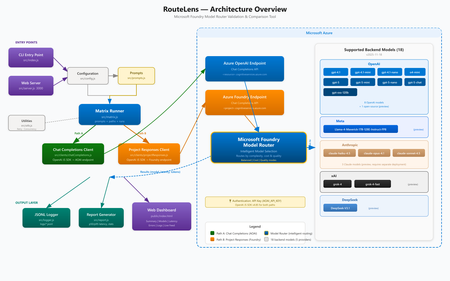
Introduction When building AI-powered applications on Azure, one of the most impactful decisions you make isn't about which model to use, it's about how your application selects models at runtime. Microsoft Foundry Model Router, available through Microsoft Foundry, automatically routes your inference requests to the best available model based on prompt complexity, latency targets, and cost efficiency. But how do you know it's actually routing correctly? And how do you compare its behavior across different API paths? That's exactly the problem RouteLens solves. It's an open-source Node.js CLI and web-based testing tool that sends configurable prompts through two distinct Azure AI runtime paths and produces a detailed comparison of routing decisions, latency profiles, and reliability metrics. In this post, we'll walk through what Model Router does, why it matters, how to use the validator tool, and best practices for designing applications that get the most out of intelligent model routing. What Is Microsoft Founry Model Router? Microsoft Foundry Model Router is a deployment option in Microsoft Foundry that sits between your application and a pool of AI models. Instead of hard-coding a specific model like gpt-4o or gpt-4o-mini , you deploy a Model Router endpoint and let Azure decide which underlying model serves each request. How It Works Your application sends an inference request to the Model Router deployment. Model Router analyzes the request (prompt complexity, token count, required capabilities). It selects the most appropriate model from the available pool. The response is returned transparently — your application code doesn't change. Why This Matters Cost optimization — Simple prompts get routed to smaller, cheaper models. Complex prompts go to more capable (and expensive) ones. Latency reduction — Lightweight prompts complete faster when they don't need a heavyweight model. Resilience — If one model is experiencing high load or throttling, traffic can shift to alternatives. Simplified application code — No need to build your own model-selection logic. The Two Runtime Paths Microsoft Foundry offers two distinct endpoint configurations for hitting Model Router. Even though both use the Chat Completions API, they may have different routing behaviour: Path SDK Endpoint AOAI + Chat Completions OpenAI JS SDK https://.cognitiveservices.azure.com/openai/deployments/ Foundry Project + Chat Completions OpenAI JS SDK (separate client) https://.cognitiveservices.azure.com/openai/deployments/ Understanding whether these two paths produce the same routing decisions is critical for production applications. If the same prompt routes to different models depending on which endpoint you use, that's a signal you need to investigate. Introducing RouteLens RouteLens is a Node.js tool that automates this comparison. It: Sends a configurable set of prompts across categories (echo, summarize, code, reasoning) through both paths. Logs every response to structured JSONL files for post-hoc analysis. Computes statistics including p50/p95 latency, error rates, and model-choice distribution. Highlights routing differences — where the same prompt was served by different models across paths. Provides a web dashboard for interactive testing and real-time result visualization. The Web Dashboard The built-in web UI makes it easy to run tests and explore results without parsing log files: The dashboard includes: KPI Dashboard — Key metrics at a glance: Success Rate, Avg TPS, Gen TPS, Peak TPS, Fastest Response, p50/p95 Latency, Most Reliable Path, Total Tokens Summary view — Per-path/per-category stats with success rate, TPS, and latency Model Comparison — Side-by-side view of which models were selected by each path Latency Charts — Visual bar charts comparing p50 and p95 latencies Error Analysis — Error distribution and detailed error messages Live Feed — Real-time streaming of results as they come in Log Viewer — Browse and inspect historical JSONL log files Model Comparison — See which models were selected by each routing path for every prompt: Live Feed — Real-time streaming of results as they come in: Log Viewer — Browse and inspect historical JSONL log files with parsed table views: Mobile Responsive — The UI adapts to smaller screens: Getting Started Prerequisites Node.js 18+ (LTS recommended) An Azure subscription with a Foundry project Model Router deployed in your Foundry project An API key from your Azure OpenAI / Foundry resource The API version (e.g. 2024-05-01-preview ) Setup # Clone and install git clone https://github.com/leestott/modelrouter-routelens/ cd modelrouter-routelens npm install # Configure your endpoints cp .env.example .env # Edit .env with your Azure endpoints (see below) Configuration The .env file needs these key settings: # Your Foundry / Cognitive Services deployment endpoint # Format: https://<resource>.cognitiveservices.azure.com/openai/deployments/<deployment> # Do NOT include /chat/completions or ?api-version FOUNDRY_PROJECT_ENDPOINT=https://<resource>.cognitiveservices.azure.com/openai/deployments/model-router AOAI_BASE_URL=https://<resource>.cognitiveservices.azure.com/openai/deployments/model-router # API key from your Azure OpenAI / Foundry resource AOAI_API_KEY=your-api-key-here # Azure OpenAI API version AOAI_API_VERSION=2024-05-01-preview</resource></resource></deployment></resource> Running Tests # Full test matrix — sends all prompts through both paths npm run run:matrix # 408 timeout diagnostic — focuses on the Responses path timeout issue npm run run:repro408 # Web UI — interactive dashboard npm run ui # Then open http://localhost:3002 (or the port set in UI_PORT) Understanding the Results Latency Comparison The latency charts show p50 (median) and p95 (tail) latency for each path and prompt category: Key things to look for: Large p50 differences between paths suggest one path has consistently higher overhead. High p95 values indicate tail latency problems — possibly timeouts or retries. Category-specific patterns — If code prompts are slow on one path but fast on another, that's a routing difference worth investigating. Model Comparison The model comparison view shows which models were selected for each prompt: When both paths select the same model, you see a green "Match" indicator. When they differ, it's flagged in red — these are the cases you want to investigate. Error Analysis The errors view helps diagnose reliability issues: Common error patterns: 408 Timeout — The Responses path may take longer for certain prompt categories 401 Unauthorized — Authentication configuration issues 429 Rate Limited — You're hitting throughput limits 500 Internal Server Error — Backend model issues Best Practices for Designing Applications with Model Router 1. Design Prompts with Routing in Mind Model Router makes decisions based on prompt characteristics. To get the best routing: Keep prompts focused — A clear, single-purpose prompt is easier for the router to classify than a multi-part prompt that spans multiple complexity levels. Use system messages effectively — A well-structured system message helps the router understand the task complexity. Separate complex chains — If you have a multi-step workflow, make each step a separate API call rather than one massive prompt. This lets the router use a cheaper model for simple steps. 2. Set Appropriate Timeouts Different models have different latency profiles. Your timeout settings should account for the slowest model the router might select: // Too aggressive — may timeout when routed to a larger model const TIMEOUT = 5000; // 5s // Better — allows headroom for model variation const TIMEOUT = 30000; // 30s // Best — use different timeouts based on expected complexity function getTimeout(category) { switch (category) { case 'echo': return 10000; case 'summarize': return 20000; case 'code': return 45000; case 'reasoning': return 60000; default: return 30000; } } 3. Implement Robust Retry Logic Because the router may select different models on retry, transient failures can resolve themselves: async function callWithRetry(prompt, maxRetries = 3) { for (let attempt = 0; attempt < maxRetries; attempt++) { try { return await client.chat.completions.create({ model: 'model-router', messages: [{ role: 'user', content: prompt }], }); } catch (err) { if (attempt === maxRetries - 1) throw err; // Exponential backoff await new Promise(r => setTimeout(r, 1000 * Math.pow(2, attempt))); } } } 4. Monitor Model Selection in Production Log which model was selected for each request so you can track routing patterns over time: const response = await client.chat.completions.create({ model: 'model-router', messages: [{ role: 'user', content: prompt }], }); // The model field in the response tells you which model was actually used console.log(`Routed to: ${response.model}`); console.log(`Tokens: ${response.usage.total_tokens}`); 5. Use the Right API Path for Your Use Case Based on our testing with RouteLens, consider: Chat Completions path — The standard path for chat-style interactions. Uses the openai SDK directly. Foundry Project path — Uses the same Chat Completions API but through the Foundry project endpoint. Useful for comparing routing behaviour across different endpoint configurations. Note: The Responses API ( /responses ) is not currently available on cognitiveservices.azure.com Model Router deployments. Both paths in RouteLens use Chat Completions. 6. Test Before You Ship Run RouteLens as part of your pre-production validation: # In your CI/CD pipeline or pre-deployment check npm run run:matrix -- --runs 10 --concurrency 4 This helps you: Catch routing regressions when Azure updates model pools Verify that your prompt changes don't cause unexpected model selection shifts Establish latency baselines for alerting Architecture Overview RouteLens sends configurable prompts through two distinct Azure AI runtime paths and compares routing decisions, latency, and reliability. The Matrix Runner dispatches prompts to both the Chat Completions Client (OpenAI JS SDK → AOAI endpoint) and the Project Responses Client ( azure/ai-projects → Foundry endpoint). Both paths converge at Azure Model Router, which intelligently selects the optimal backend model. Results are logged to JSONL files and rendered in the web dashboard. Key Benefits of Model Router Benefit Description Cost savings Automatically routes simple prompts to cheaper models, reducing spend by 30-50% in typical workloads Lower latency Simple prompts complete faster on lightweight models Zero code changes Same API contract as a standard model deployment — just change the deployment name Future-proof As Azure adds new models to the pool, your application benefits automatically Built-in resilience Routing adapts to model availability and load conditions Conclusion Azure Model Router represents a shift from "pick a model" to "describe your task and let the platform decide." This is a natural evolution for AI applications — just as cloud platforms abstract away server selection, Model Router abstracts away model selection. RouteLens gives you the visibility to trust that abstraction. By systematically comparing routing behavior across API paths and prompt categories, you can deploy Model Router with confidence and catch issues before your users do. The tool is open source under the MIT license. Try it out, file issues, and contribute improvements: GitHub Repository Model Router Documentation Microsoft Foundry700Views1like0Comments