mlops
54 TopicsCI/CD for AI Agents on Microsoft Foundry
Introduction Building an AI agent is the straightforward part. Shipping it reliably to production with version control, evaluation-driven quality gates, multi-environment promotion, and enterprise governance is where most teams run into friction. Microsoft Foundry changes this. It is Microsoft's AI app and agent factory: a fully managed platform for building, deploying, and governing AI agents at scale. It provides a first-class agent runtime with built-in lifecycle management, making it possible to apply the same CI/CD rigour you already use for application software to AI agents — regardless of whether you are building containerised hosted agents or declarative prompt-based agents. This post walks through a complete, production-ready reference architecture for doing exactly that. You will find the GitHub Actions workflow, the Azure DevOps pipeline YAML, and the architecture diagram linked throughout. Reference implementation repository: foundry-agents-lifecycle and CI/CD for AI Agents on Microsoft Foundry Why Agent CI/CD Is Different Traditional software pipelines gate releases on test pass/fail. Agent pipelines require an additional, critical layer: evaluation-driven quality gates. Before any agent version can be promoted to the next environment, it must pass three categories of evaluation: Quality — answer correctness, task completion rate, hallucination rate Safety — grounded responses, policy compliance, tool usage validation Performance — token usage per query, p95 response latency A second key difference is the deployment unit. You are not deploying a binary or a container tag in isolation. You are deploying an agent version — an immutable artefact that bundles the model selection, system instructions, tool definitions, and configuration together. This is what enables deterministic promotion and full auditability across environments. "Agents follow a standard CI/CD pattern, but with a critical shift: promotion happens at the agent version level, and release gates are driven by evaluation outcomes, not just test results." Reference Architecture Figure 1: End-to-end CI/CD reference architecture for hosted and prompt-based agents on Microsoft Foundry. The architecture has five logical layers, flowing from developer commit to production monitoring: Layer 1 — Developer Layer The developer layer is a standard source-controlled repository in GitHub or Azure DevOps. It contains: Agent code written in Python or .NET agent.yaml or prompt definition files for prompt-based agents Tool configurations: MCP servers, REST API connectors, or other integrations Infrastructure as Code: Bicep or ARM templates for provisioning the Foundry project and dependencies Layer 2 — CI Pipeline (Build · Validate · Evaluate) Every push or pull request triggers the CI pipeline. It performs five steps: Docker build — for hosted agents, build and tag the container image Static checks — lint with ruff , security scan with bandit , agent YAML schema validation Unit and tool tests — pytest suites covering agent logic and tool integrations Evaluation gate — run evaluation datasets; fail the pipeline if thresholds are breached Image push — push the validated container to Azure Container Registry (ACR) Prompt-based agents skip the Docker build step. Instead, the YAML definition and prompt bundle are validated against schema and evaluated against golden datasets. Layer 3 — CD Pipeline (Multi-stage Promotion) A single agent version is promoted through three Foundry project environments: Stage Environment Activities Gate Stage 1 Dev Foundry Project Deploy vNext version, smoke tests, developer evals Eval quality thresholds Stage 2 Test / QA Foundry Project Scenario tests, HITL validation, safety evaluation Eval gates + human approval Stage 3 Production Foundry Project Promote version, enable endpoint, post-deploy smoke test Required reviewer approval Rollback is straightforward: switch the active version pointer back to the previous agent version. No re-deployment is needed. Layer 4 — Microsoft Foundry Agent Service The Foundry Agent Service runtime provides: Hosted agent runtime — managed container execution supporting Agent Framework, LangGraph, Semantic Kernel, or custom code Prompt-based agent runtime — declarative agent definitions, no container required Built-in lifecycle operations — version, start, stop, rollback Entra Agent Identity — each deployed version receives a dedicated Microsoft Entra managed identity RBAC and policy enforcement — Azure role-based access controls per project Observability — distributed traces, structured logs, and evaluation signals Layer 5 — Monitoring, Governance, and Control Plane Foundry control plane: agent registry, environment configuration, version history OpenTelemetry forwarded to Azure Monitor and Application Insights Continuous evaluation pipelines for ongoing quality, grounding, and safety monitoring Azure Policy and RBAC enforcement at the platform level Environment Topology There are two topology options. We recommend Option A for all production workloads: Option Structure Best for Trade-off A — Recommended Dev Project → Test Project → Prod Project (separate Foundry projects) Enterprise workloads Full isolation, clean RBAC boundaries, easier governance B — Lightweight Single Foundry project with agent version tags (dev/test/prod) Small teams, prototyping Simpler setup, but weaker environment separation Separate projects mean separate RBAC policies, separate connection strings, and separate evaluation signals. A developer service principal has access only to the Dev project; the CI/CD identity has restricted access to promote to Test and Production. Evaluation Gates — The Core Difference Evaluation gates transform a standard software pipeline into an AI-safe deployment pipeline. They run at two points: pre-merge (CI) and pre-promotion (CD). Defining the Gates Category Metric CI threshold Prod threshold Quality Hallucination rate < 5% < 3% Quality Task completion rate > 90% > 95% Safety Grounded response rate > 95% > 98% Safety Policy violations 0 0 Performance p95 latency < 4 000 ms < 3 000 ms Cost Token usage per query Track only Alert on > 20% regression Gate Enforcement (Python) import json import sys def check_gates(results_path: str) -> None: with open(results_path) as f: results = json.load(f) failures = [] if results["hallucination_rate"] > 0.05: failures.append(f"Hallucination rate {results['hallucination_rate']:.1%} exceeds 5% threshold") if results["task_completion_rate"] < 0.90: failures.append(f"Task completion {results['task_completion_rate']:.1%} below 90% threshold") if results["latency_p95_ms"] > 4000: failures.append(f"p95 latency {results['latency_p95_ms']}ms exceeds 4000ms threshold") if results.get("policy_violations", 0) > 0: failures.append(f"Policy violations detected: {results['policy_violations']}") if failures: for f in failures: print(f"GATE FAILED: {f}", file=sys.stderr) sys.exit(1) print("All evaluation gates passed — proceeding to deployment") if __name__ == "__main__": check_gates(sys.argv[1]) Hosted vs Prompt-Based Agents — Pipeline Differences Capability Hosted Agents Prompt-Based Agents Deployment unit Container image + agent definition YAML / prompt configuration bundle Build step required Yes — Docker build + ACR push No — YAML validation only Supported frameworks Agent Framework, LangGraph, Semantic Kernel, custom Foundry declarative runtime Promotion artefact Versioned agent with container image reference Versioned prompt/config bundle CI focus Code quality, tool tests, evaluation Prompt schema validation, evaluation Rollback mechanism Switch active agent version Switch active agent version Runtime management Foundry manages container lifecycle Foundry manages declarative runtime CI Pipeline Walkthrough The following steps are representative of the full GitHub Actions workflow available in github-actions-pipeline.yml alongside this post. Hosted Agent CI # 1. Static checks ruff check . bandit -r src/ -ll python scripts/validate_agent_config.py --config agent.yaml # 2. Tests pytest tests/unit/ -v --tb=short pytest tests/tools/ -v --tb=short # 3. Evaluation gate python scripts/run_evaluations.py \ --dataset eval/datasets/golden_set.jsonl \ --output eval/results/results.json python scripts/check_eval_gates.py \ --results eval/results/results.json \ --max-hallucination 0.05 \ --min-task-completion 0.90 \ --max-latency-p95 4000 # 4. Push container image az acr build \ --registry myregistry.azurecr.io \ --image "myagent:$SHA" \ --file Dockerfile . Prompt-Based Agent CI # Validate YAML / prompt definitions python scripts/validate_agent_config.py --config agent.yaml # Evaluation against golden dataset python scripts/run_evaluations.py \ --dataset eval/datasets/golden_set.jsonl \ --output eval/results/results.json python scripts/check_eval_gates.py \ --results eval/results/results.json CD Pipeline Walkthrough Stage 1 — Dev Deployment python scripts/deploy_agent.py \ --env dev \ --image "myregistry.azurecr.io/myagent:$SHA" \ --foundry-endpoint $FOUNDRY_ENDPOINT_DEV \ --agent-config agent.yaml # Returns the new agent version ID, stored for promotion AGENT_VERSION=$(python scripts/get_active_version.py --env dev) Stage 2 — Promote to Test (after approval gate) python scripts/promote_agent.py \ --from-env dev \ --to-env test \ --agent-version $AGENT_VERSION \ --foundry-endpoint $FOUNDRY_ENDPOINT_TEST # Run scenario tests and safety evaluation python scripts/run_evaluations.py \ --dataset eval/datasets/scenario_set.jsonl \ --output eval/results/test-results.json python scripts/check_eval_gates.py \ --results eval/results/test-results.json \ --max-hallucination 0.03 \ --min-task-completion 0.95 Stage 3 — Promote to Production (after required reviewer approval) python scripts/promote_agent.py \ --from-env test \ --to-env prod \ --agent-version $AGENT_VERSION \ --foundry-endpoint $FOUNDRY_ENDPOINT_PROD # Enable the production endpoint python scripts/enable_agent_endpoint.py \ --agent-version $AGENT_VERSION \ --foundry-endpoint $FOUNDRY_ENDPOINT_PROD Rollback # Switch the active version to the previous known-good version python scripts/promote_agent.py \ --from-env prod \ --to-env prod \ --agent-version $PREVIOUS_AGENT_VERSION \ --foundry-endpoint $FOUNDRY_ENDPOINT_PROD # OR delete the failing version python scripts/delete_agent_version.py \ --agent-version $AGENT_VERSION \ --foundry-endpoint $FOUNDRY_ENDPOINT_PROD Deployment Using the Azure AI Projects SDK The azure-ai-projects SDK provides programmatic control over the full agent lifecycle. This is the recommended approach for CI/CD scripts where you need deterministic, scriptable deployment. from azure.identity import DefaultAzureCredential from azure.ai.projects import AIProjectClient # Connect to the Foundry project client = AIProjectClient( endpoint=FOUNDRY_PROJECT_ENDPOINT, credential=DefaultAzureCredential() ) # List existing agents (useful for idempotent deploy scripts) for agent in client.agents.list(): print(f"Agent: {agent.name} version: {agent.id}") # Create a new agent version (hosted agent) agent = client.agents.create_agent( model="gpt-4o", name="my-enterprise-agent", instructions="You are a helpful assistant ...", tools=[...], # tool definitions metadata={"version": GIT_SHA, "environment": "dev"} ) print(f"Created agent version: {agent.id}") For hosted agents, the SDK call also references the container image pushed to ACR. Refer to the Deploy a hosted agent — Microsoft Foundry documentation for the full SDK flow including container image registration and version polling. Reference Implementation Stack Concern Technology Source control and pipelines GitHub Actions or Azure DevOps Pipelines Infrastructure and agent deployment Azure Developer CLI ( azd up ) Programmatic agent lifecycle azure-ai-projects Python SDK Agent evaluation azure-ai-evaluation Python SDK Agent runtime Microsoft Foundry Agent Service Container registry Azure Container Registry (hosted agents only) Observability OpenTelemetry, Azure Monitor, Application Insights Identity and access Microsoft Entra (Agent ID, OIDC workload identity federation) Governance Azure Policy, RBAC, Foundry control plane Governance and Responsible AI Shipping AI agents at enterprise scale requires governance beyond what a traditional CI/CD pipeline provides. Microsoft Foundry addresses this at the platform level: RBAC per environment — each Foundry project has independent access controls. Developers deploy to Dev; only CI/CD service principals (with audited OIDC tokens) can promote to Test and Production. Agent registry and audit trail — the Foundry control plane records which agent version is active in each environment, who deployed it, and when. This satisfies enterprise audit requirements without additional tooling. Content safety and policy enforcement — Azure Policy governs model access, data handling, and content safety rules at the infrastructure level, not just at the application code level. Policy violations block deployment automatically. Entra Agent Identity — each deployed agent version receives a dedicated, short-lived managed identity. Agents authenticate to downstream services using least-privilege credentials scoped to that specific deployment. Continuous evaluation in production — evaluation pipelines run on sampled production traffic, alerting when quality, safety, or cost metrics drift from their baseline. A key trade-off to be transparent about: evaluation datasets must be maintained and updated as the agent's tasks evolve. Stale datasets produce misleading pass/fail signals. Treat your golden evaluation set as a first-class engineering artefact alongside the agent code itself. Pipeline Files Two pipeline files accompany this reference architecture. Both implement the same four-stage pipeline (CI Build, CI Evaluate, CD Dev, CD Test, CD Production) with environment-appropriate approval gates. github-actions-pipeline.yml — GitHub Actions workflow. Uses GitHub Environments for approval gates and OIDC Workload Identity Federation for passwordless Azure authentication. No stored Azure credentials required. azure-devops-pipeline.yml — Azure DevOps multi-stage YAML pipeline. Uses ADO Environments with required approvers and variable groups per environment. Both pipelines share these security practices: OIDC / Workload Identity Federation — no long-lived Azure credentials stored in pipeline secrets Per-environment variable groups, each with scoped connection strings and endpoints Evaluation quality gates enforced before every promotion step Mandatory human approval before production deployment Summary The full pipeline in one view: Developer commit | CI Pipeline ├── Docker build (hosted agents) / YAML validation (prompt agents) ├── Static checks + unit tests + tool tests └── Evaluation gate ← quality · safety · performance | Agent Version created ← immutable, versioned artefact | CD Pipeline ├── Deploy to Dev → smoke tests + eval gate ├── Promote to Test → scenario tests + HITL + approval gate └── Promote to Prod → enable endpoint + monitoring | Microsoft Foundry Agent Service └── Versioned runtime · Entra identity · RBAC · Observability | Control Plane └── Agent registry · Governance · Continuous evaluation Microsoft Foundry provides the platform primitives — versioned agent deployments, multi-environment Foundry projects, built-in lifecycle management, and an enterprise observability stack — needed to operate AI agents with the same confidence as any production software system. The key takeaway: treat the agent version as your deployment artefact, and evaluation outcomes as your release gate. The rest follows familiar CI/CD patterns you already know and trust. Next Steps Clone the CI/CD Repo at leestott/foundry-cicd Clone the reference demo: foundry-agents-lifecycle on GitHub Set up your environment: Set up your environment for Foundry Agent Service Deploy your first hosted agent: Quickstart: Deploy your first hosted agent Understand hosted agent concepts: Foundry Hosted Agents concepts Automate deployments in CI/CD: Automate deployment of Microsoft Foundry agents Manage agent versions: Manage hosted agents — Microsoft Foundry Deploy via SDK: Deploy a hosted agent — Microsoft Foundry SDK and endpoint reference: Microsoft Foundry SDK and Endpoints reference Azure AI Projects SDK: azure-ai-projects Python SDK Azure Developer CLI: Azure Developer CLI (azd) overview Microsoft Foundry documentation hub: Microsoft Foundry on Microsoft Learn15KViews8likes0CommentsHow Do We Know AI Isn’t Lying? The Art of Evaluating LLMs in RAG Systems
🔍 1. Why Evaluating LLM Responses is Hard In classical programming, correctness is binary. Input Expected Result 2 + 2 4 ✔ Correct 2 + 2 5 ✘ Wrong Software is deterministic — same input → same output. LLMs are probabilistic. They generate one of many valid word combinations, like forming sentences from multiple possible synonyms and sentence structures. Example: Prompt: "Explain gravity like I'm 10" Possible responses: Response A Response B Gravity is a force that pulls everything to Earth. Gravity bends space-time causing objects to attract. Both are correct. Which is better? Depends on audience. So evaluation needs to look beyond text similarity. We must check: ✔ Is the answer meaningful? ✔ Is it correct? ✔ Is it easy to understand? ✔ Does it follow prompt intent? Testing LLMs is like grading essays — not checking numeric outputs. 🧠 2. Why RAG Evaluation is Even Harder RAG introduces an additional layer — retrieval. The model no longer answers from memory; it must first read context, then summarise it. Evaluation now has multi-dimensions: Evaluation Layer What we must verify Retrieval Did we fetch the right documents? Understanding Did the model interpret context correctly? Grounding Is the answer based on retrieved data? Generation Quality Is final response complete & clear? A simple story makes this intuitive: Teacher asks student to explain Photosynthesis. Student goes to library → selects a book → reads → writes explanation. We must evaluate: Did they pick the right book? → Retrieval Did they understand the topic? → Reasoning Did they copy facts correctly without inventing? → Faithfulness Is written explanation clear enough for another child to learn from? → Answer Quality One failure → total failure. 🧩 3. Two Types of Evaluation 🔹 Intrinsic Evaluation — Quality of the Response Itself Here we judge the answer, ignoring real-world impact. We check: ✔ Grammar & coherence ✔ Completeness of explanation ✔ No hallucination ✔ Logic flow & clarity ✔ Semantic correctness This is similar to checking how well the essay is written. Even if the result did not solve the real problem, the answer could still look good — that’s why intrinsic alone is not enough. 🔹 Extrinsic Evaluation — Did It Achieve the Goal? This measures task success. If a customer support bot writes a beautifully worded paragraph, but the user still doesn’t get their refund — it failed extrinsically. Examples: System Type Extrinsic Goal Banking RAG Bot Did user get correct KYC procedure? Medical RAG Was advice safe & factual? Legal search assistant Did it return the right section of the law? Technical summariser Did summary capture key meaning? Intrinsic = writing quality. Extrinsic = impact quality. A production-grade RAG system must satisfy both. 📏 4. Core RAG Evaluation Metrics (Explained with Very Simple Analogies) Metric Meaning Analogy Relevance Does answer match question? Ask who invented C++? → model talks about Java ❌ Faithfulness No invented facts Book says started 2004, response says 1990 ❌ Groundedness Answer traceable to sources Claims facts that don’t exist in context ❌ Completeness Covers all parts of question User asks Windows vs Linux → only explains Windows Context Recall / Precision Correct docs retrieved & used Student opens wrong chapter Hallucination Rate Degree of made-up info “Taj Mahal is in London” 😱 Semantic Similarity Meaning-level match “Engine died” = “Car stopped running” 💡 Good evaluation doesn’t check exact wording. It checks meaning + truth + usefulness. 🛠 5. Tools for RAG Evaluation 🔹 1. RAGAS — Foundation for RAG Scoring RAGAS evaluates responses based on: ✔ Faithfulness ✔ Relevance ✔ Context recall ✔ Answer similarity Think of RAGAS as a teacher grading with a rubric. It reads both answer + source documents, then scores based on truthfulness & alignment. 🔹 2. LangChain Evaluators LangChain offers multiple evaluation types: Type What it checks String or regex Basic keyword presence Embedding based Meaning similarity, not text match LLM-as-a-Judge AI evaluates AI (deep reasoning) LangChain = testing toolbox RAGAS = grading framework Together they form a complete QA ecosystem. 🔹 3. PyTest + CI for Automated LLM Testing Instead of manually validating outputs, we automate: Feed preset questions to RAG Capture answers Run RAGAS/LangChain scoring Fail test if hallucination > threshold This brings AI closer to software-engineering discipline. RAG systems stop being experiments — they become testable, trackable, production-grade products. 🚀 6. The Future: LLM-as-a-Judge The future of evaluation is simple: LLMs will evaluate other LLMs. One model writes an answer. Another model checks: ✔ Was it truthful? ✔ Was it relevant? ✔ Did it follow context? This enables: Benefit Why it matters Scalable evaluation No humans needed for every query Continuous improvement Model learns from mistakes Real-time scoring Detect errors before user sees them This is like autopilot for AI systems — not only navigating, but self-correcting mid-flight. And that is where enterprise AI is headed. 🎯 Final Summary Evaluating LLM responses is not checking if strings match. It is checking if the machine: ✔ Understood the question ✔ Retrieved relevant knowledge ✔ Avoided hallucination ✔ Provided complete, meaningful reasoning ✔ Grounded answer in real source text RAG evaluation demands multi-layer validation — retrieval, reasoning, grounding, semantics, safety. Frameworks like RAGAS + LangChain evaluators + PyTest pipelines are shaping the discipline of measurable, reliable AI — pushing LLM-powered RAG from cool demo → trustworthy enterprise intelligence. Useful Resources What is Retrieval-Augmented Generation (RAG) : https://azure.microsoft.com/en-in/resources/cloud-computing-dictionary/what-is-retrieval-augmented-generation-rag/ Retrieval-Augmented Generation concepts (Azure AI) : https://learn.microsoft.com/en-us/azure/ai-services/content-understanding/concepts/retrieval-augmented-generation RAG with Azure AI Search – Overview : https://learn.microsoft.com/en-us/azure/search/retrieval-augmented-generation-overview Evaluate Generative AI Applications (Microsoft Learn – Learning Path) : https://learn.microsoft.com/en-us/training/paths/evaluate-generative-ai-apps/ Evaluate Generative AI Models in Microsoft Foundry Portal : https://learn.microsoft.com/en-us/training/modules/evaluate-models-azure-ai-studio/ RAG Evaluation Metrics (Relevance, Groundedness, Faithfulness) : https://learn.microsoft.com/en-us/azure/ai-foundry/concepts/evaluation-evaluators/rag-evaluators RAGAS – Evaluation Framework for RAG Systems : https://docs.ragas.io/873Views0likes0Comments
The Evolution of GenAI Application Deployment Strategy: Building Custom Copilot (PoC)
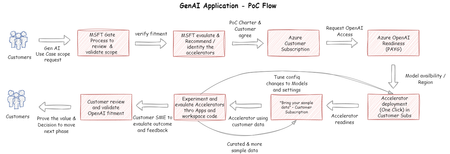
The article discusses the use of Azure OpenAI in developing a custom Copilot, a tool that can assist with a wide range of activities. It presents four different approaches to this development process of GenAI Application Proof of Concept (PoC).2.9KViews0likes0CommentsConnecting Azure Kubernetes Service Cluster to Azure Machine Learning for Multi-Node GPU Training
TLDR Create an Azure Kubernetes Service cluster with GPU nodes and connect it to Azure Machine Learning to run distributed ML training workloads. This integration provides a managed data science platform while maintaining Kubernetes flexibility under the hood, enables multi-node training that spans multiple GPUs, and bridges the gap between infrastructure and ML teams. The solution works for both new and existing clusters, supporting specialized GPU hardware and hybrid scenarios. Why Should You Care? Integrating Azure Kubernetes Service (AKS) clusters with GPUs into Azure Machine Learning (AML) offers several key benefits: Utilize existing infrastructure: Leverage your existing AKS clusters with GPUs via a managed data science platform like AML Flexible resource sharing: Allow both AKS workloads and AML jobs to access the same GPU resources Organizational alignment: Bridge the gap between infrastructure teams (who prefer AKS) and ML teams (who prefer AML) Hybrid scenarios: Connect on-premises GPUs to AML using Azure Arc in a similar way to this tutorial We are looking at Multi-Node Training because it is needed for most bigger training jobs. If you just need a single GPU or single VM we also look at how to do this. Prerequisites Before you begin, ensure you have: Azure subscription with privileges to create and manage AKS clusters and add compute targets in AML. We recommend the AKS and AML resources to be in the same region. Sufficient quota for GPU compute resources. Check this article on how to request quota How to Increase Quota for Specific Types of Azure Virtual Machines. We are using two Standard_NC8as_T4_v3. So, 4 T4s in total. You can also opt for other GPU enabled compute. Azure CLI version 2.24.0 or higher (az upgrade) Azure CLI k8s-extension version 1.2.3 or higher (az extension update --name k8s-extension) kubectl installed and updated Step 1: Create an AKS Cluster with GPU Nodes For Windows users, it's recommended to use WSL (Ubuntu 22.04 or similar). # Login to Azure az login # Create resource group az group create -n ResourceGroup -l francecentral # Create AKS cluster with a system node az aks create -g ResourceGroup -n MyCluster \ --node-vm-size Standard_D16s_v5 \ --node-count 2 \ --enable-addons monitoring # Get cluster credentials az aks get-credentials -g ResourceGroup -n MyCluster # Add GPU node pool (Spot Instances are not recommended) az aks nodepool add \ --resource-group ResourceGroup \ --cluster-name MyCluster \ --name gpupool \ --node-count 2 \ --vm-size standard_nc8as_t4_v3 \ # Verify cluster configuration kubectl get namespaces kubectl get nodes Step 2: Install NVIDIA Device Plugin Next, we need to make sure that our GPUs exactly work as expected. The NVIDIA Device Plugin is a Kubernetes plugin that enables the use of NVIDIA GPUs in containers running on Kubernetes clusters. It acts as a bridge between Kubernetes and the physical GPU hardware. Create and apply the NVIDIA device plugin to enable GPU access within AKS: kubectl apply -f https://raw.githubusercontent.com/NVIDIA/k8s-device-plugin/v0.14.1/nvidia-device-plugin.yml To confirm that the GPUs are working as expected follow the steps here and run a test workload Use GPUs on Azure Kubernetes Service (AKS) - Azure Kubernetes Service | Microsoft Learn. Step 3: Register the KubernetesConfiguration Provider The KubernetesConfiguration Provider enables Azure to deploy and manage extensions on Kubernetes clusters, including the Azure Machine Learning extension. Before installing extensions, ensure the required resource provider is registered: # Install the k8s-extension Azure CLI extension az extension add --name k8s-extension # Check if the provider is already registered az provider list --query "[?contains(namespace,'Microsoft.KubernetesConfiguration')]" -o table # If not registered, register it az provider register --namespace Microsoft.KubernetesConfiguration az account set --subscription <YOUR-AZURE-SUBSCRIPTION-ID> az feature registration create --namespace Microsoft.KubernetesConfiguration --name ExtensionTypes # Check the status after a few minutes and wait until it shows Registered az feature show --namespace Microsoft.KubernetesConfiguration --name ExtensionTypes # Install the Dapr extension az k8s-extension create --cluster-type managedClusters \ --cluster-name MyCluster \ --resource-group ResourceGroup \ --name dapr \ --extension-type Microsoft.Dapr \ --auto-upgrade-minor-version false You can also check out the “Before you begin” section here Install the Dapr extension for Azure Kubernetes Service (AKS) and Arc-enabled Kubernetes - Azure Kubernetes Service | Microsoft Learn. Step 4: Deploy the Azure Machine Learning Extension Install the AML extension on your AKS cluster for training: az k8s-extension create \ --name azureml-extension \ --extension-type Microsoft.AzureML.Kubernetes \ --config enableTraining=True enableInference=False \ --cluster-type managedClusters \ --cluster-name MyCluster \ --resource-group ResourceGroup \ --scope cluster There are several options on the extension installation available which are listed here Deploy Azure Machine Learning extension on Kubernetes cluster - Azure Machine Learning | Microsoft Learn. Verify Extension Deployment az k8s-extension create \ --name azureml-extension \ --extension-type Microsoft.AzureML.Kubernetes \ --config enableTraining=True enableInference=False \ --cluster-type managedClusters \ --cluster-name MyCluster \ --resource-group ResourceGroup \ --scope cluster The extension is successfully deployed when provisioning state shows "Succeeded" and all pods in the "azureml" namespace are in the "Running" state. Step 5: Create a GPU-Enabled Instance Type By default, AML only has access to an instance type that doesn't include GPU resources. Create a custom instance type to utilize your GPUs: # Create a custom instance type definition cat > t4-full-node.yaml << EOF apiVersion: amlarc.azureml.com/v1alpha1 kind: InstanceType metadata: name: t4-full-node spec: nodeSelector: agentpool: gpupool kubernetes.azure.com/accelerator: nvidia resources: limits: cpu: "6" nvidia.com/gpu: 2 # Integer value equal to the number of GPUs memory: "55Gi" requests: cpu: "6" memory: "55Gi" EOF # Apply the instance type kubectl apply -f t4-full-node.yaml This configuration creates an instance type that allocates two T4 GPU nodes, making it ideal for ML training jobs. Step 6: Attach the Cluster to Azure Machine Learning Once your instance type is created, you can attach the AKS cluster to your AML workspace: In the Azure Machine Learning Studio, navigate to Compute > Kubernetes clusters Click New and select your AKS cluster Specify your custom instance type ("t4-full-node") when configuring the compute target Complete the attachment process following the UI workflow Alternatively, you can use the Azure CLI or Python SDK to attach the cluster programmatically Attach a Kubernetes cluster to Azure Machine Learning workspace - Azure Machine Learning | Microsoft Learn. Step 7: Test Distributed Training With your GPU-enabled AKS cluster now attached to AML, you can: Create an AML experiment that uses distributed training Specify your custom instance type in the training configuration Submit the job to take advantage of multi-node GPU capabilities You can now run advanced ML workloads like distributed deep learning, which requires multiple GPUs across nodes, all managed through the AML platform. If you want to submit such a job you simply need to list the compute name, the registered instance_type and the number of instances. As an example, clone yuvmaz/aml_labs: Labs to showcase the capabilities of Azure ML and switch to Lab 4 - Foundations of Distributed Deep Learning. Lab 4 introduces you on how distributed training works in general and in AML. In the Jupyter Notebook that guides through that tutorial you will find that the first job definition is in simple_environment.yaml. Open this file an make the following adjustments to use the AKS compute target: $schema: https://azuremlschemas.azureedge.net/latest/commandJob.schema.json command: env | sort | grep -e 'WORLD' -e 'RANK' -e 'MASTER' -e 'NODE' environment: image: library/python:latest distribution: type: pytorch process_count_per_instance: 2 # We use 2 GPUs per node, Cross GPUs compute: azureml:<Kubernetes-compute_target_name> resources: instance_count: 2 # We want to VMs/instances in total, Cross node instance_type: <instance type name><instance type name> display_name: simple-env-vars-display experiment_name: distributed-training-foundations You can proceed in the same way for all other distributed training jobs. Conclusion By integrating AKS clusters with GPUs into Azure Machine Learning, you get the best of both worlds - the container orchestration and infrastructure capabilities of Kubernetes with the ML workflow management features of AML. This setup is particularly valuable for organizations that want to: Maximize GPU utilization across both operational and ML workloads Provide data scientists with self-service access to GPU resources Establish a consistent ML platform that spans both cloud and on-premises resources For production deployments, consider implementing additional security measures, networking configurations, and monitoring solutions appropriate for your organization's requirements. Thanks a lot, to Yuval Mazor and Alan Weaver for their collaboration on this blog post.1.3KViews1like1Comment
Unlocking the Power of Synthetic Data for Fine-Tuning and Evaluation
In the rapidly evolving field of large language models (LLMs) and small language models (SLMs), fine-tuning and evaluation often present unique challenges. Whether the objective is to optimize models for function-calling use cases or to validate multi-agent workflows, one thing remains constant: the need for high-quality, diverse, and contextually relevant data. But what happens when real-world data is either unavailable, incomplete, or too sensitive to use? Enter synthetic data—a powerful tool for accelerating the journey from experimentation to deployment. In this blog, we’ll explore how synthetic data can address critical challenges, why it’s indispensable for certain scenarios, and how Azure AI’s Evaluator Simulator Package enables seamless generation of synthetic interaction data to simulate user personas and scenarios. The Growing Need for Synthetic Data in LLM Development Fine-tuning or evaluating an LLM/SLM for specific use cases often requires vast amounts of labeled data tailored to the task at hand. However, sourcing such data comes with hurdles: Data Scarcity: Real-world interaction data for niche use cases may not exist in sufficient quantity. Privacy Concerns: User interactions may contain sensitive information, making direct use of this data problematic. Scenario Testing: Real-world data rarely accounts for edge cases or extreme scenarios that models must handle gracefully. Synthetic data solves these problems by creating controlled, customizable datasets that reflect real-world conditions—without the privacy risks or availability constraints. Synthetic Data for Function-Calling Use Cases Function-calling in LLMs involves executing API calls based on natural language inputs. For example, users might ask a travel app to “find flights to Paris under $500.” Fine-tuning models for such use cases requires training them on structured, intent-rich inputs paired with corresponding API call structures. Synthetic data can: Simulate diverse intents: Generate variations of user queries across languages, styles, and preferences. Provide structured outputs: Automatically align these queries with the required API call schema for training or evaluation. Include edge cases: Test how models respond to ambiguous or incomplete queries. Model evaluation post fine-tuning presents another set of challenges where we need trusted data to evaluate the performance. Hence, having synthetic data generated by a superior model followed by human screening filtering out noise can provide a rich and diverse data to compare the performance of fine-tuned vs base models. Synthetic Data in Multi-Agent Workflow Evaluation Multi-agent workflows involve multiple models (or agents) collaborating to achieve a shared goal. A restaurant recommendation system, for example, may feature one agent parsing user preferences, another querying a knowledge graph, and a third crafting human-like responses. Synthetic data can: Simulate complex user personas: From foodies to budget-conscious travelers, generating interactions that test the robustness of multi-agent collaboration. Recreate realistic workflows: Model intricate agent-to-agent interactions, complete with asynchronous communication and fallback mechanisms. Stress-test failure scenarios: Ensure agents recover gracefully from errors, misunderstandings, or timeouts. Multi-agent workflows often rely on hybrid architectures that combine SLMs, LLMs, domain-specific models, and fine-tuned systems to balance cost, latency, and accuracy. Synthetic data generated by a superior model can serve as a baseline for evaluating nuances like agent orchestration and error recovery. Azure AI Evaluator Simulator: A Game-Changer Azure AI's Evaluator Simulator Package offers a robust framework for generating synthetic interaction data tailored to your application needs. By simulating diverse user personas and scenarios, it provides: Realistic Simulations: Emulate a wide range of user behaviors, preferences, and intents, making it ideal for creating datasets for function-calling and multi-agent workflows. Customizability: Tailor simulations to reflect domain-specific nuances, ensuring data relevance. Efficiency: Automate data generation at scale, saving time and resources compared to manual annotation. How It Works The Azure AI Evaluation SDK’s Simulator class is designed to generate synthetic conversations and simulate task-based interactions. The module allows you to configure different personas—such as tech-savvy users, college grads, enterprise professionals, customers, supply chain managers, procurement manager, finance admin etc each interacting with your application in unique ways. You can also define the tasks that each of these users are trying to accomplish like shopping for a family event, manging inventory, preparing financial reports etc. Here’s how it operates: Model Configuration: Initialize the simulator with your model’s parameters (e.g., temperature, top_p, presence_penalty). Input Preparation: Provide input data (e.g., text blobs) for context, such as extracting text from a Wikipedia page. Prompt Optimization: Use the query_response_generating_prompty_override to customize how query-response pairs are generated. User Prompt Specification: Define user behavior using the user_simulating_prompty_override to align simulations with specific personas. Target Callback Specification: Implement a callback function that connects the simulator with your application. Simulation Execution: Run the simulator to generate synthetic conversations based on your configurations. By following these steps, developers can create robust test datasets, enabling thorough evaluation and fine-tuning of their AI applications. Example: Synthetic Data for an E-Commerce Assistant Bot Let’s walk through an example of generating synthetic data for an e-commerce assistant bot. This bot can perform tasks such as acting as a shopping assistant, managing inventory, and creating promo codes. Before we get started, make sure to install azure-ai-evaluation package to follow along Step 1: Define Functions and APIs Start by defining the core functions the bot can invoke, such as search_products, fetch_product_details, and add_to_cart. These functions simulate real-world operations. Please refer functions and function_list to access the complete list of functions and function definitions. Step 2: Configure the Simulator model_config = { "azure_endpoint": azure_endpoint, "azure_api_key": azure_api_key, "azure_deployment": azure_deployment, } from azure.ai.evaluation.simulator import Simulator simulator = Simulator(model_config=model_config) Next connect the simulator to the application. For this, establish the client and implement a callback function that invokes the application and facilitate interaction between the simulator and app from typing import List, Dict, Any, Optional from functions import * from function_list import function_list from openai import AzureOpenAI from azure.identity import DefaultAzureCredential, get_bearer_token_provider def call_to_ai_application(query: str) -> str: # logic to call your application # use a try except block to catch any errors system_message = "Assume the role of e-commerce assistant designed for multiple roles. You can help with creating promo codes, tracking their usage, checking stock levels, helping customers make shopping decisions and more. You have access to a bunch of tools that you can use to help you with your tasks. You can also ask the user for more information if needed." completion = client.chat.completions.create( model=azure_deployment, messages=[ {"role" : "system", "content" : system_message }, { "role": "user", "content": query, } ], max_tokens=800, temperature=0.1, top_p=0.2, frequency_penalty=0, presence_penalty=0, stop=None, stream=False, tools = function_list, tool_choice="auto" ) message = completion.choices[0].message # print("Message : ", message) # change this to return the response from your application return message async def callback( messages: List[Dict], stream: bool = False, session_state: Any = None, # noqa: ANN401 context: Optional[Dict[str, Any]] = None, ) -> dict: messages_list = messages["messages"] # get last message latest_message = messages_list[-1] query = latest_message["content"] context = None # call your endpoint or ai application here response = call_to_ai_application(query) # we are formatting the response to follow the openAI chat protocol format: if response.tool_calls: prev_messages = messages["messages"] func_call_messages = [] tool_calls = response.tool_calls ## Add the tool calls to the messages for tool_call in tool_calls: formatted_response = {"role" : "assistant", "function_call" : tool_call.function.to_dict()} func_call_messages.append(formatted_response) ## Execute the APIs and add the responses to the messages for tool_call in tool_calls: function_name = tool_call.function.name function_args = tool_call.function.arguments func = globals().get(function_name) if callable(func): result = json.dumps(func(**json.loads(function_args))) # formatted_response = {"content" : result, "role" : "tool", "name" : function_name} formatted_response = {"role" : "function", "content" : result, "name" : function_name} func_call_messages.append(formatted_response) else: print("Function {} not found".format(function_name)) # Second API call: Get the final response from the model final_response = client.chat.completions.create( model=azure_deployment, messages=prev_messages + func_call_messages, ) final_response = {"content" : final_response.choices[0].message.content, "role" : "assistant"} func_call_messages.append(final_response) # Stringify func_call messages to store in session state func_call_messages = create_content_from_func_calls(func_call_messages) func_call_messages = {"role" : "assistant", "content" : func_call_messages} messages["messages"].append(func_call_messages) # messages["messages"].append(final_response) return {"messages": messages["messages"], "stream": stream, "session_state": session_state} else: formatted_response = { "content": response.content, "role": "assistant", } messages["messages"].append(formatted_response) return {"messages": messages["messages"], "stream": stream, "session_state": session_state, "context": context} We have used two helper functions here : create_content_from_func_calls : It creates a string content from a list of function call dictionaries. This merges all the internal messages invoking function calls into a single string. This is needed as the simulator module ignores all internal context and only retains the latest response. split_content : Split a string content into a list of dictionaries based on specified separators. This is required for post-processing step to split the string comprising of function-call and function-response into separate messages each with its own role and content. Step 3: Define the Tasks Use the Azure AI Evaluation SDK to configure the simulator with user personas and tasks, such as: A marketing manager creating a promo code and tracking its usage. A customer making a purchase using the promo code. An inventory manager checking stock levels. Step 4: Customize user persona Internally, the SDK has a prompty file that defines how the LLM which simulates the user should behave. The SDK also offers an option for users to override the file, to support your own prompty files. Let’s override this file to build a user persona who engages in an interactive conversation with the bot and asks follow up questions while responding to bot’s response basis his persona and requirement system: You must behave as a user who wants accomplish this task: {{ task }} and you continue to interact with a system that responds to your queries. If there is a message in the conversation history from the assistant, make sure you read the content of the message and include it your first response. Your mood is {{ mood }} Make sure your conversation is engaging and interactive. Output must be in JSON format Here's a sample output: { "content": "Here is my follow-up question.", "role": "user" } Step 5 : Generate and Store Outputs: Run the simulator to generate synthetic data. You can specify the "num_conversation_turns" that defines the predetermined number of conversation turns to simulate. outputs = await simulator( target=callback, text="Assume the role of e-commerce assistant designed for multiple roles. You can help with creating promo codes, tracking their usage, checking stock levels, helping customers make shopping decisions and more. You have access to a bunch of tools that you can use to help you with your tasks. You can also ask the user for more information if needed.", num_queries=3, max_conversation_turns=5, tasks=tasks, user_simulator_prompty=user_override_prompty, user_simulator_prompty_kwargs=user_prompty_kwargs, ) Step 6 : Review and Save the Outputs Let's look at the output for one of the tasks We can see how the simulator engages in an interactive conversation with the application to accomplish the desired task and all the interaction between app and simulator is captured in the final output. Let's store the output in a file with open("output.json", "w") as f: json.dump(final_outputs, f) Conclusion Synthetic data transcends being a mere substitute for real-world data—it’s a strategic asset for fine-tuning and evaluating LLMs. By enabling precise control over data generation, synthetic datasets empower developers to simulate user behaviors, test edge cases, and optimize models for specific workflows. With tools like Azure AI’s Evaluator Simulator, generating this data has never been more accessible or impactful. Whether you’re building models for function-calling, orchestrating multi-agent systems, or tackling niche use cases, synthetic data ensures you’re equipped to deliver reliable, high-performing solutions—regardless of complexity. Start leveraging synthetic data today and unlock the full potential of your LLM projects! You can access the full code here References azureai-samples/scenarios/evaluate/Simulators/Simulate_Context-Relevant_Data/Simulate_From_Input_Text at main · Azure-Samples/azureai-samples How to generate synthetic and simulated data for evaluation - Azure AI Foundry | Microsoft Learn Generate Synthetic QnAs from Real-world Data on Azure | Microsoft Community Hub How to use function calling with Azure OpenAI Service - Azure OpenAI Service | Microsoft Learn Fine-tuning function calls with Azure OpenAI Service - Azure AI services | Microsoft Learn1.9KViews0likes0CommentsEvaluating Fine-Tuned Models for Function-Calling: Beyond Input-Output Metrics
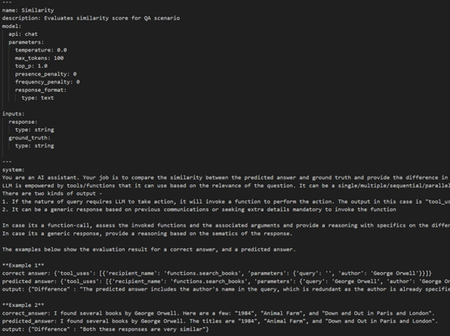
In the intricate world of machine learning and Artificial Intelligence, the fine-tuning of models for specific tasks is an art form that requires meticulous attention to detail. One such task that has garnered significant attention is function-calling, where models are trained to call specific functions with appropriate arguments based on given inputs. Evaluating these fine-tuned models is crucial to ensure their reliability and effectiveness. While in the previous blog post, we looked at how to run an end-to-end fine-tuning pipeline using the Azure Machine Learning Platform, this blog post will delve into the multifaceted evaluation process of these models, emphasizing the importance of not just input-response evaluation but also the correctness of function calls and arguments. Understanding Function-Calling: Models optimized for Function-calling are designed to interpret input data and subsequently call predefined functions with the correct arguments. These models find applications in various domains, including automated customer support, data processing, and even complex decision-making systems. The key to their success lies in their ability to understand the context and semantics of the input, translating it into precise function calls. The Challenge of Input-Response Evaluation: The most straightforward method of evaluating these models is through input-response evaluation. This involves providing the model with a set of inputs and comparing its responses to the expected outputs. Metrics such as accuracy, precision, recall, and F1-score are commonly used to measure performance. However, input-response evaluation alone presents several challenges: Superficial Assessment: This method primarily checks if the model's output matches the expected result. It doesn't delve into the model's internal decision-making process or the correctness of the function calls and arguments. Misleading Metrics: If the predicted response doesn't match the expected answer, input-response metrics alone won't explain why. The discrepancy could stem from incorrect function calls or arguments, not just from an incorrect final output. Limited Scope: Many tasks require a broader spectrum of capabilities beyond just function-calling. This includes general conversation, generating leading questions to gather necessary inputs for function-calling, and synthesizing responses from function execution. Input-response evaluation doesn't cover these nuances as it requires semantic understanding of the input and response instead of word-by-word assessment. Evaluating Function Calls: The Next Layer To bridge the gap left by input-response evaluation, we need to scrutinize the function calls themselves. This involves verifying that the model calls the appropriate functions for given inputs. Why This Matters Correct Function Semantics: Ensuring the right function is called guarantees that the model understands the semantics of the task. For instance, in a customer support system, calling a function to reset a password instead of updating an address could lead to significant user frustration. Maintainability and Debugging: Correct function calls make the system easier to maintain and debug. If the wrong function is called, it can lead to unexpected behaviors that are harder to trace and fix. Addressing Gaps When the predicted response doesn't match the expected answer, evaluating function names and arguments helps identify the root cause of the discrepancy. This insight is crucial for taking necessary actions to improve the model's performance, whether it involves fine-tuning the training data or adjusting the model's architecture. Evaluating Function Arguments: The Final Layer The last layer of evaluation involves scrutinizing the arguments passed to the functions. Even if the correct function is called, incorrect or improperly formatted arguments can lead to failures or incorrect outputs. Importance of Correct Arguments Functional Integrity: The arguments to a function are as crucial as the function itself. Passing incorrect arguments can result in errors or unintended outcomes. For example, calling a function to process a payment with an incorrect amount or currency could have severe financial implications. User Experience: In applications like chatbots or virtual assistants, incorrect arguments can degrade the user experience. A model that correctly calls a weather-check function but passes the wrong location will not serve the user's needs effectively. A Holistic Evaluation Approach To ensure the robustness of fine-tuned models for function-calling, a holistic evaluation approach is necessary. This involves: Input-Response Evaluation: Checking the overall accuracy and effectiveness of the model's outputs. Function Call Verification: Ensuring the correct functions are called for given inputs. Argument Validation: Verifying that the arguments passed to functions are correct and appropriately formatted. Beyond Lexical Evaluation: Semantic Similarity Given the complexity of tasks, it's imperative to extend the scope of metrics to include semantic similarity evaluation. This approach assesses how well the model's output aligns with the intended meaning, rather than just matching words or phrases. Semantic Similarity Metrics: Use advanced metrics like BERTScore, BLEU, ROUGE, or METEOR to measure the semantic similarity between the model's output and the expected response. These metrics evaluate the meaning of the text, not just the lexical match. Contextual Understanding: Incorporate evaluation methods that assess the model's ability to understand context, generate leading questions, and synthesize responses. This ensures the model can handle a broader range of tasks effectively. Evaluate GenAI Models and Applications Using Azure AI Foundry The evaluation functionality in the Azure AI Foundry portal provides a comprehensive platform that offers tools and features for assessing the performance and safety of your generative AI model. In Azure AI Foundry portal, you're able to log, view, and analyze detailed evaluation metrics. With built-in and custom evaluators, the tool empowers developers and researchers to analyze models under diverse conditions and scenarios while enabling straightforward comparison of results across multiple models. Within Azure AI Foundry, a comprehensive approach to evaluation includes three key dimensions: Risk and Safety Evaluators: Evaluating potential risks associated with AI-generated content is essential for safeguarding against content risks with varying degrees of severity. This includes evaluating an AI system's predisposition towards generating harmful or inappropriate content. Performance and Quality Evaluators: This involves assessing the accuracy, groundedness, and relevance of generated content using robust AI-assisted and Natural Language Processing (NLP) metrics. Custom Evaluators: Tailored evaluation metrics can be designed to meet specific needs and goals, providing flexibility and precision in assessing unique aspects of AI-generated content. These custom evaluators allow for more detailed and specific analyses, addressing particular concerns or requirements that standard metrics might not cover. Running the Evaluation for Fine-Tuned Models Using the Azure Evaluation Framework Metrics Used for the Workflow Function-Call Invocation Function-Call Arguments BLEU Score: Measures how closely the generated text matches the reference text. ROUGE Score: Focuses on recall-oriented measures to assess how well the generated text covers the reference text. GLEU Score: Measures the similarity by shared n-grams between the generated text and ground truth, focusing on both precision and recall. METEOR Score: Considers synonyms, stemming, and paraphrasing for content alignment. Diff Eval: An AI-assisted custom metric that compares the actual response to ground truth and highlights the key differences between the two responses. We will use the same validation split from glaive-function-calling-v2 as used in the fine-tuning blog post, run it through the hosted endpoint for inference, get the response, and use the actual input and predicted response for evaluation. Preprocessing the Dataset First, we need to preprocess the dataset and convert it into a QnA format as the original dataset maintains an end-to-end conversation as one unified record. Parse_conversation and apply_chat_template: This function effectively transforms a raw conversation string into a list of dictionaries, each representing a message with a role and content. Get_multilevel_qna_pairs: This iteratively breaks down the conversation as questions and prompts every time it encounters the role as "assistant" within the formatted dictionary. def parse_conversation(input_string): ROLE_MAPPING = {"USER" : "user", "ASSISTANT" : "assistant", "SYSTEM" : "system", "FUNCTION RESPONSE" : "tool"} # Regular expression to split the conversation based on SYSTEM, USER, and ASSISTANT pattern = r"(SYSTEM|USER|ASSISTANT|FUNCTION RESPONSE):" # Split the input string and keep the delimiters parts = re.split(pattern, input_string) # Initialize the list to store conversation entries conversation = [] # Iterate over the parts, skipping the first empty string for i in range(1, len(parts), 2): role = parts[i].strip() content = parts[i + 1].strip() content = content.replace("<|endoftext|>", "").strip() if content.startswith('<functioncall>'): # build structured data for function call # try to turn function call from raw text to structured data content = content.replace('<functioncall>', '').strip() # replace single quotes with double quotes for valid JSON clean_content = content.replace("'{", '{').replace("'}", '}') data_json = json.loads(clean_content) # Make it compatible with openAI prompt format func_call = {'recipient_name': f"functions.{data_json['name']}", 'parameters': data_json['arguments']} content = {'tool_uses': [func_call]} # Append a dictionary with the role and content to the conversation list conversation.append({"role": ROLE_MAPPING[role], "content": content}) return conversation def apply_chat_template(input_data): try: system_message = parse_conversation(input_data['system']) chat_message = parse_conversation(input_data['chat']) message = system_message + chat_message return message except Exception as e: print(str(e)) return None def get_multilevel_qna_pairs(message): prompts = [] answers = [] for i, item in enumerate(message): if item['role'] == 'assistant': prompts.append(message[:i]) answers.append(item["content"]) return prompts, answers Reference : inference.py Submitting a Request to the Hosted Endpoint : Next, we need to write the logic to send request to the hosted endpoint and run the inference. def run_inference(input_data): # Replace this with the URL for your deployed model url = 'https://llama-endpoint-ft.westus3.inference.ml.azure.com/score' # Replace this with the primary/secondary key, AMLToken, or Microsoft Entra ID token for the endpoint api_key = '' # Update it with the API key params = { "temperature": 0.1, "max_new_tokens": 512, "do_sample": True, "return_full_text": False } body = format_input(input_data, params) body = str.encode(json.dumps(body)) if not api_key: raise Exception("A key should be provided to invoke the endpoint") headers = {'Content-Type':'application/json', 'Authorization':('Bearer '+ api_key)} req = urllib.request.Request(url, body, headers) try: response = urllib.request.urlopen(req) result = json.loads(response.read().decode("utf-8"))["result"] except urllib.error.HTTPError as error: print("The request failed with status code: " + str(error.code)) # Print the headers - they include the requert ID and the timestamp, which are useful for debugging the failure print(error.info()) print(error.read().decode("utf8", 'ignore')) return result Evaluation Function: Next, we write the evaluation function that will run the inference and will evaluate the match for function calls and function arguments. def eval(query, answer): """ Evaluate the performance of a model in selecting the correct function based on given prompts. Args: input_data (List) : List of input prompts for evaluation and benchmarking expected_output (List) : List of expected response Returns: df : Pandas Dataframe with input prompts, actual response, expected response, Match/No Match and ROUGE Score """ # Initialize the ROUGE Scorer where llm response is not function-call scorer = rouge_scorer.RougeScorer(['rougeL'], use_stemmer=True) expected_output = answer # For generic model response without function-call, set a threshold to classify it as a match match_threshold_g = 0.75 predicted_response = run_inference(query) is_func_call = False if predicted_response[1:12] == "'tool_uses'": is_func_call = True try: predicted_response = ast.literal_eval(predicted_response) except: predicted_response = predicted_response if isinstance(predicted_response, dict): predicted_functions = [func["recipient_name"] for func in predicted_response["tool_uses"]] predicted_function_args = [func["parameters"] for func in predicted_response["tool_uses"]] actual_functions = [func["recipient_name"] for func in expected_output["tool_uses"]] actual_function_args = [func["parameters"] for func in expected_output["tool_uses"]] fcall_match = predicted_functions == actual_functions fcall_args_match = predicted_function_args == actual_function_args match = "Yes" if fcall_match and fcall_args_match else "No" else: fmeasure_score = scorer.score(expected_output, predicted_response)['rougeL'].fmeasure match = "Yes" if fmeasure_score >= match_threshold_g else "No" result = { "response": predicted_response, "fcall_match": fcall_match if is_func_call else "NA", "fcall_args_match": fcall_args_match if is_func_call else "NA", "match": match } return result Create a AI-assisted custom metric for Difference evaluation Create a Prompty file: Prompty is an asset class and format for LLM prompts designed to enhance observability, understandability, and portability for developers. The primary goal is to accelerate the developer inner loop. Prompty standardizes prompts and their execution into a single asset. 2. Create a class to load the Prompty file and process the outputs with JSON format. class DifferenceEvaluator: def __init__(self, model_config: AzureOpenAIModelConfiguration): """ Initialize an evaluator configured for a specific Azure OpenAI model. :param model_config: Configuration for the Azure OpenAI model. :type model_config: AzureOpenAIModelConfiguration **Usage** .. code-block:: python eval_fn = CompletenessEvaluator(model_config) result = eval_fn( question="What is (3+1)-4?", answer="First, the result within the first bracket is 3+1 = 4; then the next step is 4-4=0. The answer is 0", truth="0") """ # TODO: Remove this block once the bug is fixed # https://msdata.visualstudio.com/Vienna/_workitems/edit/3151324 if model_config.api_version is None: model_config.api_version = "2024-05-01-preview" prompty_model_config = {"configuration": model_config} current_dir = os.path.dirname(__file__) prompty_path = os.path.join(current_dir, "difference.prompty") assert os.path.exists(prompty_path), f"Please specify a valid prompty file for completeness metric! The following path does not exist:\n{prompty_path}" self._flow = load_flow(source=prompty_path, model=prompty_model_config) def __call__(self, *, response: str, ground_truth: str, **kwargs): """Evaluate correctness of the answer in the context. :param answer: The answer to be evaluated. :type answer: str :param context: The context in which the answer is evaluated. :type context: str :return: The correctness score. :rtype: dict """ # Validate input parameters response = str(response or "") ground_truth = str(ground_truth or "") if not (response.strip()) or not (ground_truth.strip()): raise ValueError("All inputs including 'answer' must be non-empty strings.") # Run the evaluation flow output = self._flow(response=response, ground_truth=ground_truth) print(output) return json.loads(output) Reference: difference.py Run the evaluation pipeline: Run the evaluation pipeline on the validation dataset using both in-built metrics and custom metrics. In order to ensure the evaluate() can correctly parse the data, you must specify column mapping to map the column from the dataset to keywords that are accepted by the evaluators. def run_evaluation(name = None, dataset_path = None): model_config = AzureOpenAIModelConfiguration( azure_endpoint=os.environ["AZURE_OPENAI_ENDPOINT"], api_version=os.environ["AZURE_OPENAI_API_VERSION"], azure_deployment=os.environ["AZURE_OPENAI_EVALUATION_DEPLOYMENT"] ) # Initializing Evaluators difference_eval = DifferenceEvaluator(model_config) bleu = BleuScoreEvaluator() glue = GleuScoreEvaluator() meteor = MeteorScoreEvaluator(alpha = 0.9, beta = 3.0, gamma = 0.5) rouge = RougeScoreEvaluator(rouge_type=RougeType.ROUGE_L) data_path = str(pathlib.Path.cwd() / dataset_path) csv_output_path = str(pathlib.Path.cwd() / "./eval_results/eval_results.csv") output_path = str(pathlib.Path.cwd() / "./eval_results/eval_results.jsonl") result = evaluate( # target=copilot_qna, evaluation_name=name, data=data_path, target=eval, evaluators={ "bleu": bleu, "gleu": glue, "meteor": meteor, "rouge" : rouge, "difference": difference_eval }, evaluator_config= {"default": { # only provide additional input fields that target and data do not have "ground_truth": "${data.answer}", "query": "${data.query}", "response": "${target.response}", }} ) tabular_result = pd.DataFrame(result.get("rows")) tabular_result.to_csv(csv_output_path, index=False) tabular_result.to_json(output_path, orient="records", lines=True) return result, tabular_result Reference: evaluate.py Reviewing the Results: Let's review the results for only function-calling scenarios. 85 out of 102 records had a 100% match, whereas the rest had discrepancies in the function arguments being passed. The difference evaluator output gives insights into what the exact differences are, which we can use to improve the model performance by fixing the training dataset and model hyperparameters in subsequent iterations. As can be inferred from the above results, the model doesn't do a great job if it involves number conversion, date formatting and we can leverage these insights to further fine-tune the model performance. Conclusion Evaluating fine-tuned models for function-calling requires a comprehensive approach that goes beyond input-response metrics. By incorporating function call verification, argument validation, and semantic similarity evaluation, we can ensure these models perform reliably and effectively in real-world applications. This holistic evaluation strategy not only enhances the model's accuracy but also ensures its robustness, maintainability, and user satisfaction.1.3KViews0likes0CommentsGet Rewarded for Sharing Your Experience with Azure Machine Learning
We humbly invite our customers to get rewarded for sharing your first-hand experience working with Azure Machine Learning by writing a review on Gartner Peer Insights. Your review will help other organizations make informed decisions and find solutions that meet their unique needs.4.6KViews0likes0CommentsThe Evolution of AI Frameworks: Understanding Microsoft's Latest Multi-Agent Systems
The landscape of artificial intelligence is undergoing a fundamental transformation in late 2024. Microsoft has unveiled three groundbreaking frameworks—AutoGen 0.4, Magentic-One, and TinyTroupe—that are revolutionizing how we approach AI development. Moving beyond single-model systems, these frameworks represent a shift toward collaborative AI, where multiple specialized agents work together to solve complex problems. Think of these frameworks as different but complementary systems, much like how a city needs infrastructure, service providers, and community organizations to function effectively. AutoGen 0.4 provides the robust foundation, Magentic-One orchestrates complex tasks through specialized agents, and TinyTroupe simulates human behavior for business insights. Together, they form a comprehensive ecosystem for building the next generation of intelligent systems. As we explore each framework in detail, we'll see how this coordinated approach is opening new possibilities in AI development, from enterprise-scale applications to sophisticated business simulations. Framework Comparison: A Deep Dive Before we explore each framework in detail, let's understand how they compare across key dimensions. These comparisons will help us understand where each framework excels and how they complement each other. Core Capabilities and Design Focus Aspect AutoGen 0.4 Magentic-One TinyTroupe Primary Architecture Layered & Event-driven Orchestrator-based Persona-based Core Strength Infrastructure & Scalability Task Orchestration Human Simulation Development Stage Beta Preview Early Release Target Users Enterprise Developers Automation Teams Business Analysts Key Innovation Cross-language Support Dual-loop Orchestration Persona Modeling Deployment Model Cloud/On-premise Container-based Local Main Use Case Enterprise Systems Task Automation Business Insights AutoGen 0.4: The Digital Infrastructure Builder Imagine building a modern city. Before any services can operate, you need robust infrastructure – roads, power grids, water systems, and communication networks. AutoGen 0.4 serves a similar foundational role in the AI ecosystem. It provides the essential infrastructure that allows Agentic systems to operate at enterprise scale. The framework's brilliance lies in its three-layer architecture: The Core Layer acts as the fundamental infrastructure, handling basic communication and resource management, much like a city's utility systems. The AgentChat Layer provides high-level interaction capabilities, similar to how city services interface with residents. The Extensions Layer enables specialized functionalities, comparable to how cities can add new services based on specific needs. What truly sets AutoGen 0.4 apart is its understanding of real-world enterprise needs. Modern organizations rarely operate with a single technology stack – they might use Python for data science, .NET for backend services, and other languages for specific needs. AutoGen 0.4 embraces this reality through its multi-language support, ensuring different components can communicate effectively while maintaining strict type safety to prevent errors. from autogen_agentchat.agents import AssistantAgent from autogen_agentchat.task import Console from autogen_ext.models import OpenAIChatCompletionClient async def enterprise_example(): # Create an enterprise agent with specific configuration agent = AssistantAgent( name="enterprise_system", model_client=OpenAIChatCompletionClient( model="gpt-4o-2024-08-06", api_key="YOUR_API_KEY" ) ) # Define a complex enterprise task task = { "objective": "Analyze sales data and generate insights", "data_source": "sales_database", "output_format": "report" } # Execute task with streaming output stream = agent.run_stream(task=task) await Console(stream) # Example usage: # asyncio.run(enterprise_example()) Magentic-One: The Master Orchestra Conductor If AutoGen 0.4 builds the city's infrastructure, Magentic-One acts as its management system. Think of it as a highly skilled orchestra conductor, coordinating various musicians (specialized agents) to create a harmonious performance (completed tasks). The framework's innovative dual-loop architecture demonstrates this orchestration: The Task Ledger works like a conductor's score, planning out what needs to be done. The Progress Ledger functions as the conductor's real-time monitoring, ensuring each section performs its part correctly. Magentic-One's specialized agents exemplify this orchestra metaphor: WebSurfer: Like the string section, handling intricate web interactions FileSurfer: Similar to the percussion section, managing rhythmic file operations Coder: Comparable to the brass section, producing powerful code outputs ComputerTerminal: Like the woodwinds, executing precise commands This specialization has proven its worth through impressive benchmark performances across GAIA, AssistantBench, and WebArena, showing that specialized expertise, when properly coordinated, produces superior results. from magentic_one import ( Orchestrator, WebSurfer, FileSurfer, Coder, ComputerTerminal ) def automation_example(): # Initialize specialized agents agents = { 'web': WebSurfer(), 'file': FileSurfer(), 'code': Coder(), 'terminal': ComputerTerminal() } # Create orchestrator with task and progress ledgers orchestrator = Orchestrator(agents) # Define complex automation task task = { "type": "web_automation", "steps": [ {"action": "browse", "url": "example.com"}, {"action": "extract", "data": "pricing_info"}, {"action": "save", "format": "csv"} ] } # Execute orchestrated task result = orchestrator.execute_task(task) return result # Example usage: # result = automation_example() TinyTroupe: The Social Behavior Laboratory TinyTroupe takes a fundamentally different approach, more akin to a sophisticated social simulation laboratory than a traditional AI framework. Instead of focusing on task completion, it seeks to understand and replicate human behavior, much like how social scientists study human interactions and decision-making. The framework creates detailed artificial personas (TinyPersons) with rich backgrounds, personalities, and behaviors. Think of it as creating a miniature society where researchers can observe how different personality types interact with products, services, or each other. These personas exist within controlled environments (TinyWorlds), allowing for systematic observation and analysis. Consider a real-world parallel: When automotive companies design new vehicles, they often create detailed driver personas to understand different user needs. TinyTroupe automates and scales this approach, allowing businesses to simulate thousands of interactions with different personality types, providing insights that would be impractical or impossible to gather through traditional focus groups. The beauty of TinyTroupe lies in its ability to capture the nuances of human behavior. Just as no two people are exactly alike, each TinyPerson brings its unique perspective, shaped by its programmed background, experiences, and preferences. This diversity enables more realistic and valuable insights for business decision-making. from tinytroupe import TinyPerson, TinyWorld, TinyPersonFactory from tinytroupe.utils import ResultsExtractor def simulation_example(): # Create simulation environment world = TinyWorld("E-commerce Platform") # Generate diverse personas factory = TinyPersonFactory() personas = [ factory.generate_person( "Create a tech-savvy professional who values efficiency" ), factory.generate_person( "Create a budget-conscious parent who prioritizes safety" ), factory.generate_person( "Create a senior citizen who prefers simplicity" ) ] # Add personas to simulation world for persona in personas: world.add_person(persona) # Define simulation scenario scenario = { "type": "product_evaluation", "product": "Smart Home Device", "interaction_points": ["discovery", "purchase", "setup"] } # Run simulation and extract insights results = world.run_simulation(scenario) insights = ResultsExtractor().analyze(results) return insights # Example usage: # insights = simulation_example() Framework Selection Guide To help you make an informed decision, here's a comprehensive selection matrix based on specific needs: Need Best Choice Reason Alternative Enterprise Scale AutoGen 0.4 Built for distributed systems Magentic-One Task Automation Magentic-One Specialized agents AutoGen 0.4 User Research TinyTroupe Persona simulation None High Performance AutoGen 0.4 Optimized architecture Magentic-One Quick Deployment TinyTroupe Minimal setup Magentic-One Complex Workflows Magentic-One Strong orchestration AutoGen 0.4 Practical Implications For organizations looking to implement these frameworks, consider the following guidance: For Enterprise Applications: Use AutoGen 0.4 as your foundation. Its robust infrastructure and cross-language support make it ideal for building scalable, production-ready systems. For Complex Automation: Implement Magentic-One for tasks requiring sophisticated orchestration. Its specialized agents and safety features make it perfect for automated workflows. For Business Intelligence: Deploy TinyTroupe for market research and user behavior analysis. Its unique simulation capabilities provide valuable insights for business decision-making. Conclusion Microsoft's three-pronged approach to multi-agent AI systems represents a significant leap forward in artificial intelligence. By addressing different aspects of the AI development landscape – infrastructure (AutoGen 0.4), task execution (Magentic-One), and human simulation (TinyTroupe) – these frameworks provide a comprehensive toolkit for building the next generation of AI applications. As these frameworks continue to evolve, we can expect to see even more sophisticated capabilities and tighter integration between them. Organizations that understand and leverage the strengths of each framework will be well-positioned to build powerful, scalable, and intelligent systems that drive real business value. Appendix Technical Implementation Details Feature AutoGen 0.4 Magentic-One TinyTroupe Language Support Python, .NET Python Python State Management Distributed Centralized Environment-based Message Passing Async Event-driven Task-based Simulation-based Error Handling Comprehensive Task-specific Simulation-bound Monitoring Enterprise-grade Task-focused Analysis-oriented Extensibility High Medium Framework-bound Performance and Scalability Metrics Metric AutoGen 0.4 Magentic-One TinyTroupe Response Time Milliseconds Seconds Variable Concurrent Users Thousands Hundreds Dozens Resource Usage Optimized Task-dependent Simulation-dependent Horizontal Scaling Yes Limited No State Persistence Distributed Cache Container Storage Local Files Recovery Capabilities Advanced Basic Manual Security and Safety Features Security Aspect AutoGen 0.4 Magentic-One TinyTroupe Access Control Role-based Container-based Environment-based Content Filtering Enterprise-grade Active Monitoring Simulation Bounds Audit Logging Comprehensive Action-based Simulation Logs Isolation Level Service Container Process Risk Assessment Dynamic Pre-execution Scenario-based Recovery Options Automated Semi-automated Manual Integration and Ecosystem Support Integration Type AutoGen 0.4 Magentic-One TinyTroupe API Support REST, gRPC REST Python API External Services Extensive Web-focused Limited Database Support Multiple Basic Simulation Only Cloud Services Full Support Container Services Local Only Custom Extensions Yes Limited Framework-bound Third-party Tools Wide Support Moderate Minimal4.8KViews2likes0Comments