ml.net
36 Topics
Looking for Advice on the Microsoft AI-103 Exam
I am planning to take the Microsoft AI 103 exam and would like to hear from anyone who has taken it. How was your exam experience, which topics did you find difficult, and how did you prepare for it? I would appreciate any tips or advice that could help me get ready for the exam. Thank you50Views0likes0Comments
Microsoft Word Version History Not Showing & Clarification on Built-In Grammar Tools
Hello, I recently contacted Microsoft Support regarding a concern with Microsoft Word, and they recommended that I post here for more assistance. I am a university nursing student who recently had portions of an independently written assignment flagged as AI-generated by Turnitin. I only use Microsoft Word's built-in spelling and grammar suggestions, such as clicking on underlined words and accepting the corrections. I am hoping to receive clarification regarding two concerns. 1. Microsoft Word's Built-In Spelling and Grammar Features Do Microsoft Word's standard spelling and grammar correction features use generative AI? Could accepting these corrections affect how AI detection software classifies a document? 2. Microsoft Word Version History When I tried to use my document's version history to demonstrate my writing process, I noticed that it only showed a limited time frame around when I started working on the assignment. When I googled Microsoft Word's version history and found multiple screenshots showing revisions saving every minute even, but mine only showed the time in which I started the assignment. I would appreciate clarification on the following: Is it normal for Word's version history to show only a limited number of saved versions, even if someone was actively typing and editing throughout that period? Could AutoSave settings, file storage locations, or technical issues explain the missing detailed revisions? Does Microsoft Word automatically combine multiple edits into a single saved version? Is there any way to recover additional editing history that is not currently displayed? Does having a limited version history necessarily mean that the document was written or pasted all at once? For full transparency, my university has issued a formal academic integrity concern regarding the AI detection results. This is an extremely serious matter to me, as I feel like I am being treated as guilty until proven innocent. I have already contacted Turnitin Support regarding the reliability of its AI detection system, and now I find myself questioning whether even the basic spelling and grammar correction tools built into Microsoft Word could have contributed to my assignment being flagged. It is incredibly frustrating and discouraging to feel like I have to question every tool I use, especially when these features were designed to help students improve their writing. Something as simple as clicking on a spelling or grammar suggestion has now become something I worry about. I never imagined that I would have to question whether using a feature already embedded in Microsoft Word could potentially be interpreted as AI-generated writing. What makes this even more concerning is that this could affect my standing in my nursing program, not just my assignment grade. I have been trying to find every possible way to demonstrate that my work is my own, including reviewing my version history, contacting support, and even doing research on how these technologies work. It has become mentally exhausting to feel like I constantly need to prove something that I know I did myself. I am simply a student who genuinely wants to learn and become a nurse. I should be able to focus on my education without constantly worrying that using ordinary writing assistance tools could result in another academic integrity concern. Therefore, I was hoping to receive accurate technical information about Microsoft Word's features so I can better understand what happened and provide my university with an informed explanation. Thank you for your time and assistance!75Views0likes1CommentRepeated Copilot Code of Conduct Blocks Are Preventing Legitimate Work
Hello, I am experiencing repeated and inconsistent Code of Conduct blocks while using Microsoft Copilot image generation for an unpublished multilingual creative project. The requests involve benign, fully clothed fictional character illustrations. Equivalent requests have sometimes generated successfully in English, been rejected after translation into Slovak, and then later generated successfully in Slovak without any meaningful change to the requested content. The rejection message is: “That image can't be generated due to Microsoft's code of conduct. Please start a new conversation.” This has become a serious and recurring workflow problem. Whenever I begin developing illustrations for a new chapter, I risk receiving another unexplained Code of Conduct refusal. The message provides no useful indication of: which part of the request supposedly caused the block; whether the problem is in the prompt or the anticipated image; whether the language or automatic translation affected the result; what wording or content needs to be changed; whether the refusal is a false positive; or why substantially the same request may succeed later. As a result, I cannot reliably progress with the illustration work. Starting a new conversation is not an acceptable solution because the project depends on continuity across chapters, including established character appearance, clothing, equipment and visual style. The support experience makes the problem worse On top of the image-generation problem, reaching meaningful Microsoft Support has been extremely difficult. I have been directed towards community forums, but I do not consider a peer-to-peer forum an adequate substitute for proper technical support for a premium paid service. The Microsoft Copilot Community itself states that it is an open peer-to-peer discussion space and is not a technical support channel for account-specific or break/fix problems. [techcommun...rosoft.com] A public forum may be useful for discussing experiences with other customers, but it is not the correct place to disclose: unpublished prompts; copyrighted illustrations; confidential character designs; complete conversation history; or other intellectual property required to reproduce the problem. I should not have to publish private creative work publicly in order to obtain help with a service for which I am paying. The current error message is not adequate I support appropriate safety controls. The issue is not that safety filtering exists. The issue is that the generic message provides no meaningful feedback and can incorrectly imply that the user has requested inappropriate content, even when the actual cause may be an automated false positive, language-processing issue or output-classification error. Simply telling the user to “start a new conversation” does not: explain the problem; help correct the request; preserve project continuity; report the false positive; or provide Microsoft with enough information to investigate. For a paid creative tool, this behaviour makes the service unreliable for any project that must maintain continuity across multiple sessions and chapters. Requested improvements When an image generation is blocked, Microsoft Copilot should provide: A general reason category, such as violence, sexual content, protected identity, copyright, unsafe activity or another applicable category. A clear indication of whether the input prompt or the anticipated output image triggered the restriction. Safe and practical guidance about what category of wording or visual element should be revised. A diagnostic or reference ID that can be supplied to Microsoft Support. A visible Report false positive option attached to the refusal. A method for preserving the current conversation and project context rather than instructing the user to start again. A clear path to private technical support where affected customers can submit prompts, screenshots and conversation identifiers without publishing copyrighted work. Appropriate direct support for customers paying for a premium Copilot service, rather than relying primarily on community volunteers. These improvements can be implemented without exposing internal moderation logic or helping users bypass safety protections. Questions for Microsoft Why can substantially equivalent English and Slovak prompts receive different safety decisions? Why can essentially the same Slovak request be rejected several times and later generate successfully? How can a customer identify what part of a benign prompt caused the block? How can users report an individual generation as a suspected false positive? Is there a conversation ID or generation-attempt ID that Microsoft can use for investigation? Can Microsoft privately review rejected and successful attempts from the same conversation? What is the correct direct technical-support channel for paying Copilot customers? Why are customers directed to public peer-to-peer forums for problems that require private investigation of copyrighted prompts and images? Will Microsoft replace the generic Code of Conduct response with feedback that allows legitimate users to correct a problem and continue working? Privacy and copyright I am deliberately not publishing the full prompts, character details or generated artwork because these are part of unpublished copyrighted work. I can provide the relevant prompts, screenshots, timestamps and conversation details privately to authorised Microsoft Support personnel under an appropriate support process. Conclusion The problem is not the existence of responsible AI protections. The problem is the combination of: repeated false-positive or inconsistent refusals; no meaningful reason for the refusal; no diagnostic identifier; no effective false-positive reporting mechanism; loss of project continuity; and no easily accessible private technical-support route for a premium paid service. Together, these issues mean that a legitimate multilingual creative project can be stopped without explanation and without a practical way to resolve the problem. For a premium service, “start a new conversation” and “post on a community forum” are not sufficient responses to a recurring technical issue. I am asking Microsoft to provide both better error feedback and an accessible private escalation path for paying customers whose legitimate work is repeatedly blocked. Thank you.195Views0likes2CommentsHow to identify Shadow AI traffic: the signals we've found actually useful
How to identify Shadow AI traffic: the signals we've found actually useful Shadow AI detection sounds simple until you actually try to build it. At first, the obvious approach is: Maintain a list of ChatGPT, Claude, Gemini, Perplexity, etc. -> detect traffic -> classify it as AI. But that breaks down surprisingly quickly. Take GitHub as an example. An employee visiting GitHub is not necessarily using Shadow AI. The same employee using GitHub Copilot potentially is. The same problem exists with Gmail/Gemini, Microsoft 365/Copilot, Slack AI, Notion AI, IDE extensions, browser extensions, and hundreds of SaaS products embedding AI into otherwise legitimate applications. So the real problem is not: "Is this domain an AI domain?" It is: "Does this particular interaction involve a user sending data to an AI system?" We have been working on this problem while building Shadow AI detection at Walled AI, and these are some of the signals I have found most useful. 1. Known AI domains and endpoints This is the easiest layer. Maintain intelligence for known: AI domains inference endpoints API paths model providers AI-specific subdomains SaaS AI endpoints For something like `api.openai.com`, confidence is obviously high. But domain-level detection becomes much weaker when AI functionality is embedded inside a larger application. So domain intelligence should be the first signal, not the final classifier. 2. Request characteristics The request itself can provide surprisingly useful signals. For example: POST requests relatively large text payloads JSON structures containing message- or prompt-like fields conversation history model identifiers generation parameters document or image uploads associated with an inference request None of these individually means "AI." A large POST request could simply be someone submitting a form. But several of these appearing together can increase confidence considerably. 3. Response characteristics The response can provide another independent signal. LLM applications often exhibit patterns such as: streamed responses Server-Sent Events token- or chunk-style incremental output long generated-text responses a request followed by sustained incremental response traffic Again, streaming does not automatically mean AI. Plenty of legitimate applications stream data. But: prompt-like request + AI-looking endpoint + streamed generated response is substantially stronger than any one of those signals alone. 4. Browser context matters This becomes particularly useful for embedded AI. The browser often knows more than the network does. It can potentially tell you: which page the employee is on what UI element initiated the interaction whether a prompt box exists whether text or files are being submitted whether the employee switched into an AI feature whether the user is on a personal or enterprise AI account This helps distinguish: GitHub -> normal development activity from: GitHub -> Copilot interaction without simply classifying all GitHub traffic as AI. This is one reason I do not think Shadow AI discovery can ultimately be solved through network intelligence alone. We have documented some of the multi-layer detection architecture we are building here: https://walled.ai/platform/shadow-ai-detection 5. Identity is another signal Finding an AI service is not necessarily enough. Consider: ChatGPT Enterprise -> approved versus Personal ChatGPT account -> unapproved The destination may effectively be the same while the governance implications are very different. Ideally, AI detection should therefore be correlated with: user device department account or tenant application approved or unapproved status At that point, you are moving beyond traffic classification into actual Shadow AI discovery. 6. Use confidence scoring instead of binary rules This is probably the biggest architectural lesson. Instead of: IF domain == X -> AI I would rather think about: Domain signal + endpoint signal + request signal + response signal + browser signal + identity signal -> AI confidence score High-confidence traffic can be classified deterministically. Low-confidence traffic can remain unclassified. The interesting part is the middle. 7. Use an LLM classifier only for ambiguous traffic One tempting solution is to send everything to an AI classifier. Technically, that is possible. Economically and operationally, it is probably not what you want. If you are inspecting endpoint traffic at enterprise scale, pushing every ambiguous HTTP interaction through an LLM adds: cost latency compute requirements another potential privacy consideration another dependency in the enforcement path We have therefore been experimenting with a different philosophy: Rules and patterns first -> confidence scoring -> LLM judge as fallback As the deterministic detection library improves, fewer requests should require expensive classification. In other words, the system should ideally become **cheaper and faster as its detection intelligence improves**. 8. Detection is only half the problem Once you have classified something as AI traffic, you can start answering more useful governance questions: Which AI applications are employees using? Which are approved versus unapproved? Which departments are adopting Shadow AI? Is sensitive information being submitted? Which models and services are receiving organizational data? What was allowed, redacted, or blocked? This is where we are feeding discovery and enforcement telemetry into the Walled AI Governance Dashboard, so security teams can get a consolidated view of AI usage rather than a large collection of individual network events: https://walled.ai/platform/governance-dashboard <a href="www.walled.ai">Walled AI</a> A practical architecture Known intelligence -> Network signals -> Request + response patterns -> Browser context -> Identity -> Confidence scoring -> LLM fallback rather than: List of AI domains -> Block The hardest part is not identifying ChatGPT. It is identifying AI functionality embedded inside otherwise legitimate applications without creating an unacceptable number of false positives. Curious how others working on Shadow AI are approaching this. What signals have you found reliable for distinguishing actual AI interactions from normal application traffic?225Views2likes1Comment
Where Can I post Videos Regarding AI in this community
Hi everyone, I create educational and informational videos around AI (such as Microsoft IQ content) and would like to share them with the community here, similar to how video content is shared in the Microsoft Fabric Community. Is there a designated hub, blog, or discussion category within the Microsoft Tech Community best suited for posting video content like this? For context, here is an example of the title/topic of content I produce: Implementing Microsoft IQ - The Microsoft Unified AI Framework Thanks in advance for any guidance!77Views0likes0Comments
How are AI agents changing the way enterprises automate business processes?
AI agents are becoming more capable of understanding requests, making decisions, and interacting with multiple systems through APIs and automation tools. I’m interested in how organizations are approaching this shift from traditional workflow automation toward more intelligent, agent-driven workflows. Some areas I’m exploring: How are teams deciding which processes are suitable for AI agents? What role do validation, monitoring, and human approval play in agent-based automation? How are organizations managing security and permissions when AI agents access business systems? Are AI agents replacing traditional workflows, or working alongside existing automation platforms? Would love to hear how the community is approaching AI agent adoption in real enterprise scenarios. What patterns or lessons have you learned while implementing AI-powered workflows?102Views0likes0Comments
AI questions
I'm building a survey and want to include a question about AI tools. When I look in the Glint library though I only see questions that are about Copilot specifically that are benchmarkable. Am I missing something? Questions i'm thinking of including are: I have access to the AI tools, resources and training I need to use AI effectively in my role. AI tools help me work more efficiently and focus on higher-value activities.122Views0likes0CommentsDesign Patterns for Building Reliable AI Agent Workflows in Enterprise Applications
Hi Microsoft community, AI agents are becoming increasingly common in enterprise applications, but designing reliable workflows around them introduces new challenges. A common architecture pattern is separating the AI reasoning layer from the execution layer, where agents can make decisions while business logic, permissions, and validations remain within controlled services. I would like to understand how teams are approaching: - Designing scalable AI agent architectures - Connecting agents with enterprise APIs and services - Managing agent state and workflow execution - Handling failures, retries, and human approval steps - Monitoring and evaluating agent performance in production What architecture patterns and Microsoft technologies are you finding effective when building production-ready AI agent solutions? Looking forward to learning from the community.119Views0likes0Comments
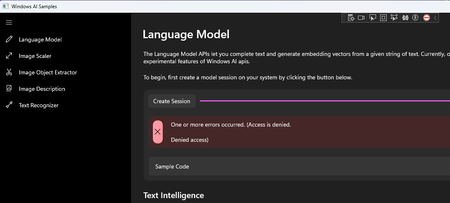
Windows AI Foundry (AI Examples) - Access Denied
Hi ! I am trying to play and run the Windows AI Foundry Apps - but keep getting an error message: Access denied Sample code: if (LanguageModel.GetReadyState() == AIFeatureReadyState.NotReady) { var languageModelDeploymentOperation = LanguageModel.EnsureReadyAsync(); await languageModelDeploymentOperation; } LanguageModel _session = await LanguageModel.CreateAsync();107Views0likes0CommentsHow GitHub Copilot Helps with Test-Driven Development (TDD)
Test-Driven Development (TDD) has been a cornerstone of modern software engineering for decades. By writing tests before implementing functionality, developers ensure better design, maintainability, and fewer bugs. But while TDD is powerful, it can sometimes feel slow or cumbersome, especially when setting up repetitive test structures or boilerplate code. This is where GitHub Copilot, the AI-powered coding assistant, becomes a valuable partner. It doesn’t replace the discipline of TDD, but it can accelerate the process and help developers stay in the flow. https://dellenny.com/how-github-copilot-helps-with-test-driven-development-tdd/243Views1like0Comments