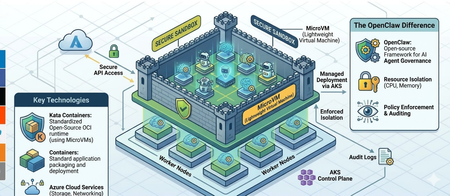
microvm
1 TopicHardening OpenClaw on AKS: Mitigating Container Escapes with Kata microVM Isolation
What is OpenClaw, and what security challenges does it pose with container escapes? OpenClaw is an open-source autonomous AI agent designed for power users and developers to automate tasks, such as managing emails, files, and scheduling via chat apps like WhatsApp or Telegram. While OpenClaw functions as a powerful autonomous assistant, its runtime model creates a massive security paradox: to be truly useful, the agent requires broad permissions to your filesystem and APIs, yet this "God Mode" access often lacks the rigorous containerized isolation typical of enterprise workloads. Because many users run the framework natively rather than within a hardened sandbox, the primary security challenge is that a single malicious "Skill" or an indirect prompt injection can escalate into full system compromise. This structural vulnerability, exemplified by high-profile exploits like CVE-2026-25253, transforms the agent from a helpful tool into a high-risk entry point for lateral movement and data exfiltration within a private network. Why container escapes matter in OpenClaw-style deployments: because containers share the host kernel, a successful container escape turns a single compromised container into a host compromise (or at least a compromise of other co-located workloads). This is especially important when OpenClaw runs code from many tenants, many teams, or varying trust levels on the same worker nodes. That soft isolation is often permeable due to the following structural and configuration-based weaknesses: Shared-kernel attack surface: the container boundary is not a hypervisor boundary. Kernel vulnerabilities (e.g., privilege escalation bugs) can allow a process in a container to gain host-level privileges. Excessive privileges / misconfiguration: running with --privileged, broad Linux capabilities, hostPath mounts, access to the Docker socket, or device passthrough (e.g., /dev/kvm, /dev/fuse) can provide direct paths to host control. Filesystem and namespace boundary breaks: mount namespace confusion, writable host mounts, or mistakes in chroot/pivot_root handling can expose host files and credentials. Supply-chain and image risk: a malicious image or dependency can execute within the container and then attempt escalation/escape. Blast radius: once the host is compromised, attackers can access node-level secrets (service account tokens, registry creds), tamper with the runtime, sniff traffic, or pivot to other containers and the broader cluster. In short, OpenClaw’s security challenge is not that containers are inherently insecure, but that the isolation boundary is thinner than a VM boundary. When the threat model includes adversarial code execution, a “container-only” isolation strategy often requires additional hardening or a stronger sandbox. What are MicroVMs and Kata Containers, and how do they help mitigate OpenClaw container-escape risks? MicroVMs are lightweight virtual machines optimized for running short-lived or container-like workloads with much lower overhead than traditional VMs. They use hardware virtualization (via a hypervisor such as KVM) but keep the device model and boot path minimal, reducing startup time and the overall attack surface compared to a full general-purpose VM. Kata Containers is an “OCI-compatible containers in a VM” approach: it runs each container (or pod sandbox) inside a dedicated microVM by default (implementation varies by runtime/config). To the orchestration layer (e.g., Kubernetes), it still looks like a container runtime, but isolation is provided by a hypervisor boundary rather than only namespaces/cgroups. Stronger isolation boundary: a container escape that relies on Linux kernel exploitation is far less likely to directly compromise the host, because the workload’s “host” kernel is typically the guest kernel inside the microVM. Reduced blast radius: compromise is contained to the microVM/pod sandbox; lateral movement to other workloads on the same node becomes significantly harder. Smaller and more controllable attack surface: minimal device models, tighter default privileges, and fewer host mounts/devices exposed to the workload. Defense-in-depth with container controls: you still can (and should) apply seccomp, capabilities dropping, read-only root filesystems, and LSMs inside the guest, but the hypervisor boundary becomes an additional layer. Better fit for hostile multi-tenant workloads: when OpenClaw executes third-party jobs/plugins, Kata-style sandboxing aligns better with an adversarial threat model. Solution overview Figure 1 illustrates a Kubernetes-based sandboxing architecture for running OpenClaw workloads with stronger isolation. The design keeps the developer experience and packaging model of containers (OCI images, Kubernetes scheduling) while ensuring that untrusted agent code executes inside a microVM boundary using Kata Containers. This reduces the likelihood that a container escape can compromise the underlying node or other co-located workloads. Key components: (1) Application gateway for HTTPS traffic to the backend, (2) Kubernetes as the orchestration, scheduling and policy enforcement plane, (3) a container runtime (e.g., containerd) configured with a Kata Containers runtime class, (4) KVM-backed microVMs that provide the isolation boundary for each untrusted workload and (5) Azure files for persistent storage which allows scaling of OpenClaw. Figure 1: Solution architecture diagram End-to-end flow: Traffic Entry via Application Gateway: Incoming user requests (e.g., from WhatsApp or Discord) first hit the Azure Application Gateway. Orchestration in AKS: The traffic is routed into an Azure Kubernetes Service (AKS) cluster, which manages the lifecycle of the OpenClaw agent and its associated "Skills." Hardened Execution via Kata Containers: Instead of running in standard shared-kernel containers, the OpenClaw agent runs inside Kata Containers. This provides a dedicated lightweight VM for the agent, creating a hardware-level isolation boundary that prevents "container escapes" from compromising the host. Stateful Storage in Azure Files: The agent interacts with Azure Files to read and write persistent data, such as conversation history, configuration files, and downloaded assets, ensuring data remains available even if the container is restarted. Security posture: by shifting isolation from “shared-kernel containers” to “containers inside microVMs,” the architecture limits the blast radius of kernel-level exploits and common escape paths. Even if an attacker achieves code execution within an OpenClaw container, they must additionally break the microVM/hypervisor boundary to affect the node or neighboring workloads, providing a strong defense-in-depth improvement over standard container alone. Implement the solution This section describes how to deploy the solution architecture. In this post, you’ll perform the following tasks: Create a Kata VM-isolated AKS node pool Mount a NFS persistent storage Create the application ConfigMap Deploy the OpenClaw gateway Expose the gateway internally Set up TLS termination Route external traffic through the Azure application gateway for containers. Ensure that you have the following prerequisites deployed before moving to the next section: An AKS cluster provisioned in Azure An Azure NFS File Share with private link enabled. An Application gateway for containers managed by ALB controller Kubectl configured and pointing to the cluster Az CLI authenticated with the correct subscription Initialise environment variables In your Linux terminal, export these variables with your own values. They will be used in later commands. export cluster_name=<CLUSTER_NAME> export resource_group=<RESOURCE_GROUP> Create the AKS Node Pool with Kata VM Isolation The OpenClaw gateway pods require Kata VM isolation (runtimeClassName: kata-vm-isolation). You must create a dedicated AKS node pool that supports this runtime before deploying any workloads. Use the Azure CLI to add a node pool with the Kata VM isolation workload runtime to your existing AKS cluster: az aks nodepool add \ --resource-group $resource_group \ --cluster-name $cluster_name \ --name katanp \ --node-count 2 \ --node-vm-size Standard_D4s_v3 \ --os-sku AzureLinux \ --workload-runtime KataMshvVmIsolation \ --labels agentpool=katanp **Important:** The `--workload-runtime KataMshvVmIsolation` flag enables the `kata-vm-isolation` runtime class on the node pool. The VM size must support nested virtualization (D-series v3/v5, E-series v3/v5, etc.). Create NFS Persistent Volume The deployment uses an Azure Files NFS share for persistent workspace storage. The PersistentVolume must exist before the PVC can bind to it. Replace volumeHandle and volumeAttributes with your own Azure Files values. cat <<EOF | kubectl apply -f - apiVersion: v1 kind: PersistentVolume metadata: name: openclaw-nfs-pv spec: capacity: storage: 100Gi accessModes: - ReadWriteMany persistentVolumeReclaimPolicy: Retain mountOptions: - sec=sys - noresvport - actimeo=30 csi: driver: file.csi.azure.com volumeHandle: <resource-group>#<storage-account>#<share-name> volumeAttributes: resourceGroup: <resource-group> shareName: <share-name> protocol: nfs server: <storage-account>.privatelink.file.core.windows.net EOF Verify that the persistent volume is created. kubectl get pv openclaw-nfs-pv Figure 2: Persistent volume Create the NFS PersistentVolumeClaim The PVC binds to the PV created. The deployment references this PVC by name (`pvc-openclaw-nfs`). cat <<EOF | kubectl apply -f - apiVersion: v1 kind: PersistentVolumeClaim metadata: # The name of the PVC name: pvc-openclaw-nfs spec: accessModes: - ReadWriteMany resources: requests: # The real storage capacity in the claim storage: 50Gi # This field must be the same as the storage class name in StorageClass storageClassName: "" volumeName: openclaw-nfs-pv EOF Verify that the persistent volume claim is created successfully. The status should show bound. Figure 3: Persistent Volume Claim Create the ConfigMap The ConfigMap provides the openclaw.json configuration file to the gateway pods. It configures allowed CORS origins for the control UI and the gateway token. Replace the allowed origins with your own ALB frontend URL. The ConfigMap also stores the gateway auth token, so DO NOT hardcode your token here. Always keep it as a variable rather than storing it in plain text so that, if attackers gain access to this file, they cannot see the OpenClaw gateway auth token. cat <<EOF | kubectl apply -f - apiVersion: v1 kind: ConfigMap metadata: name: openclaw-config data: openclaw.json: | { "gateway": { "auth": { "token": "${AUTH_TOKEN}" }, "controlUi": { "allowedOrigins": [ "https://<YOUR ALB FRONTEND URL>.alb.azure.com" ] } } } EOF Create the Auth Token Secret The OpenClaw gateway requires an authentication token to secure access. The deployment references a Kubernetes Secret named openclaw-auth-token and injects it into the container as the AUTH_TOKEN environment variable via secretKeyRef. Generate a random token (or use an existing one) and create the kubernetes secret. # Generate a random 32-byte hex token AUTH_TOKEN=$(openssl rand -hex 32) echo "$AUTH_TOKEN" # save this — you'll need it to authenticate with the gateway kubectl create secret generic openclaw-auth-token \ --from-literal=token="$AUTH_TOKEN" If the secret does not exist when the deployment is applied, pods will fail with `CreateContainerConfigError`. Deploy the OpenClaw Gateway This is the main application deployment. It depends on all previous steps: - Kata node pool (pods require runtimeClassName: kata-vm-isolation and nodeSelector: agentpool=katanp) - PVC (pvc-openclaw-nfs for persistent workspace data) - ConfigMap (openclaw-config for openclaw.json) Key details: - Runs 2 replicas with a rolling update strategy - Uses an init container to copy the config file to a writable volume - Exposes port 18789 - Includes liveness and readiness probes on /health - Resource requests: 500m CPU, 512Mi memory - Resource limits: 2 CPU, 2Gi memory cat <<EOF | kubectl apply -f - apiVersion: apps/v1 kind: Deployment metadata: name: openclaw-gateway spec: replicas: 2 selector: matchLabels: app: openclaw-gateway strategy: type: RollingUpdate rollingUpdate: maxUnavailable: 1 maxSurge: 1 template: metadata: labels: app: openclaw-gateway spec: runtimeClassName: kata-vm-isolation nodeSelector: agentpool: katanp securityContext: fsGroup: 1000 initContainers: - name: copy-openclaw-config image: alpine/openclaw:latest env: - name: HOME value: /writable command: - sh - -c - | cp /config/openclaw.json /writable/openclaw.json \ && chown 1000:1000 /writable/openclaw.json \ && echo "--- Config file contents ---" \ && cat /writable/openclaw.json volumeMounts: - name: openclaw-config-volume mountPath: /config - name: openclaw-writable mountPath: /writable containers: - name: gateway image: alpine/openclaw:latest ports: - containerPort: 18789 env: - name: NODE_OPTIONS value: "--max-old-space-size=4096" - name: AUTH_TOKEN valueFrom: secretKeyRef: name: openclaw-auth-token key: token # Start gateway the way the tutorial indicates command: ["openclaw", "gateway"] args: ["run", "--allow-unconfigured", "--bind", "lan"] volumeMounts: - name: openclaw-writable mountPath: /home/node/.openclaw - name: openclaw-data mountPath: /home/node/workspace subPath: workspace resources: requests: cpu: "500m" memory: "2Gi" limits: cpu: "1000m" memory: "4Gi" livenessProbe: httpGet: path: /health port: 18789 initialDelaySeconds: 60 periodSeconds: 15 failureThreshold: 3 readinessProbe: httpGet: path: /health port: 18789 initialDelaySeconds: 10 periodSeconds: 5 volumes: - name: openclaw-data persistentVolumeClaim: claimName: pvc-openclaw-nfs - name: openclaw-config-volume configMap: name: openclaw-config items: - key: openclaw.json path: openclaw.json - name: openclaw-writable emptyDir: {} --- apiVersion: v1 kind: Service metadata: name: openclaw-gateway-service spec: type: ClusterIP selector: app: openclaw-gateway ports: - protocol: TCP port: 18789 targetPort: 18789 EOF Verify that the deployment succeeds. Wait until all pods show `Running` and `READY 2/2`. kubectl get deployment openclaw-gateway kubectl get pods -l app=openclaw-gateway Figure 4: OpenClaw deployment Create the TLS secret (for HTTPS) The Application Gateway for Containers references a TLS secret (gateway-tls-secret) for HTTPS termination. This blog post uses a self-signed certificate; in a production environment, use a certificate signed by a certificate authority. Replace `<path-to-tls-cert>` and `<path-to-tls-key>` with paths to your TLS certificate and private key files. kubectl create secret tls gateway-tls-secret \ --cert=<path-to-tls-cert> \ --key=<path-to-tls-key> Create the Gateway The Gateway resource defines the HTTPS listener on the Azure Application Load Balancer (ALB). Update the `alb.network.azure.com/application-gateway-id` annotation to match your ALB traffic controller resource ID. You will also need to reference the gateway-tls-secret to enable HTTPS. cat <<EOF | kubectl apply -f - apiVersion: gateway.networking.k8s.io/v1 kind: Gateway metadata: name: https annotations: alb.network.azure.com/application-gateway-id: /subscriptions/<subscription id>/resourceGroups/mc_openclaw_openclaw-cluster_centralus/providers/Microsoft.ServiceNetworking/trafficControllers/<alb id> alb.networking.azure.io/alb-namespace: default alb.networking.azure.io/alb-name: alb-openclaw spec: gatewayClassName: azure-alb-external listeners: - name: https protocol: HTTPS port: 443 allowedRoutes: namespaces: from: All tls: mode: Terminate certificateRefs: - kind: Secret group: "" name: gateway-tls-secret EOF kubectl get gateway https Wait until the Gateway shows a `Programmed=True` condition. Create the HTTPRoute The HTTPRoute connects the Gateway to the backend Service. It routes all traffic (`/` prefix) from the HTTPS Gateway to `openclaw-gateway-service` on port 18789. cat <<EOF | kubectl apply -f - kind: HTTPRoute apiVersion: gateway.networking.k8s.io/v1 metadata: name: http-route spec: parentRefs: - name: https rules: - matches: - path: type: PathPrefix value: / backendRefs: - name: openclaw-gateway-service kind: Service namespace: default port: 18789 EOF Test OpenClaw application Get the external endpoint. kubectl get gateway https -o jsonpath='{.status.addresses[0].value}' Paste the endpoint into your browser to reach the OpenClaw application. If you are using a self-signed certificate, you will see a “Not secure” warning; click Advanced to proceed. In a production environment with a certificate signed by a certificate authority, you should not see that warning. Figure 5: OpenClaw Authentication Paste in your Gateway Token (the auth token created earlier). You will notice that even though the token is valid, it throws back a “pairing required” error. Pairing is required in OpenClaw whenever a new device, browser profile, or CLI client attempts to connect to the gateway for the first time, ensuring only authorized clients can control the AI agent. POD=$(kubectl get pod -l app=openclaw-gateway -o jsonpath='{.items[0].metadata.name}') POD2=$(kubectl get pod -l app=openclaw-gateway -o jsonpath='{.items[1].metadata.name}') TOKEN=$(kubectl get secret openclaw-auth-token -o jsonpath='{.data.token}' | base64 -d) kubectl exec "$POD" -c gateway -- openclaw devices approve --latest --token "$TOKEN" kubectl exec "$POD2" -c gateway -- openclaw devices approve --latest --token "$TOKEN" You should see a message like the one in the image below. You can now open the OpenClaw application and start using it. Figure 6: OpenClaw pairing success message Figure 7: OpenClaw Application You have successfully deployed OpenClaw within a microVM hosted on Azure Kubernetes Service. Test microVM kernel isolation From within the OpenClaw pod, try to read the host’s root filesystem via /proc/1/root. You should see an error like: ls: cannot access '/proc/1/root/etc/kubernetes': No such file or directory. kubectl exec -it "$POD" -c gateway -- ls /proc/1/root/etc/kubernetes 2>&1 In a standard container deployment, PID 1 inside the container is still running on the host kernel, so traversing /proc/1/root/ exposes the host's root filesystem — including sensitive paths like /etc/kubernetes (which holds kubelet credentials). With Kata VM isolation, the picture is completely different. When we run ls /proc/1/root/etc/kubernetes from inside the OpenClaw pod, it returns "No such file or directory". This is because PID 1 is no longer a process on the host — it's running inside a dedicated guest VM with its own kernel. The /proc/1/root/ path leads to the microVM's root filesystem, not the host's, and that microVM has no knowledge of the node's Kubernetes configuration or machine identity. The host is simply invisible. This is the core security guarantee of Kata Containers: even if an attacker achieves a full container escape, there is nothing to escape to — they land inside a lightweight VM boundary, not on the shared host, making lateral movement to other pods or the node itself impossible. Conclusion This post discussed why running OpenClaw workloads in standard containers can be risky when the workload includes untrusted or semi-trusted code: containers share the host Linux kernel, so a single container escape or privileged misconfiguration can expand into node-level compromise and a much larger blast radius. To address this, we introduced microVM-based sandboxing with Kata Containers on Azure Kubernetes Service (AKS) and walked through an implementation approach (a node pool with Kata VM isolation, storage, gateway deployment, and ingress). Finally, we validated the isolation properties by demonstrating that common host-visibility techniques (for example, probing /proc/1/root) no longer reveal host paths when the workload runs inside a microVM. Separate kernel boundary: Kata runs the container inside a microVM, so the workload executes against a guest kernel rather than the shared host kernel—kernel exploits and escape attempts don’t directly translate into host control. Host filesystem is no longer “in scope”: paths that often leak host context in standard containers (for example, traversals via /proc) resolve inside the microVM’s filesystem, not the node’s root filesystem. Reduced blast radius per workload: each sandbox has its own VM boundary, making it much harder to pivot from one compromised workload to other pods/containers on the same node. Stronger default device and privilege separation: the hypervisor boundary and minimal virtual device model limit exposure to host devices and privileged interfaces that commonly enable breakouts. Defense-in-depth still applies: you can keep container hardening (seccomp, capability dropping, read-only filesystems, restricted mounts) while gaining an additional isolation layer that is independent of Linux namespaces/cgroups. Overall, this post helps you deploy OpenClaw on AKS with Kata microVM isolation so you can run agent workloads with a significantly reduced risk of host-kernel compromise from container escape techniques.