microsoft sentinel
4 TopicsMicrosoft Sentinel platform — Unified, Graph-enabled, and AI-ready Security
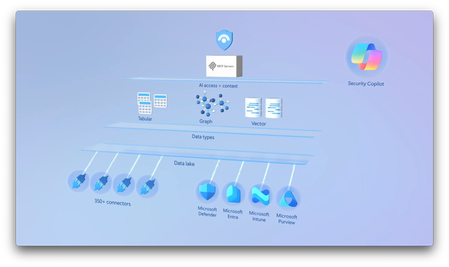
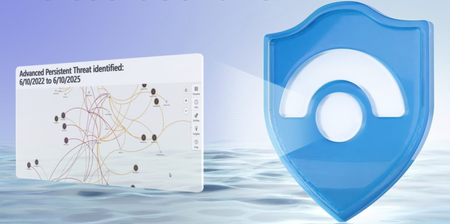
Visualize relationships across users, devices, and resources to pinpoint vulnerabilities and focus your response where it matters most. Using natural language, you can investigate faster. Ask questions, get context, and act on insights without writing complex queries. Build and extend your own identity graphs to include multicloud systems like Salesforce, enriching your view of risk. Vandana Mahtani, Microsoft Sentinel Principal PM, shares how to detect, investigate, and disrupt threats in one connected experience with Microsoft Sentinel. You can find more info on custom graphs: https://aka.ms/sentinel/graph/ignite and sign-up for preview at: https://aka.ms/sentinel/graph/customsignup Understand and mitigate risks. Connect the dots across users, devices, and resources with blast radius analysis in Sentinel graph. Take a look. Ask questions in natural language. Let the Sentinel MCP server analyze user activities across connected services. See it here. Create custom identity graphs. Map multicloud risk, detect high-risk users, and safeguard critical systems. Check out Microsoft Sentinel platform. QUICK LINKS: 00:00 — Microsoft Sentinel SIEM and AI-ready security platform 01:37 — Blast radius integration 02:34 — Investigate using AI with the Sentinel MCP server 03:40 — Advanced hunting 04:53 — Custom graphs 07:07 — Build your own custom graph 08:51 — Wrap up Link References For more information, visit https://aka.ms/sentinelplatform Custom graph public preview signup at https://aka.ms/sentinel/graph/customsignup Unfamiliar with Microsoft Mechanics? As Microsoft’s official video series for IT, you can watch and share valuable content and demos of current and upcoming tech from the people who build it at Microsoft. Subscribe to our YouTube: https://www.youtube.com/c/MicrosoftMechanicsSeries Talk with other IT Pros, join us on the Microsoft Tech Community: https://techcommunity.microsoft.com/t5/microsoft-mechanics-blog/bg-p/MicrosoftMechanicsBlog Watch or listen from anywhere, subscribe to our podcast: https://microsoftmechanics.libsyn.com/podcast Keep getting this insider knowledge, join us on social: Follow us on Twitter: https://twitter.com/MSFTMechanics Share knowledge on LinkedIn: https://www.linkedin.com/company/microsoft-mechanics/ Enjoy us on Instagram: https://www.instagram.com/msftmechanics/ Loosen up with us on TikTok: https://www.tiktok.com/@msftmechanics Video Transcript: -What if your security tools could not only detect threats, but understand them? What if they could reason over your entire digital estate, connect the dots between disconnected security signals, and predict where attackers might go next? All of this is now possible with Microsoft Sentinel, which is now more powerful, as it has evolved to be both a SIEM and an AI-ready security platform. Let’s break this down. At the foundation, Sentinel data lake unifies all your data in one place to enrich your investigations. Hundreds of available connectors help you bring in your security data wherever it resides. Risk signals contained in security data from different systems come together in the new Sentinel graph. -Here, real-time threat intelligence, like suspicious sign-ins and risky network activity, is mapped with the relationships identified across entities, from your users, devices, and resources across your entire digital estate, to reveal the potential attack paths or overall blast radius and more, so that you can understand the risk posed to critical assets. And you can perform complex queries using natural language enabled by the Sentinel MCP server that serves as a powerful gateway for AI to retrieve structured context to reason over all of your security data: from tabular and relational, to graph-based and vector-based semantic data, ultimately helping you detect, investigate, and disrupt threats faster. Let me make this real by first showing you the transformed experience for incident investigation. -The experience starts with Microsoft Defender, where you can easily access Microsoft Sentinel capabilities. I’m going to navigate to my active incidents. I’m interested in this multi-stage attack, and I can straight-away see that a user Mark Gafarova’s credentials have been compromised. In the past, figuring out where the attacker would go next would take a lot of extra hunting which you may not have the luxury of time for. With the new blast radius integration powered by Sentinel graph, we can quickly see the potential attack paths the attacker could take to get to critical assets, like the wg-prod key vault, which would escalate the severity of the attack by providing access to critical assets and data. As you saw, with Sentinel graph working behind the scenes, connecting the dots is faster when timing is critical. Now that we know the target of the attack and the potential assets at risk, we can customize our investigation using AI with the Sentinel MCP server. -Here I have a chat agent that my company Zava has built using GitHub Copilot. It’s connected to the Sentinel MCP server. Even though we know this incident has flagged Mark as potentially being compromised, I want to understand more about Mark. In the past, I would have had to be competent in Kusto querying to start to build a picture, but I can now just pose a question in natural language and replace multiple queries with a single question. I’ll ask, “What do we know about user Mark Gafarova and his actions?” And as you can see, this agent first connects to the MCP server, then performs a series of semantic searches and Kusto queries, then reasons over the retrieved data to analyze the user’s activities and checks for risk events across connected services. And we can see it’s found all of Mark’s recent activities and we know more about his activities before we revoke his access to resources. -With more clues in hand, we can now move on to more advanced hunting using the new hunting graph. We just saw that the wg-prod key vault looked accessible by our attackers. In fact, this visual shows us other accounts that have access. Our high privilege account, Malin on the right, is well protected using phishing-resistant authentication, so they are more immune to an attacker. But Laura Hanak on the left and Alberto Polak on top are standard business users, so let’s find out first if Laura’s account was compromised. I’ll move back to our agent and prompt it with, “Show me the blast radius from Laura Hanak,” and it identifies all the resources that Laura’s account can access along with what is at risk, like our key vault production environment, security infrastructure, automation systems, and AI/ML platforms. It also presents recommendations of what to do to lock down these at-risk resources and monitor them. And I can keep going for more information. I’ll ask, “Why is this risky?” And it generates a detailed security analysis with different attack risks and their tactics, techniques and protocols for each. So, graphs are a powerful way to investigate risk in your environment. In some cases, you may want to use custom graphs enriched with specific data. -For example, you might want to understand if attack risk from an incident extends to your CRM system, like Salesforce using your favorite opensource graph, or even build your own. Here we’ve ingested Salesforce data into Sentinel data lake via the available connector, which allows for higher fidelity relationship mapping to instantiate a custom multicloud identity graph, and that our agent is connected to. -This time I’ll ask, “Can you analyze Alberto Polak using the custom identity graph. Is there risk to Salesforce?” And the agent uses the identity graph. It’s getting information to understand potential attack paths. Then it finds the blast radius specific to Alberto. Then it’s searching for Salesforce-specific connections and runs more queries in different ways against the data lake. You’ll see that it found Alberto to be high risk based on his access level. We can see clearly that Alberto is a Helpdesk Tier 1 admin with admin rights, who can delegate privileges to other accounts and even APIs and perform remote script execution. This goes beyond information that can be queried in Microsoft Entra ID. This could lead to privilege escalation and bulk data exfiltration via API data sync. -Under Direct Salesforce Risk, it lists risky things that his account can do: managing users, modifying all data, and again the API privileges. Then it highlights attack scenarios with single sign-on compromise and the API. Lastly, it gives great immediate recommendations. These ones are at a critical level focused on reducing Alberto’s access levels, including his group memberships, enabling just-in-time elevation to limit standing privileges, and auditing connected apps to make sure they have not been compromised. Then in high priority recommendations, these themes are reiterated at a more zoomed-in level for specific parameters, activities, and assets. -Next, let me show you more of the details behind building your own custom graph that works with your data in the Sentinel data lake. Here I’m in Visual Studio Code using the Microsoft Sentinel extension, and I’m building a graph similar to what we just saw with Salesforce data. This uses Spark SQL queries to create graph nodes and edges as entities to pull in. The graph assembly step connects everything together so that we can instantiate the graph itself, and after that we can query it. There’s an initial prerequisite and connection step to install the client, then connect and authenticate to our tenant. -Then in step 1, we’re adding all of our relevant Microsoft and Azure nodes, like SQL instances, users, and groups. Below that, you’ll see our connections to Salesforce nodes, with tenant, user, and administrator details. Then we’re defining edges for each and mapping the different keys together to form the relationships and bring the data together first in Azure and Entra, then with the same types of information in Salesforce, as well as mapping Entra objects with Salesforce objects in the respective directories. -Now that we’ve defined everything, the second step is to build the actual graph using the ingredients and relationships defined in the previous step, and finally instantiate our custom graph. And with everything built out, we can test it with a few queries from the notebook. Here, for example, we’re looking for shortest paths from a specific user to Salesforce privileged nodes. And in this case, we’re testing again with Alberto Polak, and from there, we’ve also run a few different types of queries. So with the graph tested, it’s ready to be used as a grounding source of data for our agent. -With Microsoft Sentinel, you now have what you need to extend visibility across your environment and detect, investigate, understand, and disrupt active security threats faster from one single platform. To learn more, visit aka.ms/sentinelplatform, and keep watching Microsoft Mechanics for the latest tech updates. Thanks for watching!934Views1like0CommentsNew data lake in Microsoft Sentinel
Correlate signals, run advanced analytics, and perform forensic investigations from a single copy of data — without costly migrations or data silos. Detect persistent, low-and-slow attacks with greater visibility, automate responses using scheduled jobs, and generate predictive insights by combining Copilot, KQL, and machine learning. Vandana Mahtani, Microsoft Sentinel Principal Product Manager shows how to uncover long-running threats, streamline investigations, and automate defenses — all within a unified, AI-powered SIEM experience. Store security data for up to 12 years. Perfect for long-term investigations and compliance. Check out our new data lake in Microsoft Sentinel. Streamline your data strategy. Send high-volume logs to the new low-cost data lake tier and control retention per table. See it here. Detect threats and trigger blocks. Schedule automated queries using Microsoft Sentinel jobs and notebooks. Start here. QUICK LINKS: 00:00 — Microsoft Sentinel Data Lake 01:49 — Data Management 02:46 — Table Management 03:36 — Data Lake exploration 04:17 — Advanced Hunting 05:23 — Query retention data 06:16 — Automate threat detection 07:18 — Move from reactive to predictive 08:50 — Wrap up Link References Check out https://aka.ms/SentinelDataLake Unfamiliar with Microsoft Mechanics? As Microsoft’s official video series for IT, you can watch and share valuable content and demos of current and upcoming tech from the people who build it at Microsoft. Subscribe to our YouTube: https://www.youtube.com/c/MicrosoftMechanicsSeries Talk with other IT Pros, join us on the Microsoft Tech Community: https://techcommunity.microsoft.com/t5/microsoft-mechanics-blog/bg-p/MicrosoftMechanicsBlog Watch or listen from anywhere, subscribe to our podcast: https://microsoftmechanics.libsyn.com/podcast Keep getting this insider knowledge, join us on social: Follow us on Twitter: https://twitter.com/MSFTMechanics Share knowledge on LinkedIn: https://www.linkedin.com/company/microsoft-mechanics/ Enjoy us on Instagram: https://www.instagram.com/msftmechanics/ Loosen up with us on TikTok: https://www.tiktok.com/@msftmechanics Video Transcript: -Microsoft Sentinel, our industry-leading SIEM, now has a brand-new unified data lake, and this changes everything. That’s because your ability to detect and respond to security threats in your organization is only as good as the visibility and longevity of your data. It means being able to look across your digital estate at scale as it produces terabytes of logs, assets, and alerts, and then correlate signals going as far back in time as needed to pinpoint security events. The trick is being able to do this efficiently without being constrained by storage costs or siloed tools, and that’s what we’ve solved for. -Our new data lake takes an open-format approach to bring all your security data together, centrally leveraging our expanding set of connectors, and you can even mirror data from on-premises and non-Microsoft cloud data sources at hyperscale without migrating it. Because storage and compute are decoupled, you can store massive volumes of data affordably up to 12 years, and query it using experiences, such as KQL and Notebooks, to run advanced analytics, machine learning, and forensic investigations all from a single copy of data. -This means you can now bring in high-volume, low fidelity, and long-term data, like firewall logs, that previously were not practical to keep, so that you now have the data to discover low and slow attacks happening under the radar, as attackers take weeks to months before striking, and disrupt them with Microsoft Sentinel’s built-in threat intelligence, automation, and AI, all in one single solution. Let me start by showing you the new core capabilities. From Microsoft Defender, you can now connect to a Sentinel Workspace, bringing everything you need to investigate security threats in one place. Once connected, Microsoft Sentinel appears in your left navigation pane with a full set of new experiences, including our unified data lake capabilities. -Let’s start with Data Management, which is now available directly in the Defender portal. This is where you’ll typically begin by connecting your logging sources using our expanding set of connectors. It works with your existing connectors and gives you new flexibility to cost-effectively store data well beyond the previous 90-day default. And, for the first time, you can mirror data from Microsoft sources, alongside external sources like the AWS S3 and CISCO Network logs shown here, into the data lake. And as mentioned, using Table Management, you can manage precisely where and how you store data and manage retention. From the new Table Management page, you can continue sending data to the Analytics tier as before, and it will now automatically be mirrored to the new lake. -If I click on Manage Table I can change retention settings, so now it’s easy to send what you want directly to the data lake tier, which is ideal for high-volume, low-fidelity data, like these firewall logs. And from here, I can also stipulate the retention period for this table. And soon, you’ll also be able to split the data between the two tiers, giving you full control over cost and performance, which gives you more flexibility and is more streamlined than using siloed approaches. Next, Data Lake exploration is where you’ll interact with your data in the lake. Using the KQL queries tab, you can run KQL queries against any data in the lake. And from here, you can view all of the tables and schema to help you author your queries. -Then, if I move over to the Jobs tab, this lets you use automation with your KQL and Notebook jobs to run them on a schedule. And if I filter to the job that I want, and select this Password Spray Analyzer job, this will let me query the lake and even store its output in a table and promote those insights into the Analytics tier where I can create alerts and detections. Now, let me show you how these capabilities help improve your threat investigation and response, and I’ll stay in the context of a password spray attack, where the initial activity could have happened months ago. In the Microsoft Defender portal, I’ll start in Advanced Hunting, and I’ll use Security Copilot. -To save time, I’ll paste in my prompt: “To create a KQL query to detect slow password spray attacks within the last 90 days.” And I’ve added a few more instructions on other attributes that I’m looking for so that I can assess if the attack is affecting multiple users. And Copilot takes a moment to generate the query. And I can move its query over to the editor, where I can make changes like this one to the failed attempts threshold. I’ll run it, and based on these rows, like this first one where 39 users had 807 failed attempts over 90 days using this same IP address, we can see that this is definitely a password spray pattern, as are the instances in the rows below that. -So far, I’ve only gone back 90 days, but I want to better understand when the attack first started. This time, I’ll change my query to go further back in time by leveraging the data lake. I’ll use Data Lake exploration and start in KQL Queries. This is where I can query our longer-term retention data, which again can be up to 12 years old. I’ll paste in the same query. And in this case, we worked on a similar incident 12 months ago, so let’s see if they are connected. So I’ll adjust the dates to the timing of that incident. I have a custom range from August 15, 2024 to September 10, 2024, and I’ll save that. And now I’ll go ahead and run it. And that takes a moment. -Now, I see a clear pattern. Again, multiple accounts targeted from the same network infrastructure, each with a low volume of failed attempts. So I can see the attack was active even then and indeed was the same attacker. It looks like this attacker is persistent, so we should set up logic to see which new IPs and domains they’ll be using moving forward, then update our protections to block new attempts as they move to different infrastructure. To do that, in Jobs, first we need to capture Threat Intelligence matching data against our Cisco network and sign-in logs in the lake, so I’ll create a Job. I just need to give it a name and description, then select a workspace, and create a new table in this case, and I’ll call it “CiscoDailyLog.” -Next, I’ll paste in my query. Here, I can choose to run it once, or automatically run it as a scheduled job. This will promote the output to the analytics tier. And from there, we’ll be able use those insights to automate blocks in Microsoft Entra and our firewall. To get that going, I’ve selected my start time, then I just need to confirm, and submit. So I traced post-breach data to find the root cause, enabling dynamic and proactive defenses. -Next, by applying data science and machine learning to the data lake, SOC analysts can work together with data scientists to move from reactive to predictive insights. As a data scientist, in VS Code, I’ve installed the new Microsoft Sentinel extension from the marketplace. This uses the same single copy of data that’s in the lake. Here, at the Notebook, I can author queries in-line, and in this case, I even used GitHub Copilot for that. I don’t need to worry about provisioning compute, since it’s all managed. I’ve also already run this Python query using the Microsoft Sentinel Provider library. I’ve used popular machine learning libraries to train a user sign-in anomaly insights model. -Notebooks are also great for in-line visualizations, and I’ve created a scatter plot chart to see deviations from baseline user sign in behavior, like sign-ins from unusual IP ranges, login attempts outside normal hours, or unexpected device types. In this case, the red dots represent significant deviation from expected user login behavior. And if I scroll down a little more, I can see that they are captured in this output. Now I have the insights that I need. And of course, from there, I’d just put those anomalous sign-ins into the analytics tier and use that information to generate predictive blocks. And as I showed before, Notebooks can also be rerun as Jobs to automate the process. -So that’s how Microsoft Sentinel, our industry-leading SIEM, and its brand-new unified data lake expands your visibility so that you can act on new and existing threats, helping you to detect, mitigate, and disrupt them faster. To learn more, check out aka.ms/sentineldatalake. Keep checking back to Microsoft Mechanics for the latest tech updates, and thanks for watching.707Views0likes0Comments