microsoft identity manager
27 TopicsRequest to enable preview feature - Face Check with CAP
Dear Microsoft, I am on a business premium plan for my home test tenant. I cannot raise ticket nor do I have an account manager. I know this is in private preview. I would like my tenant to be enabled to test this new Verified ID feature to have "Face Check" in CAP as one of the Grant conditions. tenant id: bc85b508-0107-4472-a49c-fc8cefd4f0d7 Thank you.388Views0likes1Comment
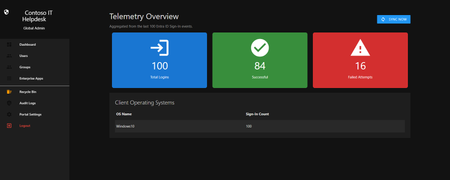
Introducing the Entra Helpdesk Portal: A Zero-Trust, Dockerized ITSM Interface for Tier 1 Support
Hello everyone, If you manage identity in Microsoft Entra ID at an enterprise scale, you know the struggle: delegating day-to-day operational tasks (like password resets, session revocations, and MFA management) to Tier 1 and Tier 2 support staff is inherently risky. The native Azure/Entra portal is incredibly powerful, but it’s complex and lacks mandatory ITSM enforcement. Giving a helpdesk technician the "Helpdesk Administrator" role grants them access to a portal where a single misclick can cause a major headache. To solve this, I’ve developed the Entra Helpdesk Portal (Community Edition)—an open-source, containerized application designed to act as an isolated "airlock" between your support team and your Entra ID tenant. Why This Adds Value to Your Tenant Instead of having technicians log into the Azure portal, they log into this clean, Material Design web interface. It leverages a backend Service Principal (using MSAL and the Graph API) to execute commands on their behalf. Strict Zero Trust: Logging in via Microsoft SSO isn’t enough. The app intercepts the token and checks the user’s UPN against a hardcoded ALLOWED_ADMINS whitelist in your Docker environment file. Mandatory ITSM Ticketing: You cannot enforce ticketing in the native Azure Portal. In this app, every write action prompts a modal requiring a valid ticket number (e.g., INC-123456). Local Audit Logging: All actions, along with the actor, timestamp, and ticket number, are written to an immutable local SQLite database (audit.db) inside the container volume. Performance: Heavy Graph API reads are cached in-memory with a Time-To-Live (TTL) and smart invalidation. Searching for users or loading Enterprise Apps takes milliseconds. What Can It Do? Identity Lifecycle: Create users, auto-generate secure 16-character passwords, revoke sign-in sessions, reset passwords, and delete specific MFA methods to force re-registration. Diagnostics: View a user's last 5 sign-in logs, translating Microsoft error codes into plain English. Group Management: Add/remove members to Security and M365 groups. App/SPN Management: Lazy-load raw requiredResourceAccess Graph API payloads to audit app permissions, and instantly rotate client secrets. Universal Restore: Paste the Object ID of any soft-deleted item into the Recycle Bin tab to instantly resurrect it. How Easy Is It to Setup? I wanted this to be universally deployable, so I compiled it as a multi-architecture Docker image (linux/amd64 and linux/arm64). It will run on a massive Windows Server or a simple Raspberry Pi. Setup takes less than 5 minutes: Create an App Registration in Entra ID and grant it the necessary Graph API Application Permissions (e.g., User.ReadWrite.All, AuditLog.Read.All). Create a docker-compose.yml file. Define your feature toggles. You can literally turn off features (like User Deletion) by setting an environment variable to false. version: '3.8' services: helpdesk-portal: image: jahmed22/entra-helpdesk:latest container_name: entra_helpdesk restart: unless-stopped ports: - "8000:8000" environment: # CORE IDENTITY - TENANT_ID=your_tenant_id_here - CLIENT_ID=your_client_id_here - CLIENT_SECRET=your_client_secret_here - BASE_URL=https://entradesk.jahmed.cloud - ALLOWED_ADMINS=email address removed for privacy reasons # CUSTOMIZATION & FEATURE FLAGS - APP_NAME=Entra Help Desk - ENABLE_PASSWORD_RESET=true - ENABLE_MFA_MANAGEMENT=true - ENABLE_USER_DELETION=false - ENABLE_GROUP_MANAGEMENT=true - ENABLE_APP_MANAGEMENT=true volumes: - entra_helpdesk_data:/app/static/uploads - entra_helpdesk_db:/app volumes: entra_helpdesk_data: entra_helpdesk_db: 4.Run docker compose up -d and you are done! I built this to give back to the community and help secure our Tier 1 operations. If you are interested in testing it out in your dev tenants or want to see the full architecture breakdown, you can read the complete documentation on my website here I’d love to hear your thoughts, feedback, or any feature requests you might have!314Views0likes0Comments
External (guest) users can't access my registered application
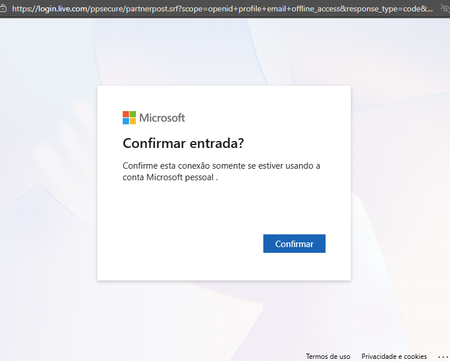
We have a FileMaker application registered with Entra ID, using OAuth, for internal and external (guests) users in my organization. Since January 19th, external users have been encountering a different authentication process, which results in a 404 error (see images below). No changes were made to the Entra ID or the application configurations before this change in behaviour. It seems that logging in to a personal account results in an incorrect token for the redirect URL, which does not happen when logging in with organizational accounts.853Views1like1CommentReachability of a domain across multiple tenants
I have a general question about an Entra scenario that we currently need to implement. Our company consists of 3 companies (companyA.com, companyB.com, companyC.com), each with their own MS Tenant. Here, A is the parent company and B and C are subsidiaries. Is it somehow possible, perhaps with Cross Tenant Synchronization from B, C -> A, that users from the subsidiaries can log in with the parent company's domain name in Entra, Teams & Co., and that Teams invitations can also be sent via an email address of the parent company? So I have mailto:email address removed for privacy reasons and I would like this user to also be known as mailto:email address removed for privacy reasons in the Microsoft ecosystem. From a marketing perspective, it is important that all employees log in and are reachable with the same domain. A migration into one tenant is probably not easily possible for legal reasons. Thank you in advance for your assistance. Christian322Views0likes1CommentAdd members to a dynamic sec-grp excluding users with a specific "serviceplanid" assigned license
Hello, I am trying to populate dynamically a security group that shoud contain all members with a specific attribut value and trying to filter the groupe membership based on a serviceplanId assigned to members (user.extensionAttribute9 -startsWith "83") -and (user.accountEnabled -eq True) -and (user.mail -ne null) -and (User.AssignedPlans -any (assignedPlan.servicePlanId -ne "818523f5-016b-4355-9be8-ed6944946ea7" -and assignedPlan.capabilityStatus -eq "Enabled")) How to exclude members with the ServicePlanId : "818523f5-016b-4355-9be8-ed6944946ea7" from the list of the groupe members ?231Views0likes1Comment
Sign In Error 90072 with On Prem Accounts - How to mitigate?
We receive weekly reports from one of our security vendors regarding login failures across our environment. As of recent, we've noticed a spike in interactive login failures, particularly with Microsoft services. The application that produces many of these logs is Microsoft Office. Upon investigation, we've determined that many of these sign ins procure error code 90072 with the following error message: "User account '{user}' from identity provider '{idp}' does not exist in tenant '{tenant}' and cannot access the application '{application}'({appName}) in that tenant. The account needs to be added as an external user in the tenant first. Sign out and sign in again with a different Azure Active Directory user account" As a disclaimer, I did not edit this message to insert the unfilled variables in brackets - that's how the error message appears in our Entra portal. We currently run a hybrid environment, and all of the users with high volumes of failed sign ins with the given error code and message are on-prem accounts. These logs produce a lot of noise that we would rather not have polluting our reports. Do you have any information we can use to help remediate this issue?528Views0likes1CommentShape the future of our communities! Take this survey to share your practitioner insights. 💡 ✏️ 🔓
This brief survey explores your experiences and preferences in professional identity and network security communities. Your feedback will help shape our team's approach to future community resources and engagement opportunities. Take the survey here! For any questions about this survey, please contact dansantos@microsoft.com. Privacy Statement: https://go.microsoft.com/fwlink/?LinkId=52183972Views0likes0Comments
Cloud-First Attribute Ownership for Synced Users in Entra ID Is Not Supported
📝 Description As an enterprise architect working to modernize identity provisioning, I’ve encountered a major limitation in Microsoft Entra ID’s hybrid identity model. While Microsoft promotes a cloud-first strategy, the current architecture forces reliance on on-premises Active Directory for attribute ownership when users are synced via Entra Connect. Key issues: Directory extension attributes, even when created in the cloud, are read-only for synced users. Custom security attributes are not queryable and cannot be used in dynamic groups or claims. There is no supported mechanism to allow cloud apps (e.g., Workday provisioning) to own or update specific attributes for synced users. Breaking sync to convert users to cloud-only is disruptive and not scalable for large enterprises. This creates a conflict between cloud-first provisioning goals and technical limitations, making it difficult to fully transition away from on-prem AD. ✅ Requested Improvements Attribute-Level Ownership Delegation Allow cloud apps to own and update specific attributes for synced users, even if the user is still managed by AD. Writable Directory Extensions for Synced Users Enable Graph API write access to cloud-created directory extensions for hybrid users. Dynamic Query Support for Custom Security Attributes Make custom security attributes usable in dynamic groups, claims, and app filtering. Clear Guidance and Tooling for Cloud-First Identity Models Provide supported patterns and tools for transitioning identity provisioning and attribute management to the cloud. 🙏 Why This Matters Organizations are actively trying to reduce reliance on legacy infrastructure and embrace cloud-first identity. The current limitations in Entra ID make this transition unnecessarily complex and inconsistent with Microsoft’s cloud-first messaging. ---copiloted response for sure after many days of trying to work a solution that does not create more tech debt...381Views0likes1CommentEntra App Gallery required for Excel AddIn
Hi, We have an Excel Addin published to Microsoft AppSource: https://appsource.microsoft.com/en-us/product/office/WA200009029?tab=Overview The Excel Addin uses Entra ID to obtain an OIDC token to securely / seamlessly access MS 365 SharePoint on behalf of the user. In order to achive this the Entra ID subscription needs the TR4E application registered as an Enterprise Application / App Registration. My question is whether I need to submit the TR4E application separately to the Entra App Gallery, so it can be installed by the Entra ID admin - or will the registration in Entra ID happen automatically when a new user first tries using TR4E? I note that MS has suspended new application submissions for Entra App Gallery, which means our customers would need to manually create the Entra ID Enterprise Application (which is not a great experience). Cheers, Andrew266Views0likes1CommentUser Identities in EntraID - how to remove?
I have a user that shows up with multiple identities. No other users are like this and we believe its stopping him from logging in with his alias email address. When i run get-entrauser it returns the following under Identities: {@{signInType=federated; issuer=MicrosoftAccount; issuerAssignedId=}, @{signInType=federated; issuer=MicrosoftAccount; issuerAssignedId=}, @{signInType=userPrincipalName; issuer=OURPRIMARYDOMAIN.onmicrosoft.com; issuerAssignedId=UPN}} Every other account just has this @{signInType=userPrincipalName; issuer=OURPRIMARYDOMAIN.onmicrosoft.com; issuerAssignedId=UPN}} How would i go about removing those identies from that user? Struggling to find any info online.580Views0likes1Comment