microsoft entra tenant governance
1 TopicShould You Use the New Microsoft Entra Tenant Governance or Azure Lighthouse? (part 3 of 3)
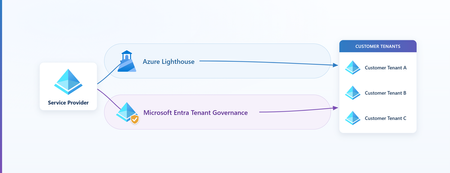
In Part 1 we built Azure Lighthouse the technical way. In Part 2, "Bring Your Partner In, Without Letting Their Identities In," we made the security case for it: let a service provider operate a customer's Azure resources without creating any identity in the customer's tenant. This third part introduces another, newly available delegation model Microsoft Entra Tenant Governance and helps you to answer the question: which one do I use, and when?. If you already know Lighthouse, you have everything you need to follow along - If not, catch up on the previous two articles. While most of the focus will be on Microsoft Entra Tenant Governance, we will compare and contrast it with Azure Lighthouse. There's one idea that makes the whole comparison click: the two models project access in opposite directions. 1. Azure Lighthouse, and its boundary As a brief refresher, Azure Lighthouse lets a service provider manage a customer's Azure resources (subscriptions and resource groups) from the provider's own tenant. The provider's users never get an account in the customer's directory and never become guests there; instead, the customer's subscriptions and resource groups are delegated to the provider through Azure Resource Manager, and the provider operates them with their home credentials (Azure Lighthouse architecture). No identity sprawl, no extra license, no charge (Azure Lighthouse overview). Lighthouse is scoped to the Azure Resource Manager control plane. It delegates resources from subscriptions or resource groups such as virtual machines, storage, networking, policy, and Sentinel workspaces. It does not grant Microsoft Entra directory roles, it does not reach resource data planes such as Storage blob data or Key Vault secrets, and it doesn't reach Microsoft 365 (cross-tenant management experience). But it leaves a real question open. What happens when the partner (or an enterprise with multiple tenants) legitimately needs access to the directory, to read identity configuration, run security operations, administer users, or govern identities, and not just the resource estate? Lighthouse, by design, can't take you there. That's the gap the second model fills. 2. Two directions of projection The easiest way to keep the two models straight is to consider the following: Azure Lighthouse projects the customer's resources up into the provider's tenant. The provider manages those resources from its own context. The customer's subscription is, in effect, presented inside the provider's Azure portal. Microsoft Entra Tenant Governance projects the provider's identity down into the customer's tenant. A principal from the provider tenant becomes usable inside the customer, and a provider user or service principal uses it there to do the work. Each delegate cross-tenant access without local accounts, but the thing that moves is opposite. And who moves strongly shapes whose rules apply. When the customer's resources come up to the provider, the work happens in the provider's context. When the provider's identity goes down to the customer, the work happens in the customer's context. Think of the word "projection" as a way to reason about trust direction, not a literal claim that objects are copied between tenants. Lighthouse is delegated management from the provider's context; Tenant Governance creates a governed principal in the customer's context that can hold directory roles and Azure RBAC. 3. What is Microsoft Entra Tenant Governance? Microsoft Entra Tenant Governance is the capability that lets one tenant securely administer another. The connection between a specific pair of tenants is called a governance relationship: a directional link in which one tenant, the governing tenant (the provider), administers another, the governed tenant (the customer) (set up a governance relationship). Throughout, this article is written from the provider's vantage point: when it says you, it means the provider (governing) side, and the other tenant is always referred to explicitly as the customer. The topics discussed here apply equally to Enterprises needing to manage many of their own tenants as well as Service Providers who manage many customer tenants. You set it up in two steps: A policy template in the provider tenant that declares which principal will be projected and which Entra roles it should receive. Note that RBAC assignments are not part of the governance relationship and must be completed by the customer in their tenant. A handshake between the two tenants that establishes the trust boundary and provisions the access. Now let’s dive into the details: what gets projected, and how it gets its powers. 4. What actually gets projected: one proxy principal In the provider tenant you start with something completely ordinary, a security group (say, your "Cloud Operators" group), or a custom multitenant application. When you form the governance relationship, a proxy of that principal is created in the customer tenant: A security group is projected in as a remote tenant group. An application (a custom multitenant app) is projected in as a service principal, when the relationship is established, Tenant Governance automatically creates a service principal with the same permissions in the customer tenant (no manual step on the customer's side): "Tenant Governance creates a service principal with the same permissions in the governed tenant" (governance policy templates). It’s important to keep two things straight, neither is a local account or a guest: The proxy, the remote tenant group (or, for an app, the service principal), is a new principal created in the customer tenant by the relationship. It is not a copy of the provider's group, not a local group created in the customer, and not a guest. It exists only because the relationship projects it, and it is what the provider grants roles to. The people and apps that use it, the provider's users and service principals, stay in the provider tenant. They never receive a member account or a guest invitation in the customer; they reach the customer through the proxy. Here is what that provider user or service principal is and isn't, from the customer's point of view: The provider user or service principal is NOT… …it IS… A local member account created in the customer's directory An identity that stays in the provider tenant and authenticates with provider credentials A B2B guest invited into the customer Reachable only through the projected proxy, a signed-in user shows in the customer's logs as the provider tenant's name + Technician (e.g. Contoso Technician) A standing, permanent object listed among the customer's users Present only as a governed session or principal, scoped by the relationship and revocable by the customer To work in the customer tenant, a provider user opens a supported admin portal (Entra or Azure) and appends the customer's tenant ID, for example https://entra.microsoft.com/{customer-tenant-id}, then signs in with their provider-tenant credentials. The customer's logs then show them a directory display name of user_{object-id} (the provider object ID without dashes), and, in sign-in and audit logs, the provider tenant's name followed by Technician, so for a provider tenant named Contoso the entry reads Contoso Technician (use cross-tenant delegated administration). No local account, no guest object, the resource-plane property Lighthouse provides, now on the directory plane (cross-tenant delegated administration). A note on the two projection mechanics, because they differ in a way worth understanding. A group projects as a remote tenant group, a cross-tenant reference back to the provider's group, with no new local membership stored in the customer. An application projects as a real service principal that is actually created in the customer with the consented permissions. Same idea, a governed proxy of a provider principal, but a group is a reference, while an app is an instantiated object. 5. How the proxy gets its powers: roles attach to the one principal The proxy is one principal. You don't create separate identities for "directory access" and "resource access." Instead, you grant roles to that single proxy, and the roles can come from two different planes: Directory roles govern the customer's Microsoft Entra directory. Think of well-known ones such as Global Reader (read-only across the directory), Global Administrator, or User Administrator, selected as built-in roles in the policy template (governance policy templates). Azure RBAC roles govern the customer's Azure resources. Think of the familiar Reader, Contributor, or a service-specific roles like Virtual Machine Contributor, assigned to the remote tenant group at a subscription or resource-group scope. This is not done as part of the governance relationship as the Entra directory role is. This must be assigned after the relationship is established likely by a privileged customer admin. The bridge from directory to resources is the remote tenant group itself: because the projected group can be referenced by Azure RBAC, the same proxy that holds Global Reader in the directory can also hold Reader or Contributor on a resource group. Critically, these are not separate identities, they are both roles held by the one remote tenant group, as the diagram above shows. And the directory role grants no Azure access on its own; the resource rights come entirely from the explicit RBAC assignment you choose. That single design choice, roles branch off one proxy, is what lets one projected principal span both planes: the same remote tenant group can hold a directory role and a separate, explicit Azure RBAC grant, without ever issuing a local account. What do these identities actually look like in the customer tenant? The only place you will see the security group is in the governance relationship. You will not find it among your other Entra groups. t For RBAC purposes, you can find the proxy security group under resource Access Control (IAM) as a foreign group. 6. The building blocks, and how they depend on each other Now that the concept is in place, here's the assembly order. Each block depends on the one before it. A role-assignable security group in the provider tenant, the principal you intend to project. A policy template that selects which directory roles that group should receive when projected (governance policy templates). A governance relationship, established by a handshake. In the standard three-step flow the customer invites, the provider requests (carrying the template), and the customer accepts; a streamlined two-step flow (request → accept) applies when the two tenants already share a qualifying signal, such as a billing relationship or an existing governance relationship. At acceptance, the role assignments are provisioned in the customer (set up a governance relationship). The template's role set is projected onto the relationship, so later template edits require a fresh request and re-approval, the customer always gets to review what changes. The projected proxy plus its role assignments in the customer, the remote tenant group (or service principal), now holding the directory and/or Azure RBAC roles you granted. Under the hood: this cross-tenant delegation is powered by granular delegated admin privileges (GDAP), the same delegation technology behind Partner Center (cross-tenant delegated administration). You don't configure it directly; the relationship and the template do it for you. That's all you need to know about the plumbing. The whole flow is also scriptable through the Microsoft Graph Tenant Governance APIs (API overview), and a default template can bring new add-on tenants under governance automatically at creation (deployment guide). 7. Key Features Because the proxy can hold both directory roles and Azure RBAC, Tenant Governance unlocks delegated administration across the entire surface a partner might legitimately need: Directory administration, read or manage the customer's Microsoft Entra directory with least-privileged built-in roles, using home credentials, no local accounts. Identity governance, run access reviews, entitlement management, and lifecycle workflows across many customer tenants from one place. Security operations, operate security and compliance tooling centrally. Microsoft Defender XDR and Microsoft Sentinel multitenant management for MSSPs is one prominent example built on this model (governance relationships for unified SecOps). Azure resource management, the remote tenant group can carry Azure RBAC for any Azure service, exactly the way a local group would. That covers the management (control) plane only; neither model delegates the resource data plane (for example, blob data or Key Vault secrets), so those operations still require an identity native to the customer tenant. Application management, project a custom multitenant app as a service principal with consistent, least-privileged permissions across tenants (governance policy templates). The provider's users and service principals use their provider-tenant identities, and no local or B2B account is ever planted in the customer. The one object the customer does gain is in the application case, a governed service principal of the projected app, created and maintained through the relationship rather than as a standing local login. 8. Comparing Tenant Governance with Azure Lighthouse Now that both models are understood, the comparison is straightforward. They operate on different planes and point in different directions. Dimension Azure Lighthouse Microsoft Entra Tenant Governance Direction of projection Customer resources → provider Provider identity → customer Where the provider identity operates From the provider tenant (customer resources projected up; no customer sign-in) In the customer tenant, authenticated by the provider home tenant — as {Provider} Technician Planes reached Azure resource (ARM) plane only Directory plane and Azure resource plane Data-plane access (e.g., blob data, Key Vault secrets) Not supported (control/ARM plane only) Not supported (the proxy can hold a DataActions role, but cannot obtain a data-plane token) Identity footprint in customer None A projected proxy principal, no local or guest object Conditional Access Only the provider's policies apply (security practices) The customer's policies apply, the customer is the resource tenant for the technician's sign-in (lab-verified; see below) Where the privileged assignment lives Provider tenant (JIT approvers in the provider) (eligible authorizations) Customer tenant (the role assignment is owned customer-side) Audit of provider actions Customer Activity Log (view activity) Customer audit log records the provider user’s actions; the authentication sign-in is recorded provider-side, it appears in the customer's sign-in log only when the customer's CA fires Role types Azure built-in roles only, no custom roles; Owner and roles with DataActions excluded, and Microsoft.Authorization/* writes excluded except User Access Administrator for managed-identity assignments (role rules) Directory roles and Azure RBAC (including custom RBAC) on the proxy Setup ARM template / Marketplace offer (onboard) Relationship handshake (invitation → request → acceptance) Revocation Remove the delegation, either party (remove) Terminate the relationship, either party Operational view Single pane of glass, every delegated customer's resources surface in the provider's own portal Per-customer, the admin signs in to each customer tenant individually Best for Scaled Azure resource operations Directory / identity / security delegation plus resources The sign-in, Conditional Access, footprint, and audit rows describe the human delegated-administration path (a projected group). In the application case the customer instead gets a governed service principal, so those rows read differently. Direction of projection, the root cause. Everything else in the table is a consequence of this one row. Lighthouse brings the customer's resources up to the provider; Tenant Governance places a governed proxy of the provider's identity down in the customer. Decide which direction your scenario actually needs, and the rest mostly answers itself. Conditional Access, the cleanest inverse. With Lighthouse, provider users authenticate in their own tenant, so the customer's Conditional Access never reaches them, "Only policies set on the managing tenant apply"(recommended security practices). With Tenant Governance the provider actually signs in to the customer tenant (use cross-tenant delegated administration), which makes the customer the resource tenant that evaluates Conditional Access, so the customer's policies govern the inbound provider login, not the provider's policies. Two nuances to keep in mind: When the provider logs into the customer tenant, the authentication still happens with the provider’s tenant, but the conditional access policy applied to the login is in the customer tenant. Where privileged access lives. Lighthouse offers just-in-time elevation through eligible authorizations, and the approvers sit in the provider (managing) tenant, "up to 10 users or user groups in the managing tenant who can approve"(create eligible authorizations). Tenant Governance inverts the ownership: the proxy's role assignment lives in the customer tenant, so privileged-access governance over that assignment is anchored customer-side. The useful contrast is simply where the assignment lives and who governs it, provider-side for Lighthouse, customer-side for Tenant Governance. Audit and identity footprint. With Lighthouse, provider actions land in the customer's Azure Activity Log under a named user, with no customer sign-in and no directory object (view provider activity). Tenant Governance is more subtle. The provider user's authentication is handled and logged in the provider (home) tenant, so the bare sign-in appears there, not in the customer tenant. What does get logged in the customer directory is the provider user’s actions, in its audit log, where the actor shows as the <provider tenant's name + Technician> (e.g. Contoso Technician) (use cross-tenant delegated administration). A sign-in entry from the provider user only appears in the customer's logs when the customer's Conditional Access evaluates the session, for example, an MFA challenge. Without such a policy, that sign-in is only logged on the provider side. Either way, the customer keeps a full audit of what the technician does and gains no standing local or guest object (cross-tenant delegated administration). <provider name> Technician" One console vs. many: Operational reach. Because Lighthouse projects the customer's resources up, the provider works from a single pane of glass, every delegated customer's subscriptions appear in the provider's own Azure portal, and cross-tenant tooling, Azure Resource Graph, Microsoft Sentinel, Azure Policy, Azure Monitor, can span all of them at once. Tenant Governance points the other way: the provider's identity projects down into each customer, so day-to-day administration is per-customer, the admin signs in to each customer tenant in turn. (Service consoles such as Microsoft Defender XDR add their own aggregated multitenant views on top, but the underlying delegated-admin model is per-tenant.) When operating many customers' Azure estates from one console is the priority, that single-pane reach is a distinct Lighthouse strength. 9. Where the two models overlap As is the case with other delegated access models, there is clear overlap between Azure Lighthouse and Tenant Governance: Both eliminate local and B2B accounts in the customer. The partner's people stay in the provider tenant either way (Lighthouse architecture, cross-tenant delegated administration). Both can ultimately place Azure RBAC on customer resources, Lighthouse directly through the delegation, Tenant Governance via the remote tenant group. Both are limited to the control (management) plane, neither delegates resource data-plane access (for example, blob data or Key Vault secrets); that still requires an identity native to the customer tenant. Both keep the customer in control of the audit record, provider actions are written to the customer's logs. Both are revocable by either party, remove the delegation, or terminate the relationship. 10. What is complimentary with the two models? Because they sit on different planes and point in opposite directions, you can use one or both. Deciding between the two delegated access models: Need only to operate the customer's Azure resources, especially across many customers? Choose Azure Lighthouse, no extra license or charge, a broad set of Azure built-in roles (Owner and custom roles excluded), just-in-time elevation with provider-side approval, zero directory footprint, and a single pane of glass: because customer resources project up into the provider's tenant, the provider manages every customer's estate from their own portal, with cross-tenant tooling spanning all of them at once. Need directory, identity, or security reach, not just resources? Choose Microsoft Entra Tenant Governance, directory roles and Azure RBAC on one projected principal, with the customer's own sign-in controls in the loop. Because the provider's identity projects down into each customer, administration is per-customer: the admin signs in to each customer tenant in turn rather than from one aggregated console. Need both on the same tenant? Use both. They coexist because they operate on different planes, Lighthouse for the resource estate, Tenant Governance for directory and security. 11. Key points to remember about Entra Tenant Governance Least privilege. A directory role grants no Azure access, and an Azure RBAC role grants no directory access. Each plane is an explicit grant to the proxy, start with read-only (e.g., Global Reader in the directory, Reader on resources) and add only what's needed. Directory ≠ resource. The two planes are independent. If the partner needs to operate Azure resources, that comes from an explicit RBAC assignment on the remote tenant group, not from any directory role. That RBAC is control-plane only; neither Tenant Governance nor Lighthouse delegates the resource data plane (for example, blob data or Key Vault secrets), which still requires an identity native to the customer tenant. Tenant discovery is irreversible. Enabling related-tenant discovery is permanent (deployment guide). For a controlled pilot, run the handshake by tenant ID and skip discovery. Azure Lighthouse, by contrast, coexists with a governance relationship on the same customer, different mechanism, different plane. Conditional Access is the customer's to enforce. Because the provider signs in to the customer tenant, the customer's Conditional Access governs that access. 12. Summary Azure Lighthouse and Microsoft Entra Tenant Governance are two delegation models pointing in opposite directions. Lighthouse brings the customer's resources up to the provider and keeps the provider's Azure access clean and identity-free. Tenant Governance places a governed proxy of the provider down in the customer, extending the very philosophy from Parts 1–2, govern the relationship, not the people, from the resource plane all the way into the directory. Choose by the direction the trust needs to flow: bring the resources to you (Azure Lighthouse), or place a governed proxy of yourself in the customer (Microsoft Entra Tenant Governance). When you need both, use both.