microsoft defender threat intelligence
114 Topics
SmartScreen reputation issue for EV Code Signed Windows application
Hello Microsoft Defender Threat Intelligence Team, We are the developer of a legitimate Windows desktop application called "ShangJing". Recently, our users reported that Microsoft Defender SmartScreen displays the following warning when downloading and launching our application: "Microsoft Defender SmartScreen can't verify this file is safe." The application is not malicious and has been digitally signed with a GlobalSign EV Code Signing Certificate. Application information: Product Name: ShangJing Publisher: Zhaoyi Information Technology (Shanghai) Co., Ltd. Certificate: GlobalSign EV Code Signing Certificate File: 尚镜_2.0.0_platinum_setup.exe Issue: Users receive SmartScreen reputation warning when downloading our application. We have already submitted the file through Microsoft Security Intelligence submission portal 7 days ago, but we have not received any update yet. Submission ID: 0c015296-b9cf-4130-9eaf-fc59cd145370 The file is distributed through our official website: https://www.changine.cn/downloads We would like to understand: 1. Is this caused by insufficient SmartScreen reputation for a newly released binary? 2. Is there any additional verification required from the software publisher side? 3. How can we ensure our legitimate application gains proper SmartScreen reputation? Our application is widely used for live streaming and camera-related workflows. It does not contain any malicious behavior. We would appreciate any guidance from the Microsoft team. Thank you.336Views1like3Comments
Need information on generating sample events for Threat Intelligence" (both duplicate posts)
Two things are tripping this up, and they're common mix-ups: First — Attack Simulation Training doesn't generate Threat Intelligence events. If you used the built-in phishing simulator, its logs only show up under Email & collaboration → Attack simulation training → Simulations — they're intentionally excluded from real Threat Intelligence telemetry. That's likely why nothing's showing up even though you ran a campaign. Second — your EICAR test should actually work, but check the right place: not the generic Office 365 Management Activity API's AuditLogRecordType page in isolation — go specifically to the RecordType values used for Defender for Office 365 threat events: 28 = ThreatIntelligence (phishing/malware events) 41 = ThreatIntelligenceUrl (Safe Links time-of-click/block events) Plus ThreatIntelligenceAtpContent, ThreatFinder, MSTIC To reliably generate one: Confirm Purview audit logging is enabled for the tenant first — if it isn't, nothing downstream gets logged regardless of what you trigger. From an external mailbox, send a test user the EICAR string as a .txt attachment (exact 68-byte string, see Microsoft's anti-malware testing doc). Defender for Office 365 should detect and quarantine it. Verify it landed first in the portal UI: Email & collaboration → Explorer → Malware tab — if it's there, the underlying ThreatIntelligence record exists and the Management API call should return it (allow a short delay; these aren't instant). For the Safe Links side, send a known-safe-but-flagged test URL (Microsoft publishes test URLs for this) to trigger ThreatIntelligenceUrl. If it shows up in Explorer but still doesn't appear via the Management API, that's usually an API subscription/permission issue (you need an active subscription to the DLP.All or relevant Office 365 Management API content type, not just Graph permissions) — worth checking separately from the detection side.167Views0likes0CommentsCan the Microsoft Defender portal show the server details as per security group?
Yes — this is exactly what Device Groups + RBAC are designed for in Microsoft Defender (assuming you're managing these servers through Defender for Endpoint, which is the typical path for cross-vendor server monitoring). The model: Device groups are the scoping unit (not Entra security groups directly) — create one per vendor/company (e.g., "Company A Servers", "Company B Servers"), using a matching rule (tag, OS, name pattern, etc.) to auto-assign devices. RBAC roles then get tied to an Entra security group and granted access to only specific device groups. So: Company A's people go in an Entra group → that group is assigned an MDE role scoped to "Company A Servers" only → they only ever see those devices, alerts, and incidents in the portal. You as admin keep your existing Global Admin/Security Admin role (or get added to both device groups' RBAC scope), so you retain visibility across both. Path: Settings → Endpoints → Permissions → Device groups to create the groups, then Permissions → Roles to create a role and tie it to your Entra security group with that device group as the scope. One thing to verify before committing to this design: this RBAC model affects what shows in alerts, incidents, advanced hunting (scoped automatically), and inventory — but make sure nobody from Company A/B also needs organization-wide Defender features like global threat analytics, since those aren't scopable the same way. If you're actually talking about servers monitored via Defender for Cloud (Azure subscription-based, not MDE-onboarded), the equivalent mechanism is Azure RBAC at the subscription/resource group level (assign Security Reader scoped to the RG containing Company A's VMs) — different mechanism, same outcome. Worth clarifying which portal/product this is so the right one gets recommended.181Views0likes0Comments
My companies app incorrectly detected as a trojan
Hi Team. I am the developer of a gaming geo fence and your system had falsely detected my app as Trojan:Script/Wacatac.C!ml I need help to remove it as it seems like analysts are no longer checking false detections anymore? ( at least to me it seems automatic now )? My app is a geo fence which creates firewall rules and use npcaap for packet capture to display server locations and the exe is encrypted to help fight against software pirates. Here is an example submission of my exe for my application https://www.microsoft.com/en-us/wdsi/submission/5ab00c91-ea84-4fbb-a739-613316b32dfe Please get an analyst to manually inspect the file and whitelist it as its a pain telling my customers to turn off their anti virus and also its not advice i should have to give to be honest. My company is called sbmmoff ltd https://papagal.bg/eik/207176266/58b9 Website is bflocker.com I really would appreciate a speedy response to resolve the situation and thank you for your time.Solved584Views0likes4CommentsMicrosoft Defender doesn't, Spy hunter shows a Hijacker
Spy Hunter indicates a "Elex Hijacker" and three other problems were as Defender and McAfee do not show any problem. Is Spy Hunter legitimate? I did have a Search engine redirect problem that has a name "ext.ladispatcher.com" and "search-load.com" while using Chrome browser with Chrome search engine. But no problem with Microsoft Edge and Bing. My monitor screen occasionally momentary collapses and reverts back to normal in a split second. Could there be a connection to malware.? Please let me know if i am posting on the wrong site.319Views0likes2CommentsNeed information on generating sample events for Threat Intelligence
Hi community, I am working on exploring MS Threat Intelligence and its features. But I am not able to generate sample data for this product, nor able to view the Threat Intelligence logs using Microsoft Management API following the schema - https://learn.microsoft.com/en-us/office/office-365-management-api/office-365-management-activity-api-schema#auditlogrecordtype I tried sending some mails from external email account to my organisation's test user containing EICAR files, and also tried with some safe but malicious test URLs. But still unable to get data inside Threat Intelligence. Can someone please help me here for generating events and viewing the content using Management APIs?325Views1like2Comments
Need information on generating sample events for Threat Intelligence
Hi community, I am working on exploring MS Threat Intelligence and its features. But I am not able to generate sample data for this product, nor able to view the Threat Intelligence logs using Microsoft Management API following the schema - https://learn.microsoft.com/en-us/office/office-365-management-api/office-365-management-activity-api-schema#auditlogrecordtype I tried sending some mails from external email account to my organisation's test user containing EICAR files, and also tried with some safe but malicious test URLs. But still unable to get data inside Threat Intelligence. Can someone please help me here for generating events and viewing the content using Management APIs?303Views0likes1CommentDisable Defender TI access to end user
Hi, When our users access Defender quarantine (or access Defender Admin Center directly), they also get access to Microsoft Defender Threat Intelligence. Is it possible to disable it and allow access only to the Quarantine? Thanks, Dario WoitasenSolved317Views0likes1Comment
Can the Microsoft Defender portal show the server details as per security group?
I'm using Microsoft Defender to monitor the servers. I have multiple groups of people working from various other vendors. I would like create multiple security groups and add people based on their company and configure the defender such a manner that only people from Company "A" can see their own servers and people working from Campany "B" can see their respective servers. Also, I as admin can see both "A's" and "B's" servers. Can this be achieved using Microsoft Defender? If yes, how to achieve this? Any step-by-step approach would help. Or if there are any other ways, please suggest. Thanks197Views0likes1Comment
New Blog | New Copilot for Security Plugin Name Reflects Broader Capabilities
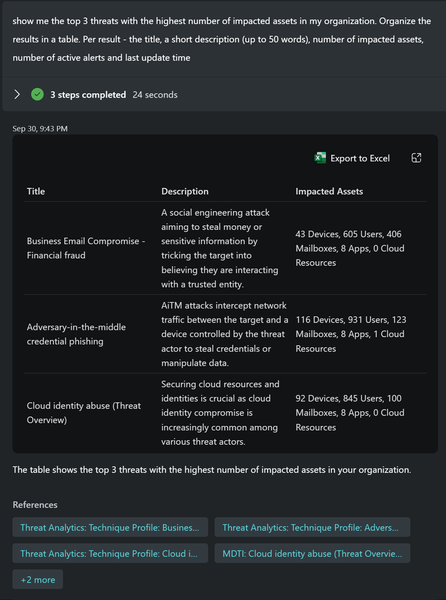
By Michael Browning The Copilot for Security team is continuously enhancing threat intelligence (TI) capabilities in Copilot for Security to provide a more comprehensive and integrated TI experience for customers. We're excited to share that the Copilot for Security threat Intelligence plugin has broadened beyond just MDTI to now encapsulate data from other TI sources, including Microsoft Threat Analytics (TA) and SONAR, with even more sources becoming available soon. To reflect this evolution of the plugin, customers may notice a change in its name from "Microsoft Defender Threat Intelligence (MDTI) to "Microsoft Threat Intelligence," reflecting its broader scope and enhanced capabilities. Since launch in April, Copilot for Security customers have been able to access, operate on, and integrate the raw and finished threat intelligence from MDTI developed from trillions of daily security signals and the expertise of over 10 thousand multidisciplinary analysts through simple natural language prompts. Now, with the ability for Copilot for Security's powerful generative AI to reason over more threat intelligence, customers have a more holistic, contextualized view of the threat landscape and its impact on their organization. Read the full post here: New Copilot for Security Plugin Name Reflects Broader Capabilities372Views1like0Comments