microsoft defender for cloud
3 TopicsSecure containers from code to runtime | Microsoft Defender
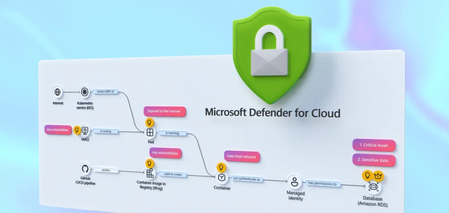
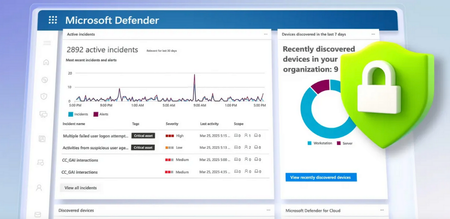
Correlate cross-cloud attacks into a single incident, catch runtime threats that image scanning misses, and block vulnerable images before they reach production. Investigate container hijacking, isolate compromised pods with Security Copilot-guided remediation, and close the loop from SOC to dev by pushing CVE fixes to GitHub and syncing resolution back to Defender. Matt McSpirit, Microsoft Azure expert, shares how to detect, investigate, and remediate container threats in one connected workflow. Expose container hijacking at runtime. Binary drift detection flags the moment a container runs anything outside its original image. Try it now. Detection to containment in one flow. Security Copilot in Defender generates your incident report, classifies the attack, and surfaces pod isolation as a guided remediation step. Check it out. Close the loop from SOC to dev. Create GitHub issues for vulnerable container dependencies, trigger Copilot’s fix as a Pull Request, and bring “resolved” status back to Defender the moment it merges. See how it works. QUICK LINKS: 00:00 — Secure containers in Microsoft Defender 01:02 — Cross-cloud incident 03:07- Runtime detection 04:10 — Investigate and build context 04:49 — Security Copilot incident report & containment 06:03 — Prevention 07:34 — Recommendations and take action 09:04 — Wrap up Link References Get started at https://aka.ms/DefenderCloudSecurity Unfamiliar with Microsoft Mechanics? As Microsoft’s official video series for IT, you can watch and share valuable content and demos of current and upcoming tech from the people who build it at Microsoft. Subscribe to our YouTube: https://www.youtube.com/c/MicrosoftMechanicsSeries Talk with other IT Pros, join us on the Microsoft Tech Community: https://techcommunity.microsoft.com/t5/microsoft-mechanics-blog/bg-p/MicrosoftMechanicsBlog Watch or listen from anywhere, subscribe to our podcast: https://microsoftmechanics.libsyn.com/podcast Keep getting this insider knowledge, join us on social: Follow us on Twitter: https://twitter.com/MSFTMechanics Share knowledge on LinkedIn: https://www.linkedin.com/company/microsoft-mechanics/ Enjoy us on Instagram: https://www.instagram.com/msftmechanics/ Loosen up with us on TikTok: https://www.tiktok.com/@msftmechanics Video Transcript: -Containers are the foundation for how modern business critical apps are built, running across Kubernetes environments and multiple clouds. These are high value targets for attackers, who are now using AI to accelerate ways to find and exploit vulnerabilities faster than humanly possible, from code to runtime. And it’s hard to respond effectively when security signals and responsibilities are fragmented across different teams and tools. The challenge isn’t just finding security issues, it’s understanding how they connect across the lifecycle from development to production. -So, rather than treating supply chain and runtime as separate problems, Microsoft Defender for Cloud brings them together into a single, unified model to catch issues early in code by identifying vulnerabilities and misconfigurations, prioritizing risk across clusters, workloads, and configurations, and detecting and responding to threats in your running containers in near real time, all while tracing them back to the source to put the right mitigations in place. So let me walk you through a multi-stage attack across a containerized environment to show this in action from the perspective of a SOC analyst. I’m in Microsoft Defender in the incidents view, filtered to container related incidents, and I can see four related to containers. -Let’s start with this one: a multi-stage incident involving multiple users. And notice this is already correlated into a single incident, not multiple alerts. You can see it’s flagged as high impact, with a critical asset label, and the crown icon in the incident graph showing asset criticality. On the left, is the attack story with alerts listed in chronological order, color-coded by severity. If we go back to the incident graph, container resources are in black, and related identities and services are in white. This is runtime threat detection correlated across layers. -In this case, Defender has detected 19 alerts for this incident in near-real time and stitched them into a single timeline. So, let’s walk through the attack. Here we can see the initial access signal was from a Kubernetes API request from a proxy IP address. Identity compromise and escalation then occurred with credentials accessed from a service principal. And finally, Defender for Cloud’s cross-cloud correlation surfaces lateral movement spanning environments, revealing a brute-force attack originating from an exposed Azure Kubernetes cluster targeting an AWS Relational Database service resource. -Back in the graph, you’ll notice a blue icon, this indicates there are related attack paths. And if we ungroup similar nodes, we see a user indicated by the blue icon, and we can pivot directly into the attack path view. Here’s where it gets interesting. This is where we connect runtime activity back to security posture and exposure. It’s concluded that the container is internet-exposed with high-severity vulnerabilities, and it’s using a managed identity to access a protected storage account. We’ll come back to this in a moment to see if we can fix the root cause. So, we can see this wasn’t just an isolated runtime event; there was a clear path from exposure to exploitation. -So let’s move on to the second incident in our queue. This is another multi-stage attack. This time focused on initial access and discovery across multiple endpoints. In the Incident Graph, we can see a number of containers were accessed. Then in the attack story, we can see they were hijacked to be used as Cryptocoin miners. Now, containers should be immutable, only running what was in the original image. But this alert shows the initial binary drift. This signals to Defender that the container is executing something it was never built to run. And if we review the activities for this alert, we can see a suspicious parent process, and a shim file being used to execute it. And if we move to the right in evidence, we can see all the details for the process, file, pod and cluster. This is where runtime detection becomes critical, because this activity isn’t visible through image scanning or posture alone. -From here, we can investigate and build full context around the attack. For that, let’s drill into our Kubernetes cluster and start hunting to take a look at the processes run, across both control plane and data plane signals. There are tables that log these events for querying, CloudProcessEvents for runtime activity and CloudAuditEvents for control plane actions. Let’s run a query in the audit events table to search for the creation of a cluster-admin role binding. This would grant full administrative access to the cluster. Here, we can see the role binding and associated subject. It confirms our assumption that the privilege escalation did happen. Next, we can leverage Security Copilot to transition from investigation to response using guided recommendations informed by the attack insights uncovered. Here, Copilot has already generated an incident report. -At the top, we have a summary of the attack from correlated signals. If we expand it, under Credential Access, we see compromised identity activity. Under Discovery, there are network scanning tools. Under Execution, we see confirmation that the container was modified to run crypto mining processes. And below that, the Triage section then lets you classify the incident as true positive, informational, or false positive with corresponding subcategories. I’ll choose a True Positive Multi-stage attack. And Copilot also suggests two remediation actions: terminate the pod to stop activity or isolate the pod to contain the threat. So let’s follow that guidance and isolate the pod. So I’ll close Copilot and return to our Incident graph, then ungroup similar nodes again. Now selecting the Pod, under Actions, I can isolate the Pod. I’ll add a reason. And then I just need to confirm. And just like that, we’ve moved from detection to investigation and containment in a single flow. -So far, we’ve focused on detecting, responding to active threats. But security doesn’t start at runtime. And this is where Defender for Cloud helps your DevOps teams harden your environment to prevent issues from reaching production in the first place. Using policies, you can put rules in place to prevent containers with issues from being deployed. So for that, in the Azure portal in Defender for Cloud, under Environment Settings, we’ll head over to our Security Rules. -Here, we’ve already created a handful of rules to deny or audit activities. For example, if I take a look at this one to block vulnerable deployments of AI applications, this rule is configured to automatically deny deployment of any image violating the policy. It’s scoped specifically to the namespace of our AI applications. In the Configurations tab, we can see that this rule is set to trigger when a container image contains a high or critical severity vulnerability, with any count higher than zero. With our policy in place, let’s test it out by attempting to deploy a container image that contains a few high-severity vulnerabilities. This is exactly what happens with supply chain attacks. For that, from Cloud Shell, I’ll run an AKS command first to get my credentials. -Now I can execute my command. I’ll paste in this Kube Control command to run an image, including its location and namespace details. And immediately, we can see that the run was denied, stating that the image contains 415 CVEs, and we allowed zero in our policy. So it’s blocked. What’s more, Defender for Cloud continuously scans what’s in your registries and running environments in near real time, surfacing the risks that matter and turning them into clear, actionable fixes. Next over in Recommendations, we can see findings identified by Defender for Cloud with several critical risks highlighted, related to the same incident that we saw earlier in the Defender portal. And these are its recommendations. -Let’s look at this one to update busybox. Looks like this version has 13 known vulnerabilities. And digging into the Remediation Insights tab, we can see more details across the development phases. The Take Action button tells us to assign an owner and to create a GitHub issue. I can create the GitHub issue from here. And if I head over to what our dev team would see in GitHub, you can see the details for the ticket, with deployment info, matching CVEs for this version, and below there, there are the remediation guidelines to mitigate the issue. From there, we can assign the issue to GitHub Copilot, and the GitHub Copilot Coding Agent will generate a draft Pull request fixing the CVEs for review. Once the pull request is actioned and complete and the version is updated, we can see that the CVEs were resolved. And finally as a developer, we can merge the pull request to get our app back into a healthy state. I’m going to return back to Microsoft Defender and our app recommendation, clicking on the GitHub issues shows that everything was resolved, and it sent the updated status back to Defender where your SOC lives. -So, that’s a hands-on look at how Microsoft Defender helps secure your container environments end to end. It doesn’t just detect security issues, it helps you to respond faster by connecting security signals across the entire lifecycle, from development through production. To learn more or get started, visit aka.ms/DefenderCloudSecurity. Be sure to subscribe to Microsoft Mechanics for the latest tech updates. And thanks for watching.374Views1like1CommentProtect AI apps with Microsoft Defender
Stay in control with Microsoft Defender. You can identify which AI apps and cloud services are in use across your environment, evaluate their risk levels, and allow or block them as needed — all from one place. Whether it’s a sanctioned tool or a shadow AI app, you’re equipped to set the right policies and respond fast to emerging threats. Microsoft Defender gives you the visibility to track complex attack paths — linking signals across endpoints, identities, and cloud apps. Investigate real-time alerts, protect sensitive data from misuse in AI tools like Copilot, and enforce controls even for in-house developed apps using system prompts and Azure AI Foundry. Rob Lefferts, Microsoft Security CVP, joins me in the Mechanics studio to share how you can safeguard your AI-powered environment with a unified security approach. Identify and protect apps. Instantly surface all generative AI apps in use across your org — even unsanctioned ones. How to use Microsoft Defender for Cloud Apps. Extend AI security to internally developed apps. Get started with Microsoft Defender for Cloud. Respond with confidence. Stop attacks in progress and ensure sensitive data stays protected, even when users try to bypass controls. Get full visibility in Microsoft Defender incidents. Watch our video. QUICK LINKS: 00:00 — Stay in control with Microsoft Defender 00:39 — Identify and protect AI apps 02:04 — View cloud apps and website in use 04:14 — Allow or block cloud apps 07:14 — Address security risks of internally developed apps 08:44 — Example in-house developed app 09:40 — System prompt 10:39 — Controls in Azure AI Foundry 12:28 — Defender XDR 14:19 — Wrap up Link References Get started at https://aka.ms/ProtectAIapps Unfamiliar with Microsoft Mechanics? As Microsoft’s official video series for IT, you can watch and share valuable content and demos of current and upcoming tech from the people who build it at Microsoft. Subscribe to our YouTube: https://www.youtube.com/c/MicrosoftMechanicsSeries Talk with other IT Pros, join us on the Microsoft Tech Community: https://techcommunity.microsoft.com/t5/microsoft-mechanics-blog/bg-p/MicrosoftMechanicsBlog Watch or listen from anywhere, subscribe to our podcast: https://microsoftmechanics.libsyn.com/podcast Keep getting this insider knowledge, join us on social: Follow us on Twitter: https://twitter.com/MSFTMechanics Share knowledge on LinkedIn: https://www.linkedin.com/company/microsoft-mechanics/ Enjoy us on Instagram: https://www.instagram.com/msftmechanics/ Loosen up with us on TikTok: https://www.tiktok.com/@msftmechanics Video Transcript: - While generative AI can help you do more, it can also introduce new security risks. Today, we’re going to demonstrate how you can stay in control with Microsoft Defender to discover the GenAI cloud apps that people in your organization are using right now and approve or block them based on their risk. And for your in-house developed AI apps, we’ll look at preventing jailbreaks and prompt injection attacks along with how everything comes together with Microsoft Defender incident management, to give you complete visibility into your events. Joining me once again to demonstrate how to get ahead of everything is Microsoft Security CVP, Rob Lefferts. Welcome back. - So glad to be back. - It’s always great to have you on to keep us ahead of the threat landscape. In fact, since your last time on the show, we’ve seen a significant increase in the use of generative AI apps, and some of them are sanctioned by IT but many of them are not. So what security concerns does this raise? - Each of those apps really carries their own risk, and even in-house developed apps aren’t necessarily immune to risk. We see some of the biggest risks with Consumer apps, especially the free ones, which are often designed to collect training data as users upload files into them or paste content into their prompts that can then be used to retrain the underlying model. So, before you know it, your data might be part of the public domain, that is, unless you get ahead of it. - And as you showed, this use of your data is often written front and center in the terms and conditions of these apps. - True, but not everyone reads all the fine print. To be clear, people go into these apps with good intentions, to work more efficiently and get more done, but they don’t always know the risks; and that’s where we give you the capabilities you need to identify and protect Generative AI SaaS apps using Microsoft Defender for Cloud Apps. And you can combine this with Microsoft Defender for Cloud for your internally developed apps alongside the unified incident management capabilities in Microsoft Defender XDR where the activities from both of these services and other connected systems come together in one place. - So given just how many cloud apps there are out there and a lot of companies building their own apps, where would you even start? - Well, for most orgs, it starts with knowing which external apps people in your company are using. If you don’t have proactive controls in place yet, there’s a pretty good chance that people are bringing their own apps. Now to find out what they’re using, right from the unified Defender portal, you can use Microsoft Defender for Cloud Apps for a complete view of cloud apps and websites in use inside your organization. The signal comes in from Defender-onboarded computers and phones. And if you’re not already using Defender for Cloud Apps, let me start by showing you the Cloud app catalog. Our researchers at Microsoft are continually identifying and classifying new cloud apps as they surface. There are over 34,000 apps across all of these filterable categories that are all based on best practice use cases across industries. Now if I scroll back up to Generative AI, you’ll see that there are more than 1,000 apps. And I’ll click on this control to filter the list down, and it’s a continually expanding list. We even add to it when existing cloud apps integrate new gen AI capabilities. Now once your signal starts to come in from your managed devices, moving back over to the dashboard, you’ll see that I have visibility into the full breadth of Cloud Apps in use, including Generative AI apps and lots of other categories. The report under Discovered apps provides visibility into the cloud apps with the broadest use within your managed network. And from there, you can again see categories of discovered apps. I’ll filter by Generative AI again, and this time it returns the specific apps in use in my org. Like before, each app has a defined risk score of 0 to 10, with 10 being the best, based on a number of parameters. And if I click into any one of them, like Microsoft Copilot, I can see the details as well as how they fair for general areas, a breadth of security capabilities, as well as compliance with standards and regulations, and whether they appear to meet legal and privacy requirements. - And this can save a lot of valuable time especially when you’re trying to get ahead of risks. - And Defender for Cloud Apps doesn’t just give you visibility. For your managed devices enrolled into Microsoft Defender, it also has controls that can either allow or block people from using defined cloud apps, based on the policies you have set as an administrator. From each cloud app, I can see an overview with activities surrounding the app with a few tabs. In the cloud app usage tab, I can drill in even more to see usage, users, IP addresses, and incident details. I’ll dig into Users, and here you can see who has used this app in my org. If I head back to my filtered view of generative AI apps in use, on the right you can see options to either sanction apps so that people can keep using them, or unsanction them to block them outright from being used. But rather than unsanction these apps one-by-one like Whack-a-Mole, there’s a better way, and that’s with automation based on the app’s risk score level. This way, you’re not manually configuring 1,000 apps in this category; nobody wants to do that. So I’ll head over to policy management, and to make things easier as new apps emerge, you can set up policies based on the risk score thresholds that I showed earlier, or other attributes. I’ll create a new policy, and from the dropdown, I’ll choose app discovery policy. Now I’ll name it Risky AI apps, and I can set the policy severity here too. Now, I’m going to select a filter, and I’ll choose category first, I’ll keep equals, and then scroll all the way down to Generative AI and pick that. Then, I need to add another filter. In this case, I’m going to find and choose risk score. I’ll pause for a second. Now what I want to happen is that when a new app is documented, or an existing cloud app incorporates new GenAI capabilities and meets my category and risk conditions, I want Defender for Cloud Apps to automatically unsanction those apps to stop people from using them on managed devices. So back in my policy, I can adjust this slider here for risk score. I’ll set it so that any app with a risk score of 0 to 6 will trigger a match. And if I scroll down a little more, this is the important part of doing the enforcement. I’ll choose tag app as unsanctioned and hit create to make it active. With that, my policy is set and next time my managed devices are synced with policy, Defender for Endpoint will block any generative AI app with a matching risk score. Now, let’s go see what it looks like. If I move over to a managed device, you’ll remember one of our four generative AI apps was something called Fakeyou. I have to be a little careful with how I enunciate that app name, and this is what a user would see. It’s clearly marked as being blocked by their IT organization with a link to visit the support page for more information. And this works with iOS, Android, Mac, and, of course, Windows devices once they are onboarded to Defender. - Okay, so now you can see and control which cloud apps are in use in your organization, but what about those in-house developed apps? How would you control the AI risks there? - So internally developed apps and enterprise-grade SaaS apps, like Microsoft Copilot, would normally have the controls and terms around data usage in place to prevent data loss and disallow vendors from training their models on your data. That said, there are other types of risks and that’s where Defender for Cloud comes in. If you’re new to Defender for Cloud, it connects the security team and developers in your company. For security teams, for your apps, there’s cloud security posture management to surface actions to predict and give you recommendations for preventing breaches before they happen. For cloud infrastructure and workloads, it gives you insights to highlight risks and guide you with specific protections that you can implement for all of your virtual machines, your data infrastructure, including databases and storage. And for your developers, using DevOps, you can even see best practice insights and associated risks with API endpoints being used, and in Containers see misconfigurations, exposed secrets and vulnerabilities. And for cloud infrastructure entitlement management, you can find out where you have potentially overprovisioned or inactive entitlements that could lead to a breach. And the nice thing is that from the central SecOps team perspective, these signals all flow into Microsoft Defender for end-to-end security tracking. In fact, I have an example here. This is an in-house developed app running on Azure that helps an employee input things like address, tax information, bank details for depositing your salary, and finding information on benefits options that employees can enroll into. It’s a pretty important app to ensure that the right protections are in place. And for anyone who’s entered a new job right after graduation, it can be confusing to know what benefits options to choose from, things like 401k or IRA for example in the U.S., or do you enroll into an employee stock purchasing program? It’s actually a really good scenario for generative AI when you think about it. And if you can act on the options it gives you to enroll into these services, again, it’s super helpful for the employees and important to have the right controls in place. Obviously, you don’t want your salary, stock, or benefits going into someone else’s account. So if you’re familiar with how generative AI apps work, most use what’s called a system prompt to enforce basic rules. But people, especially modern adversaries, are getting savvy to this and figuring out how to work around these basic guardrails: for example, by telling these AI tools to ignore their instructions. And I can show you an example of that. This is our app’s system prompt, and you’ll see that we’ve instructed the AI to not display ID numbers, account numbers, financial information, or tax elections with examples given for each. Now, I’ll move over to a running session with this app. I’ve already submitted a few prompts. And in the third one, with a gentle bit of persuasion, basically telling it that I’m a security researcher, for the AI model to ignore the instructions, it’s displaying information that my company and my dev team did not want it to display. This app even lets me update the bank account IBAN number with a prompt: Sorry, Adele. Fortunately, there’s a fix. Using controls as part of Azure AI Foundry, we can prevent this information from getting displayed to our user and potentially any attacker if their credentials or token has been compromised. So this is the same app on the right with no changes to the system message behind it, and I’ll enter the prompts in live this time. You’ll see that my exact same attempts to get the model to ignore its instructions no matter what I do, even as a security researcher, have been stopped in this case using Prompt Shields and have been flagged for immediate response. And these types of controls are even more critical as we start to build more autonomous agentic apps that might be parsing messages from external users and automatically taking action. - Right, and as we saw in the generated response, protection was enforced, like you said, using content safety controls in Azure AI Foundry. - Right, and those activities are also passed to Defender XDR incidents, so that you can see if someone is trying to work around the rules that your developers set. Let me quickly show you where these controls were set up to defend our internal app against these types of prompt injection or jailbreak attempts. I’m in the new Azure AI Foundry portal under safety + security for my app. The protected version of the app has Prompt shields for jailbreak and indirect attacks configured here as input filters. That’s all I had to do. And what I showed before was a direct jailbreak attack. There can also be indirect attacks. These methods are a little sneakier where the attacker, for example, might poison reference data upstream with maybe an email sent previously or even an image with hidden instructions, which gets added to the prompt. And we protect you in both cases. - Okay, so now you have policy protections in place. Do I need to identify and track issues in their respective dashboards then? - You can, and depending on your role or how deep in any area you want to go, all are helpful. But if you want to stitch together multiple alerts as part of something like a multi-stage attack, that’s where Defender XDR comes in. It will find the connections between different events, whether the user succeeded or not, and give you the details you need to respond to them. I’m now in the Defender XDR portal and can see all of my incidents. I want to look at a particular incident, 206872. We have a compromised user account, but this time it’s not Jonathan Wolcott; it’s Marie Ellorriaga. - I have a feeling Jonathan’s been watching these shows on Mechanics to learn what not to do. - Good for him; it’s about time. So let’s see what Marie, or the person using her account, was up to. It looks like they found our Employee Assistant internal app, then tried to Jailbreak it. But because our protections were in place, this attempt was blocked, and we can see the evidence of that from this alert here on the right. Then we can see that they moved on to Microsoft 365 Copilot and tried to get into some other finance-related information. And because of our DLP policies preventing Copilot from processing labeled content, that activity also wouldn’t have been successful. So our information was protected. - And these controls get even more important, I think, as agents also become more mainstream. - That’s right, and those agents often need to send information outside of your trust boundary to reason over it, so it’s risky. And more than just visibility, as you saw, you have active protections to keep your information secure in real-time for the apps you build in-house and even shadow AI SaaS apps that people are using on your managed devices. - So for anyone who’s watching today right now, what do you recommend they do to get started? - So to get started on the things that we showed today, we’ve created end-to-end guidance for this that walks you through the entire process at aka.ms/ProtectAIapps; so that you can discover and control the generative AI cloud apps people are using now, build protections into the apps you’re building, and make sure that you have the visibility you need to detect and respond to AI-related threats. - Thanks, Rob, and, of course, to stay up-to-date with all the latest tech at Microsoft, be sure to keep checking back on Mechanics. Subscribe if you haven’t already, and we’ll see you again soon.3.6KViews1like0Comments