microsoft build
17 Topics
Microsoft Leads a New Era of Software Supply Chain Transparency
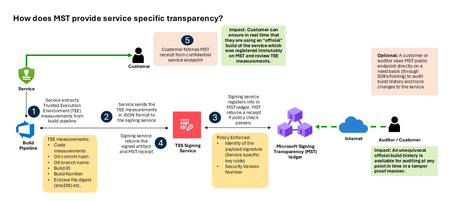
Microsoft announces the general availability of Microsoft’s Signing Transparency (MST) – a first-of-its-kind capability that brings unprecedented visibility and trust to our software supply chain. With this release, Microsoft is leading the industry by recording the build of critical cloud services into a publicly readable and verifiable SCITT standard (Supply Chain Integrity, Transparency, and Trust) compliant ledger. This means every production software build for in scope services like Azure Attestation and Azure Managed HSM (Hardware Security Module), Azure confidential ledger, Microsoft Signing Transparency itself (and others over time) – is now logged in an immutable, tamper-evident record. Only builds that are in the MST ledger are deployed to production; this gives customers confidence that the supply chain for these critical services can be audited at anytime. Notably, the MST ledger is fully open source and built to align with the emerging IETF SCITT standard. By embracing SCITT’s principles and open protocols, Microsoft ensures that MST not only secures our own ecosystem but also contributes to a broader industry movement toward standardized supply chain transparency. The open-source MST ledger serves as a verifiable trust anchor that any organization or researcher can inspect, audit, or even integrate with their own tooling. MST itself meets the highest levels of transparency, backed by a tamper-proof confidential ledger, open-source, and independently verified. Specifically, we are making the foundation of our trust model transparent and accessible to everyone – reinforcing that trust must be earned through proof, not just promises. This launch marks a major milestone in our commitment to Zero Trust principles, extending “never trust, always verify” all the way into the build itself. Building on a public preview introduced late last year, MST’s general availability delivers verifiable transparency at the software level. It transforms traditional code signing with an additive trust layer that is accessible via an open verification model. Every new software update is accompanied by a publicly auditable proof of integrity, enabling security teams to proactively confirm that each update is authentic and unaltered. To help organizations get the most out of this capability, we are also introducing a free tool to explore the contents – Ledger Explorer – an offline tool that allows security teams to examine MST ledger entries, verify cryptographic proofs, and even validate the ledger’s integrity independently. This tool, combined with MST’s open design, ensures that every Microsoft customer – and the broader community – can hold us accountable in real time for the software we run on their behalf. Key Benefits of Microsoft’s Signing Transparency (MST) Verified Code Integrity – Every software release is cryptographically logged in MST’s ledgers. This makes each build tamper-evident and traceable. If an attacker attempts to inject malicious code or sign an unauthorized update, it will be evident through the well-defined validation step built into the SCITT standard. Organizations gain the assurance that code integrity can be independently confirmed at any time. Independent Verification & Zero Trust – MST enables customers and auditors to verify software authenticity on their own, without having to solely rely on vendor attestations. For each update, Microsoft provides a transparency “receipt” (proof of logging) that you can use to prove the update was officially published and unaltered. This fosters a “don’t just trust, verify” approach, empowering security teams to double-check everything running in their environment aligns with what Microsoft intended. Audit-Trail & Compliance – The transparency ledger creates a permanent, auditable timeline of code deployments. Every entry is a record of what was released and when, backed by cryptographic proofs. This simplifies compliance reporting and accelerates forensic analysis. In the event of an incident, you can quickly audit the ledger to see if any unexpected code was introduced. For highly regulated industries, MST offers concrete evidence of software integrity and policy compliance over time. Leadership & Open Standards – We are delivering real transparency now, encouraging a future where all critical software is released with verifiable integrity. MST’s open source implementation and SCITT-compliant design exemplify our commitment to openness and collaboration. We believe widespread adoption of these standards will strengthen supply chain security for everyone, making trust verification a universal practice. Next Steps Microsoft’s Signing Transparency is more than a new security feature and shapes the advances in trust technology. As threats grow more sophisticated, we must evolve the way we assure our customers about the software they depend on. With MST now generally available, we are leading by example: proving that it is possible to open up the traditionally opaque process of software deployment and turn it into a source of strength and trust, i.e. empowering each person with verifiable transparency. We invite the industry to join us on this journey and get started by reading the documentation and exploring Ledger Explorer today! Together, by embracing transparency and open standards, we can turn “trust but verify” from a slogan into an everyday reality for digital infrastructure.Foundry Toolkit for VS Code at //build: Hosted Agents End-to-End, a Smarter Toolbox, and More
We’re excited to share what’s new for Foundry Toolkit for Visual Studio Code at //build 2026. Since going generally available, the toolkit has kept moving fast, and this release is a big one. The headline: a complete, end-to-end Hosted Agent experience, scaffold, run, deploy, and observe without ever leaving VS Code. On top of that, we’ve expanded the Toolbox with native enterprise integrations and shipped a wave of LangGraph samples so every developer has a clear path from idea to production. From your first prompt to a production-grade, observable agent, Foundry Toolkit meets you where you are. Hosted Agents, End to End Building an agent is the easy part; getting it from a first draft to a production-grade, observable service is what matters. This release makes the full Hosted Agent lifecycle available in VS Code, and it follows the way you actually work — scaffold, run, deploy, observe. Scaffold — start from a rich set of samples Hosted Agent creation now opens with a refreshed scaffolding experience and a rich sample selection, so you start from a working, framework-appropriate template instead of a blank file. Creation is smarter, too: we auto-select your subscription when there’s only one, gate tabs more clearly, and tightened spacing for a cleaner setup flow. Run (F5) — inspect as you build Press F5 and your agent runs locally with the Agent Inspector, now aligned with the rest of the extension and featuring Copilot SDK visualization so you can see what the Inspector visualizes as the agent executes. It’s the fastest loop from change to verification before anything leaves your machine. Deploy — a new UX and new ways to ship Different teams ship differently, so deployment got a refreshed UX and two new options for Hosted Agents: ZIP Code Deploy: Package your agent source as a ZIP and deploy it directly to Microsoft Foundry Agent Service. Bring-Your-Own-Image (BYOI): Already have a pre-built container in your own Azure Container Registry? Deploy straight from it. Observe — know it works in production Once deployed, the full observability story is now available: Hosted Agent Tracing: Inspect end-to-end traces of Hosted Agent invocations directly from VS Code — tool calls, delegation chains, and timing for real debugging instead of guesswork. Continuous Evaluation Settings: A new page to configure ongoing evaluation for deployed Hosted Agents, so quality is measured continuously — not just at ship time. Evaluations Node: One-click access to evaluation runs and results right from the Foundry project tree. A Smarter, More Connected Toolbox What it is, and why it matters A Toolbox is how your agent gets its capabilities — the curated set of tools, knowledge sources, and integrations it can call at runtime. Instead of hand-wiring each connection, you assemble a Toolbox once and your agent consumes it consistently across local runs and production. The result: agents that can act on real enterprise data and systems, with the connections managed in one place. From what to how: create, connect, consume Create: Start a new Toolbox from the Foundry Toolkit sidebar “Tools Catalog” and pick the capabilities your agent needs. Connect: Configure and wire in enterprise systems through native, first-class connections once, and use it for all your agents. Consume: Reference the Toolbox from your Hosted Agent so its tools are available the moment the agent runs, locally (F5) and once deployed. New this release Building on that flow, the Toolbox is now richer and more enterprise-ready: WorkIQ as a Built-in Tool: A first-class WorkIQ experience powered by A2A connections — no MCP fallback required. End-to-end toolbox creation with WorkIQ works out of the box. Fabric IQ (OneLake Catalog) Integration: Connect your agents to Microsoft Fabric OneLake catalogs directly from the Toolbox. Toolbox Guardrails: Apply content-safety guardrails to your Toolbox for safer agent execution. Faster discovery: A new Toolbox Search Toggle and Agent Tool Multi-Select let you find and wire in multiple tools in a single action. LangGraph Reaches Parity LangGraph developers, this one is for you. We’ve added five new Hosted Agent samples that bring LangGraph to full parity with the Agent Framework Responses learning path — so you get an equivalent, end-to-end walkthrough no matter which framework you prefer: MCP — tool loading from a remote MCP server (defaults to GitHub Copilot MCP) via MultiServerMCPClient. Workflows — a custom StateGraph chaining three specialized LLM nodes: slogan writer, legal reviewer, and formatter. Files — local filesystem tools plus the Foundry-Toolbox code_interpreter working over session-uploaded files. Human-in-the-Loop — a StateGraph that drafts a proposal and pauses for approval via langgraph.types.interrupt. Observability — GenAI OpenTelemetry tracing with enable_auto_tracing(); spans, metrics, and logs flow to Application Insights. We’ve also refreshed the existing bring-your-own LangGraph samples against the new hosting layer (chat with local tools, Foundry-managed Toolbox loading, and SSE-streamed multi-turn sessions backed by a MemorySaver checkpointer), so every sample reflects how Hosted Agents work today. Polish Across the Board A release is more than headline features. This one also includes a redesigned Prompt Builder “Improve an Instruction” dialog for faster iteration, fixes for MCP toolbox tool icons, clearer ZIP-deploy error surfacing, and assorted Agent Builder and Playground regression fixes — the whole experience feels tighter end to end. Get Started Today Install: Foundry Toolkit on the VS Code Marketplace Quick Start: Follow our getting-started tutorial to build your first Hosted Agent Deep Dive: Explore the documentation, samples, and LangGraph parity walkthroughs Join the Community Share your projects, file issues, or suggest features on our GitHub repository. We can’t wait to see what you build. Welcome to the next chapter of AI development!356Views0likes0CommentsSELECT * FROM build2026_sessions WHERE postgres = true;
Microsoft Build 2026 is around the corner, and this year it’s shaping up to be a big one for PostgreSQL experts and enthusiasts. If you’re a developer working with Postgres, or just love exploring new database technology, there's plenty to get excited about. Microsoft’s new cloud-first evolution of PostgreSQL, Azure HorizonDB, alongside sessions featuring Azure Database for PostgreSQL, will highlight how Postgres is powering the next wave of AI-driven applications. A new horizon in Postgres Build 2026 arrives at a time when the role of databases in modern apps is evolving rapidly. From enabling AI model integration to scaling seamlessly across the cloud, PostgreSQL developers today are dealing with more complex demands than ever. That’s why Azure HorizonDB – Microsoft’s new cloud-native PostgreSQL service – is generating so much buzz ahead of Build. What is Azure HorizonDB? In short, it’s a reimagined version of PostgreSQL designed for cloud-scale performance and AI-era workloads. Azure HorizonDB, introduces a distributed architecture that decouples compute and storage, delivering sub-millisecond latencies and three times the throughput of self-managed Postgres at massive scale. It aims to preserve Postgres’s beloved features and SQL ecosystem while adding next-generation capabilities: built-in vector indexing for high-speed AI/ML retrieval, the ability to run AI models and vector operations directly in the database, and multi-zone replication for resilience. For Postgres developers, this means less time stitching together external data stores or machine learning services – and more time building powerful apps on a unified platform that’s both familiar and built for the future. The bottom line: Microsoft Build 2026 is an ideal opportunity for developers to see Azure HorizonDB in action, learn best practices for modern PostgreSQL architectures, and understand how to leverage Postgres in new scenarios like generative AI and multi-agent applications. Read on for a rundown of sessions covering these topics, complete with what you’ll learn from each one. Top sessions for PostgreSQL databases on Azure Below are key sessions tailored for PostgreSQL users and those interested in Azure HorizonDB, with session types and highlights of what you’ll gain by attending. 🎤 Breakout: From Rows to Reasoning: Designing Databases for AI Apps and Agents (BRK223, 45 min, in-person and digital options) Discover how to architect databases that can power tomorrow’s intelligent applications. This technical breakout will show how AI-ready databases can move beyond plain transactions. You’ll see live demos of integrating transactional, analytical, and vector data in one unified platform, with Azure’s new database capabilities, including Azure HorizonDB. Learn how to simplify your stack by eliminating separate analytics engines or vector stores. The session will highlight patterns that reduce data movement and latency so your apps can efficiently reason over live data with minimal complexity. 🧪 Hands-on lab: Create Advanced Postgres-Powered Agentic Apps with Azure HorizonDB (LAB511, 75 min, in person and digital options) Roll up your sleeves and get hands-on building a real multi-agent AI application with Postgres. In this advanced lab, you’ll create a production-ready AI agent powered by Azure HorizonDB as an all-in-one data, search, and intelligence layer. Experiment with retrieval-augmented generation (RAG) by combining semantic vector search (DiskANN) with traditional SQL queries right inside the database. Implement hybrid search and agent workflows without resorting to external vector databases or glue code – thanks to HorizonDB’s built-in vector indexing and in-database AI model capabilities. This lab is perfect for developers who want to experience how HorizonDB can simplify your stack and boost performance for AI-driven apps. Multiple hands-on labs are offered to suite your schedule. 💻 Demo: Simplify App Dev with Cloud-Native PostgreSQL in Azure HorizonDB (DEM364, 25 min, in-person and digital options) See how to cut your development time and complexity with built-in AI and search features in Postgres. This fast-paced demo shows how Azure HorizonDB helps eliminate the need for separate search engines and AI services by pulling those capabilities straight into PostgreSQL. Expect to learn how you can run hybrid vector + keyword queries using SQL, integrate AI models directly from within the database, and apply full-text search (BM25) and semantic ranking to get smarter results. If you’re eager to deliver intelligent apps faster, with fewer moving parts, this session will show how HorizonDB simplifies your architecture without sacrificing performance. ⚡Lightning Talk: Cloud-Native PostgreSQL, Rebuilt for Scale: Azure HorizonDB (LTG413, 15 min, in-person only) Get a rapid-fire introduction to the architecture behind HorizonDB’s eye-popping performance. This short talk dives into how HorizonDB re-architects core PostgreSQL to deliver effortless scale out and blazing speed. Learn how decoupled compute and storage, predictive caching, and multi-region replication combine to achieve sub-millisecond query latencies and 3× higher throughput than standard Postgres. If you care about performance tuning and high-scale database design, don’t miss this quick primer on the tech under HorizonDB’s hood. 👥 Interactive Table Talk: Scaling PostgreSQL for AI Apps: Patterns and Tradeoffs (TT622, 45 min, in-person only) Bring your questions and ideas to this collaborative discussion. In this open round-table session with community and Microsoft experts, you’ll explore architecture patterns for scaling PostgreSQL to meet the demands of agent-based and AI-driven applications. Discuss real-world strategies for handling vector embeddings in Postgres, unifying relational and document data, integrating with AI models, and more. Compare the trade-offs between different scaling approaches – from monolithic to microservices, sharding strategies, and new technologies like HorizonDB – and learn where each design shines or struggles in production. Come ready to share your experiences and learn from others in the room. ▶️ On-Demand: Smarter PostgreSQL Migrations to Power Modern, Intelligent Apps (OD822, 30 min, digital only) Planning to migrate to Postgres or move your databases to Azure? Start here. This on-demand session focuses on new tools and proven strategies to migrate large-scale databases to Azure Database for PostgreSQL quickly and safely. You’ll see AI-assisted migration tools in action that minimize downtime and risk when moving terabytes of data. Just as importantly, you’ll learn how migrating to Azure unlocks advanced capabilities – from boosted performance and enhanced security to AI-ready features – helping you turn your newly migrated data into intelligent apps and services. On-demand session will be available to stream on the first day of Build. Meet the team: PostgreSQL expert meetups If you’re attending Build in person, stop by the Expert Meetup (EMU) area and head to the relational cloud databases booth. This is your chance to talk directly with the engineers and product teams behind PostgreSQL on Azure. Bring your questions about architecture decisions, scaling patterns, migrations, AI workloads, or anything else on your mind. Whether you want to sanity-check a design, dig deeper into something you saw in a session, or give direct feedback, the EMU space is designed for exactly that convo. How to get the most out of Build (and what to do next) With so much great content lined up, how do you decide where to start? It really depends on what you’re most excited about: Curious about AI and agentic apps: Start with From Rows to Reasoning, then go deeper with the Simplify App Dev with HorizonDB demo or get hands-on at the Azure HorizonDB labs to see how these ideas work in practice. Performance and scale are your focus: The short Lightning Talk on HorizonDB’s cloud-native architecture and the Table Talk on scaling Postgres will both provide unique insights and pro tips for running Postgres at massive scale. Planning a migration to PostgreSQL on Azure: Watch the Smarter PostgreSQL Migrations on-demand session to learn how to migrate large workloads with minimal downtime, and the benefits you can unlock after moving to Azure. Looking for real answers to your specific questions: Make time for the PostgreSQL Expert Meetup area to connect directly with the team. No matter which sessions you choose, Build 2026 promises to be an exciting event for the PostgreSQL developer community. Browse the session catalog, save the sessions that match your interests, and we’ll see you at Build.856Views2likes0CommentsEssential Microsoft Resources for MVPs & the Tech Community from the AI Tour
Unlock the power of Microsoft AI with redeliverable technical presentations, hands-on workshops, and open-source curriculum from the Microsoft AI Tour! Whether you’re a Microsoft MVP, Developer, or IT Professional, these expertly crafted resources empower you to teach, train, and lead AI adoption in your community. Explore top breakout sessions covering GitHub Copilot, Azure AI, Generative AI, and security best practices—designed to simplify AI integration and accelerate digital transformation. Dive into interactive workshops that provide real-world applications of AI technologies. Take it a step further with Microsoft’s Open-Source AI Curriculum, offering beginner-friendly courses on AI, Machine Learning, Data Science, Cybersecurity, and GitHub Copilot—perfect for upskilling teams and fostering innovation. Don’t just learn—lead. Access these resources, host impactful training sessions, and drive AI adoption in your organization. Start sharing today! Explore now: Microsoft AI Tour Resources.Microsoft Build 2024: Essential Guide for AI Developers at Startups and Cloud-First Companies
Generative AI is advancing fast, with OpenAI’s GPT-4o leading the way. GPT-4o boasts improved multilingual understanding, faster responses, lower costs, and real-time processing of text, audio, and images. This boosts new Generative AI (GenAI) use cases. Explore cutting-edge solutions like models, frameworks, vector databases, and LLM observability platforms. Born-in-the-cloud companies are at the forefront of this AI revolution. Be part of the future at Microsoft Build 2024!
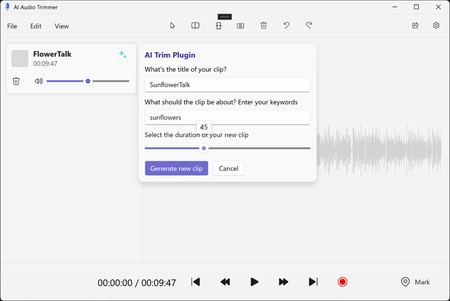
Local AI on Windows: Explaining the Audio Editor App Sample
Take a look at an app sample from this year's Build that showcases three different local models being leveraged on Windows. Get a high-level overview of Silero Voice Activity Detection, Whisper Transcription, and MiniLM embeddings models, and how they are used to implement an "audio smart trimming" feature. All code for this sample has been open-sourced if you would like to dive into how the sample was built.Join the GitHub Challenge - Microsoft Build Edition!
Immerse yourself in cutting-edge AI technology, build new skills, and earn a special badge by completing our GitHub Challenge! This challenge offers a variety of resources to help you succeed, including interactive Microsoft Learn community events, live and recorded learning sessions delivered by experts, and training assets. The challenge ends until June 21, 2024. Take this unique time opportunity! Register here now: aka.ms/GitHubChallengeBuild16KViews4likes4Comments