microsoft azure
60 Topics
The Clinical Friction Ledger: Should Every Healthcare AI Tool Remove More Work Than It Creates?
The Clinical Friction Ledger: Should Every AI Feature Remove More Work Than It Creates? One question I keep coming back to is this: How can a healthcare organization determine whether an AI tool is actually reducing work? I propose a simple working framework—the Clinical Friction Ledger. On one side, record the friction removed: documentation time, unnecessary clicks, repeated data entry, handoffs, and waiting. On the other side, record the friction added: verification time, new alerts, exception handling, training, and work quietly transferred to another person or shift. An AI model can look impressive in a demonstration while making the overall care process harder. Before an AI pilot is scaled, both sides of this ledger should be examined. If the friction added outweighs the friction removed—or if the burden is simply shifted to someone else—the productivity claim is incomplete. The real measure of success is not only what the AI can do. It is whether the people closest to care experience less friction because of it. What would you put on each side of the Clinical Friction Ledger?225Views0likes0CommentsFind and fix app issues - Azure Copilot Observability Agent
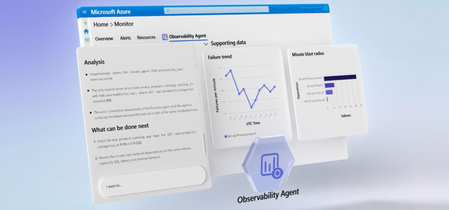
The Azure Copilot Observability Agent autonomously investigates incidents, correlates signals across logs, metrics, alerts, application health, and ML anomalies, then surfaces root cause with charts and recommended next steps. Extend coverage to your AI agents in Microsoft Foundry, track Gen AI errors and token consumption with trace-level detail, and write plain-language instructions to tune autonomous behavior to match your team’s workflow. Matt McSpirit, Microsoft Azure expert, shares how to take full control of incident response at scale. Any alert, full stack. The Azure Copilot Observability Agent correlates OpenTelemetry & native Azure signals end-to-end. Trace any issue to deep failure analysis across every tier. Check it out. Logs. Metrics. Alerts. ML anomalies. The Azure Copilot Observability Agent correlates them all, surfaces root cause, and recommends mitigation steps automatically. See it here. Tune the Azure Copilot Observability Agent to match your team’s workflow. Write natural-language instructions to set alert groupings, escalation rules, and issue priorities. See how. QUICK LINKS: 00:00 — Azure Copilot Observability Agent 00:43 — How to use it as you work 01:33 — Unified Full-Stack Telemetry 02:39 — Root Cause Investigation 04:12 — Investigate further 04:55 — Re-run the investigation 05:36 — Autonomous Alert Correlation & Triage 07:13 — Natural Language Agent Customization 07:34 — Wrap up Link References Get started at https://aka.ms/ObservabilityAgent Unfamiliar with Microsoft Mechanics? As Microsoft’s official video series for IT, you can watch and share valuable content and demos of current and upcoming tech from the people who build it at Microsoft. Subscribe to our YouTube: https://www.youtube.com/c/MicrosoftMechanicsSeries Talk with other IT Pros, join us on the Microsoft Tech Community: https://techcommunity.microsoft.com/t5/microsoft-mechanics-blog/bg-p/MicrosoftMechanicsBlog Watch or listen from anywhere, subscribe to our podcast: https://microsoftmechanics.libsyn.com/podcast Keep getting this insider knowledge, join us on social: Follow us on Twitter: https://twitter.com/MSFTMechanics Share knowledge on LinkedIn: https://www.linkedin.com/company/microsoft-mechanics/ Enjoy us on Instagram: https://www.instagram.com/msftmechanics/ Loosen up with us on TikTok: https://www.tiktok.com/@msftmechanics Video Transcript: -When you run compute services at scale, issues are bound to happen. The real question is how quickly you can understand and fix them. This is where AI can cut through the noise, bringing you the right signals so that you can start your day with critical issues already investigated. Azure Copilot Observability Agent, powered by Azure Monitor, can run autonomously with knowledge of your environment, application topology, its dependencies and typical patterns. It monitors alerts streaming into Azure Monitor, triaging and correlating related alerts into issues requiring your attention so that you experience less alert fatigue and noise. The agent investigates critical issues to determine the root cause, and then recommends mitigation steps. Let me walk you through how you can use the Observability Agent to your advantage as you work. -Using Azure Monitor, I can observe my app, across tiers. The App map shows me the topological view of my app. It’s a multi-tier app with a modern micro-service backend, hosted on Kubernetes, with a SQL database, Redis cache and more. The app also has an agent built in Microsoft Foundry, and with the new Foundry capabilities, I can also observe how it is performing from operational metrics, including Agent Runs, Gen AI Errors, Tool Calls, underlying Models, and Token Consumption. And scrolling up, we can even view traces with Gen AI errors and can see a list of traces. I’ll look at this one with 93 items. And if I click in, I can see a trace view of all the agent’s activities with direct integration into our existing backend APIs through an MCP server. This is where Azure Monitor and unified logging is foundational to connecting the dots for a more complete view of the health of your service. It unifies telemetry in real time across the stack using OpenTelemetry as well as native integrations with Azure Services and normalizes those signals into a consistent schema. -And because everything shares the same data foundation, it’s easy for either you or the Observability Agent to move instantly from insights, such as failed requests to more details across different failure categories, which can be drilled into and queried further without having to stitch anything together. So, this way even though there are several teams involved across app and infrastructure managing my app, everyone shares a common operational view to keep it operating smoothly. -In fact, let’s go back into Azure Monitor to see how my app is doing, specifically my agent. This time I’ll start in our agent alerts view. It looks like my agent is experiencing some errors I’ll choose this alert, to view additional details and this is where you can invoke the Observability Agent using the investigate button. Importantly, once you have Azure Monitor running in your environment, there is no setup needed. -So, now I have the agent open. Let’s start the investigation. Now, when invoked for the first time, the Observability Agent will learn about your app, its topology, patterns, baselines, and more. In this case, the agent already has deep knowledge of my app so it launches directly into an investigation. It’s able to correlate and reason across signals spanning the full application stack, logs, metrics, alerts, application health, and ML-detected anomalies, to pinpoint the root cause of the incident. It plans, executes, backtracks, runs multiple queries and validates or disproves hypotheses, just like a human expert would. After completing the investigation, Observability Agent produces a detailed report with its findings. Now in this case, it’s discovered failures when the agent hit the MCP product catalog where the backend telemetry shows the underlying failure was a SQL execution time out. We can see a consistent time out pattern with 117 failed SQL dependency calls. It’s ruled out any issues with the Redis cache. And has determined that there was NO SQL outage. -Instead, SQL metrics show a small saturation window at the incident start which dropped after the initial spike which would have led to connection failure. And it also charts its findings visually with search failures, latency spikes, failures by dependency and CPU and DTU spikes. And back on the left we see it’s recommending what can be done next, including how to improve querying and code, as well as monitoring. -Now at this point, you can either start a new investigation or build off the Observability Agent’s findings. I want to investigate further. There are a few things that cause spikes like this so I’m going to clarify if our SQL server saw a spike in traffic leading to timeouts. The Observability Agent responds quickly and notes stable to moderate SQL volume with many of the details we saw earlier. This time though, it’s found the root cause. It appears that an expensive query consumed significant SQL CPU resources. I am also concerned about token usage during the incident so I’ll ask the Observability Agent to check for anomalies. And after it’s done its analysis, the agent rules out my hypothesis there too. -So, it’s easy to collaborate with the Observability Agent, in the context of the incident. You can even ask the agent to re-run the entire investigation with additional instructions if you need to. Next, I want to create an issue that captures the progress of the investigation I’ll keep all the details and agree to share the agent chat around this issue so that it can be viewed by others on my team, which lets you hand off the issue to a colleague without losing context. The issue will retain the history of the incident, so no one has to start from scratch. In fact, this becomes a shared case file for the investigation. -So, I just walked you through a manual flow for how you can use the new Observability Agent as you work. Next, let me show you how you can get the Observability Agent to work alongside you autonomously on your behalf with a new capability in public preview. Either from the marketplace or Azure Monitor, you can create a new Observability Agent resource. -First, you start by giving it name, selecting the region, and your Azure Monitor workspace. Next, you’ll point it at your Application Insights resource. We’ll use our “ct-agent” from before. And then you can configure whether you want the agent instance to run autonomously on auto-created issues to provide root cause analysis and next steps. From there, I just review and confirm. The Observability Agent will then learn about your application to establish deep expertise and knowledge of your environment and preserve it in the agent instance. And if an alert arrives, the agent creates an issue automatically and correlates any additional related alerts into that same issue, before launching an investigation. -Now once an investigation is underway, the Observability Agent notifies you, for example, via email, with background on the detected issue. And from there, you can review the overview and look at the associated alerts. As you can see, in our case, the Observability Agent was able to use deep, agentic reasoning to correlate separate alerts both for the agent in this application and for the backend APIs invoked independently and then bring them together into a single, unified view. This significantly reduces alert noise. -Now this correlation is also important for issue triage. Because individually, these alerts might have lower severity, but when correlated, they increase the overall severity of the issue. And clicking into the Observability Agent tab we can see that the investigation is complete. This is a comprehensive report like we saw earlier with its analysis, corresponding chart visualizations, and recommendations on what to do next. Now as you set up agents, you can also customize them with your own instructions to prioritize what’s important. So, if we go back to where you create a new agent instance, here’s where you would add specific instructions, written in natural language. For example, you can tell an agent to group certain alerts, and prioritize the ones that should always trigger an issue so that its autonomous behavior matches how your team operates. -So that’s the power of Azure Monitor with the Azure Copilot Observability Agent which together turn alerts into fully investigated issues with clear, actionable insights. By correlating signals across your entire stack, it helps you move from detection, to root cause, to action-faster, and without losing context. The result: less time triaging, faster resolution, and more resilient systems at scale. To learn more, visit aka.ms/ObservabilityAgent. Keep watching Microsoft Mechanics for the latest tech updates and thanks for watching.308Views0likes0CommentsBuild Agent Architecture using AI Landing Zones
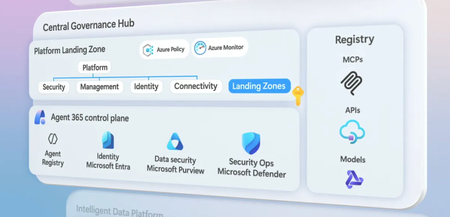
Establish a shared Governance Hub to centralize model access, MCP catalogs, and policy enforcement, then give every agent a traceable identity, runtime protection, and data governance through Agent 365. Layer in Microsoft Fabric’s Ontologies so your agents reason over real business context, not just raw data. Choose your runtime — no-code, hosted container, or custom — and deploy a production-grade environment in minutes using the AI Landing Zone accelerator. Matt McSpirit, Microsoft Azure Expert, joins Jeremy Chapman, Microsoft 365 Director, to share how to architect, govern, and scale a full agent mesh across the Microsoft stack. One model gateway governs all AI traffic. Azure API Management enforces policies, caps workload quotas, & attributes costs per team. Pair it with Azure API Center for a full MCP catalog. Check it out. Improve AI output quality across every query. Fabric IQ in Microsoft Fabric treats knowledge models as shared, governed assets. Ontologies give agents an explicit map of your business entities, processes, and relationships. Get started. No-code, hosted, or custom container. Pick the runtime that fits your agent. Foundry & Copilot Studio handle orchestration, telemetry, and identity. External runtimes like AKS or EKS plug in through the governance hub. See it in action. QUICK LINKS: 00:00 — Build secure AI agents 01:07 — Accelerate development, reduce risks 02:51 — Model Gateway + MCP Gateway 03:24 — Agent 365 Unified Control Plane 03:56 — Azure Policy + Azure Monitor 04:27 — Intelligent data platform 05:37 — OneLake in Microsoft Fabric 06:39 — Microsoft Purview data governance 07:13 — Fabric IQ with Ontologies 07:51 — Landing Zones 09:23 — Three Hosting Runtimes 11:06 — AI Landing Zone Accelerator 13:16 — Scalability 14:16 — Wrap up Link References Check out https://aka.ms/AIArchitecture Unfamiliar with Microsoft Mechanics? As Microsoft’s official video series for IT, you can watch and share valuable content and demos of current and upcoming tech from the people who build it at Microsoft. Subscribe to our YouTube: https://www.youtube.com/c/MicrosoftMechanicsSeries Talk with other IT Pros, join us on the Microsoft Tech Community: https://techcommunity.microsoft.com/t5/microsoft-mechanics-blog/bg-p/MicrosoftMechanicsBlog Watch or listen from anywhere, subscribe to our podcast: https://microsoftmechanics.libsyn.com/podcast Keep getting this insider knowledge, join us on social: Follow us on Twitter: https://twitter.com/MSFTMechanics Share knowledge on LinkedIn: https://www.linkedin.com/company/microsoft-mechanics/ Enjoy us on Instagram: https://www.instagram.com/msftmechanics/ Loosen up with us on TikTok: https://www.tiktok.com/@msftmechanics Video Transcript: - How do you design an enterprise-ready AI agent architecture that scales fast without bypassing security and control? It’s possible, and it doesn’t need to slow down your developers. In fact, in the next few minutes, we’ll show you how you can implement this architecture across the Microsoft stack and demonstrate what you can do right now to get started. And to explain the mechanics behind it, I’m joined once again by Azure expert, Matt McSpirit. Welcome back! - It’s great to be back! - So, there’s a lot of agent development going on right now, a lot of development, and the raw speed of that can mean that people aren’t always optimizing for scale or re-usability or potential security risks. It’s a bit like the wild, wild west out there. - That’s right, and that’s part of what makes it so exciting right now. But it also creates some real challenges. You’ve got teams building agents in silos, often without a shared approach or standards. On top of that, there’s frequently direct, ungoverned access to models and data, which raises concerns. And when you layer in inconsistent identity management and limited auditability, it becomes harder to scale things responsibly or maintain control as all of this grows. - Okay, so what can be put in place then to accelerate agent development, but also reduce our risks so we can get kind of a win-win? - Well, you’re setting a high bar! And it’s totally possible. One of the best things you can do to unlock developers and agent coding is to establish a catalog of shared services and resources, which exists in two parts. The first provides a shared platform that centralizes AI model registries, knowledge sources, such as MCP servers, APIs, and agents, making them easy to discover and use, along with shared identity and access management, policy engines, and reporting for consistency and observability. We call this the governance hub, and it’s directly tied to Agent 365 and architecturally part of what we call the Platform Landing Zone. The second part, which we call the Intelligent Data Platform, consists of the shared data components themselves, including core operational data as well as the underlying data that agents connect to via MCP Servers and APIs. These are managed data sources spanning structured and unstructured data, where each can be leveraged as tools for agents. Then you have a third component, the Application Plane with defined AI Landing Zones, which are specific to individual agents or sets of agents with similar requirements and policy controls. They’re important because not all AI apps and agents should have the same resources or controls applied to them. Now, together, it’s an enterprise-wide pattern for how agents discover and invoke models, tools, data, and other agents. And at the same time, this allows teams to run decentralized and to choose the runtime that best fits their agent. And for peace of mind, everything is wrapped in a common set of reporting with shared policy and access controls. - Okay, so why don’t we make this real for everyone who’s watching right now and go through all of these components and their corresponding architecture? - Yeah, sounds good. Let’s start with the shared governance hub, which as mentioned, is made up of a few components. First, the AI gateway in Azure API Management enforces policies and routes AI traffic, and enables transparent per‑workload cost attribution. Next, the MCP gateway provides a central catalog of MCP Server data, enabling agent access to knowledge sources using the Model Context Protocol while managing inventory and access permissions. The governance hub also includes Agent 365 as the unified control plane for agents, which itself contains agent management as part of the Microsoft 365 admin center. Then Microsoft Entra enforces strong identity with least privilege access and clear ownership for agents. Microsoft Defender adds runtime protection and deep observability with end-to-end activity tracing and detection. And finally, Microsoft Purview enforces data protection and posture by monitoring how agents interact with sensitive information. Finally at the platform level, you’ll use services like Azure Policy to manage any resources running in Azure directly, or via Azure Arc for anything outside of the Microsoft cloud, including on-premises or in other cloud platforms. Then Azure Monitor for unified reporting of infrastructure, application and agent services, along with the resources or tokens consumed. - So, the governance hub then is like a central set of shared enabling services and plumbing that you connect to and view and control agents with and all the related activities. And it really glues everything together, but it doesn’t include the agent frontend, the logic, the backend, so where do those parts come in? - So, those all come next. Moving on to the Intelligent Data Platform, this provides the managed data for agents to reason over. This is valuable, unique information to the business. For agents to work well, connected data needs to be trusted and clearly understood. And the platform comprises grounding sources optimized for agent reasoning, with several options depending on the nature of what agents are designed to do. For example, the Work IQ API provides the context for how you work, with connections to your email, calendar, previous meetings, Teams chat, files, and more. Foundry IQ then lets you combine multiple knowledge sources for your agents, where everything from structured data sources in databases, to unstructured data in your cloud stores, even images, can be retrieved by agentic processes. And Fabric IQ can then be used to add context over your connected business operations, like sales data, customer records, logistics, and more. You can combine the output of all of these IQs to generate richer, more relevant responses. - Right, and speaking of Microsoft Fabric, it really forms the foundation for operational data in the Intelligent Data Platform, along with things like governance and security, so why don’t we spend some time then to explain all of this further? Why don’t we start with the data lake and how we can manage underlying operational data? - Sure, this is where OneLake in Microsoft Fabric plays an important role. As a unified enterprise data lake, it brings in all operational data across multiple sources. Database mirroring continuously replicates data from on-premises and cloud databases. And shortcuts enable virtual access to external platforms like Databricks, Snowflake, and major cloud object stores without data movement, allowing it to be queried as a single unified data source. For batch and data streaming ingestion of continuous data feeds, Fabric Pipelines and Real-Time Intelligence can be leveraged by your agents. Everything in Microsoft Fabric is stored as Delta files, allowing them to be queried with SQL or Spark. And all access is secured through Microsoft Entra down to row and column level. - Okay, so as agents scale and start acting on business information autonomously, controls over that data are really important to prevent sensitive data from getting into the wrong hands. - They are, and this is where ideally your data should be organized as domain-owned products with clear ownership, data quality controls, and observable policies, so this is where Microsoft Purview can help. It’s got built-in data governance capabilities across the lifecycle from discovery and cataloging to automated classification, end-to-end lineage, policy-based access controls, and auditing. And if your operational data is running on Fabric, the context for agents gets better. Most sources and even the best MCP Servers do not encode business meaning, process, relationships, and priority. And that’s where Fabric IQ comes in to treat knowledge models as shared, governed assets, explicitly representing business entities, relationships, and metrics in a machine-readable form to improve AI output quality and relevance. It uses Ontologies to represent operational models by defining business entities and the relationships that connect them. These give agents an explicit, machine-readable representation of business analytics. And all of this ensures that your agents have consistency, control, and traceability. - Okay, so now with our data and control backends in place for secured access to business context, why don’t we move on to agent-specific controls? - Yeah, and that’s where AI Application Landing Zones come in. We did a whole Mechanics show on this a while back, and they can be used for individual or multiple agents with similar policy requirements. Each landing zone is a spoke subscription boundary that hosts per-workload resources under the ownership of an AI project team. It’s a best practice for apps, and this translates to agents as well. So, here, each project team is responsible for solution delivery and operations within the boundary of the application landing zone. And these still leverage the shared set of resources as part of the platform landing zone, including identity and security controls. This separation matches how enterprises actually structure their teams and operate, where the central team enforces baseline controls, while project teams build and run workloads. Each landing zone itself is a standardized foundation, with its own private networking configuration, AI-specific resources, monitoring and telemetry, along with application services including containers. Everything is managed using Azure Resource Groups, so there are clear RBAC boundaries. And each landing zone is integrated with the governance hub and the intelligent data plane. This way, you have the structure for developers to deploy production-ready agent solutions without violating corporate policies or provisioning new foundational infrastructure for every project. - That said, there are always seems to be new ways to build agents these days, so how does the Application Plane then support development? - Well, enterprise scenarios have different trade-offs. This balances convenience, control, extensibility, and operational responsibility, so we support three hosting formats as runtimes. First, there’s no-code and low-code agents implemented as prompt agents and workflows within Microsoft Copilot Studio and in Microsoft Foundry Agent Service. You’d use managed services in the platform for orchestration, evaluation, and telemetry, each leveraging MCP tools, knowledge grounding, and project-scoped observability. Then you have hosted container agents running in Microsoft Foundry. These are built-in code. And they benefit from core capabilities like conversation history storage and identity and access control, private connectivity, along with agent and fleet-level telemetry and tracing. And when interacted with, they operate under project-level orchestration and centrally applied governance, ensuring policies and guardrails, such as content filtering, prompt injection protection, and copyright safeguards, are consistently enforced. Then, finally, there are custom container-hosted agents, which run externally, outside of Foundry, in places like Azure Container Apps, Azure Kubernetes Service, or non-Azure environments, like EKS. All three still consume hub-mediated models and tools and use identity patterns to avoid unmanaged distribution, while sending telemetry for end-to-end observability. A key part of this is that model and tool access is mediated by the governance hub so that they can use template-driven patterns instead of unique embedded endpoints and credentials for each agent. - So, we’ve shown these before for apps. Is there an accelerator then to deploy AI Landing Zones? - Yeah, the landing zone accelerator provides infrastructure-as-code templates and continuous delivery pipelines. It’s a production-grade reference architecture, and I’ll show you where to find it and how to set one up. First, you can find the AI Landing Zones page on GitHub using aka.ms/AILandingZone. This site contains all of our documentation. Below, you’ll see the Reference Architectures and the automated Extensible Implementations to get the underlying services up and running. You can deploy these using the Azure CLI, Terraform, or using the portal method, so I’ll choose the Azure Portal option so I can show you what gets deployed. You’ll start with the normal project and instance details. so here, you can choose if you want Platform Landing Zone Integration. I’ve chosen no in this case. Next, you’ll see all of the selectable AI services, data backend, Key Vault, and storage. Then the application services, including container infrastructure. Followed by the DevOps configuration with jumpbox options. Next is ensuring that monitoring is configured with Log Analytics and App Insights. Everything uses OpenTelemetry signals and standardized telemetry pipelines so that traces and metrics can be correlated across your agent activities. Then there are all of your network configurations, with firewall and virtual network settings. These are configured with defined private networking posture with virtual networks, private endpoints, network security groups, and private DNS to eliminate public ingress paths between agents, gateways, telemetry, and managed retrieval stores for data. Of course, you’ll want to add the right tagging for this specific project. And after the service runs a quick validation check, you can Create all of the selected resources. And since we’re creating dozens of new resources and more than a hundred deployments counting the dependencies and configurations, this will run several minutes, so we’ll jump ahead to the results. And in the corresponding resource group, you can see all of the resources deployed, networking, Foundry AI, container apps, Cosmos DB instance, monitoring, storage, and our jump VMs. Everything deployed uses managed agent identities as the default mechanism for service-to-service access, avoiding any credential distribution. - Okay, so now we’ve got everything configured and deployed, so how would all this scale over time? - Yeah, this is really important as agents proliferate so you can manage them. The first thing is unique agent identities, which ensures that every agent has clear ownership, permissions, and lifecycle status, so actions can be attributed even in autonomous execution. Next are your shared policy baselines and guardrails, where for example, you enforce authentication, authorization, data access, as well as content safety controls so that they’re consistent across the different agent runtimes. Then you have consistent and defined observability, where your organization can trace interactions for each agent, along with the tools and data they use, as well as correlate failures and attribute costs and risks to each agent via monitoring. It also helps to create agent templates for developers, just like you would for applications, so they can reuse what works instead of reinventing the wheel. And with that in place, you can speed up deployments while still maintaining the right controls and visibility across your agents. - Now we’ve got our architecture, and for anyone who’s watching right now, looking to learn more and get started, what do you recommend? - Well, first, you don’t have to wait. You can get started today by expanding your governance hub and pulling together your registry of data products, MCPs, APIs, models, and agents. Also, make sure that you have the right shared resources and policies at the platform level, and start building! Check out aka.ms/AIArchitecture for more information. - Thanks, Matt, for joining us today and showing how you can build an agent mesh out in your organization. Of course, keep checking back to Microsoft Mechanics for the latest updates, subscribe if you haven’t already, and thanks for watching.760Views0likes0CommentsIntroducing Azure HorizonDB - PostgreSQL
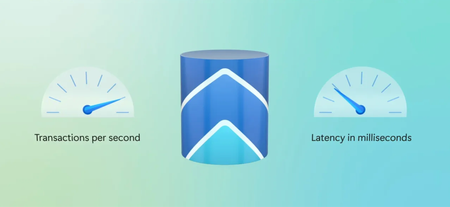
Call AI models directly from SQL, build durable vector pipelines inside the database, and deliver high-accuracy similarity search at massive scale with DiskANN and AI re-ranking, all without leaving PostgreSQL. Debug and optimize queries faster with the Azure HorizonDB VS Code extension. Visualize execution plans, let Copilot generate fixes, and clone production data to test environments in seconds. Charles Feddersen, PostgreSQL Partner Director PM, shares how to put all of it to work on Azure. Same hardware, same zone, same PostgreSQL version. 4,200 TPS self-managed vs. 11,000+ on Azure HorizonDB. The separation of storage and compute layers make the difference. See how it works. Chunking. Embeddings. Vector storage. All running as a durable background task inside PostgreSQL with AI Pipelines in Azure HorizonDB, no external orchestration needed. Check it out. Visual query execution plans. Copilot-generated fixes. The Azure HorizonDB VS Code extension brings all of it into the editor. Get it now. QUICK LINKS: 00:00 — Azure HorizonDB features 00:57 — Open-source PostgreSQL 02:24 — How it works 03:37 — Performance 04:51 — Enterprise-ready security 05:34 — Memory & storage work together 06:29 — AI Model Management + AI Functions 08:24 — AI Pipelines 09:50 — DiskANN + AI Re-ranking 10:50 — VS Code Extension + Data Cloning 12:31 — Wrap up Link References Check out our blog at https://aka.ms/azurepostgresblog Unfamiliar with Microsoft Mechanics? As Microsoft’s official video series for IT, you can watch and share valuable content and demos of current and upcoming tech from the people who build it at Microsoft. Subscribe to our YouTube: https://www.youtube.com/c/MicrosoftMechanicsSeries Talk with other IT Pros, join us on the Microsoft Tech Community: https://techcommunity.microsoft.com/t5/microsoft-mechanics-blog/bg-p/MicrosoftMechanicsBlog Watch or listen from anywhere, subscribe to our podcast: https://microsoftmechanics.libsyn.com/podcast Keep getting this insider knowledge, join us on social: Follow us on Twitter: https://twitter.com/MSFTMechanics Share knowledge on LinkedIn: https://www.linkedin.com/company/microsoft-mechanics/ Enjoy us on Instagram: https://www.instagram.com/msftmechanics/ Loosen up with us on TikTok: https://www.tiktok.com/@msftmechanics Video Transcript: - The Postgres you know and love is now even more supercharged on Azure with the latest platform optimizations and AI for enterprise apps all made possible with the new cloud-native Postgres service, Azure HorizonDB. Now, we’ll go deep on its ultra fast performance at high scale, the built-in resiliency across different availability zones, along with major new built-in AI-centric features, leveraging DiskANN, as well as integrated AI model management, where you can provision models or bring your own from Microsoft Foundry, plus a built-in AI pipeline that automatically chunks and processes data in real time as it’s ingested into the database. And finally, a brand new VS code extension with AI-powered query development and debugging as you build your apps and more. And today I’m joined once again by Charles Feddersen who leads the Postgres efforts on Azure. Welcome back to the show. - Thanks Jeremy, it’s good to be back and we’ve got a lot to get through today. - Yeah, so the new HorizonDB service in Azure is our newest managed Postgres service where we also have Azure database for Postgres, and we’re actively making deep contributions in the Postgres project as well. - Yeah, so Microsoft has been actively supporting Postgres on Azure for about nine years now, and our approach has always been to keep the Postgres, you know, and love for its portability and ecosystem and make Azure the best place to run your Postgres workloads. You know, and as you mentioned, we are a major contributor to open source Postgres. In Postgres 19, Microsoft Committers modified over 64,000 lines of code, which represents about 8% of all changes in this version. And we made about 340 commits. These improvements cover both new functionality and also improvements based on our own learnings of running Postgres at a massive scale on Azure. We also host the largest virtual Postgres community conference in the world called POSETTE, which is now in its fifth year. Because we understand the core Postgres engine so well, it’s not unusual for our core committers on the team to work with our customers to help debug and resolve issues that they might be having as well. - Right, and I remember last time you were on, we discussed how you were shipping major versions of Postgres on Azure within weeks of their releases. - Yeah, and now we’ve effectively eliminated that delay. There is now zero cloud lag in waiting to leverage the latest features when using Postgres on Azure. We ship the new major version on the same day in Azure. - So that’s a big deal, there’s no lag, same day access. Why don’t we move back though to our newest managed Postgres service HorizonDB. How does that then change the game for anyone who’s running Postgres services now on Azure? - Yeah, so HorizonDB brings cloud scale performance built-in resilience and AI ready capabilities to Postgres without changing how you build or run your apps. How this works is we’ve completely decoupled compute and storage to improve performance, scale and availability. At the compute layer, it runs the Postgres engine, fully compatible so existing apps and tools just work. At the storage layer, we built a new and highly optimized log service for transactions where we can sustain a commit latency of typically under one millisecond. That log service is paired to a new shared storage platform, which natively stores data across availability zones for resilient storage by default. We can attach multiple read replicas to the storage and the primary can fail over to any of these replicas in less than five seconds, in the event of an outage. This gives you read scale without replication latency. Ultimately, HorizonDB lets you run any Postgres workload from new AI apps to large scale enterprise systems with the performance, resilience and scale of Azure already built in. - All right, so you said performance. Let’s dig deeper there. Everybody loves a performance story, so can you prove it? - Yeah, so one of the big challenges with self-managed Postgres is that enabling high availability, especially across cloud zones, often comes with a performance cost. With HorizonDB, we introduced a new quorum commit protocol that let you durably commit across zones before flushing to disk, so you get both resilience and high performance. Now to show this in action, I’ve got a split screen, HorizonDB on the right and self-managed Postgres on the left. This is the same Postgres version on the same hardware with the same high availability setup in the same Azure region. And I’ll kick both off and then go ahead and let them run. And as you can see clearly HorizonDB is delivering about three times more transactions per second. This gain comes directly from the storage architecture, and now that it’s finished, we can see that self-managed Postgres on the left delivered over 4,200 transactions per second. And HorizonDB had more than 11,000 with much lower latency. Performance was a core design principle for HorizonDB from the beginning, and it’s something that you’ll see directly in your applications. - Okay, so performance is ultra fast, and we know this is built for both enterprises and developers, and we know enterprises love security. So what’s different there? - Yeah, so security of course is foundational. It spans everything from network isolation and identity to data protection. Just like performance, it’s been a core focus from day one. And we’re building on the proven enterprise capabilities of Azure database for Postgres to deliver it out of the box like Entra ID integration, where you can enable identity-based access, so users connect securely without managing passwords or private endpoints to lock down access. So the database is only reachable over your private network with no public exposure and of course encryption at rest where data is automatically encrypted on the disk. All of this is available from day one, so you get strong enterprise ready security without any extra setup. - Okay, and bringing this back to our developers who are watching the built-in AI centric features with HorizonDB now also make it easier to build AI apps. - Yeah, and this is an area that we’re really leaning into. Postgres was already popular and chat with your data use cases accelerated that adoption because it natively supports vectors for similarity search. Our focus is on making intelligent retrieval and generative AI work on a massive scale with high accuracy and efficiency. To do that, we’ve rethought how memory and storage work together in the database so that more IO traffic moves to disk letting you take advantage of much larger storage capacity using Microsoft’s disk accelerated nearest neighbor or DiskANN technology. This quantize a vector-based graph in memory and maps it to a full precision graph stored on disk, which significantly reduces memory requirements while still delivering fast higher quality similarity search across your data. - And speaking of generative AI responses, we’ve also made it easier for the database to work directly with AI models. - Yeah, we have, and this starts with AI model management, which automatically registers a set of models with your instance of HorizonDB. It’s really simple. So here’s my HorizonDB, and I’ll just select the enable managed models then confirm. And what this does behind the scenes is it automatically registers a few AI models for use. Once the provisioning is complete, you can see the AI model management blade in the portal with the GPT, text embedding and re-ranking models listed. And you can also bring your own models where you register them through the database directly. - So now you can use models effectively with Postgres without extra manual provisioning configuration. So, how would you interact with them? - Yeah, this is where AI functions come in. These are a set of SQL functions that you interact directly with AI models. The Azure AI extension in HorizonDB provides functions that you can invoke using SQL to leverage AI models. So let me show you a couple. For example, you can use the generate function to produce a response from a prompt. In this case, I’ll say summarize the following customer reviews in two to three sentences, and then I’ll run it and you can see the response is generated as a SQL result that I could use in my app. Alternatively, the extract function is designed to pull specific entities from unstructured text into a structured form that you can then store and query. You can see here that I’m going to use an array to ask for the main product features along with the customer sentiment from my database. Now, we’ll let that run for a moment and we can see the response of producers for each item in the catalog. - And this is just one scenario that you showed with querying, but I can imagine another case where you might say, use data transformation where the results are written back into the database. - Yeah, absolutely. And when you do that, obviously the retrieval time for those results stored in the database is incredibly fast and you’re saving on your tokens as well. - That’s really great to see. So another challenge that we hear a lot of times is around building and maintaining AI pipeline. So we’re making that easier too. - So this is where AI pipelines in HorizonDB extend AI model management and AI functions even further. Today, most generative AI apps rebuild the same steps, chunking, creating embeddings, backfilling data, often in fragile external pipelines. With AI pipelines, all of this is built directly into Postgres. So you can see here that I’ve created a pipeline using the create pipeline function in the AI extension. This chunks the data in a database in real time as it’s added. It will then create embeddings for those chunks using the embedding model that the AI model management enabled for us. And these are ultimately stored in a table. So I can then go ahead and run this, and then if I count the records in the output table, you can see that it’s increasing. And this is all happening asynchronously in the background so that it’s not blocking or really having any real performance impact on my transactional workload. But the best thing about these pipelines is that they’re durable. And this means that I could pause it. And you can see here that the row count stops increasing, even if the workload continues and I can resume it, think of it as a reliable background task. And if my server fails over, it’s no problem, the AI pipeline fails over as well and it just keeps running. - So all that pipeline complexity then just moves into the database and kind of reduces the complexity and runs reliably. - Exactly, and building on this, we can now also use the rank function to re-rank search results with an AI model. Earlier I talked about how DiskANN improved similarity search, but that’s just the first step. With rank, we can apply a model like Cohere to refine the top results and improve overall relevance. Let me show you, I’ve got two identical queries here. One just uses an index and the other wraps the same query in our rank function to improve the relevance of results. If I run the first query for the headphones with the highest playtime and good calling, you can see the results seem pretty good. And these aren’t bad with a few showing around 40 hours. But when I run the rank query that applies the AI ranking model, the top most results are definitely more relevant to my search. Here, there are headphones with 60 or more hours, and the top ranked model has a hundred. - And this is really powerful. So you basically started out with fast similarity search, then used AI to make the results even more relevant. But why don’t we move beyond the database itself and look at what we’ve done then to help with the building experience of Postgres workloads on HorizonDB? - Sure, and this is one of my favorite additions. We’ve built a new VS code extension that brings familiar Postgres tools into a modern AI powered experience. As someone who spent years working in database tools, this is something that I really wish I’d had. It makes debugging and development a lot more easy. So here we’re in VS code and on the left you can see I’m using the Postgres extension. Now this works with any Postgres, but when you connect to Postgres on Azure, you get even deeper integration. So let’s look at an Azure server, and if I right click, you can see a number of server management features like network configuration, backups, and even start stop built in with a single click. And if I right click on tables, one of the most recent additions is object properties. But now let’s run a query. This is a little slower than we’d expect. So I open the new visual query execution plans to debug. It’s easy to identify the Inefficient query operator, and I can click on that to debug further. But the best part is that Copilot can fix it for me. Here, I’ll just click on the Copilot button in the query plan and it gets to work. The Copilot generates the fix for me, and it’s really that simple. Now I want to test this fix in a non-prod server, and that’s easy to. For that, I’ll show you a first look at the new built-in data cloning. I’ll go back up to the server and right click and I can clone it with all my data. And that just takes a moment to validate my solution. - And that’s a real shift. You got the same familiar Postgres experience, but now with AI and platform capabilities that really improve how you build and run apps. So what’s next? - Yeah, so we’ve covered a lot today, but this is just the start. We’re continuing to push the boundaries of what you can do with Postgres on Azure. So here’s a lot more coming. - So what’s the best way then for everyone watching to get started with Azure HorizonDB? - Yeah, so, you know, you can go try it for yourself. It’s in preview now and it’s easy to get started with everything that I demoed. The VS code extension is available in the VS code marketplace. And of course, to stay current, check out our blog at aka.ms/azurepostgresblog. - Thanks so much for joining us today, Charles, and of course, keep checking back to Microsoft Mechanics for the latest tech updates, and we’ll see you again next time.508Views1like1CommentExploring Azure OpenAI Assistants and Azure AI Agent Services: Benefits and Opportunities
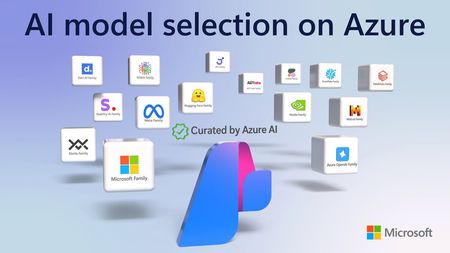
In the rapidly evolving landscape of artificial intelligence, businesses are increasingly turning to cloud-based solutions to harness the power of AI. Microsoft Azure offers two prominent services in this domain: Azure OpenAI Assistants and Azure AI Agent Services. While both services aim to enhance user experiences and streamline operations, they cater to different needs and use cases. This blog post will delve into the details of each service, their benefits, and the opportunities they present for businesses. Understanding Azure OpenAI Assistants What Are Azure OpenAI Assistants? Azure OpenAI Assistants are designed to leverage the capabilities of OpenAI's models, such as GPT-3 and its successors. These assistants are tailored for applications that require advanced natural language processing (NLP) and understanding, making them ideal for conversational agents, chatbots, and other interactive applications. Key Features Pre-trained Models: Azure OpenAI Assistants utilize pre-trained models from OpenAI, which means they come with a wealth of knowledge and language understanding out of the box. This reduces the time and effort required for training models from scratch. Customizability: While the models are pre-trained, developers can fine-tune them to meet specific business needs. This allows for the creation of personalized experiences that resonate with users. Integration with Azure Ecosystem: Azure OpenAI Assistants seamlessly integrate with other Azure services, such as Azure Functions, Azure Logic Apps, and Azure Cognitive Services. This enables businesses to build comprehensive solutions that leverage multiple Azure capabilities. Benefits of Azure OpenAI Assistants Enhanced User Experience: By utilizing advanced NLP capabilities, Azure OpenAI Assistants can provide more natural and engaging interactions. This leads to improved customer satisfaction and loyalty. Rapid Deployment: The availability of pre-trained models allows businesses to deploy AI solutions quickly. This is particularly beneficial for organizations looking to implement AI without extensive development time. Scalability: Azure's cloud infrastructure ensures that applications built with OpenAI Assistants can scale to meet growing user demands without compromising performance. Understanding Azure AI Agent Services What Are Azure AI Agent Services? Azure AI Agent Services provide a more flexible framework for building AI-driven applications. Unlike Azure OpenAI Assistants, which are limited to OpenAI models, Azure AI Agent Services allow developers to utilize a variety of AI models, including those from other providers or custom-built models. Key Features Model Agnosticism: Developers can choose from a wide range of AI models, enabling them to select the best fit for their specific use case. This flexibility encourages innovation and experimentation. Custom Agent Development: Azure AI Agent Services support the creation of custom agents that can perform a variety of tasks, from simple queries to complex decision-making processes. Integration with Other AI Services: Like OpenAI Assistants, Azure AI Agent Services can integrate with other Azure services, allowing for the creation of sophisticated AI solutions that leverage multiple technologies. Benefits of Azure AI Agent Services Diverse Use Cases: The ability to use any AI model opens a world of possibilities for businesses. Whether it's a specialized model for sentiment analysis or a custom-built model for a niche application, organizations can tailor their solutions to meet specific needs. Enhanced Automation: AI agents can automate repetitive tasks, freeing up human resources for more strategic activities. This leads to increased efficiency and productivity. Cost-Effectiveness: By allowing the use of various models, businesses can choose cost-effective solutions that align with their budget and performance requirements. Opportunities for Businesses Improved Customer Engagement Both Azure OpenAI Assistants and Azure AI Agent Services can significantly enhance customer engagement. By providing personalized and context-aware interactions, businesses can create a more satisfying user experience. For example, a retail company can use an AI assistant to provide tailored product recommendations based on customer preferences and past purchases. Data-Driven Decision Making AI agents can analyze vast amounts of data and provide actionable insights. This capability enables organizations to make informed decisions based on real-time data analysis. For instance, a financial institution can deploy an AI agent to monitor market trends and provide investment recommendations to clients. Streamlined Operations By automating routine tasks, businesses can streamline their operations and reduce operational costs. For example, a customer support team can use AI agents to handle common inquiries, allowing human agents to focus on more complex issues. Innovation and Experimentation The flexibility of Azure AI Agent Services encourages innovation. Developers can experiment with different models and approaches to find the most effective solutions for their specific challenges. This culture of experimentation can lead to breakthroughs in product development and service delivery. Enhanced Analytics and Insights Integrating AI agents with analytics tools can provide businesses with deeper insights into customer behavior and preferences. This data can inform marketing strategies, product development, and customer service improvements. For example, a company can analyze interactions with an AI assistant to identify common customer pain points, allowing them to address these issues proactively. Conclusion In summary, both Azure OpenAI Assistants and Azure AI Agent Services offer unique advantages that can significantly benefit businesses looking to leverage AI technology. Azure OpenAI Assistants provide a robust framework for building conversational agents using advanced OpenAI models, making them ideal for applications that require sophisticated natural language understanding and generation. Their ease of integration, rapid deployment, and enhanced user experience make them a compelling choice for businesses focused on customer engagement. Azure AI Agent Services, on the other hand, offer unparalleled flexibility by allowing developers to utilize a variety of AI models. This model-agnostic approach encourages innovation and experimentation, enabling businesses to tailor solutions to their specific needs. The ability to automate tasks and streamline operations can lead to significant cost savings and increased efficiency. Additional Resources To further explore Azure OpenAI Assistants and Azure AI Agent Services, consider the following resources: Agent Service on Microsoft Learn Docs Watch On-Demand Sessions Streamlining Customer Service with AI-Powered Agents: Building Intelligent Multi-Agent Systems with Azure AI Microsoft learn Develop AI agents on Azure - Training | Microsoft Learn Community and Announcements Tech Community Announcement: Introducing Azure AI Agent Service Bonus Blog Post: Announcing the Public Preview of Azure AI Agent Service AI Agents for Beginners 10 Lesson Course https://aka.ms/ai-agents-beginners6.3KViews0likes2Comments