microsoft authenticator
71 Topics
Sole Global Administrator locked out — no working MFA method — need account recovery
I'm the sole Global Administrator of my Microsoft Entra ID tenant and I'm completely locked out due to losing access to my MFA device, with no other admin and no working alternate verification method. Account details: - User (UPN): email address removed for privacy reasons - Custom verified domain: apip.dk - Tenant ID: can be provided - Azure Subscription ID: can be provided What happened: My phone (with Microsoft Authenticator installed — my only registered MFA method) was destroyed. I know my password and secondary email, but: - Phone-call verification during sign-in does not connect. - I have a FIDO2 security key, but it is not currently enabled/registered as a sign-in method on this account. - There is no other Global Administrator in this tenant and no other active session I can use to self-recover. What I need: An MFA/authentication-method reset on my account so I can sign back in and register a new MFA method, or guidance on an alternative recovery path. Proof of ownership I can provide: - I own the custom domain apip.dk and can add/modify a DNS TXT (or CNAME) record to verify tenant ownership. - I can provide billing details for the subscription (card on file, recent invoice amounts, billing address) if needed for verification. Additional context: I recently updated the payment method on this subscription, so I'm concerned about a billing failure at the next payment date while this recovery is pending — I'd appreciate the account being flagged so it isn't suspended during this process. Please let me know what verification steps you need from me to proceed. Thank you, Andreas58Views0likes1Comment
Passkey/FIDO2 for users in mainland China – recommended approach?
Hi, We are currently evaluating the adoption of Passkey/FIDO2 in Microsoft Entra ID as part of our strategy to move users away from traditional authentication methods such as SMS and voice and towards phishing-resistant authentication. Our Microsoft Entra ID tenant is a global tenant (not Azure China operated by 21Vianet), but we have a group of users who are physically located in mainland China. For users in other regions, we are evaluating Passkeys in Microsoft Authenticator and FIDO2 security keys. However, before defining the approach for our users in China, we would like to better understand the supported and recommended architecture for this particular scenario. We have reviewed the Microsoft documentation and understand that: Passkeys are not available for Microsoft Azure operated by 21Vianet. On iOS, Microsoft Authenticator Passkeys can be used to sign in to global organizations while the user is in China. On Android, Passkey authentication has dependencies such as Google Play Services, which raises questions for devices operating in mainland China. Our main questions are: For users physically located in mainland China but authenticating against a global Microsoft Entra ID tenant, what is Microsoft's recommended approach for deploying phishing-resistant authentication with Passkey/FIDO2? Is Microsoft Authenticator Passkey on iOS considered a fully supported option for users permanently located in mainland China, rather than only users temporarily traveling there? For Android users in mainland China, what is the recommended approach considering the dependency on Google Play Services? Is Passkey in Microsoft Authenticator a realistic supported option in this scenario? Would physical FIDO2 security keys be the preferred or more consistent alternative for users in China when mobile Passkeys cannot be reliably used? Are there any other Microsoft-supported Passkey providers or authentication approaches that should be considered specifically for mainland China? From an enrollment perspective, what would be the recommended bootstrap process for these users? For example, would Temporary Access Pass (TAP) be the recommended method to allow users to register their Passkey/FIDO2 credential before SMS/Voice is removed? Are there any additional regional, connectivity, mobile OS, or application compatibility considerations that should be taken into account before enforcing a phishing-resistant Authentication Strength through Conditional Access? Our objective is not simply to enable Passkey in the tenant, but to define a supported and sustainable authentication model for users located in mainland China before starting a broader rollout. Any experience, Microsoft guidance, or recommended architecture for this type of scenario would be greatly appreciated. Thanks in advance.25Views0likes0Comments
Entra ID 53003: How to identify primary authentication when Authentication Details are empty?
We are investigating repeated interactive Microsoft Entra ID sign-ins with the following pattern: - ErrorCode: 53003 (BlockedByConditionalAccess) - isInteractive: true - AppDisplayName: OfficeHome - Authentication requirement: Multifactor authentication Conditional Access correctly blocks these requests because they originate outside our trusted locations. We have already confirmed through controlled testing that the authentication flow can reach 53003 after the correct credentials are provided. Our current problem is different: We need to determine what mechanism satisfied the primary/first authentication factor for the observed 53003 events. For these events, Authentication Details are empty: - Authentication method: empty - Authentication method detail: empty - Result detail: empty Therefore, we cannot determine whether primary authentication was performed using a password, an existing token/session claim, PHS, PTA, federation, Seamless SSO, or another mechanism. Our questions are: 1. Is there any tenant-visible telemetry that can identify the primary authentication mechanism when AuthenticationDetails is empty? 2. Can fields such as AuthenticationProcessingDetails, AuthenticationProtocol, IncomingTokenType, OriginalTransferMethod, or AuthenticationMethodsUsed reliably distinguish between password validation and reuse of an existing authentication/token? 3. If additional authentication infrastructure is used: - can PTA Authentication Agent logs be correlated using RequestId or CorrelationId? - should Seamless SSO generate a corresponding Kerberos 4769 event for AZUREADSSOACC$? - should federated authentication be traceable in AD FS logs? 4. For Password Hash Synchronization, is there any tenant-visible telemetry confirming that Entra ID actually validated the password for a specific sign-in request? 5. If this information is not exposed to the tenant, can Microsoft Support retrieve backend authentication telemetry for a specific Sign-in ID / RequestId / CorrelationId and determine how primary authentication was satisfied? Our goal is not to determine why Conditional Access generated 53003 — that part is already understood. We specifically need to identify what satisfied primary authentication before the Conditional Access evaluation.123Views0likes0Comments
Guest accounts and MFA via Conditional Access in MS Entra
Hi experts, trying to get some help on my scenario and issue that external users started to experience since I've enabled MFA for external identities & guest users via Conditional Access. We have lots of external partners that we share some documentation with from our SharePoint. Some time ago, I have enabled "MS Entra B2B Integration for SharePoint and OneDrive" so that any external user that access shared files/folders in our SharePoint gets a GUEST account created in our tenant. This was also preparation for enabling MFA for External users via Conditional Access. I believe these are called "B2B Collaboration guests" Now, few days ago, I have enabled MFA via Conditional Access for all external users and guests, enabled for all cloud apps and require MFA to grant access. Until now, I got feedback from two external partners that their existing access doesnt work anymore - and they need to go through MFA (which is expected). The problem is that when they go through MFA set up, it ends up in a "loop" - meaning, they go through all steps but when completing the last step they are returned back to the very 1st step again. So they: scan QR code successfully authenticate get the page that it was successful get back to the 1st step asking to install or use MS Auth app The user tried different browsers also with Incognito tabs... When I am checking sing-in logs: guest account is created fine the status is: "Interrupted" additional details: The user was presented options to provide contact options so that they can do MFA. conditional access forcing MFA is marked as FAILED as MFA was not completed Both external partners that reported this are using MS Entra and I see their IDENTITY as ExternalAzureAD. Have not heard back from anyone else using other than ExternalAzureAD so not sure if there is something extra that needs to be configured. Anyone experienced this issue? Any idea what can be wrong? I do not have any cross-tenant collaboration etc configured...2.4KViews0likes5CommentsReport suspicious activity (Preview)
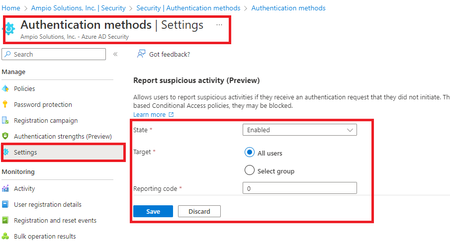
Allows users to report suspicious activities if they receive an authentication request that they did not initiate. This control is available when using the Microsoft Authenticator app and voice calls. Reporting suspicious activity will set the user's risk to high. If the user is subject to risk-based Conditional Access policies, they may be blocked.12KViews2likes8CommentsIntroducing the Entra Helpdesk Portal: A Zero-Trust, Dockerized ITSM Interface for Tier 1 Support
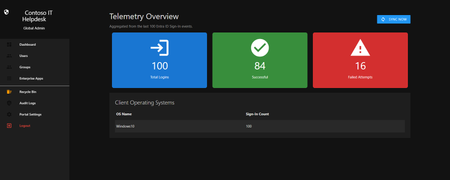
Hello everyone, If you manage identity in Microsoft Entra ID at an enterprise scale, you know the struggle: delegating day-to-day operational tasks (like password resets, session revocations, and MFA management) to Tier 1 and Tier 2 support staff is inherently risky. The native Azure/Entra portal is incredibly powerful, but it’s complex and lacks mandatory ITSM enforcement. Giving a helpdesk technician the "Helpdesk Administrator" role grants them access to a portal where a single misclick can cause a major headache. To solve this, I’ve developed the Entra Helpdesk Portal (Community Edition)—an open-source, containerized application designed to act as an isolated "airlock" between your support team and your Entra ID tenant. Why This Adds Value to Your Tenant Instead of having technicians log into the Azure portal, they log into this clean, Material Design web interface. It leverages a backend Service Principal (using MSAL and the Graph API) to execute commands on their behalf. Strict Zero Trust: Logging in via Microsoft SSO isn’t enough. The app intercepts the token and checks the user’s UPN against a hardcoded ALLOWED_ADMINS whitelist in your Docker environment file. Mandatory ITSM Ticketing: You cannot enforce ticketing in the native Azure Portal. In this app, every write action prompts a modal requiring a valid ticket number (e.g., INC-123456). Local Audit Logging: All actions, along with the actor, timestamp, and ticket number, are written to an immutable local SQLite database (audit.db) inside the container volume. Performance: Heavy Graph API reads are cached in-memory with a Time-To-Live (TTL) and smart invalidation. Searching for users or loading Enterprise Apps takes milliseconds. What Can It Do? Identity Lifecycle: Create users, auto-generate secure 16-character passwords, revoke sign-in sessions, reset passwords, and delete specific MFA methods to force re-registration. Diagnostics: View a user's last 5 sign-in logs, translating Microsoft error codes into plain English. Group Management: Add/remove members to Security and M365 groups. App/SPN Management: Lazy-load raw requiredResourceAccess Graph API payloads to audit app permissions, and instantly rotate client secrets. Universal Restore: Paste the Object ID of any soft-deleted item into the Recycle Bin tab to instantly resurrect it. How Easy Is It to Setup? I wanted this to be universally deployable, so I compiled it as a multi-architecture Docker image (linux/amd64 and linux/arm64). It will run on a massive Windows Server or a simple Raspberry Pi. Setup takes less than 5 minutes: Create an App Registration in Entra ID and grant it the necessary Graph API Application Permissions (e.g., User.ReadWrite.All, AuditLog.Read.All). Create a docker-compose.yml file. Define your feature toggles. You can literally turn off features (like User Deletion) by setting an environment variable to false. version: '3.8' services: helpdesk-portal: image: jahmed22/entra-helpdesk:latest container_name: entra_helpdesk restart: unless-stopped ports: - "8000:8000" environment: # CORE IDENTITY - TENANT_ID=your_tenant_id_here - CLIENT_ID=your_client_id_here - CLIENT_SECRET=your_client_secret_here - BASE_URL=https://entradesk.jahmed.cloud - ALLOWED_ADMINS=email address removed for privacy reasons # CUSTOMIZATION & FEATURE FLAGS - APP_NAME=Entra Help Desk - ENABLE_PASSWORD_RESET=true - ENABLE_MFA_MANAGEMENT=true - ENABLE_USER_DELETION=false - ENABLE_GROUP_MANAGEMENT=true - ENABLE_APP_MANAGEMENT=true volumes: - entra_helpdesk_data:/app/static/uploads - entra_helpdesk_db:/app volumes: entra_helpdesk_data: entra_helpdesk_db: 4.Run docker compose up -d and you are done! I built this to give back to the community and help secure our Tier 1 operations. If you are interested in testing it out in your dev tenants or want to see the full architecture breakdown, you can read the complete documentation on my website here I’d love to hear your thoughts, feedback, or any feature requests you might have!287Views0likes0Comments
'Microsoft App Access Panel' and Conditional Access with SSPR combined registration bug
Currently, enabling self-service password reset (SSPR) registration enforcement causes the app 'Microsoft App Access Panel' to be added to the login flow of users who have SSPR enabled. This app is not able to be excluded from Conditional Access (CA) polices and is caught by 'All cloud apps', which breaks secure zero-trust scenarios and CA policy configurations. Best way to demonstrate this is through examples... ----Example 1---- Environment: CA Policy 1 - 'All cloud apps' requiring hybrid/compliant device, but excluding [App] (for all non-guest accounts) CA Policy 2 - [App] requiring MFA only (for contractor accounts, etc) CA Policy 3 - [App] requiring hybrid/compliant device (for internal accounts, etc) SSPR registration enforcement (Password reset > Registration) - set to 'Yes' MFA registration enforcement (Security > Authentication Methods > Registration campaign) - set to 'Enabled' Scenario: A new user requires access to web [App] on an unenrolled device and is assigned an account that falls under CA Policy 1 and 2, however [App] is excluded from 1 and shouldn't apply to this login. When accessing [App] for the first time, users must register SSPR/MFA. They see the below message, click 'Next' and are directed to https://accounts.activedirectory.windowsazure.com/passwordreset/register.aspx: Then they see this screen, which will block the login and try to get the user to download the Company Portal app: While behind the scenes, the login to [App] is being blocked by 'Microsoft App Access Panel' because it is seemingly added to the login flow and caught in CA Policy 1 in Req 2/3: CA Policy 1 shows as not applied on Req 1, CA Policy 2 shows as successful for Req 1/2/3 and CA Policy 3 shows as not applied for Req 1/2/3. Creating a CA policy for the 'Register security information' user action has no effect on this scenario and also shows as not applied on all the related sign-in logs. ----Example 2---- Environment: Same as above, but SSPR registration enforcement - set to 'No' Scenario: Same as above, but when accessing the [App] for the first time, they see the below message instead, click 'Next' and are directed to https://accounts.activedirectory.windowsazure.com/proofup.aspx: Then they are directed to the combined SSPR/MFA registration experience successfully: The 'Microsoft App Access Panel' doesn't show in the sign-in logs and the sign-in is successful after registration. From the two examples, it seems to be a bug with the SSPR registration enforcement and the combined registration experience. ----Workarounds---- 1 - Prevent using 'All cloud apps' with device based CA policies (difficult, requires redesigning/thinking/testing policies, could introduce new gaps, etc) 2 - Turn off SSPR registration enforcement and turn on MFA registration enforcement like in example 2 (easy, but only enforces MS MFA App registration, doesn't seem to re-trigger registration if the MS MFA App is removed, no other methods are supported for registration, and doesn't remind users to update) 3 - Disable SSPR entirely for affected users (medium depending on available security groups, and doesn't allow for affected users to use SSPR) ----Related links---- https://feedback.azure.com/d365community/idea/d5253b08-d076-ed11-a81b-000d3adb7ffd https://feedback.azure.com/d365community/idea/1365df89-c625-ec11-b6e6-000d3a4f0789 Conditional Access Policies, Guest Access and the "Microsoft Invitation Acceptance Portal" - Microsoft Community Hub MS, please either: 1 - Allow 'Microsoft App Access Panel' to be added to CA policies so it can be excluded 2 - Prevent 'Microsoft App Access Panel' from showing up in the CA login flow when SSPR registration enforcement is enabled23KViews2likes15Comments
MFA catch-22 during onboarding due to registration policy
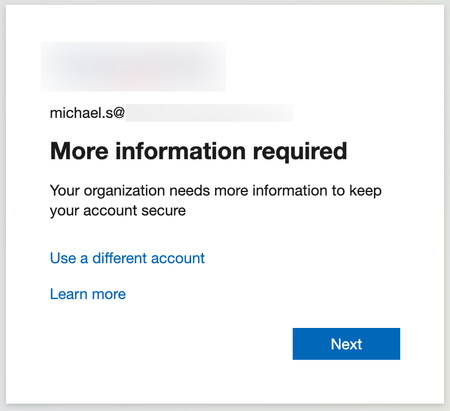
Hi, We are experiencing a catch-22 scenario during user onboarding related to MFA. New users are required to install the Microsoft Authenticator app via our Company Portal. However, they are prompted to complete MFA registration before they can access or download anything from the Company Portal. Since they do not yet have the Authenticator app installed, they are effectively blocked from completing the MFA setup. From our investigation, it appears that the Multi-Factor Authentication registration policy is enforcing MFA registration for new users. In our scenario, this creates a circular dependency. We have attempted to exclude our office network from MFA using Conditional Access, but this does not resolve the issue because the MFA registration policy is triggered before Conditional Access policies are evaluated. Our questions: Is there a recommended way to handle MFA onboarding in this type of scenario? Can Conditional Access policies be used instead of the MFA registration policy for initial MFA enrollment?606Views0likes4CommentsPasswordless POC Blocked by CA BYOD Policy – Looking for Workarounds
We’re currently running a POC for passwordless authentication in our environment. One challenge we’ve hit is that our CA BYOD policy blocks personal devices, which prevents users from enabling passwordless sign-in via the Microsoft Authenticator app. Since Authenticator is not a cloud app, we can’t exclude it from the CA policy using the usual cloud app filters. This is causing issues when users try to register or use passwordless sign-in from their personal phones. Has anyone dealt with this scenario or found a workaround that allows passwordless sign-in while still enforcing BYOD restrictions? Any ideas, suggestions, or creative solutions would be much appreciated! Thanks in advance!305Views0likes1CommentDisable MFA for User with certain admin roles
Hello all, we have a user with sharepoint administrator role and a self build application support manager role (the suer is allowed to create apps in Azure). We are now at a point where this user has to register an app for our helpdesk tool, but we have to remove the MFA for the registration. We excluded the user from the "MFA is mandatory for all users"-policy, the "MFA is mandatory for admins"-policy and set his MFA in the MFA-per-user setting on disabled. We have no other policy that enforces MFA for this user. Wenn we try to log in with the user (under http://www.office.com), we still get the request to register MFA Authenticator. I am aware that MS enforced MFA for admins, when they try to log in into the admin portals. Does this also apply for sharepoint admins? Does anyone have an idea, where the MFA request for this user could come from. Any help is appreciated. Cheers, Erik534Views0likes2Comments