microsoft 360
1 TopicWork IQ | Data, Context, Skills & Tools for Copilot and Your Agents
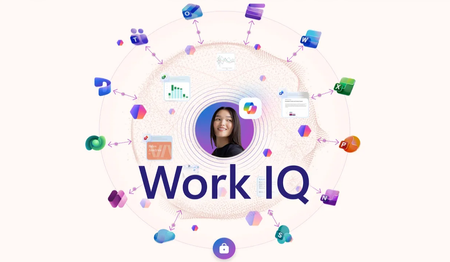
Pull context from SharePoint, OneDrive, Teams, email, and meetings — all through Work IQ. Draft Word documents that carry your existing sensitivity labels, and resolve calendar conflicts in Outlook. Run multi-step Copilot Cowork workflows that generate files, schedule meetings, and send status updates from a single prompt. Extend the same knowledge layer to ServiceNow, CRMs, and other non-Microsoft systems with API and MCP Server connectors in the Microsoft 365 admin center, or build your own agents in code against the Work IQ API. Jeremy Chapman, Microsoft 365 Director, shares how data, context, and skills & tools combine into a single grounding layer for Copilot and your custom agents. Skip the manual prompt scaffolding. Work IQ delivers data, context, skills & tools as the built-in knowledge layer behind Microsoft 365 Copilot and agents. See how it grounds every response. Kick off Copilot Cowork with one prompt. Generate a briefing doc, customer presentation, and Excel forecast in parallel. Queue up meeting scheduling and email drafts while it works. See how it runs. Your agent. Your code. Work IQ’s grounding. Integrate Work IQ data, MCP servers, plugins, and skills into custom agents via the Work IQ API. Start here. QUICK LINKS: 00:00 — Work IQ Knowledge Layer 01:32 — Copilot Chat experiences 02:16 — Work IQ in your apps 03:03 — Auto-Applied Sensitivity Labels 04:20 — Copilot Cowork Agentic Workflow 06:11 — Admin Center Connectors 07:21 — Work IQ API for Developers 08:50 — Wrap up Link References Check out the latest updates at https://aka.ms/WorkIQ Unfamiliar with Microsoft Mechanics? As Microsoft’s official video series for IT, you can watch and share valuable content and demos of current and upcoming tech from the people who build it at Microsoft. Subscribe to our YouTube: https://www.youtube.com/c/MicrosoftMechanicsSeries Talk with other IT Pros, join us on the Microsoft Tech Community: https://techcommunity.microsoft.com/t5/microsoft-mechanics-blog/bg-p/MicrosoftMechanicsBlog Watch or listen from anywhere, subscribe to our podcast: https://microsoftmechanics.libsyn.com/podcast Keep getting this insider knowledge, join us on social: Follow us on Twitter: https://twitter.com/MSFTMechanics Share knowledge on LinkedIn: https://www.linkedin.com/company/microsoft-mechanics/ Enjoy us on Instagram: https://www.instagram.com/msftmechanics/ Loosen up with us on TikTok: https://www.tiktok.com/@msftmechanics Video Transcript: -Imagine AI that understands your individual work context without you having to author long, detailed prompts, manually upload reference content, or query and add business data. That’s what Work IQ is all about. Today, I’ll explain what Work IQ is, how it works, and show you what it can do. So, Work IQ is the brain behind Microsoft 365 Copilot and agents. It’s a built-in knowledge layer that comprises data, with secure access to your unstructured work data across SharePoint, emails, Teams chats and meetings, as well as your structured business data in Dynamics 365 and Power Apps. And you can extend Work IQ data even further to securely interact with external systems using Copilot and Power Platform connectors. -Then context adds semantic understanding of your business data and relationships, like who you work with, work patterns, like projects important to you. This context also includes personalization in Copilot, consisting of the instructions you provide to format its responses, as well as saved memories comprising personal interests and important facts that Copilot retains from chat. -And finally, skills and tools as actions that AI can take with specialized capabilities like generating different files, workflow automation for business processes, scheduling relevant meetings, and more. Together, all of these elements are added to your prompts and subsequent reasoning steps performed to generate more relevant responses and outputs. If you’re using other AI tools today, these are things that you would need to bring in manually, sometimes moving files from policy-protected locations to services without your security controls or visibility, so let me show you a few examples of how this works, starting with a few that use data and context. -So, I’m in Copilot Chat and want to follow up on a recent project discussion, so I’m going to I’ll prompt it, “What did Daichi say about the solar promo timelines earlier this week?” Even though this is a vague statement and could be information in email, Teams, or a recent meeting, Work IQ finds the conversation and its details, then presents those to me. It also finds a related meeting series in my calendar that Daichi scheduled on the topic. And these Work IQ experiences are also available in your apps, like Outlook or other Microsoft 365 apps. -In this case, my calendar is packed with meetings and I’m double-booked in three different time slots. From Outlook, I can ask Copilot to recommend how to resolve conflicts on my calendar for May 12. Copilot, using information from Work IQ, analyzes my schedule, along with my priorities and past meeting patterns. It finds the three timing conflicts on top. Then for each conflict, it reasons over the adjacent meetings, my role, and work patterns to create detailed recommendations for each conflict time. Below that in the summary, it suggests which meetings to reschedule, who to notify, and some actions to take. And Work IQ can help as you write or edit your files in apps like Word. -So, here, I want to to write a summary for a project, and as you can see, there are no project details in this document. It’s just a blank page. So I’ll open Copilot and I’ll prompt it to draft an executive summary about our expansion strategy that highlights our products, the market for outdoor gear, our unique position, and go-to-market strategy. Copilot, together with Work IQ, finds and pulls in data from relevant project files in SharePoint and OneDrive, recent updates from meetings, and relevant emails and Teams conversations. You can see that it automatically applied a sensitivity label based on my existing information protection policies. -Then it generates a detailed summary using all of the data and context that it found, and assembles a fully formatted Word document with specific details about our connected outdoor products, the market opportunity, go-to-market strategy, and our expansion plan with details for carrying it out. As you saw, I didn’t need to author a super long detailed prompt with the project details and have to upload any content or even directly reference files using links. It automatically retrieved relevant content that was aligned with my access permissions as well as my company’s data security policies. -Now let me show you an example using intelligent skills and tools. In this case, I need to prepare for a customer meeting where I need to have several files generated, internal briefing document, a customer presentation, and data insights in a spreadsheet. So, for that, I’ll use Copilot Cowork. I’m going to paste in my prompt where I’m asking it to create those files. Now, I’ll kick off the process. And now it’s using Work IQ data, context, skills, and tools to find relevant data and information and then generate the files I want. -Now, this process can run several minutes, so I’ll speed things up a little to save time. As it works, I can even request more tasks while it’s running using other skills and tools. Here, I ask it to schedule prep time with people on my team and send an email status update to the account team. As it continues working, it checks and finds a mutually open time on our schedules, and it proposes a meeting with participants with all of the details filled in. I can create it right from here. Then it uses another skill to author an email to my contact on the account team that I can even edit right from here. Once everything’s done, you’ll see that it’s created a Zava client presentation, a customer briefing doc, and a customer overview Excel file. I’ll open the briefing document first, and it has everything relevant to the meeting and uses our standard briefing template. -Now, I’ll open the presentation it generated. It explains our work at a glance with key metrics from Work IQ and referenced files, as well as revenue and growth highlights. Now, if I move on to the generated Excel file and open that, it’s laid out year-over-year performance and used that to generate forecasts for this year And you can see the growth trends and more, all from the data it discovered via Work IQ. And like I mentioned, the data can be securely extended to systems from non-Microsoft services using connectors, allowing you to pull in other information like your online CRM systems, content management, databases, ticketing system, and more. -Now, these can be added and configured under Copilot Connectors in the Microsoft 365 admin center. The gallery lets you select from dozens of pre-built connectors or you can create your own. And these can be API-based or MCP server-based. API connections are indexed for read operations and MCP servers are not indexed and support read and write. To add one, like this API-backed connector for ServiceNow Knowledge, you’ll set up the REST API endpoint, provide its namespace and URL to your instance. And since I already have a few MCP server connectors configured, I’ll cancel out of this view and then go to my connections to show you those. Now, here, you can see all of the MCP connections that I have configured in my tenant for things like financial apps, creative suites, collaboration services, and more. -Once connected, these in turn can be accessed via Work IQ by Copilot or your agents. In fact, as a developer, if you are building agents, you can integrate Work IQ into your code with connections using the Work IQ API. Here, I’m using the GitHub CLI. It’s connected to Work IQ and using its underlying MCP servers, plugins, and skills. I have my prompt already entered to find a conversation with Ben and Darrel asking about the availability of an MCP server from the claims team. Now, I want this agent to build another agent based on our discussed feature requests, so I’m going to kick it off. And you can see that it reasons immediately and looks for the conversation to find the features that it needs. -So, after it’s found that, it lists out the features and connects to the insurance claims MCP server and looks at its available tooling. Then it starts to build the scaffolding files for the new agent as JSON and text files. And then deploys a local instance of the agent to test out with a link, so I’ll open that and run a prompt to stack-rank my open claims by age so I can clear the backlog. Then the agent builds a nice claims dashboard with a tiled view of each stack ranked claim. And below that, it even summarizes my priorities so that I can easily focus on what’s important and work through the list. -So, even as you develop new agents or work in other solutions, you can use the data, context, skills, and tools from Work IQ to power those experiences and save time. Work IQ works with Copilot and your agents to deliver personalized, accurate, and grounded outputs based on your real work data, context, and specialized skills and tools. -To learn more, check out the latest updates at aka.ms/WorkIQ. Keep watching Microsoft Mechanics for latest deep dives about AI and what makes it work. And thanks for watching.814Views0likes0Comments