merge
3 TopicsMerge Smart Copy + Math Resolver + Web Capture
Now we have 3 features that require user to select a part of the screen to do tasks on it. I think now it's the time to merge these into 1 unified option. you select an area and then you will have different options to choose from, whether you want to make a Smart Copy, you want to just capture it as screenshot using Web Capture, or you want to scan it for equation to run on Math solver. instead of 3 distinct buttons on Edge toolbar and 3 distinct options either in (...) menu or right-click, just have 1 button, call it something suitable, a multip-purpose button (i haven't come up with a good name yet).1.4KViews2likes2CommentsNew Improvements to Edge settings - smart merge (new tab page, home, startup)
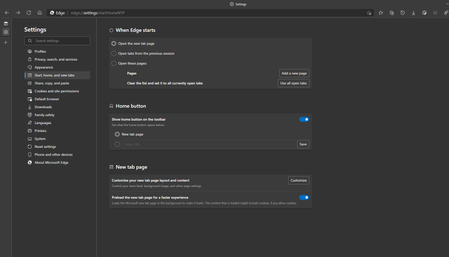
Microsoft Edge Version 90.0.808.0 (Official build) canary (64-bit) New: Old - How it looked before: So what has happened is that these 2 settings pages: edge://settings/newTabPage edge://settings/onStartup have been merged into one: edge://settings/startHomeNTP (Start, home, and new tabs) a very smart and good move to optimize free space and organize options more efficiently. Another change in settings: edge://settings/appearance selecting "set button URL" takes you to the newly merged settings page. New: Old: As always, remember changes in insider channels may follow the controlled feature rollouts plan.4.7KViews2likes15Comments