media literacy
1 TopicNew information literacy features in Search Progress now generally available
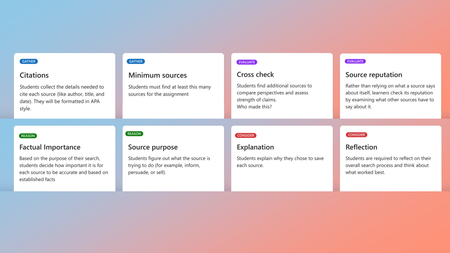
Hello all! Last September, we shared a preview of new information literacy features coming to Search Progress — designed to help students pause, think critically, and show their reasoning as they research online. Today, we’re excited to share that these features are generally available for all educators using Search Progress through Assignments in Teams for Education and the Microsoft 365 LTI®. A special thank you to the educators who participated in the preview and shared feedback along the way; your insights helped shape these features into what they are today. See it in action Want a walkthrough before reading the details? Watch our Elevate Signature Series session, “Show Me Your Thinking,” where Dr. Geri Gillespy and I discuss future ready skills along with Search Progress setup, the full educator-to-student workflow, and how these skills connect to global assessment frameworks like PISA 2029. Why process matters more than ever Information literacy skills like verifying sources, understanding context, and thinking critically are foundational for responsible and effective navigation of online information. These skills become even more critical as AI becomes an integral part of learning and daily life, where students don’t just need access to information, they need to know how to evaluate it. To ensure these features were developed in alignment with the latest in online reasoning research, we consulted with experts from the Digital Inquiry Group — a team with decades of experience as curriculum designers, classroom educators, researchers, and teacher educators — recognized with awards from UNESCO, the American Educational Research Association, and the School Library Association, to name a few. What’s now available The enhanced Search Progress features introduce structured activities and checkpoints — cognitive forcing functions that encourage students to pause, consider, and articulate their reasoning as they navigate the complex world of online information. Here’s what you can now enable for your assignments: Evaluating source reputability: Instead of relying solely on what a source says about itself, students investigate the individuals or organizations behind the information by looking into what other sources say about them, like how employers use references in a job interview. Cross-checking and lateral reading: “Using the internet to check the internet”, students compare information and perspectives across multiple sources to reveal patterns, differences, and possible inaccuracies. Impact awareness: Students consider what could be at risk if the information is inaccurate or fabricated with the new "factual importance" checkpoint. For instance, health advice carries different consequences than an AI-generated image of a cat dancing at the disco. Identifying source purpose: Information is created for a reason. Students consider who created a source, and whether it’s trying to inform, persuade, sell, or entertain. Metacognitive reflection: Students reflect on the research process itself including why certain sources stood out, which strategies worked best, and how to apply those learnings in the future. Not just for research projects These features aren’t only for formal research assignments. They’re designed for class activities that involve online research, whether students are exploring a new topic, gathering sources for a presentation, or verifying information for a discussion. The goal is to build habits that transfer throughout the digital information ecosystem, from navigating social media to evaluating AI-generated content. For example: A science educator assigns a pre-lab research task on chemical reactions. By enabling Source Reputation and Factual Importance, students learn to prioritize safety data sheets and academic sources over unverified blogs and to think about why accuracy matters when the stakes are high. A social studies educator uses Cross-check for an assignment focusing on current events. Students discover that a viral statistic has been reported differently across sources, and they practice tracing claims back to their origin — building lateral reading habits they’ll carry into their media consumption outside of school. What educators are saying Teacher librarians, in particular, have told us that the “process over product” approach gives them something they’ve been missing — visibility into the process of student inquiry, not just what they turn in. These features give them a window into the journey, not just the destination. With new scaffolds that support cross-checking and the investigation of source reputation, Search Progress now covers more of the skills they’ve been trying to teach. We’ve heard from educators that the explanation prompts reveal a side of student thinking that traditional assignments don't often capture. During an early pilot, students pushed back on a text field that didn’t scroll to expand, not because they wanted less writing, but because they had more to say about why they chose their sources and wanted more space to explain their thinking. Students who described themselves as not being strong essay writers found a different way to show their thinking, and when they knew that their reasoning mattered as much as the final product, it changed how they engaged with the assignment. Preparing students with future-ready skills for the age of AI As educators worldwide work to build students’ information literacy skills, global frameworks are evolving to match. The OECD recently published a first draft of the PISA 2029 Media and Artificial Intelligence Literacy (MAIL) assessment framework — a new assessment that will measure 15-year-olds’ ability to critically evaluate digital and AI-generated content across all participating countries. We were interested to see how closely the skills that Search Progress helps build align with the competences this framework describes. The MAIL assessment places significant emphasis on evaluating source credibility, assessing purpose and bias, and cross-checking information across multiple sources — all skills that Search Progress is designed to support through structured activities and checkpoints in the flow of research. Educators have also shared that these features help address a tension many are navigating right now: how to maintain academic integrity when AI-generated work is increasingly difficult to distinguish from student work. Rather than relying on detection tools at the end of the pipeline, Search Progress makes the research process itself the artifact, which gives educators evidence of student thinking throughout. Of course, information literacy is broader than any single tool. The MAIL framework also includes competences around content creation and collaborative digital participation that go beyond what Search Progress currently addresses. But for the core skill of analysing and evaluating online information — which the framework highlights as one of its most heavily weighted competences — Search Progress can help you give your students meaningful practice right now. By integrating these research habits into everyday assignments, you’re helping students build skills that will serve them well beyond any single assessment — from navigating social media to evaluating AI-generated content in their daily lives. Getting started Open Assignments in Teams for Education (or your LMS via the Microsoft 365 LTI). Create a new assignment and select Search Progress as a Learning Accelerator. Choose which information literacy features to enable for this assignment; you can mix and match based on the lesson. Customize the checkpoint card prompts to fit your subject area and grade level. Assign it to your class and watch the research process unfold. Requirements Available to all Microsoft 365 Education customers Classes set up in Teams for Education or the Microsoft 365 LTI Helpful links 📘 Take the MS Learn course — Intro course for educators 📘 Microsoft 365 LTI app overview — Bring Search Progress into your LMS 💬 Join the Education Insiders Program — Share feedback directly with our product team We’re committed to helping you foster information and AI literacy, and your feedback continues to shape how these tools evolve. Join the Search Progress channel in the Education Insiders Program to connect with other educators, attend community calls, and share your experience directly with the product team. If you’re not yet an EIP member, sign up here: aka.ms/JoinEIP. Have questions or ideas? Drop them in the comments below. I’d love to hear how you’re using these features in your classroom! Until next time, Emma Gray Product Manager II Microsoft Education Learning Tools Interoperability® (LTI®) is a trademark of the 1EdTech Consortium, Inc. (1edtech.org)490Views1like0Comments