major version upgrade
14 TopicsAnnouncing new security, maintenance and analytics features for PostgreSQL at Microsoft Build 2026
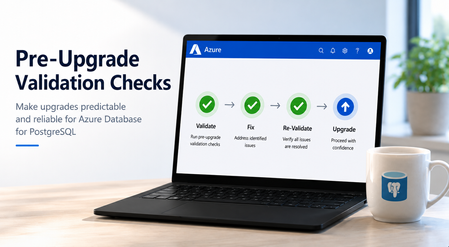
At Microsoft Build 2026, we’re announcing a major wave of PostgreSQL innovation across Azure. Alongside the public preview of Azure HorizonDB, we’re delivering a broad set of enhancements for our fully managed open-source PostgreSQL service: Azure Database for PostgreSQL flexible server. These updates span performance, analytics, security, operations, resilience and migration - helping you build faster, operate with more control, secure your workloads, and modernize with confidence. Here’s a quick tour of the top flexible server announcements at Build 2026. Feature Highlights pg_ivm Extension Defender Security assessments temporal_tables Extension Cross-tenant CMK Automatic Entra token refresh libraries New Powershell module: Az.PostgreSQLFlexibleServer More control over planned maintenance Pre-Upgrade validation checks New Built-in Grafana dashboards Chaos Studio supports Azure Database for PostgreSQL AI-assisted Oracle to PostgreSQL migration Migration Service for Azure Database for PostgreSQL improvements (EDB, AlloyDB) Performance, Scale & Analytics pg_ivm Extension Generally Available Materialized views are a useful way to optimize performance for queries that run regularly, but if underlying data becomes stale the result set needs to be recomputed. With the pg_ivm extension you can automatically maintain materialized views as the underlying data changes. This is particularly valuable for large datasets with small incremental changes that need real-time freshness, like dashboards, catalog analytics and SaaS usage reporting. We are pleased to announce the pg_ivm extension is now generally available in Azure Database for PostgreSQL. Learn more: pg_ivm. Security, Auditing & Identity Defender security assessments Preview Microsoft Defender Security Assessments for Azure Database for PostgreSQL enables continuous evaluation of your database security posture, helping identify vulnerabilities and misconfigurations across server and database configurations. Previously limited to reactive threat detection, in the latest preview release, Defender now provides proactive, risk-based insights through assessments tailored to PostgreSQL-specific best practices, delivering more relevant and actionable guidance. This helps you strengthen your security baseline, prioritize remediation, and align with best practices and compliance requirements. Learn more: https://aka.ms/Defender-Assessments-for-PG-Preview temporal_tables Extension Generally Available We’ve had many customer requests to support the temporal_tables extension, which provides built-in support for tracking and querying historical changes to data over time. Temporal tables are now generally available in Azure Database for PostgreSQL. With this extension enabled you can easily perform time-based queries, audit data changes, and maintain historical records without building custom tracking logic, simplifying application development and compliance scenarios. Learn more: temporal_tables Cross-tenant CMK Preview Azure Database for PostgreSQL now supports cross-tenant customer-managed keys (CMK) in public preview, allowing you to encrypt your data at rest using an Azure Key Vault key that resides in a separate Microsoft Entra tenant from the database service. This feature is designed for SaaS providers and enterprises that need to maintain strict separation of duties and ownership of encryption keys, enabling you to retain full control over key lifecycle management while PostgreSQL runs in a service provider’s tenant. Learn more: Data encryption at rest in Azure Database for PostgreSQL Automatic Entra token refresh libraries Preview We’re making it easier to use Entra ID authentication with Azure Database for PostgreSQL throughout the application stack by introducing new token refresh libraries for .NET, JavaScript, and Python. With Entra ID, access tokens are short-lived which can make managing their lifecycle complex in real-world applications. Developers need to be aware of token refresh and build additional handling around token expiration, connection retry, and session continuity. These new libraries remove that friction. By handling Entra token refresh seamlessly in the background, they allow applications to stay connected without interruption and with no custom logic required. The result is a simpler development experience and more resilient applications, especially for long-running or connection-heavy workloads. Across languages, the libraries provide a consistent and streamlined way to adopt secure, passwordless authentication, helping teams focus more on building their applications and less on managing authentication. Learn more: .NET, JavaScript, and Python. Operations, Maintenance & Monitoring New Powershell module: Az.PostgreSQLFlexibleServer Generally Available We’re excited to introduce the newly renamed Az.PostgreSQLFlexibleServer PowerShell module, delivering a streamlined experience for managing Azure Database for PostgreSQL with PowerShell. Building on the capabilities of the previous Az.PostgreSql module, the updated module aligns with the new features in the 2026-01-01 preview REST API. This module brings support for PostgreSQL 18, elastic clusters for scalable workloads and a range of enhancements designed to simplify management and improve performance. Whether you're provisioning new deployments or managing complex environments, this module ensures you can take full advantage of the latest platform capabilities directly from PowerShell. To learn more, visit our official documentation on PowerShell: Az.PostgreSql Module | Microsoft Learn More control over planned maintenance Generally Available We’ve seen many requests to provide more control when a maintenance update is applied to Azure Database for PostgreSQL. Sometimes when a critical workload is running you want to apply the maintenance when you’re ready. Announcing general availability this week, we’re building on the existing System and Custom maintenance window options and adding new self-service maintenance capabilities to the Azure portal. You can now reschedule upcoming maintenance updates for up to two weeks and apply maintenance on demand at a time that suits you. You can also view scheduled maintenance and review your server’s maintenance history after updates are complete. These options help you better align maintenance with your business schedules, reduce disruption during critical workload periods, and minimize the need for support-driven deferral requests. CLI and API support are coming soon. Learn more: https://aka.ms/azure-postgres-reschedule-maintenance Pre-Upgrade validation checks Preview Major version upgrades are critical for staying current with PostgreSQL features, security updates, and performance improvements, but you often discover blockers only after starting the upgrade workflow. Pre-Upgrade Validation Checks lets you validate upgrade readiness before initiating the actual upgrade by running Azure-specific upgrade checks and PostgreSQL pg_upgrade --check validations independently. The shift is simple: you can identify and fix upgrade blockers before the upgrade window begins. The feature surfaces actionable issues across configurations, extensions, dependencies, replication slots, event triggers, and other upgrade-sensitive objects. You can fix blockers, re-run validation until all checks pass, and proceed with the upgrade with greater predictability. Learn more: https://aka.ms/pg-flex-upgrade-checks New Built-in Grafana dashboards Generally Available Grafana dashboards are now built directly into the Azure portal for Azure Database for PostgreSQL - no setup, no extra cost, and no separate service to manage. You can open your PostgreSQL resource in the portal and immediately access prebuilt dashboards for key health and performance signals such as CPU, memory, storage, IOPS, connections, transactions, and availability. The key value is metrics + logs in one place. You can quickly correlate performance spikes with PostgreSQL logs, understand what changed, and troubleshoot faster using the familiar Grafana experience. Dashboards can also be customized, saved to your subscription, and shared across teams for ongoing operations. Learn more: https://aka.ms/azure-postgres-dashboards-grafana Resilience & Business Continuity Chaos Studio supports Azure Database for PostgreSQL Preview No matter how much you prepare, you only really know how good your database disaster recovery plan is when something breaks. With Chaos Studio support for Azure Database for PostgreSQL, you can simulate zone-down scenarios on PostgreSQL HA-enabled instances and validate the resilience of your mission-critical workloads. With Chaos Studio integration, you can proactively test failover behavior and gain confidence in how your applications respond to real-world zonal failures. This feature is currently available through a gated private preview. To get started, submit your subscription details using the form. Once reviewed, our team will enable the feature for your subscription, with guidance to help you begin testing. Getting started is simple: Create a Chaos Studio workspace via the Chaos Studio portal and configure your subscription, resource group, and region. Define the scope and assign the required managed identity and permissions. Review and verify your workspace setup. Browse available scenarios and select the PostgreSQL zone-down scenario. Configure the test (name, duration), then run it from My Library to begin validating failover behavior. With just a few steps, you’ll be able to simulate real-world failure conditions and gain confidence in your application’s resilience. To get started, please submit your details using this link: Private Preview Support for Chaos Studio Migration & Modernization AI-assisted Oracle to PostgreSQL migration Generally Available AI-assisted migration tooling has dramatically lowered the bar for moving between different databases and is changing the way people look at the return on investment for migration. The VS Code PostgreSQL extension comes with AI-Assisted migration tooling which converts Oracle schema and application code to Azure Database for PostgreSQL. This tooling uses GitHub Copilot, Microsoft Foundry, and custom Language Model tools to convert Oracle schema, database code and client applications into the PostgreSQL equivalents, and validates every change against a running flexible server instance. Learn more: Schema conversion, App conversion. Migration Service for Azure Database for PostgreSQL improvements (EDB, AlloyDB) Generally Available We’ve added AlloyDB and EDB Extended Server as new sources for migrating to PostgreSQL in the Azure Database for PostgreSQL Migration Service, with support for both online and offline migration support. Learn more: Migrate from AlloyDB, Migrate from EDB. Looking ahead That wraps up the Build 2026 announcements for Azure Database for PostgreSQL flexible server. There are also many great PostgreSQL technical sessions at Build this week, covering cloud-native app & AI development and migration. To find out more, here's a link to the Build session catalog for PostgreSQL sessions: https://aka.ms/Postgres-on-Azure_Build-2026. We'll continue to build out our roadmap over the coming months to deliver on your asks to improve the performance, security and stability of your PostgreSQL workloads. Check the Microsoft Blog for PostgreSQL for a regular monthly recap where we share the latest enhancements and product updates.1.5KViews2likes0CommentsPostgreSQL 18 is now GA on Azure Database for PostgreSQL
PostgreSQL 18 is now GA on Azure Database for PostgreSQL Excited to announce that Flexible Server now offers full general availability of #PostgreSQL18 - the fastest GA we’ve ever shipped after community release. This means: 𝘸𝘰𝘳𝘭𝘥𝘸𝘪𝘥𝘦 𝘳𝘦𝘨𝘪𝘰𝘯 𝘴𝘶𝘱𝘱𝘰𝘳𝘵, 𝘪𝘯-𝘱𝘭𝘢𝘤𝘦 𝘮𝘢𝘫𝘰𝘳-𝘷𝘦𝘳𝘴𝘪𝘰𝘯 𝘶𝘱𝘨𝘳𝘢𝘥𝘦𝘴 (𝘗𝘎11-𝘗𝘎17 → 𝘗𝘎18), 𝘔𝘪𝘤𝘳𝘰𝘴𝘰𝘧𝘵 𝘌𝘯𝘵𝘳𝘢 𝘐𝘋 𝘢𝘶𝘵𝘩𝘦𝘯𝘵𝘪𝘤𝘢𝘵𝘪𝘰𝘯, and 𝘘𝘶𝘦𝘳𝘺 𝘚𝘵𝘰𝘳𝘦 𝘸𝘪𝘵𝘩 𝘐𝘯𝘥𝘦𝘹 𝘛𝘶𝘯𝘪𝘯𝘨. Check out the full blog for a deep dive 👉https://techcommunity.microsoft.com/blog/adforpostgresql/postgresql-18-now-ga-on-azure-postgres-flexible-server/4469802 #Microsoft #Azure #Cloud #Database #Postgres #PG18Azure PostgreSQL Lesson Learned #6: Major Upgrade Blocked by Password Auth (The One-Change Fix)
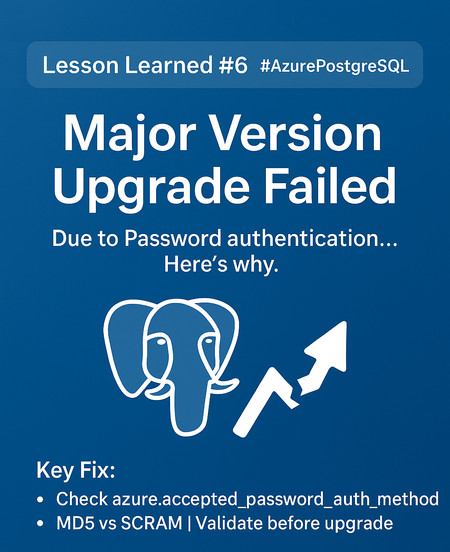
Co‑authored with angesalsaa Symptoms Portal Upgrade action fails or the precheck reports that upgrading with password authentication from 11 isn’t allowed. Users still authenticate with legacy MD5/password (or the server’s auth isn’t set to allow SCRAM‑SHA‑256). Error you can hit: - Fail at precheck. Root Cause PostgreSQL 11 on Flexible Server requires SCRAM to be enabled before attempting an in‑place major version upgrade to higher versions. The service precheck blocks the upgrade if the server is still on password/MD5‑only auth. Why SCRAM? It’s the modern, secure challenge‑response protocol (SCRAM‑SHA‑256) recommended by Postgres. Mentioned in our Public Documentation under Unsupported Configuration Parameter: Major Version Upgrades - Azure Database for PostgreSQL | Microsoft Learn Contributing Factors No prior auth hardening: password_encryption not set to scram-sha-256. User passwords still stored as MD5 hashes, not re-issued under SCRAM. Clients/drivers unverified for SCRAM support (older libraries may fail). Specific Conditions We Observed Source server on PG 11 (Flexible Server). Upgrade target to a higher supported version via portal. Operational Checks Before you flip the switch, confirm you can safely move authentication: List server auth parameters (portal → Server parameters): Verify these 2 server parameters password_encryption & azure.accepted_password_auth_method = scram-sha-256 and authentication methods include SCRAM. Mitigation Goal: Enable SCRAM and re-issue all passwords → re-run the upgrade. 1) Enable SCRAM on the server Portal: Server parameters → set: password_encryption = scram-sha-256 azure.accepted_password_auth_method = scram-sha-256 Check Important Note: Connectivity with SCRAM - Azure Database for PostgreSQL | Microsoft Learn These are dynamic properties and don't require server restart. Verify client/driver compatibility Ensure your application drivers (JDBC, Npgsql, libpq, etc.) support SCRAM before enforcing it. Update client libraries if needed. Re‑run the Major Version Upgrade Portal: Overview → Upgrade → select target major version → Upgrade. Post‑Resolution Upgrade completed successfully. Authentication now uses SCRAM‑SHA‑256; users continue connecting with updated passwords. No further precheck blocks on auth. Prevention & Best Practices Standardize on SCRAM (password_encryption = scram-sha-256) across all environments. Inventory roles and rotate passwords under SCRAM before your upgrade window. Validate drivers in CI/CD for SCRAM support to avoid runtime surprises. Read the upgrade docs (concepts + how‑to) and version policy so you understand supported targets and timelines. Understand Unsupported Scenarios: Major Version Upgrades - Azure Database for PostgreSQL | Microsoft Learn Why This Matters Skipping this step causes failed upgrades, longer downtime, and emergency rollbacks. Moving to SCRAM not only unblocks the upgrade but also improves security posture (MD5 is deprecated in the community). Key Takeaways Issue: PG11 → higher major upgrade blocked due to password/MD5 authentication. Fix: Enable SCRAM and reset all role passwords, then retry the upgrade. References SCRAM in Azure Database for PostgreSQL – Flexible Server (how to enable & verify) — https://learn.microsoft.com/en-us/azure/postgresql/flexible-server/security-connect-scram Authentication parameters (incl. password_encryption) — https://learn.microsoft.com/en-us/azure/postgresql/flexible-server/param-connections-authentication-authentication Major version upgrade: concepts & steps — Concepts · https://learn.microsoft.com/en-us/azure/postgresql/flexible-server/how-to-perform-major-version-upgrade649Views0likes0CommentsAzure PostgreSQL Lesson Learned #8: Post-Upgrade Performance Surprises (The One-Step Fix)
Co‑authored with angesalsaa Symptoms Upgrade from PostgreSQL 12 → higher version succeeds. After migration, workloads show: Queries running slower than before. Unexpected CPU spikes during normal operations. No obvious errors in logs or connectivity issues. Root Cause Missing or stale statistics can lead to bad query plans, which in turn might degrade performance and consume excessive memory. After a major version upgrade, the query planner relies on outdated or default estimates because the optimizer’s learned patterns are not refreshed. This often results in: Sequential scans instead of index scans. Inefficient join strategies. Increased CPU and memory usage. Contributing Factors Large tables with skewed data distributions. Complex queries with multiple joins. Workloads dependent on accurate cost estimates. Specific Conditions We Observed Any source server version can be impacted once you upgrade to higher version. No ANALYZE or VACUUM run post-upgrade. Operational Checks Before troubleshooting, confirm: Query plans differ significantly from pre-upgrade. pg_stats indicates outdated or missing statistics. Mitigation Goal: Refresh statistics so the planner can optimize queries. Run ANALYZE on all tables: ANALYZE; Important Notes: These commands are safe and online. For very large datasets, consider running during low-traffic windows. We recommend running the ANALYZE command in each database to refresh the pg_statistic table. Post-Resolution Queries return to expected performance. CPU utilization stabilizes. Execution plans align with indexes and cost-based optimization. Prevention & Best Practices Always schedule ANALYZE immediately after major upgrades. Automate stats refresh in your upgrade runbook. Validate plans for critical queries before going live. Why This Matters Skipping this step can lead to: Hours of degraded performance. Emergency escalations and customer dissatisfaction. Misdiagnosis as engine regression when it’s just missing stats. Key Takeaways Issue: Post-upgrade query slowness and CPU spikes due to stale/missing statistics. Fix: Run ANALYZE immediately after upgrade. Pro Tip: Automate this in CI/CD or maintenance scripts for zero surprises. References Major Version Upgrades - Azure Database for PostgreSQL | Microsoft Learn654Views0likes0CommentsOctober 2025 Recap: Azure Database for PostgreSQL
Hello Azure Community, We are excited to bring October 2025 recap blog for Azure Database for PostgreSQL! This blog focuses on key announcements around the General Availability of the REST API for 2025, maintenance payload visibility and several new features aimed at improving performance and a guide on minimizing downtime for MVU operation with logical replication. Stay tuned as we dive deeper into each of these feature updates. Get Ready for Ignite 2025! Before we get into the feature breakdown, Ignite is just around the corner! It’s packed with major announcements for Azure Database for PostgreSQL. We’ve prepared a comprehensive guide to all the sessions we have lined up, don’t miss out! Follow this link to explore the Ignite session guide. Feature Highlights Stable REST API release for 2025 – Generally Available Maintenance payload visibility – Generally Available Achieving Zonal resiliency for High-Availability workloads - Preview Japan West now supports zone-redundant HA PgBouncer 1.23.1 version upgrade Perform Major Version upgrade (MVU) with logical replication PgConf EU 2025 – Key Takeaways and Sessions Stable REST API release for 2025 – Generally Available We’ve released the stable REST API version 2025-08-01! This update adds support for PostgreSQL 17 so you can adopt new versions without changing your automation patterns. We also introduced the ability to set the default database name for Elastic Clusters. To improve developer experience, we have renamed operation IDs for clearer navigation and corrected HTTP response codes so scripts and retries behave as expected. Security guidance gets a boost with a new CMK encryption example that demonstrates automatic key version updates. Finally, we have cleaned up the specification itself by renaming files for accuracy, reorganizing the structure for easier browsing and diffs, and enhancing local definition metadata, delivering a clearer, safer, and more capable API for your 2025 roadmaps. Learn how to call or use Azure Database for PostgreSQL REST APIs. Learn about the operations available in our latest GA REST API. Repository for all Released GA APIs. Maintenance payload visibility – Generally Available The Azure Database for PostgreSQL maintenance experience has been enhanced to increase transparency and control. With this update, customers will receive Azure Service Health notifications that include a direct link to the detailed maintenance payload for each patch. This means you’ll know exactly what’s changing – helping you plan ahead, reduce surprises, and maintain confidence in your operations. Additionally, all maintenance payloads are now published in the dedicated Maintenance Release Notes section of our documentation. This enhancement provides greater visibility into upcoming updates and empowers you with the information needed to align maintenance schedules with your business priorities. Achieving Zonal resiliency for High-Availability workloads - Preview High Availability is important to ensure that you have your primary and standby servers deployed with same-zone or zone-redundant HA option. Zonal resiliency helps you protect your workloads against zonal outage. With the latest update, Azure Portal introduces a Zonal Resiliency setting under the High Availability section. This setting can be toggled Enabled or Disabled: Enabled: The system attempts to create the standby server in a different availability zone, activating zone-redundant HA mode. If the selected region does not support zone-redundant HA, you can select the fallback checkbox (shown in the image) to use same-zone HA instead. If you don’t select the checkbox and zonal capacity is unavailable, HA enablement fails. This design enforces zone-redundant HA as the default while providing a controlled fallback to same-zone HA, ensuring workloads achieve resiliency even in regions without multi-zone capacity. The feature offers flexibility while maintaining strong high availability across supported regions. To know more about how to configure high availability follow our documentation link. Japan West now supports zone-redundant HA Azure Database for PostgreSQL now offers Availability Zone support in Japan West, enabling deployment of zone-redundant high availability (HA) configurations in this region. This enhancement empowers customers to achieve greater resiliency and business continuity through robust zone-redundant architecture. We’re committed to bringing Azure PostgreSQL closer to where you build and run your apps, while ensuring robust disaster recovery options. For the full list of regions visit: Azure Database for PostgreSQL Regions. PgBouncer 1.23.1 version upgrade PgBouncer 1.23.1 is now available in Azure Database for PostgreSQL. As a Built-In connection pooling feature, PgBouncer helps you scale thousands of connections with low overhead by efficiently managing idle and short-lived connections. With this update, you benefit from the latest community improvements, including enhanced protocol handling and important stability fixes, giving you a more reliable and resilient connection pooling experience. Because PgBouncer is integrated into Azure Postgres, you don’t need to install or maintain it separately - simply enable it on port 6432 and start reducing connection overhead in your applications. This release keeps your PostgreSQL servers aligned with the community while providing the reliability of a managed Azure service. Learn More - PgBouncer in Azure Database for PostgreSQL. Perform Major Version upgrade (MVU) with logical replication Our Major Version Upgrade feature ensures you always have access to the latest and most powerful capabilities included in each PostgreSQL release. We’ve published a new blog that explains how to minimize downtime during major version upgrades by leveraging logical replication and virtual endpoints. The blog highlights two approaches: Using logical replication and virtual endpoints on a Point-in-Time Restore (PITR) instance Using logical replication and virtual endpoints on a server running different PostgreSQL versions, restored via pg_dump and pg_restore Follow this guide to get started and make your upgrade process smoother: Upgrade Azure Database for PostgreSQL with Minimal Downtime Using Logical Replication PgConf EU 2025 – key takeaways and sessions The Azure Database for PostgreSQL team participated in PGConf EU 2025, delivering insightful sessions on key PostgreSQL advancements. If you missed the highlights, here are a few topics we covered: AIO in PG 18 and beyond, by Andres Freund of Microsoft [Link to slides] Improved Freezing in Postgres Vacuum: From Idea to Commit, by Melanie Plageman of Microsoft [Link to slides] Behind Postgres 18: The People, the Code, & the Invisible Work [Link to Slides] Read the PGConf EU summary blog here. Azure Postgres Learning Bytes 🎓 Handling “Cannot Execute in a Read-Only Transaction” after High Availability (HA) Failover After a High Availability (HA) failover, some applications may see this error: ERROR: cannot execute <command> in a read-only transaction This happens when the application continues connecting to the old primary instance, which becomes read-only after failover. The usual cause is connecting via a static-IP or a private DNS record that doesn’t refresh automatically. Resolution Steps Use FQDN - Always connect using FQDN i.e. “<servername>.postgres.database.azure.com” instead of a hardcoded IP. Validate DNS - Run “nslookup yourservername.postgres.database.azure.com” to confirm resolution to the current primary. Private DNS - Update or automate the A-record refresh after failover. Best Practices Always use FQDN for app database connectivity. Add retry logic for transient failovers. Periodically validate DNS resolution for HA-enabled servers. For more details, refer to this detailed blog post from CSS team. Conclusion We’ll be back soon with more exciting announcements and key feature enhancements for Azure Database for PostgreSQL, so stay tuned! Your feedback is important to us, have suggestions, ideas, or questions? We’d love to hear from you: https://aka.ms/pgfeedback. Follow us here for the latest announcements, feature releases, and best practices: Microsoft Blog for PostgreSQL.880Views2likes0Comments