lighthouse
1 TopicImplementing Azure Lighthouse: A Technical Guide for Service Providers and Enterprises
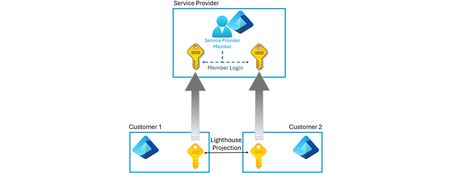
Managing resources across multiple tenants is a common challenge for managed service providers (MSPs) and large enterprises. There are many scenarios where you may need to manage resources in many tenants, whether those tenants belong to your organization or they belong to your customers. Without a unified approach, administrators must create accounts in each customer tenant or rely on guest identities, which increases credential sprawl and makes it hard to enforce consistent governance. This also doesn’t scale, as an administrator who needs to manage many customers would need to separately login to each customer tenant in order to view and work on subscription resources across tenants. This is cumbersome and time consuming. Without a delegated access model such as Azure Lighthouse, this is how most organizations manage resources across tenants. While the focus of this article is Azure Lighthouse, there are other delegated access models available which I will compare further below. Microsoft’s Azure Lighthouse addresses the challenge of managing resources across tenants at scale by allowing service providers and customers to delegate access to specific scopes in the customer’s tenant. Users sign in to their own tenant and manage delegated resources across all customers through a logical projection model. These subscriptions appear as if they are in the service providers’ tenant and they no longer have to login to each separate tenant. This article introduces the core architecture and operational model of Azure Lighthouse and provides guidance for implementers along with lesser-known tips to help you succeed. For clarity and simplicity, this article uses variations of two consistent terms. The Service Provider refers to the managing entity, or the tenant that contains the identities used to manage resources in another tenant. The Customer refers to the entity whose resources are being managed. Accordingly, the tenant hosting those managed resources is referred to as the Customer Tenant, while the tenant hosting the managing identities is the Service Provider Tenant. Understanding Azure Lighthouse Azure Lighthouse isn’t a separate management portal, it’s a set of delegated resource management capabilities that operate through Azure Resource Manager (ARM) and the Azure portal. When a customer delegates a subscription or resource group, two resources are created in the customer tenant: Registration definition – describes the managing tenant, the built-in role assignments (principal IDs + roles) and metadata for the managed service offer. One definition exists per subscription. Registration assignment – binds the registration definition to a specific scope (subscription or resource group). Azure Resource Manager verifies the presence of these two resources when a user in the service provider’s tenant performs an operation on customer resources. The customer’s resources are logically projected into the managing tenant, so users can stay signed in to their own tenant and still manage delegated resources without switching directories. All activity performed by managing-tenant users is logged in the customer’s activity log, enabling accountability. Onboarding Customers to Azure Lighthouse Methods There are two supported onboarding methods: ARM template deployment – The service provider creates a JSON template specifying the managedByTenantId (the provider’s tenant), an authorizations array containing principal IDs and built-in role IDs, and optional metadata (offer name/description). The provider then delivers the template to the customer, who deploys it into their subscription or resource group. You must know the customer’s tenant ID and subscription ID (or resource group names) and the provider’s tenant ID. Each authorization requires the principal ID (user, group or service principal) and the built-in role definition ID. Managed service offer via Azure Marketplace – Partners who meet competency requirements can publish public or private offers in the Azure Marketplace. Customers accept the offer via the Marketplace, which automatically deploys the registration definition and assignment into their tenant. Offers apply identically across all purchasers. To customize roles for specific customers, you must publish separate private offers or use the ARM template method. Once deployed, these resources produce a logical projection of the delegated subscriptions/resource groups. Scope and Role Considerations Tenant and subscription IDs – When deploying via ARM, you must know the tenant ID of both the service provider and the customer, plus the subscription ID(s) or resource group names you intend to onboard. Role definitions – Any Azure built-in role except Owner is supported; custom roles and classic administrator roles are not supported. Roles containing DataActions (e.g., storage listKeys) or certain Microsoft.Authorization actions aren’t allowed. Always assign roles that follow the principle of least privilege; for example, use Reader for monitoring tasks, Contributor for VM management or custom roles where data access isn’t needed. Assigning the Managed Services Registration Assignment Delete Role is recommended so that service-provider users can remove their own access later. Group vs. individual assignments – It’s best practice to assign permissions to Microsoft Entra security groups or service principals rather than individual users. This allows you to add or remove users without redeploying the delegation and simplifies the management of large teams. Ensure the group type is set to Security. Eligible authorizations (just-in-time) – Azure Lighthouse supports Azure Privileged Identity Management (PIM). You can create eligible authorizations that require users to activate their role for a defined duration (up to eight hours) and optionally require approval or multi-factor authentication. This model reduces the number of permanent privileged assignments. Working with Delegated Resources Navigating the Azure Portal Service providers manage delegated tenants through the My customers blade in the Azure portal. Users must have at least the Reader role to access this view. From My customers, you can: View all customers that have delegated subscriptions or resource groups to your tenant. Inspect customer details, offers and delegations; drill down to see which subscriptions or resource groups have been delegated and which roles are assigned. Review delegation change activity; the activity log lists every delegation and removal (requires Monitoring Reader at root scope). Remove delegations – If the delegation was created with the Managed Services Registration Assignment Delete Role, your users can revoke their own access via the trash-can icon; otherwise, only the customer can remove the delegation. Within other Azure services, you can work directly in the context of a delegated subscription. Use the Directories + subscriptions filter to choose delegated subscriptions and resource groups (turn off Advanced filters) and set them as your default scope. The portal will automatically scope your operations (e.g., creating VMs, assigning policies) to the selected delegated subscription. CLI and API Support All Azure Resource Manager APIs and management tools (Azure CLI, Azure PowerShell, Terraform, etc.) work with delegated resources. Use Get-AzSubscription in PowerShell or az account list in CLI to list your subscriptions; these commands include homeTenantId and managedByTenantIds fields to differentiate between your own and delegated subscriptions. If you do not see these fields, run az account clear then log in again. Cross-Tenant Scenarios and Services Azure Lighthouse enables cross-tenant management across many services as long as the user has the appropriate role. Example scenarios include: Azure Arc – Onboard servers, Kubernetes clusters and SQL resources outside Azure into delegated subscriptions; enforce consistent policy and use GitOps across customers. Azure Backup – View and manage backups across delegated subscriptions. Backup center and Backup Explorer provide aggregated views for delegated resources. Azure Automation / Functions – Use automation accounts or serverless functions in your tenant to run tasks against delegated resources. Cost Management – CSP partners can view consumption costs (pre-tax, retail rates) for delegated subscriptions. Key Vault and Kubernetes – Create Key Vaults in customer tenants and manage AKS clusters; monitor container performance across customer tenants. These services reflect only a subset of supported capabilities; most ARM-based operations will work cross tenant. Security and Governance Best Practices Implementing Azure Lighthouse is not just about technology; it requires strong governance: Require multi-factor authentication (MFA) – Users in your managing tenant should always be subject to Microsoft Entra MFA. Encourage customers to do the same. Conditional Access Policies: Conditional access policies defined in the customer tenant do not apply to delegated users; only the managing tenant’s policies are enforced. For example, it would be wrong for a customer to assume that if they enforce an MFA conditional access policy, that a delegated user from the service providers tenant would be forced to use MFA when accessing customer resources. MFA would need to be enforced in the service providers tenant to ensure that delegated users would access the customer resources with MFA. Principle of least privilege – Use Azure RBAC roles with the minimum permissions necessary. Limit the number of users with high privileges and regularly review memberships. Use groups / service principals – Assign roles to security groups or service principals instead of individuals; this simplifies management when people join or leave your team. Assign the Registration Assignment Delete role – Always include the built-in Managed Services Registration Assignment Delete Role in your authorizations so that your users can remove their own access without customer intervention. Understand role limitations – The Owner role isn’t supported; neither are roles with DataActions permissions (e.g., retrieving storage account keys). Roles with specific Microsoft.Authorization actions are also not allowed. Monitor activity and use logs – The customer’s activity log records all write and action operations performed by delegated users. Encourage customers to review these logs and ensure compliance. Opt for eligible authorizations – Where practical, use Azure PIM to create eligible authorizations for just-in-time elevation. Pay attention to subscription transfers – If a delegated subscription is transferred to another Microsoft Entra tenant, the registration definition and assignment remain so long as the subscription hasn’t been delegated to that tenant before. If it has, the delegation resources for that tenant are removed and access via Azure Lighthouse stops. Comparing Delegation and Packaging Models Azure Lighthouse, Administer on behalf of (AOBO), and Azure Managed Applications are all Azure delegation models that enable one organization to manage resources owned by another without fully transferring ownership. Each is designed to support scenarios where a service provider, partner, or central IT team needs some level of administrative control over customer or business unit subscriptions. They share a common goal of simplifying operations while maintaining separation between the managing party and the resource owner. However, they differ substantially in how access is granted, how permissions are scoped and enforced, and whether the focus is ongoing environment administration or tightly controlled application management. Understanding these differences is essential for choosing the right model for governance, security, and scale. Azure Lighthouse is designed for cross-tenant, large-scale management, allowing a service provider or central IT team to manage multiple customer or internal tenants through Azure RBAC-based delegation without adding guest accounts; permissions are explicit, least-privilege, auditable, and can span subscriptions, resource groups, or management groups. AOBO is an older, Commerce-era mechanism primarily tied to CSP subscriptions that allows partners to administer customer subscriptions, but it relies on broad, often implicit permissions and Entra ID guest access, lacks fine-grained RBAC control, and does not scale well for modern governance scenarios. Azure Managed Applications, by contrast, focus on application lifecycle control rather than general administration: they allow a publisher to deploy and manage specific Azure resources on a customer’s behalf while the customer retains ownership, with access restricted to only the managed resource group defined by the application. Architectural differences AOBO – The provider logs in as a guest into the customer’s Azure AD tenant and is assigned RBAC roles manually. The provider must switch directories to operate within each customer’s environment. Azure Lighthouse – Delegated assignments are created at the ARM control plane. No guest accounts are needed; the provider uses its own Microsoft Entra tenant and can see delegated subscriptions under My customers. The customer remains in full control and can remove the delegation at any time. Azure Managed Applications – The provider packages an entire solution into an ARM template and publishes it privately or publicly via a service catalog or marketplace. When deployed, Azure creates a managed resource group in the customer’s subscription. That resource group is hidden from the customer; only an application resource and configurable parameters are exposed. The provider automatically receives owner access on the managed resource group to operate the solution Access and control AOBO – Access is granted via individual RBAC assignments to guest users. Providers juggle multiple customer tenants and must maintain least privilege manually. Customers must remove each role assignment if they want to revoke access to services. Azure Lighthouse – Access is granted via delegated roles defined in an offer or through portal‑based delegation. Providers work under their own tenant context, and customers can revoke the entire delegation in one action. Operations by the provider are logged in the customer’s activity logs and are subject to the customer’s policies. Azure Managed Applications – Access is tied to the managed resource group; Management is done in the provider tenant and not the customer tenant. Customers cannot see underlying resources or modify them directly. Providers control the life‑cycle of the solution (deployment, updates, operations). Customers interact with the application through exposed parameters and can remove it by deleting the application resource, which cleans up the managed resource group. AOBO Azure Lighthouse Azure Managed Applications Access model Guest accounts with manual role assignments in the customer tenant; cross‑tenant administration is done via individual RBAC assignments. Delegated resource management assignments created at the control plane through ARM; provider uses its own tenant identity. ARM templates package resources into a managed resource group; provider gets owner access to that group via the Managed Application’s authorization definition. Scalability Manual; each tenant must assign roles per provider user; difficult to scale across many customers. High; one offer can onboard many customers and delegated scopes appear automatically in the provider portal. Scalable for packaging repeatable solutions; each deployment creates its own managed resource group but does not provide cross‑tenant visibility. Governance Hard to enforce least privilege; guest users may accumulate high‑privilege roles and require per‑user, per‑subscription revocation. Strong governance; customers can remove the entire delegation with one action and providers request only the roles they need. Provider controls a hidden managed resource group; customers have limited oversight but can delete the application to remove the solution. Identity management Providers manage multiple guest accounts and switch Azure AD directories. Providers remain in their own Azure AD tenant; no guest accounts; context switching is eliminated. Providers operate via a service principal with owner access on the managed resource group; customers interact via an application resource. Billing / commerce None; AOBO is purely an access model with no built‑in billing. Can be combined with private or Marketplace plans for management services. Pricing defined in the Marketplace or service catalog; supports usage‑based or flat‑rate charges for the packaged solution. Purpose Historical mechanism for delegated admin in partner programs; largely superseded by Lighthouse. Delegate access to existing resources across tenants for operations such as monitoring, compliance and support. Deliver packaged solutions to run in the customer’s subscription as a managed service under provider control. Resource location Existing resources remain in the customer’s subscription; no separate resource groups created. Existing resources remain in the customer’s subscription; no new resource groups are created by the delegation. Resources are deployed into a dedicated managed resource group that is hidden from the customer. Customer control The customer holds full control but must revoke individual role assignments; risk of lingering privileges. The customer retains full visibility and can revoke the entire delegation at any time. The customer’s control is limited to application parameters; underlying resources are hidden but can be removed by deleting the application. Provider control Provider’s access depends on assigned roles; may result in over‑privileged guest users. Provider’s access is scoped by delegated roles; cannot exceed what is granted by the customer; operations are audited. Provider has owner access to the managed resource group and manages the entire solution life‑cycle. Common scenarios Legacy cross‑tenant administration patterns in partner programs, now considered less secure and hard to scale. Multi‑tenant monitoring, patching, policy enforcement, security posture management or support services for existing workloads. Turnkey Marketplace offerings, SaaS extensions, complex enterprise architectures or packaged infrastructure solutions. Lesser-Known Features and Tips Partner ID linkage for earned credit – Members of the Microsoft AI Cloud Partner Program can associate their Partner ID with a service principal or user account. This allows Microsoft to identify partners driving Azure success and earn Partner Earned Credit (PEC). The account linked to the Partner ID must have access to every onboarded subscription. Azure Resource Graph – Use Azure Resource Graph (ARG) to query resources across all delegated subscriptions from a single endpoint. For example, query compliance status of virtual machines across your customer base using Resources | where type =~ 'Microsoft.Compute/virtualMachines' along with tags or policy states. ARG provides aggregated visibility at scale. Cost management nuances – Cost management via Azure Lighthouse displays pre-tax consumption at retail rates; purchases and discounts are not included. Ensure that your organization is aware of this when providing cost reporting to customers. Role updates and deprecations – Roles can change over time; if a previously supported role gains DataActions permissions, it becomes ineligible for new delegations, though existing assignments remain. Always review role definitions when updating templates. Support for ISVs and multiple delegations – Customers can delegate the same subscription or resource group to multiple service providers. This allows independent software vendors (ISVs) to project their own management resources into the customer tenant while other service providers manage operations. Conclusion Azure Lighthouse provides a robust and secure framework for multi-tenant management. By logically projecting delegated resources into a managing tenant, service providers and enterprises gain centralized visibility and automation while customers retain control over scopes and roles. Implementing Azure Lighthouse requires careful design of role assignments, adherence to security best practices, and continuous governance. For further reading and template samples, consult the Azure Lighthouse documentation.