lee stott
4 TopicsEngineering Agentic Recall Controls with MCP and Microsoft Foundry
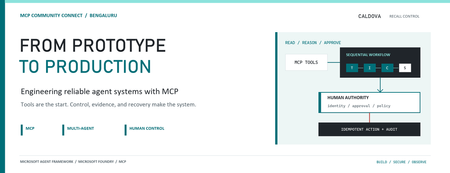
AI agents become operationally interesting when they can reach real systems. They also become operationally dangerous at exactly the same moment. Caldova Recall Control Tower is a developer demonstration built around that tension. It uses a fictional pharmaceutical recall to show how an agent can gather evidence and prepare a decision while deterministic application code retains authority over approval and inventory mutation. The implementation combines the Model Context Protocol (MCP), Microsoft Agent Framework, a Microsoft Foundry Hosted Agent, FastAPI, Microsoft Entra authentication, managed identity, and optimistic concurrency in Azure Blob Storage. Central design rule: Let the model interpret and recommend. Make ordinary code authenticate, authorize, mutate, and prove what happened. Caldova is fictional, all operational data is synthetic, and this sample is not a production recall system or a source of clinical advice. The scenario: useful reasoning, consequential action The demo starts with a temperature excursion affecting batch B-2408-AX7 of Caldova Relief 20 mg tablets. The synthetic inventory contains 2,196 units across two distribution centers and two retail stores. A useful system must establish the notice, locate every affected position, check supplier status, explain uncertainty, and recommend an action. That analysis is a good fit for specialized agents. Quarantining inventory is not. Quarantine changes operational state. It therefore needs an authenticated human, explicit authorization, a batch-scoped approval, concurrency control, idempotency, and an audit record. None of those guarantees should depend on a prompt being followed. The authenticated hosted application at the start of the fictional recall. Architecture: separate reasoning from authority The solution has two related but deliberately separate paths. Caldova separates model reasoning from application authority. Official Microsoft service icons identify Foundry Agent Service, App Service, Managed Identity, and Blob Storage. The reasoning path invokes a Hosted Agent through the Responses protocol. Four agents run in a fixed sequence: triage, inventory impact, supplier/compliance, and supervisor. The first three have narrow read-only tools. The supervisor has no tools and synthesizes the accumulated context into a decision brief. The authority path remains in the web application. It validates the EasyAuth identity claims, checks an approver allowlist, binds approval to the caller, batch, action, and current demo generation, and only then calls deterministic domain code. State is stored per actor in Blob Storage and updated with ETag match conditions so concurrent writes fail instead of silently overwriting each other. There is also a deterministic localhost demo. It reuses synthetic domain fixtures and demonstrates MCP contracts, approval, quarantine, and replay without a model or cloud account. It is useful for development, but its typed approver name and in-memory state are not production identity or durable compliance evidence. Building a narrow MCP surface MCP standardizes how an AI application discovers and calls external tools. It does not remove the need to design those tools carefully. Caldova exposes small, typed operations such as get_recall_notice , locate_inventory , and get_supplier_status . Inputs are constrained with Pydantic, and tool annotations tell clients that these operations are read-only and closed-world: @mcp.tool( title="Locate affected inventory", annotations=ToolAnnotations( read_only_hint=True, open_world_hint=False, ), ) def locate_inventory(batch_id: BatchId) -> dict[str, Any]: return STORE.locate_inventory(batch_id) The mutation tool is separately marked destructive and requires a batch-scoped approval token. Those annotations improve discovery and planning, but they are metadata, not an authorization boundary. The real check occurs inside quarantine_batch , below the model and below the tool description. The Hosted Agent does not receive the mutation tools at all. Its specialists call only three read operations through an isolated MCP stdio subprocess. This is stronger than asking an all-powerful agent to "please remain read-only": capability is constrained by construction. The subprocess boundary also keeps MCP v2 dependencies isolated from the Foundry hosting environment. Each call has a timeout, bounded concurrency, structured JSON handling, and a generic failure response that does not leak subprocess details. Fixed workflows beat vague autonomy for this case Multi-agent does not have to mean dynamic routing. Caldova uses an explicit sequence because the business dependency is explicit: validate the notice before locating inventory, locate inventory before checking supplier implications, and synthesize only after all three specialist outputs exist. return ( WorkflowBuilder(start_executor=triage, output_from=[supervisor]) .add_edge(triage, inventory) .add_edge(inventory, compliance) .add_edge(compliance, supervisor) .build() .as_agent() ) This topology is easier to test and reason about than an unconstrained planner. Each specialist has one job and one tool allowlist. Full context is passed where synthesis requires it, while the supervisor remains tool-free. Request isolation matters too. A hosted process can serve concurrent users, so workflow state must not leak between requests. The sample creates a fresh workflow agent for each request context rather than reusing mutable agent state globally. What the live hosted run showed The hosted application completed a read-only assessment for the synthetic batch. The resulting brief reported: 2,196 affected units across four locations. A high-risk inbound temperature excursion. Supplier acknowledgement, a 36-hour replacement estimate, and a drafted credit note. Unknown transit temperature details, excursion duration, stability impact, final supplier disposition, and potentially issued stock. A recommendation to hold or quarantine stock, explicitly stating that no quarantine had occurred. A required human approval before any inventory restriction. The live Hosted Agent decision brief. Transient response and correlation identifiers are masked; the operations rail is excluded because it contains actor-scoped audit data. The screenshot also shows an important truthfulness choice: the UI says Hosted workflow trace unavailable. The application does not invent stage completion or tool-call evidence when the hosted endpoint does not return trustworthy trace data. The answer can be displayed, but it must not be presented as proof of an internal execution path. Approval is a protocol, not a button The hosted web path uses App Service authentication with Microsoft Entra. The application accepts the injected principal only on the configured App Service host, validates tenant and object identifiers, applies a user allowlist, and performs an additional approver check for mutation requests. State-changing calls also require the expected origin and an application request header. Approval is then bound to five facts: The authenticated actor. The current demo generation. The affected batch. The quarantine action. A ten-minute validity window until first use. Resetting the demo creates a new generation, invalidating old handles. Consuming an approval does not make replay unsafe: the same bound handle can repeat the same quarantine operation, but domain code changes only positions that are not already quarantined. A second call reports an idempotent replay with zero additional positions changed. This is the difference between a human-in-the-loop interface and a human-authorized system. A modal dialog provides user experience; identity binding and deterministic policy provide control. Durable state needs concurrency semantics The hosted application stores each actor's synthetic session in a separate Blob object. A load returns both JSON state and its ETag. A save uses IfNotModified semantics; if another request updated the same state first, Azure Storage rejects the stale write and the API returns a conflict. conditions = ( {"etag": etag, "match_condition": MatchConditions.IfNotModified} if etag else {} ) await blob.upload_blob( json.dumps(state), overwrite=etag is not None, **conditions, ) Without that condition, two browser requests could both read the same approval state and overwrite one another using last-writer-wins behavior. Agent systems do not get a concurrency exemption: ordinary distributed-systems rules still apply. Fail closed, and make the failure legible The analysis adapter accepts only HTTPS Foundry endpoints with the expected path, uses a managed-identity token for https://ai.azure.com/.default , disables redirects, and enforces bounded connect and overall timeouts. It accepts only a completed assistant response with non-empty output text. If the endpoint times out, returns partial output, returns malformed data, or becomes unavailable, the application clears the analysis lease and reports that no inventory changed. It does not substitute a local answer and label it as hosted. Approval remains locked until a new hosted analysis succeeds. This can feel strict during a demo, but it protects provenance. A degraded fallback is useful only when the UI and audit model can identify it accurately. What is proven, and what is not The sample provides useful evidence for several engineering claims: Typed MCP tools reject malformed input. Hosted specialists receive read-only capabilities only. Approval is checked below the model and bound to identity and session state. Quarantine is idempotent in the synthetic domain. Blob ETags prevent stale session writes. Empty, partial, failed, and timed-out hosted responses fail closed. Local tests cover domain, MCP, workflow, API, and repository-hygiene behavior. It does not prove that the sample is a production recall platform. The scenario is synthetic. The local audit log is not tamper-evident. The hosted UI currently lacks trustworthy per-stage and per-tool trace rendering. Deployment-specific RBAC, EasyAuth configuration, telemetry access, model behavior, load characteristics, costs, and recovery procedures require validation in each environment. Evaluation evidence also expires. Golden cases and evaluator configuration are useful assets, but historical results are not a current release certificate. Re-run evaluations against the deployed agent version and inspect failures before making quality claims. Try the pattern Start with the deterministic path before provisioning cloud resources: Set-Location (git rev-parse --show-toplevel) py -3.13 -m venv caldova-recall-control/.venv ./caldova-recall-control/.venv/Scripts/python.exe -m pip install ` -r caldova-recall-control/requirements-ui.txt ./caldova-recall-control/.venv/Scripts/python.exe -m uvicorn ` control_tower_api:app ` --app-dir caldova-recall-control/src ` --host 127.0.0.1 ` --port 8091 Then inspect the MCP server over stdio: ./caldova-recall-control/.venv/Scripts/python.exe ` caldova-recall-control/scripts/inspect_mcp.py The inspector discovers the real tool schemas, reads the synthetic inventory, rejects malformed input and an unapproved mutation, and confirms the stock remains unchanged. Only after that local contract is understood should you configure a Foundry project, deployment identity, model deployment, and Hosted Agent. Engineering takeaways The most reusable lesson in Caldova is not the number of agents. It is the placement of authority. Give each model the smallest useful toolset. Prefer explicit workflow topology when the business process is known. Treat tool annotations as descriptive metadata, not access control. Bind consequential approval to authenticated identity, resource, action, and session generation. Put mutation and idempotency in deterministic domain code. Use optimistic concurrency for durable web state. Preserve provenance by failing closed instead of silently changing execution paths. Show only evidence the system actually captured. Agents are excellent at turning fragmented evidence into an actionable brief. Reliable systems make sure the brief and the action remain two different things. References Caldova source repository Model Context Protocol introduction Microsoft Agent Framework workflow capabilities Deploy a Hosted Agent in Microsoft Foundry Configure Microsoft Entra authentication for Azure App Service Manage concurrency in Azure Blob StorageMicrosoft Foundry Hosted Agents and MCP in Practice: Building Fibey Field Ops
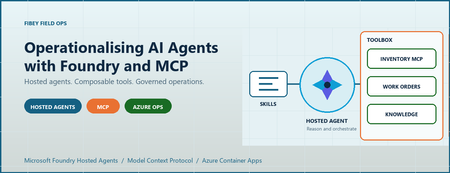
An agent can produce a convincing answer while the system around it is still difficult to deploy, authorize, debug, and recover. For AI engineers and developers, that is often the real gap between a promising prototype and an application people can depend on. Fibey Field Ops makes that gap concrete. It is a synthetic fiber-operations assistant built with Microsoft Foundry Hosted Agents, Model Context Protocol (MCP), and Azure Container Apps. This walkthrough follows one field-service task through the implementation, then examines the deployment and operational decisions behind it. Introduction: the application is more than the model Imagine a technician preparing a fiber work order. Before leaving the depot, they need the job details, available parts, relevant procedures, and network status. Those facts belong to different systems. A useful assistant must retrieve them, combine them, and explain what is missing without inventing an answer. The challenge is not simply selecting a capable model. It is establishing reliable contracts between the model, its tools, the hosting platform, and the application. Fibey demonstrates those contracts with one hosted agent, five instruction skills, eleven operational tools, and five supporting Container Apps. There is an important qualification: Fibey is a protected, synthetic-data demonstration, not a production-ready field-service system. Its gateway mappings and work orders remain in memory, and it does not enforce per-user session ownership or approval of operational writes. Those limitations are useful teaching material rather than details to hide. The Fibey repository contains the implementation, infrastructure, documentation, and presentation deck. Repository access depends on its permissions. 1. Separate reasoning, instructions, and tool execution MCP is a standard interface for discovering and invoking tools. In Fibey, the agent connects to one Microsoft Foundry Toolbox MCP endpoint. The toolbox exposes capabilities backed by an inventory MCP server, a work-orders OpenAPI service, and a Search knowledge base. That common interface does not make the underlying systems identical. OpenAPI still describes an HTTP API, inventory still implements MCP, and knowledge retrieval still depends on indexed documents. The toolbox centralizes the agent-facing integration and connection configuration while preserving those implementation choices. Four terms describe different responsibilities: Concept Responsibility in Fibey Agent Classifies the request, loads instructions, selects tools, and constructs the response Skill An instruction document for a task such as inventory lookup or field briefing Tool An operation with an advertised input schema and a result Toolbox The curated MCP surface and references to downstream connections Fibey's five skills cover inventory lookup, work-order management, knowledge retrieval, work-order preparation, and field briefings. The last two coordinate several tools; they do not create additional agents. The configured toolbox exposes eleven operational tools directly: six inventory/status operations, four work-order operations, and one knowledge-retrieval operation. The agent uses their actual names and schemas. Discovery wrappers such as tool_search and call_tool are relevant only when a toolbox exposes them; they are not mandatory steps before every call. This distinction matters when debugging. A missing wrapper is not necessarily a broken integration. A skill mentioning a capability is also not proof that the runtime can invoke it. The current tool schema is the executable contract. 2. Follow the hosted Azure architecture Microsoft Foundry hosts the agent container and exposes its endpoint. Azure Container Apps (ACA) hosts the application services around it. The deployment source of truth is azure.yaml , which declares the GPT-5.4-mini model deployment and the hosted agent's Responses 2.0.0 protocol. The design keeps the browser-facing application separate from agent execution and backend integration. That makes it easier to inspect each boundary, but it does not make the whole deployment private or remove the need for application authorization. Treat GPT-5.4-mini as the sample's configured baseline, not a claim that it is optimal for every workload. When evaluating another model, measure tool-selection accuracy, schema compliance, grounded answers, latency, and cost per completed task rather than choosing from a fluent demo response alone. The engineering architecture expands this presentation view with resource ownership, identities, configuration, and telemetry paths. The application request path The browser signs in through Microsoft Entra ID at the UI's ACA authentication boundary. An explicit allowlist restricts access to the intended user. Nginx serves the React application and proxies chat requests to the internal FastAPI gateway. The gateway invokes the Foundry-hosted agent using its managed identity. Server-sent events (SSE), a streaming HTTP format, carry answer text, tool activity, citations, failures, and completion back to the UI. Gateway and dashboard ingress are internal to the ACA environment. Inventory and work orders have external ingress so the toolbox can reach them, but their operational endpoints require separate API keys. External accessibility is not anonymous access, and internal ingress is not a complete network-isolation strategy. The knowledge and status paths The knowledge pipeline starts with eight Markdown documents in the repository. A setup script uploads them to a private Blob Storage container, configures a Search data source and indexer, verifies ingestion, and creates the knowledge source and knowledge base used by Foundry IQ. This is not an embedding pipeline assembled implicitly by the chat application. The current configuration uses minimal reasoning and extractive retrieval, with defaults of three output documents and 6,000 output tokens. Its knowledge-base configuration and MCP endpoint use preview APIs, which need lifecycle and support review before production adoption. Network status takes a different path. Inventory's get_network_status tool reads the configured internal HTML dashboard. It is a narrow HTTP fetch, not browser automation, arbitrary website navigation, or a real operational clearance. Azure Container Registry supplies container images. ACA logs go to Log Analytics. Hosted code enables OpenTelemetry, the standard instrumentation framework for traces and metrics, but the repository does not provision Application Insights. The project's linked trace destination must be configured and verified separately. 3. Trace a work-order briefing through the implementation The most useful demonstration starts with one concrete request: prepare a technician for a job. The field-briefing skill provides the instructions for combining work-order data, inventory, procedures, and status without pretending that one backend contains everything. Use a request such as the following in a prepared synthetic environment. The exact wording and tool order may vary; the important evidence is which operations succeeded and which facts support the answer. Brief me on WO-007, including stock, relevant procedures, safety, and network status. The intended flow is: Load the field-briefing instructions and retrieve WO-007. Identify required parts and use a batch stock check when several parts need checking. Combine procedure and safety questions into one focused knowledge retrieval. Read the configured synthetic status dashboard through inventory MCP. Produce a briefing grounded in successful results, with source references and explicit gaps. Batching is a useful engineering choice, not a claim of a measured performance improvement. One batch stock call avoids unnecessary repeated requests. Combining related retrieval questions can also reduce duplicate context and tool traffic. This screenshot was captured from an authenticated deployment. The displayed briefing identifies an unavailable connector kit and available test equipment. It illustrates a specific synthetic response, not current stock or a benchmark. Use the supported hosted integration The relevant implementation is the hosted entrypoint. It uses FoundryToolbox from agent_framework_foundry_hosting , a FoundryChatClient , a skills provider, and ResponsesHostServer.run_async() . The hosting helper does more than attach a bearer token. It authenticates MCP requests and forwards the hosted runtime's per-request call ID. Replacing it with a generic transport can lose context that the platform expects. The entrypoint also closes credentials and clients when execution exits. Hosted skill discovery prefers published skills when available and retains bundled instructions as a fallback in auto mode. Explicit mcp mode fails if published skills cannot be loaded; file mode uses the bundled documents. This makes the fallback intentional rather than silently running without the task instructions. Distinguish history from compute affinity The gateway maintains two hosted mappings. previous_response_id links conversation history, while agent_session_id preserves affinity to the hosted compute session. Losing one is not equivalent to losing the other. Both mappings are held in gateway memory, which is why it remains at one replica. A UUID (universally unique identifier) is a conversation handle, not proof of ownership. Reset clears the local mappings but does not reset work orders or delete the old remote compute session. There is also a privacy distinction between storage and telemetry. Gateway requests use stored Responses history, while the agent's model-call options use store: false . Sensitive tracing being disabled does not mean all conversation persistence is disabled. 4. Run locally without confusing development and cloud boundaries Local development is useful for inspecting the gateway and agent without rebuilding the hosted image. It still calls a real Foundry project, model, and toolbox. It is not an offline simulation, and tool writes can affect the configured synthetic backend. Use Python 3.12+, uv, Node.js 24 LTS, and an authorized Azure developer identity. The commands below run from the repository root in PowerShell. Keep the existing dependency locks and copy .env.example only when creating a new local configuration. uv sync --frozen Copy-Item .env.example .env Set FOUNDRY_PROJECT_ENDPOINT , FOUNDRY_MODEL , and TOOLBOX_MCP_URL in the ignored .env . Use your environment's actual values. Backend API keys belong in Foundry connections, not in the browser or prompts. Start the gateway: az login uv run --frozen uvicorn fibey.gateway.api_server:app --host 127.0.0.1 --port 8080 In another terminal, start the UI: Set-Location ui npm ci npm run dev Open http://localhost:5173 . Vite forwards /api to the gateway on port 8080. These development servers do not reproduce the cloud Entra boundary, and a cloud toolbox cannot reach your workstation's localhost . Inspect the API progressively With the local gateway running, start with a health request in a separate PowerShell terminal: $base = "http://127.0.0.1:8080" Invoke-RestMethod "$base/api/health" Next, create a UUID conversation and submit one synthetic request: $session = [guid]::NewGuid().ToString() $body = @{ message = "Show me WO-007."; session_id = $session } | ConvertTo-Json -Compress $response = Invoke-WebRequest "$base/api/chat" -Method Post -ContentType "application/json" -Body $body $response.Headers["X-Session-Id"] $response.Content This prints the completed SSE body rather than animating the stream. Reuse the same session for a follow-up by extracting a small helper: function Invoke-FibeyTurn { param([string] $Message, [string] $SessionId) $payload = @{ message = $Message; session_id = $SessionId } | ConvertTo-Json -Compress $result = Invoke-WebRequest "$base/api/chat" -Method Post ` -ContentType "application/json" -Body $payload return $result.Content } Invoke-FibeyTurn -Message "What parts does that work order need?" -SessionId $session The helper uses $base and $session from the preceding examples. It makes continuity explicit without hiding the API contract. The browser remains the better place to watch incremental text and activity. See local development for reset behavior and supporting-service details. 5. Deploy artifacts and infrastructure together Fibey's initial deployment is intentionally staged. A container image, its target port, its health probes, its registry association, and its runtime permissions must agree. Successfully building an image does not establish that agreement. The first supporting-infrastructure pass creates placeholder apps on port 80. Once all five real images have been published, a second pass applies the images with their application ports and probes. Plain azd deploy of a supporting service is not the initial port-switch mechanism for this sample. The deployment guide gives the complete sequence and prerequisites: Select the intended environment and provision the Foundry layer. Configure project aliases, the Entra application, the allowed user, and separate API keys. Provision placeholder supporting apps and verify scoped access and registry identity associations. Publish all five supporting images and confirm every image setting is populated. Provision supporting infrastructure again to apply the matching images, ports, and probes. Run knowledge setup, then toolbox setup. Deploy fibey-agent and perform protected-path acceptance checks. For example, this publication step comes after placeholders and access checks, not at the start of an unconfigured environment: azd publish status-dashboard azd publish inventory-mcp azd publish work-orders-api azd publish gateway azd publish ui Only after all five SERVICE_*_IMAGE_NAME settings exist should the next azd provision infra apply them. Keep those settings: an empty value selects a placeholder again. This is where DevOps becomes tangible. Review source, Bicep, locks, schemas, skills, and configuration together; record accepted image references, model configuration, toolbox version, and hosted-agent version. GitOps adds controlled reconciliation of reviewed desired state. The repository supplies the ingredients, not an existing CI/CD pipeline or GitOps controller. Toolbox promotion deserves the same discipline. The unversioned consumer endpoint follows the published default version. A version-specific developer endpoint can test a candidate before promotion. Updating a shared connection or default can affect consumers without rebuilding their images, so Git history alone is not a rollback mechanism. 6. Treat governance, observability, and scale as separate concerns Role-based access control (RBAC) grants an identity permission at a resource scope. The control plane creates and configures Azure resources; the data plane performs application work such as invoking agents, querying Search, or reading blobs. The identities used across those operations are not interchangeable. In particular, a successful UI login is not automatic end-user identity passthrough to every tool, and resource provisioning permissions do not establish all runtime permissions. Boundary Identity or credential Browser to UI Entra user, application registration, and user allowlist Gateway to Foundry Gateway managed identity with project-scoped invocation access Hosted agent to model and toolbox Foundry-provided runtime agent identity Toolbox to inventory and work orders Separate API keys stored in project connections Toolbox to Search knowledge base Foundry project managed identity Search indexer to documents Search managed identity with Blob reader access Image delivery adds another boundary: each supporting app needs both AcrPull and a registry association selecting its identity. The Foundry project identity used for infrastructure operations is also distinct from the hosted agent's runtime identity. Approval must exist outside the prompt Fibey's synthetic work-order writes run without an enforced human approval round trip. That is appropriate to understand in a disposable demo and inappropriate to conceal when discussing production. The hosted toolbox documentation is explicit: approval metadata alone does not block tools/call . The runtime must pause, collect a decision, and resume or reject the exact proposed operation. A prompt saying "ask first" is not equivalent to that control. Real writes need server-side authorization, approval tied to the arguments, idempotency, and a durable audit record. If a write's response is uncertain, read its state before retrying. Treat tool results as untrusted data rather than instructions. Debug the boundary that failed The activity sidebar makes tool use visible, but it is not a durable audit log or access to the model's hidden reasoning. Combine it with timestamps, request/session identifiers, ACA logs, and configured hosted traces. Keep sensitive message tracing off unless a controlled investigation explicitly requires it. Verify that a synthetic trace reaches the intended sink; enabled instrumentation alone does not prove ingestion. Symptom First checks UI returns 502 Gateway revision, target port, fixed Nginx upstream, SNI, and certificate trust Agent or tool returns 401/403 Identity, token audience, role scope, and downstream connection credential Knowledge retrieval fails Indexer completion, project Search role, API version, and advertised input schema Briefing receives 429 Model quota, concurrency, retrieval budgets, and repeated tool calls Stream ends early Terminal response event, timeout, malformed SSE, and transport failure The gateway must surface failed or truncated streams rather than treating partial text as a completed action. A final stream terminator after an error is not application success. Scale only after identifying state and capacity limits Foundry manages hosted runtime capabilities, but it does not externalize Fibey's gateway mappings or in-memory work orders. Adding replicas before redesigning that state would undermine continuity and consistent updates. Model throughput, hosted compute, downstream API capacity, Search, and ACA are separate constraints. Measure latency, errors, tokens, tool counts, and recovery under concurrent load. Registry storage/builds, model inference, compute, Search, Blob Storage, and telemetry all have costs; using a managed platform does not remove the need for budgets. 7. Evaluate the result before adding more agents The practical result is an inspectable workflow that combines heterogeneous systems into a grounded response. We can demonstrate inventory lookup, a synthetic work order, cited knowledge, a fixed status fetch, and a combined briefing through one agent-facing toolbox. That is functional evidence, not a production certification or benchmark. This post does not establish latency percentiles, cost per successful task, throughput, or availability under load. Those measurements should be acceptance criteria for an adaptation, not numbers inferred from a screenshot. Multi-agent coordination is a possible next design, not deployed Fibey behavior. A coordinator could delegate read-only inventory and procedure tasks while a restricted specialist handles approved writes. Each handoff would need typed inputs/results, correlation IDs, deadlines, cancellation, and budgets. Sharing a toolbox alone does not implement that coordination. Specialists also introduce additional failure paths, identity decisions, and state. Start with them only when task complexity, ownership, or isolation requirements justify the cost. The current five skills already provide modular instructions without creating five independently operated agents. 8. Summary: reuse the engineering boundaries Fibey's reusable pattern is the separation of model reasoning, task instructions, tool contracts, hosted execution, and operational controls. MCP gives the agent a common tool interface; Foundry supplies managed hosting and integration capabilities. The application team remains responsible for the guarantees around its data and actions. Start with one workflow and verify each boundary. Then add durable state, per-user authorization, enforced approvals, secret rotation, appropriate networking, evaluation, and recovery before introducing real operational data or more autonomous behavior. For a practical starting point, use the repository, follow the deployment guide, and reproduce the session walkthrough with synthetic data. The presentation deck provides the same architecture and demo sequence for a team discussion. References The repository describes what this sample implements. Microsoft documentation describes the surrounding platform capabilities, responsibilities, and supported integration contracts. Read both before adapting the solution, especially where preview APIs, identity behavior, or approval enforcement affect your requirements. Fibey Field Ops repository Fibey engineering architecture Fibey deployment guide Fibey toolbox integration Microsoft Foundry hosted agents Use a toolbox with a hosted agent Official Python hosted-agent toolbox sample🚀 Mission Agent Possible: Your Chance to Build, Solve, and Win at Microsoft Ignite 2025!
🔍 What’s Mission Agent Possible? It’s a contest designed for developers who love building intelligent solutions. Your mission: Create an AI Agent Solve a simulated crisis Showcase your skills to the world And yes—there are prizes! Top prizes like an Xbox and hundreds of dollars in Microsoft Store credit are reserved for in-person attendees. Global participants can still win recognition and a chance to be featured on the Model Mondays podcast. 👉 Contest details: https://aka.ms/ignite25/mission-agent 🧠 How Do You Choose the Right AI Model? Model selection is critical for building an effective agent. To help you succeed, check out our Model Selection Adventure blog: Learn how to identify the right problem Explore model strengths and trade-offs Test outputs using GitHub Models Playground This guide will give your agent the competitive edge it needs. 📖 Read more: https://aka.ms/models-blog ✅ Why Join? Showcase your skills to a global audience Learn hands-on techniques for AI agent development Win prizes and earn recognition 🔗 Ready to Accept the Mission? Don’t wait—start preparing now! The contest officially kicks off on November 18 and closes on November 20 (PST): 👉 https://aka.ms/ignite25/mission-agent 👉 https://aka.ms/models-blog Follow the conversation: https://aka.ms/ignite25/agent-contest/discord Share your progress on social with #MissionAgentPossible Please read through the eligibility guidance.Transform Your AI Applications with Local LLM Deployment
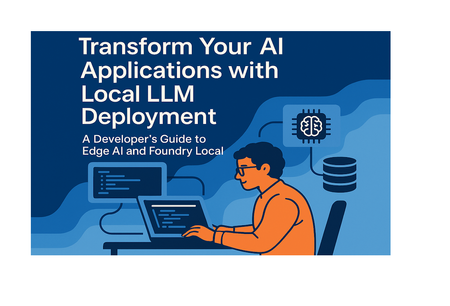
Introduction Are you tired of watching your AI application costs spiral out of control every time your user base grows? As AI Engineers and Developers, we've all felt the pain of cloud-dependent LLM deployments. Every API call adds up, latency becomes a bottleneck in real-time applications, and sensitive data must leave your infrastructure to get processed. Meanwhile, your users demand faster responses, better privacy, and more reliable service. What if there was a way to run powerful language models directly on your users' devices or your local infrastructure? Enter the world of Edge AI deployment with Microsoft's Foundry Local a game-changing approach that brings enterprise-grade LLM capabilities to local hardware while maintaining full OpenAI API compatibility. The Edge AI for Beginners https://aka.ms/edgeai-for-beginners curriculum provides AI Engineers and Developers with comprehensive, hands-on training to master local LLM deployment. This isn't just another theoretical course, it's a practical guide that will transform how you think about AI infrastructure, combining cutting-edge local deployment techniques with production-ready implementation patterns. In this post, we'll explore why Edge AI deployment represents the future of AI applications, dive deep into Foundry Local's capabilities across multiple frameworks, and show you exactly how to implement local LLM solutions that deliver both technical excellence and significant business value. Why Edge AI Deployment Changes Everything for Developers The shift from cloud-dependent to edge-deployed AI represents more than just a technical evolution, it's a fundamental reimagining of how we build intelligent applications. As AI Engineers, we're witnessing a transformation that addresses the most pressing challenges in modern AI deployment while opening up entirely new possibilities for innovation. Consider the current state of cloud-based LLM deployment. Every user interaction requires a round-trip to external servers, introducing latency that can kill user experience in real-time applications. Costs scale linearly (or worse) with usage, making successful applications expensive to operate. Sensitive data must traverse networks and live temporarily in external systems, creating compliance nightmares for enterprise applications. Edge AI deployment fundamentally changes this equation. By running models locally, we achieve several critical advantages: Data Sovereignty and Privacy Protection: Your sensitive data never leaves your infrastructure. For healthcare applications processing patient records, financial services handling transactions, or enterprise tools managing proprietary information, this represents a quantum leap in security posture. You maintain complete control over data flow, meeting even the strictest compliance requirements without architectural compromises. Real-Time Performance at Scale: Local inference eliminates network latency entirely. Instead of 200-500ms round-trips to cloud APIs, you get sub-10ms response times. This enables entirely new categories of applications—real-time code completion, interactive AI tutoring systems, voice assistants that respond instantly, and IoT devices that make intelligent decisions without connectivity. Predictable Cost Structure: Transform variable API costs into fixed infrastructure investments. Instead of paying per-token for potentially unlimited usage, you invest in local hardware that serves unlimited requests. This makes ROI calculations straightforward and removes the fear of viral success destroying your margins. Offline Capabilities and Resilience: Local deployment means your AI features work even when connectivity fails. Mobile applications can provide intelligent features in areas with poor network coverage. Critical systems maintain AI capabilities during network outages. Edge devices in remote locations operate autonomously. The technical implications extend beyond these obvious benefits. Local deployment enables new architectural patterns: AI-powered applications that work entirely client-side, edge computing nodes that make intelligent routing decisions, and distributed systems where intelligence lives close to data sources. Foundry Local: Multi-Framework Edge AI Deployment Made Simple Microsoft's Foundry Local https://www.foundrylocal.ai represents a breakthrough in local AI deployment, designed specifically for developers who need production-ready edge AI solutions. Unlike single-framework tools, Foundry Local provides a unified platform that works seamlessly across multiple programming languages and deployment scenarios while maintaining full compatibility with existing OpenAI-based workflows. The platform's approach to multi-framework support means you're not locked into a single technology stack. Whether you're building TypeScript applications, Python ML pipelines, Rust systems programming projects, or .NET enterprise applications, Foundry Local provides native SDKs and consistent APIs that integrate naturally with your existing codebase. Enterprise-Grade Model Catalog: Foundry Local comes with a curated selection of production-ready models optimized for edge deployment. The `phi-3.5-mini` model delivers impressive performance in a compact footprint, perfect for resource-constrained environments. For applications requiring more sophisticated reasoning, `qwen2.5-0.5b` provides enhanced capabilities while maintaining efficiency. When you need maximum capability and have sufficient hardware resources, `gpt-oss-20b` offers state-of-the-art performance with full local control. Intelligent Hardware Optimization: One of Foundry Local's most powerful features is its automatic hardware detection and optimization. The platform automatically identifies your available compute resources, NVIDIA CUDA GPUs, AMD GPUs, Intel NPUs, Qualcomm Snapdragon NPUs, or CPU-only environments and downloads the most appropriate model variant. This means the same application code delivers optimal performance across diverse hardware configurations without manual intervention. ONNX Runtime Acceleration: Under the hood, Foundry Local leverages Microsoft's ONNX Runtime for maximum performance. This provides significant advantages over generic inference engines, delivering optimized execution paths for different hardware architectures while maintaining model accuracy and compatibility. OpenAI SDK Compatibility: Perhaps most importantly for developers, Foundry Local maintains complete API compatibility with the OpenAI SDK. This means existing applications can migrate to local inference by changing only the endpoint configuration—no rewriting of application logic, no learning new APIs, no disruption to existing workflows. The platform handles the complex aspects of local AI deployment automatically: model downloading, hardware-specific optimization, memory management, and inference scheduling. This allows developers to focus on building intelligent applications rather than managing AI infrastructure. Framework-Agnostic Benefits: Foundry Local's multi-framework approach delivers consistent benefits regardless of your technology choices. Whether you're working in a Node.js microservices architecture, a Python data science environment, a Rust embedded system, or a C# enterprise application, you get the same advantages: reduced latency, eliminated API costs, enhanced privacy, and offline capabilities. This universal compatibility means teams can adopt edge AI deployment incrementally, starting with pilot projects in their preferred language and expanding across their technology stack as they see results. The learning curve is minimal because the API patterns remain familiar while the underlying infrastructure transforms to local deployment. Implementing Edge AI: From Code to Production Moving from cloud APIs to local AI deployment requires understanding the implementation patterns that make edge AI both powerful and practical. Let's explore how Foundry Local's SDKs enable seamless integration across different development environments, with real-world code examples that you can adapt for your production systems. Python Implementation for Data Science and ML Pipelines Python developers will find Foundry Local's integration particularly natural, especially in data science and machine learning contexts where local processing is often preferred for security and performance reasons. import openai from foundry_local import FoundryLocalManager # Initialize with automatic hardware optimization alias = "phi-3.5-mini" manager = FoundryLocalManager(alias) This simple initialization handles a remarkable amount of complexity automatically. The `FoundryLocalManager` detects your hardware configuration, downloads the most appropriate model variant for your system, and starts the local inference service. Behind the scenes, it's making intelligent decisions about memory allocation, selecting optimal execution providers, and preparing the model for efficient inference. # Configure OpenAI client for local deployment client = openai.OpenAI( base_url=manager.endpoint, api_key=manager.api_key # Not required for local, but maintains API compatibility ) # Production-ready inference with streaming def analyze_document(content: str): stream = client.chat.completions.create( model=manager.get_model_info(alias).id, messages=[{ "role": "system", "content": "You are an expert document analyzer. Provide structured analysis." }, { "role": "user", "content": f"Analyze this document: {content}" }], stream=True, temperature=0.7 ) result = "" for chunk in stream: if chunk.choices[0].delta.content: content_piece = chunk.choices[0].delta.content result += content_piece yield content_piece # Enable real-time UI updates return result Key implementation benefits here: • Automatic model management: The `FoundryLocalManager` handles model lifecycle, memory optimization, and hardware-specific acceleration without manual configuration. • Streaming interface compatibility: Maintains the familiar OpenAI streaming API while processing locally, enabling real-time user interfaces with zero latency overhead. • Production error handling: The manager includes built-in retry logic, graceful degradation, and resource management for reliable production deployment. JavaScript/TypeScript Implementation for Web Applications JavaScript and TypeScript developers can integrate local AI capabilities directly into web applications, enabling entirely new categories of client-side intelligent features. import { OpenAI } from "openai"; import { FoundryLocalManager } from "foundry-local-sdk"; class LocalAIService { constructor() { this.foundryManager = null; this.openaiClient = null; this.isInitialized = false; } async initialize(modelAlias = "phi-3.5-mini") { this.foundryManager = new FoundryLocalManager(); const modelInfo = await this.foundryManager.init(modelAlias); this.openaiClient = new OpenAI({ baseURL: this.foundryManager.endpoint, apiKey: this.foundryManager.apiKey, }); this.isInitialized = true; return modelInfo; } The initialization pattern establishes local AI capabilities with full error handling and resource management. This enables web applications to provide AI features without external API dependencies. async generateCodeCompletion(codeContext, userPrompt) { if (!this.isInitialized) { throw new Error("LocalAI service not initialized"); } try { const completion = await this.openaiClient.chat.completions.create({ model: this.foundryManager.getModelInfo().id, messages: [ { role: "system", content: "You are a code completion assistant. Provide accurate, efficient code suggestions." }, { role: "user", content: `Context: ${codeContext}\n\nComplete: ${userPrompt}` } ], max_tokens: 150, temperature: 0.2 }); return completion.choices[0].message.content; } catch (error) { console.error("Local AI completion failed:", error); throw new Error("Code completion unavailable"); } } } Implementation advantages for web applications • Zero-dependency AI features: Applications work entirely offline once models are downloaded, enabling AI capabilities in disconnected environments. • Instant response times: Eliminate network latency for real-time features like code completion, content generation, or intelligent search. • Client-side privacy: Sensitive code or content never leaves the user's device, meeting strict security requirements for enterprise development tools. Cross-Platform Production Deployment Patterns Both Python and JavaScript implementations share common production deployment patterns that make Foundry Local particularly suitable for enterprise applications: Automatic Hardware Optimization: The platform automatically detects and utilizes available acceleration hardware. On systems with NVIDIA GPUs, it leverages CUDA acceleration. On newer Intel systems, it uses NPU acceleration. On ARM-based systems like Apple Silicon or Qualcomm Snapdragon, it optimizes for those architectures. This means the same application code delivers optimal performance across diverse deployment environments. Graceful Resource Management: Foundry Local includes sophisticated memory management and resource allocation. Models are loaded efficiently, memory is recycled properly, and concurrent requests are handled intelligently to maintain system stability under load. Production Monitoring Integration: The platform provides comprehensive metrics and logging that integrate naturally with existing monitoring systems, enabling production observability for AI workloads running at the edge. These implementation patterns demonstrate how Foundry Local transforms edge AI from an experimental concept into a practical, production-ready deployment strategy that works consistently across different technology stacks and hardware environments. Measuring Success: Technical Performance and Business Impact The transition to edge AI deployment delivers measurable improvements across both technical and business metrics. Understanding these impacts helps justify the architectural shift and demonstrates the concrete value of local LLM deployment in production environments. Technical Performance Gains Latency Elimination: The most immediately visible benefit is the dramatic reduction in response times. Cloud API calls typically require 200-800ms round-trips, depending on geographic location and network conditions. Local inference with Foundry Local reduces this to sub-10ms response times—a 95-99% improvement that fundamentally changes user experience possibilities. Consider a code completion feature: cloud-based completion feels sluggish and interrupts developer flow, while local completion provides instant suggestions that enhance productivity. The same applies to real-time chat applications, interactive AI tutoring systems, and any application where response latency directly impacts usability. Automatic Hardware Utilization: Foundry Local's intelligent hardware detection and optimization delivers significant performance improvements without manual configuration. On systems with NVIDIA RTX 4000 series GPUs, inference speeds can be 10-50x faster than CPU-only processing. On newer Intel systems with NPUs, the platform automatically leverages neural processing units for efficient AI workloads. Apple Silicon systems benefit from Metal Performance Shaders optimization, delivering excellent performance per watt. ONNX Runtime Optimization: Microsoft's ONNX Runtime provides substantial performance advantages over generic inference engines. In benchmark testing, ONNX Runtime consistently delivers 2-5x performance improvements compared to standard PyTorch or TensorFlow inference, while maintaining full model accuracy and compatibility. Scalability Characteristics: Local deployment transforms scaling economics entirely. Instead of linear cost scaling with usage, you get horizontal scaling through hardware deployment. A single modern GPU can handle hundreds of concurrent inference requests, making per-request costs approach zero for high-volume applications. Business Impact Analysis Cost Structure Transformation: The financial implications of local deployment are profound. Consider an application processing 1 million tokens daily through OpenAI's API—this represents $20-60 in daily costs depending on the model. Over a year, this becomes $7,300-21,900 in recurring expenses. A comparable local deployment might require a $2,000-5,000 hardware investment with no ongoing API costs. For high-volume applications, the savings become dramatic. Applications processing 100 million tokens monthly face $60,000-180,000 annual API costs. Local deployment with appropriate hardware infrastructure could reduce this to electricity and maintenance costs—typically under $10,000 annually for equivalent processing capacity. Enhanced Privacy and Compliance: Local deployment eliminates data sovereignty concerns entirely. Healthcare applications processing patient records, financial services handling transaction data, and enterprise tools managing proprietary information can deploy AI capabilities without data leaving their infrastructure. This simplifies compliance with GDPR, HIPAA, SOX, and other regulatory frameworks while reducing legal and security risks. Operational Resilience: Local deployment provides significant business continuity advantages. Applications continue functioning during network outages, API service disruptions, or third-party provider issues. For mission-critical systems, this resilience can prevent costly downtime and maintain user productivity during external service failures. Development Velocity: Local deployment accelerates development cycles by eliminating API rate limits, usage quotas, and external dependencies during development and testing. Developers can iterate freely, run comprehensive test suites, and experiment with AI features without cost concerns or rate limiting delays. Enterprise Adoption Metrics Real-world enterprise deployments demonstrate measurable business value: Local Usage: Foundry Local for internal AI-powered tools, reporting 60-80% reduction in AI-related operational costs while improving developer productivity through instant AI responses in development environments. Manufacturing Applications: Industrial IoT deployments using edge AI for predictive maintenance show 40-60% reduction in unplanned downtime while eliminating cloud connectivity requirements in remote facilities. Financial Services: Trading firms deploying local LLMs for market analysis report sub-millisecond decision latencies while maintaining complete data isolation for competitive advantage and regulatory compliance. ROI Calculation Framework For AI Engineers evaluating edge deployment, consider these quantifiable factors: Direct Cost Savings: Compare monthly API costs against hardware amortization over 24-36 months. Most applications with >$1,000 monthly API costs achieve positive ROI within 12-18 months. Performance Value: Quantify the business impact of reduced latency. For customer-facing applications, each 100ms of latency reduction typically correlates with 1-3% conversion improvement. Risk Mitigation: Calculate the cost of downtime or compliance violations prevented by local deployment. For many enterprise applications, avoiding a single significant outage justifies the infrastructure investment. Development Efficiency: Measure developer productivity improvements from unlimited local AI access during development. Teams report 20-40% faster iteration cycles when AI features can be tested without external dependencies. These metrics demonstrate that edge AI deployment with Foundry Local delivers both immediate technical improvements and substantial long-term business value, making it a strategic investment in AI infrastructure that pays dividends across multiple dimensions. Your Edge AI Journey Starts Here The shift to edge AI represents more than just a technical evolution, it's an opportunity to fundamentally improve your applications while building valuable expertise in an emerging field. Whether you're looking to reduce costs, improve performance, or enhance privacy, the path forward involves both learning new concepts and connecting with a community of practitioners solving similar challenges. Master Edge AI with Comprehensive Training The Edge AI for Beginners https://aka.ms/edgeai-for-beginners curriculum provides the complete foundation you need to become proficient in local AI deployment. This isn't a superficial overview, it's a comprehensive, hands-on program designed specifically for developers who want to build production-ready edge AI applications. The curriculum takes you through hours of structured learning, progressing from fundamental concepts to advanced deployment scenarios. You'll start by understanding the principles of edge AI and local inference, then dive deep into practical implementation with Foundry Local across multiple programming languages. The program includes working examples and comprehensive sample applications that demonstrate real-world use cases. What sets this curriculum apart is its practical focus. Instead of theoretical discussions, you'll build actual applications: document analysis systems that work offline, real-time code completion tools, intelligent chatbots that protect user privacy, and IoT applications that make decisions locally. Each project teaches both the technical implementation and the architectural thinking needed for successful edge AI deployment. The curriculum covers multi-framework deployment patterns extensively, ensuring you can apply edge AI principles regardless of your preferred development stack. Whether you're working in Python data science environments, JavaScript web applications, C# enterprise systems, or Rust embedded projects, you'll learn the patterns and practices that make edge AI successful. Join a Community of AI Engineers Learning edge AI doesn't happen in isolation, it requires connection with other developers who are solving similar challenges and discovering new possibilities. The Foundry Local Discord community https://aka.ms/foundry-local-discord provides exactly this environment, connecting AI Engineers and Developers from around the world who are implementing local AI solutions. This community serves multiple crucial functions for your development as an edge AI practitioner. You'll find experienced developers sharing implementation patterns they've discovered, debugging complex deployment issues collaboratively, and discussing the architectural decisions that make edge AI successful in production environments. The Discord community includes dedicated channels for different programming languages, specific deployment scenarios, and technical discussions about optimization and performance. Whether you're implementing your first local AI feature or optimizing a complex multi-model deployment, you'll find peers and experts ready to help problem-solve and share insights. Beyond technical support, the community provides valuable career and business insights. Members share their experiences with edge AI adoption in different industries, discuss the business cases that have proven most successful, and collaborate on open-source projects that advance the entire ecosystem. Share Your Experience and Build Expertise One of the most effective ways to solidify your edge AI expertise is by sharing your implementation experiences with the community. As you build applications with Foundry Local and deploy edge AI solutions, documenting your process and sharing your learnings provides value both to others and to your own professional development. Consider sharing your deployment stories, whether they're successes or challenges you've overcome. The community benefits from real-world case studies that show how edge AI performs in different environments and use cases. Your experience implementing local AI in a healthcare application, financial services system, or manufacturing environment provides valuable insights that others can build upon. Technical contributions are equally valuable, whether it's sharing configuration patterns you've discovered, performance optimizations you've implemented, or integration approaches you've developed for specific frameworks or libraries. The edge AI field is evolving rapidly, and practical contributions from working developers drive much of the innovation. Sharing your work also builds your professional reputation as an edge AI expert. As organizations increasingly adopt local AI deployment strategies, developers with proven experience in this area become valuable resources for their teams and the broader industry. The combination of structured learning through the Edge AI curriculum, active participation in the community, and sharing your practical experiences creates a comprehensive path to edge AI expertise that serves both your immediate project needs and your long-term career development as AI deployment patterns continue evolving. Key Takeaways Local LLM deployment transforms application economics: Replace variable API costs with fixed infrastructure investments that scale to unlimited usage, typically achieving ROI within 12-18 months for applications with significant AI workloads. Foundry Local enables multi-framework edge AI: Consistent deployment patterns across Python, JavaScript, C#, and Rust environments with automatic hardware optimization and OpenAI API compatibility. Performance improvements are dramatic and measurable: Sub-10ms response times replace 200-800ms cloud API latency, while automatic hardware acceleration delivers 2-50x performance improvements depending on available compute resources. Privacy and compliance become architectural advantages: Local deployment eliminates data sovereignty concerns, simplifies regulatory compliance, and provides complete control over sensitive information processing. Edge AI expertise is a strategic career investment: As organizations increasingly adopt local AI deployment, developers with hands-on edge AI experience become valuable technical resources with unique skills in an emerging field. Conclusion Edge AI deployment represents the next evolution in intelligent application development, transforming both the technical possibilities and economic models of AI-powered systems. With Foundry Local and the comprehensive Edge AI for Beginners curriculum, you have access to production-ready tools and expert guidance to make this transition successfully. The path forward is clear: start with the Edge AI for Beginners curriculum to build solid foundations, connect with the Foundry Local Discord community to learn from practicing developers, and begin implementing local AI solutions in your projects. Each step builds valuable expertise while delivering immediate improvements to your applications. As cloud costs continue rising and privacy requirements become more stringent, organizations will increasingly rely on developers who can implement local AI solutions effectively. Your early adoption of edge AI deployment patterns positions you at the forefront of this technological shift, with skills that will become increasingly valuable as the industry evolves. The future of AI deployment is local, private, and performance-optimized. Start building that future today. Resources Edge AI for Beginners Curriculum: Comprehensive training with 36-45 hours of hands-on content examples, and production-ready deployment patterns https://aka.ms/edgeai-for-beginners Foundry Local GitHub Repository: Official documentation, samples, and community contributions for local AI deployment https://github.com/microsoft/foundry_local Foundry Local Discord Community: Connect with AI Engineers and Developers implementing edge AI solutions worldwide https://aka.ms/foundry/discord Foundry Local Documentation: Complete technical documentation and API references Foundry Local documentation | Microsoft Learn Foundry Local Model Catalog: Browse available models and deployment options for different hardware configurations Foundry Local Models - Browse AI Models