learn
121 TopicsBuild an AI-Powered Space Invaders Game
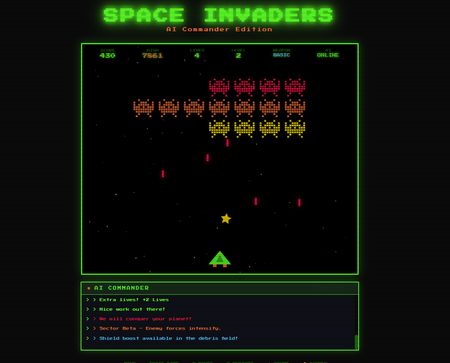
Build an AI-Powered Space Invaders Game: Integrating LLMs into HTML5 Games with Microsoft Foundry Local Introduction What if your game could talk back to you? Imagine playing Space Invaders while an AI commander taunts you during battle, delivers personalized mission briefings, and provides real-time feedback based on your performance. This isn't science fiction it's something you can build today using HTML, JavaScript, and a locally-running AI model. In this tutorial, we'll explore how to create an HTML5 game with integrated Large Language Model (LLM) features using Microsoft Foundry Local. You'll learn how to combine classic game development with modern AI capabilities, all running entirely on your own machine—no cloud services, no API costs, no internet connection required during gameplay. We'll be working with the Space Invaders - AI Commander Edition project, which demonstrates exactly how to architect games that leverage local AI. Whether you're a student learning game development, exploring AI integration patterns, or building your portfolio, this guide provides practical, hands-on experience with technologies that are reshaping how we build interactive applications. What You'll Learn By the end of this tutorial, you'll understand how to combine traditional web development with local AI inference. These skills transfer directly to building chatbots, interactive tutorials, AI-enhanced productivity tools, and any application where you want intelligent, context-aware responses. Set up Microsoft Foundry Local for running AI models on your machine Understand the architecture of games that integrate LLM features Use GitHub Copilot CLI to accelerate your development workflow Implement AI-powered game features like dynamic commentary and adaptive feedback Extend the project with your own creative AI features Why Local AI for Games? Before diving into the code, let's understand why running AI locally matters for game development. Traditional cloud-based AI services have limitations that make them impractical for real-time gaming experiences. Latency is the first challenge. Cloud API calls typically take 500ms to several seconds, an eternity in a game running at 60 frames per second. Local inference can respond in tens of milliseconds, enabling AI responses that feel instantaneous and natural. When an enemy ship appears, your AI commander can taunt you immediately, not three seconds later. Cost is another consideration. Cloud AI services charge per token, which adds up quickly when generating dynamic content during gameplay. Local models have zero per-use cost, once installed, they run entirely on your hardware. This frees you to experiment without worrying about API bills. Privacy and offline capability complete the picture. Local AI keeps all data on your machine, perfect for games that might handle player information. And since nothing requires internet connectivity, your game works anywhere, on planes, in areas with poor connectivity, or simply when you want to play without network access. Understanding Microsoft Foundry Local Microsoft Foundry Local is a runtime that enables you to run small language models (SLMs) directly on your computer. It's designed for developers who want to integrate AI capabilities into applications without requiring cloud infrastructure. Think of it as having a miniature AI assistant living on your laptop. Foundry Local handles the complex work of loading AI models, managing memory, and processing inference requests through a simple API. You send text prompts, and it returns AI-generated responses, all happening locally on your CPU or GPU. The models are optimized to run efficiently on consumer hardware, so you don't need a supercomputer. For our Space Invaders game, Foundry Local powers the "AI Commander" feature. During gameplay, the game sends context about what's happening, your score, accuracy, current level, enemies remaining and receives back contextual commentary, taunts, and encouragement. The result feels like playing alongside an AI companion who actually understands the game. Setting Up Your Development Environment Let's get your machine ready for AI-powered game development. We'll install Foundry Local, clone the project, and verify everything works. The entire setup takes about 10-15 minutes. Step 1: Install Microsoft Foundry Local Foundry Local installation varies by operating system. Open your terminal and run the appropriate command: # Windows (using winget) winget install Microsoft.FoundryLocal # macOS (using Homebrew) brew install microsoft/foundrylocal/foundrylocal These commands download and install the Foundry Local runtime along with a default small language model. The installation includes everything needed to run AI inference locally. Verify the installation by running: foundry --version If you see a version number, Foundry Local is ready. If you encounter errors, ensure you have administrator/sudo privileges and that your package manager is up to date. Step 2: Install Node.js (If Not Already Installed) Our game's AI features require a small Node.js server to communicate between the browser and Foundry Local. Check if Node.js is installed: node --version If you see a version number (v16 or higher recommended), you're set. Otherwise, install Node.js: # Windows winget install OpenJS.NodeJS.LTS # macOS brew install node # Linux sudo apt install nodejs npm Node.js provides the JavaScript runtime that powers our proxy server, bridging browser code with the local AI model. Step 3: Clone the Project Get the Space Invaders project onto your machine: git clone https://github.com/leestott/Spaceinvaders-FoundryLocal.git cd Spaceinvaders-FoundryLocal This downloads all game files, including the HTML interface, game logic, AI integration module, and server code. Step 4: Install Dependencies and Start the Server Install the Node.js packages and launch the AI-enabled server: npm install npm start The first command downloads required packages (primarily for the proxy server). The second starts the server, which listens for AI requests from the game. You should see output indicating the server is running on port 3001. Step 5: Play the Game Open your browser and navigate to: http://localhost:3001 You should see Space Invaders with "AI: ONLINE" displayed in the game HUD, indicating that AI features are active. Use arrow keys or A/D to move, SPACE to fire, and P to pause. The AI Commander will start providing commentary as you play! Understanding the Project Architecture Now that the game is running, let's explore how the different pieces fit together. Understanding this architecture will help you modify the game and apply these patterns to your own projects. The project follows a clean separation of concerns, with each file handling a specific responsibility: Spaceinvaders-FoundryLocal/ ├── index.html # Main game page and UI structure ├── styles.css # Retro arcade visual styling ├── game.js # Core game logic and rendering ├── llm.js # AI integration module ├── sound.js # Web Audio API sound effects ├── server.js # Node.js proxy for Foundry Local └── package.json # Project configuration index.html: Defines the game canvas and UI elements. It's the entry point that loads all other modules. game.js: Contains the game loop, physics, collision detection, scoring, and rendering logic. This is the heart of the game. llm.js: Handles all communication with the AI backend. It formats game state into prompts and processes AI responses. server.js: A lightweight Express server that proxies requests between the browser and Foundry Local. sound.js: Synthesizes retro sound effects using the Web Audio API—no audio files needed! How the AI Integration Works The magic of the AI Commander happens through a simple but powerful pattern. Let's trace the flow from gameplay event to AI response. When something interesting happens in the game, you clear a wave, achieve a combo, or lose a life, the game logic in game.js triggers an AI request. This request includes context about the current game state: your score, accuracy percentage, current level, lives remaining, and what just happened. The llm.js module formats this context into a prompt. For example, when you clear a wave with 85% accuracy, it might construct: You are an AI Commander in a Space Invaders game. The player just cleared wave 3 with 85% accuracy. Score: 12,500. Lives: 3. Provide a brief, enthusiastic comment (1-2 sentences). This prompt travels to server.js , which forwards it to Foundry Local. The AI model processes the prompt and generates a response like: "Impressive accuracy, pilot! Wave 3 didn't stand a chance. Keep that trigger finger sharp!" The response flows back through the server to the browser, where llm.js passes it to the game. The game displays the message in the HUD, creating the illusion of playing alongside an AI companion. This entire round trip typically completes in 50-200 milliseconds, fast enough to feel responsive without interrupting gameplay. Using GitHub Copilot CLI to Explore and Modify the Code GitHub Copilot CLI accelerates your development workflow by letting you ask questions and generate code directly in your terminal. Let's use it to understand and extend the Space Invaders project. Installing Copilot CLI If you haven't installed Copilot CLI yet, here's the quick setup: # Install GitHub CLI winget install GitHub.cli # Windows brew install gh # macOS # Authenticate with GitHub gh auth login # Add Copilot extension gh extension install github/gh-copilot # Verify installation gh copilot --help With Copilot CLI ready, you can interact with AI directly from your terminal while working on the project. Exploring Code with Copilot CLI Use Copilot to understand unfamiliar code. Navigate to the project directory and try: gh copilot explain "How does llm.js communicate with the server?" Copilot analyzes the code and explains the communication pattern, helping you understand the architecture without reading every line manually. You can also ask about specific functions: gh copilot explain "What does the generateEnemyTaunt function do?" This accelerates onboarding to unfamiliar codebases, a valuable skill when working with open source projects or joining teams. Generating New Features Want to add a new AI feature? Ask Copilot to help generate the code: gh copilot suggest "Create a function that asks the AI to generate a mission briefing at the start of each level, including the level number and a random mission objective" Copilot generates starter code that you can customize and integrate. This combination of AI-powered development tools and AI-integrated gameplay demonstrates how LLMs are transforming both how we build games and how games behave. Customizing the AI Commander The default AI Commander provides generic gaming commentary, but you can customize its personality and responses. Open llm.js to find the prompt templates that control AI behavior. Changing the AI's Personality The system prompt defines who the AI "is." Find the base prompt and modify it: // Original const systemPrompt = "You are an AI Commander in a Space Invaders game."; // Customized - Drill Sergeant personality const systemPrompt = `You are Sergeant Blaster, a gruff but encouraging drill sergeant commanding space cadets. Use military terminology, call the player "cadet," and be tough but fair.`; // Customized - Supportive Coach personality const systemPrompt = `You are Coach Nova, a supportive and enthusiastic gaming coach. Use encouraging language, celebrate small victories, and provide gentle guidance when players struggle.`; These personality changes dramatically alter the game's feel without changing any gameplay code. It's a powerful example of how AI can add variety to games with minimal development effort. Adding New Commentary Triggers Currently the AI responds to wave completions and game events. You can add new triggers in game.js : // Add AI commentary when player achieves a kill streak if (killStreak >= 5 && !streakCommentPending) { requestAIComment('killStreak', { count: killStreak }); streakCommentPending = true; } // Add AI reaction when player narrowly avoids death if (nearMissOccurred) { requestAIComment('nearMiss', { livesRemaining: lives }); } Each new trigger point adds another opportunity for the AI to engage with the player, making the experience more dynamic and personalized. Understanding the Game Features Beyond AI integration, the Space Invaders project demonstrates solid game development patterns worth studying. Let's explore the key features. Power-Up System The game includes eight different power-ups, each with unique effects: SPREAD (Orange): Fires three projectiles in a spread pattern LASER (Red): Powerful beam with high damage RAPID (Yellow): Dramatically increased fire rate MISSILE (Purple): Homing projectiles that track enemies SHIELD (Blue): Grants an extra life EXTRA LIFE (Green): Grants two extra lives BOMB (Red): Destroys all enemies on screen BONUS (Gold): Random score bonus between 250-750 points Power-ups demonstrate state management, tracking which power-up is active, applying its effects to player actions, and handling timeouts. Study the power-up code in game.js to understand how temporary state modifications work. Leaderboard System The game persists high scores using the browser's localStorage API: // Saving scores localStorage.setItem('spaceInvadersScores', JSON.stringify(scores)); // Loading scores const savedScores = localStorage.getItem('spaceInvadersScores'); const scores = savedScores ? JSON.parse(savedScores) : []; This pattern works for any data you want to persist between sessions—game progress, user preferences, or accumulated statistics. It's a simple but powerful technique for web games. Sound Synthesis Rather than loading audio files, the game synthesizes retro sound effects using the Web Audio API in sound.js . This approach has several benefits: no external assets to load, smaller project size, and complete control over sound parameters. Examine how oscillators and gain nodes combine to create laser sounds, explosions, and victory fanfares. This knowledge transfers directly to any web project requiring audio feedback. Extending the Project: Ideas for Students Ready to make the project your own? Here are ideas ranging from beginner-friendly to challenging, each teaching valuable skills. Beginner: Customize Visual Theme Modify styles.css to create a new visual theme. Try changing the color scheme from green to blue, or create a "sunset" theme with orange and purple gradients. This builds CSS skills while making the game feel fresh. Intermediate: Add New Enemy Types Create a new enemy class in game.js with different movement patterns. Perhaps enemies that move in sine waves, or boss enemies that take multiple hits. This teaches object-oriented programming and game physics. Intermediate: Expand AI Interactions Add new AI features like: Pre-game mission briefings that set up the story Dynamic difficulty hints when players struggle Post-game performance analysis and improvement suggestions AI-generated names for enemy waves Advanced: Multiplayer Commentary Modify the game for two-player support and have the AI provide play-by-play commentary comparing both players' performance. This combines game networking concepts with advanced AI prompting. Advanced: Voice Integration Use the Web Speech API to speak the AI Commander's responses aloud. This creates a more immersive experience and demonstrates browser speech synthesis capabilities. Troubleshooting Common Issues If something isn't working, here are solutions to common problems. "AI: OFFLINE" Displayed in Game This means the game can't connect to the AI server. Check that: The server is running ( npm start shows no errors) You're accessing the game via http://localhost:3001 , not directly opening the HTML file Foundry Local is installed correctly ( foundry --version works) Server Won't Start If npm start fails: Ensure you ran npm install first Check that port 3001 isn't already in use by another application Verify Node.js is installed ( node --version ) AI Responses Are Slow Local AI performance depends on your hardware. If responses feel sluggish: Close other resource-intensive applications Ensure your laptop is plugged in (battery mode may throttle CPU) Consider that first requests may be slower as the model loads Key Takeaways Local AI enables real-time game features: Microsoft Foundry Local provides fast, free, private AI inference perfect for gaming applications Clean architecture matters: Separating game logic, AI integration, and server code makes projects maintainable and extensible AI personality is prompt-driven: Changing a few lines of prompt text completely transforms how the AI interacts with players Copilot CLI accelerates learning: Use it to explore unfamiliar code and generate new features quickly The patterns transfer everywhere: Skills from this project apply to chatbots, assistants, educational tools, and any AI-integrated application Conclusion and Next Steps You've now seen how to integrate AI capabilities into a browser-based game using Microsoft Foundry Local. The Space Invaders project demonstrates that modern AI features don't require cloud services or complex infrastructure, they can run entirely on your laptop, responding in milliseconds. More importantly, you've learned patterns that extend far beyond gaming. The architecture of sending context to an AI, receiving generated responses, and integrating them into user experiences applies to countless applications: customer support bots, educational tutors, creative writing tools, and accessibility features. Your next step is experimentation. Clone the repository, modify the AI's personality, add new commentary triggers, or build an entirely new game using these patterns. The combination of GitHub Copilot CLI for development assistance and Foundry Local for runtime AI gives you powerful tools to bring intelligent applications to life. Start playing, start coding, and discover what you can create when your games can think. Resources Space Invaders - AI Commander Edition Repository - Full source code and documentation Play Space Invaders Online - Try the basic version without AI features Microsoft Foundry Local Documentation - Official installation and API guide GitHub Copilot CLI Documentation - Installation and usage guide GitHub Education - Free developer tools for students Web Audio API Documentation - Learn about browser sound synthesis Canvas API Documentation - Master HTML5 game rendering999Views0likes3CommentsSet Up Plaud Note Pro with Microsoft Foundry
Prerequisites Riffado, up and running: follow the setup guide in the official Riffado repository to get it going with Docker Compose. A Microsoft Foundry (formerly Azure AI Foundry) resource, with the models you want deployed; in my case, whisper for transcription and o3-mini for summaries. A Plaud device, or any audio recordings you can import into Riffado. Once Riffado is up, head to the Settings page > Providers > Add Provider, and select Custom. This is where the Azure details will go. Why "OpenAI-compatible" isn’t one thing on Microsoft Foundry Azure AI Foundry exposes two different API surfaces on the same resource, and which one serves your model depends on the model: Surface Path shape Serves OpenAI-compatible? v1 route /openai/v1/… gpt-4o-transcribe, gpt-4o-mini-transcribe, chat models, embeddings Yes: Bearer auth, model in the body, no api-version needed Classic route /openai/deployments/{name}/… Whisper (and other legacy audio) No: deployment name lives in the URL, and ?api-version= is mandatory A generic OpenAI client (Riffado's included) can only speak the first dialect. It has nowhere to put a deployment name in the path and no way to append a query parameter. That single fact drives everything below. Part 1 - Transcription Whisper and the DeploymentNotFound mystery Symptom My very first transcription attempt in Riffado failed with 404 Resource not found. Off to a flying start. Configured provider: base URL https://<resource>.services.ai.azure.com, model whisper. Dead end #1: the missing path The first bug was mine: the base URL had no path. Riffado's OpenAI client appends /audio/transcriptions to whatever you give it, so requests were hitting https://<resource>…/audio/transcriptions, a path that doesn't exist on the resource at all. Fixing the base URL to end in /openai/v1 got us to a more interesting error: POST /openai/v1/audio/transcriptions · model=whisper {"error":{"code":"DeploymentNotFound","message":"The API deployment for this resource does not exist. If you created the deployment within the last 5 minutes, please wait a moment and try again."}} Dead end #2: catalog ≠ deployment Worth checking before anything else: selecting a model in the Foundry catalog is not deploying it. GET /openai/v1/models lists everything you could deploy; only Deployments → Deploy model creates an endpoint that answers. If you get DeploymentNotFound, first confirm a deployment actually exists (the listing below requires only the API key): enumerate real deployments (classic control-plane, key auth) curl -s -H "api-key: $KEY" \ "https://<resource>.openai.azure.com/openai/deployments?api-version=2023-03-15-preview" # → {"data":[{"id":"whisper","model":"whisper","status":"succeeded",…}]} The actual cause Here is the part that nearly drove me mad: the deployment existed and was succeeded, yet the v1 route still said DeploymentNotFound. Because Whisper deployments are not served on the v1 route at all. They only answer on the classic path. Verified side by side with the same tiny WAV file: Request Result POST /openai/v1/audio/transcriptions · model=whisper · Bearer 404 DeploymentNotFound POST /openai/deployments/whisper/audio/transcriptions?api-version=2024-06-01 · Bearer 200 {"text":"you"} Same classic path, without ?api-version= 404 Resource not found Three constraints, then: Whisper needs the classic path; the classic path needs api-version; Riffado can send neither. One piece of good news hiding in the table: the classic route accepts Authorization: Bearer, not just Azure's api-key header, so the shim doesn't have to touch auth at all. The fix: a Caddy shim Drop a stock caddy:2-alpine container into the Compose network. Riffado points at it as if it were OpenAI; the shim rewrites the path, injects api-version, and proxies to Azure. The Bearer header passes through untouched. azure-shim.Caddyfile { admin off auto_https off } :80 { @transcribe path /v1/audio/transcriptions /audio/transcriptions handle @transcribe { rewrite * /openai/deployments/whisper/audio/transcriptions?api-version=2024-06-01 reverse_proxy https://<resource>.services.ai.azure.com { header_up Host <resource>.services.ai.azure.com } } handle { respond "azure-shim ok" 200 } } docker-compose.yml (added service) azure-shim: image: caddy:2-alpine restart: unless-stopped volumes: - ./azure-shim.Caddyfile:/etc/caddy/Caddyfile:ro Riffado's provider settings become: Field Value Base URL http://azure-shim/v1 Model whisper (must equal the deployment name) API key the Azure resource key (forwarded as Bearer) Verified From inside the Riffado container: POST http://azure-shim/v1/audio/transcriptions → 200 {"text":"…"}. Transcription works end-to-end in the UI. Part 2 · Summaries & titles o3-mini and the empty answer Symptom The summary button showed "An unexpected error occurred." The container logs were more honest: riffado-app logs Error generating title: TypeError: undefined is not an object (evaluating 'C.choices[0]') Riffado calls chat/completions and reads choices[0] without checking whether the response was an error. So anything the API refuses becomes "an unexpected error." What was it refusing? Cause 1: reasoning models reject the classic knobs o3-mini belongs to Azure/OpenAI's o-series reasoning models, which hard-reject parameters every classic chat client sends. Riffado sends temperature: 0.7 and max_tokens: 50 for titles (0.5 / 2000 for summaries), and o3-mini answers: POST /openai/v1/chat/completions · model=o3-mini HTTP 400 {"error":{"message":"Unsupported parameter: 'max_tokens' is not supported with this model. Use 'max_completion_tokens' instead.", …}} # and with max_tokens fixed: HTTP 400 {"error":{"message":"Unsupported parameter: 'temperature' is not supported with this model.", …}} Cause 2: reasoning tokens starve the output Stripping the bad params gets you to 200, and then comes a subtler failure, my personal favourite of this whole saga. Reasoning models spend completion tokens on internal "thinking" before emitting a single visible character. Riffado's 50-token title budget is consumed entirely by reasoning, and the reply comes back syntactically valid and empty: max_completion_tokens reasoning_effort finish_reason content 50 not set length "" (all 50 spent reasoning) 2000 not set stop "Q3 Budget Planning Strategy Meeting" 2000 low stop same, less reasoning overhead The fix: a Node shim that rewrites the request body Caddy can rewrite paths but not JSON bodies, so this shim is ~60 lines of dependency-free Node on node:20-alpine. Per request it: converts max_tokens → max_completion_tokens, strips temperature / top_p / penalties, floors the token budget at 4000, sets reasoning_effort: "low", maps /v1/* → /openai/v1/*, and forwards to the Azure resource. o3-shim.js const http = require('http'); const https = require('https'); const UPSTREAM_HOST = '<resource>.services.ai.azure.com'; // Params o-series reasoning models reject on chat/completions. const STRIP = ['temperature','top_p','presence_penalty', 'frequency_penalty','logprobs','top_logprobs']; const server = http.createServer((req, res) => { const chunks = []; req.on('data', c => chunks.push(c)); req.on('end', () => { let body = Buffer.concat(chunks); // Riffado's base_url is http://o3-shim/v1 → map to Azure's /openai/v1 let path = req.url; if (path.startsWith('/v1/')) path = '/openai' + path; const ct = (req.headers['content-type'] || '').toLowerCase(); if (ct.includes('application/json') && body.length) { try { const j = JSON.parse(body.toString('utf8')); if (j && typeof j === 'object' && !Array.isArray(j)) { if ('max_tokens' in j) { if (!('max_completion_tokens' in j)) j.max_completion_tokens = j.max_tokens; delete j.max_tokens; } // Reasoning spends tokens before any visible output; small // budgets (Riffado sends 50 for titles) return empty strings. if (Array.isArray(j.messages)) { j.max_completion_tokens = Math.max(Number(j.max_completion_tokens) || 0, 4000); if (!('reasoning_effort' in j)) j.reasoning_effort = 'low'; } for (const k of STRIP) delete j[k]; body = Buffer.from(JSON.stringify(j)); } } catch (_) { /* not JSON - forward untouched */ } } const headers = { ...req.headers, host: UPSTREAM_HOST, 'content-length': Buffer.byteLength(body) }; const up = https.request( { host: UPSTREAM_HOST, port: 443, method: req.method, path, headers }, upRes => { res.writeHead(upRes.statusCode, upRes.headers); upRes.pipe(res); } ); up.on('error', e => { res.writeHead(502, {'content-type':'application/json'}); res.end(JSON.stringify({error:{message:'o3-shim upstream error: '+e.message}})); }); up.end(body); }); }); server.listen(80, () => console.log('o3-shim listening on :80')); docker-compose.yml (added service) o3-shim: image: node:20-alpine restart: unless-stopped working_dir: /app command: ["node", "/app/o3-shim.js"] volumes: - ./o3-shim.js:/app/o3-shim.js:ro Add a second provider in Riffado (base URL http://o3-shim/v1, model o3-mini, the resource's API key) and set it as the default enhancement provider (summaries/titles), keeping the Whisper one as default for transcription. Riffado's exact title request (temperature: 0.7, max_tokens: 50) through the shim → 200, finish_reason: stop, real title text. A full meeting-transcript summary returns structured key points and action items. The final shape Reading it left to right: Riffado never talks to Azure directly. Transcription requests pass through azure-shim, a stock Caddy container that rewrites each request onto Whisper's classic deployment path and injects the mandatory api-version parameter. Summary and title requests pass through o3-shim, a tiny Node server that rewrites the request body into the shape o3-mini accepts and floors the token budget so the model's internal reasoning cannot starve the actual answer. As far as Riffado is concerned, it is simply talking to two ordinary OpenAI providers. Both shims live on the Compose network only; nothing is exposed publicly. Riffado is unmodified. Verification checklist Each layer, testable in isolation. Run these before blaming the app: smoke tests # 1. Key + resource alive? (v1 models listing, Bearer auth) curl -s -H "Authorization: Bearer $KEY" \ https://<resource>.services.ai.azure.com/openai/v1/models | head -c 200 # 2. Whisper answers on the classic path? curl -s -H "Authorization: Bearer $KEY" -F file=@test.wav \ "https://<resource>.services.ai.azure.com/openai/deployments/whisper/audio/transcriptions?api-version=2024-06-01" # 3. Shim translates correctly? (from inside the compose network) docker exec riffado-app node -e "fetch('http://azure-shim/') .then(r=>r.text()).then(console.log)" # 4. o3-mini via shim, sending the params Riffado sends? # (temperature + max_tokens:50; the shim must absorb both) If you'd rather not run shims Both shims exist because of the specific models chosen. Pick models that live natively on the v1 route and Riffado connects directly, with base URL https://<resource>.services.ai.azure.com/openai/v1 and zero extra containers: Transcription: deploy gpt-4o-mini-transcribe (or gpt-4o-transcribe) instead of Whisper. Summaries: deploy a non-reasoning chat model such as gpt-4o-mini, which happily accepts temperature and max_tokens. The shim approach earns its keep when you're standardized on specific models (Whisper's transcription quality, o3-mini's reasoning), or when you want a control point to add logging, retries, or budget caps later. For reference, this is what the finished setup looks like on Riffado's side. Each shim is registered as a plain Custom provider. Here is the whisper provider pointing at azure-shim, with Use for transcription ticked: And once both are saved, they sit side by side in the providers list, whisper tagged for transcription and o3-mini tagged for enhancement: A quick look at the Foundry portal In the Microsoft Foundry portal, head over to Models > AI Services and you will find a pleasant surprise: fifteen AI service models already deployed and ready to use, covering the Azure Speech family (including Voice Live and Speech to Text), Azure Translator, Azure Language, and Content Understanding: You can of course deploy another model for this, but the pre-deployed ones are a handy cost-saving option. Click on the Azure Speech – Voice Live radio button and you will be shown the Base URL and API Key, which you can then paste into the provider settings on Riffado's Settings page. A quick note on cost: these services are not free. They are billed pay-as-you-go based on usage. Azure Speech transcription is charged per audio hour, and Voice Live pricing is tiered by the model you choose. The free tier does include a monthly allowance, though. Check the Azure Speech pricing page before committing. And if you would rather deploy a dedicated transcription model such as whisper, Foundry gives you the flexibility to do just that. Open the model page in the catalogue, click Deploy, and go with Default settings unless you need custom quotas or guardrails: Let's test the setup On your Plaud device, just tap to start recording. The little LED bars light up to show it is listening: Or skip the device entirely and upload an audio file straight into Riffado using the Upload Audio button. Either way, the recording lands on the Recordings page; hit Transcribe and let the spinner do its thing: As you can see below, whisper, the transcription model we deployed earlier, even managed to transcribe a recording in Malay without a hitch. My 3:32 test clip came back as 186 words of clean Malay, with the language correctly detected and tagged: I have also set o3-mini as the enhancement provider, and it enhanced the transcription with a proper summary, key points, and title as well! The Meeting Notes-style summary came straight out of o3-mini through the shim, with zero manual prompting. Wrapping up What started as a TikTok-fuelled impulse buy nearly killed off by subscription pricing ended up as a fully self-hosted pipeline: Plaud for recording, Riffado as the interface, and Microsoft Foundry serving whisper and o3-mini behind two tiny shims. The total extra infrastructure came to two containers and roughly sixty lines of code, and not a single monthly subscription in sight. If you try this setup and run into a failure mode I have not covered here, do share it in the comments. Half the fun is in the debugging.392Views0likes0Comments
Mind the Specs: Grading formal specifications and KPIs as artefacts for LLM-driven code generation
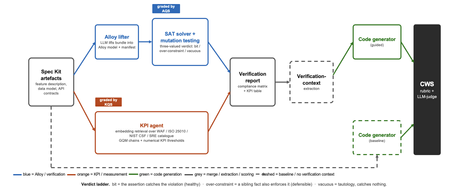
Large language models now write code straight from a prompt, but the specification in between is never checked, and a model asked to judge its own work brings the same blind spots to the review. We built a pipeline that lifts a plain-language requirements bundle into two graded specifications (a formal Alloy model and a set of numerical KPI targets), scores both before a single line of code is written, and hands the graded result to the code generator. It starts from GitHub Spec Kit and the Azure Well-Architected Framework. Here is what we built, and what we learned from running it at scale. The problem Writing software used to be four separate activities: gathering requirements, writing a specification, verifying it, and implementing it. A language model collapses all four into a single step. Two of those activities used to give us a quality signal before any code existed: a formal specification you could inspect, and measurable targets an implementation had to hit. The prompt-to-code loop inherits neither. There is no externally observable signal, before a line of code is written, that the requirements a model received are even well-formed enough to drive a correct implementation. You might think the model could just check its own work. It cannot do so reliably. Ask a language model to check the logic it just wrote: not only will it bring the same blind spot to the review, but its stochastic nature will make it produce different answers on each run. A SAT solver does not behave this way. Its verdict is deterministic: the same specification produces the same verdict every time. The thing that historically kept formal specification out of everyday development was never its rigour, it was the cost of writing the specification by hand. And that is exactly the step a language model can now do. What we built We built an agentic pipeline that sits between the requirements and the generated code. In plain terms it takes the requirements once, turns them into two things that can be checked by a machine: a precise description of rules that the system must obey, and a set of measurable targets that the system must hit. These artefacts are both graded, and are handed to the code generator. We split the work in two and gave each half to the tool that is good at it. The language model does the creative part, turning messy prose into formal structure. Deterministic checks, not the model's own opinion, grade what it produces. From a single Spec Kit artefacts bundle the pipeline builds two graded specifications before any code exists, and then carries both into code generation. Since these grades are computed deterministically rather than just generated, you can actually trust them. The input is a GitHub Spec Kit bundle. Spec Kit is an open-source, specification-first toolkit: instead of prompting for code directly, you describe what you want to build, and it produces a set of structured artefacts, a feature specification, a data model, and a set of API contracts. Our pipeline reads that bundle and turns it into the two graded specifications in parallel. overview. Spec Kit artefacts on the left. The Alloy lifter (with SAT solver and the attack step) and the KPI agent run in parallel. Their graded outputs are merged into a verification report that feeds the guided code generator. A dashed baseline path feeds the goal alone to the generator for comparison. Lift the requirements into a formal model The first half is structural. An Alloy lifter translates the requirements into a formal model written in Alloy, a specification language whose rules a SAT solver can check exhaustively, and whose verdict is deterministic, so the grade never depends on asking an LLM what it thinks. A banking requirement like "zero balance discrepancies" becomes a precise, checkable rule: the money leaving one account and the money arriving in another must always add up to the balances you started with, so a transfer can never quietly create or destroy money. The solver searches for any scenario that would break the rule. We modified Spec Kit's templates to force the model to output functional requirements and their corresponding Alloy code blocks in a structured format. Against the stock templates, that change alone nearly doubled the Alloy code compilation rate, jumping from 40 to 74 percent. A machine-written specification cannot be trusted, though, so the lifter does more than write it: it attacks it. Each load-bearing rule is deliberately broken by clearing its body and injecting a clause that forces a violation and the solver is re-run on the broken model. If the solver fails after this mutation, the original rule genuinely caught the violation it was meant to catch. If it still passes, the rule never really constrained anything on its own. Mutation testing usually grades a test suite against a specification that is assumed correct; here the roles are reversed, and the specification itself is on trial. Turn the requirements into measurable targets The second half is measurable. A KPI agent takes the same Spec Kit bundle, retrieves the most relevant principles from the Azure Well-Architected Framework, and derives numerical targets in the Goal-Question-Metric style. Each target carries an explicit threshold, a direction, and a measurement method, the kind of target a monitoring tool could actually track. Where earlier automated approaches stopped at describing quality in words, this half emits the actual numbers an implementation has to satisfy. And the knowledge base is a setting, not a fixture: swapping the Well-Architected Framework for ISO 25010, the NIST Cybersecurity Framework, or Google's SRE workbook requires zero changes to the underlying code. Review the report before any code Both graded halves merge into one human-readable verification report: the patterns the model applied, which rules passed, the counterexamples the solver found, the attack results, and the KPI threshold table. A developer reads it first and can see exactly where the specification is weak: a rule that passed for the wrong reason, or a requirement that nothing covers. After revising the specification, they re-run the lifting phase. Because the process is cached, re-runs are cheap, allowing the developer to loop until the report looks perfect, all before any code exists. The work shifts from reviewing generated code after the fact to curating a specification and reading a report before anything is built. Carry the graded context into code generation Only then does the report do its real job. In the guided pipeline, the merged report becomes the context handed to a code generator, which is asked to implement each rule, requirement, and KPI threshold and to leave markers tracing the code back to them. A baseline generator gets only the plain-language goal. Same generator, same settings; the only difference is whether it can see the graded specification. Feeding graded artefacts, rather than raw prose, into code generation is the piece that ties the whole pipeline together. So three choices separate this from simply asking a model for a spec: the specification is attacked rather than trusted, the targets are numbers rather than prose, and what reaches the code generator is graded evidence rather than raw text. How we tested it We ran the pipeline at scale: 270 Alloy lifts and 1,930 KPI records, across three application domains chosen to differ sharply (banking, software-as-a-service, and healthcare), three levels of requirement detail, four knowledge bases, and three model tiers, with ten runs of each combination so a real effect could be told apart from noise. For the code-generation half, we generated two codes for each case, once with the graded report as context and once from the plain-language goal alone, and compared the two. What we found First, the foundation: the specifications proved gradeable. The rubric cleanly separated sound specifications from degenerate ones. Because it returned the same verdict run after run, the grades are reliable enough to act on. The three key observations are as follows: The model matters more than the prompt Of the two knobs a practitioner controls, the model you choose and the amount of detail you write, the model dominated by roughly nine to one. A weak model could not be rescued by richer requirements. But you do not need the most expensive one: a mid-tier model delivered about 98 percent of the best model's quality at under a third of the cost and about half the time. The cheapest tier was a false economy, producing a model the analyser could even load only 23 percent of the time. More detail can backfire More requirements are not always better. Sparse and standard requirements scored the same, but over-specified requirements collapsed: KPI quality fell from about 0.89 to about 0.73, and the effect held across all four knowledge bases. Pile in too much numerical detail and the pipeline starts echoing the numbers it was handed instead of deriving sound ones, which is the opposite of what more detail is supposed to buy. Graded context produces far better code This is the payoff, and it is the point of the whole pipeline. Across all nine combinations of domain and detail, code generated with the graded verification context scored about 8 out of 10, against about 1 out of 10 for the same generator given only the plain-language goal. The guided code carried the traceability back to each requirement, the named rules, and the structural patterns that a bare prompt gives us no way to know about. This part of the study is a single run per combination, so we report the size and the consistency of the gap rather than a precise average, but the gap was large and it held in every case. What this means for you Four things to take from our study into your own work: Write requirements at a standard, middle level of detail. Not sparse, and not exhaustively numerical. The middle is the sweet spot on both halves of the specification. Reach for a capable mid-tier model before you invest in heavy prompt engineering. Model choice moves quality more than requirement detail does, and the mid tier is the value leader. Give the code generator externally graded context instead of letting it specify for itself. That is where most of the quality gain came from. Treat the knowledge base as a setting worth tuning, not a fixed ingredient. Each is a recommendation that data supports under the conditions we tested, not a universal law. The limit Every grade measures structure, not meaning. A high score says the specification is well-formed, discriminating, and stable. It does not say whether the invariants are the right ones, or the thresholds are the right ones for your deployment. A specification can be perfectly well-formed and still describe the wrong system. That judgement stays with a human, which is where we think it belongs. The pipeline is built to make that judgement efficient by moving it earlier, to curating the specification and reading the report, rather than to remove it. Generated code should not be shipped end to end without human validation. Try it The full pipeline, every input, and the artefacts behind every figure are in the project repository. If you want the Microsoft tools it builds on, start here: Project repository: https://github.com/RadaanMadhan/Specification-Led-Development GitHub Spec Kit: https://github.com/github/spec-kit Azure Well-Architected Framework: https://learn.microsoft.com/en-us/azure/well-architected/ If you'd like to explore the work in more detail, we've included the full technical report in the project repository, covering the related work, methodology, pipeline design, experimental setup, and extended results. About the team This project was carried out by six students at Imperial College London: Leon Hausmann, Charlotte Maxwell, Radaan Madhan, Keshav Das, Anson Huang, and Ander Cobo, in collaboration with Microsoft and supervised by Lee Stott (Microsoft) and Max Cattafi (Imperial College London)372Views1like0CommentsBuilding Reliable AI Coding Workflows Using Modular AI Agent Optimization
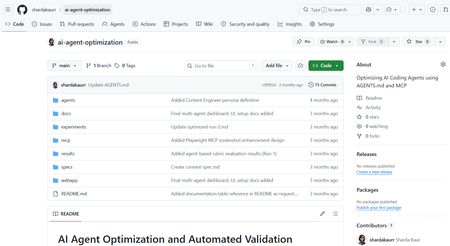
Artificial Intelligence is rapidly transforming the modern software development industry. AI-powered coding assistants such as GitHub Copilot, Claude Code, and other Large Language Model (LLM)-based systems are helping developers automate repetitive coding tasks, improve productivity, and accelerate software development processes. These tools can generate code, assist with debugging, provide recommendations, and support developers during implementation. However, despite their growing capabilities, many AI coding assistants still face challenges related to reliability, maintainability, project-specific conventions, and structured software engineering workflows. Most coding assistants perform well for generic programming tasks but often struggle when working with domain-specific development requirements, API integrations, project architectures, validation workflows, and coding standards. In real-world software engineering environments, developers require systems that not only generate code but also follow project conventions, maintain readability, support modular development, and improve long-term maintainability. The project “AI Agents Optimization” focuses on improving the reliability and effectiveness of AI coding agents by designing structured workflows, modular configurations, validation mechanisms, and optimized task execution strategies. The objective of the project is to investigate how AI agents can become dependable collaborators in practical software engineering tasks instead of functioning only as autocomplete systems. The project explores different approaches for organizing AI agent workflows using structured instruction handling, modular task division, context management, validation systems, and integration of external tools and documentation sources. Different agent configurations are analyzed and evaluated to understand how workflow optimization affects software development quality and performance. Why Existing AI Coding Workflows Often Fail Most AI coding assistants perform well for isolated coding tasks but struggle in real-world engineering environments where projects involve multiple files, coding standards, APIs, validation requirements, and contextual dependencies. For example, a generic prompt such as: “Build authentication middleware” may generate functional code, but the output often lacks: Project-specific architecture Error handling consistency Validation logic Security best practices Dependency awareness This project approaches the problem differently by introducing a structured workflow pipeline where AI agents operate in defined stages rather than generating outputs in a single step. The workflow separates planning, generation, validation, and refinement into independent modules. This improves maintainability, reduces inconsistent outputs, and supports iterative refinement similar to real software engineering workflows. Project Objectives The primary objective of this project is to optimize AI coding agents for real-world software engineering workflows. The project aims to improve how AI systems handle development tasks such as code generation, debugging, testing, validation, feature implementation, and workflow management. Another major objective is to design modular AI workflows where different stages of software development are managed systematically. The workflow focuses on task planning, instruction processing, validation, refinement, and output evaluation. This structured approach improves transparency, maintainability, and consistency in AI-generated outputs. The project also aims to evaluate how AI coding agents perform under different configurations and development scenarios. By testing multiple workflows and structured instruction methods, the project analyzes how optimization techniques improve development reliability and coding quality. Technologies and Tools Used The project utilizes multiple modern technologies and development tools for experimentation and workflow optimization. Technology / Tool Purpose Python Automation and scripting GitHub Copilot AI-assisted coding Claude / LLM APIs AI workflow experimentation Visual Studio Code Development environment Git & GitHub Version control and repository management Structured Prompting Workflow optimization MCP Concepts Tool and context integration These tools collectively support the implementation and testing of optimized AI coding workflows. Implementation Workflow The system was implemented using a modular AI workflow pipeline where each stage performs a dedicated engineering task. Step 1 — Task Parsing The user submits a development task or coding requirement. The Instruction Processing Module extracts: Objective Constraints Project context Expected output format Example structured prompt: Task: Create JWT authentication middleware Language: Node.js Constraints: - Use Express.js - Add token validation - Follow modular architecture - Include error handling Step 2 — Planning & Reasoning The Planning Module divides the task into subtasks such as: Route handling Token verification Error management Security validation This improves reasoning consistency before generation begins. Step 3 — Code Generation The Code Generation Module produces outputs using structured prompts and contextual references instead of generic instructions. Step 4 — Validation Generated outputs are validated using: Syntax checks Logical consistency checks Formatting standards Dependency validation Step 5 — Refinement If validation fails, the workflow loops back into refinement where issues are corrected before final delivery. System Workflow The workflow of the AI Agents Optimization system is based on modular task execution and structured development processes. The workflow begins with task planning and requirement analysis. The AI agent receives structured instructions along with coding constraints, project context, and validation requirements. The system processes the provided instructions and generates outputs according to defined workflows and development standards. Different configurations are tested to evaluate how instruction structures and modular task handling influence the quality of generated code The workflow also includes validation and refinement stages where generated outputs are analyzed for correctness, maintainability, and consistency. The project focuses not only on code generation but also on improving readability, workflow transparency, debugging support, and adherence to project conventions. Key Features of the Project Structured AI workflow design Modular task execution AI-assisted software development Workflow optimization strategies Validation and refinement mechanisms Integration of development tools and documentation Improved maintainability and readability Support for practical software engineering workflows Challenges Faced During Development One of the major challenges encountered during the project was maintaining consistency and reliability in AI-generated outputs. Different AI models often produce different responses depending on prompts, context, and task structure. Designing workflows that improve output stability and maintain coding standards required careful experimentation and optimization. Another challenge involved integrating structured workflows while ensuring flexibility in task execution. AI systems often require clear instructions and contextual information to produce accurate outputs. Balancing automation with maintainability and project-specific requirements was an important aspect of the project. Managing validation and refinement processes was also challenging because generated outputs needed to be evaluated not only for correctness but also for readability, maintainability, and software engineering best practices. Observations and Outcomes During experimentation, structured workflows produced more reliable and maintainable outputs compared to single-prompt generation approaches. Some important observations included: Reduced repetitive corrections during code refinement Improved consistency in generated outputs Better adherence to coding structure and formatting More stable workflow behavior for multi-step tasks Improved readability and maintainability of generated code The validation and refinement stages were particularly effective in reducing incomplete outputs and improving response quality. Although the project focuses primarily on workflow architecture and qualitative analysis rather than benchmark testing, the results demonstrate that modular AI pipelines can significantly improve practical software engineering workflows. Future Enhancements The project can be further enhanced by implementing advanced multi-agent collaboration systems where multiple AI agents work together on complex software development tasks. Future versions may also include real-time documentation integration, automated testing frameworks, cloud-based workflow management, and improved reasoning models. Additional enhancements may include IDE extensions, intelligent debugging systems, automated code review mechanisms, and adaptive workflow optimization based on project requirements. Conclusion The AI Agents Optimization project demonstrates how structured workflows and modular configurations can improve the effectiveness of AI-powered coding assistants in modern software engineering environments. By focusing on workflow optimization, validation mechanisms, modular task execution, and structured instruction handling, the project highlights the future potential of AI agents as reliable development collaborators capable of supporting real-world software engineering processes. The project represents an important step toward building dependable AI-assisted development systems that improve productivity, maintainability, and software quality while supporting modern engineering practices. How to Try This Workflow Define a structured development task Provide project constraints and context Break the task into subtasks Generate output using structured prompts Validate output quality Refine based on validation feedback1.1KViews0likes0CommentsModel Mondays S2E13: Open Source Models (Hugging Face)
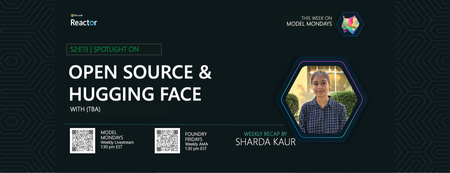
1. Weekly Highlights 1. Weekly Highlights Here are the key updates we covered in the Season 2 finale: O1 Mini Reinforcement Fine-Tuning (GA): Fine-tune models with as few as ~100 samples using built-in Python code graders. Azure Live Interpreter API (Preview): Real-time speech-to-speech translation supporting 76 input languages and 143 locales with near human-level latency. Agent Factory – Part 5: Connecting agents using open standards like MCP (Model Context Protocol) and A2A (Agent-to-Agent protocol). Ask Ralph by Ralph Lauren: A retail example of agentic AI for conversational styling assistance, built on Azure OpenAI and Foundry’s agentic toolset. VS Code August Release: Brings auto-model selection, stronger safety guards for sensitive edits, and improved agent workflows through new agents.md support. 2. Spotlight – Open Source Models in Azure AI Foundry Guest: Jeff Boudier, VP of Product at Hugging Face Jeff showcased the deep integration between the Hugging Face community and Azure AI Foundry, where developers can access over 10 000 open-source models across multiple modalities—LLMs, speech recognition, computer vision, and even specialized domains like protein modeling and robotics. Demo Highlights Discover models through Azure AI Foundry’s task-based catalog filters. Deploy directly from Hugging Face Hub to Azure with one-click deployment. Explore Use Cases such as multilingual speech recognition and vision-language-action models for robotics. Jeff also highlighted notable models, including: SmoLM3 – a 3 B-parameter model with hybrid reasoning capabilities Qwen 3 Coder – a mixture-of-experts model optimized for coding tasks Parakeet ASR – multilingual speech recognition Microsoft Research protein-modeling collection MAGMA – a vision-language-action model for robotics Integration extends beyond deployment to programmatic access through the Azure CLI and Python SDKs, plus local development via new VS Code extensions. 3. Customer Story – DraftWise (BUILD 2025 Segment) The finale featured a customer spotlight on DraftWise, where CEO James Ding shared how the company accelerates contract drafting with Azure AI Foundry. Problem Legal contract drafting is time-consuming and error-prone. Solution DraftWise uses Azure AI Foundry to fine-tune Hugging Face language models on legal data, generating contract drafts and redline suggestions. Impact Faster drafting cycles and higher consistency Easy model management and deployment with Foundry’s secure workflows Transparent evaluation for legal compliance 4. Community Story – Hugging Face & Microsoft The episode also celebrated the ongoing collaboration between Hugging Face and Microsoft and the impact of open-source AI on the global developer ecosystem. Community Benefits Access to State-of-the-Art Models without licensing barriers Transparent Performance through public leaderboards and benchmarks Rapid Innovation as improvements and bug fixes spread quickly Education & Empowerment via tutorials, docs, and active forums Responsible AI Practices encouraged through community oversight 5. Key Takeaways Open Source AI Is Here to Stay Azure AI Foundry and Hugging Face make deploying, fine-tuning, and benchmarking open models easier than ever. Community Drives Innovation: Collaboration accelerates progress, improves transparency, and makes AI accessible to everyone. Responsible AI and Transparency: Open-source models come with clear documentation, licensing, and community-driven best practices. Easy Deployment & Customization: Azure AI Foundry lets you deploy, automate, and customize open models from a single, unified platform. Learn, Build, Share: The open-model ecosystem is a great place for students, developers, and researchers to learn, build, and share their work. Sharda's Tips: How I Wrote This Blog For this final recap, I focused on capturing the energy of the open source AI movement and the practical impact of Hugging Face and Azure AI Foundry collaboration. I watched the livestream, took notes on the demos and interviews, and linked directly to official resources for models, docs, and community sites. Here’s my Copilot prompt for this episode: "Generate a technical blog post for Model Mondays S2E13 based on the transcript and episode details. Focus on open source models, Hugging Face, Azure AI Foundry, and community workflows. Include practical links and actionable insights for developers and students! Learn & Connect Explore Open Models in Azure AI Foundry Hugging Face Leaderboard Responsible AI in Azure Machine Learning Llama-3 by Meta Hugging Face Community Azure AI Documentation About Model Mondays Model Mondays is your weekly Azure AI learning series: 5-Minute Highlights: Latest AI news and product updates 15-Minute Spotlight: Demos and deep dives with product teams 30-Minute AMA Fridays: Ask anything in Discord or the forum Start building: Watch Past Replays Register For AMA Recap Past AMAs Join The Community Don’t build alone! The Azure AI Developer Community is here for real-time chats, events, and support: Join the Discord Explore the Forum About Me I'm Sharda, a Gold Microsoft Learn Student Ambassador focused on cloud and AI. Find me on GitHub, Dev.to, Tech Community, and LinkedIn. In this blog series, I share takeaways from each week’s Model Mondays livestream.486Views0likes0CommentsEdge AI for Beginners : Getting Started with Foundry Local
In Module 08 of the EdgeAI for Beginners course, Microsoft introduces Foundry Local a toolkit that helps you deploy and test Small Language Models (SLMs) completely offline. In this blog, I’ll share how I installed Foundry Local, ran the Phi-3.5-mini model on my windows laptop, and what I learned through the process. What Is Foundry Local? Foundry Local allows developers to run AI models locally on their own hardware. It supports text generation, summarization, and code completion — all without sending data to the cloud. Unlike cloud-based systems, everything happens on your computer, so your data never leaves your device. Prerequisites Before starting, make sure you have: Windows 10 or 11 Python 3.10 or newer Git Internet connection (for the first-time model download) Foundry Local installed Step 1 — Verify Installation After installing Foundry Local, open Command Prompt and type: foundry --version If you see a version number, Foundry Local is installed correctly. Step 2 — Start the Service Start the Foundry Local service using: foundry service start You should see a confirmation message that the service is running. Step 3 — List Available Models To view the models supported by your system, run: foundry model list You’ll get a list of locally available SLMs. Here’s what I saw on my machine: Note: Model availability depends on your device’s hardware. For most laptops, phi-3.5-mini works smoothly on CPU. Step 4 — Run the Phi-3.5 Model Now let’s start chatting with the model: foundry model run phi-3.5-mini-instruct-generic-cpu:1 Once it loads, you’ll enter an interactive chat mode. Try a simple prompt: Hello! What can you do? The model replies instantly — right from your laptop, no cloud needed. To exit, type: /exit How It Works Foundry Local loads the model weights from your device and performs inference locally.This means text generation happens using your CPU (or GPU, if available). The result: complete privacy, no internet dependency, and instant responses. Benefits for Students For students beginning their journey in AI, Foundry Local offers several key advantages: No need for high-end GPUs or expensive cloud subscriptions. Easy setup for experimenting with multiple models. Perfect for class assignments, AI workshops, and offline learning sessions. Promotes a deeper understanding of model behavior by allowing step-by-step local interaction. These factors make Foundry Local a practical choice for learning environments, especially in universities and research institutions where accessibility and affordability are important. Why Use Foundry Local Running models locally offers several practical benefits compared to using AI Foundry in the cloud. With Foundry Local, you do not need an internet connection, and all computations happen on your personal machine. This makes it faster for small models and more private since your data never leaves your device. In contrast, AI Foundry runs entirely on the cloud, requiring internet access and charging based on usage. For students and developers, Foundry Local is ideal for quick experiments, offline testing, and understanding how models behave in real-time. On the other hand, AI Foundry is better suited for large-scale or production-level scenarios where models need to be deployed at scale. In summary, Foundry Local provides a flexible and affordable environment for hands-on learning, especially when working with smaller models such as Phi-3, Qwen2.5, or TinyLlama. It allows you to experiment freely, learn efficiently, and better understand the fundamentals of Edge AI development. Optional: Restart Later Next time you open your laptop, you don’t have to reinstall anything. Just run these two commands again: foundry service start foundry model run phi-3.5-mini-instruct-generic-cpu:1 What I Learned Following the EdgeAI for Beginners Study Guide helped me understand: How edge AI applications work How small models like Phi 3.5 can run on a local machine How to test prompts and build chat apps with zero cloud usage Conclusion Running the Phi-3.5-mini model locally with Foundry Localgave me hands-on insight into edge AI. It’s an easy, private, and cost-free way to explore generative AI development. If you’re new to Edge AI, start with the EdgeAI for Beginners course and follow its Study Guide to get comfortable with local inference and small language models. Resources: EdgeAI for Beginners GitHub Repo Foundry Local Official Site Phi Model Link1.2KViews1like0CommentsThe Hidden Architecture of Nano Architectures
Why does the same prompt, on the same checkpoint, with temperature set to zero, sometimes produce a different answer only when the system is under real load? If you have ever watched token three flip and then watched the whole completion diverge, you already know this is not a product bug. It is a systems fact. Here is the thing. In production, you did not deploy a model. You deployed a runtime that selects an execution plan under constraints. The weights are inside that plan. The behavior is the plan. I’m Hazem Ali — Microsoft AI MVP, Distinguished AI and ML Engineer and Architect, and Founder and CEO of Skytells. I’ve built and led engineering work that turns deep learning research into production systems that survive real-world constraints. I speak at major conferences and technical communities, and I regularly deliver deep technical sessions on enterprise AI and agent architectures. If there’s one thing you’ll notice about me, it’s that I’m drawn to the deepest layers of engineering, the parts most teams only discover when systems are under real pressure. My specialization spans the full AI stack, from deep learning and system design to enterprise architecture and security. A rule I repeat in every serious review is simple. If you cannot explain the runtime, you do not understand the model you deployed. — Hazem Ali This is the next layer after my earlier deep dive on memory, KV cache, paging, and trust boundaries in The Hidden Memory Architecture of LLMs I also break down the memory-and-paging failure modes in When Your LLM Trips the MMU This one goes lower, into the execution that decides which math actually runs. When I Had to Prove It Live I still remember the first time I had to make this concrete in front of a room full of engineers. It was during a technical session I gave, and the question came up in the exact form you’ve probably heard before: Why does the same prompt on the same checkpoint, with temperature set to zero, sometimes produce a different answer only under real load? So I answered it the only way that holds up in a serious engineering room. I didn’t frame it as randomness. I framed it as execution. Not because it sounds cleaner, but because it is the only framing that survives scrutiny: under load, the system is not evaluating the same computation. In production, you don’t deploy weights in isolation. You deploy a runtime that selects an execution plan under constraints. Under load, the constraints change at token cadence: microbatch membership shifts, shapes shift, workspace feasibility tightens, and kernels or algorithms that were legal in the calm regime can become infeasible in the pressured regime. The runtime stays correct by contract, but it executes a different plan. And once the executed plan changes, reduction staging can change. When reduction staging changes, rounding happens at different points. That can move last bits. In decoding, last bits can become different tokens when early logit margins are thin. After the first token flips, divergence is expected because the context is different. That’s what I mean throughout this article when I say: The weights are inside the plan, but the behavior is the plan. What is Happening in Runtime Let’s start with the part most teams skip: the runtime pipeline from admission to a token. A production LLM server is not a function call. It is a control plane. And under real load, it behaves like one. It is not asking “what does the model say.” It is asking “what can I execute right now without breaking my guarantees.” Right now matters. Not in theory, in milliseconds. Because every decode step is a new scheduling event. The system does not commit to a single plan for the entire completion. It keeps re-evaluating feasibility as state shifts. What can I execute at this moment, with the VRAM I still have, on the hardware state I am currently in, while staying inside isolation boundaries and latency targets. That question is not answered once per request. It is answered repeatedly, at token cadence. The queue changes. The batch changes. Memory headroom changes. Cache residency changes. Workspace availability changes. The set of legal kernel and algorithm choices changes with them. And that is the point most people miss. The runtime is not just running your weights. It is continuously selecting an execution plan under constraint. The weights are inside that plan, but behavior lives in the selection. That selection is layered. Admission shapes the effective request. Scheduling forms the batch for this step. Kernel and algorithm choice binds the math that will actually run. Memory residency and allocation decide what is feasible. Isolation rules decide what sharing is allowed. Each layer contributes to the final plan, and the plan is what you are deploying. Admission and shaping Before your prompt ever reaches the model, it gets shaped. Truncation, policy injection, tool schema expansion, routing metadata, tenant tags, prefix reuse decisions, and safety transformations. If you do not know what I mean by effective request, I mean the exact token sequence that the model saw after shaping. That is the only input that matters for reproducibility. Batching and step level scheduling Modern servers do not just batch requests. They batch token steps. In a continuous batching system, token step timing feeds back into batching decisions. A slightly slower step changes who joins the next step. Who joins the next step changes shapes. Shapes change kernels. Kernels change numeric pathways. This is not an opinion. It is why vLLM exists. The PagedAttention paper describes serving as a batching problem where KV cache grows dynamically, wastes memory through fragmentation, and limits batch size. It introduces block level KV management and builds vLLM on top of it as an LLM serving system. Kernel plan selection and library behavior Once shapes are known, the runtime selects kernel variants and library algorithms that are feasible for those shapes and the workspace currently available. This is the part people underestimate. The same operator can have multiple valid implementations. The chosen implementation can change when workspace is tight, when shapes change, or when the engine wants to trade latency for throughput. Memory allocation and residency KV cache, activations, temporary buffers, workspace, graph memory, and communication buffers compete for VRAM. Under pressure, allocation patterns change. Fragmentation changes. Residency changes. Cache locality changes. All of that changes the system timeline and the feasible plan space. If you want a one line summary that is accurate in 2026 production inference, it is this. Inference is a scheduling problem plus a memory residency problem, and the model is inside that. The Scope First, Let me put it very clear. I am not claiming every deployment is nondeterministic. I am not claiming every kernel variant flips tokens. I am not claiming seeds are useless. I am making a narrower claim, the kind you can defend in an incident review without hand waving. Floating point math is not associative. Order matters. When you parallelize, you change the order of operations, and it is therefore valid for parallel results to differ from a sequential evaluation. NVIDIA states this directly in the CUDA C Best Practices Guide. CUDA also makes a foundational guarantee to the hardware and scheduler, not to your intuition. Thread blocks must be able to execute independently, in any order, in parallel or in series. That freedom is part of the programming model, not an edge case (ref). Now connect those two facts. If accumulation order changes, the last bits can change even when every operation is correct, because floating point addition is not associative. NVIDIA explicitly calls this out as well. Then layer in what serving stacks actually do. Production systems intentionally reshape execution through continuous batching and KV memory management. vLLM is a published example of this co design, where serving throughput is achieved by dynamic batching and memory-aware KV handling. Finally, bridge the nano to the semantic. When early logit margins are small, tiny numeric deltas can reorder the top candidates, and a single token flip is enough to diverge the entire completion. Here is the part that should feel a little scary, because it changes what you think you are operating. Under real load, the system is not just slower. It can enter a different execution regime. Batch composition shifts, shapes shift, workspace and residency shift, and the runtime is forced into a different set of legal kernel and algorithm choices. Nothing “breaks.” No bug is required. The system is still correct by contract. But your output is now a property of the regime you are in, not the demo you validated. That means you can pass every determinism test at idle and still ship a system that drifts only when it matters, at p95 and p99, when queues are long and memory headroom is tight. The first time you notice is often a user screenshot, an audit question, or an incident report where two replicas disagree on the same request because the runtime state was not the same. The equation principals should use in incident reviews Most teams ship with the demo mental model. y = f(x, θ) One prompt in, one checkpoint, one output. If the output changes, someone concludes the weights changed, or “AI is random.” That is not how production inference behaves, because production inference is not just a function. It is execution under constraint. Production behavior is closer to this. y = Decode( Exec(θ, x; s) ) θ is still the same weights. But the thing you actually shipped is Exec, and Exec is chosen. It is chosen per step, under the current state of the system. The behavior you observe is the behavior of the executed plan, not the abstract weights. X is not the prompt. X is the effective request. X is the exact token sequence the model saw after shaping. Truncation, policy injection, tool schema expansion, routing metadata, prefix reuse, safety transforms. All of that can change what the model actually receives. If you cannot reconstruct x, you are not replaying the request. You are replaying an approximation. Here is the minimum you should log for x, even if you cannot store raw text: # minimal "x" record: enough to reproduce or prove you cannot trace_x = { "req_id": req_id, "raw_prompt_sha256": sha256(raw_prompt), "effective_text_sha256": sha256(effective_text), "effective_tokens": len(effective_tokens), "truncated": truncated, "trunc_reason": trunc_reason, # e.g., "latency_guard", "context_cap" "decode_cfg_applied": decode_cfg, # temperature/top_p/max_tokens, etc. "shaping_events": events, # ["policy_inject:v3", "tool_schema:v2", ...] } S is not a vibe. S is the execution state that decides the math. S is what principals should demand in a postmortem, because this is what turns “it drifted” into “this plan executed under this regime.” At minimum, s includes: per-step batch composition and shape class queue delays and scheduling outcomes VRAM headroom and workspace availability cache pressure signals precision path and engine fallbacks distributed timeline signals (TP/PP latency, collective stalls) isolation posture (what batching is allowed) Why this matters: in continuous batching, time becomes part of semantics. A few milliseconds of delay changes who gets co-scheduled at the next token step. That changes shapes. Shapes change kernel/algorithm feasibility. Feasibility changes the numeric pathway. When early logit margins are thin, a tiny pathway delta is enough to flip the argmax. Here is a short, practical “s” record you can emit per decode step: # per-step "s" record: what plan ran, under what pressure step_s = { "req_id": req_id, "step": t, "batch_fp": sha256(",".join(sorted(batch_req_ids)))[:12], "shape": f"q=1,k={klen},h={heads},d={hidden},tp={tp}", "queue_ms": queue_ms, "gpu_ms": gpu_ms, "vram_free_mb": vram_free_mb, "workspace_free_mb": workspace_free_mb, "kv_regime": kv_regime, # "normal" | "pressured" | "paged" "precision_path": precision_path, # "bf16" | "fp16" | "tf32" | "fp32" "algo_id": algo_id, # backend/engine specific "kernel_variant": kernel_variant, # if available "isolation_mode": isolation_mode, # "shared" | "strict" } The incident-review translation If you only ask “what prompt did the user send” and “what weights did we run,” you are using the demo equation. You will argue about seeds, debate “randomness,” and never converge. The production equation forces the real question. Which plan executed, under which constraints, and what state pushed us into that plan. The line principals should repeat until teams internalize it is simple. Weights are static. Behavior is a property of the executed plan. And the executed plan depends on state. If you want one more operational layer that makes this feel real, add a regime marker. Regime changes are where “stability” collapses without any bug: def regime(vram_free_mb, paging_on, isolation_strict, queue_p95_ms): if isolation_strict: return "isolation_strict" if paging_on: return "paging" if vram_free_mb < 1024: return "memory_pressured" if queue_p95_ms > 50: return "queue_degraded" return "normal" When the regime changes, the feasible plan space changes. When the plan space changes, the executed math can change. That is the production reality your incident review must be able to explain. Floating point order is where small deltas are born Let’s break it down without hand waving. Finite precision makes rounding part of the computation Floating point math is not real-number math. Every add and multiply is followed by rounding to the representable format you are using. That rounding is not “noise.” It is part of the computation. Once you accept that, one consequence becomes unavoidable. Order matters. NVIDIA states the rule clearly: floating point involves rounding, and when you parallelize you can change operation order, so parallel results may not match sequential results. Why LLM inference is a perfect storm: reductions everywhere Now connect that to what an LLM does at inference time. LLM inference is reduction-heavy by design. Dot products in GEMMs, attention score accumulation, softmax normalization, layer norm statistics, even top-k selection pathways. These are not single operations. They are many partial operations combined into a final scalar or vector. In floating point, the way you combine partials is the outcome. GPU reductions are staged: partial sums, then merges A reduction on GPU is not “a sum.” It is a staged reduction of partials. On a CPU, you can imagine a left-to-right accumulation: ((((a1 + a2) + a3) + a4) + ...) On a GPU, that mental model is wrong. The GPU is built to run thousands of threads. So it computes partial sums in parallel and then merges them in stages. The staging pattern is determined by kernel design and how the backend maps the problem to hardware. Put the figure here, right after the staging idea lands. The staging depends on decisions you do not control at the prompt layer: how data is tiled into blocks how each block maps to warps how many partials each warp reduces whether it uses warp-level primitives, shared memory, or tensor core fragments how the final merge is staged across blocks Change the tile size, or the block shape, or the occupancy, and you often change the staging order. Change the staging order, and you change when rounding happens. You can get two results that are both correct under IEEE floating point rules, and they differ in the last bits. This is not a bug. It is the contract of finite-precision parallel math, applied at scale. Why the last bits move at the core level Floating point addition is not associative under rounding because rounding happens after each operation. The error introduced at each step depends on the magnitude and sign of what you are adding at that step. When you change the staging order, you change: which numbers get added together early which partial sums get rounded early how cancellation behaves when positive and negative terms interact when large and small magnitudes meet, where small values can lose representable impact That is the core mechanism behind “small deltas.” It is not mystical. It is mechanical. Why this shows up in production serving, not in your demo LLM inference is dominated by massive matrix operations and attention. Under the hood, those paths accumulate across large dimensions. An accumulation is exactly where rounding order matters most. And the server does not always run the same kernel variant for those ops. Under load, shape shifts and workspace pressure can push the backend into different implementations. Different implementations often imply different tiling. Different tiling implies different staging. Different staging implies different rounding. Different rounding implies different last bits. So even with an identical prompt, identical checkpoint, and temperature set to zero, you can still see tiny numeric differences when: batch composition changes and produces different effective shapes the engine picks a different algorithm because workspace is tighter the kernel selects a different tile path due to shape class and occupancy the GPU is in a different pressure regime, changing feasibility and scheduling behavior Those deltas are small, but they are real. And in decoding, small can be enough. The bridge from ulps to language: logits, argmax, divergence A tiny last-bit difference is often irrelevant, Until it hits a decision boundary. At decode step t, greedy decoding chooses an argmax. If the top logits are close, a small delta can swap the ordering. Once token t changes, the context changes, and the completion diverges. That is not randomness. That is deterministic branching from a slightly different numerical pathway. So the actionable takeaway is not “GPUs are nondeterministic.” It is this. Parallel math is allowed to produce multiple correct last-bit outcomes, and LLM decoding can amplify those outcomes into different text when margins are thin. CUDA scheduling makes ordering a form of runtime state CUDA makes a stronger statement than most people realize. Thread blocks must be able to run independently. It must be possible to execute blocks in any order, in parallel or in series. That is why the same kernel can execute with different inter block ordering depending on occupancy, contention, and scheduling. Now bring atomics into the picture. Atomics guarantee correctness of each update. They do not guarantee the arrival order of updates across threads and blocks. When floating point updates arrive in different legal orders, the final sum can differ in the last bits, because floating point addition is not associative. If you do not know what atomic add means, here is the useful definition. Atomic add ensures updates do not overwrite each other. It does not ensure which thread gets there first. This is the nano architecture layer that explains a lot of weirdness. Many engineers assume determinism is a property of weights. In practice, determinism is constrained by the legal reorderings of parallel execution. Logit margin is the bridge from ulps to language Now we connect the last bits to a changed sentence. At decode step t, greedy decoding picks the argmax over logits. Let the top two logits be ℓₐ and ℓ_b. Define the margin: mₜ = ℓₐ − ℓ_b A token flip happens when a small perturbation changes the ordering of these top two. If you want an operational translation, it is this. If the model barely prefers token A over token B, a tiny numeric delta can make it prefer B. Once token t changes, the rest of the completion evolves under a different context. Divergence is expected. This is why I keep pushing one instrumentation idea that sounds boring until you need it. Measure early step margins. You cannot manage stability if you never measure how close the decision boundary is. The effective request problem, the quiet killer of reproducibility Here is the pattern I see in almost every serious production investigation. The team replays the user prompt, cannot reproduce the output, and concludes the model is nondeterministic. Then the incident dies in ambiguity. And then, usually too late, someone asks the only question that matters. What did the model actually see. “In every postmortem, I ask one question before I look at weights, kernels, or seeds: what did the model actually see. If we cannot answer that, nothing else is evidence.” - Hazem Ali In production, the user prompt is not the input. It is an ingredient. By the time a request reaches the model, it has passed through a shaping pipeline that exists to keep the system safe, fast, and multi-tenant. That pipeline is not cosmetic. It can change semantics, length, and even decode behavior. The result is the only input that matters for reproducibility. The effective request. This is the same thesis you have already accepted earlier in the article. y = Decode( Exec(θ, x; s) ) If you do not know x, your replay is not valid. If you do not know s, your replay is not comparable. And if you only log the raw prompt, you are logging neither. Shaping changes semantics, not just length Truncation is the obvious one. Under load, systems often cap context length to protect latency and GPU memory. Same prompt, different truncation boundary, different effective context, different output. Nothing “random” happened. You executed a different input. But truncation is only the beginning. Policy injection can prepend or append system text that changes intent. Tool schema expansion can add hundreds or thousands of tokens and push the request over a context boundary. Routing metadata can select a different template. Prefix caching can reconstruct parts of context from cached state rather than raw text. Safety transformations can rewrite or neutralize content. Even small differences here can shift early logits when margins are thin, and this article already showed how small deltas become different tokens. The worst part is that this is silent by default. The user sees their prompt. Engineers see the prompt in logs. The model sees a different token sequence. Then everyone argues about reproducibility using the wrong input. Why this interacts with load, not just correctness Under low load, your system often has enough headroom to be generous. Longer context, fewer cutoffs, stable routing, more consistent batching, and fewer fallbacks. Under real load, shaping becomes defensive. Dynamic truncation thresholds kick in. Tool schema expansions collide with context limits. Prefix reuse behavior changes. Safety gates can become stricter. The same user text can produce a different effective request, and therefore a different output, precisely when the system is under pressure. So if you are only validating reproducibility at idle, you are validating a different system than the one you ship. What principals should require in telemetry If you want strict reproducibility, you must log the execution contract per request. Not the story. The contract. At minimum: effective token count after shaping truncation boundary and reason final merged decode config actually applied policy gates that modified prompt or decode path whether prefix cache was used, and what cache key was referenced routing template version and system message hash If you are privacy constrained, you still can log hashes and structural facts. You do not need raw prompts to diagnose effective request drift. You need verifiable fingerprints. Here is the short version in one line. If you only log the user prompt, you have not logged x. You have logged an approximation of x. And without x, you cannot claim reproducibility. You can only hope for it. Continuous batching, why time becomes part of semantics This is where principal level thinking matters. Continuous batching does not just increase throughput. It changes the execution context at each token step. Batch composition changes shapes. Shapes influence kernel selection and workspace feasibility. Those choices can change reduction structure and rounding pathways. If you want a published anchor, use vLLM. The PagedAttention paper frames high throughput serving as a need to batch many requests, but KV cache grows dynamically and wastes memory through fragmentation. It proposes PagedAttention and builds vLLM on top of it, with block level memory management and flexible sharing of KV cache to reduce memory usage. (arxiv) Here is what this really means in production. The server is selecting which requests share a step. That changes the math shapes. That changes the executed plan. That is why the same prompt behaves differently under load even at temperature zero. Algorithm selection and engine fallback The hidden variability people forget about If you have ever tried to reproduce a drift across replicas and felt like you were chasing ghosts, this is usually the layer you were missing. Libraries and engines choose, Not in a philosophical sense. In a literal, per-operator, per-shape sense. The same attention call is a fork in the road between multiple legal tactics, each with different tiling, different reduction staging, different fusion boundaries, and different temporary memory requirements. Your checkpoint is the same, your prompt is the same, your temperature is zero, and the output still moves because the executed plan moved. PyTorch says the quiet part directly. Disabling cuDNN benchmarking makes cuDNN deterministically select an algorithm, and PyTorch stresses this is different from the deterministic setting. That is the whole story in one sentence: one switch affects how the backend selects an algorithm, another affects whether the selected algorithms are deterministic. Those are separate layers, and under load they can diverge. Now go down to the core of the core. A tactic is not fast or slow. In production serving, a tactic is legal or illegal under the constraints of this token step. The constraint that forces most plan switches is not compute. It is workspace feasibility. Many high-performance kernels need scratch buffers. Some need enough contiguous space to stage tiles, reorder operands, hold partials, or run fused epilogues. When VRAM is fragmented or headroom drops, a tactic becomes impossible even if it is the tactic you validated at idle. The engine does not throw a warning. It simply selects another legal tactic. That is the first uncomfortable point. The second uncomfortable point is what makes this align perfectly with the next section. The constraint is not only “how many MB are free.” The constraint is the memory hierarchy state of the chip. Under load, two replicas can have the same free VRAM and still be in a different regime because the chip is not one pool of memory. It is HBM plus an on-die L2, plus TLBs, plus page tables, plus a fabric that is arbitrating traffic between SMs, L2 slices, and HBM controllers. When that hierarchy shifts, latency per token step shifts. And in continuous batching, a few milliseconds is not a timing detail, it is a scheduling input. This is how a performance event becomes a behavior event without any bug. The engine’s planner sees a world where a tactic that was “best” at idle is no longer best, or no longer feasible, because the chip is in a different pressure state. Your runtime is still correct. It is just operating a different plan in a different regime. One op, multiple legal kernels. The chosen tactic depends on shape class and feasibility. Now bring TensorRT into the picture, because it makes the precision dimension explicit. TensorRT states TF32 Tensor Core usage is not guaranteed and it can fall back to FP32, and it documents configuration controls around TF32. That statement is not about “precision preference.” It is about the reality that precision is part of tactic selection. Precision changes which instructions execute and how accumulation is staged. When your early logit margins are thin, a small pathway delta can swap the argmax at one step. One token flips, and the rest of the completion deterministically diverges. So “temperature zero” is not a determinism guarantee. Temperature governs sampling. It does not pin the execution pathway. If you want a more mechanical anchor, treat matmul the way NVIDIA exposes it: cuBLASLt has a preference descriptor for applying algorithm search preferences and fine-tuning the heuristic function. That is not marketing. That is the API admitting that algorithm selection is a constrained search problem. Now the part that gets rare, and the part most teams never write down. CUDA’s programming model requires that thread blocks be able to execute independently and may execute in any order, in parallel or in series. This matters here because tactic switches often change block geometry and tiling. Different block geometry changes reduction staging. Reduction staging changes where rounding happens. Even if every operation is correct, last bits can move because you legally changed the staging of partial sums. You do not need randomness. You need a different legal staging tree. Now pull security into the same frame, because it is not a separate layer in production. Security posture changes what the scheduler is allowed to do. Isolation constraints reduce batching freedom. Reduced batching freedom increases tail latency. Tail latency pushes you toward tighter admission controls and more aggressive memory behavior. That shrinks the feasible tactic set sooner. In other words, security decisions can move you across regime boundaries faster, which increases plan switching frequency. Stability becomes an SLO dimension of your security posture, not a property of your weights. This is the business consequence that shows up in the worst possible way. So here is the operational rule I use in reviews. If you cannot prove which plan ran, you cannot claim reproducibility. And that leads to the only practical addition that belongs in this section before we move into VRAM bandwidth and cache residency. VRAM bandwidth, cache residency, and why memory hierarchy becomes control plane input Let’s talk about the performance facts that quietly become behavior facts. And yes, I know how complex this gets. I have watched strong staff and principal engineers get lost here, not because they are weak, but because the system crosses too many layers at once: GPU microarchitecture, allocator behavior, kernel tactics, batching policy, and SLO-driven control loops. No single dashboard shows you the full causal chain. That is exactly why I frame it this way. It is not “performance tuning.” It is a coupled control system. So let me break it down cleanly, from the chip outward, until the behavior change becomes inevitable. NVIDIA describes H100 SXM5 as having HBM3 bandwidth around 3 TB/s and an L2 cache of 50 MB designed to reduce trips to HBM by caching repeated accesses. Most teams read that as “the GPU is fast.” In serving, it is more precise to say: the GPU gives you a memory hierarchy with regimes, and your runtime is forced to adapt to whichever regime you are currently in. The chip-level model you should carry in your head Decode is not one big matmul. It is a loop that repeatedly touches a shifting working set: KV blocks for the active sequences attention metadata (block tables, indirection, masks) sampling buffers (logits, top-k/top-p structures) runtime bookkeeping for continuous batching Those accesses are not purely streaming. They are pointer-heavy, and their locality depends on how your KV is laid out, which requests are co-scheduled, and how fragmented your memory becomes under churn. Here is the simplest mental model that is still honest: B_HBM is the number of bytes actually read from HBM during this step. B_L2miss is the number of bytes that missed L2 and therefore had to be fetched from HBM. t_translate is the address-translation tax: extra time from TLB misses and page-table walks. That last term is the one that surprises people. It’s “invisible” until it dominates. Why L2 residency becomes a control-plane input Now connect that to decode, Decode repeatedly reads KV state. If L2 hit rate drops, HBM traffic rises. When HBM traffic rises, stalls rise. When stalls rise, token-step latency shifts. When token-step latency shifts, the server changes batching decisions. This is the control loop you should keep in your head: L2 hit rate ↓ → t_step ↑ → Δt ↑ → batch composition changes → shape class changes → tactic set changes That is the bridge from “cache miss” to “different plan executed.” In continuous batching, time is not just an output metric. Time is an input into the next scheduling decision. A few milliseconds can change who gets co-scheduled at the next token step. That changes shapes. Shapes change feasible kernels and algorithms. That changes the executed math. And if early logit margins are thin, a small pathway delta can flip a token and send the rest of the completion down a different branch. Rare but matters: the translation tax that breaks the “free VRAM” illusion Two replicas can report similar free VRAM and still be in different regimes. Why? Because the chip is not “a pool of memory.” It is an on-die cache, translation structures, page tables, and a fabric that is arbitrating traffic under pressure. When KV is stored in blocks (or pages) and those blocks are scattered due to churn, you often get: worse spatial locality more distinct memory regions per step more TLB pressure more page walks Page walks are not abstract. They are memory reads. They compete with your payload reads. Under real load, this turns into self-inflicted HBM traffic. So you can be “bandwidth rich” on paper and still be “latency poor” in practice because the working set became translation-hostile. This is how a performance event becomes a behavior event without any bug. A concrete KV bandwidth sanity check If you want a back-of-the-envelope check for why decode becomes memory-shaped, use a conservative estimate. Per token step, you often need to read a large portion of KV for the active context. A rough model is: KV bytes per step ≈ 2 × B × L × H × D × s Where: B is batch size (number of sequences co-scheduled in the step) L is current context length (tokens already in KV) H is the number of attention heads (or KV heads, depending on the model) D is head dimension s is bytes per element (2 for fp16/bf16, 1 for int8, etc.) The factor 2 accounts for K and V. Even if your kernel is compute-efficient, you are still moving a lot of bytes. If locality collapses and L2 misses rise, you shift into an HBM-limited regime fast. That is the mechanical reason your p95/p99 step time moves under load, even with the same checkpoint and temperature. Business impact, stated plainly This is why drift shows up where it hurts: p95 and p99. At idle, L2 residency is generous, fragmentation is lower, translation pressure is calmer, and step time is stable. Under load, residency collapses, translation tax rises, allocator feasibility tightens, step time stretches, and your control plane adapts by changing batching and shapes. That can move you into different execution plans without any model change. An enterprise buyer does not care whether you call it “L2 miss driven plan churn.” They care that two identical requests disagree and you cannot explain it. So the takeaway I want principals to internalize is simple: In continuous batching, memory hierarchy state is control-plane state. It shapes latency. Latency shapes batching. Batching shapes shapes. Shapes shape feasibility. Feasibility shapes the executed plan. That is how “performance” becomes “behavior.” Multi node tensor parallel, the execution plan extends across the fabric Once you go multi-node tensor parallel, you add a second execution plane that most teams underestimate. You are no longer operating only a GPU runtime. You are operating a distributed timeline. And the timeline is not a background detail. In continuous batching, the timeline becomes a control input that reshapes batching, shapes, and eventually the executed plan. Let me be precise about what I am claiming, and what I am not. I am not going to claim collectives reorder arithmetic inside a kernel. That would be sloppy. The correct claim is this: Distributed synchronization changes the timeline. The timeline changes admission and batching. Batching changes shapes. Shapes change which plans are legal. That’s enough to explain why the “same prompt, same checkpoint, temp=0” can drift only under real load. The minimal equation you should carry At each decode step, your latency is no longer “GPU time.” It’s GPU time plus fabric time: t_step ≈ t_compute + t_comm + t_sync And the part that hurts is that t_comm and t_sync are not stable. They are affected by contention, queueing, stragglers, and topology. A useful mental model for the communication piece is the classic latency–bandwidth form: t_comm(message) ≈ α + (n / β_eff) α is the per-collective startup and synchronization overhead n is bytes moved β_eff is the effective bandwidth you actually get under contention In isolation, this looks like performance math. In a continuous batching server, this becomes behavior math, because t_step feeds back into the next scheduling decision. What actually happens in multi-node TP at token cadence Tensor parallelism shards the model across devices. Every token step requires cross-device coordination for some portion of the layer execution. In practice, this means collectives become part of the critical path. NCCL’s collective ops are explicit about the semantics: for example, AllReduce reduces values across ranks and returns identical results to all ranks. That tells you what the runtime must do: it must wait for coordination across ranks before progressing. So the decode loop becomes: execute local compute for this step hit a collective boundary wait for the slowest rank to finish and for the fabric to deliver proceed That “slowest rank” detail is the piece people feel but rarely name. In distributed inference, p99 is often a straggler story. A single congested link, a slightly delayed rank, or a transient fabric stall turns into a global stall because collectives synchronize progress. In other words, a multi-node TP system behaves like a coupled oscillator: the fastest GPU is still gated by the slowest collective. Why this changes the executed plan, not just the latency Here’s the bridge to the thesis of the whole article. In a continuous batching server, you do not just execute requests. You continuously reform microbatches at token cadence. That means step time affects who joins the next step. And in multi-node TP, fabric jitter is one of the biggest sources of step-time variability. So when comm jitter shifts t_step, it shifts the schedule: queue delay changes microbatch membership changes effective shape class changes workspace feasibility changes tactic choice changes You already established earlier that a changed shape class can force a different tactic set. Multi-node TP adds a new reason shape churn happens: not only GPU pressure, but fabric timing pressure. So the claim stays clean and defensible: Distributed synchronization doesn’t need to change arithmetic to change behavior. It only needs to change the timeline that drives batching. Chip-to-fabric reality: why infrastructure details belong in the reproducibility record At this scale, the infrastructure is part of the runtime. According to Azure Docs, Azure’s ND H100 v5 series is explicitly positioned for tightly coupled scale-up and scale-out Generative AI and HPC workloads, and it’s built around the idea that the fabric matters, not just the GPUs: If you are running multi-node TP in production, treat fabric telemetry as part of your reproducibility record. Not because it is fun. Because it changes the system timeline that drives batching. A practical minimum is to track per-step: collective type on the critical path (e.g., all-reduce / all-gather) comm time and jitter (p50/p95/p99 per step window) rank skew (max(rank_time) − min(rank_time)) effective bandwidth estimate (n / t_comm) retransmit / congestion signals if your stack exposes them a “fabric regime” marker: normal vs congested vs degraded When drift becomes expensive This is one of the reasons enterprise teams report the most confusing failures only at load. At idle, your timeline is stable, your microbatches are stable, your shapes are stable, and your plan selection is stable. Under real load, the fabric introduces jitter, jitter reshapes batching, batching reshapes shapes, and shapes reshape the executed plan. Now two replicas can disagree, not because the model changed, but because the timeline differed. That shows up as: inconsistent answers across replicas in high-stakes workflows reproducibility failures during audits and incident reviews “regressions” after scaling out, even with the same checkpoint and code support costs and credibility loss because you cannot explain why behavior changed only at p95/p99 So the operational sentence I want you to carry into your postmortems is: In multi-node tensor parallel inference, the execution plan extends across the fabric. If you do not log the fabric timeline, you are missing part of the runtime state that decides which plan was feasible. Where Infrastructure Stops Being “Just Infrastructure” Once you accept the thesis of this article, one conclusion becomes unavoidable: cloud choices are not just cost and convenience decisions. They shape which execution regimes your runtime will enter under pressure. At scale, you are no longer buying “GPUs.” You are buying: A fabric and topology that holds up under synchronized token-step collectives A VM family with predictable characteristics for tightly coupled scale-out workloads (the kind multi-node inference actually is) An isolation posture that can be enforced in hardware when your threat model requires it, without hand-waving away the runtime implications First-class observability for GPU behavior, not just CPU and request traces, so you can correlate drift with the state variables that caused it (for example, exporting NVIDIA DCGM metrics into managed Prometheus and Azure Managed Grafana on AKS). This is the quiet reason certain platforms feel “more stable” in production. Not because the model is different, but because the runtime state is easier to constrain, measure, and explain when the underlying infrastructure is designed for the exact regime you’re operating in. Quantization effects on execution paths and causal stragglers in multi-node TP Let me be direct about what most articles miss when they discuss distributed inference at scale. The conversation typically stops at "how many GPUs" and "what's the bandwidth." That's not wrong. It's just incomplete. What's missing is the interaction between quantization-induced plan churn and straggler amplification in the collective path, two forces that quietly reshape your execution regime under VRAM pressure and fabric contention. These are not theoretical curiosities. They are production realities at 100+ GPU scale, the kind of scale where you can no longer afford to treat quantization as a "precision choice" or stragglers as a "latency outlier." At that scale, they become causal inputs to your runtime's decision surface. Quantization variability: not just precision, but plan selection When teams talk about INT8 or FP8 quantization, the conversation usually centers on memory savings and throughput gains. That's the marketing layer. The execution layer is more nuanced: quantization changes which kernels are legal, where fusion boundaries land, and how reduction trees are staged. Here's what I mean in concrete terms. Under VRAM pressure, your serving stack may need to requantize activations mid-forward-pass to stay within memory bounds. That requant step is not "free" in the plan sense. It introduces: dequant/requant cycles that break fusion opportunities you had in the FP16 path new non-associative operations in the reduction tree, where rounding happens at different stages fallback paths when the quantized kernel variant lacks workspace or doesn't support the current shape class Let me state this in the language of the article's thesis: quantization is not a data type. It is a tactic constraint that reshapes the feasible plan space. Memory pressure can force dequant/requant cycles, change fusion boundaries, and trigger fallback kernels with different reduction staging, producing last-bit differences that can flip tokens during decoding. The practical consequence? Two replicas running "the same quantized model" can execute different kernel variants when one is memory-pressured and the other is not. The memory-pressured replica may be forced into a fallback path with different reduction staging. Different staging means different rounding order. Different rounding order means different last bits. And in decoding, last bits can become different tokens. I've watched incident reviews where teams assumed INT8 was "deterministic" because they set the quantization scheme once at export time. What they missed is that the runtime's quantization pathway depends on the state of VRAM fragmentation, workspace availability, and kernel preference histograms, exactly the regime-dependent variables we've been building toward throughout this article. If you're operating at scale, instrument this. Track: per-step kernel selection via cuBLASLt preference descriptors dequant/requant cycle counts when memory pressure rises fallback events when preferred quantized tactics become infeasible whether the executed plan matched the "expected" quantization pathway This is rare telemetry. Most teams never see it because they're not running large enough clusters under sustained pressure. But once you cross into 100+ GPU inference workloads, quantization-induced plan churn becomes visible in your p99 drift signatures. Causal stragglers: when one rank's fallback stalls the collective Now let's talk about the fabric-scale pathology that couples with everything we just discussed: head-of-line blocking in distributed tensor parallelism. You already know from the multi-node TP section that collectives synchronize progress. The fastest rank waits for the slowest. That's the contract. What's less documented—and what I've only seen formalized in internal NVIDIA serving postmortem templates—is how a single rank's kernel fallback can become a collective-wide straggler, and how that straggler amplifies through the batching feedback loop. Here's the causal chain: One rank enters memory pressure. Maybe fragmentation is worse on that device, maybe it's handling a slightly different KV layout due to request assignment. That rank falls back to a slower tactic. The preferred kernel requires workspace. Workspace isn't available. The engine selects a legal fallback. The fallback kernel takes longer. Not by seconds—by milliseconds. But in a collective, milliseconds matter. The collective waits. AllReduce can't proceed until all ranks contribute. The straggler becomes the bottleneck. Step time stretches. The stretched step reshapes the next batch in continuous batching. Different batch, different shapes, different feasibility. The cycle repeats. Now multiple ranks may be in fallback paths. The p99 drift you're seeing isn't random—it's a feedback loop. This is what I call a causal straggler: not just a slow rank, but a rank whose performance degradation causally reshapes the execution regime of the entire TP group. And here's where quantization and stragglers intersect. If one rank is under more VRAM pressure and is forced into more frequent dequant/requant cycles, it becomes the straggler. Its quantization pathway differs from the other ranks—not because the model changed, but because the memory regime changed. That difference in pathway becomes a difference in step time. That difference in step time becomes a collective stall. That stall becomes a batching change. That batching change becomes a new plan. The output drifts, and you're left wondering why "the same checkpoint at temperature zero" produced different text only under load. The answer is: you weren't in the same execution regime. You were in a regime where one rank's memory pressure caused a straggler, the straggler caused a timeline shift, and the timeline shift caused a plan change. Rarity value: why this knowledge is elite production battle scars Let me be honest about why these gaps are rare. Most teams never operate at the scale where these effects dominate. If you're running inference on 8 GPUs, you might see hints of this. At 100+ GPUs with multi-node TP and continuous batching under sustained load, it's no longer a hint—it's the signature. The teams that do operate at this scale track: cuBLASLt preference histograms to detect when algorithm selection is churning across steps NCCL timeline traces to identify straggler signatures and correlate them with per-rank memory state per-rank kernel fallback events to see when one device is operating a different plan than its peers quantization pathway divergence across ranks under pressure This is the telemetry that doesn't show up in tutorials. It shows up in postmortems at hyperscaler SLO thresholds, where p99 latency violations trigger incident reviews and someone finally asks: "Why did replica 3 disagree with replica 1 only during the peak load window?" The article you're reading now covers single-node memory regimes beautifully. What bridges to 10/10 elite production knowledge is this: fabric-scale causality. The understanding that in multi-node TP, your execution regime is not just shaped by your GPU's memory state—it's shaped by the worst GPU's memory state, because collectives couple everyone's timeline. That's the gap. That's the rarity value. And if you're building or operating inference at 100+ GPU scale, that's the layer where your next outage is hiding. Peak depth: wavefront divergence, tensor core fragmentation, NCCL backpressure, and ISR collision Everything above operates at the principal and staff engineer level. What follows is the layer below that—the chip architect handoff, where you stop talking about "plans" in the abstract and start talking about warp stall cycles, tensor core fragment occupancy, NCCL retransmit chains, and memory evaporation under replication pressure. I'm writing this section because it's the part I never see published outside internal design reviews, and because these are the exact pathologies that turn a well-architected inference cluster into a system that disagrees with itself only during peak traffic. "Most engineers debug the layer they understand. The system breaks at the layer they don't. In production inference, that layer is almost always the one where microarchitecture meets scheduling meets the fabric." — Hazem Ali Wavefront divergence in decode attention kernels Let me take you inside the warp. In SIMT execution, a warp is 32 threads executing in lockstep. When all threads follow the same control path, you get full utilization. When they diverge—different threads take different branches—the warp must serialize both paths. That's textbook GPU architecture. What's not textbook is how this interacts with paged KV attention in production decode loops. In a paged KV system (the exact kind vLLM introduced), KV blocks are scattered across VRAM. Different sequences in the same microbatch may have their KV blocks in different residency states: some hot in L2, some cold in HBM, some partially evicted under paging pressure. When the attention kernel issues loads for KV blocks, threads within the same warp can stall at different rates depending on which blocks they're accessing and where those blocks reside. This creates a subtle but measurable pathology: Lane divergence inside the attention kernel. Not control-flow divergence in the traditional sense, but memory-latency divergence: some lanes return fast (L2 hit), some stall (HBM fetch), and the warp can't retire until the slowest lane completes. Register pressure amplification. When warps stall, the SM must keep their register state live. Under heavy stalling, register pressure rises, which can force the compiler to spill to local memory (which lives in L2/HBM). Spills create more memory traffic, which creates more stalls. It's a feedback loop at the microarchitectural level. Measurable p99 step variance in identical-shape batches. This is the part that confuses teams. Two consecutive decode steps with the same batch size and the same sequence lengths can have different step times, because the KV block residency pattern differed. The shape was identical. The memory topology was not. If you want to see this in practice, the tool is Nsight Systems. What you're looking for: # Nsight Systems trace analysis: partition warp stall cycles # Look for these stall reasons in the GPU metrics view: # - smsp__warps_issue_stalled_long_scoreboard → memory dependency stalls # - smsp__warps_issue_stalled_short_scoreboard → register dependency stalls # - smsp__warps_issue_stalled_no_instruction → instruction cache miss # # Correlate with: # - l1tex__t_sectors_pipe_lsu_mem_global_op_ld → global load sectors (KV fetches) # - lts__t_sectors_srcunit_tex_op_read_hit_rate → L2 hit rate during attention # # The diagnostic signal: when stall_long_scoreboard spikes correlate with # L2 hit rate drops, you're seeing KV residency divergence across warps. The stall partition tells you why the warp stalled. When you see long_scoreboard stalls dominating during attention kernels—and you see them correlating with L2 miss rate fluctuations—you're observing exactly the KV residency divergence I'm describing. The warp is waiting for scattered KV blocks, and the scatter pattern changes with every batch because paging decisions are state-dependent. This is how "identical shapes" produce different timelines. The shape is the same. The KV block map is not. And the block map is a function of runtime allocation history—the same state-dependent variable that drives everything else in this article. Tensor core fragment utilization collapse under shape churn Now let's go inside the tensor cores themselves. H100 and Blackwell tensor cores operate on matrix fragments—fixed-size tiles that map directly to the hardware's matrix multiply-accumulate units. On H100, the native fragment sizes for FP16 are typically 16×16×16 (m×n×k). When your operand dimensions align cleanly with fragment boundaries, you get full utilization. When they don't, you get fragment waste: the hardware still executes full fragments, but some of the lanes carry padding zeros. In continuous batching, shape churn is the norm. Your microbatch dimensions change at token cadence. And this is where a subtle but devastating efficiency collapse hides. Consider two microbatches that arrive one step apart: # Step t: B=16, L=2048 → GEMM shape aligns cleanly with 16×16 fragments # Fragment utilization: ~98% # cuBLASLt selects: WMMA-based kernel (tensor core native) # # Step t+1: B=17, L=2047 → GEMM shape straddles fragment boundaries # Fragment utilization: drops below 25% on trailing tiles # cuBLASLt selects: fallback to non-WMMA FP16 kernel # (or WMMA with heavy padding, depending on heuristic) The difference is one sequence in the batch and one token in context length. The performance consequence is that the runtime switches from tensor core native execution to a scalar FP16 path. That's not a minor variant. That's a fundamentally different instruction mix, a different reduction tree, and a different accumulation order. The ulp deltas that result from this switch don't stay contained in the GEMM output. They propagate forward through layer normalization—which is itself a reduction over the hidden dimension. Layer norm amplifies small differences because it divides by a variance term computed from the same values. A tiny shift in the GEMM output becomes a slightly different variance, which becomes a slightly different normalization, which becomes a slightly different input to the next layer's attention. You can observe this directly via cuBLASLt's algorithm preference reporting: # cuBLASLt algorithm preference histogram (conceptual) # Track per-step which algorithm ID was selected for the primary GEMM # # Healthy (stable shapes): # algo_id=42 (WMMA_TENSOR_OP_HMMA_16816) → 99.2% of steps # algo_id=17 (SIMT_FP16_SPLITK) → 0.8% of steps # # Under shape churn (continuous batching, mixed lengths): # algo_id=42 (WMMA_TENSOR_OP_HMMA_16816) → 61.3% of steps # algo_id=17 (SIMT_FP16_SPLITK) → 22.1% of steps # algo_id=31 (WMMA_TENSOR_OP_PAD16) → 16.6% of steps # # When algo_id distribution churns, your reduction tree is churning. # When your reduction tree churns, your last bits are churning. # When your last bits churn under thin margins, your tokens can flip. That histogram is the smoking gun. When you see algorithm preference distribution widening under load, you're watching the tensor cores get destabilized by shape churn. The fix isn't "use bigger batches." The fix is to understand that continuous batching creates a shape distribution, not a fixed shape, and that shape distribution maps directly to a tactic distribution, which maps directly to a ulp distribution. NCCL causal backpressure chains across TP+DP pods Now scale this to the fabric. Take an 8×TP + 4×DP pod: 32 GPUs total, where every token step requires AllReduce across the 8-way TP group, and gradient synchronization (or KV redistribution in some architectures) across the 4-way DP group. Here's the causal backpressure chain I've traced in production, laid out as a timeline: Rank 5 (of 8 TP ranks) hits a quant/dequant stall. Its KV blocks are fragmented, workspace is tight, and the runtime forces a dequant cycle mid-attention. That adds ~1.2ms to this rank's compute. AllReduce stalls on Rank 5. The other 7 ranks complete their portion and issue their NCCL send. Rank 5 hasn't arrived yet. NCCL's ring/tree protocol can't progress past this rank. Effective t_sync inflates by 2× compared to the no-straggler baseline. P2P retransmit triggers. Under some fabric topologies and congestion states, the delayed arrival from Rank 5 can cause NCCL to hit internal retry logic on the NVLink or InfiniBand path. This is not a "network error"—it's the transport protocol managing flow control under backpressure. But it adds latency jitter that is invisible unless you're tracing at the NCCL bootstrap level. vLLM scheduler reacts to the stretched step. The scheduler sees that step t took 2× longer than expected. Under its latency-aware admission control, it drops batch size from 32 → 12 to protect SLO. Smaller batch means different shapes. Different shapes mean different tactics. The plan changes. The batch size drop propagates. With batch size at 12, queued requests wait longer. Queue pressure builds. When the scheduler recovers and re-admits, the burst creates shape churn. Shape churn destabilizes tensor core fragment utilization. The system is now in a different execution regime—triggered by one rank's memory fragmentation. That is a causal backpressure chain. Not a latency spike. Not a network blip. A causally connected sequence where a microarchitectural event on one device reshapes the execution plan across the entire pod. To trace this, you need NCCL bootstrap traces with NVTX domain annotations: # NCCL tracing with NVTX domains for causal analysis # # Environment setup for trace collection: # NCCL_DEBUG=INFO # NCCL_DEBUG_SUBSYS=INIT,COLL,P2P # NSYS_NVTX_DOMAINS=nccl,cuda,cublas # # In Nsight Systems, correlate: # 1. Per-rank kernel duration (cuda domain) — identify the straggler # 2. NCCL collective start/end (nccl domain) — measure t_sync inflation # 3. P2P transport events (nccl/P2P) — detect retransmit/backpressure # 4. Scheduler batch decisions (application NVTX) — see batch size reaction # # The causal signal: when rank N's kernel duration spike aligns with # NCCL collective inflation across all ranks, followed by batch size # reduction in the scheduler, you have a causal backpressure chain. # # Regex for filtering straggler events in nsys export: # grep -E "ncclAllReduce.*duration_us > (2 * median_duration)" trace.sqlite # → correlate timestamp with scheduler batch_size change events This is the telemetry that separates "we think there was network jitter" from "Rank 5's dequant stall caused a 2× collective inflation that forced the scheduler to halve batch size, which shifted the shape class into a non-WMMA tactic for the next 47 steps." The first is a guess. The second is a causal explanation. And in an incident review at scale, only the second one survives. ISR + checkpoint overlap pathology: memory evaporation under replication pressure This is the deepest pathology in this article, and it almost never surfaces below 512 sequences per second. Large-scale inference deployments use incremental state replication (ISR) for fault tolerance: rather than checkpointing the entire model state, you replicate KV cache deltas and scheduler state to a standby node incrementally, so failover is fast. Separately, many systems run async checkpointing for recovery: periodic snapshots of model and optimizer state written to persistent storage, overlapped with inference to avoid blocking the decode loop. Under normal load, these two systems coexist peacefully. ISR replicates small deltas. Checkpointing writes in the background. Memory headroom is sufficient for both. Under paging pressure—the exact regime we've been discussing throughout this article—they collide. Here's the pathological interaction: The system is under VRAM pressure. KV blocks are being paged (allocated, evicted, re-allocated) at high frequency. Memory headroom is thin. ISR kicks in. It needs to replicate recent KV deltas to the standby. To do this, it must pin certain KV blocks in memory while it serializes and transmits them. Async checkpointing overlaps. The checkpoint writer is also holding references to memory regions it's snapshotting. Under normal conditions, this is fine—there's enough headroom. Under paging pressure, the checkpoint's memory holds compete with ISR's memory holds. Memory evaporation. The combined pinning from ISR + checkpointing temporarily removes KV blocks from the pool available to the decode loop. The pager sees available blocks drop. It may be forced to evict active KV blocks—blocks that are needed for in-flight sequences—to make room. Evicted blocks must be recomputed. When a sequence's KV is evicted mid-collective (during an AllReduce, for example), the rank that lost its KV must recompute it. That recompute makes this rank the straggler. And we already know what stragglers do to the collective timeline. The straggler triggers the full backpressure chain. Collective stall → batch size reduction → shape churn → tactic churn → output drift. All caused by a fault-tolerance mechanism designed to keep you safe. ISR pins KV deltas for replication while async checkpointing pins regions for snapshotting. Under paging pressure, the combined pinning shrinks the decode-available KV pool, forces evictions and recompute, creates stragglers, and cascades into collective stalls → batch reduction → shape/tactic churn → p99 output drift. I call this memory evaporation because from the decode loop's perspective, VRAM that was available simply vanishes for a window of time. The blocks are still physically present—they're held by ISR and the checkpointer, but they're not available to the runtime. The effect is identical to a sudden drop in free VRAM, and the runtime reacts accordingly: it enters a pressured regime. This is why the pathology rarely surfaces below 512 seq/s. At lower throughput, there's enough headroom that ISR and checkpointing never compete meaningfully with the decode loop's memory needs. At high throughput under sustained load, the margins collapse, and the three systems—decode, ISR, checkpoint—start fighting over the same memory. The fix is not "turn off ISR." The fix is to coordinate memory budgets across these three subsystems and to treat ISR and checkpointing as memory consumers that participate in the regime calculation. If your regime function doesn't account for replication and checkpoint holds, it's underestimating pressure, and your system will surprise you at exactly the scale where fault tolerance matters most. # extended regime function accounting for replication and checkpoint pressure def regime_extended(vram_free_mb, paging_on, isolation_strict, queue_p95_ms, isr_pinned_mb, ckpt_pinned_mb, kv_pool_total_mb): effective_free = vram_free_mb - isr_pinned_mb - ckpt_pinned_mb effective_ratio = effective_free / kv_pool_total_mb if kv_pool_total_mb > 0 else 1.0 if isolation_strict: return "isolation_strict" if effective_ratio < 0.05: return "memory_evaporation" # ISR+ckpt collision if paging_on: return "paging" if effective_free < 1024: return "memory_pressured" if queue_p95_ms > 50: return "queue_degraded" return "normal" That "memory_evaporation" regime is the one you never see at idle. It only appears when throughput is high enough that ISR frequency, checkpoint frequency, and decode memory demand all peak simultaneously. And when it appears, it doesn't show up as an OOM. It shows up as a straggler, which shows up as a collective stall, which shows up as a batch size drop, which shows up as a shape change, which shows up as output drift at p99. That's the full causal chain from fault tolerance to token flip. The chip-architect handoff These four pathologies, wavefront divergence, tensor core fragmentation, NCCL backpressure, and ISR collision are what elevate from principal-level operational insight to chip-architect-level systems thinking. They share a common structure: A microarchitectural or infrastructure event occurs that is invisible at the API layer. The event changes the timeline or the memory topology, not the "inputs." The changed timeline or topology feeds back into scheduling, shaping, or tactic selection. The feedback loop produces a different executed plan. The different plan produces a different result that is correct by contract but different by observation. If you're instrumenting at this depth, you're not debugging anymore. You're operating a system where the observability itself is part of the architecture. And if you're carrying the thesis of this article to its logical conclusion: the executed plan is not just a function of the GPU state. It's a function of the warp state, the fragment state, the fabric state, and the replication state—all coupled through continuous batching at token cadence. Security is not a layer, it changes execution Now let’s go deep, because this is where a lot of principal level reviews go wrong. Teams talk about security as confidentiality and correctness as something separate. In multi tenant inference, they couple. IOMMU based GPU isolation and DMA remapping Microsoft documents IOMMU based GPU isolation as a technique to manage how GPUs access system memory, improving security and stability: Microsoft also documents IOMMU DMA remapping, describing how GPUs access memory through logical addresses that are no longer mapped one to one, enabling logically contiguous address ranges through translation: This matters for two reasons. First, it is a real hardware enforced boundary, not a policy checkbox. Second, boundaries introduce overhead and constraints. Constraints change what is allowed. Allowed execution choices shape the plan space. Confidential computing on H100 NVIDIA states that H100 is the first GPU to introduce support for confidential computing and that it can be used in virtualized environments with VMs or Kubernetes based deployments. Azure has also published general availability of confidential VMs with H100, which is the practical deployment side of this posture: Now the key architectural point. When you turn on stronger isolation, you often restrict sharing. You restrict cross tenant microbatching. You add attestation requirements. You change how memory is mapped and protected. That can reduce throughput. Reduced throughput moves you closer to regime boundaries. When the system crosses a regime boundary, the executed plan changes. Security posture becomes an SLO dimension. If you do not test it, you do not know what system you are running. GPU cache side channels, why sharing is not a theoretical risk There is published research that treats GPU caches as a leakage surface. The USENIX Security 2024 paper Invalidate plus Compare presents a timer free GPU cache attack primitive. I will not provide attack recipes. You do not need them to understand the conclusion. If your threat model includes untrusted co tenants, shared microarchitectural resources matter. If you respond by increasing isolation, your execution constraints change. That changes performance and can change the execution regimes your serving stack enters. Security and runtime behavior are coupled. State collapse, the phase transition that looks like model instability If you don’t know what state collapse is, imagine a highway that looks perfectly calm at 2 a.m. Every lane is open. Every car keeps its distance. Your ETA is stable. You run the same route ten times and you get the same arrival time. Then 8:30 a.m. hits. Nothing “broke” in the highway. The asphalt is the same. The speed limit is the same. The cars are the same. But the system crosses a density threshold. One small brake tap becomes a shockwave. Lanes start interacting. Merges become bottlenecks. A single slow truck creates a queue that ripples backwards. Suddenly your ETA isn’t a property of your car anymore. It’s a property of the traffic regime. That is state collapse in production inference. At low load, the system behaves stable. At high load, output drift appears. And teams mislabel it as “model instability,” or “LLM randomness,” or “temperature drift.” Most of the time, it is none of that. It is a phase transition in the runtime. You didn’t change weights. You crossed a regime boundary. What collapses, exactly State collapse is not “everything gets slower.” It is when the control plane loses the degrees of freedom it was using to keep execution consistent. Under low load, the runtime has slack: enough VRAM headroom to keep preferred tactics feasible enough cache residency to keep step times predictable enough scheduling flexibility to keep microbatch composition stable enough workspace contiguity to avoid algorithm fallbacks enough fabric stability (in multi-node TP) to keep step cadence tight Under high load, that slack disappears. The runtime stops being a “fast executor” and becomes a “survival scheduler.” And once it crosses that boundary, it starts making different decisions that are all valid, all correct by contract, and all capable of shifting outputs. This is why it feels like instability: the model hasn’t changed, but the executed plan has. Why this shows up as output drift, not just latency drift Because decoding is a branching process. A small numerical difference that does nothing in a benchmark can flip a token if the margin is thin. One flip changes the context. The context changes the next logits. Now you’re on a different path. So the runtime doesn’t need to be “wrong” to produce different text. It just needs to execute a different legal plan under a different legal regime. That is the whole thesis of this article, condensed into one sentence: Weights are static. Behavior is a property of the executed plan. The executed plan is a function of state. The common triggers that push systems into collapse You can treat these as the usual “threshold crossings” that shrink the feasible plan space: Memory headroom shrinks → feasible tactic set shrinks Preferred kernels often require workspace. When headroom or contiguity drops, tactics become illegal and the engine selects other tactics. Cache residency collapses → stalls rise → step timing drifts L2 hit rate drops, HBM traffic rises, and decode steps stretch. In continuous batching, stretched steps reshape the next batch. Continuous batching shifts the mix and shapes Under load, microbatch membership changes at token cadence. Shape class changes are not cosmetic; they change kernel feasibility. Framework and engine algorithm selection changes depending on settings Autotuning, benchmarking, and backend heuristics mean the “same op” can legally choose different algorithms. Under pressure, the best choice can become infeasible. CUDA execution permits ordering freedom and floating point order sensitivity remains true Parallel staging and legal reordering can shift last bits. Under thin margins, last bits can become different tokens. Nothing here requires a bug. This is what “execution under constraint” looks like. The incident question that stops the hand-waving If you want a more honest incident question, use this: Which execution regime ran, and what constraints pushed us into it? Not “was the prompt the same.” Not “were the weights the same.” Not “did we set temperature to zero.” Regime first. Because state collapse is not a mystery. It’s a threshold. And once you learn to name the threshold, you can instrument it, test it, and stop being surprised by it at p95 and p99. A reproducibility protocol that works for principals, not demos Logging prompts is not reproducibility. It is wishful thinking. If you want to be able to defend behavior, you need to reconstruct the execution state. Log the execution contract Per request, log: effective input length after shaping truncation boundary and reason decode configuration actually applied admission time, queue time, GPU time per step batch fingerprint or at minimum batch identity and shape class memory headroom watermark and whether you were in a pressured allocation regime engine precision mode settings and any fallback relevant flags cuDNN benchmark and deterministic settings if relevant isolation posture, including whether cross tenant batching is permitted Track margins early Track top two logit margins for early steps. Use it as a stability budget. If the margin collapses under a certain prompt family, treat that as a risk surface. Not every prompt is equally stable. Test under regimes, not at idle Do not run determinism tests at idle and call it solved. Test under: sustained concurrency mixed sequence lengths continuous batching realistic memory pressure real isolation posture If you do not do this, you are validating a different system than the one you ship. vLLM’s paper exists precisely because these conditions define the serving problem. Closing If you want production LLM behavior to be explainable, stop treating the model as the whole system. Weights are static. Executed math is selected under constraint. Behavior lives in the gap. You did not deploy weights. You deployed a physics constrained runtime that contains weights. And that runtime is allowed to change the executed plan, because floating point order matters, CUDA scheduling freedom is part of the contract, engines can choose precision pathways, and serving stacks intentionally reshape batching and memory. Acknowledgments While this article dives into the hidden memory mechanics that shape LLM behavior under load, I’m grateful it was peer-reviewed and challenged before publishing. A special thanks for Hammad Atta and Abhilekh Verma for peer-reviewing this piece and challenging it from a security-and-systems angle. If this article resonated, it’s likely because it describes a reality many teams encounter only after an incident: production LLM behavior is a property of the executed plan, and the executed plan is a function of state. If you’re running production inference at scale and observing behavior shifts under load—especially in tail-latency regimes, I’m happy to connect on LinkedIn. I’m open to substantive technical discussion. Thank you for reading. I hope this helps you surface the hidden variables in serving and turn them into telemetry, controls, and repeatable postmortem evidence. And if you’re seeing similar regime transitions or plan churn in your own deployments, I’d be interested to hear how it presents in your stack. — Hazem Ali Microsoft AI MVP, Distinguished AI & ML Engineer / Architect702Views0likes0CommentsAgents League: Build, Learn, and Level Up Your AI Skills
We're inviting the next generation of developers to join Agents League, running February 16-27. It's a two-week challenge where you'll build AI agents using production-ready tools, learn from live coding sessions, and get feedback directly from Microsoft product teams. We've put together starter kits for each track to help you get up and running quickly that also includes requirements and guidelines. Whether you want to explore what GitHub Copilot can do beyond autocomplete, build reasoning agents on Microsoft Foundry, or create enterprise integrations for Microsoft 365 Copilot, we have a track for you. Important: Register first to be eligible for prizes and your digital badge. Without registration, you won't qualify for awards or receive a badge when you submit. What Is Agents League? It's a 2-week competition where you learn by doing: 📽️ Live coding battles – Watch experts compete in real-time and explain their thinking 💻 Build at your pace – Two weeks to work on your project 💬 Get help on Discord – AMAs, community support, and a friendly crowd to cheer you on 🏆 Win prizes – $500 per track, GitHub Copilot Pro subscriptions, and digital badges for everyone who submits The Three Tracks 🎨 Creative Apps — Build with GitHub Copilot (Chat, CLI, or SDK) 🧠 Reasoning Agents — Build with Microsoft Foundry 💼 Enterprise Agents — Build with M365 Agents Toolkit (or Copilot Studio) More details on each track below, or jump straight to the starter kits. The Schedule Agents League starts on February 16th and runs through February 27th. Within 2 weeks, we host live battles on Reactor and AMA sessions on Discord. Week 1: Live Battles (Feb 17-19) We're kicking off with live coding battles streamed on Microsoft Reactor. Watch experienced developers compete in real-time, explaining their approach and architectural decisions as they go. Tue Feb 17, 9 AM PT — 🎨 Creative Apps battle Wed Feb 18, 9 AM PT — 🧠 Reasoning Agents battle Thu Feb 19, 9 AM PT — 💼 Enterprise Agents battle All sessions are recorded, so you can watch on your own schedule. Week 2: Build + AMAs (Feb 24-26) This is your time to build and ask questions on Discord. The async format means you work when it suits you, evenings, weekends, whatever fits your schedule. We're also hosting AMAs on Discord where you can ask questions directly to Microsoft experts and product teams: Tue Feb 24, 9 AM PT — 🎨 Creative Apps AMA Wed Feb 25, 9 AM PT — 🧠 Reasoning Agents AMA Thu Feb 26, 9 AM PT — 💼 Enterprise Agents AMA Bring your questions, get help when you're stuck, and share what you're building with the community. Pick Your Track We've created a starter kit for each track with setup guides, project ideas, and example scenarios to help you get started quickly. 🎨 Creative Apps Tool: GitHub Copilot (Chat, CLI, or SDK) Build innovative, imaginative applications that showcase the potential of AI-assisted development. All application types are welcome, web apps, CLI tools, games, mobile apps, desktop applications, and more. The starter kit walks you through GitHub Copilot's different modes and provides prompting tips to get the best results.View the Creative Apps starter kit. 🧠 Reasoning Agents Tool: Microsoft Foundry (UI or SDK) and/or Microsoft Agent Framework Build a multi-agent system that leverages advanced reasoning capabilities to solve complex problems. This track focuses on agents that can plan, reason through multi-step problems, and collaborate. The starter kit includes architecture patterns, reasoning strategies (planner-executor, critic/verifier, self-reflection), and integration guides for tools and MCP servers. View the Reasoning Agents starter kit. 💼 Enterprise Agents Tool: M365 Agents Toolkit or Copilot Studio Create intelligent agents that extend Microsoft 365 Copilot to address real-world enterprise scenarios. Your agent must work on Microsoft 365 Copilot Chat. Bonus points for: MCP server integration, OAuth security, Adaptive Cards UI, connected agents (multi-agent architecture). View the Enterprise Agents starter kit. Prizes & Recognition To be eligible for prizes and your digital badge, you must register before submitting your project. Category Winners ($500 each): 🎨 Creative Apps winner 🧠 Reasoning Agents winner 💼 Enterprise Agents winner GitHub Copilot Pro subscriptions: Community Favorite (voted by participants on Discord) Product Team Picks (selected by Microsoft product teams) Everyone who registers and submits a project wins: A digital badge to showcase their participation. Beyond the prizes, every participant gets feedback from the teams who built these tools, a valuable opportunity to learn and improve your approach to AI agent development. Why This Matters AI development is where the opportunities are right now. Building with GitHub Copilot, Microsoft Foundry, and M365 Agents Toolkit gives you: A real project for your portfolio Hands-on experience with production-grade tools Connections with developers from around the world Whether you're looking for your first internship, exploring AI, or just want to build something cool, this is two weeks well spent. How to Get Started Register first — This is required to be eligible for prizes and to receive your digital badge. Without registration, your submission won't qualify for awards or a badge. Pick a track — Choose one track. Explore the starter kits to help you decide. Watch the battles — See how experienced developers approach these challenges. Great for learning even if you're still deciding whether to compete. Build your project — You have until Feb 27. Work on your own schedule. Submit via GitHub — Open an issue using the project submission template. Join us on Discord — Get help, share your progress, and vote for your favorite projects on Discord. Links Register: https://aka.ms/agentsleague/register Starter Kits: https://github.com/microsoft/agentsleague/starter-kits Discord: https://aka.ms/agentsleague/discord Live Battles: https://aka.ms/agentsleague/battles Submit Project: Project submission template707Views0likes0Comments
Building a Multi-Agent System with Azure AI Agent Service: Campus Event Management
Personal Background My name is Peace Silly. I studied French and Spanish at the University of Oxford, where I developed a strong interest in how language is structured and interpreted. That curiosity about syntax and meaning eventually led me to computer science, which I came to see as another language built on logic and structure. In the academic year 2024–2025, I completed the MSc Computer Science at University College London, where I developed this project as part of my Master’s thesis. Project Introduction Can large-scale event management be handled through a simple chat interface? This was the question that guided my Master’s thesis project at UCL. As part of the Industry Exchange Network (IXN) and in collaboration with Microsoft, I set out to explore how conversational interfaces and autonomous AI agents could simplify one of the most underestimated coordination challenges in campus life: managing events across multiple departments, societies, and facilities. At large universities, event management is rarely straightforward. Rooms are shared between academic timetables, student societies, and one-off events. A single lecture theatre might host a departmental seminar in the morning, a society meeting in the afternoon, and a careers talk in the evening, each relying on different systems, staff, and communication chains. Double bookings, last-minute cancellations, and maintenance issues are common, and coordinating changes often means long email threads, manual spreadsheets, and frustrated users. These inefficiencies do more than waste time; they directly affect how a campus functions day to day. When venues are unavailable or notifications fail to reach the right people, even small scheduling errors can ripple across entire departments. A smarter, more adaptive approach was needed, one that could manage complex workflows autonomously while remaining intuitive and human for end users. The result was the Event Management Multi-Agent System, a cloud-based platform where staff and students can query events, book rooms, and reschedule activities simply by chatting. Behind the scenes, a network of Azure-powered AI agents collaborates to handle scheduling, communication, and maintenance in real time, working together to keep the campus running smoothly. The user scenario shown in the figure below exemplifies the vision that guided the development of this multi-agent system. Starting with Microsoft Learning Resources I began my journey with Microsoft’s tutorial Build Your First Agent with Azure AI Foundry which introduced the fundamentals of the Azure AI Agent Service and provided an ideal foundation for experimentation. Within a few weeks, using the Azure Foundry environment, I extended those foundations into a fully functional multi-agent system. Azure Foundry’s visual interface was an invaluable learning space. It allowed me to deploy, test, and adjust model parameters such as temperature, system prompts, and function calling while observing how each change influenced the agents’ reasoning and collaboration. Through these experiments, I developed a strong conceptual understanding of orchestration and coordination before moving to the command line for more complex development later. When development issues inevitably arose, I relied on the Discord support community and the GitHub forum for troubleshooting. These communities were instrumental in addressing configuration issues and providing practical examples, ensuring that each agent performed reliably within the shared-thread framework. This early engagement with Microsoft’s learning materials not only accelerated my technical progress but also shaped how I approached experimentation, debugging, and iteration. It transformed a steep learning curve into a structured, hands-on process that mirrored professional software development practice. A Decentralised Team of AI Agents The system’s intelligence is distributed across three specialised agents, powered by OpenAI’s GPT-4.1 models through Azure OpenAI Service. They each perform a distinct role within the event management workflow: Scheduling Agent – interprets natural language requests, checks room availability, and allocates suitable venues. Communications Agent – notifies stakeholders when events are booked, modified, or cancelled. Maintenance Agent – monitors room readiness, posts fault reports when venues become unavailable, and triggers rescheduling when needed. Each agent operates independently but communicates through a shared thread, a transparent message log that serves as the coordination backbone. This thread acts as a persistent state space where agents post updates, react to changes, and maintain a record of every decision. For example, when a maintenance fault is detected, the Maintenance Agent logs the issue, the Scheduling Agent identifies an alternative venue, and the Communications Agent automatically notifies attendees. These interactions happen autonomously, with each agent responding to the evolving context recorded in the shared thread. Interfaces and Backend The system was designed with both developer-focused and user-facing interfaces, supporting rapid iteration and intuitive interaction. The Terminal Interface Initially, the agents were deployed and tested through a terminal interface, which provided a controlled environment for debugging and verifying logic step by step. This setup allowed quick testing of individual agents and observation of their interactions within the shared thread. The Chat Interface As the project evolved, I introduced a lightweight chat interface to make the system accessible to staff and students. This interface allows users to book rooms, query events, and reschedule activities using plain language. Recognising that some users might still want to see what happens behind the scenes, I added an optional toggle that reveals the intermediate steps of agent reasoning. This transparency feature proved valuable for debugging and for more technical users who wanted to understand how the agents collaborated. When a user interacts with the chat interface, they are effectively communicating with the Scheduling Agent, which acts as the primary entry point. The Scheduling Agent interprets natural-language commands such as “Book the Engineering Auditorium for Friday at 2 PM” or “Reschedule the robotics demo to another room.” It then coordinates with the Maintenance and Communications Agents to complete the process. Behind the scenes, the chat interface connects to a FastAPI backend responsible for core logic and data access. A Flask + HTMX layer handles lightweight rendering and interactivity, while the Azure AI Agent Service manages orchestration and shared-thread coordination. This combination enables seamless agent communication and reliable task execution without exposing any of the underlying complexity to the end user. Automated Notifications and Fault Detection Once an event is scheduled, the Scheduling Agent posts the confirmation to the shared thread. The Communications Agent, which subscribes to thread updates, automatically sends notifications to all relevant stakeholders by email. This ensures that every participant stays informed without any manual follow-up. The Maintenance Agent runs routine availability checks. If a fault is detected, it logs the issue to the shared thread, prompting the Scheduling Agent to find an alternative room. The Communications Agent then notifies attendees of the change, ensuring minimal disruption to ongoing events. Testing and Evaluation The system underwent several layers of testing to validate both functional and non-functional requirements. Unit and Integration Tests Backend reliability was evaluated through unit and integration tests to ensure that room allocation, conflict detection, and database operations behaved as intended. Automated test scripts verified end-to-end workflows for event creation, modification, and cancellation across all agents. Integration results confirmed that the shared-thread orchestration functioned correctly, with all test cases passing consistently. However, coverage analysis revealed that approximately 60% of the codebase was tested, leaving some areas such as Azure service integration and error-handling paths outside automated validation. These trade-offs were deliberate, balancing test depth with project scope and the constraints of mocking live dependencies. Azure AI Evaluation While functional testing confirmed correctness, it did not capture the agents’ reasoning or language quality. To assess this, I used Azure AI Evaluation, which measures conversational performance across metrics such as relevance, coherence, fluency, and groundedness. The results showed high scores in relevance (4.33) and groundedness (4.67), confirming the agents’ ability to generate accurate and context-aware responses. However, slightly lower fluency scores and weaker performance in multi-turn tasks revealed a retrieval–execution gap typical in task-oriented dialogue systems. Limitations and Insights The evaluation also surfaced several key limitations: Synthetic data: All tests were conducted with simulated datasets rather than live campus systems, limiting generalisability. Scalability: A non-functional requirement in the form of horizontal scalability was not tested. The architecture supports scaling conceptually but requires validation under heavier load. Despite these constraints, the testing process confirmed that the system was both technically reliable and linguistically robust, capable of autonomous coordination under normal conditions. The results provided a realistic picture of what worked well and what future iterations should focus on improving. Impact and Future Work This project demonstrates how conversational AI and multi-agent orchestration can streamline real operational processes. By combining Azure AI Agent Services with modular design principles, the system automates scheduling, communication, and maintenance while keeping the user experience simple and intuitive. The architecture also establishes a foundation for future extensions: Predictive maintenance to anticipate venue faults before they occur. Microsoft Teams integration for seamless in-chat scheduling. Scalability testing and real-user trials to validate performance at institutional scale. Beyond its technical results, the project underscores the potential of multi-agent systems in real-world coordination tasks. It illustrates how modularity, transparency, and intelligent orchestration can make everyday workflows more efficient and human-centred. Acknowledgements What began with a simple Microsoft tutorial evolved into a working prototype that reimagines how campuses could manage their daily operations through conversation and collaboration. This was both a challenging and rewarding journey, and I am deeply grateful to Professor Graham Roberts (UCL) and Professor Lee Stott (Microsoft) for their guidance, feedback, and support throughout the project.1KViews4likes1Comment
Microsoft’s A-Grade Azure AI Stack: From Dissertation Prototype to Smart Campus Pilot
This post isn't just about the Student Support Agent (SSA) I built, which earned me a Distinction. It's about how Microsoft's tools made it possible to go from a rough concept to a robust pilot, proving their developer stack is one of the most convenient and powerful options for building intelligent, ethical, and scalable educational systems. The Vision: Cutting Through Campus Complexity University life is full of fragmented systems. Students constantly juggle multiple logins, websites, and interfaces just to check a timetable, book a room, or find a policy. My goal was simple: reduce that cognitive load by creating a unified assistant that could manage all these tasks through a single, intelligent conversation. The Stack That Made It Possible The core of the system relied on a few key, interconnected technologies: Technology Core Function Impact Azure AI Search Hybrid Data Retrieval Anchored responses in official documents. Azure OpenAI Natural Language Generation Created human-like, accurate answers. Semantic Kernel (SK) Multi-Agent Orchestration Managed complex workflows and memory. Azure Speech SDK Multimodal Interface Enabled accessible voice input and output. The foundation was built using Streamlit and FastAPI for rapid prototyping. Building a system that's context-aware, accessible, and extensible is a huge challenge, but it's exactly where the Microsoft AI stack shined. From Simple Chatbot to Multi-Agent Powerhouse Early campus chatbots are often single-agent models, great for basic FAQs, but they quickly fail when tasks span multiple services. I used Semantic Kernel (SK) Microsoft's powerful, open-source framework to build a modular, hub-and-spoke multi-agent system. A central orchestrator routes a request (like "book a study room") to a specialist agent (the Booking Agent), which knows exactly how to handle that task. This modularity was a game-changer: I could add new features (like an Events Agent) without breaking the core system, ensuring the architecture stayed clean and ready for expansion. Agentic Retrieval-Augmented Generation (Agentic RAG): Trust and Transparency To ensure the assistant was trustworthy, I used Agentic RAG to ground responses in real campus (Imperial College London) documentation. This included everything from admission fee payments to campus shuttle time. Azure AI Search indexed all handbooks and policies, allowing the assistant to pull relevant chunks of data and then cite the sources directly in its response. Result: The system avoids common hallucinations by refusing to answer when confidence is low. Students can verify every piece of advice, dramatically improving trust and transparency. Results: A Foundation for Scalable Support A pilot study with 15 students was highly successful: 100% positive feedback on the ease of use and perceived benefit. 93% satisfaction with the voice features. High trust was established due to transparent citations. The SSA proved it could save students time by centralising tasks like booking rooms, checking policies and offering study tips! Final Thoughts Microsoft’s AI ecosystem didn’t just support my dissertation; it shaped it. The tools were reliable, well-documented, and flexible enough to handle real-world complexity. More importantly, they allowed me to focus on student experience, ethics, and pedagogy, rather than wrestling with infrastructure. If you’re a student, educator, or developer looking to build intelligent systems that are transparent, inclusive, and scalable, Microsoft’s AI stack is a great place to start! 🙋🏽♀️ About Me I’m Tyana Tshiota, a postgraduate student in Applied Computational Science and Engineering at Imperial College London. Leveraging Microsoft’s AI stack and the extensive documentation on Microsoft Learn played a key role in achieving a Distinction in my dissertation. Moving forward, I’m excited to deepen my expertise by pursuing Azure certifications. I’d like to extend my sincere gratitude to my supervisor, Lee_Stott , for his invaluable mentorship and support throughout this project. If you haven’t already, check out his insightful posts on the Educator Developer Blog, or try building your own agent with the AI Agents for Beginners curriculum developed by Lee and his team! You can reach out via my LinkedIn if you’re interested in smart campus systems, AI in education, collaborative development, or would like to discuss opportunities.545Views0likes0Comments