key vault
4 Topics
Azure Key Vault Replication: Why Paired Regions Alone Don’t Guarantee Business Continuity
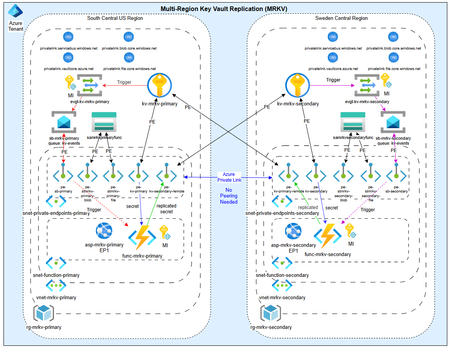
As customers modernize toward multi‑region architectures in Azure, one question comes up repeatedly: “If my region goes down, will Azure Key Vault continue to work without disruption?” The short answer: it depends on what you mean by “work.” Azure Key Vault provides strong durability and availability guarantees, but those guarantees are often misunderstood—especially when customers assume paired‑region replication equals full disaster recovery. In reality, Azure Key Vault replication is designed for survivability, not uninterrupted write access or customer‑controlled failover. This post explains: How Azure Key Vault replication actually works (per Microsoft Learn) Why paired‑region failover does not equal business continuity Two reference architectures that implement true multi‑region Key Vault availability, with Terraform How Azure Key Vault Replication Works (Per Microsoft Learn) Azure Key Vault includes multiple layers of Microsoft‑managed redundancy. In‑Region and Zone Resiliency Vault contents are replicated within the region. In regions that support availability zones, Key Vault is zone‑resilient by default. This protects against localized hardware or zone failures. Paired‑Region Replication If a Key Vault is deployed in a region with an Azure‑defined paired region, its contents are asynchronously replicated to that paired region. This replication is automatic and cannot be configured, observed, or tested by customers. Microsoft‑Managed Regional Failover If Microsoft declares a full regional outage, requests are automatically routed to the paired region. After failover, the vault operates in read‑only mode: ✅ Read secrets, keys, and certificates ✅ Perform cryptographic operations ❌ Create, update, rotate, or delete secrets, keys, or certificates This is a critical distinction. Paired‑region replication preserves access — not operational continuity. Why Paired‑Region Replication Is Not Business Continuity From a reliability and DR perspective, several limitations matter: Failover is Microsoft‑initiated, not customer‑controlled No write operations during regional failover No secret rotation or certificate renewal No way to test DR Accidental deletions replicate No point‑in‑time recovery without backups Microsoft Learn explicitly states that critical workloads may require custom multi‑region strategies beyond built‑in replication. For many customers, this means Azure Key Vault becomes a single‑region dependency in an otherwise multi‑region application design. The Multi‑Region Key Vault Pattern The two GitHub repositories below implement a common architectural shift: Multiple independent Key Vaults deployed in separate regions, with customer‑controlled replication and failover. Instead of relying on invisible platform replication, the vaults become first‑class, region‑scoped resources, aligned with application failover. Solution 1: Private, Locked‑Down Multi‑Region Key Vault Replication Repository: 👉 https://github.com/jclem2000/KeyVault-MultiRegion-Replication-Private Architecture Highlights Independent Key Vault per region Private Endpoints only No public network exposure Terraform‑based deployment Controlled replication using Event Based synchronization What This Enables ✅ Full read/write access during regional outages ✅ Continued secret rotation and certificate renewal ✅ Customer‑defined failover and RTO ✅ DR testing and validation ✅ Strong alignment with zero‑trust and regulated environments Trade‑offs Higher operational complexity Requires automation and application awareness of multiple vaults Solution 2: Low‑Cost Public Multi‑Region Key Vault Replication Repository: 👉 https://github.com/jclem2000/KeyVault-MultiRegion-Replication-Public Architecture Highlights Independent Key Vault per region Public endpoints Minimal networking dependencies Terraform‑based Controlled replication using Event Based synchronization Optimized for simplicity and cost What This Enables ✅ Full read/write availability in any region ✅ Clear and testable DR posture ✅ Lower cost than private endpoint designs ✅ Suitable for many non‑regulated workloads Trade‑offs Public exposure (mitigated via firewall rules, RBAC, and conditional access) Not appropriate for all compliance requirements Requires automation and application awareness of multiple vaults Azure Native Replication vs Customer‑Managed Multi‑Region Vaults Capability Azure Paired Region Multi‑Region Vaults Read access during outage ✅ ✅ Write access during outage ❌ ✅ Secret rotation during outage ❌ ✅ Customer‑controlled failover ❌ ✅ DR testing ❌ ✅ Isolation from accidental deletion ❌ ✅ Predictable RTO ❌ ✅ Azure Key Vault’s native replication optimizes for platform durability. The multi‑region pattern optimizes for application continuity. When to Use Each Approach Paired‑Region Replication Is Often Enough When: Secrets are mostly static Read‑only access during outages is acceptable RTO is flexible You prefer Microsoft‑managed recovery Multi‑Region Vaults Are Recommended When: Secrets or certificates rotate frequently Applications must remain writable during outages Deterministic failover is required DR testing is mandatory Regulatory or operational isolation is needed Closing Thoughts Azure Key Vault behaves exactly as documented on Microsoft Learn—but it’s important to be clear about what those guarantees mean. Paired‑region replication protects your data, not your ability to operate. If your application is designed to survive a regional outage, Key Vault must follow the same multi‑region design principles as the application itself. The reference architectures above show how to extend Azure’s native durability model into true operational resilience, without waiting for a platform‑level failover decision.687Views0likes1Comment
Protecting Oracle Keys with Azure Key Vault
Has anyone used Azure Key Vault to protect keys for on-premises Oracle databases? From what I can see, it isn't a direct integration but rather using Oracle Key Vault for the key management and then integrating OKV with Azure Key Vault as the HSM. Has anyone done this, and is it a supported configuration?185Views0likes2CommentsTemporary-Access-on-Azure-Resources
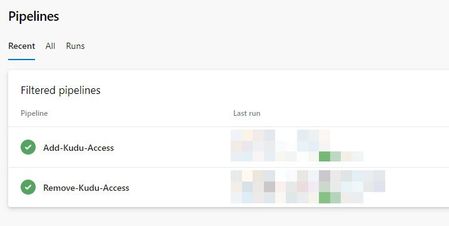
Sometimes developers need to access temporarily to Azure resources for troubleshooting purposes or just for the fun 😉 but they don't have always access on Azure to proceed by themselves. That's why I thought to afford them autonomy through Azure DevOps. Of course these pipelines/scripts can be adapted to answer your own context with different Azure services like Key Vault, Storage Account, Database, ... Azure DevOps pipelines Of course, these access, must be temporary, that's why I create: - One pipeline to allow developers to add their public Ip on Azure resources - One pipeline to remove automatically these access each day In our example, the target Azure resource is an App Service, and we add/remove access on Kudu portal. Add IP to Kudu The goal of that Pipeline, based on the allow_ips.yml file is to allow developers to add their public IP on Kudu for different environments like DEV, TST or UAT ones. Application Environment Region Resource Group App Service Variable Group MyApp DEV North Europe - EU MYAPPLICATION-DEV-EU-RG01 MyAppService1 var-devops-app1-dev-eu MyApp TST North Europe - EU MYAPPLICATION-TST-EU-RG01 MyAppService2 var-devops-app1-tst-eu MyApp UAT North Europe - EU MYAPPLICATION-UAT-EU-RG01 MyAppService3 var-devops-app1-uat-eu MyApp UAT East US 2 - US MYAPPLICATION-UAT-US-RG01 MyAppService4 var-devops-app1-uat-us MyApp UAT Australia East - AU MYAPPLICATION-UAT-AU-RG01 MyAppService5 var-devops-app1-uat-au To easily managed the Azure resources in Azure DevOps, I decided to create a varibale group per environment with information like! - Environment - ResourceGroupName - AppServiceName Remove IP from Kudu As mentionned previsouly, these access are temporary, so we created another Pipeline that will be triggered every day at a specific time to remove the IP on Kudu. How to Process to add your IP 1. First step is to add your public IP into the dev_team_ips.txt file combined with **/32** (The format could be different depending of the Azure services you'll need access): Example: **11.22.33.44/32** 1. Launch the first Pipeline by selecting your environment and the region 1. You should be able to connect on the App Service through Kudu Process to remove your IP Two ways to proceed: 1. Launch manually the pipeline to remove the IP 1. Wait until the configured hour that will automatically trigger the pipeline to remove the IP without any human intervention Sources All the content used for these pipelines are attached to that post or can be retrieve on my GitHub https://github.com/onag-fr/Temporary-Access-on-Azure-Resources/?WT.mc_id=AZ-MVP-5005062.1.6KViews0likes0CommentsNEW PUBLIC PREVIEW FEATURE | Integrate Key Vault with Azure Private Link
We wanted to make you aware of a new public preview feature available to try. Azure Private Link Service enables you to access Azure Services (for example, Azure Key Vault, Azure Storage, and Azure Cosmos DB) and Azure hosted customer/partner services over a Private Endpoint in your virtual network. Now, in preview, you can integrate a key vault with your Azure Private Link. Private endpoint ensures that no customer data leaves their virtual network. It eliminates exposure to your key vault from the public internet and keeps all customer traffic on Azure. If an organization used a public endpoint, they would have to configure a VPN or Expressroute connection to securely connect to key vault via the public internet. If an organization uses service endpoints, all their traffic would remain within Azure but they would have to allow their resource access to all traffic to / from the key vault service (not scoped to one particular vault). Now with private endpoint, you can give each resource access to only 1 particular key vault, which provides a higher level granularity of permissions. Many government, healthcare, and financial institutions have tight regulations and want to plan for "worst case" scenarios in the event of a breach. This provides more redundancy and greater protections. Prerequisites: A key vault An Azure virtual network A subnet in the virtual network Owner or contributor permissions for both the key vault and the virtual network Your private endpoint and virtual network must be in the same region See our public documentation for more information on how to try this feature.1.3KViews0likes0Comments