javascript
47 TopicsIf You're Building AI on Azure, ECS 2026 is Where You Need to Be
Let me be direct: there's a lot of noise in the conference calendar. Generic cloud events. Vendor showcases dressed up as technical content. Sessions that look great on paper but leave you with nothing you can actually ship on Monday. ECS 2026 isn't that. As someone who will be on stage at Cologne this May, I can tell you the European Collaboration Summit combined with the European AI & Cloud Summit and European Biz Apps Summit is one of the few events I've seen where engineers leave with real, production-applicable knowledge. Three days. Three summits. 3,000+ attendees. One of the largest Microsoft-focused events in Europe, and it keeps getting better. If you're building AI systems on Azure, designing cloud-native architectures, or trying to figure out how to take your AI experiments to production — this is where the conversation is happening. What ECS 2026 Actually Is ECS 2026 runs May 5–7 at Confex in Cologne, Germany. It brings together three co-located summits under one roof: European Collaboration Summit — Microsoft 365, Teams, Copilot, and governance European AI & Cloud Summit — Azure architecture, AI agents, cloud security, responsible AI European BizApps Summit — Power Platform, Microsoft Fabric, Dynamics For Azure engineers and AI developers, the European AI & Cloud Summit is your primary destination. But don't ignore the overlap, some of the most interesting AI conversations happen at the intersection of collaboration tooling and cloud infrastructure. The scale matters here: 3,000+ attendees, 100+ sessions, multiple deep-dive tracks, and a speaker lineup that includes Microsoft executives, Regional Directors, and MVPs who have built, broken, and rebuilt production systems. The Azure + AI Track - What's Actually On the Agenda The AI & Cloud Summit agenda is built around real technical depth. Not "intro to AI" content, actual architecture decisions, patterns that work, and lessons from things that didn't. Here's what you can expect: AI Agents and Agentic Systems This is where the energy is right now, and ECS is leaning in. Expect sessions covering how to design agent workflows, chain reasoning steps, handle memory and state, and integrate with Azure AI services. Marco Casalaina, VP of Products for Azure AI at Microsoft, is speaking if you want to understand the direction of the Azure AI platform from the people building it, this is a direct line. Azure Architecture at Scale Cloud-native patterns, microservices, containers, and the architectural decisions that determine whether your system holds up under real load. These sessions go beyond theory you'll hear from engineers who've shipped these designs at enterprise scale. Observability, DevOps, and Production AI Getting AI to production is harder than the demos suggest. Sessions here cover monitoring AI systems, integrating LLMs into CI/CD pipelines, and building the operational practices that keep AI in production reliable and governable. Cloud Security and Compliance Security isn't optional when you're putting AI in front of users or connecting it to enterprise data. Tracks cover identity, access patterns, responsible AI governance, and how to design systems that satisfy compliance requirements without becoming unmaintainable. Pre-Conference Deep Dives One underrated part of ECS: the pre-conference workshops. These are extended, hands-on sessions typically 3–6 hours that let you go deep on a single topic with an expert. Think of them as intensive short courses where you can actually work through the material, not just watch slides. If you're newer to a particular area of Azure AI, or you want to build fluency in a specific pattern before the main conference sessions, these are worth the early travel. The Speaker Quality Is Different Here The ECS speaker roster includes Microsoft executives, Microsoft MVPs, and Regional Directors, people who have real accountability for the products and patterns they're presenting. You'll hear from over 20 Microsoft speakers: Marco Casalaina — VP of Products, Azure AI at Microsoft Adam Harmetz — VP of Product at Microsoft, Enterprise Agent And dozens of MVPs and Regional Directors who are in the field every day, solving the same problems you are. These aren't keynote-only speakers — they're in the session rooms, at the hallway track, available for real conversations. The Hallway Track Is Not a Cliché I know "networking" sounds like a corporate afterthought. At ECS it genuinely isn't. When you put 3,000 practitioners, engineers, architects, DevOps leads, security specialists in one venue for three days, the conversations between sessions are often more valuable than the sessions themselves. You get candid answers to "how are you actually handling X in production?" that you won't find in documentation. The European Microsoft community is tight-knit and collaborative. ECS is where that community concentrates. Why This Matters Right Now We're in a period where AI development is moving fast but the engineering discipline around it is still maturing. Most teams are figuring out: How to move from AI prototype to production system How to instrument and observe AI behaviour reliably How to design agent systems that don't become unmaintainable How to satisfy security and compliance requirements in AI-integrated architectures ECS 2026 is one of the few places where you can get direct answers to these questions from people who've solved them — not theoretically, but in production, on Azure, in the last 12 months. If you go, you'll come back with practical patterns you can apply immediately. That's the bar I hold events to. ECS consistently clears it. Register and Explore the Agenda Register for ECS 2026: ecs.events Explore the AI & Cloud Summit agenda: cloudsummit.eu/en/agenda Dates: May 5–7, 2026 | Location: Confex, Cologne, Germany Early registration is worth it the pre-conference workshops fill up. And if you're coming, find me, I'll be the one talking too much about AI agents and Azure deployments. See you in Cologne.AZD for Beginners: A Practical Introduction to Azure Developer CLI
If you are learning how to get an application from your machine into Azure without stitching together every deployment step by hand, Azure Developer CLI, usually shortened to azd , is one of the most useful tools to understand early. It gives developers a workflow-focused command line for provisioning infrastructure, deploying application code, wiring environment settings, and working with templates that reflect real cloud architectures rather than toy examples. This matters because many beginners hit the same wall when they first approach Azure. They can build a web app locally, but once deployment enters the picture they have to think about resource groups, hosting plans, databases, secrets, monitoring, configuration, and repeatability all at once. azd reduces that operational overhead by giving you a consistent developer workflow. Instead of manually creating each resource and then trying to remember how everything fits together, you start with a template or an azd -compatible project and let the tool guide the path from local development to a running Azure environment. If you are new to the tool, the AZD for Beginners learning resources are a strong place to start. The repository is structured as a guided course rather than a loose collection of notes. It covers the foundations, AI-first deployment scenarios, configuration and authentication, infrastructure as code, troubleshooting, and production patterns. In other words, it does not just tell you which commands exist. It shows you how to think about shipping modern Azure applications with them. What Is Azure Developer CLI? The Azure Developer CLI documentation on Microsoft Learn, azd is an open-source tool designed to accelerate the path from a local development environment to Azure. That description is important because it explains what the tool is trying to optimise. azd is not mainly about managing one isolated Azure resource at a time. It is about helping developers work with complete applications. The simplest way to think about it is this. Azure CLI, az , is broad and resource-focused. It gives you precise control over Azure services. Azure Developer CLI, azd , is application-focused. It helps you take a solution made up of code, infrastructure definitions, and environment configuration and push that solution into Azure in a repeatable way. Those tools are not competitors. They solve different problems and often work well together. For a beginner, the value of azd comes from four practical benefits: It gives you a consistent workflow built around commands such as azd init , azd auth login , azd up , azd show , and azd down . It uses templates so you do not need to design every deployment structure from scratch on day one. It encourages infrastructure as code through files such as azure.yaml and the infra folder. It helps you move from a one-off deployment towards a repeatable development workflow that is easier to understand, change, and clean up. Why Should You Care About azd A lot of cloud frustration comes from context switching. You start by trying to deploy an app, but you quickly end up learning five or six Azure services, authentication flows, naming rules, environment variables, and deployment conventions all at once. That is not a good way to build confidence. azd helps by giving a workflow that feels closer to software delivery than raw infrastructure management. You still learn real Azure concepts, but you do so through an application lens. You initialise a project, authenticate, provision what is required, deploy the app, inspect the result, and tear it down when you are done. That sequence is easier to retain because it mirrors the way developers already think about shipping software. This is also why the AZD for Beginners resource is useful. It does not assume every reader is already comfortable with Azure. It starts with foundation topics and then expands into more advanced paths, including AI deployment scenarios that use the same core azd workflow. That progression makes it especially suitable for students, self-taught developers, workshop attendees, and engineers who know how to code but want a clearer path into Azure deployment. What You Learn from AZD for Beginners The AZD for Beginners course is structured as a learning journey rather than a single quickstart. That matters because azd is not just a command list. It is a deployment workflow with conventions, patterns, and trade-offs. The course helps readers build that mental model gradually. At a high level, the material covers: Foundational topics such as what azd is, how to install it, and how the basic deployment loop works. Template-based development, including how to start from an existing architecture rather than building everything yourself. Environment configuration and authentication practices, including the role of environment variables and secure access patterns. Infrastructure as code concepts using the standard azd project structure. Troubleshooting, validation, and pre-deployment thinking, which are often ignored in beginner content even though they matter in real projects. Modern AI and multi-service application scenarios, showing that azd is not limited to basic web applications. One of the strongest aspects of the course is that it does not stop at the first successful deployment. It also covers how to reason about configuration, resource planning, debugging, and production readiness. That gives learners a more realistic picture of what Azure development work actually looks like. The Core azd Workflow The official overview on Microsoft Learn and the get started guide both reinforce a simple but important idea: most beginners should first understand the standard workflow before worrying about advanced customisation. That workflow usually looks like this: Install azd . Authenticate with Azure. Initialise a project from a template or in an existing repository. Run azd up to provision and deploy. Inspect the deployed application. Remove the resources when finished. Here is a minimal example using an existing template: # Install azd on Windows winget install microsoft.azd # Check that the installation worked azd version # Sign in to your Azure account azd auth login # Start a project from a template azd init --template todo-nodejs-mongo # Provision Azure resources and deploy the app azd up # Show output values such as the deployed URL azd show # Clean up everything when you are done learning azd down --force --purge This sequence is important because it teaches beginners the full lifecycle, not only deployment. A lot of people remember azd up and forget the cleanup step. That leads to wasted resources and avoidable cost. The azd down --force --purge step is part of the discipline, not an optional extra. Installing azd and Verifying Your Setup The official install azd guide on Microsoft Learn provides platform-specific instructions. Because this repository targets developer learning, it is worth showing the common install paths clearly. # Windows winget install microsoft.azd # macOS brew tap azure/azd && brew install azd # Linux curl -fsSL https://aka.ms/install-azd.sh | bash After installation, verify the tool is available: azd version That sounds obvious, but it is worth doing immediately. Many beginner problems come from assuming the install completed correctly, only to discover a path issue or outdated version later. Verifying early saves time. The Microsoft Learn installation page also notes that azd installs supporting tools such as GitHub CLI and Bicep CLI within the tool's own scope. For a beginner, that is helpful because it removes some of the setup friction you might otherwise need to handle manually. What Happens When You Run azd up ? One of the most important questions is what azd up is actually doing. The short answer is that it combines provisioning and deployment into one workflow. The longer answer is where the learning value sits. When you run azd up , the tool looks at the project configuration, reads the infrastructure definition, determines which Azure resources need to exist, provisions them if necessary, and then deploys the application code to those resources. In many templates, it also works with environment settings and output values so that the project becomes reproducible rather than ad hoc. That matters because it teaches a more modern cloud habit. Instead of building infrastructure manually in the portal and then hoping you can remember how you did it, you define the deployment shape in source-controlled files. Even at beginner level, that is the right habit to learn. Understanding the Shape of an azd Project The Azure Developer CLI templates overview explains the standard project structure used by azd . If you understand this structure early, templates become much less mysterious. A typical azd project contains: azure.yaml to describe the project and map services to infrastructure targets. An infra folder containing Bicep or Terraform files for infrastructure as code. A src folder, or equivalent source folders, containing the application code that will be deployed. A local .azure folder to store environment-specific settings for the project. Here is a minimal example of what an azure.yaml file can look like in a simple app: name: beginner-web-app metadata: template: beginner-web-app services: web: project: ./src/web host: appservice This file is small, but it carries an important idea. azd needs a clear mapping between your application code and the Azure service that will host it. Once you see that, the tool becomes easier to reason about. You are not invoking magic. You are describing an application and its hosting model in a standard way. Start from a Template, Then Learn the Architecture Beginners often assume that using a template is somehow less serious than building something from scratch. In practice, it is usually the right place to begin. The official docs for templates and the Awesome AZD gallery both encourage developers to start from an existing architecture when it matches their goals. That is a sound learning strategy for two reasons. First, it lets you experience a working deployment quickly, which builds confidence. Second, it gives you a concrete project to inspect. You can look at azure.yaml , explore the infra folder, inspect the app source, and understand how the pieces connect. That teaches more than reading a command reference in isolation. The AZD for Beginners material also leans into this approach. It includes chapter guidance, templates, workshops, examples, and structured progression so that readers move from successful execution into understanding. That is much more useful than a single command demo. A practical beginner workflow looks like this: # Pick a known template azd init --template todo-nodejs-mongo # Review the files that were created or cloned # - azure.yaml # - infra/ # - src/ # Deploy it azd up # Open the deployed app details azd show Once that works, do not immediately jump to a different template. Spend time understanding what was deployed and why. Where AZD for Beginners Fits In The official docs are excellent for accurate command guidance and conceptual documentation. The AZD for Beginners repository adds something different: a curated learning path. It helps beginners answer questions such as these: Which chapter should I start with if I know Azure a little but not azd ? How do I move from a first deployment into understanding configuration and authentication? What changes when the application becomes an AI application rather than a simple web app? How do I troubleshoot failures instead of copying commands blindly? The repository also points learners towards workshops, examples, a command cheat sheet, FAQ material, and chapter-based exercises. That makes it particularly useful in teaching contexts. A lecturer or workshop facilitator can use it as a course backbone, while an individual learner can work through it as a self-study track. For developers interested in AI, the resource is especially timely because it shows how the same azd workflow can be used for AI-first solutions, including scenarios connected to Microsoft Foundry services and multi-agent architectures. The important beginner lesson is that the workflow stays recognisable even as the application becomes more advanced. Common Beginner Mistakes and How to Avoid Them A good introduction should not only explain the happy path. It should also point out the places where beginners usually get stuck. Skipping authentication checks. If azd auth login has not completed properly, later commands will fail in ways that are harder to interpret. Not verifying the installation. Run azd version immediately after install so you know the tool is available. Treating templates as black boxes. Always inspect azure.yaml and the infra folder so you understand what the project intends to provision. Forgetting cleanup. Learning environments cost money if you leave them running. Use azd down --force --purge when you are finished experimenting. Trying to customise too early. First get a known template working exactly as designed. Then change one thing at a time. If you do hit problems, the official troubleshooting documentation and the troubleshooting sections inside AZD for Beginners are the right next step. That is a much better habit than searching randomly for partial command snippets. How I Would Approach AZD as a New Learner If I were introducing azd to a student or a developer who is comfortable with code but new to Azure delivery, I would keep the learning path tight. Read the official What is Azure Developer CLI? overview so the purpose is clear. Install the tool using the Microsoft Learn install guide. Work through the opening sections of AZD for Beginners. Deploy one template with azd init and azd up . Inspect azure.yaml and the infrastructure files before making any changes. Run azd down --force --purge so the lifecycle becomes a habit. Only then move on to AI templates, configuration changes, or custom project conversion. That sequence keeps the cognitive load manageable. It gives you one successful deployment, one architecture to inspect, and one repeatable workflow to internalise before adding more complexity. Why azd Is Worth Learning Now azd matters because it reflects how modern Azure application delivery is actually done: repeatable infrastructure, source-controlled configuration, environment-aware workflows, and application-level thinking rather than isolated portal clicks. It is useful for straightforward web applications, but it becomes even more valuable as systems gain more services, more configuration, and more deployment complexity. That is also why the AZD for Beginners resource is worth recommending. It gives new learners a structured route into the tool instead of leaving them to piece together disconnected docs, samples, and videos on their own. Used alongside the official Microsoft Learn documentation, it gives you both accuracy and progression. Key Takeaways azd is an application-focused Azure deployment tool, not just another general-purpose CLI. The core beginner workflow is simple: install, authenticate, initialise, deploy, inspect, and clean up. Templates are not a shortcut to avoid learning. They are a practical way to learn architecture through working examples. AZD for Beginners is valuable because it turns the tool into a structured learning path. The official Microsoft Learn documentation for Azure Developer CLI should remain your grounding source for commands and platform guidance. Next Steps If you want to keep going, start with these resources: AZD for Beginners for the structured course, examples, and workshop materials. Azure Developer CLI documentation on Microsoft Learn for official command, workflow, and reference guidance. Install azd if you have not set up the tool yet. Deploy an azd template for the first full quickstart. Azure Developer CLI templates overview if you want to understand the project structure and template model. Awesome AZD if you want to browse starter architectures. If you are teaching others, this is also a good sequence for a workshop: start with the official overview, deploy one template, inspect the project structure, and then use AZD for Beginners as the path for deeper learning. That gives learners both an early win and a solid conceptual foundation.Building Your First Local RAG Application with Foundry Local
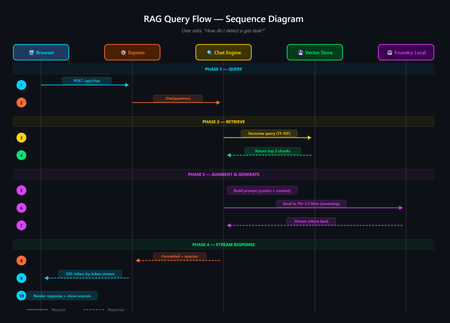
A developer's guide to building an offline, mobile-responsive AI support agent using Retrieval-Augmented Generation, the Foundry Local SDK, and JavaScript. Imagine you are a gas field engineer standing beside a pipeline in a remote location. There is no Wi-Fi, no mobile signal, and you need a safety procedure right now. What do you do? This is the exact problem that inspired this project: a fully offline RAG-powered support agent that runs entirely on your machine. No cloud. No API keys. No outbound network calls. Just a local language model, a local vector store, and your own documents, all accessible from a browser on any device. In this post, you will learn how it works, how to build your own, and the key architectural decisions behind it. If you have ever wanted to build an AI application that runs locally and answers questions grounded in your own data, this is the place to start. The finished application: a browser-based AI support agent that runs entirely on your machine. What Is Retrieval-Augmented Generation? Retrieval-Augmented Generation (RAG) is a pattern that makes AI models genuinely useful for domain-specific tasks. Rather than hoping the model "knows" the answer from its training data, you: Retrieve relevant chunks from your own documents using a vector store Augment the model's prompt with those chunks as context Generate a response grounded in your actual data The result is fewer hallucinations, traceable answers with source attribution, and an AI that works with your content rather than relying on general knowledge. If you are building internal tools, customer support bots, field manuals, or knowledge bases, RAG is the pattern you want. RAG vs CAG: Understanding the Trade-offs If you have explored AI application patterns before, you have likely encountered Context-Augmented Generation (CAG). Both RAG and CAG solve the same core problem: grounding an AI model's answers in your own content. They take different approaches, and each has genuine strengths and limitations. RAG (Retrieval-Augmented Generation) How it works: Documents are split into chunks, vectorised, and stored in a database. At query time, the most relevant chunks are retrieved and injected into the prompt. Strengths: Scales to thousands or millions of documents Fine-grained retrieval at chunk level with source attribution Documents can be added or updated dynamically without restarting Token-efficient: only relevant chunks are sent to the model Supports runtime document upload via the web UI Limitations: More complex architecture: requires a vector store and chunking strategy Retrieval quality depends on chunking parameters and scoring method May miss relevant content if the retrieval step does not surface it CAG (Context-Augmented Generation) How it works: All documents are loaded at startup. The most relevant ones are selected per query using keyword scoring and injected into the prompt. Strengths: Drastically simpler architecture with no vector database or embeddings All information is always available to the model Minimal dependencies and easy to set up Near-instant document selection Limitations: Constrained by the model's context window size Best suited to small, curated document sets (tens of documents) Adding documents requires an application restart Want to compare these patterns hands-on? There is a CAG-based implementation of the same gas field scenario using whole-document context injection. Clone both repositories, run them side by side, and see how the architectures differ in practice. When Should You Choose Which? Consideration Choose RAG Choose CAG Document count Hundreds or thousands Tens of documents Document updates Frequent or dynamic (runtime upload) Infrequent (restart to reload) Source attribution Per-chunk with relevance scores Per-document Setup complexity Moderate (ingestion step required) Minimal Query precision Better for large or diverse collections Good for keyword-matchable content Infrastructure SQLite vector store (single file) None beyond the runtime For the sample application in this post (20 gas engineering procedure documents with runtime upload), RAG is the clear winner. If your document set is small and static, CAG may be simpler. Both patterns run fully offline using Foundry Local. Foundry Local: Your On-Device AI Runtime Foundry Local is a lightweight runtime from Microsoft that downloads, manages, and serves language models entirely on your device. No cloud account, no API keys, no outbound network calls (after the initial model download). What makes it particularly useful for developers: No GPU required: runs on CPU or NPU, making it accessible on standard laptops and desktops Native SDK bindings: in-process inference via the foundry-local-sdk npm package, with no HTTP round-trips to a local server Automatic model management: downloads, caches, and loads models automatically Hardware-optimised variant selection: the SDK picks the best variant for your hardware (GPU, NPU, or CPU) Real-time progress callbacks: ideal for building loading UIs that show download and initialisation progress The integration code is refreshingly minimal: import { FoundryLocalManager } from "foundry-local-sdk"; // Create a manager and discover models via the catalogue const manager = FoundryLocalManager.create({ appName: "gas-field-local-rag" }); const model = await manager.catalog.getModel("phi-3.5-mini"); // Download if not cached, then load into memory if (!model.isCached) { await model.download((progress) => { console.log(`Download: ${Math.round(progress * 100)}%`); }); } await model.load(); // Create a chat client for direct in-process inference const chatClient = model.createChatClient(); const response = await chatClient.completeChat([ { role: "system", content: "You are a helpful assistant." }, { role: "user", content: "How do I detect a gas leak?" } ]); That is it. No server configuration, no authentication tokens, no cloud provisioning. The model runs in the same process as your application. The Technology Stack The sample application is deliberately simple. No frameworks, no build steps, no Docker: Layer Technology Purpose AI Model Foundry Local + Phi-3.5 Mini Runs locally via native SDK bindings, no GPU required Back end Node.js + Express Lightweight HTTP server, everyone knows it Vector Store SQLite (via better-sqlite3 ) Zero infrastructure, single file on disc Retrieval TF-IDF + cosine similarity No embedding model required, fully offline Front end Single HTML file with inline CSS No build step, mobile-responsive, field-ready The total dependency footprint is three npm packages: express , foundry-local-sdk , and better-sqlite3 . Architecture Overview The five-layer architecture, all running on a single machine. The system has five layers, all running on a single machine: Client layer: a single HTML file served by Express, with quick-action buttons and a responsive chat interface Server layer: Express.js starts immediately and serves the UI plus SSE status and chat endpoints RAG pipeline: the chat engine orchestrates retrieval and generation; the chunker handles TF-IDF vectorisation; the prompts module provides safety-first system instructions Data layer: SQLite stores document chunks and their TF-IDF vectors; documents live as .md files in the docs/ folder AI layer: Foundry Local runs Phi-3.5 Mini on CPU or NPU via native SDK bindings Building the Solution Step by Step Prerequisites You need two things installed on your machine: Node.js 20 or later: download from nodejs.org Foundry Local: Microsoft's on-device AI runtime: winget install Microsoft.FoundryLocal The SDK will automatically download the Phi-3.5 Mini model (approximately 2 GB) the first time you run the application. Getting the Code Running # Clone the repository git clone https://github.com/leestott/local-rag.git cd local-rag # Install dependencies npm install # Ingest the 20 gas engineering documents into the vector store npm run ingest # Start the server npm start Open http://127.0.0.1:3000 in your browser. You will see the status indicator whilst the model loads. Once the model is ready, the status changes to "Offline Ready" and you can start chatting. Desktop view Mobile view How the RAG Pipeline Works Let us trace what happens when a user asks: "How do I detect a gas leak?" The query flow from browser to model and back. 1 Documents are ingested and indexed When you run npm run ingest , every .md file in the docs/ folder is read, parsed (with optional YAML front-matter for title, category, and ID), split into overlapping chunks of approximately 200 tokens, and stored in SQLite with TF-IDF vectors. 2 Model is loaded via the SDK The Foundry Local SDK discovers the model in the local catalogue and loads it into memory. If the model is not already cached, it downloads it first (with progress streamed to the browser via SSE). 3 User sends a question The question arrives at the Express server. The chat engine converts it into a TF-IDF vector, uses an inverted index to find candidate chunks, and scores them using cosine similarity. The top 3 chunks are returned in under 1 ms. 4 Prompt is constructed The engine builds a messages array containing: the system prompt (with safety-first instructions), the retrieved chunks as context, the conversation history, and the user's question. 5 Model generates a grounded response The prompt is sent to the locally loaded model via the Foundry Local SDK's native chat client. The response streams back token by token through Server-Sent Events to the browser. Source references with relevance scores are included. A response with safety warnings and step-by-step guidance The sources panel shows which chunks were used and their relevance Key Code Walkthrough The Vector Store (TF-IDF + SQLite) The vector store uses SQLite to persist document chunks alongside their TF-IDF vectors. At query time, an inverted index finds candidate chunks that share terms with the query, then cosine similarity ranks them: // src/vectorStore.js search(query, topK = 5) { const queryTf = termFrequency(query); this._ensureCache(); // Build in-memory cache on first access // Use inverted index to find candidates sharing at least one term const candidateIndices = new Set(); for (const term of queryTf.keys()) { const indices = this._invertedIndex.get(term); if (indices) { for (const idx of indices) candidateIndices.add(idx); } } // Score only candidates, not all rows const scored = []; for (const idx of candidateIndices) { const row = this._rowCache[idx]; const score = cosineSimilarity(queryTf, row.tf); if (score > 0) scored.push({ ...row, score }); } scored.sort((a, b) => b.score - a.score); return scored.slice(0, topK); } The inverted index, in-memory row cache, and prepared SQL statements bring retrieval time to sub-millisecond for typical query loads. Why TF-IDF Instead of Embeddings? Most RAG tutorials use embedding models for retrieval. This project uses TF-IDF because: Fully offline: no embedding model to download or run Zero latency: vectorisation is instantaneous (it is just maths on word frequencies) Good enough: for 20 domain-specific documents, TF-IDF retrieves the right chunks reliably Transparent: you can inspect the vocabulary and weights, unlike neural embeddings For larger collections or when semantic similarity matters more than keyword overlap, you would swap in an embedding model. For this use case, TF-IDF keeps the stack simple and dependency-free. The System Prompt For safety-critical domains, the system prompt is engineered to prioritise safety, prevent hallucination, and enforce structured responses: // src/prompts.js export const SYSTEM_PROMPT = `You are a local, offline support agent for gas field inspection and maintenance engineers. Behaviour Rules: - Always prioritise safety. If a procedure involves risk, explicitly call it out. - Do not hallucinate procedures, measurements, or tolerances. - If the answer is not in the provided context, say: "This information is not available in the local knowledge base." Response Format: - Summary (1-2 lines) - Safety Warnings (if applicable) - Step-by-step Guidance - Reference (document name + section)`; This pattern is transferable to any safety-critical domain: medical devices, electrical work, aviation maintenance, or chemical handling. Runtime Document Upload Unlike the CAG approach, RAG supports adding documents without restarting the server. Click the upload button to add new .md or .txt files. They are chunked, vectorised, and indexed immediately. The upload modal with the complete list of indexed documents. Adapting This for Your Own Domain The sample project is designed to be forked and adapted. Here is how to make it yours in four steps: 1. Replace the documents Delete the gas engineering documents in docs/ and add your own markdown files. The ingestion pipeline handles any markdown content with optional YAML front-matter: --- title: Troubleshooting Widget Errors category: Support id: KB-001 --- # Troubleshooting Widget Errors ...your content here... 2. Edit the system prompt Open src/prompts.js and rewrite the system prompt for your domain. Keep the structure (summary, safety, steps, reference) and update the language to match your users' expectations. 3. Tune the retrieval In src/config.js : chunkSize: 200 : smaller chunks give more precise retrieval, less context per chunk chunkOverlap: 25 : prevents information falling between chunks topK: 3 : how many chunks to retrieve per query (more gives more context but slower generation) 4. Swap the model Change config.model in src/config.js to any model available in the Foundry Local catalogue. Smaller models give faster responses on constrained devices; larger models give better quality. Building a Field-Ready UI The front end is a single HTML file with inline CSS. No React, no build tooling, no bundler. This keeps the project accessible to beginners and easy to deploy. Design decisions that matter for field use: Dark, high-contrast theme with 18px base font size for readability in bright sunlight Large touch targets (minimum 44px) for operation with gloves or PPE Quick-action buttons that wrap on mobile so all options are visible without scrolling Responsive layout that works from 320px to 1920px+ screen widths Streaming responses via SSE, so the user sees tokens arriving in real time The mobile chat experience, optimised for field use. Testing The project includes unit tests using the built-in Node.js test runner, with no extra test framework needed: # Run all tests npm test Tests cover the chunker, vector store, configuration, and server endpoints. Use them as a starting point when you adapt the project for your own domain. Ideas for Extending the Project Once you have the basics running, there are plenty of directions to explore: Embedding-based retrieval: use a local embedding model for better semantic matching on diverse queries Conversation memory: persist chat history across sessions using local storage or a lightweight database Multi-modal support: add image-based queries (photographing a fault code, for example) PWA packaging: make it installable as a standalone offline application on mobile devices Hybrid retrieval: combine TF-IDF keyword search with semantic embeddings for best results Try the CAG approach: compare with the local-cag sample to see which pattern suits your use case Ready to Build Your Own? Clone the RAG sample, swap in your own documents, and have an offline AI agent running in minutes. Or compare it with the CAG approach to see which pattern suits your use case best. Get the RAG Sample Get the CAG Sample Summary Building a local RAG application does not require a PhD in machine learning or a cloud budget. With Foundry Local, Node.js, and SQLite, you can create a fully offline, mobile-responsive AI agent that answers questions grounded in your own documents. The key takeaways: RAG is ideal for scalable, dynamic document sets where you need fine-grained retrieval with source attribution. Documents can be added at runtime without restarting. CAG is simpler when you have a small, stable set of documents that fit in the context window. See the local-cag sample to compare. Foundry Local makes on-device AI accessible: native SDK bindings, in-process inference, automatic model selection, and no GPU required. TF-IDF + SQLite is a viable vector store for small-to-medium collections, with sub-millisecond retrieval thanks to inverted indexing and in-memory caching. Start simple, iterate outwards. Begin with RAG and a handful of documents. If your needs are simpler, try CAG. Both patterns run entirely offline. Clone the repository, swap in your own documents, and start building. The best way to learn is to get your hands on the code. This project is open source under the MIT licence. It is a scenario sample for learning and experimentation, not production medical or safety advice. local-rag on GitHub · local-cag on GitHub · Foundry LocalBuilding an Offline AI Interview Coach with Foundry Local, RAG, and SQLite
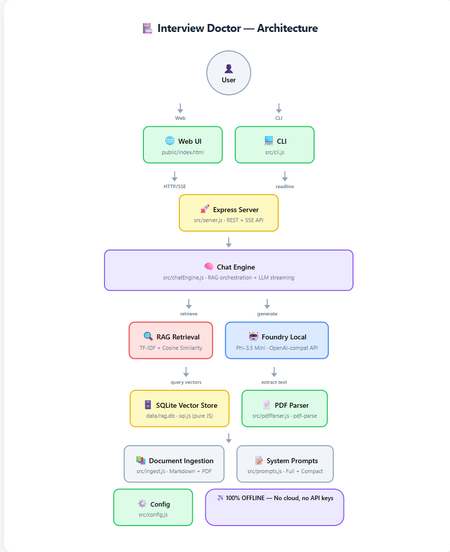
How to build a 100% offline, AI-powered interview preparation tool using Microsoft Foundry Local, Retrieval-Augmented Generation, and nothing but JavaScript. Foundry Local 100% Offline RAG + TF-IDF JavaScript / Node.js Contents Introduction What is RAG and Why Offline? Architecture Overview Setting Up Foundry Local Building the RAG Pipeline The Chat Engine Dual Interfaces: Web & CLI Testing Adapting for Your Own Use Case What I Learned Getting Started Introduction Imagine preparing for a job interview with an AI assistant that knows your CV inside and out, understands the job you're applying for, and generates tailored questions, all without ever sending your data to the cloud. That's exactly what Interview Doctor does. Interview Doctor's web UI, a polished, dark-themed interface running entirely on your local machine. In this post, I'll walk you through how I built an interview prep tool as a fully offline JavaScript application using: Foundry Local — Microsoft's on-device AI runtime SQLite — for storing document chunks and TF-IDF vectors RAG (Retrieval-Augmented Generation) — to ground the AI in your actual documents Express.js — for the web server Node.js built-in test runner — for testing with zero extra dependencies No cloud. No API keys. No internet required. Everything runs on your machine. What is RAG and Why Does It Matter? Retrieval-Augmented Generation (RAG) is a pattern that makes AI models dramatically more useful for domain-specific tasks. Instead of relying solely on what a model learned during training (which can be outdated or generic), RAG: Retrieves relevant chunks from your own documents Augments the model's prompt with those chunks as context Generates a response grounded in your actual data For Interview Doctor, this means the AI doesn't just ask generic interview questions, it asks questions specific to your CV, your experience, and the specific job you're applying for. Why Offline RAG? Privacy is the obvious benefit, your CV and job applications never leave your device. But there's more: No API costs — run as many queries as you want No rate limits — iterate rapidly during your prep Works anywhere — on a plane, in a café with bad Wi-Fi, anywhere Consistent performance — no cold starts, no API latency Architecture Overview Complete architecture showing all components and data flow. The application has two interfaces (CLI and Web) that share the same core engine: Document Ingestion — PDFs and markdown files are chunked and indexed Vector Store — SQLite stores chunks with TF-IDF vectors Retrieval — queries are matched against stored chunks using cosine similarity Generation — relevant chunks are injected into the prompt sent to the local LLM Step 1: Setting Up Foundry Local First, install Foundry Local: # Windows winget install Microsoft.FoundryLocal # macOS brew install microsoft/foundrylocal/foundrylocal The JavaScript SDK handles everything else — starting the service, downloading the model, and connecting: import { FoundryLocalManager } from "foundry-local-sdk"; import { OpenAI } from "openai"; const manager = new FoundryLocalManager(); const modelInfo = await manager.init("phi-3.5-mini"); // Foundry Local exposes an OpenAI-compatible API const openai = new OpenAI({ baseURL: manager.endpoint, // Dynamic port, discovered by SDK apiKey: manager.apiKey, }); ⚠️ Key Insight Foundry Local uses a dynamic port never hardcode localhost:5272 . Always use manager.endpoint which is discovered by the SDK at runtime. Step 2: Building the RAG Pipeline Document Chunking Documents are split into overlapping chunks of ~200 tokens. The overlap ensures important context isn't lost at chunk boundaries: export function chunkText(text, maxTokens = 200, overlapTokens = 25) { const words = text.split(/\s+/).filter(Boolean); if (words.length <= maxTokens) return [text.trim()]; const chunks = []; let start = 0; while (start < words.length) { const end = Math.min(start + maxTokens, words.length); chunks.push(words.slice(start, end).join(" ")); if (end >= words.length) break; start = end - overlapTokens; } return chunks; } Why 200 tokens with 25-token overlap? Small chunks keep retrieved context compact for the model's limited context window. Overlap prevents information loss at boundaries. And it's all pure string operations, no dependencies needed. TF-IDF Vectors Instead of using a separate embedding model (which would consume precious memory alongside the LLM), we use TF-IDF, a classic information retrieval technique: export function termFrequency(text) { const tf = new Map(); const tokens = text .toLowerCase() .replace(/[^a-z0-9\-']/g, " ") .split(/\s+/) .filter((t) => t.length > 1); for (const t of tokens) { tf.set(t, (tf.get(t) || 0) + 1); } return tf; } export function cosineSimilarity(a, b) { let dot = 0, normA = 0, normB = 0; for (const [term, freq] of a) { normA += freq * freq; if (b.has(term)) dot += freq * b.get(term); } for (const [, freq] of b) normB += freq * freq; if (normA === 0 || normB === 0) return 0; return dot / (Math.sqrt(normA) * Math.sqrt(normB)); } Each document chunk becomes a sparse vector of word frequencies. At query time, we compute cosine similarity between the query vector and all stored chunk vectors to find the most relevant matches. SQLite as a Vector Store Chunks and their TF-IDF vectors are stored in SQLite using sql.js (pure JavaScript — no native compilation needed): export class VectorStore { // Created via: const store = await VectorStore.create(dbPath) insert(docId, title, category, chunkIndex, content) { const tf = termFrequency(content); const tfJson = JSON.stringify([...tf]); this.db.run( "INSERT INTO chunks (...) VALUES (?, ?, ?, ?, ?, ?)", [docId, title, category, chunkIndex, content, tfJson] ); this.save(); } search(query, topK = 5) { const queryTf = termFrequency(query); // Score each chunk by cosine similarity, return top-K } } 💡 Why SQLite for Vectors? For a CV plus a few job descriptions (dozens of chunks), brute-force cosine similarity over SQLite rows is near-instant (~1ms). No need for Pinecone, Qdrant, or Chroma — just a single .db file on disk. Step 3: The RAG Chat Engine The chat engine ties retrieval and generation together: async *queryStream(userMessage, history = []) { // 1. Retrieve relevant CV/JD chunks const chunks = this.retrieve(userMessage); const context = this._buildContext(chunks); // 2. Build the prompt with retrieved context const messages = [ { role: "system", content: SYSTEM_PROMPT }, { role: "system", content: `Retrieved context:\n\n${context}` }, ...history, { role: "user", content: userMessage }, ]; // 3. Stream from the local model const stream = await this.openai.chat.completions.create({ model: this.modelId, messages, temperature: 0.3, stream: true, }); // 4. Yield chunks as they arrive for await (const chunk of stream) { const content = chunk.choices[0]?.delta?.content; if (content) yield { type: "text", data: content }; } } The flow is straightforward: vectorize the query, retrieve with cosine similarity, build a prompt with context, and stream from the local LLM. The temperature: 0.3 keeps responses focused — important for interview preparation where consistency matters. Step 4: Dual Interfaces — Web & CLI Web UI The web frontend is a single HTML file with inline CSS and JavaScript — no build step, no framework, no React or Vue. It communicates with the Express backend via REST and SSE: File upload via multipart/form-data Streaming chat via Server-Sent Events (SSE) Quick-action buttons for common follow-up queries (coaching tips, gap analysis, mock interview) The setup form with job title, seniority level, and a pasted job description — ready to generate tailored interview questions. CLI The CLI provides the same experience in the terminal with ANSI-coloured output: npm run cli It walks you through uploading your CV, entering the job details, and then generates streaming questions. Follow-up questions work interactively. Both interfaces share the same ChatEngine class, they're thin layers over identical logic. Edge Mode For constrained devices, toggle Edge mode to use a compact system prompt that fits within smaller context windows: Edge mode activated, uses a minimal prompt for devices with limited resources. Step 5: Testing Tests use the Node.js built-in test runner, no Jest, no Mocha, no extra dependencies: import { describe, it } from "node:test"; import assert from "node:assert/strict"; describe("chunkText", () => { it("returns single chunk for short text", () => { const chunks = chunkText("short text", 200, 25); assert.equal(chunks.length, 1); }); it("maintains overlap between chunks", () => { // Verifies overlapping tokens between consecutive chunks }); }); npm test Tests cover the chunker, vector store, config, prompts, and server API contract, all without needing Foundry Local running. Adapting for Your Own Use Case Interview Doctor is a pattern, not just a product. You can adapt it for any domain: What to Change How Domain documents Replace files in docs/ with your content System prompt Edit src/prompts.js Chunk sizes Adjust config.chunkSize and config.chunkOverlap Model Change config.model — run foundry model list UI Modify public/index.html — it's a single file Ideas for Adaptation Customer support bot — ingest your product docs and FAQs Code review assistant — ingest coding standards and best practices Study guide — ingest textbooks and lecture notes Compliance checker — ingest regulatory documents Onboarding assistant — ingest company handbooks and processes What I Learned Offline AI is production-ready. Foundry Local + small models like Phi-3.5 Mini are genuinely useful for focused tasks. You don't need vector databases for small collections. SQLite + TF-IDF is fast, simple, and has zero infrastructure overhead. RAG quality depends on chunking. Getting chunk sizes right for your use case is more impactful than the retrieval algorithm. The OpenAI-compatible API is a game-changer. Switching from cloud to local was mostly just changing the baseURL . Dual interfaces are easy when you share the engine. The CLI and Web UI are thin layers over the same ChatEngine class. ⚡ Performance Notes On a typical laptop (no GPU): ingestion takes under 1 second for ~20 documents, retrieval is ~1ms, and the first LLM token arrives in 2-5 seconds. Foundry Local automatically selects the best model variant for your hardware (CUDA GPU, NPU, or CPU). Getting Started git clone https://github.com/leestott/interview-doctor-js.git cd interview-doctor-js npm install npm run ingest npm start # Web UI at http://127.0.0.1:3000 # or npm run cli # Interactive terminal The full source code is on GitHub. Star it, fork it, adapt it — and good luck with your interviews! Resources Foundry Local — Microsoft's on-device AI runtime Foundry Local SDK (npm) — JavaScript SDK Foundry Local GitHub — Source, samples, and documentation Local RAG Reference — Reference RAG implementation Interview Doctor (JavaScript) — This project's source code
Implementing the Backend-for-Frontend (BFF) / Curated API Pattern Using Azure API Management
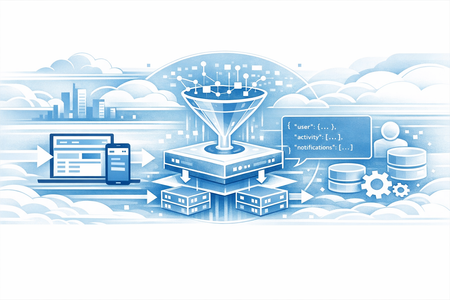
Modern digital applications rarely serve a single type of client. Web portals, mobile apps, partner integrations, and internal tools often consume the same backend services—yet each has different performance, payload, and UX requirements. Exposing backend APIs directly to all clients frequently leads to over-fetching, chatty networks, and tight coupling between UI and backend domain models. This is where a Curated API or Backend for Frontend API design pattern becomes useful. What Is the Backend-for-Frontend (BFF) Pattern? The Backend-for-Frontend (BFF)—also known as the Curated API pattern—solves this problem by introducing a client-specific API layer that shapes, aggregates, and optimizes data specifically for the consuming experience. There is very good architectural guidance on this at Azure Architecture Center [Check out the 1st Link on Citation section] The BFF pattern introduces a dedicated backend layer for each frontend experience. Instead of exposing generic backend services directly, the BFF: Aggregates data from multiple backend services Filters and reshapes responses Optimizes payloads for a specific client Shields clients from backend complexity and change Each frontend (web, mobile, partner) can evolve independently, without forcing backend services to accommodate UI-specific concerns. Why Azure API Management Is a Natural Fit for BFF Azure API Management is commonly used as an API gateway, but its policy engine enables much more than routing and security. Using APIM policies, you can: Call multiple backend services (sequentially or in parallel) Transform request and response payloads to provide a unform experience Apply caching, rate limiting, authentication, and resiliency policies All of this can be achieved without modifying backend code, making APIM an excellent place to implement the BFF pattern. When Should You Use a Curated API in APIM? Using APIM as a BFF makes sense when: Frontend clients require optimized, experience-specific payloads Backend services must remain generic and reusable You want to reduce round trips from mobile or low-bandwidth clients You want to implement uniform polices for cross cutting concerns, authentication/authorization, caching, rate-limiting and logging, etc. You want to avoid building and operating a separate aggregation service You need strong governance, security, and observability at the API layer How the BFF Pattern Works in Azure API Management There is a Git Hub Repository [Check out the 2nd Link on Citation section] that provides a wealth of information and samples on how to create complex APIM policies. I recently contributed to this repository with a sample policy for Curated APIs [Check out the 3rd Link on Citation section] At a high level, the policy follows this flow: APIM receives a single client request APIM issues parallel calls to multiple backend services as shown below <wait for="all"> <send-request mode="copy" response-variable-name="operation1" timeout="{{bff-timeout}}" ignore-error="false"> <set-url>@("{{bff-baseurl}}/operation1?param1=" + context.Request.Url.Query.GetValueOrDefault("param1", "value1"))</set-url> </send-request> <send-request mode="copy" response-variable-name="operation2" timeout="{{bff-timeout}}" ignore-error="false"> <set-url>{{bff-baseurl}}/operation2</set-url> </send-request> <send-request mode="copy" response-variable-name="operation3" timeout="{{bff-timeout}}" ignore-error="false"> <set-url>{{bff-baseurl}}/operation3</set-url> </send-request> <send-request mode="copy" response-variable-name="operation4" timeout="{{bff-timeout}}" ignore-error="false"> <set-url>{{bff-baseurl}}/operation4</set-url> </send-request> </wait> Few things to consider The Wait policy allows us to make multiple requests using nested send-request policies. The for="all" attribute value implies that the policy execution will await all the nested send requests before moving to the next one. {{bff-baseurl}}: This example assumes a single base URL for all end points. It does not have to be. The calls can be made to any endpoint response-variable-name attribute sets a unique variable name to hold response object from each of the parallel calls. This will be used later in the policy to transform and produce the curated result. timeout attribute: This example assumes uniform timeouts for each endpoint, but it might vary as well. ignore-error: set this to true only when you are not concerned about the response from the backend (like a fire and forget request) otherwise keep it false so that the response variable captures the response with error code. Once responses from all the requests have been received (or timed out) the policy execution moves to the next policy Then the responses from all requests are collected and transformed into a single response data <!-- Collect the complete response in a variable. --> <set-variable name="finalResponseData" value="@{ JObject finalResponse = new JObject(); int finalStatus = 200; // This assumes the final success status (If all backend calls succeed) is 200 - OK, can be customized. string finalStatusReason = "OK"; void ParseBody(JObject element, string propertyName, IResponse response){ string body = ""; if(response!=null){ body = response.Body.As<string>(); try{ var jsonBody = JToken.Parse(body); element.Add(propertyName, jsonBody); } catch(Exception ex){ element.Add(propertyName, body); } } else{ element.Add(propertyName, body); //Add empty body if the response was not captured } } JObject PrepareResponse(string responseVariableName){ JObject responseElement = new JObject(); responseElement.Add("operation", responseVariableName); IResponse response = context.Variables.GetValueOrDefault<IResponse>(responseVariableName); if(response == null){ finalStatus = 207; // if any of the responses are null; the final status will be 207 finalStatusReason = "Multi Status"; ParseBody(responseElement, "error", response); return responseElement; } int status = response.StatusCode; responseElement.Add("status", status); if(status == 200){ // This assumes all the backend APIs return 200, if they return other success responses (e.g. 201) add them here ParseBody(responseElement, "body", response); } else{ // if any of the response codes are non success, the final status will be 207 finalStatus = 207; finalStatusReason = "Multi Status"; ParseBody(responseElement, "error", response); } return responseElement; } // Gather responses into JSON Array // Pass on the each of the response variable names here. JArray finalResponseBody = new JArray(); finalResponseBody.Add(PrepareResponse("operation1")); finalResponseBody.Add(PrepareResponse("operation2")); finalResponseBody.Add(PrepareResponse("operation3")); finalResponseBody.Add(PrepareResponse("operation4")); // Populate finalResponse with aggregated body and status information finalResponse.Add("body", finalResponseBody); finalResponse.Add("status", finalStatus); finalResponse.Add("reason", finalStatusReason); return finalResponse; }" /> What this code does is prepare the response into a single JSON Object. using the help of the PrepareResponse function. The JSON not only collects the response body from each response variable, but it also captures the response codes and determines the final response code based on the individual response codes. For the purpose of his example, I have assumed all operations are GET operations and if all operations return 200 then the overall response is 200-OK, otherwise it is 206 -Partial Content. This can be customized to the actual scenario as needed. Once the final response variable is ready, then construct and return a single response based on the above calculation <!-- This shows how to return the final response code and body. Other response elements (e.g. outbound headers) can be curated and added here the same way --> <return-response> <set-status code="@((int)((JObject)context.Variables["finalResponseData"]).SelectToken("status"))" reason="@(((JObject)context.Variables["finalResponseData"]).SelectToken("reason").ToString())" /> <set-body>@(((JObject)context.Variables["finalResponseData"]).SelectToken("body").ToString(Newtonsoft.Json.Formatting.None))</set-body> </return-response> This effectively turns APIM into an experience-specific backend tailored to frontend needs. When not to use APIM for BFF Implementation? While this approach works well when you want to curate a few responses together and apply a unified set of policies, there are some cases where you might want to rethink this approach When the need for transformation is complex. Maintaining a lot of code in APIM is not fun. If the response transformation requires a lot of code that needs to be unit tested and code that might change over time, it might be better to sand up a curation service. Azure Functions and Azure Container Apps are well suited for this. When each backend endpoint requires very complex request transformation, then that also increases the amount of code, then that would also indicate a need for an independent curation service. If you are not already using APIM then this does not warrant adding one to your architecture just to implement BFF. Conclusion Using APIM is one of the many approaches you can use to create a BFF layer on top of your existing endpoint. Let me know your thoughts con the comments on what you think of this approach. Citations Azure Architecture Center – Backend-for-Frontends Pattern Azure API Management Policy Snippets (GitHub) Curated APIs Policy Example (GitHub) Send-request Policy ReferenceBuilding a Privacy-First Hybrid AI Briefing Tool with Foundry Local and Azure OpenAI
Introduction Management consultants face a critical challenge: they need instant AI-powered insights from sensitive client documents, but traditional cloud-only AI solutions create unacceptable data privacy risks. Every document uploaded to a cloud API potentially exposes confidential client information, violates data residency requirements, and creates compliance headaches. The solution lies in a hybrid architecture that combines the speed and privacy of on-device AI with the sophistication of cloud models—but only when explicitly requested. This article walks through building a production-ready briefing assistant that runs AI inference locally first, then optionally refines outputs using Azure OpenAI for executive-quality presentations. We'll explore a sample implementation using FL-Client-Briefing-Assistant, built with Next.js 14, TypeScript, and Microsoft Foundry Local. You'll learn how to architect privacy-first AI applications, implement sub-second local inference, and design transparent hybrid workflows that give users complete control over their data. Why Hybrid AI Architecture Matters for Enterprise Applications Before diving into implementation details, let's understand why a hybrid approach is essential for enterprise AI applications, particularly in consulting and professional services. Cloud-only AI services like OpenAI's GPT-4 offer remarkable capabilities, but they introduce several critical challenges. First, every API call sends your data to external servers, creating audit trails and potential exposure points. For consultants handling merger documents, financial reports, or strategic plans, this is often a non-starter. Second, cloud APIs introduce latency, typically 2-5 seconds per request due to network round-trips and queue times. Third, costs scale linearly with usage, making high-volume document analysis expensive at scale. Local-only AI solves privacy and latency concerns but sacrifices quality. Small language models (SLMs) running on laptops produce quick summaries, but they lack the nuanced reasoning and polish needed for C-suite presentations. You get fast, private results that may require significant manual refinement. The hybrid approach gives you the best of both worlds: instant, private local processing as the default, with optional cloud refinement only when quality matters most. This architecture respects data privacy by default while maintaining the flexibility to produce executive-grade outputs when needed. Architecture Overview: Three-Layer Design for Privacy and Performance The FL-Client-Briefing-Assistant implements a clean three-layer architecture that separates concerns and ensures privacy at every level. At the frontend, a Next.js 14 application provides the user interface with strong TypeScript typing throughout. Users interact with four quick-action templates: document summarization, talking points generation, risk analysis, and executive summaries. The UI clearly indicates which model (local or cloud) processed each request, ensuring transparency. The middle tier consists of Next.js API routes that act as orchestration endpoints. These routes validate requests using Zod schemas, route to appropriate inference services, and enforce privacy settings. Critically, the API layer never persists user content unless explicitly opted in via privacy settings. The inference layer contains two distinct services. The local service uses Foundry Local SDK to communicate with a locally running Phi-4 model (or similar SLM). This provides sub-second inference, typical 500ms-1s response times, completely offline. The cloud service connects to Azure OpenAI using the official JavaScript SDK, accessed via Managed Identity or API keys, with proper timeout and retry logic. Setting Up Foundry Local for On-Device Inference Foundry Local is Microsoft's runtime for running AI models entirely on your device—no internet required, no data leaving your machine. Here's how to get it running for this application. First, install Foundry Local on Windows using Windows Package Manager: winget install Microsoft.FoundryLocal After installation, verify the service is ready: foundry service start foundry service status The status command will show you the service endpoint, typically running on a dynamic port like http://127.0.0.1:5272 . This port changes between restarts, so your application must query it programmatically. Next, load an appropriate model. For briefing tasks, Phi-4 Mini provides an excellent balance of quality and speed: foundry model load phi-4 The model downloads (approximately 3.6GB) and loads into memory. This takes 2-5 minutes on first run but persists between sessions. Once loaded, inference is nearly instant, most requests complete in under 1 second. In your application, configure the connection in .env.local : the port for foundry local is dynamic so please ensure you add the correct port. FOUNDRY_LOCAL_ENDPOINT=http://127.0.0.1:**** The application uses the Foundry Local SDK to query the running service: import { FoundryLocalClient } from 'foundry-local-sdk'; const client = new FoundryLocalClient({ endpoint: process.env.FOUNDRY_LOCAL_ENDPOINT }); const response = await client.chat.completions.create({ model: 'phi-4', messages: [ { role: 'system', content: 'You are a professional consultant assistant.' }, { role: 'user', content: 'Summarize this document: ...' } ], max_tokens: 500, temperature: 0.3 }); This code demonstrates several best practices: Explicit model specification: Always name the model to ensure consistency across environments System message framing: Set the appropriate professional context for consulting use cases Conservative temperature: Use 0.3 for factual summarization tasks to reduce hallucination Token limits: Cap outputs to prevent excessive generation times and costs Implementing Privacy-First API Routes The Next.js API routes form the security boundary of the application. Every request must be validated, sanitized, and routed according to privacy settings before reaching inference services. Here's the core local inference route ( app/api/briefing/local/route.ts ): import { NextRequest, NextResponse } from 'next/server'; import { z } from 'zod'; import { FoundryLocalClient } from 'foundry-local-sdk'; const RequestSchema = z.object({ prompt: z.string().min(10).max(5000), template: z.enum(['summary', 'talking-points', 'risk-analysis', 'executive']), context: z.string().optional() }); export async function POST(request: NextRequest) { try { // Validate and parse request body const body = await request.json(); const validated = RequestSchema.parse(body); // Initialize Foundry Local client const client = new FoundryLocalClient({ endpoint: process.env.FOUNDRY_LOCAL_ENDPOINT! }); // Build system prompt based on template const systemPrompts = { 'summary': 'You are a consultant creating concise document summaries.', 'talking-points': 'You are preparing structured talking points for meetings.', 'risk-analysis': 'You are analyzing risks and opportunities systematically.', 'executive': 'You are crafting executive-level briefing notes.' }; // Execute local inference const startTime = Date.now(); const completion = await client.chat.completions.create({ model: 'phi-4', messages: [ { role: 'system', content: systemPrompts[validated.template] }, { role: 'user', content: validated.prompt } ], temperature: 0.3, max_tokens: 500 }); const latency = Date.now() - startTime; // Return structured response with metadata return NextResponse.json({ content: completion.choices[0].message.content, model: 'phi-4 (local)', latency_ms: latency, tokens: completion.usage?.total_tokens, timestamp: new Date().toISOString() }); } catch (error) { if (error instanceof z.ZodError) { return NextResponse.json( { error: 'Invalid request format', details: error.errors }, { status: 400 } ); } console.error('Local inference error:', error); return NextResponse.json( { error: 'Inference failed', message: error.message }, { status: 500 } ); } } This implementation demonstrates several critical security and quality patterns: Request validation with Zod: Every field is type-checked and bounded before processing, preventing injection attacks and malformed inputs Template-based system prompts: Different use cases get optimized prompts, improving output quality and consistency Comprehensive error handling: Validation errors, inference failures, and network issues are caught and reported with appropriate HTTP status codes Performance tracking: Latency measurement enables monitoring and helps users understand response times Metadata enrichment: Responses include model attribution, token usage, and timestamps for auditing The cloud refinement route follows a similar pattern but adds privacy checks: export async function POST(request: NextRequest) { try { const body = await request.json(); const validated = RequestSchema.parse(body); // Check privacy settings from cookie/header const confidentialMode = request.cookies.get('confidential-mode')?.value === 'true'; if (confidentialMode) { return NextResponse.json( { error: 'Cloud refinement disabled in confidential mode' }, { status: 403 } ); } // Proceed with Azure OpenAI call only if privacy allows const client = new OpenAI({ apiKey: process.env.AZURE_OPENAI_KEY, baseURL: process.env.AZURE_OPENAI_ENDPOINT, defaultHeaders: { 'api-key': process.env.AZURE_OPENAI_KEY } }); const completion = await client.chat.completions.create({ model: process.env.AZURE_OPENAI_DEPLOYMENT!, messages: [/* ... */], temperature: 0.5, // Slightly higher for creative refinement max_tokens: 800 }); return NextResponse.json({ content: completion.choices[0].message.content, model: `${process.env.AZURE_OPENAI_DEPLOYMENT} (cloud)`, privacy_notice: 'Content processed by Azure OpenAI', // ... metadata }); } catch (error) { // Error handling } } The confidential mode check is crucial—it ensures that even if a user accidentally clicks the refinement button, no data leaves the device when privacy mode is enabled. This fail-safe design prevents data leakage through UI mistakes or automated workflows. Building the Frontend: Transparent Privacy Controls The user interface must make privacy decisions explicit and visible. Users need to understand which AI service processed their content and make informed choices about cloud refinement. The main briefing interface ( app/page.tsx ) implements this transparency through clear visual indicators: 'use client'; import { useState, useEffect } from 'react'; import { PrivacySettings } from '@/components/PrivacySettings'; export default function BriefingAssistant() { const [confidentialMode, setConfidentialMode] = useState(true); // Privacy by default const [content, setContent] = useState(''); const [result, setResult] = useState(null); const [loading, setLoading] = useState(false); // Load privacy preference from localStorage useEffect(() => { const saved = localStorage.getItem('confidential-mode'); if (saved !== null) { setConfidentialMode(saved === 'true'); } }, []); async function generateBriefing(template: string, useCloud: boolean = false) { if (useCloud && confidentialMode) { alert('Cloud refinement is disabled in confidential mode. Adjust settings to enable.'); return; } setLoading(true); const endpoint = useCloud ? '/api/briefing/cloud' : '/api/briefing/local'; try { const response = await fetch(endpoint, { method: 'POST', headers: { 'Content-Type': 'application/json' }, body: JSON.stringify({ prompt: content, template }) }); const data = await response.json(); setResult({ ...data, processedBy: useCloud ? 'cloud' : 'local' }); } catch (error) { console.error('Briefing generation failed:', error); } finally { setLoading(false); } } return ( <div className="briefing-assistant"> <header> <h1>Client Briefing Assistant</h1> <div className="status-bar"> <span className={confidentialMode ? 'confidential' : 'standard'}> {confidentialMode ? '🔒 Confidential Mode' : '🌐 Standard Mode'} </span> <PrivacySettings confidentialMode={confidentialMode} onChange={setConfidentialMode} /> </div> </header> <div className="quick-actions"> <button onClick={() => generateBriefing('summary')}> 📄 Summarize Document </button> <button onClick={() => generateBriefing('talking-points')}> 💬 Generate Talking Points </button> <button onClick={() => generateBriefing('risk-analysis')}> 🎯 Risk Analysis </button> <button onClick={() => generateBriefing('executive')}> 📊 Executive Summary </button> </div> <textarea value={content} onChange={(e) => setContent(e.target.value)} placeholder="Paste client document or meeting notes here..." /> {result && ( <div className="result-card"> <div className="result-header"> <span className="model-badge">{result.model}</span> <span className="latency">{result.latency_ms}ms</span> </div> <div className="result-content">{result.content}</div> {result.processedBy === 'local' && !confidentialMode && ( <button onClick={() => generateBriefing(result.template, true)} className="refine-btn" > ✨ Refine for Executive Presentation </button> )} </div> )} </div> ); } This interface design embodies several principles of responsible AI UX: Privacy by default: Confidential mode is enabled unless explicitly changed, ensuring accidental cloud usage requires multiple intentional actions Clear attribution: Every result shows which model generated it and how long it took, building user trust through transparency Conditional refinement: The cloud refinement button only appears when privacy allows and local inference has completed, preventing premature cloud requests Persistent settings: Privacy preferences save to localStorage, respecting user choices across sessions Visual status indicators: The header always shows current privacy mode with recognizable icons (🔒 for confidential, 🌐 for standard) Testing Privacy and Performance Requirements A privacy-first application demands rigorous testing to ensure data never leaks unintentionally. The project includes comprehensive test suites using Vitest for unit tests and Playwright for end-to-end scenarios. Here's a critical privacy test ( tests/privacy.test.ts ): import { describe, it, expect, beforeEach } from 'vitest'; import { TestUtils } from './utils/test-helpers'; describe('Privacy Controls', () => { let testUtils: TestUtils; beforeEach(() => { testUtils = new TestUtils(); testUtils.enableConfidentialMode(); }); it('should prevent cloud API calls when confidential mode is enabled', async () => { const response = await testUtils.requestBriefing({ template: 'summary', prompt: 'Confidential merger document...', cloud: true }); expect(response.status).toBe(403); expect(response.error).toContain('disabled in confidential mode'); }); it('should allow local inference in confidential mode', async () => { const response = await testUtils.requestBriefing({ template: 'summary', prompt: 'Confidential merger document...', cloud: false }); expect(response.status).toBe(200); expect(response.model).toContain('local'); expect(response.content).toBeTruthy(); }); it('should not persist sensitive content without opt-in', async () => { await testUtils.requestBriefing({ template: 'executive', prompt: 'Strategic acquisition plan...', cloud: false }); const history = await testUtils.getConversationHistory(); expect(history).toHaveLength(0); // No storage by default }); it('should support opt-in history with explicit consent', async () => { testUtils.enableHistorySaving(); await testUtils.requestBriefing({ template: 'executive', prompt: 'Strategic acquisition plan...', cloud: false }); const history = await testUtils.getConversationHistory(); expect(history).toHaveLength(1); expect(history[0].prompt).toContain('acquisition'); }); }); Performance testing ensures local inference meets the sub-second requirement: describe('Performance SLA', () => { it('should complete local inference in under 1 second', async () => { const samples = []; for (let i = 0; i < 10; i++) { const start = Date.now(); await testUtils.requestBriefing({ template: 'summary', prompt: 'Standard 500-word document...', cloud: false }); samples.push(Date.now() - start); } const p95 = calculatePercentile(samples, 95); expect(p95).toBeLessThan(1000); // 95th percentile under 1s }); it('should handle 5 concurrent requests without degradation', async () => { const requests = Array(5).fill(null).map(() => testUtils.requestBriefing({ template: 'talking-points', prompt: 'Meeting agenda...', cloud: false }) ); const results = await Promise.all(requests); expect(results.every(r => r.status === 200)).toBe(true); expect(results.every(r => r.latency_ms < 2000)).toBe(true); }); }); These tests validate the core promise: local inference is fast, private, and reliable under realistic loads. Deployment Considerations and Production Readiness Moving from development to production requires addressing several operational concerns: model distribution, environment configuration, monitoring, and incident response. For Foundry Local deployment, ensure IT teams pre-install the runtime and required models on consultant laptops. Use MDM (Mobile Device Management) systems or Group Policy to automate model downloads during onboarding. Models can be cached in shared network locations to avoid redundant downloads across teams. Environment configuration should separate local and cloud credentials cleanly: # .env.local (local development) FOUNDRY_LOCAL_ENDPOINT=http://127.0.0.1:5272 AZURE_OPENAI_ENDPOINT=https://your-org.openai.azure.com AZURE_OPENAI_DEPLOYMENT=gpt-4o-mini AZURE_OPENAI_KEY=your-key-here # For production, use Azure Managed Identity instead of API keys USE_MANAGED_IDENTITY=true Managed Identity eliminates API key management—the application authenticates using Azure AD, with permissions controlled via IAM policies. This prevents key leakage and simplifies rotation. Monitoring should track both local and cloud usage patterns. Implement structured logging with clear privacy labels: logger.info('Briefing generated', { model: 'local', template: 'summary', latency_ms: 847, tokens: 312, privacy_mode: 'confidential', user_id: hash(userId), // Never log raw user IDs timestamp: new Date().toISOString() }); This approach enables operational insights (average latency, most-used templates, error rates) without exposing sensitive content or user identities. For incident response, establish clear escalation paths. If Foundry Local fails, the application should gracefully degrade—inform users that local inference is unavailable and offer cloud-only mode (with explicit consent). If cloud services fail, local inference continues uninterrupted, ensuring the application remains useful even during Azure outages. Key Takeaways and Next Steps Building a privacy-first hybrid AI application requires careful architectural decisions that prioritize user data protection while maintaining high-quality outputs. The FL-Client-Briefing-Assistant demonstrates that you can achieve sub-second local inference, transparent privacy controls, and optional cloud refinement in a production-ready package. Key lessons from this implementation: Privacy must be the default, not an opt-in feature—confidential mode should require explicit action to disable Transparency builds trust—always show users which model processed their data and how long it took Fallback strategies ensure reliability—graceful degradation when services fail keeps the application useful Testing validates promises—comprehensive tests for privacy, performance, and functionality are non-negotiable Operational visibility without privacy leaks—structured logging enables monitoring without exposing sensitive content To extend this application, consider adding: Document parsing: Integrate PDF, DOCX, and PPTX extractors to analyze file uploads directly Multi-document synthesis: Combine insights from multiple client documents into unified briefings Custom templates: Allow consultants to define their own briefing formats and save them for reuse Offline mode indicators: Detect network connectivity and disable cloud features automatically Audit logging: For regulated industries, implement immutable audit trails showing when cloud refinement was used The full implementation, including all code, tests, and deployment guides, is available at github.com/leestott/FL-Client-Briefing-Assistant. Clone the repository, follow the setup guide, and experience privacy-first AI in action. Resources and Further Reading FL-Client-Briefing-Assistant Repository - Complete source code and documentation Microsoft Foundry Local Documentation - Official runtime documentation and API reference Azure OpenAI Service - Cloud refinement integration guide Project Specification - Detailed requirements and acceptance criteria Implementation Guide - Architecture decisions and design patterns Testing Guide - How to run and interpret comprehensive test suitesThe JavaScript AI Build-a-thon Season 2 starts March 2!
The JavaScript AI Build-a-thon is a free, hands-on program designed to close that gap. Over the course of four weeks (March 2 - March 31, 2026), you'll move from running AI 100% on-device (Local AI), to designing multi-service, multi-agentic systems, all in JavaScript/ TypeScript and using tools you are already familiar with. The series will culminate in a hackathon, where you will create, compete and turn what you'll have learnt into working projects you can point to, talk about and extend.On-Premises Manufacturing Intelligence
Manufacturing facilities face a fundamental dilemma in the AI era: how to harness artificial intelligence for predictive maintenance, equipment diagnostics, and operational insights while keeping sensitive production data entirely on-premises. Industrial environments generate proprietary information, CNC machining parameters, quality control thresholds, equipment performance signatures, maintenance histories, that represents competitive advantage accumulated over decades of process optimization. Sending this data to cloud APIs risks intellectual property exposure, regulatory non-compliance, and operational dependencies that manufacturing operations cannot accept. Traditional cloud-based AI introduces unacceptable vulnerabilities. Network latency of 100-500ms makes real-time decision support impossible for time-sensitive manufacturing processes. Internet dependency creates single points of failure in environments where connectivity is unreliable or deliberately restricted for security. API pricing models become prohibitively expensive when analyzing thousands of sensor readings and maintenance logs continuously. Most critically, data residency requirements for aerospace, defense, pharmaceutical, and automotive industries make cloud AI architectures non-compliant by design ITAR, FDA 21 CFR Part 11, and customer-specific mandates require data never leaves facility boundaries. This article demonstrates a sample solution for manufacturing asset intelligence that runs entirely on-premises using Microsoft Foundry Local, Node.js, and JavaScript. The FoundryLocal-IndJSsample repository provides production-ready implementation with Express backend, HTML/JavaScript frontend, and comprehensive Foundry Local SDK integration. Facilities can deploy sophisticated AI-powered monitoring without external dependencies, cloud costs, data exposure risks, or network requirements. Every inference happens locally on facility hardware with predictable performance and zero data egress. Why On-Premises AI Matters for Industrial Operations The case for local AI inference in manufacturing extends beyond simple preference, it addresses fundamental operational, security, and compliance requirements that cloud solutions cannot satisfy. Understanding these constraints shapes architectural decisions that prioritize reliability, data sovereignty, and cost predictability. Data Sovereignty and Intellectual Property Protection Manufacturing processes represent years of proprietary research, optimization, and competitive advantage. Equipment configurations, cycle times, quality thresholds, and maintenance schedules contain intelligence that competitors would value highly. Sending this data to third-party cloud services, even with contractual protections, introduces risks that manufacturing operations cannot accept. On-premises AI ensures that production data never leaves the facility network perimeter. Telemetry from CNC machines, hydraulic systems, conveyor networks, and control systems remains within air-gapped environments where physical access controls and network isolation provide demonstrable data protection. This architectural guarantee of data locality satisfies both internal security policies and external audit requirements without relying on contractual assurances or encryption alone. Operational Resilience and Network Independence Factory floors frequently operate in environments with limited, unreliable, or intentionally restricted internet connectivity. Remote facilities, secure manufacturing zones, and legacy industrial networks cannot depend on continuous cloud access for critical monitoring functions. When network failures occur, whether from ISP outages, DDoS attacks, or infrastructure damage, AI capabilities must continue operating to prevent production losses. Local inference provides true operational independence. Equipment health monitoring, anomaly detection, and maintenance prioritization continue functioning during network disruptions. This resilience is essential for 24/7 manufacturing operations where downtime costs can exceed tens of thousands of dollars per hour. By eliminating external dependencies, on-premises AI becomes as reliable as the local power supply and computing infrastructure. Latency Requirements for Real-Time Decision Making Manufacturing processes involve precise timing where milliseconds determine quality outcomes. Automated inspection systems must classify defects before products leave the production line. Safety interlocks must respond to hazardous conditions before injuries occur. Predictive maintenance alerts must trigger before catastrophic equipment failures cascade through production lines. Cloud-based AI introduces latency that incompatible with these requirements. Network round-trips to cloud endpoints typically require 100-500 milliseconds, in some case latency is unacceptable for real-time applications. Local inference with Foundry Local delivers sub-50ms response times by eliminating network hops, enabling true real-time AI integration with SCADA systems, PLCs, and manufacturing execution systems. Cost Predictability at Industrial Scale Manufacturing facilities generate enormous volumes of time-series data from thousands of sensors, producing millions of data points daily. Cloud AI services charge per API call or per token processed, creating unpredictable costs that scale linearly with data volume. High-throughput industrial applications can quickly accumulate tens of thousands of dollars in monthly API fees. On-premises AI transforms this variable operational expense into fixed capital infrastructure costs. After initial hardware investment, inference costs remain constant regardless of query volume. For facilities analyzing equipment telemetry, maintenance logs, and operator notes continuously, this economic model provides cost certainty and eliminates budget surprises. Regulatory Compliance and Audit Requirements Regulated industries face strict data handling requirements. Aerospace manufacturers must comply with ITAR controls on technical data. Pharmaceutical facilities must satisfy FDA 21 CFR Part 11 requirements for electronic records. Automotive suppliers must meet customer-specific data residency mandates. Cloud AI services complicate compliance by introducing third-party data processors, cross-border data transfers, and shared infrastructure concerns. Local AI simplifies regulatory compliance by eliminating external data flows. Audit trails remain within the facility. Data handling procedures avoid third-party agreements. Compliance demonstrations become straightforward when AI infrastructure resides entirely within auditable physical and network boundaries. Architecture: Manufacturing Intelligence Without Cloud Dependencies The manufacturing asset intelligence system demonstrates a practical architecture for deploying AI capabilities entirely on-premises. The design prioritizes operational reliability, straightforward integration patterns, and maintainable code structure that facilities can adapt to their specific requirements. System Components and Technology Stack The implementation consists of three primary layers that separate concerns and enable independent scaling: Foundry Local Layer: Provides the local AI inference runtime. Foundry Local manages model loading, execution, and resource allocation. It supports multiple model families (Phi-3.5, Phi-4, Qwen2.5) with automatic hardware acceleration detection for NVIDIA GPUs (CUDA), Intel GPUs (OpenVINO), ARM Qualcomm (QNN) and optimized CPU inference. The service exposes a REST API on localhost that the backend layer consumes for completions. Backend Service Layer: An Express Node.js application that serves as the integration point between the AI runtime and the manufacturing data systems. This layer implements business logic for equipment monitoring, maintenance log classification, and conversational interfaces. It formats prompts with equipment context, calls Foundry Local for inference, and structures responses for the frontend. The backend persists chat history and provides RESTful endpoints for all AI operations. Frontend Interface Layer: A standalone HTML/JavaScript application that provides operator interfaces for equipment monitoring, maintenance management, and AI assistant interactions. The UI fetches data from the backend service and renders dashboards, equipment status views, and chat interfaces. No framework dependencies or build steps are required, the frontend operates as static files that any web server or file system can serve. Data Flow for Equipment Analysis Understanding how data moves through the system clarifies integration points and extension opportunities. When an operator requests AI analysis of equipment status, the following sequence occurs: The frontend collects equipment context including asset ID, current telemetry values, alert status, and recent maintenance history. It constructs an HTTP request to the backend's equipment summary endpoint, passing this context as query parameters or request body. The backend retrieves additional context from the equipment database, including specifications, normal operating ranges, and historical performance patterns. The backend constructs a detailed prompt that provides the AI model with comprehensive context: equipment specifications, current telemetry with alarming conditions highlighted, recent maintenance notes, and specific questions about operational status. This prompt engineering is critical, the model's accuracy depends entirely on the context provided. Generic prompts produce generic responses; detailed, structured prompts yield actionable insights. The backend calls Foundry Local's completion API with the formatted prompt, specifying temperature, max tokens, and other generation parameters. Foundry Local loads the configured model (if not already in memory) and generates a response analyzing the equipment's condition. The inference occurs locally with no network traffic leaving the facility. Response time typically ranges from 500ms to 3 seconds depending on prompt complexity and model size. Foundry Local returns the generated text to the backend, which parses the response for structured information if required (equipment health classifications, priority levels, recommended actions). The backend formats this analysis as JSON and returns it to the frontend. The frontend renders the AI-generated summary in the equipment health dashboard, highlighting critical findings and recommended operator actions. Prompt Engineering for Maintenance Log Classification The maintenance log classification feature demonstrates effective prompt engineering for extracting structured decisions from language models. Manufacturing facilities accumulate thousands of maintenance notes, operator observations, technician reports, and automated system logs. Automatically classifying these entries by severity enables priority-based work scheduling without manual review of every log entry. The classification prompt provides the model with clear instructions, classification categories with definitions, and the maintenance note text to analyze: const classificationPrompt = `You are a manufacturing maintenance expert analyzing equipment log entries. Classify the following maintenance note into one of these categories: CRITICAL: Immediate safety hazard, equipment failure, or production stoppage HIGH: Degraded performance, abnormal readings requiring same-shift attention MEDIUM: Scheduled maintenance items or routine inspections LOW: Informational notes, normal operations logs Provide your response in JSON format: { "classification": "CRITICAL|HIGH|MEDIUM|LOW", "reasoning": "Brief explanation of classification decision", "recommended_action": "Specific next steps for maintenance team" } Maintenance Note: ${maintenanceNote} Classification:`; const response = await foundryClient.chat.completions.create({ model: currentModelAlias, messages: [{ role: 'user', content: classificationPrompt }], temperature: 0.1, // Low temperature for consistent classification max_tokens: 300 }); Key aspects of this prompt design: Role definition: Establishing the model as a "manufacturing maintenance expert" activates relevant knowledge and reasoning patterns in the model's training data. Clear categories: Explicit classification options with definitions prevent ambiguous outputs and enable consistent decision-making across thousands of logs. Structured output format: Requesting JSON responses with specific fields enables automated parsing and integration with maintenance management systems without fragile text parsing. Temperature control: Setting temperature to 0.1 reduces randomness in classifications, ensuring consistent severity assessments for similar maintenance conditions. Context isolation: Separating the maintenance note text from the instructions with clear delimiters prevents prompt injection attacks where malicious log entries might attempt to manipulate classification logic. This classification runs locally for every maintenance log entry without API costs or network delays. Facilities processing hundreds of maintenance notes daily benefit from immediate, consistent classification that routes critical issues to technicians automatically while filtering routine informational logs. Model Selection and Performance Trade-offs Foundry Local supports multiple model families with different memory requirements, inference speeds, and accuracy characteristics. Choosing appropriate models for manufacturing environments requires balancing these trade-offs against hardware constraints and operational requirements: Qwen2.5-0.5b (500MB memory): The smallest available model provides extremely fast inference (100-200ms responses) on limited hardware. Suitable for simple classification tasks, keyword extraction, and high-throughput scenarios where response speed matters more than nuanced understanding. Works well on older servers or edge devices with constrained resources. Phi-3.5-mini (2.1GB memory): The recommended default model balances accuracy with reasonable memory requirements. Provides strong reasoning capabilities for equipment analysis, maintenance prioritization, and conversational assistance. Response times of 1-3 seconds on modern CPUs are acceptable for interactive dashboards. This model handles complex prompts with detailed equipment context effectively. Phi-4-mini (3.6GB memory): Increased model capacity improves understanding of technical terminology and complex equipment relationships. Best choice when analyzing detailed maintenance histories, interpreting sensor correlation patterns, or providing nuanced operational recommendations. Requires more memory but delivers noticeably improved analysis quality for complex scenarios. Qwen2.5-7b (4.7GB memory): The largest supported model provides maximum accuracy and sophisticated reasoning. Ideal for facilities with modern server hardware where best-possible analysis quality justifies longer inference times (3-5 seconds). Consider this model for critical applications where operator decisions depend heavily on AI recommendations. Facilities can download all models during initial setup and switch between them based on specific use cases. Use faster models for real-time dashboard updates and automated classification. Deploy larger models for detailed equipment analysis and maintenance planning where operators can wait several seconds for comprehensive insights. Implementation: Equipment Monitoring and AI Analysis The practical implementation reveals how straightforward on-premises AI integration can be with modern JavaScript tooling and proper architectural separation. The backend service manages all AI interactions, shielding the frontend from inference complexity and providing clean REST interfaces. Backend Service Architecture with Express The Node.js backend initializes the Foundry Local SDK client and exposes endpoints for equipment operations: const express = require('express'); const { FoundryLocalClient } = require('foundry-local-sdk'); const cors = require('cors'); const app = express(); const PORT = process.env.PORT || 3000; // Initialize Foundry Local client const foundryClient = new FoundryLocalClient({ baseURL: 'http://localhost:8008', // Default Foundry Local endpoint timeout: 30000 }); // Middleware configuration app.use(cors()); // Enable cross-origin requests from frontend app.use(express.json()); // Parse JSON request bodies // Health check endpoint for monitoring app.get('/api/health', (req, res) => { res.json({ ok: true, service: 'manufacturing-ai-backend' }); }); // Start server app.listen(PORT, () => { console.log(`Manufacturing AI backend running on port ${PORT}`); console.log(`Foundry Local endpoint: http://localhost:8008`); }); This foundational structure establishes the Express application with CORS support for browser-based frontends and JSON request handling. The Foundry Local client connects to the local inference service running on port 8008, no external network configuration required. Equipment Summary Generation with Context-Rich Prompts The equipment summary endpoint demonstrates effective context injection for accurate AI analysis: app.get('/api/assets/:id/summary', async (req, res) => { try { const assetId = req.params.id; const asset = equipmentDatabase.find(a => a.id === assetId); if (!asset) { return res.status(404).json({ error: 'Asset not found' }); } // Construct detailed equipment context const contextPrompt = buildEquipmentContext(asset); // Generate AI analysis const completion = await foundryClient.chat.completions.create({ model: 'phi-3.5-mini', messages: [{ role: 'user', content: contextPrompt }], temperature: 0.3, max_tokens: 500 }); const analysis = completion.choices[0].message.content; res.json({ assetId: asset.id, assetName: asset.name, analysis: analysis, generatedAt: new Date().toISOString() }); } catch (error) { console.error('Equipment summary error:', error); res.status(500).json({ error: 'AI analysis failed', details: error.message }); } }); The equipment context builder assembles comprehensive information for accurate analysis: function buildEquipmentContext(asset) { const alerts = asset.alerts.filter(a => a.severity !== 'INFO'); const telemetry = asset.currentTelemetry; return `Analyze the following manufacturing equipment status: Equipment: ${asset.name} (${asset.id}) Type: ${asset.type} Location: ${asset.location} Current Telemetry: - Temperature: ${telemetry.temperature}°C (Normal range: ${asset.specs.tempRange}) - Vibration: ${telemetry.vibration} mm/s (Threshold: ${asset.specs.vibrationThreshold}) - Pressure: ${telemetry.pressure} PSI (Normal: ${asset.specs.pressureRange}) - Runtime: ${telemetry.runHours} hours (Next maintenance due: ${asset.nextMaintenance}) Active Alerts: ${alerts.map(a => `- ${a.severity}: ${a.message}`).join('\n')} Recent Maintenance History: ${asset.recentMaintenance.slice(0, 3).map(m => `- ${m.date}: ${m.description}`).join('\n')} Provide a concise operational summary focusing on: 1. Current equipment health status 2. Any concerning trends or anomalies 3. Recommended operator actions if applicable 4. Maintenance priority level Summary:`; } This context-rich approach produces accurate, actionable analysis because the model receives equipment specifications, current telemetry with context, alert history, maintenance patterns, and structured output guidance. The model can identify abnormal conditions accurately rather than guessing what values seem unusual. Conversational AI Assistant with Manufacturing Context The chat endpoint enables natural language queries about equipment status and operational questions: app.post('/api/chat', async (req, res) => { try { const { message, conversationId } = req.body; // Retrieve conversation history for context const history = conversationStore.get(conversationId) || []; // Build plant-wide context for the query const plantContext = buildPlantOperationsContext(); // Construct system message with domain knowledge const systemMessage = { role: 'system', content: `You are an AI assistant for a manufacturing facility's operations team. You have access to real-time equipment data and maintenance records. Current Plant Status: ${plantContext} Provide specific, actionable responses based on actual equipment data. If you don't have information to answer a query, clearly state that. Never speculate about equipment conditions beyond available data.` }; // Include conversation history for multi-turn context const messages = [ systemMessage, ...history, { role: 'user', content: message } ]; const completion = await foundryClient.chat.completions.create({ model: 'phi-3.5-mini', messages: messages, temperature: 0.4, max_tokens: 600 }); const assistantResponse = completion.choices[0].message.content; // Update conversation history history.push( { role: 'user', content: message }, { role: 'assistant', content: assistantResponse } ); conversationStore.set(conversationId, history); res.json({ response: assistantResponse, conversationId: conversationId, timestamp: new Date().toISOString() }); } catch (error) { console.error('Chat error:', error); res.status(500).json({ error: 'Chat request failed', details: error.message }); } }); The conversational interface enables operators to ask natural language questions and receive grounded responses based on actual equipment data, citing specific asset IDs, current metric values, and alert statuses rather than speculating. Deployment and Production Operations Deploying on-premises AI in industrial settings requires consideration of hardware placement, network architecture, integration patterns, and operational procedures that differ from typical web application deployments. Hardware and Infrastructure Requirements The system runs on standard server hardware without specialized AI accelerators, though GPU availability improves performance significantly. Minimum requirements include 8GB RAM for the Phi-3.5-mini model, 4-core CPU, and 50GB storage for model files and application data. Production deployments benefit from 16GB+ RAM to support larger models and concurrent analysis requests. For facilities with NVIDIA GPUs, Foundry Local automatically utilizes CUDA acceleration, reducing inference times by 3-5x compared to CPU-only execution. Deploy the backend service on dedicated server hardware within the factory network. Avoid running AI workloads on the same systems that host critical SCADA or MES applications due to resource contention concerns. Network Architecture and SCADA Integration The AI backend should reside on the manufacturing operations network with firewall rules permitting connections from operator workstations and monitoring systems. Do not expose the backend service directly to the internet, all access should occur through the facility's internal network with authentication via existing directory services. Integrate with SCADA systems through standard industrial protocols. Configure OPC-UA clients to subscribe to equipment telemetry topics and forward readings to the AI backend via REST API calls. Modbus TCP gateways can bridge legacy PLCs to modern APIs by polling register values and POSTing updates to the backend's telemetry ingestion endpoints. Security and Compliance Considerations Many manufacturing facilities operate air-gapped networks where physical separation prevents internet connectivity entirely. Deploy Foundry Local and the AI application in these environments by transferring model files and application packages via removable media during controlled maintenance windows. Implement role-based access control (RBAC) using Active Directory integration. Configure the backend to validate user credentials against LDAP before serving AI analysis requests. Maintain detailed audit logs of all AI invocations including user identity, timestamp, equipment queried, and model version used. Store these logs in immutable append-only databases for compliance audits. Key Takeaways Building production-ready AI systems for industrial environments requires architectural decisions that prioritize operational reliability, data sovereignty, and integration simplicity: Data locality by architectural design: On-premises AI ensures proprietary production data never leaves facility networks through fundamental architectural guarantees rather than configuration options Model selection impacts deployment feasibility: Smaller models (0.5B-2B parameters) enable deployment on commodity hardware without specialized accelerators while maintaining acceptable accuracy Fallback logic preserves operational continuity: AI capabilities enhance but don't replace core monitoring functions, ensuring equipment dashboards display raw telemetry even when AI analysis is unavailable Context-rich prompts determine accuracy: Effective prompts include equipment specifications, normal operating ranges, alert thresholds, and maintenance history to enable grounded recommendations Structured outputs enable automation: JSON response formats allow automated systems to parse classifications and route work orders without fragile text parsing Integration patterns bridge legacy systems: OPC-UA and Modbus TCP gateways connect decades-old PLCs and SCADA systems to modern AI without replacing functional control infrastructure Resources and Further Exploration The complete implementation with extensive comments and documentation is available in the GitHub repository. Additional resources help facilities customize and extend the system for their specific requirements. FoundryLocal-IndJSsample GitHub Repository – Full source code with JavaScript backend, HTML frontend, and sample data files Quick Start Guide and Documentation – Installation instructions, API documentation, and troubleshooting guidance Microsoft Foundry Local Documentation – Official SDK reference, model catalog, and deployment guidance Sample Manufacturing Data – Example equipment telemetry, maintenance logs, and alert structures Backend Implementation Reference – Express server code with Foundry Local SDK integration patterns OPC Foundation – Industrial communication standards for SCADA and PLC integration Edge AI for Beginners - Online FREE course and resources for learning more about using AI on Edge Devices Why On-Premises AI Cloud AI services offer convenience, but they fundamentally conflict with manufacturing operational requirements. Understanding these conflicts explains why local AI isn't just preferable, it's mandatory for production environments. Data privacy and intellectual property protection stand paramount. A CNC machining program represents years of optimization, feed rates, tool paths, thermal compensation algorithms. Quality control measurements reveal product specifications competitors would pay millions to access. Sending this data to external APIs, even with encryption, creates unacceptable exposure risk. Every API call generates logs on third-party servers, potentially subject to subpoenas, data breaches, or regulatory compliance failures. Latency requirements eliminate cloud viability for real-time decisions. When a thermal sensor detects bearing temperature exceeding safe thresholds, the control system needs AI analysis in under 50 milliseconds to prevent catastrophic failure. Cloud APIs introduce 100-500ms baseline latency from network round-trips alone, before queue times and processing. For safety systems, quality inspection, and process control, this latency is operationally unacceptable. Network dependency creates operational fragility. Factory floors frequently have limited connectivity, legacy equipment, RF interference, isolated production cells. Critical AI capabilities cannot fail because internet service drops. Moreover, many defense, aerospace, and pharmaceutical facilities operate air-gapped networks for security compliance. Cloud AI is simply non-operational in these environments. Regulatory requirements mandate data residency. ITAR (International Traffic in Arms Regulations) prohibits certain manufacturing data from leaving approved facilities. FDA 21 CFR Part 11 requires strict data handling controls for pharmaceutical manufacturing. GDPR demands data residency in approved jurisdictions. On-premises AI simplifies compliance by eliminating cross-border data transfers. Cost predictability at scale favors local deployment. A high-volume facility generating 10,000 equipment events per day, each requiring AI analysis, would incur significant cloud API costs. Local models have fixed infrastructure costs that scale economically with usage, making AI economically viable for continuous monitoring. Application Architecture: Web UI + Local AI Backend The FoundryLocal-IndJSsample implements a clean separation between data presentation and AI inference. This architecture ensures the UI remains responsive while AI operations run independently, enabling real-time dashboard updates without blocking user interactions. The web frontend serves a single-page application with vanilla HTML, CSS, and JavaScript, no frameworks, no build tools. This simplicity is intentional: factory IT teams need to audit code, customize interfaces, and deploy on legacy systems. The UI presents four main interfaces: Plant Asset Overview (real-time health cards for all equipment), Asset Health (AI-generated summaries and trend analysis), Maintenance Logs (classification and priority routing), and AI Assistant (natural language interface for operations queries). The Node.js backend runs Express as the HTTP server, handling static file serving, API routing, and WebSocket connections for real-time updates. It loads sample manufacturing data from JSON files, equipment telemetry, maintenance logs, historical events, simulating the data streams that would come from SCADA systems, PLCs, and MES platforms in production. Foundry Local provides the AI inference layer. The backend uses foundry-local-sdk to communicate with the locally running service. All model loading, prompt processing, and response generation happens on-device. The application detects Foundry Local automatically and falls back to rule-based analysis if unavailable, ensuring core functionality persists even when AI is offline. Here's the architectural flow for asset health analysis: User Request (Web UI) ↓ Express API Route (/api/assets/:id/summary) ↓ Load Equipment Data (from JSON/database) ↓ Build Analysis Prompt (Equipment ID, telemetry, alerts) ↓ Foundry Local SDK Call (local AI inference) ↓ Parse AI Response (structured insights) ↓ Return JSON Result (with metadata: model, latency, confidence) ↓ Display in UI (formatted health summary) This architecture demonstrates several industrial system design principles: Offline-first operation: Core functionality works without internet connectivity, with AI as an enhancement rather than dependency Graceful degradation: If AI fails, fall back to rule-based logic rather than crashing operations Minimal external dependencies: Simple stack reduces attack surface and simplifies air-gapped deployment Data locality: All processing happens on-premises, no external API calls Real-time updates: WebSocket connections enable push-based event streaming for dashboard updates Setting Up Foundry Local for Industrial Applications Industrial deployments require careful model selection that balances accuracy, speed, and hardware constraints. Factory edge devices often run on limited hardware—industrial PCs with modest GPUs or CPU-only configurations. Model choice significantly impacts deployment feasibility. Install Foundry Local on the industrial edge device: # Windows (most common for industrial PCs) winget install Microsoft.FoundryLocal # Verify installation foundry --version For manufacturing asset intelligence, model selection trades off speed versus quality: # Fast option: Qwen 0.5B (500MB, <100ms inference) foundry model load qwen2.5-0.5b # Balanced option: Phi-3.5 Mini (2.1GB, ~200ms inference) foundry model load phi-3.5-mini # High quality option: Phi-4 Mini (3.6GB, ~500ms inference) foundry model load phi-4 # Check which model is currently loaded foundry model list For real-time monitoring dashboards where hundreds of assets update continuously, qwen2.5-0.5b provides sufficient quality at speeds that don't bottleneck refresh cycles. For detailed root cause analysis or maintenance report generation where quality matters most, phi-4 justifies the slightly longer inference time. Industrial systems benefit from proactive model caching during downtime: # During maintenance windows, pre-download models foundry model download phi-3.5-mini foundry model download qwen2.5-0.5b # Models cache locally, eliminating runtime downloads The backend automatically detects Foundry Local and selects the loaded model: // backend/services/foundry-service.js import { FoundryLocalClient } from 'foundry-local-sdk'; class FoundryService { constructor() { this.client = null; this.modelAlias = null; this.initializeClient(); } async initializeClient() { try { // Detect Foundry Local endpoint const endpoint = process.env.FOUNDRY_LOCAL_ENDPOINT || 'http://127.0.0.1:5272'; this.client = new FoundryLocalClient({ endpoint }); // Query which model is currently loaded const models = await this.client.models.list(); this.modelAlias = models.data[0]?.id || 'phi-3.5-mini'; console.log(`✅ Foundry Local connected: ${this.modelAlias}`); } catch (error) { console.warn('⚠️ Foundry Local not available, using rule-based fallback'); this.client = null; } } async generateCompletion(prompt, options = {}) { if (!this.client) { // Fallback to rule-based analysis return this.ruleBasedAnalysis(prompt); } try { const startTime = Date.now(); const completion = await this.client.chat.completions.create({ model: this.modelAlias, messages: [ { role: 'system', content: 'You are an industrial asset intelligence assistant analyzing manufacturing equipment.' }, { role: 'user', content: prompt } ], temperature: 0.3, // Low temperature for factual analysis max_tokens: 400, ...options }); const latency = Date.now() - startTime; return { content: completion.choices[0].message.content, model: this.modelAlias, latency_ms: latency, tokens: completion.usage?.total_tokens }; } catch (error) { console.error('Foundry inference error:', error); return this.ruleBasedAnalysis(prompt); } } ruleBasedAnalysis(prompt) { // Fallback logic for when AI is unavailable // Pattern matching and heuristics return { content: '(Rule-based analysis) Equipment status: Monitoring...', model: 'rule-based-fallback', latency_ms: 5, tokens: 0 }; } } export default new FoundryService(); This service layer demonstrates critical production patterns: Automatic endpoint detection: Tries environment variable first, falls back to default Model auto-discovery: Queries Foundry Local for currently loaded model rather than hardcoding Robust error handling: Every API call wrapped in try-catch with fallback logic Performance tracking: Latency measurement enables monitoring and capacity planning Conservative temperature: 0.3 temperature reduces hallucination for factual equipment analysis Implementing AI-Powered Asset Health Analysis Equipment health monitoring forms the core use case, synthesizing telemetry from multiple sources into actionable insights. Traditional monitoring systems show raw metrics (temperature, vibration, pressure) but require expert interpretation. AI transforms this into natural language summaries that any operator can understand and act upon. Here's the API endpoint that generates asset health summaries: // backend/routes/assets.js import express from 'express'; import foundryService from '../services/foundry-service.js'; import { getAssetData } from '../data/asset-loader.js'; const router = express.Router(); router.get('/api/assets/:id/summary', async (req, res) => { try { const assetId = req.params.id; // Load equipment data const asset = await getAssetData(assetId); if (!asset) { return res.status(404).json({ error: 'Asset not found' }); } // Build analysis prompt with context const prompt = buildHealthAnalysisPrompt(asset); // Generate AI summary const analysis = await foundryService.generateCompletion(prompt); // Structure response res.json({ asset_id: assetId, asset_name: asset.name, summary: analysis.content, model_used: analysis.model, latency_ms: analysis.latency_ms, timestamp: new Date().toISOString(), telemetry_snapshot: { temperature: asset.telemetry.temperature, vibration: asset.telemetry.vibration, runtime_hours: asset.telemetry.runtime_hours }, active_alerts: asset.alerts.filter(a => a.active).length }); } catch (error) { console.error('Asset summary error:', error); res.status(500).json({ error: 'Analysis failed' }); } }); function buildHealthAnalysisPrompt(asset) { return ` Analyze the health of this manufacturing equipment and provide a concise summary: Equipment: ${asset.name} (${asset.id}) Type: ${asset.type} Location: ${asset.location} Current Telemetry: - Temperature: ${asset.telemetry.temperature}°C (Normal: ${asset.specs.normal_temp_range}) - Vibration: ${asset.telemetry.vibration} mm/s (Threshold: ${asset.specs.vibration_threshold}) - Operating Pressure: ${asset.telemetry.pressure} PSI - Runtime: ${asset.telemetry.runtime_hours} hours - Last Maintenance: ${asset.maintenance.last_service_date} Active Alerts: ${asset.alerts.map(a => `- ${a.severity}: ${a.message}`).join('\n')} Recent Events: ${asset.recent_events.slice(0, 3).map(e => `- ${e.timestamp}: ${e.description}`).join('\n')} Provide a 3-4 sentence summary covering: 1. Overall equipment health status 2. Any concerning trends or anomalies 3. Recommended actions or monitoring focus Be factual and specific. Do not speculate beyond the provided data. `.trim(); } export default router; This prompt construction demonstrates several best practices for industrial AI: Structured data presentation: Organize telemetry, specs, and alerts in clear sections with labels Context enrichment: Include normal operating ranges so AI can assess abnormality Explicit constraints: Instruction to avoid speculation reduces hallucination risk Output formatting guidance: Request specific structure (3-4 sentences, covering key points) Temporal context: Include recent events so AI understands trend direction Example AI-generated asset summary: { "asset_id": "CNC-L2-M03", "asset_name": "CNC Mill #3", "summary": "Equipment is operating outside normal parameters with elevated temperature at 92°C, significantly above the 75-80°C normal range. Thermal Alert indicates possible coolant flow issue. Vibration levels remain acceptable at 2.8 mm/s. Recommend immediate inspection of coolant system and thermal throttling may impact throughput until resolved.", "model_used": "phi-3.5-mini", "latency_ms": 243, "timestamp": "2026-01-30T14:23:18Z", "telemetry_snapshot": { "temperature": 92, "vibration": 2.8, "runtime_hours": 12847 }, "active_alerts": 2 } This summary transforms raw telemetry into actionable intelligence—operations staff immediately understand the problem, its severity, and the appropriate response, without requiring deep equipment expertise. Maintenance Log Classification with AI Maintenance departments generate hundreds of logs daily, technician notes, operator observations, inspection reports. Manually categorizing and prioritizing these logs consumes significant time. AI classification automatically routes logs to appropriate teams, identifies urgent issues, and extracts key information. The classification endpoint processes maintenance notes: // backend/routes/maintenance.js router.post('/api/logs/classify', async (req, res) => { try { const { log_text, equipment_id } = req.body; if (!log_text || log_text.length < 10) { return res.status(400).json({ error: 'Log text required (min 10 chars)' }); } const classificationPrompt = ` Classify this maintenance log entry into appropriate categories and priority: Equipment: ${equipment_id || 'Unknown'} Log Text: "${log_text}" Classify into EXACTLY ONE primary category: - MECHANICAL: Physical components, bearings, belts, motors - ELECTRICAL: Power systems, sensors, controllers, wiring - HYDRAULIC: Pumps, fluid systems, pressure issues - THERMAL: Cooling, heating, temperature control - SOFTWARE: PLC programming, HMI issues, control logic - ROUTINE: Scheduled maintenance, inspections, calibration Assign priority level: - CRITICAL: Immediate action required, safety or production impact - HIGH: Resolve within 24 hours, performance degradation - MEDIUM: Schedule within 1 week, minor issues - LOW: Routine maintenance, cosmetic issues Extract key details: - Symptoms described - Suspected root cause (if mentioned) - Recommended actions Return ONLY a JSON object with this exact structure: { "category": "MECHANICAL", "priority": "HIGH", "symptoms": ["grinding noise", "vibration above 5mm/s"], "suspected_cause": "bearing wear", "recommended_actions": ["inspect bearings", "order replacement parts"] } `.trim(); const analysis = await foundryService.generateCompletion(classificationPrompt); // Parse AI response as JSON let classification; try { // Extract JSON from response (AI might add explanation text) const jsonMatch = analysis.content.match(/\{[\s\S]*\}/); classification = JSON.parse(jsonMatch[0]); } catch (parseError) { // Fallback parsing if JSON extraction fails classification = parseClassificationText(analysis.content); } // Validate classification const validCategories = ['MECHANICAL', 'ELECTRICAL', 'HYDRAULIC', 'THERMAL', 'SOFTWARE', 'ROUTINE']; const validPriorities = ['CRITICAL', 'HIGH', 'MEDIUM', 'LOW']; if (!validCategories.includes(classification.category)) { classification.category = 'ROUTINE'; } if (!validPriorities.includes(classification.priority)) { classification.priority = 'MEDIUM'; } res.json({ original_log: log_text, classification, model_used: analysis.model, latency_ms: analysis.latency_ms, timestamp: new Date().toISOString() }); } catch (error) { console.error('Classification error:', error); res.status(500).json({ error: 'Classification failed' }); } }); function parseClassificationText(text) { // Fallback parser for when AI doesn't return valid JSON // Extract category, priority, and details using regex patterns const categoryMatch = text.match(/category[":]\s*(MECHANICAL|ELECTRICAL|HYDRAULIC|THERMAL|SOFTWARE|ROUTINE)/i); const priorityMatch = text.match(/priority[":]\s*(CRITICAL|HIGH|MEDIUM|LOW)/i); return { category: categoryMatch ? categoryMatch[1].toUpperCase() : 'ROUTINE', priority: priorityMatch ? priorityMatch[1].toUpperCase() : 'MEDIUM', symptoms: [], suspected_cause: 'Unknown', recommended_actions: [] }; } This implementation demonstrates several critical patterns for structured AI outputs: Explicit output format requirements: Prompt specifies exact JSON structure to encourage parseable responses Defensive parsing: Try JSON extraction first, fall back to text parsing if that fails Validation with sensible defaults: Validate categories and priorities against allowed values, default to safe values on mismatch Constrained classification vocabulary: Limit categories to predefined set rather than open-ended categories Priority inference rules: Guide AI to assess urgency based on safety, production impact, and timeline Example classification output: POST /api/logs/classify { "log_text": "Hydraulic pump PUMP-L1-H01 making grinding noise during startup. Vibration readings spiked to 5.2 mm/s this morning. Possible bearing wear. Recommend inspection.", "equipment_id": "PUMP-L1-H01" } Response: { "original_log": "Hydraulic pump PUMP-L1-H01 making grinding noise...", "classification": { "category": "MECHANICAL", "priority": "HIGH", "symptoms": ["grinding noise during startup", "vibration spike to 5.2 mm/s"], "suspected_cause": "bearing wear", "recommended_actions": ["inspect bearings", "schedule replacement if confirmed worn"] }, "model_used": "phi-3.5-mini", "latency_ms": 187, "timestamp": "2026-01-30T14:35:22Z" } This classification automatically routes the log to the mechanical maintenance team, marks it high priority for same-day attention, and extracts actionable details, all without human intervention. Building the Natural Language Operations Assistant The AI Assistant interface enables operations staff to query equipment status, ask diagnostic questions, and get contextual guidance using natural language. This interface bridges the gap between complex SCADA systems and operators who need quick answers without navigating multiple screens. The chat endpoint implements contextual conversation: // backend/routes/chat.js router.post('/api/chat', async (req, res) => { try { const { message, conversation_id } = req.body; if (!message || message.length < 3) { return res.status(400).json({ error: 'Message required (min 3 chars)' }); } // Load conversation history if exists const history = conversation_id ? await loadConversationHistory(conversation_id) : []; // Build context from current plant state const plantContext = await buildPlantContext(); // Construct system prompt with operational context const systemPrompt = ` You are an operations assistant for a manufacturing facility. Answer questions about equipment status, maintenance, and operational issues. Current Plant Status: ${plantContext} Guidelines: - Provide specific, actionable answers based on current data - Reference specific equipment IDs when relevant - Suggest appropriate next steps for issues - If information is unavailable, say so clearly - Use concise language suitable for busy operators Do not speculate about issues without data to support it. `.trim(); // Build message chain with history const messages = [ { role: 'system', content: systemPrompt }, ...history.map(h => ({ role: h.role, content: h.content })), { role: 'user', content: message } ]; // Generate response const response = await foundryService.generateCompletion( message, { messages } // Pass full conversation context ); // Save conversation const newConversationId = conversation_id || generateConversationId(); await saveConversationTurn(newConversationId, message, response.content); res.json({ response: response.content, conversation_id: newConversationId, model_used: response.model, latency_ms: response.latency_ms, timestamp: new Date().toISOString() }); } catch (error) { console.error('Chat error:', error); res.status(500).json({ error: 'Chat failed' }); } }); async function buildPlantContext() { const assets = await getAllAssets(); // Summarize plant-wide status const criticalAlerts = assets.flatMap(a => a.alerts.filter(alert => alert.severity === 'CRITICAL') ); const equipmentStatus = assets.map(a => `${a.id}: ${a.status} (Temp: ${a.telemetry.temperature}°C, Alerts: ${a.alerts.length})` ); return ` Total Equipment: ${assets.length} Critical Alerts: ${criticalAlerts.length} Equipment Status Summary: ${equipmentStatus.join('\n')} `.trim(); } Example conversational interactions: User: "What's wrong with Line 2?" AI: "Line 2 has elevated issues. CNC-L2-M03 is running 12°C above normal temperature at 92°C with a thermal alert active. This has caused 28% below-target throughput as the equipment throttles to prevent damage. The coolant system requires immediate inspection—flow rate dropped to 3.2 L/min from the normal 5.5 L/min, indicating a potential blockage or pump failure. Other Line 2 equipment (CONV-L2-B01, PLC-L2-MAIN) is operating normally." User: "How's the hydraulic pump performing?" AI: "PUMP-L1-H01 has a high-priority maintenance alert. Grinding noise was reported during startup with vibration at 5.2 mm/s, exceeding the 4.0 mm/s threshold. This pattern suggests bearing wear. Current operational status shows the pump is running but degraded. Recommend inspection today to prevent catastrophic failure. Bearing replacement typically requires 2-4 hours downtime." User: "What should I prioritize this shift?" AI: "Priority order for this shift: 1) CNC-L2-M03 coolant inspection (CRITICAL - impacting production, safety risk), 2) PUMP-L1-H01 bearing check (HIGH - prevent failure progression), 3) Routine inspections on CONV-L1-B02 (scheduled maintenance). Focus immediate attention on Line 2 thermal issues. Line 1 is stable." The assistant provides grounded, specific responses citing actual equipment IDs, current metrics, and actionable priorities. This data-grounded approach maintains operational credibility, operators quickly learn to trust responses that reference specific equipment conditions they can independently verify on SCADA systems. Real-World Industrial Scenario: Thermal Event Response To understand the system's practical value, consider how it supports operators during an actual equipment incident. This scenario simulates realistic manufacturing conditions where multiple issues develop simultaneously and operators need rapid situational awareness. Scenario Setup: Assembly Line Degradation During Shift B operations on a Tuesday evening at a precision manufacturing facility, multiple equipment anomalies develop on production lines. The plant overview dashboard begins displaying elevated alert counts. Telemetry monitoring detects concerning patterns across Assembly Line 2 equipment. CNC mill CNC-L2-M03 reports sustained high temperature at 92°C compared to normal operating range of 65-75°C. Coolant flow sensors indicate 40% reduction from baseline levels—dropping from 5.5 L/min to 3.2 L/min. Equipment throughput has decreased 28% as thermal management systems automatically throttle spindle speeds to prevent damage. The mill has accumulated 12,847 runtime hours with next scheduled maintenance in 153 hours. Simultaneously, hydraulic pump PUMP-L1-H01 on Line 1 logged a maintenance note during startup: "Grinding noise observed during pump startup, vibration spike detected." Automated vibration sensors registered 5.2 mm/s compared to the 4.0 mm/s alarm threshold. The pump's condition monitoring system flagged bearing wear as probable cause based on frequency analysis of vibration signatures. The shift supervisor, monitoring the plant overview dashboard, sees both alerts flagged as high priority. Traditional response would require accessing SCADA screens, checking telemetry history, reviewing maintenance logs across multiple systems, correlating patterns, and consulting equipment experts, consuming 15-20 minutes of investigation time while equipment conditions potentially worsen. AI-Assisted Response Workflow Instead, the supervisor uses the AI Assistant interface to rapidly assess the situation. The workflow demonstrates how local AI transforms incident response: Step 1 - Initial Assessment Query: Supervisor types "What's the current plant status?" The AI assistant analyzes the complete equipment database and returns: "Plant status as of 22:14: 14 assets monitored, 2 high-priority alerts active. Critical issues: CNC-L2-M03 thermal event (92°C, coolant flow reduced 40%, throughput down 28%). High-priority: PUMP-L1-H01 mechanical degradation (bearing wear suspected, 5.2 mm/s vibration). All other equipment operating within normal parameters. Recommend immediate attention to Line 2 thermal issue—production impact and potential equipment damage risk." Step 2 - Detailed Equipment Analysis: Supervisor navigates to Asset Health tab and selects CNC-L2-M03 for detailed analysis. Within 1.8 seconds, the AI summary generates: "CNC-L2-M03 Health Summary: DEGRADED - IMMEDIATE ACTION REQUIRED Current Status: Elevated thermal condition with active coolant flow issue. Operating temperature 92°C exceeds normal range (65-75°C) by 22%. Coolant flow rate 3.2 L/min indicates 42% reduction from baseline 5.5 L/min. Impact Assessment: Throughput reduced 28% due to automatic thermal throttling. Spindle speed limited to 65% capacity to prevent thermal damage. Current production rate: 18 parts/hour vs. target 25 parts/hour. Root Cause Analysis: Coolant flow reduction suggests blockage in cooling circuit or coolant pump degradation. Temperature rise pattern correlates with gradual flow reduction observed over past 6 hours. Recommended Actions: 1. Immediate: Verify coolant reservoir level and pump operation 2. Inspect: Check cooling circuit for blockages or debris 3. Monitor: Temperature trend every 15 minutes until resolved 4. Consider: Production pause if temperature exceeds 95°C Maintenance Priority: HIGH - Production impact and equipment damage risk if unresolved. Estimated repair time: 1-2 hours for coolant system service." Step 3 - Maintenance Log Classification: When the pump maintenance note is entered, the AI classification system analyzes it and returns structured classification within 240ms: { "classification": { "category": "MECHANICAL", "priority": "HIGH", "symptoms": ["grinding noise during startup", "vibration spike to 5.2 mm/s", "frequency pattern indicates bearing wear"], "suspected_cause": "bearing wear - inner race degradation probable", "recommended_actions": [ "schedule bearing inspection within 8 hours", "prepare replacement bearings (6208-2RS)", "plan maintenance window: 2-4 hours", "order backup pump if repair extended" ], "estimated_downtime": "2-4 hours for bearing replacement" } } Step 4 - Decision Support and Prioritization: Supervisor asks "What should I prioritize tonight?" The AI synthesizes all context: "Priority recommendations for Shift B: IMMEDIATE (next 30 minutes): - CNC-L2-M03: Dispatch maintenance to coolant system NOW. Production impacted, equipment damage risk if temperature continues rising. Impact: $2,400/hour revenue loss at current throughput reduction. HIGH (within 4 hours): - PUMP-L1-H01: Schedule bearing inspection for line changeover at 02:00. Pump operational but degraded—plan bearing replacement parts and backup pump. Risk: Catastrophic failure if bearing fully degrades. STANDARD (this week): - CONV-L1-B02: Scheduled inspection per maintenance calendar - Routine: Daily checklist completion for all lines Resource allocation: Focus maintenance team lead on CNC thermal issue. Assign technician to prepare pump bearing replacement kit during current production run." Outcome: Rapid Response Enabled by Local AI The AI-assisted workflow reduced incident assessment time from 15-20 minutes to under 3 minutes. The supervisor immediately dispatched maintenance to investigate CNC-L2-M03's coolant system, identified as root cause. Technicians found debris blocking a cooling circuit junction, 5-minute clearance procedure restored coolant flow to 5.3 L/min. Equipment temperature dropped to 73°C within 10 minutes, and full production throughput resumed. For the hydraulic pump, bearing inspection was scheduled during planned line changeover at 02:00, preventing emergency production stoppage. Bearings were replaced preemptively, avoiding the catastrophic pump failure that would have caused 6-8 hours of unplanned downtime. Total downtime avoided: 8+ hours. Revenue protection: ~$48,000 based on facility's production value. All decisions made with AI running entirely on local edge device, no cloud dependency, no data exposure, no network latency impact. The complete incident response workflow operated on facility-controlled infrastructure with full data sovereignty. Key Takeaways for Manufacturing AI Deployment Building production-ready AI systems for industrial environments requires architectural decisions that prioritize operational reliability, data sovereignty, and integration pragmatism over cutting-edge model sophistication. Several critical lessons emerge from implementing on-premises manufacturing intelligence: Data locality through architectural guarantee: On-premises AI ensures proprietary production data never leaves facility networks not through configuration but through fundamental architecture. There are no cloud API calls to misconfigure, no data upload features to accidentally enable, no external endpoints to compromise. This physical data boundary satisfies security audits and competitive protection requirements with demonstrable certainty rather than contractual assurance. Model selection determines deployment feasibility: Smaller models (0.5B-2B parameters) enable deployment on commodity server hardware without specialized AI accelerators. These models provide sufficient accuracy for industrial classification, summarization, and conversational assistance while maintaining sub-3-second response times essential for operator acceptance. Larger models improve nuance but require GPU infrastructure and longer inference times that may not justify marginal accuracy gains for operational decision-making. Graceful degradation preserves operations: AI capabilities enhance but never replace core monitoring functions. Equipment dashboards must display raw telemetry, alert states, and historical trends even when AI analysis is unavailable. This architectural separation ensures operations continue during AI service maintenance, model updates, or system failures. AI becomes value-add intelligence rather than critical dependency. Context-rich prompts determine accuracy: Generic prompts produce generic responses unsuitable for operational decisions. Effective industrial prompts include equipment specifications, normal operating ranges, alert thresholds, maintenance history, and temporal context. This structured context enables models to provide grounded, specific recommendations citing actual equipment conditions rather than hallucinated speculation. Prompt engineering matters more than model size for operational accuracy. Structured outputs enable automation: JSON response formats with predefined fields allow automated systems to parse classifications, severity levels, and recommended actions without fragile natural language parsing. Maintenance management systems can automatically route work orders, trigger alerts, and update dashboards based on AI classification results. This structured integration scales AI beyond human-read summaries into automated workflow systems. Integration patterns bridge legacy and modern: OPC-UA clients and Modbus TCP gateways connect decades-old PLCs and SCADA systems to modern AI backends without replacing functional control infrastructure. This evolutionary approach enables AI adoption without massive capital equipment replacement. Manufacturing facilities can augment existing investments rather than ripping and replacing proven systems. Responsible AI through grounding and constraints: Industrial AI must acknowledge limits and avoid speculation beyond available data. System prompts should explicitly instruct models: "If you don't have information to answer, clearly state that" and "Do not speculate about equipment conditions beyond provided data." This reduces hallucination risk and maintains operator trust. Operators must verify AI recommendations against domain expertise, position AI as decision support augmenting human judgment, not replacing it. Getting Started: Installation and Deployment Implementing the manufacturing intelligence system requires Foundry Local installation, Node.js backend deployment, and frontend hosting, achievable within a few hours for facilities with existing IT infrastructure and server hardware. Prerequisites and System Requirements Hardware requirements depend on selected AI models. Minimum configuration supports Phi-3.5-mini model (2.1GB): 8GB RAM, 4-core CPU (Intel Core i5/AMD Ryzen 5 or better) 50GB available storage for model files and application data Windows 11/Server 2025 distribution. Recommended production configuration: 16GB+ RAM (supports larger models and concurrent requests), 8-core CPU or NVIDIA GPU (RTX 3060/4060 or better for 3-5x inference acceleration), 100GB SSD storage, gigabit network interface for intra-facility communication. Software prerequisites: Node.js 18 or newer (download from nodejs.org or install via system package manager), Git for repository cloning, modern web browser (Chrome, Edge, Firefox) for frontend access, Windows: PowerShell 5.1+. Foundry Local Installation and Model Setup Install Foundry Local using system-appropriate package manager: # Windows installation via winget winget install Microsoft.FoundryLocal # Verify installation foundry --version # macOS installation via Homebrew brew install microsoft/foundrylocal/foundrylocal Download AI models based on hardware capabilities and accuracy requirements: # Fast option: Qwen 0.5B (500MB, 100-200ms inference) foundry model download qwen2.5-0.5b # Balanced option: Phi-3.5 Mini (2.1GB, 1-3 second inference) foundry model download phi-3.5-mini # High quality option: Phi-4 Mini (3.6GB, 2-5 second inference) foundry model download phi-4-mini # Check downloaded models foundry model list Load a model into the Foundry Local service: # Load default recommended model foundry model run phi-3.5-mini # Verify service is running and model is loaded foundry service status The Foundry Local service will start automatically and expose a REST API on localhost:8008 (default port). The backend application connects to this endpoint for all AI inference operations. Backend Service Deployment Clone the repository and install dependencies: # Clone from GitHub git clone https://github.com/leestott/FoundryLocal-IndJSsample.git cd FoundryLocal-IndJSsample # Navigate to backend directory cd backend # Install Node.js dependencies npm install # Start the backend service npm start The backend server will initialize and display startup messages: Manufacturing AI Backend Starting... ✓ Foundry Local client initialized: http://localhost:8008 ✓ Model detected: phi-3.5-mini ✓ Sample data loaded: 6 assets, 12 maintenance logs ✓ Server running on port 3000 ✓ Frontend accessible at: http://localhost:3000 Health check: http://localhost:3000/api/health Verify backend health: # Test backend API curl http://localhost:3000/api/health # Expected response: {"ok":true,"service":"manufacturing-ai-backend"} # Test Foundry Local integration curl http://localhost:3000/api/models/status # Expected response: {"serviceRunning":true,"model":"phi-3.5-mini"} Frontend Access and Validation Open the web interface by navigating to web/index.html in a browser or starting from the backend URL: # Windows: Open frontend directly start http://localhost:3000 # macOS/Linux: Open frontend open http://localhost:3000 # or xdg-open http://localhost:3000 The web interface displays a navigation bar with four main sections: Overview: Plant-wide dashboard showing all equipment with health status cards, alert counts, and "Load Scenario" button to populate sample data Asset Health: Equipment selector dropdown, telemetry display, active alerts list, and "Generate AI Summary" button for detailed analysis Maintenance: Text area for maintenance log entry, "Classify Log" button, and classification result display showing category, priority, and recommendations AI Assistant: Chat interface with message input, conversation history, and natural language query capabilities Running the Sample Scenario Test the complete system with included sample data: Load scenario data: Click "Load Scenario Inputs" button in Overview tab. This populates equipment database with CNC-L2-M03 thermal event, PUMP-L1-H01 vibration alert, and baseline telemetry for all assets. Generate asset summary: Navigate to Asset Health tab, select "CNC-L2-M03" from dropdown, click "Generate AI Analysis". Within 2-3 seconds, detailed health summary appears explaining thermal condition, coolant flow issue, impacts, and recommended actions. Classify maintenance note: Go to Maintenance tab, enter text: "Grinding noise on startup, vibration 5.2 mm/s, suspect bearing wear". Click "Classify Log". AI categorizes as MECHANICAL/HIGH priority with specific repair recommendations. Ask operational questions: Open AI Assistant tab, type "What's wrong with Line 2?" or "Which equipment needs attention?" AI responds with specific equipment IDs, current conditions, and prioritized action list. Production Deployment Considerations For actual manufacturing facility deployment, several additional configurations apply: Hardware placement: Deploy backend service on dedicated server within manufacturing network zone. Avoid co-locating AI workloads with critical SCADA/MES systems due to resource contention. Use physical server or VM with direct hardware access for GPU acceleration. Network configuration: Backend should reside behind facility firewall with access restricted to internal networks. Do not expose AI service directly to internetm use VPN for remote access if required. Implement authentication via Active Directory/LDAP integration. Configure firewall rules permitting connections from operator workstations and monitoring systems only. Data integration: Replace sample JSON data with connections to actual data sources. Implement OPC-UA client for SCADA integration, connect to MES database for production schedules, integrate with CMMS for maintenance history. Code includes placeholder functions for external data source integration, customize for facility-specific systems. Model selection: Choose appropriate model based on hardware and accuracy requirements. Start with phi-3.5-mini for production deployment. Upgrade to phi-4-mini if analysis quality needs improvement and hardware supports it. Use qwen2.5-0.5b for high-throughput scenarios where speed matters more than nuanced understanding. Test all models against validation scenarios before production promotion. Monitoring and maintenance: Implement health checks monitoring Foundry Local service status, backend API responsiveness, model inference latency, and error rates. Set up alerting when inference latency exceeds thresholds or service unavailable. Establish procedures for model updates during planned maintenance windows. Keep audit logs of all AI invocations for compliance and troubleshooting. Resources and Further Learning The complete implementation with detailed comments, sample data, and documentation provides a foundation for building custom manufacturing intelligence systems. Additional resources support extension and adaptation to specific facility requirements. FoundryLocal-IndJSsample GitHub Repository – Complete source code with JavaScript backend, HTML/CSS/JS frontend, sample manufacturing data, and comprehensive README Installation and Configuration Guide – Detailed setup instructions, API documentation, troubleshooting procedures, and deployment guidance Microsoft Foundry Local Documentation – Official SDK reference, model catalog, hardware requirements, and performance tuning guidance Sample Manufacturing Data Format – JSON structure examples for equipment telemetry, maintenance logs, alert definitions, and operational events Backend Implementation Reference – Express server architecture, Foundry Local SDK integration patterns, API endpoint implementations, and error handling OPC Foundation – Industrial communication standards (OPC-UA, OPC DA) for SCADA system integration and PLC connectivity ISA Standards – International Society of Automation standards for industrial systems, SCADA architecture, and manufacturing execution systems EdgeAI for Beginner - Learn more about Edge AI using these course materials The manufacturing intelligence implementation demonstrates that sophisticated AI capabilities can run entirely on-premises without compromising operational requirements. Facilities gain predictive maintenance insights, natural language operational support, and automated equipment analysis while maintaining complete data sovereignty, zero network dependency, and deterministic performance characteristics essential for production environments.Teaching AI Development Through Gamification:
Introduction Learning AI development can feel overwhelming. Developers face abstract concepts like embeddings, prompt engineering, and workflow orchestration topics that traditional tutorials struggle to make tangible. How do you teach someone what an embedding "feels like" or why prompt engineering matters beyond theoretical examples? The answer lies in experiential learning through gamification. Instead of reading about AI concepts, what if developers could play a game that teaches these ideas through progressively challenging levels, immediate feedback, and real AI interactions? This article explores exactly that: building an educational adventure game that transforms AI learning from abstract theory into hands-on exploration. We'll dive into Foundry Local Learning Adventure, a JavaScript-based game that teaches AI fundamentals through five interactive levels. You'll learn how to create engaging educational experiences, integrate local AI models using Foundry Local, design progressive difficulty curves, and build cross-platform applications that run both in browsers and terminals. Whether you're an educator designing technical curriculum or a developer building learning tools, this architecture provides a proven blueprint for gamified technical education. Why Gamification Works for Technical Learning Traditional technical education follows a predictable pattern: read documentation, watch tutorials, attempt exercises, struggle with setup, eventually give up. The problem isn't content quality, it's engagement and friction. Gamification addresses both issues simultaneously. By framing learning as progression through levels, you create intrinsic motivation. Each completed challenge feels like unlocking a new ability in a game, triggering the same dopamine response that keeps players engaged in entertainment experiences. Progress is visible, achievements are celebrated, and setbacks feel like natural parts of the journey rather than personal failures. More importantly, gamification reduces friction. Instead of "install dependencies, configure API keys, read documentation, write code, debug errors," learners simply start the game and begin playing. The game handles setup, provides guardrails, and offers immediate feedback. When a concept clicks, the game celebrates it. When learners struggle, hints appear automatically. For AI development specifically, gamification solves a unique challenge: making probabilistic, non-deterministic systems feel approachable. Traditional programming has clear right and wrong answers, but AI outputs vary. A game can frame this variability as exploration rather than failure, teaching developers to evaluate AI responses critically while maintaining confidence. Architecture Overview: Dual-Platform Design for Maximum Reach The Foundry Local Learning Adventure implements a dual-platform architecture with separate but consistent implementations for web browsers and command-line terminals. This design maximizes accessibility, learners can start playing instantly in a browser, then graduate to CLI mode for the full terminal experience when they're ready to go deeper. The web version prioritizes zero-friction onboarding. It's deployed to GitHub Pages and can also be opened locally via a simple HTTP server, no build step, no package managers. The game starts with simulated AI responses in demo mode, but crucially, it also supports real AI responses when Foundry Local is installed. The web version auto-discovers Foundry Local's dynamic port through a foundry-port.json file (written by the startup scripts) or by scanning common ports. Progress saves to localStorage, badges unlock as you complete challenges, and an AI-powered mentor named Sage guides you through a chat widget in the corner. This version is perfect for classrooms, conference demos, and learners who want to try before committing to a full CLI setup. The CLI version provides the full terminal experience with real AI interactions. Built on Node.js with ES modules, this version features a custom FoundryLocalClient class that connects to Foundry Local's OpenAI-compatible REST API. Instead of relying on an external SDK, the game implements its own API client with automatic port discovery, model selection, and graceful fallback to demo mode. The terminal interface includes a rich command system ( play , hint , ask , explain , progress , badges ) and the Sage mentor provides contextual guidance throughout. Both versions implement the same five levels and learning objectives independently. The CLI uses game/src/game.js , levels.js , and mentor.js as ES modules, while the web version uses game/web/game-web.js and game-data.js . A key innovation is the automatic port discovery system, which eliminates manual configuration: // 3-tier port discovery strategy (game/src/game.js) class FoundryLocalClient { constructor() { this.commonPorts = [61341, 5272, 51319, 5000, 8080]; this.mode = 'demo'; // 'local', 'azure', or 'demo' } async initialize() { // Tier 1: CLI discovery - parse 'foundry service status' output const cliPort = await this.discoverPortViaCLI(); if (cliPort) { this.baseUrl = cliPort; this.mode = 'local'; return; } // Tier 2: Try configured URL from config.json if (await this.tryFoundryUrl(config.foundryLocal.baseUrl)) { this.mode = 'local'; return; } // Tier 3: Scan common ports for (const port of this.commonPorts) { if (await this.tryFoundryUrl(`http://127.0.0.1:${port}`)) { this.mode = 'local'; return; } } // Fallback: demo mode with simulated responses console.log('💡 Running in demo mode (no Foundry Local detected)'); this.mode = 'demo'; } async chat(messages, options = {}) { if (this.mode === 'demo') return this.getDemoResponse(messages); const response = await fetch(`${this.baseUrl}/v1/chat/completions`, { method: 'POST', headers: { 'Content-Type': 'application/json' }, body: JSON.stringify({ model: this.selectedModel, messages, temperature: options.temperature || 0.7, max_tokens: options.max_tokens || 300 }) }); const data = await response.json(); return data.choices[0].message.content; } } This architecture demonstrates several key principles for educational software: Progressive disclosure: Start simple (web demo mode), add complexity optionally (real AI via Foundry Local or Azure) Consistent learning outcomes: Both platforms teach the same five concepts through independently implemented but equivalent experiences Zero barriers to entry: No installation required for the web version eliminates the #1 reason learners abandon technical tutorials Automatic service discovery: The 3-tier port discovery strategy means no manual configuration, just install Foundry Local and play Graceful degradation: Three connection modes (local, Azure, demo) ensure the game always works regardless of setup Level Design: Teaching AI Concepts Through Progressive Challenges The game's five levels form a carefully designed curriculum that builds AI understanding incrementally. Each level introduces one core concept, provides hands-on practice, and validates learning before proceeding. Level 1: Meet the Model teaches the fundamental request-response pattern. Learners send their first message to an AI and see it respond. The challenge is deliberately trivial, just say hello, because the goal is building confidence. The level succeeds when the learner realizes "I can talk to an AI and it understands me." This moment of agency sets the foundation for everything else. The implementation focuses on positive reinforcement. In the CLI version, the Sage mentor celebrates each completion with contextual messages, while the web version displays inline celebration banners with badge animations: // Level 1 execution (game/src/game.js) async executeLevel1() { const level = this.levels.getLevel(1); this.displayLevelHeader(level); // Sage introduces the level const intro = await this.mentor.introduceLevel(1); console.log(`\n🧙 Sage: ${intro}`); const userPrompt = await this.askQuestion('\nYour prompt: '); console.log('\n🤖 AI is thinking...'); const response = await this.client.chat([ { role: 'system', content: 'You are Sage, a friendly AI mentor.' }, { role: 'user', content: userPrompt } ]); console.log(`\n📨 AI Response:\n${response}`); if (response && response.length > 10) { // Sage celebrates const celebration = await this.mentor.celebrateLevelComplete(1); console.log(`\n🧙 Sage: ${celebration}`); console.log('\n🎯 You earned the Prompt Apprentice badge!'); console.log('🏆 +100 points'); this.progress.completeLevel(1, 100, '🎯 Prompt Apprentice'); } } This celebration pattern repeats throughout, explicit acknowledgment of success via the Sage mentor, explanation of what was learned, and a preview of what's next. The mentor system ( game/src/mentor.js ) provides contextual encouragement using AI-generated or pre-written fallback messages, transforming abstract concepts into concrete achievements. Level 2: Prompt Mastery introduces prompt quality through comparison. The game presents a deliberately poor prompt: "tell me stuff about coding." Learners must rewrite it to be specific, contextual, and actionable. The game runs both prompts, displays results side-by-side, and asks learners to evaluate the difference. // Level 2: Prompt Improvement (game/src/game.js) async executeLevel2() { const level = this.levels.getLevel(2); this.displayLevelHeader(level); const intro = await this.mentor.introduceLevel(2); console.log(`\n🧙 Sage: ${intro}`); // Show the bad prompt const badPrompt = "tell me stuff about coding"; console.log(`\n❌ Poor prompt: "${badPrompt}"`); console.log('\n🤖 Getting response to bad prompt...'); const badResponse = await this.client.chat([ { role: 'user', content: badPrompt } ]); console.log(`\n📊 Bad prompt result:\n${badResponse}`); // Get the learner's improved version console.log('\n✍️ Now write a BETTER prompt about the same topic:'); const goodPrompt = await this.askQuestion('Your improved prompt: '); console.log('\n🤖 Getting response to your prompt...'); const goodResponse = await this.client.chat([ { role: 'user', content: goodPrompt } ]); console.log(`\n📊 Your prompt result:\n${goodResponse}`); // Evaluate: improved prompt should be longer and more specific const isImproved = goodPrompt.length > badPrompt.length && goodResponse.length > 0; if (isImproved) { const celebration = await this.mentor.celebrateLevelComplete(2); console.log(`\n🧙 Sage: ${celebration}`); console.log('\n✨ You earned the Prompt Engineer badge!'); console.log('🏆 +150 points'); this.progress.completeLevel(2, 150, '✨ Prompt Engineer'); } else { const hint = await this.mentor.provideHint(2); console.log(`\n💡 Sage: ${hint}`); } } This comparative approach is powerful, learners don't just read about prompt engineering, they experience its impact directly. The before/after comparison makes quality differences undeniable. Level 3: Embeddings Explorer demystifies semantic search through practical demonstration. Learners search a knowledge base about Foundry Local using natural language queries. The game shows how embedding similarity works by returning relevant content even when exact keywords don't match. // Level 3: Embedding Search (game/src/game.js) async executeLevel3() { const level = this.levels.getLevel(3); this.displayLevelHeader(level); // Knowledge base loaded from game/data/knowledge-base.json const knowledgeBase = [ { id: 1, content: "Foundry Local runs AI models entirely on your device" }, { id: 2, content: "Embeddings convert text into numerical vectors" }, { id: 3, content: "Cosine similarity measures how related two texts are" }, // ... more entries about AI and Foundry Local ]; const query = await this.askQuestion('\n🔍 Search query: '); // Get embedding for user's query const queryEmbedding = await this.client.getEmbedding(query); // Get embeddings for all knowledge base entries const results = []; for (const item of knowledgeBase) { const itemEmbedding = await this.client.getEmbedding(item.content); const similarity = this.cosineSimilarity(queryEmbedding, itemEmbedding); results.push({ ...item, similarity }); } // Sort by similarity and show top matches results.sort((a, b) => b.similarity - a.similarity); console.log('\n📑 Top matches:'); results.slice(0, 3).forEach((r, i) => { console.log(` ${i + 1}. (${(r.similarity * 100).toFixed(1)}%) ${r.content}`); }); } // Cosine similarity calculation (also in TaskHandler) cosineSimilarity(a, b) { const dot = a.reduce((sum, val, i) => sum + val * b[i], 0); const magA = Math.sqrt(a.reduce((sum, val) => sum + val * val, 0)); const magB = Math.sqrt(b.reduce((sum, val) => sum + val * val, 0)); return dot / (magA * magB); } // Demo mode generates pseudo-embeddings when Foundry isn't available getPseudoEmbedding(text) { // 128-dimension hash-based vector for offline demonstration const embedding = new Array(128).fill(0); for (let i = 0; i < text.length; i++) { embedding[i % 128] += text.charCodeAt(i) / 1000; } return embedding; } Learners query things like "How do I run AI offline?" and discover content about Foundry Local's offline capabilities—even though the word "offline" appears nowhere in the result. When Foundry Local is running, the game calls the /v1/embeddings endpoint for real vector representations. In demo mode, a pseudo-embedding function generates 128-dimension hash-based vectors that still demonstrate the concept of similarity search. This concrete demonstration of semantic understanding beats any theoretical explanation. Level 4: Workflow Wizard teaches AI pipeline composition. Learners build a three-step workflow: summarize text → extract keywords → generate questions. Each step uses the previous output as input, demonstrating how complex AI tasks decompose into chains of simpler operations. // Level 4: Workflow Builder (game/src/game.js) async executeLevel4() { const level = this.levels.getLevel(4); this.displayLevelHeader(level); const intro = await this.mentor.introduceLevel(4); console.log(`\n🧙 Sage: ${intro}`); console.log('\n📝 Enter text for the 3-step AI pipeline:'); const inputText = await this.askQuestion('Input text: '); // Step 1: Summarize console.log('\n⚙️ Step 1: Summarizing...'); const summary = await this.client.chat([ { role: 'system', content: 'Summarize this in 2 sentences.' }, { role: 'user', content: inputText } ]); console.log(` Result: ${summary}`); // Step 2: Extract keywords (chained from Step 1 output) console.log('\n🔑 Step 2: Extracting keywords...'); const keywords = await this.client.chat([ { role: 'system', content: 'Extract 5 important keywords.' }, { role: 'user', content: summary } ]); console.log(` Keywords: ${keywords}`); // Step 3: Generate questions (chained from Step 2 output) console.log('\n❓ Step 3: Generating study questions...'); const questions = await this.client.chat([ { role: 'system', content: 'Create 3 quiz questions about these topics.' }, { role: 'user', content: keywords } ]); console.log(` Questions:\n${questions}`); console.log('\n✅ Workflow complete!'); const celebration = await this.mentor.celebrateLevelComplete(4); console.log(`\n🧙 Sage: ${celebration}`); console.log('\n⚡ You earned the Workflow Wizard badge!'); console.log('🏆 +250 points'); this.progress.completeLevel(4, 250, '⚡ Workflow Wizard'); } This level bridges the gap between "toy examples" and real applications. Learners see firsthand how combining simple AI operations creates sophisticated functionality. Level 5: Build Your Own Tool challenges learners to create a custom AI-powered tool by selecting from pre-built templates and configuring them. Rather than asking learners to write arbitrary code, the game provides four structured templates that demonstrate how AI tools work in practice: // Level 5: Tool Builder templates (game/web/game-web.js) const TOOL_TEMPLATES = [ { id: 'summarizer', name: '📝 Text Summarizer', description: 'Summarizes long text into key points', systemPrompt: 'You are a text summarization tool. Provide concise summaries.', exampleInput: 'Paste any long article or document...' }, { id: 'translator', name: '🌐 Code Translator', description: 'Translates code between programming languages', systemPrompt: 'You are a code translation tool. Convert code accurately.', exampleInput: 'function hello() { console.log("Hello!"); }' }, { id: 'reviewer', name: '🔍 Code Reviewer', description: 'Reviews code for bugs, style, and improvements', systemPrompt: 'You are a code review tool. Identify issues and suggest fixes.', exampleInput: 'Paste code to review...' }, { id: 'custom', name: '✨ Custom Tool', description: 'Design your own AI tool with a custom system prompt', systemPrompt: '', // Learner provides this exampleInput: '' } ]; // Tool testing sends the configured system prompt + user input to Foundry Local async function testTool(template, userInput) { const response = await callFoundryAPI([ { role: 'system', content: template.systemPrompt }, { role: 'user', content: userInput } ]); console.log(`🔧 Tool output: ${response}`); return response; } This template-based approach is safer and more educational than arbitrary code execution. Learners select a template, customize its system prompt, test it with sample input, and see how the AI responds differently based on the tool's configuration. The "Custom Tool" option lets advanced learners design their own system prompts from scratch. Completing this level marks true understanding—learners aren't just using AI, they're shaping what it can do through prompt design and tool composition. Building the Web Version: Zero-Install Educational Experience The web version demonstrates how to create educational software that requires absolutely zero setup. This is critical for workshops, classroom settings, and casual learners who won't commit to installation until they see value. The architecture is deliberately simple, vanilla JavaScript with ES6 modules, no build tools, no package managers. The HTML includes a multi-screen layout with a welcome screen, level selection grid, game area, and modals for progress, badges, help, and game completion: <!-- game/web/index.html --> <!DOCTYPE html> <html lang="en"> <head> <meta charset="UTF-8"> <meta name="viewport" content="width=device-width, initial-scale=1.0"> <title>Foundry Local Learning Adventure</title> <link rel="stylesheet" href="styles.css"> </head> <body> <!-- Welcome Screen with name input --> <div id="welcome-screen" class="screen active"> <h1>🎮 Foundry Local Learning Adventure</h1> <p>Master Microsoft Foundry AI - One Level at a Time!</p> <input type="text" id="player-name" placeholder="Enter your name"> <button id="start-btn">Start Adventure</button> <div id="foundry-status"><!-- Auto-detected connection status --></div> </div> <!-- Menu Screen with level grid --> <div id="menu-screen" class="screen"> <div class="level-grid"> <!-- 5 level cards with lock/unlock states --> </div> <div class="stats-bar"> <span id="points-display">0 points</span> <span id="badges-count">0/5 badges</span> </div> </div> <!-- Level Screen with task area --> <div id="level-screen" class="screen"> <div id="level-header"></div> <div id="task-area"><!-- Level-specific UI loads here --></div> <div id="response-area"></div> <div id="hint-area"></div> </div> <!-- Sage Mentor Chat Widget (fixed bottom-right) --> <div id="mentor-chat" class="mentor-widget"> <div class="mentor-header">🧙 Sage (AI Mentor)</div> <div id="mentor-messages"></div> <input type="text" id="mentor-input" placeholder="Ask Sage anything..."> </div> <script type="module" src="game-data.js"></script> <script type="module" src="game-web.js"></script> </body> </html> A critical feature of the web version is its ability to connect to a real Foundry Local instance. On startup, the game checks for a foundry-port.json file (written by the cross-platform start scripts) and falls back to scanning common ports: // game/web/game-web.js - Foundry Local auto-discovery let foundryConnection = { connected: false, baseUrl: null }; async function checkFoundryConnection() { // Try reading port from discovery file (written by start scripts) const discoveredPort = await readDiscoveredPort(); if (discoveredPort) { try { const resp = await fetch(`${discoveredPort}/v1/models`); if (resp.ok) { foundryConnection = { connected: true, baseUrl: discoveredPort }; updateStatusBadge('🟢 Foundry Local Connected'); return; } } catch (e) { /* continue to port scan */ } } // Scan common Foundry Local ports const ports = [61341, 5272, 51319, 5000, 8080]; for (const port of ports) { try { const resp = await fetch(`http://127.0.0.1:${port}/v1/models`); if (resp.ok) { foundryConnection = { connected: true, baseUrl: `http://127.0.0.1:${port}` }; updateStatusBadge('🟢 Foundry Local Connected'); return; } } catch (e) { continue; } } // Demo mode - use simulated responses from DEMO_RESPONSES updateStatusBadge('🟡 Demo Mode (install Foundry Local for real AI)'); } async function callFoundryAPI(messages) { if (!foundryConnection.connected) { return getDemoResponse(messages); // Simulated responses } const resp = await fetch(`${foundryConnection.baseUrl}/v1/chat/completions`, { method: 'POST', headers: { 'Content-Type': 'application/json' }, body: JSON.stringify({ model: 'auto', messages, temperature: 0.7 }) }); const data = await resp.json(); return data.choices[0].message.content; } The web version also includes level-specific UIs: each level type has its own builder function that constructs the appropriate interface. For example, Level 2 (Prompt Improvement) shows a split-view with the bad prompt result on one side and the learner's improved prompt on the other. Level 3 (Embeddings) presents a search interface with similarity scores. Level 5 (Tool Builder) offers a template selector with four options (Text Summarizer, Code Translator, Code Reviewer, and Custom). This architecture teaches several patterns for web-based educational tools: LocalStorage for persistence: Progress survives page refreshes without requiring accounts or databases ES6 modules for organization: Clean separation between game data ( game-data.js ) and engine ( game-web.js ) Hybrid AI mode: Real AI when Foundry Local is available, simulated responses when it's not—same code path for both Multi-screen navigation: Welcome, menu, level, and completion screens provide clear progression Always-available mentor: The Sage chat widget in the corner lets learners ask questions at any point Implementing the CLI Version with Real AI Integration The CLI version provides the authentic AI development experience. This version requires Node.js and Foundry Local, but rewards setup effort with genuine model interactions. Installation uses a startup script that handles prerequisites: #!/bin/bash # scripts/start-game.sh echo "🎮 Starting Foundry Local Learning Adventure..." # Check Node.js if ! command -v node &> /dev/null; then echo "❌ Node.js not found. Install from https://nodejs.org/" exit 1 fi # Check Foundry Local if ! command -v foundry &> /dev/null; then echo "❌ Foundry Local not found." echo " Install: winget install Microsoft.FoundryLocal" exit 1 fi # Start Foundry service echo "🚀 Starting Foundry Local service..." foundry service start # Wait for service sleep 2 # Load model echo "📦 Loading Phi-4 model..." foundry model load phi-4 # Install dependencies echo "📥 Installing game dependencies..." npm install # Start game echo "✅ Launching game..." npm start The game logic integrates with Foundry Local using the official SDK: // game/src/game.js import { FoundryLocalClient } from 'foundry-local-sdk'; import readline from 'readline/promises'; const client = new FoundryLocalClient({ endpoint: 'http://127.0.0.1:5272' // Default Foundry Local port }); async function getAIResponse(prompt, level) { try { const startTime = Date.now(); const completion = await client.chat.completions.create({ model: 'phi-4', messages: [ { role: 'system', content: `You are Sage, a friendly AI mentor teaching ${LEVELS[level-1].title}.` }, { role: 'user', content: prompt } ], temperature: 0.7, max_tokens: 300 }); const latency = Date.now() - startTime; console.log(`\n⏱️ AI responded in ${latency}ms`); return completion.choices[0].message.content; } catch (error) { console.error('❌ AI error:', error.message); console.log('💡 Falling back to demo mode...'); return getDemoResponse(prompt, level); } } async function playLevel(levelNumber) { const level = LEVELS[levelNumber - 1]; console.clear(); console.log(`\n${'='.repeat(60)}`); console.log(` Level ${levelNumber}: ${level.title}`); console.log(`${'='.repeat(60)}\n`); console.log(`🎯 ${level.objective}\n`); console.log(`📚 ${level.description}\n`); const rl = readline.createInterface({ input: process.stdin, output: process.stdout }); const userPrompt = await rl.question('Your prompt: '); rl.close(); console.log('\n🤖 AI is thinking...'); const response = await getAIResponse(userPrompt, levelNumber); console.log(`\n📨 AI Response:\n${response}\n`); // Evaluate success if (level.successCriteria(response, userPrompt)) { celebrateSuccess(level); updateProgress(levelNumber); if (levelNumber < 5) { const playNext = await askYesNo('Play next level?'); if (playNext) { await playLevel(levelNumber + 1); } } else { showGameComplete(); } } else { console.log(`\n💡 Hint: ${level.hints[0]}\n`); const retry = await askYesNo('Try again?'); if (retry) { await playLevel(levelNumber); } } } The CLI version adds several enhancements that deepen learning: Latency visibility: Display response times so learners understand local vs cloud performance differences Graceful fallback: If Foundry Local fails, switch to demo mode automatically rather than crashing Interactive prompts: Use readline for natural command-line interaction patterns Progress persistence: Save to JSON files so learners can pause and resume Command history: Log all prompts and responses for learners to review their progression Key Takeaways and Educational Design Principles Building effective educational software for technical audiences requires balancing several competing concerns: accessibility vs authenticity, simplicity vs depth, guidance vs exploration. The Foundry Local Learning Adventure succeeds by making deliberate architectural choices that prioritize learner experience. Key principles demonstrated: Zero-friction starts win: The web version eliminates all setup barriers, maximizing the chance learners will actually begin Automatic service discovery: The 3-tier port discovery strategy means no manual configuration, just install Foundry Local and play Progressive challenge curves build confidence: Each level introduces exactly one new concept, building on previous knowledge Immediate feedback accelerates learning: Learners know instantly if they succeeded, with Sage providing contextual explanations Real tools create transferable skills: The CLI version uses professional developer patterns (OpenAI-compatible REST APIs, ES modules, readline) that apply beyond the game Celebration creates emotional investment: Badges, points, and Sage's encouragement transform learning into achievement Dual platforms expand reach: Web attracts casual learners, CLI converts them to serious practitioners—and both support real AI Graceful degradation ensures reliability: Three connection modes (local, Azure, demo) mean the game always works regardless of setup To extend this approach for your own educational projects, consider: Domain-specific challenges: Adapt level structure to your technical domain (e.g., API design, database optimization, security practices) Multiplayer competitions: Add leaderboards and time trials to introduce social motivation Adaptive difficulty: Track learner performance and adjust challenge difficulty dynamically Sandbox modes: After completing the curriculum, provide free-play areas for experimentation Community sharing: Let learners share custom levels or challenges they've created The complete implementation with all levels, both web and CLI versions, comprehensive tests, and deployment guides is available at github.com/leestott/FoundryLocal-LearningAdventure. You can play the web version immediately at leestott.github.io/FoundryLocal-LearningAdventure or clone the repository to experience the full CLI version with real AI. Resources and Further Reading Foundry Local Learning Adventure Repository - Complete source code for both web and CLI versions Play Online Now - Try the web version instantly in your browser (supports real AI with Foundry Local installed) Microsoft Foundry Local Documentation - Official SDK and CLI reference Contributing Guide - How to contribute new levels or improvementsBenchmarking Local AI Models
Introduction Selecting the right AI model for your application requires more than reading benchmark leaderboards. Published benchmarks measure academic capabilities, question answering, reasoning, coding, but your application has specific requirements: latency budgets, hardware constraints, quality thresholds. How do you know if Phi-4 provides acceptable quality for your document summarization use case? Will Qwen2.5-0.5B meet your 100ms response time requirement? Does your edge device have sufficient memory for Phi-3.5 Mini? The answer lies in empirical testing: running actual models on your hardware with your workload patterns. This article demonstrates building a comprehensive model benchmarking platform using FLPerformance, Node.js, React, and Microsoft Foundry Local. You'll learn how to implement scientific performance measurement, design meaningful benchmark suites, visualize multi-dimensional comparisons, and make data-driven model selection decisions. Whether you're evaluating models for production deployment, optimizing inference costs, or validating hardware specifications, this platform provides the tools for rigorous performance analysis. Why Model Benchmarking Requires Purpose-Built Tools You cannot assess model performance by running a few manual tests and noting the results. Scientific benchmarking demands controlled conditions, statistically significant sample sizes, multi-dimensional metrics, and reproducible methodology. Understand why purpose-built tooling is essential. Performance is multi-dimensional. A model might excel at throughput (tokens per second) but suffer at latency (time to first token). Another might generate high-quality outputs slowly. Your application might prioritize consistency over average performance, a model with variable response times (high p95/p99 latency) creates poor user experiences even if averages look good. Measuring all dimensions simultaneously enables informed tradeoffs. Hardware matters enormously. Benchmark results from NVIDIA A100 GPUs don't predict performance on consumer laptops. NPU acceleration changes the picture again. Memory constraints affect which models can even load. Test on your actual deployment hardware or comparable specifications to get actionable results. Concurrency reveals bottlenecks. A model handling one request excellently might struggle with ten concurrent requests. Real applications experience variable load, measuring only single-threaded performance misses critical scalability constraints. Controlled concurrency testing reveals these limits. Statistical rigor prevents false conclusions. Running a prompt once and noting the response time tells you nothing about performance distribution. Was this result typical? An outlier? You need dozens or hundreds of trials to establish p50/p95/p99 percentiles, understand variance, and detect stability issues. Comparison requires controlled experiments. Different prompts, different times of day, different system loads, all introduce confounding variables. Scientific comparison runs identical workloads across models sequentially, controlling for external factors. Architecture: Three-Layer Performance Testing Platform FLPerformance implements a clean separation between orchestration, measurement, and presentation: The frontend React application provides model management, benchmark configuration, test execution, and results visualization. Users add models from the Foundry Local catalog, configure benchmark parameters (iterations, concurrency, timeout values), launch test runs, and view real-time progress. The results dashboard displays comparison tables, latency distribution charts, throughput graphs, and "best model for..." recommendations. The backend Node.js/Express server orchestrates tests and captures metrics. It manages the single Foundry Local service instance, loads/unloads models as needed, executes benchmark suites with controlled concurrency, measures comprehensive metrics (TTFT, TPOT, total latency, throughput, error rates), and persists results to JSON storage. WebSocket connections provide real-time progress updates during long benchmark runs. Foundry Local SDK integration uses the official foundry-local-sdk npm package. The SDK manages service lifecycle, starting, stopping, health checkin, and handles model operations, downloading, loading into memory, unloading. It provides OpenAI-compatible inference APIs for consistent request formatting across models. The architecture supports simultaneous testing of multiple models by loading them one at a time, running identical benchmarks, and aggregating results for comparison: User Initiates Benchmark Run ↓ Backend receives {models: [...], suite: "default", iterations: 10} ↓ For each model: 1. Load model into Foundry Local 2. Execute benchmark suite - For each prompt in suite: * Run N iterations * Measure TTFT, TPOT, total time * Track errors and timeouts * Calculate tokens/second 3. Aggregate statistics (mean, p50, p95, p99) 4. Unload model ↓ Store results with metadata ↓ Return comparison data to frontend ↓ Visualize performance metrics Implementing Scientific Measurement Infrastructure Accurate performance measurement requires instrumentation that captures multiple dimensions without introducing measurement overhead: // src/server/benchmark.js import { performance } from 'perf_hooks'; export class BenchmarkExecutor { constructor(foundryClient, options = {}) { this.client = foundryClient; this.options = { iterations: options.iterations || 10, concurrency: options.concurrency || 1, timeout_ms: options.timeout_ms || 30000, warmup_iterations: options.warmup_iterations || 2 }; } async runBenchmarkSuite(modelId, prompts) { const results = []; // Warmup phase (exclude from results) console.log(`Running ${this.options.warmup_iterations} warmup iterations...`); for (let i = 0; i < this.options.warmup_iterations; i++) { await this.executePrompt(modelId, prompts[0].text); } // Actual benchmark runs for (const prompt of prompts) { console.log(`Benchmarking prompt: ${prompt.id}`); const measurements = []; for (let i = 0; i < this.options.iterations; i++) { const measurement = await this.executeMeasuredPrompt( modelId, prompt.text ); measurements.push(measurement); // Small delay between iterations to stabilize await sleep(100); } results.push({ prompt_id: prompt.id, prompt_text: prompt.text, measurements, statistics: this.calculateStatistics(measurements) }); } return { model_id: modelId, timestamp: new Date().toISOString(), config: this.options, results }; } async executeMeasuredPrompt(modelId, promptText) { const measurement = { success: false, error: null, ttft_ms: null, // Time to first token tpot_ms: null, // Time per output token total_ms: null, tokens_generated: 0, tokens_per_second: 0 }; try { const startTime = performance.now(); let firstTokenTime = null; let tokenCount = 0; // Streaming completion to measure TTFT const stream = await this.client.chat.completions.create({ model: modelId, messages: [{ role: 'user', content: promptText }], max_tokens: 200, temperature: 0.7, stream: true }); for await (const chunk of stream) { if (chunk.choices[0]?.delta?.content) { if (firstTokenTime === null) { firstTokenTime = performance.now(); measurement.ttft_ms = firstTokenTime - startTime; } tokenCount++; } } const endTime = performance.now(); measurement.total_ms = endTime - startTime; measurement.tokens_generated = tokenCount; if (tokenCount > 1 && firstTokenTime) { // TPOT = time after first token / (tokens - 1) const timeAfterFirstToken = endTime - firstTokenTime; measurement.tpot_ms = timeAfterFirstToken / (tokenCount - 1); measurement.tokens_per_second = 1000 / measurement.tpot_ms; } measurement.success = true; } catch (error) { measurement.error = error.message; measurement.success = false; } return measurement; } calculateStatistics(measurements) { const successful = measurements.filter(m => m.success); const total = measurements.length; if (successful.length === 0) { return { success_rate: 0, error_rate: 1.0, sample_size: total }; } const ttfts = successful.map(m => m.ttft_ms).sort((a, b) => a - b); const tpots = successful.map(m => m.tpot_ms).filter(v => v !== null).sort((a, b) => a - b); const totals = successful.map(m => m.total_ms).sort((a, b) => a - b); const throughputs = successful.map(m => m.tokens_per_second).filter(v => v > 0); return { success_rate: successful.length / total, error_rate: (total - successful.length) / total, sample_size: total, ttft: { mean: mean(ttfts), median: percentile(ttfts, 50), p95: percentile(ttfts, 95), p99: percentile(ttfts, 99), min: Math.min(...ttfts), max: Math.max(...ttfts) }, tpot: tpots.length > 0 ? { mean: mean(tpots), median: percentile(tpots, 50), p95: percentile(tpots, 95) } : null, total_latency: { mean: mean(totals), median: percentile(totals, 50), p95: percentile(totals, 95), p99: percentile(totals, 99) }, throughput: { mean_tps: mean(throughputs), median_tps: percentile(throughputs, 50) } }; } } function mean(arr) { return arr.reduce((sum, val) => sum + val, 0) / arr.length; } function percentile(sortedArr, p) { const index = Math.ceil((sortedArr.length * p) / 100) - 1; return sortedArr[Math.max(0, index)]; } function sleep(ms) { return new Promise(resolve => setTimeout(resolve, ms)); } This measurement infrastructure captures: Time to First Token (TTFT): Critical for perceived responsiveness—users notice delays before output begins Time Per Output Token (TPOT): Determines generation speed after first token—affects throughput Total latency: End-to-end time—matters for batch processing and high-volume scenarios Tokens per second: Overall throughput metric—useful for capacity planning Statistical distributions: Mean alone masks variability—p95/p99 reveal tail latencies that impact user experience Success/error rates: Stability metrics—some models timeout or crash under load Designing Meaningful Benchmark Suites Benchmark quality depends on prompt selection. Generic prompts don't reflect real application behavior. Design suites that mirror actual use cases: // benchmarks/suites/default.json { "name": "default", "description": "General-purpose benchmark covering diverse scenarios", "prompts": [ { "id": "short-factual", "text": "What is the capital of France?", "category": "factual", "expected_tokens": 5 }, { "id": "medium-explanation", "text": "Explain how photosynthesis works in 3-4 sentences.", "category": "explanation", "expected_tokens": 80 }, { "id": "long-reasoning", "text": "Analyze the economic factors that led to the 2008 financial crisis. Discuss at least 5 major causes with supporting details.", "category": "reasoning", "expected_tokens": 250 }, { "id": "code-generation", "text": "Write a Python function that finds the longest palindrome in a string. Include docstring and example usage.", "category": "coding", "expected_tokens": 150 }, { "id": "creative-writing", "text": "Write a short story (3 paragraphs) about a robot learning to paint.", "category": "creative", "expected_tokens": 200 } ] } This suite covers multiple dimensions: Length variation: Short (5 tokens), medium (80), long (250)—tests models across output ranges Task diversity: Factual recall, explanation, reasoning, code, creative—reveals capability breadth Token predictability: Expected token counts enable throughput calculations For production applications, create custom suites matching your actual workload: { "name": "customer-support", "description": "Simulates actual customer support queries", "prompts": [ { "id": "product-question", "text": "How do I reset my password for the customer portal?" }, { "id": "troubleshooting", "text": "I'm getting error code 503 when trying to upload files. What should I do?" }, { "id": "policy-inquiry", "text": "What is your refund policy for annual subscriptions?" } ] } Visualizing Multi-Dimensional Performance Comparisons Raw numbers don't reveal insights—visualization makes patterns obvious. The frontend implements several comparison views: Comparison Table shows side-by-side metrics: // frontend/src/components/ResultsTable.jsx export function ResultsTable({ results }) { return ( {results.map(result => ( ))} Model TTFT (ms) TPOT (ms) Throughput (tok/s) P95 Latency Error Rate {result.model_id} {result.stats.ttft.median.toFixed(0)} (p95: {result.stats.ttft.p95.toFixed(0)}) {result.stats.tpot?.median.toFixed(1) || 'N/A'} {result.stats.throughput.median_tps.toFixed(1)} {result.stats.total_latency.p95.toFixed(0)} ms 0.05 ? 'error' : 'success'}> {(result.stats.error_rate * 100).toFixed(1)}% ); } Latency Distribution Chart reveals performance consistency: // Using Chart.js for visualization export function LatencyChart({ results }) { const data = { labels: results.map(r => r.model_id), datasets: [ { label: 'Median (p50)', data: results.map(r => r.stats.total_latency.median), backgroundColor: 'rgba(75, 192, 192, 0.5)' }, { label: 'p95', data: results.map(r => r.stats.total_latency.p95), backgroundColor: 'rgba(255, 206, 86, 0.5)' }, { label: 'p99', data: results.map(r => r.stats.total_latency.p99), backgroundColor: 'rgba(255, 99, 132, 0.5)' } ] }; return ( ); } Recommendations Engine synthesizes multi-dimensional comparison: export function generateRecommendations(results) { const recommendations = []; // Find fastest TTFT (best perceived responsiveness) const fastestTTFT = results.reduce((best, r) => r.stats.ttft.median < best.stats.ttft.median ? r : best ); recommendations.push({ category: 'Fastest Response', model: fastestTTFT.model_id, reason: `Lowest median TTFT: ${fastestTTFT.stats.ttft.median.toFixed(0)}ms` }); // Find highest throughput const highestThroughput = results.reduce((best, r) => r.stats.throughput.median_tps > best.stats.throughput.median_tps ? r : best ); recommendations.push({ category: 'Best Throughput', model: highestThroughput.model_id, reason: `Highest tok/s: ${highestThroughput.stats.throughput.median_tps.toFixed(1)}` }); // Find most consistent (lowest p95-p50 spread) const mostConsistent = results.reduce((best, r) => { const spread = r.stats.total_latency.p95 - r.stats.total_latency.median; const bestSpread = best.stats.total_latency.p95 - best.stats.total_latency.median; return spread < bestSpread ? r : best; }); recommendations.push({ category: 'Most Consistent', model: mostConsistent.model_id, reason: 'Lowest latency variance (p95-p50 spread)' }); return recommendations; } Key Takeaways and Benchmarking Best Practices Effective model benchmarking requires scientific methodology, comprehensive metrics, and application-specific testing. FLPerformance demonstrates that rigorous performance measurement is accessible to any development team. Critical principles for model evaluation: Test on target hardware: Results from cloud GPUs don't predict laptop performance Measure multiple dimensions: TTFT, TPOT, throughput, consistency all matter Use statistical rigor: Single runs mislead—capture distributions with adequate sample sizes Design realistic workloads: Generic benchmarks don't predict your application's behavior Include warmup iterations: Model loading and JIT compilation affect early measurements Control concurrency: Real applications handle multiple requests—test at realistic loads Document methodology: Reproducible results require documented procedures and configurations The complete benchmarking platform with model management, measurement infrastructure, visualization dashboards, and comprehensive documentation is available at github.com/leestott/FLPerformance. Clone the repository and run the startup script to begin evaluating models on your hardware. Resources and Further Reading FLPerformance Repository - Complete benchmarking platform Quick Start Guide - Setup and first benchmark run Microsoft Foundry Local Documentation - SDK reference and model catalog Architecture Guide - System design and SDK integration Benchmarking Best Practices - Methodology and troubleshooting