it admin
5 TopicsMicrosoft Education Solutions Guide - available for all IT Admins, partners and schools
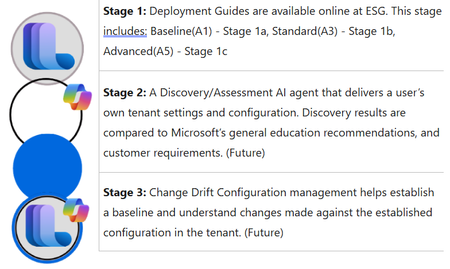
What is ESG- Education Solutions Guide The Microsoft Education Solution Guide (ESG) was developed to simplify and enhance understanding of the license features and products that you have available to you in a Microsoft 365 tenant. Initial focus and intent were to create better tools to understand the tenant setup and configuration to enhance security and compliance. Link to full guide is here. It consists of three stages: Goals and Objectives for ESG Goals Develop prescriptive deployment guides that provide a centralized resource with education-specific scenarios to assist organizations in defining, managing, and organizing their tenant and appropriate applications. Reduce the overall complexity of tenant and service deployment. Establish baseline recommended pathways to facilitate a common and agreed-upon configuration based on subject-matter experts. Utilize AI technology to uncover and compare recommended settings against user requirements based on documented configurations. Implement phased configurations to aid customers and partners in understanding what they may not know or should consider during discovery to meet customer expectations. Highlight unused features and products to ensure customers fully leverage the potential and benefits of their purchased product licenses. Identify opportunities for partner participation in achieving customer goals and expectations based on customer requirements and ESG findings. Create an easy pathway for customer change management to enhance control, security, compliance, and privacy of tenants. Develop custom assessments to evaluate product entry for items such as Copilot, Defender, Purview, Intune, Zero-Trust, and Microsoft Entra ID. Objectives Deliver information for features available (used/unused) to users based on license model. Prescriptive recommendations based on education scenarios. - Present upgrade license opportunities from A1 to A3 to A5. Security analysis exposing gaps and issues proactively to allow modifications before it's too late. Promote partner access to customers that have defined gaps based on assessments and are requesting partner assistance. Better discovery and assessment analysis with new tools. Designed to be more self-serving customer and partner access management. Speed up user adoption for educators and IT Admins alike. Recommended Roles for Implementation IT Admin Identity Admin Security Admin Compliance Admin OneDrive Admin SharePoint Admin Exchange Online Admin Teams Admin Navigation ESG has seven main sections in the navigations. ESG – Microsoft Solutions Guide overall, Microsoft Education license (A1-A3-A5), and Microsoft addons licenses. Baseline Phase – Overview, Products and Features, Licenses. All five sections (Setup, Identity, Applications, Security and Compliance, and Devices) Standard Phase - Overview, Products and Features, Licenses All five sections (Setup, Identity, Applications, Security and Compliance, and Devices. Advanced Phase - Overview, Products and Features, Licenses. Three sections (Identity, Applications, and Security and Compliance) Addons – Any addon products and when/where they can be added to your current license configuration. Windows – Education specific Windows based products and features. References – Any process or configuration that is not outlined in the three license phases will be included here. Phases Deployment Sequence The Baseline phase is the first step in the three-phase approach: Baseline (A1) → Standard (A3) → Advanced (A5) The Baseline phase is the foundational first phase in the Microsoft Education Solution Guide deployment sequence, aligned with the Microsoft 365 A1 education license. Standard Phase - The Standard phase is the second phase in the Microsoft Education Solution Guide deployment sequence, aligned with the Microsoft 365 A3 education license. The Advanced phase is the third and most comprehensive phase in the Microsoft Education Solution Guide deployment sequence, aligned with the Microsoft 365 A5 education license. Sections Setup Tenant setup is key to establishing a secure and valid tenant. Setup goes through domain assignments, administration, and service management. Identity Establishing an identity via Microsoft Entra ID and establishing authentication methods, Single Sign-On, and user procurement methodologies. Applications Applications like Microsoft Teams, SharePoint, OneDrive, Exchange Online is the core to a Microsoft tenant. Getting these applications setup are essential to allow users in education to access services and apps like Learning Accelerators. Security and Compliance Security via each phase is essential to maintain order and blocking access for bad actors. Along with security compliance/privacy considerations that are established to adhere to a multitude of local and government requirements worldwide. Devices Managed and unmanaged devices are another key to helping secure the network and potential cyber-security considerations that enter the network via these devices. How do you use ESG? ESG uses deployment guidelines for content that contain education scenario specifics. These prescriptive “Purple Boxes” allow education organizations the ability to see prescriptive guidelines and recommendations based on an edu scenario. ESG has a linked path for each modules based on the phase (Baseline,Standard,Advanced). Users can follow the deployment content to establish or redefine the tenant configuration in order to enable additional services and products. What’s Next Go to https://aka.ms/esg to access Microsoft Education Solutions Guide. Stage 2 – A custom agent to discover the tenant configuration settings and allow customers and partners the ability to qualify what is set to standard recommendation. This agent will also have the ability to access partner content and internal Microsoft resources. Using an AI Agent to discover tenant settings based on Graph API calls and Microsoft MCP Server for Enterprise to evaluate against known Microsoft recommended settings. Part 3 – Change management from discovery data baselines to access and deliver any updates/changes/modifications, daily/weekly/monthly.1.4KViews0likes0CommentsNew School Data Sync Experience is Now Generally Available
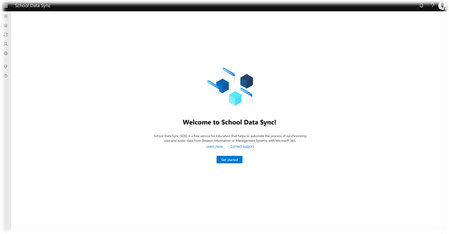
We are excited to announce the new School Data Sync (SDS) experience is now generally available. School Data Sync (SDS) is a free service for Education that helps to automate the process of synchronizing user and roster data from Student Information or Management Systems (SIS/SMS) with Microsoft 365. SDS has various enhancements and improvements over SDS (Classic).26KViews2likes9CommentsEnd of Year Guide for Educators and IT Admins
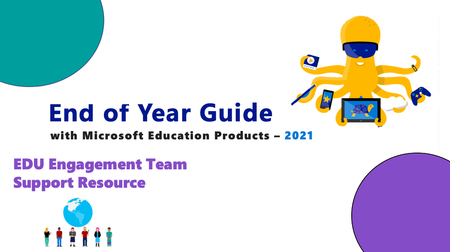
It's that time of the year for northern hemisphere schools! Time to plan your end of year activities, close out the current school year and ensure you are set-up for success in the new school year or for summer school. Checkout our new End of Year Guide for some quick tips on getting back into the swing of things!11KViews5likes6CommentsEnable Efficient Remote Learning with the most current updates for Microsoft 365 Apps
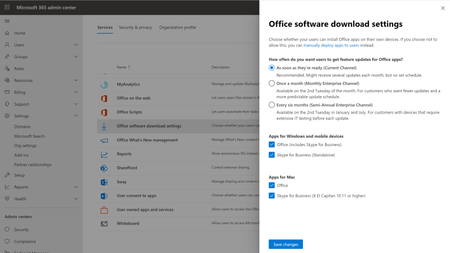
Recently we’ve heard from our educators around the world wanting to make sure they have the most current capabilities to support remote learning and real-time collaboration for educators, students, and We always listen to feedback to improve the Microsoft 365 Apps experience. To help ensure you can leverage these improvements, we recommend the Current Channel for feature updates to Microsoft 365 Apps.6.9KViews0likes0Comments