investigation
288 TopicsMicrosoft Ignite 2026: New Sentinel Connectors Announcement
Microsoft Sentinel helps organizations detect, investigate, and respond to threats across increasingly complex environments. As AI transforms security operations, bringing together the right data and context is more important than ever, giving human defenders and AI agents a more complete view of the environment to reason over and act on. These integrations bring signals from Microsoft and third-party technologies together across the security environment, unlocking richer context for investigations and helping power the new Integrated Security Operations Center (ISOC) in Microsoft Defender, where human defenders and AI agents can reason across the environment with shared context. The connector ecosystem isn’t the only area seeing rapid growth. Microsoft Sentinel continues to add new capabilities, including Nested API support, Azure Blob support, and multi-account support, while AI-powered tools like the connector builder agent are making it easier than ever for developers to build integrations and bring more of their security data into Sentinel. At the same time, Unified Data Management, now in public preview, makes it easier for customers to manage their Microsoft Sentinel data, connectors, tables, and ingestion health in one place. For Microsoft Ignite 2026, we’re excited to showcase recent additions to this growing ecosystem and the partners making them possible. These new and enhanced connectors continue to broaden the security data available to customers, helping human defenders and AI agents gain the context they need across the technology estate. Airlock Digital for Microsoft Sentinel Airlock Digital helps prevent malware, ransomware, and unauthorized software with deny by default application control, allowing only trusted applications, scripts, and processes to run. Its Microsoft Sentinel push integration ingests execution history, browser extension control events, server administrative activity, and policy changes for monitoring and investigation. Included parsers map execution and audit events to Microsoft’s ASIM for analysis alongside other security signals. A customizable workbook supports investigation and monitoring, and teams can create analytics rules using the ingested data. NC Protect Data Connector for Microsoft Sentinel NC Protect Data Connector for Microsoft Sentinel from archTIS brings user activity and protection logs from NC Protect into Sentinel for centralized security analysis. The connector captures user activities and access-related events, while built-in workbooks support investigation and visualization of user behavior. By correlating NC Protect audit data with other security telemetry, the integration helps teams identify suspicious user activity, trigger alerts and response workflows, strengthen auditing, and monitor guest activity across SharePoint and Teams. blacklens.io for Microsoft Sentinel blacklens.io for Microsoft Sentinel brings external and internal attack-surface data, risk-prioritized vulnerabilities, darknet intelligence, and supply-chain risks into Microsoft Sentinel. The connector ingests exposed assets, compromised identities, stolen credentials and session cookies, typosquatting domains, and supplier activity on ransomware leak sites. The solution includes a data connector and analytics rule for creating Sentinel incidents, with configurable notification rules for alert severity and type. Findings are available in Log Analytics for correlation with existing Sentinel signals and can support custom analytics rules, workbooks, automation, and threat investigations. BloodHound Enterprise BloodHound Enterprise (BHE) helps organizations protect critical assets across modern hybrid environments by continuously uncovering identity attack paths and providing actionable remediation guidance. By integrating with Microsoft Sentinel, BHE delivers attack path data and identity security posture insights directly into Sentinel workflows. This helps security teams prioritize remediation efforts based on exposure to critical assets while enriching investigations into identity-based threats, including lateral movement and privilege escalation. Together, BHE and Microsoft Sentinel help security teams connect threat detection to underlying identity risk, speed investigations, and reduce opportunities for attackers. BlueVoyant Anthropic Claude Compliance BlueVoyant Anthropic Claude Compliance brings compliance activity from the Anthropic Claude Compliance API into Microsoft Sentinel using the Codeless Connector Framework (CCF). The connector ingests Claude compliance events into Sentinel, giving security, risk, and audit teams centralized visibility into AI usage and related activity. By correlating these compliance signals with identity, endpoint, and other security telemetry, the integration supports threat hunting, investigation of policy violations and anomalous behavior, compliance monitoring, and repeatable audit workflows. Cato Networks for Microsoft Sentinel Cato Networks for Microsoft Sentinel brings security and network events from the Cato SASE Platform into Microsoft Sentinel using the Codeless Connector Framework (CCF) Push pattern. The connector pushes events into a dedicated Log Analytics table, making Cato activity available alongside other Sentinel data. By centralizing this telemetry in Sentinel, the integration enables security teams to incorporate Cato events into threat hunting, detection, and visualization workflows alongside broader security signals. Check Point EM ThreatCloud Intelligence Feed Connector for Microsoft Sentinel The Check Point EM ThreatCloud Intelligence Feed Connector brings threat intelligence from Check Point Exposure Management into Microsoft Sentinel. The connector ingests indicators of compromise (IoCs), including malicious IP addresses, domains, URLs, and file hashes, enriched with threat context such as confidence, severity, kill-chain stage, and campaign associations. An included playbook further enriches incident IoCs through ThreatCloud, helping security teams correlate intelligence with existing telemetry, accelerate triage and investigation, and reduce the manual effort required to maintain threat intelligence. Check Point Exposure Management Threat Intelligence IoC for Microsoft Sentinel Check Point Exposure Management Threat Intelligence IoC for Microsoft Sentinel brings threat intelligence from Check Point Infinity External Risk Management into Sentinel. The connector ingests malicious IP addresses, domains, URLs, and file hashes, enriched with context such as severity, confidence, and detected activity. By correlating these indicators of compromise (IoCs) with existing logs through analytics rules, hunting queries, and watchlists, the integration helps security teams reduce manual intelligence management, identify matches with external threats, and accelerate threat detection and investigation. Citrix SPA Sentinel App Citrix SPA Sentinel App brings Citrix Secure Private Access and Device Posture service events into Microsoft Sentinel using the Codeless Connector Framework (CCF). The connector imports critical logs, policy outcomes, and user activity data, giving security teams greater visibility into application access and device posture activity. An included workbook supports visualization and analysis of Citrix data, helping SOC teams correlate activity with broader security telemetry, investigate security risks, support compliance monitoring, and strengthen threat hunting across their environment. ContraForce Events for Microsoft Sentinel ContraForce Events for Microsoft Sentinel brings security delivery and administrative activity from ContraForce workspaces into Microsoft Sentinel using the Codeless Connector Framework (CCF). ContraForce is an Agentic Security Delivery Platform for service providers and security teams running triage, investigation, and response across Microsoft Defender XDR and Sentinel. The connector ingests incidents, privileged access changes, service account credential activity, and high-impact workspace actions. Three included analytics rules detect privileged access, credential, and high-impact workspace activity, helping teams monitor and investigate the platform supporting their security operations. Corelight for Microsoft Sentinel By transforming all network traffic into rich, comprehensive evidence, Corelight gives security teams using Microsoft Sentinel the visibility to understand exactly what is happening across their enterprise networks. In addition to native integration with Microsoft Sentinel, Corelight integrates with Microsoft Defender for Endpoint, Defender Vulnerability Management, and Entra ID to streamline investigations, accelerate responses, and remediate incidents quickly and easily. The Corelight App for Microsoft Sentinel includes intuitive dashboards, pre-defined workbooks , sample queries, and analytics rules that help make SOC teams more efficient and effective. CTM360 CTM360 brings external threat visibility into Microsoft Sentinel. The integration connects the CTM360 HackerView and CyberBlindspot platforms to Sentinel through REST APIs, so external attack surface and digital risk events flow straight into security operations workflows. HackerView surfaces externally exposed assets and security issues across your attack surface. CyberBlindspot adds organization-specific threat intelligence from surface, deep, and dark web monitoring. With these signals centralized in Sentinel, security teams can analyze external exposures alongside their broader telemetry and speed up detection, investigation, and response. Cyren CrowdStrike IOC Automation Cyren CrowdStrike IOC Automation connects Cyren IP reputation threat intelligence with Microsoft Sentinel and CrowdStrike Falcon to operationalize malicious IP indicators. An included Logic App playbook automatically retrieves known malicious IP addresses from Cyren and submits them to CrowdStrike Falcon as custom indicators of compromise (IOCs) for blocking and detection. Scheduled execution keeps the intelligence updated and automates the flow of Cyren IP reputation data into CrowdStrike Falcon for blocking and detection. Vaikora AI Agent Signals for Microsoft Sentinel Vaikora AI Agent Signals for Microsoft Sentinel brings behavioral security signals from AI agents into Sentinel for centralized monitoring and response. The connector ingests risk scores, anomaly and threat classifications, policy enforcement decisions, and audit data, including signals for prompt injection attempts and suspicious tool usage. Included analytics rules and a workbook help security teams detect behavioral anomalies, investigate policy violations, and incorporate AI agent risks into existing Sentinel incident workflows. Vaikora AI Agent Signals for SentinelOne Vaikora AI Agent Signals for SentinelOne brings high-risk behavioral security signals from Vaikora into SentinelOne as threat intelligence indicators of compromise (IOCs). The integration filters high-severity and anomalous AI agent activity and maps Vaikora risk scores to SentinelOne severity levels. The resulting IOCs are submitted to SentinelOne and expire after 90 days, enabling Vaikora security signals to be incorporated into SentinelOne endpoint protection workflows. DataBahn Agentic Data Control Plane for Microsoft Sentinel DataBahn’s agentic data control plane integrates with Microsoft Sentinel to provide our shared customers an AI-native data pipeline and orchestration platform that allows them to accelerate enterprise deployments. DataBahn’s pipeline standardizes onboarding and shaping across all data sources while providing operational visibility into data flow and health. Together, the collaboration focuses on reducing onboarding friction, improving normalization consistency, and enabling intentional routing, which helps security teams improve visibility, support threat detection, and streamline investigation and incident response workflows. Delinea Platform for Microsoft Sentinel Delinea Platform Sentinel Solution brings privileged access activity into Sentinel natively through the Content Hub, as a complete SOC package. The connector pulls audit events covering secrets access, authentication, session activity and configuration changes directly into Sentinel. Ready-made workbooks, analytics rules with baseline-driven detection, hunting queries and an automated response playbook let security teams detect bulk secret access, failed sign-in bursts and privilege escalation sooner, investigate without leaving Sentinel and answer auditors with a record of what happened and why it was allowed. Dynatrace Software Intelligence Platform with Microsoft Sentinel Dynatrace integrates bidirectionally with Microsoft Sentinel, bringing application attacks, runtime vulnerabilities, Dynatrace Intelligence problems, and audit logs into Sentinel, where analytics rules, workbooks, and playbooks support detection, triage, and response. Sentinel can also send alerts to Dynatrace and enrich detected attacks with Sentinel and Microsoft Defender XDR insights. Bindplane by Dynatrace complements the integration by collecting and routing logs into Sentinel, including normalization to ASIM tables, giving SOC teams runtime and topology context for investigations. ExtraHop RevealX for Microsoft Sentinel ExtraHop RevealX for Microsoft Sentinel brings network detection and response (NDR) into Sentinel, giving your SOC visibility into threats that endpoint and log tools miss, including lateral movement and credential abuse hiding in encrypted east-west traffic. RevealX decrypts and analyzes network traffic at line rate, out of band with no impact on the network. The connector sends ExtraHop detections into Sentinel for dashboards, custom alerts, and investigation, so network context enriches your existing SOC workflows instead of sitting in a separate console. Fire Compass FireCompass Risks for Microsoft Sentinel brings validated external risk findings from the FireCompass platform into Microsoft Sentinel through the Codeless Connector Framework. The connector ingests risk data including severity, affected assets, assessment context, impact, and remediation guidance. By making validated exposures available in Sentinel, security teams can correlate external risks with endpoint and network telemetry, track remediation progress, and build analytics rules, workbooks, and hunting queries on top of FireCompass findings. Gambit Security Sentinel Solution Gambit brings resilience context into Microsoft Sentinel. It finds the resilience issues in your environment and syncs them to your Sentinel workspace daily, to help analysts see recovery risk before anything goes wrong. Sentinel correlates those issues with its detections. Your team can then prioritize the attacks most likely to disrupt critical operations: the ones hitting resources that aren’t ready to recover. Sentinel tells you what’s happening. Gambit tells you whether you can recover from it. Group-IB Threat Intelligence Integration with Azure Group-IB Threat Intelligence for Microsoft Sentinel brings adversary-centric threat intelligence into Sentinel, including malicious IPs, domains, URLs, and file hashes with risk scores and malware attribution. Additional intelligence on threat actors, malware, vulnerabilities, data leaks, compromised credentials, and suspicious payment details are available for hunting and visualization. Enrichment playbooks also let analysts add Group-IB context, WHOIS data, and IP scoring directly to incidents, supporting threat investigation and analysis. Holm Security for Microsoft Sentinel Holm Security for Microsoft Sentinel brings asset data from the Holm Security platform into Sentinel via the Holm Security REST API. The connector ingests web and network assets into Microsoft Sentinel, including metadata such as IP addresses, hostnames, operating systems, tags, and vulnerability counts per asset. By incorporating this asset inventory alongside other security telemetry, the integration enables security teams to build dashboards, create custom alerts, and correlate asset information with other data in Microsoft Sentinel. Idira Endpoint Privilege Manager for Microsoft Sentinel The Idira® Endpoint Privilege Manager by Palo Alto Networks integration for Microsoft Sentinel pulls application events and policy audit activity into Microsoft Sentinel using the Codeless Connector Framework and the Idira Endpoint Privilege Manager REST API. Events land in a dedicated Log Analytics table, so security teams can analyze privilege activity alongside their other telemetry and build detections. IPinfo: IP geolocation & intelligence database IPinfo: IP geolocation & intelligence database brings contextual IP intelligence into Microsoft Sentinel to enrich security logs and investigations. The solution provides data such as IP geolocation, network ownership and routing, proxy and residential proxy detection, ASN information, and other IP classifications. By adding this context to IP addresses observed in Sentinel, the integration helps security teams better understand indicators of compromise, prioritize security events, strengthen threat detection and investigation, and inform network and access management decisions. Island Solution for Microsoft Sentinel Island Solution for Microsoft Sentinel brings user activity and administrative audit events from the Island Enterprise Browser into Microsoft Sentinel for centralized security monitoring. The solution automatically shares events from the Island Management Console with Sentinel and includes data connectors and workbooks for user activity and admin audit logs. By adding browser activity context to existing security telemetry, the integration helps security teams monitor and analyze user and administrative activity and investigate potential security issues. NetApp Ransomware Resilience for Microsoft Sentinel NetApp Ransomware Resilience detects and contains ransomware attacks on NetApp ONTAP workloads in real time, then enables fast, clean recovery. Its Microsoft Sentinel integration enriches alerts with data-layer context, including attack type, severity, user and IP, and affected cluster, volume, and SVM. The NetApp SOAR playbook can take actions on ONTAP such as trigger immutable snapshots, block suspicious users or IPs, and take compromised volumes offline. Together, these integrations extend the NetApp Platform’s ability to help security teams triage and respond to ransomware attacks, limit data loss, protect recovery points, and coordinate response across storage and security teams. NordStellar for Microsoft Sentinel NordLayer Intelligence by NordStellar for Microsoft Sentinel brings external threat and exposure findings into Sentinel through the Azure Monitor Logs Ingestion API. The integration provides findings including leaked credentials, breach exposures, malware and info-stealer infections, dark web activity, domain impersonation risks, and external attack surface vulnerabilities. By correlating these findings with other security telemetry in Sentinel, the solution helps teams investigate external threats, identify exposures affecting their organization, and automate triage and response through analytics rules and SOAR playbooks. Panorays for Microsoft Sentinel Panorays for Microsoft Sentinel brings third-party security findings from the Panorays platform into Sentinel through the Panorays API. The connector provides security teams with visibility into the security posture of vendors and supply-chain organizations, making third-party risk and vulnerability findings available alongside other security telemetry. By incorporating Panorays findings into Sentinel workflows, the integration helps SOC teams centrally monitor and investigate third-party risks and correlate them with internal security signals. USTA Account Takeover Prevention Sentinel Connector USTA Account Takeover Prevention Sentinel Connector brings compromised credential intelligence from the PRODAFT USTA Threat Intelligence platform into Microsoft Sentinel. The connector ingests alerts for exposed corporate credentials, enabling security teams to investigate potential account takeover risks within existing Sentinel workflows. Included analytics can identify newly compromised credentials and successful Microsoft Entra ID sign-ins involving known-compromised accounts, helping SOC teams operationalize external credential intelligence and prioritize investigation and response. USTA IoC Threat Stream for Sentinel USTA IoC Threat Stream for Sentinel brings curated indicators of compromise (IoCs) from the PRODAFT USTA Threat Stream into Microsoft Sentinel Threat Intelligence. The integration provides indicators including malicious URLs, phishing sites, and malware hashes derived from PRODAFT investigations. By making these indicators available for correlation with existing telemetry, hunting queries, and detection rules, the solution helps security teams identify connections to malicious infrastructure, investigate phishing and malware activity, and incorporate external threat intelligence into existing triage and response workflows. USTA Payment Card Fraud Intelligence Sentinel Connector USTA Payment Card Fraud Intelligence Sentinel Connector brings compromised payment card intelligence from the PRODAFT USTA Threat Intelligence platform into Microsoft Sentinel. The connector retrieves alerts associated with an organization’s payment card BIN ranges and makes them available within Sentinel for investigation. Included analytics identify newly exposed and non-expired compromised cards, helping security teams centralize payment fraud intelligence, prioritize potentially actionable exposures, and incorporate them into existing investigation and response workflows. Pulumi Cloud Audit Logs for Microsoft Sentinel Pulumi Cloud Audit Logs for Microsoft Sentinel brings audit logs from Pulumi, the infrastructure platform for humans and agents, into Microsoft Sentinel through the Codeless Connector Framework (CCF). The connector ingests authentication events, organization membership changes, stack lifecycle operations, policy changes, and access token usage. It also includes three analytics rules that detect failed login attempts, stack deletions, and organization membership changes. Your security team can see what a human or agent did, when, and where across infrastructure as code, secrets, configuration, and policies, which helps speed up security and governance investigations. QCrypton PQC Scanner for Microsoft Sentinel QCrypton PQC Scanner for Microsoft Sentinel brings post-quantum cryptography readiness findings from Azure environments into Sentinel using the Codeless Connector Framework (CCF). The connector provides visibility into cryptographic assets including Key Vault keys, TLS certificates and configurations, and Entra ID app registration certificates, with quantum posture ratings and risk scores. Included are six analytics rules, a workbook, and a notification playbook to help security teams identify vulnerable cryptographic assets and prioritize post-quantum migration planning. SailPoint for Microsoft Sentinel SailPoint for Microsoft Sentinel brings identity security telemetry from SailPoint Identity Security Cloud into Sentinel using the Codeless Connector Framework (CCF). The solution streams audit and search events into Sentinel tables, where analysts can correlate identity activity with other security signals and query SailPoint APIs for additional identity and account context during incident triage. Automated playbooks can also remediate threats by revoking access or disabling compromised accounts, helping teams connect identity insight with investigation and response. SAP LogServ (RISE), S/4HANA Cloud private edition SAP LogServ (RISE), S/4HANA Cloud private edition extends Microsoft Sentinel security monitoring for SAP RISE environments with infrastructure, database, operating system, and network security logs managed by SAP Enterprise Cloud Services. Deployed alongside the Microsoft Sentinel Solution for SAP applications, it complements application-layer monitoring to provide visibility across the SAP stack and enable cross-layer threat detection and correlation. The solution supports near real-time log collection, built-in analytics and workbooks, ASIM-based security content, and correlation with signals from endpoints, Microsoft Entra ID, and other sources in Microsoft Sentinel. MailRisk data connector for Microsoft Sentinel MailRisk data connector for Microsoft Sentinel brings suspicious email data analyzed by users through Secure Practice MailRisk into Sentinel. The connector ingests enriched email metadata and risk assessment updates from the Secure Practice API, providing potential indicators of compromise identified from reported emails. By incorporating MailRisk data alongside other security telemetry, the integration helps security teams correlate suspicious email activity, search and investigate potential threats, and incorporate user-reported email intelligence into alerting and incident response workflows. SecurityScorecard Ratings for Microsoft Sentinel SecurityScorecard Ratings for Microsoft Sentinel provides cybersecurity posture ratings based on continuously monitored risk factors and threat intelligence. SecurityScorecard evaluates organizations using an A-F rating, helping security teams identify and track cybersecurity risks. The solution supports use cases including enterprise cyber risk management, third-party risk monitoring, executive reporting, and cyber due diligence. SIGNL4 - Mobile Alerting & Response for Microsoft Sentinel and Defender for Cloud SIGNL4 bridges the gap between security detection and human response with mobile-first alerting and incident management for Microsoft Sentinel and Defender for Cloud. Its two-way integrations allow security teams to acknowledge, escalate, and resolve incidents directly from their mobile devices, with updates automatically synchronized back to Sentinel. Critical Defender for Cloud findings trigger actionable response workflows, while persistent mobile notifications, automated escalations, and on-call scheduling ensure the right people are reached when it matters most. The result is faster incident response, clear accountability, and a fully auditable process - wherever responders are. SOC Prime Audit CCP SOC Prime Audit CCP brings SOC Prime Platform audit logs into Microsoft Sentinel for centralized security monitoring and analysis. The connector ingests platform activity including user actions, API calls, and administrative events, providing an audit trail across detection engineering processes. By correlating SOC Prime activity with other security signals in Sentinel, the integration helps security teams investigate platform activity, support compliance monitoring, and incorporate audit telemetry into broader threat detection and response workflows. SOCRadar Alerts Azure Sentinel Directional Solution SOCRadar Threat Intelligence for Microsoft Sentinel enriches security operations by bringing prioritized, context-rich alerts directly into Microsoft Sentinel. Covering SOCRadar’s Extended Threat Intelligence capabilities, including Brand Protection, External Attack Surface Management (ASM), Third-Party Findings, and other security modules, the integration helps organizations monitor external threats and manage investigations within their existing SOC workflows. Bidirectional synchronization also helps keep incident status, severity, and comments aligned between Microsoft Sentinel and SOCRadar. SpyCloud Enterprise Protection for Microsoft Sentinel SpyCloud Enterprise Protection for Microsoft Sentinel brings stolen identity data from infostealer malware, phishing attacks, and third-party breaches into Microsoft Sentinel, helping security teams uncover compromised identities, prioritize high-risk exposures, and accelerate remediation to prevent session hijacking and other targeted identity-based attacks. The solution includes a custom API connector, a Logic Apps playbook for ingesting data into Log Analytics, analytic rules that generate Sentinel incidents from breach and malware data, and additional Logic Apps playbooks for incident automation and enrichment. Tenable App for Microsoft Sentinel Tenable App for Microsoft Sentinel brings asset and vulnerability data from Tenable One Vulnerability Management into Sentinel for centralized security analysis. The integration combines Tenable cyber exposure insights with Sentinel’s collection, detection, and investigation capabilities, making vulnerability context available alongside other security telemetry. By incorporating asset and vulnerability findings into Sentinel workflows, the solution helps security teams correlate exposure data with security signals, investigate risks affecting vulnerable assets, and better prioritize remediation efforts. Uniqkey Security Events for Microsoft Sentinel Uniqkey Security Events for Microsoft Sentinel brings authentication, credential access and management, sharing, administrative activity, and platform threat detections into Microsoft Sentinel using the Codeless Connector Framework (CCF). Included analytics rules identify scenarios such as sign-ins from unfamiliar IP addresses, excessive credential access, data exports, and security policy or privilege changes. A workbook visualizes activity and threat detections, helping security teams monitor password-management activity, investigate potential credential risks, and correlate findings with broader security telemetry. Utimaco Enterprise Secure Key Manager Utimaco Enterprise Secure Key Manager (ESKM) integrates with Microsoft Sentinel to provide centralized security monitoring and visibility into cryptographic key management activities through KMIP server logs. The solution enables organizations to monitor key operations, KMIP client activity, and authentication events, helping security teams identify suspicious behavior and investigate potential threats. Built-in analytics rules help detect brute-force authentication attempts, repeated permission-denied events, and key-destruction activity, while hunting queries and a dedicated workbook support deeper investigation of unusual users, source IPs, key retrieval patterns, and after-hours activity. valimail-sentinel-enforce Valimail enables organizations to see who sends email using your domain, protects against domain impersonation, and displays a verified logo in inboxes to increase brand trust. Our Microsoft Sentinel Connector brings Valimail Enforce event data directly into Sentinel, allowing security teams to incorporate our telemetry into unified SIEM workflows, monitor authentication and enforcement trends in real time, and build custom alerts and visualizations based on DMARC events. Once configured, Sentinel continuously ingests Valimail event logs, enriching your broader security intelligence and helping to improve your ability to detect and respond to threats across your environment. Varonis for Sentinel Solutions Varonis for Sentinel Solutions brings enriched, data-centric Varonis alerts into Microsoft Sentinel for triage, investigation, and remediation. Varonis insights are contextualized alongside other security events to provide a unified view of data risk. This allows security teams to view and close Varonis alerts directly within Sentinel, reducing the need to switch interfaces and supporting incident resolution with less manual effort Whisper for Sentinel Whisper for Sentinel enriches Microsoft Sentinel incidents and alerts with threat and infrastructure intelligence for IPs, domains, ASNs, and networks. The solution provides threat scores, supporting evidence, infrastructure relationships, and historical context directly within Sentinel. Included enrichment playbooks, analytics rules, hunting queries, and workbooks support investigation of threats including C2 communications, malicious infrastructure, suspicious domains, and BGP anomalies, while retained enrichment data can be queried and correlated with existing logs. WhoisFreaks Threat Intelligence for Microsoft Sentinel The WhoisFreaks solution for Microsoft Sentinel brings domain threat intelligence and newly registered domain (NRD) data into Sentinel using the Codeless Connector Framework (CCF). Customers can connect malware, phishing, and spam threat feeds, along with gTLD and ccTLD NRD feeds with or without WHOIS data. Included analytics rule templates help identify high-confidence malicious domains, newly registered domains appearing in threat feeds, threat-listed parked domains, and unusual NRD volumes that may indicate bulk registration activity. Wiz for Microsoft Sentinel Wiz for Microsoft Sentinel brings Wiz Issues, Vulnerability Findings, and Audit logs into Microsoft Sentinel. Wiz identifies and prioritizes cloud security risks across areas including vulnerabilities, malware, internet exposure, identity, and data security in AWS, Azure, Google Cloud, OCI, Alibaba, and Kubernetes environments. In addition to the solutions from our third-party partners, we are also excited to announce the following connectors published by the Microsoft Sentinel team: Agari Solution Akamai DDOS Protection Alibaba Cloud Networking Atlassian Organization Audit AWS Elastic Kubernetes Service AWS Elastic Load Balancing Cisco Cloud Security Cisco Meraki Events via REST API Crowdstrike Falcon Endpoint Protection Elastic Agent Solution Imperva WAF Cloud Solution Microsoft Copilot Microsoft Dragon Copilot Mulesoft CloudHub Alerts OpenAI Qualys VM Knowledgebase Rapid7 InsightVM CloudAPI SentinelOne TheHive Solution Trellix Enpoint Security Trend Micro Cloud App Security VMware Workspace ONE Zoom Reports Building a more connected foundation for security operations The strength of the connector ecosystem reflects the work of Microsoft and our technology partners to support our shared customers. Together, we are helping organizations connect the technologies they rely on and bring more of their security data into a unified operational experience. For customers If you are a Microsoft Sentinel or ISOC customer, or considering adopting it, we want you to have the security connectors and integrations you need to get value from the platform. If an integration with an independent software vendor (ISV) is not yet available, or you have an issue with an existing solution, we have a dedicated team that may be able to assist by working with ISVs to build new or update existing connectors. For software companies If you are a software development partner, the Microsoft Sentinel Codeless Connector Framework (CCF) provides a streamlined way to bring your product into the Microsoft Security ecosystem. Partners can also work directly with Microsoft for engineering guidance and support to build or improve a connector. Building a more connected foundation for security operations Our goal is simple: help customers protect their digital environments by giving human defenders and AI agents a more complete picture of risk. We’ll continue investing in connectors, partnerships, and integrated security experiences to help customers defend their organizations with greater visibility, context, and confidence. Learn More Microsoft Sentinel What is Microsoft Sentinel Empower Real-Time Security with Microsoft Sentinel’s CCF Push Feature | Microsoft Community Hub Growing our connector ecosystem with 500+ Microsoft Sentinel connectors Protecting Microsoft's SAP workload with Microsoft Sentinel for SAP: the RISE with SAP chapter Microsoft Defender ISOC in Microsoft Defender Microsoft Sentinel connector hands-on labs Building Microsoft Sentinel Connectors in Minutes with the Sentinel Connector Builder Agent Building a CCF Nested API Pull Connector: A Technical Lab Walkthrough Microsoft Sentinel features in public preview Accelerate connectors development using AI agent in Microsoft Sentinel | Microsoft Community Hub Extending Sentinel Data Integration: Azure Blob Storage Support for CCF Connectors | Microsoft Community Hub Public Preview: Nested API Support Comes to Microsoft Sentinel CCF | Microsoft Community Hub Public Preview: Multi-Account Support for Microsoft Sentinel Codeless Connectors | Microsoft Community Hub Manage all your Microsoft Sentinel data in one place with Unified Data Management (Public Preview) | Microsoft Community Hub2KViews0likes1Comment
Microsoft Defender: Problems with correlations in Azure Sentinel
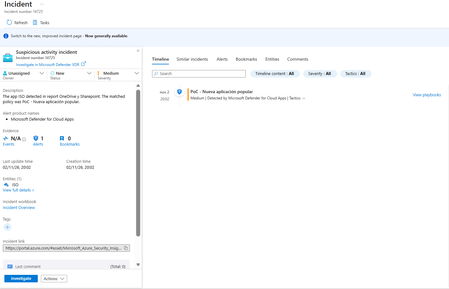
Hi community! Sharing something we've noticed this week, in case anyone else is running into the same thing. Since around October 31, several of our environments have been generating more incidents than before. Many of the automation rules we have deployed are based on the incident title, and they're now "failing" because the alert that creates the incident is being correlated and the incident is getting a different title. On top of that, I can't base these automation rules on the analytics rule name instead, because the alert comes from Defender and that condition isn't available for it in the automation rule. In addition, some incidents from Sentinel analytics rules now show Defender-generated titles, even though they contain only a single alert. For example, the rule "Office365 Sharepoint File transfer Folders above threshold" now generates an incident called "Exfiltration incident involving one user", and "PoC - Nueva aplicación popular" now generates "Suspicious activity incident". .222Views0likes2Comments
Microsoft Defender AMSI false positive — private evidence submission guidance
We're seeking guidance on the official private review process for a suspected Microsoft Defender Antivirus AMSI false-positive detection. Detection: HackTool:PowerShell/ApexToolkit.A The detection occurred during an authorized PowerShell-based .NET development/testing workflow. The original AMSI payload is unavailable. We've collected the official Microsoft Defender diagnostic CAB, but it contains personal and internal system information, along with unrelated security history. Microsoft Support referred us to Tech Community because the consumer support channel could not escalate the investigation directly. Our question: Is there an official private channel for submitting sanitized incident records for initial classification review, or obtaining guidance about secure handling of the full diagnostic CAB? We want to maintain Defender protections and avoid posting sensitive diagnostic evidence publicly. Thank you for any guidance on the appropriate Microsoft review process.308Views0likes1CommentWhat’s new in Microsoft Sentinel: September 2026
Welcome back to What's new in Microsoft Sentinel. In September, Case Management brings investigation and collaboration together in Microsoft Defender, with a shared workspace to track work through resolution. Defender unified RBAC custom roles for granular delegated admin privileges (GDAP) give you finer control over what managed security service providers (MSSPs) and other partners can access. In Sentinel data lake, a single Codeless Connector Framework (CCF) connector can bring in data from many accounts, and our connector catalog has passed 500 data connectors. Read on for the details. Sentinel innovations: Sentinel SIEM Sentinel data lake Sentinel SIEM Case Management (Public Preview) Starting September 23, 2026, Case Management brings investigation and collaboration together in one experience in Defender. With Incident Cases, you can investigate, coordinate response, assign work, capture notes, and track progress through resolution, all from a shared workspace that holds investigation context alongside tasks and workflow tracking. Your existing Sentinel automation, playbooks, workbooks, and integrations carry over unchanged. This builds on the integrated security operations (ISOC) vision of bringing the context and workflows practitioners need to investigate and respond together in Defender. Read our Case Management blog, see the documentation, and watch the demo to learn more. Unified RBAC custom roles (Public Preview) If you work with a managed security service provider (MSSP) or manage multiple tenants, giving partners the right level of access is simpler. Granular delegated admin privileges (GDAP) sets which partner groups can be delegated access to your tenant, and Defender unified role-based access control (RBAC) sets what they can see and do once delegated. You can assign unified RBAC custom roles to GDAP remote tenant groups and scope each role down to specific security products, data sources, and data collections so partners receive only the access they need. GDAP previously only supported Microsoft Entra directory roles, which often meant handing partners more access than the job needed. Anyone who is a member of a remote tenant group receives its permissions. Your partner manages who belongs to the group, while you keep control of the role and its scope. Learn more. Sentinel data lake Multi-account support for codeless connectors (Public Preview) A single connector built on the Codeless Connector Framework (CCF) can bring data from many accounts, tenants, or environments into one Sentinel workspace. A unified connections list shows each account as its own row, labeled so you can tell them apart by account name, tenant ID, or environment. An “Add connection” experience walks you through setting up each one, and an independent lifecycle per connection means you can edit or remove any account without affecting the rest. Shared, efficient ingestion sends all of it to the same table, so you have one place to investigate instead of a separate connector for every account. This helps if you run separate production and development accounts, segment by region or business unit, or manage several customers in one workspace. Learn more. Sentinel data connectors pass the 500 mark Sentinel has reached an exciting milestone of more than 500 data connectors. Our connectors bring security signals from Microsoft services, non-Microsoft solutions, multicloud environments, applications, infrastructure, and custom sources into Sentinel, where they can be correlated and analyzed to help teams detect threats, investigate incidents, hunt across their digital estate, and automate response. With 500+ connectors and growing, Sentinel makes it easier for organizations to unify their security ecosystem and give the security operations center (SOC) broader visibility where it matters most. Find your connector. Additional resources Blogs and documentation: Integrated Security Operations Center in Microsoft Defender ISOC in Microsoft Defender (preview) Activate Microsoft Defender unified role-based access control (URBAC) Support multiple connections in a codeless connector Upcoming webinars: Oct 6: Security Immersion Event: Into the Breach Oct 14: Microsoft Security Immersion Event: Shadow Hunter Upcoming events: Oct 19: Microsoft Security Days Summit: Dallas Edition (In Person) ISOC: What's new with the Defenders Capture the Flag: Agent Wars (Hands-on) Nov 17–20: Microsoft Ignite at Moscone Center in San Francisco, CA, USA. See what's next in Microsoft Security. Register now. Stay connected Check back each month for the latest innovations, updates, and events to ensure you’re getting the most out of Microsoft Sentinel. We’ll see you in the next edition!1.4KViews2likes1Comment
RESYNC MICROSOFT DEFENDER FOR ENDPOINT
hey guys im a junior IT officer and i have been tasked with finding a way to get microsoft defender for enpoint to get fresh data without waiting 24hrs or the 4 hours that microsoft insists the resync will happen,I tried advanced hunting running queries directly there,i tried runnning an anti virus scan but nothing happened and APIs i tried looking for APIs that can initiate a restart but nothing...any ideas ? i read on here there was github repo for using powerBI with defender to get new data https://github.com/microsoft/MicrosoftDefenderForEndpoint-PowerBI but its not clear how that work...any intel would be helpful411Views0likes1Comment
Monitoring work from home
My boss has asked me if there is a way to see just how "busy" people who are working from home are. I have this data in Sentinel: Entra sign-in logs Defender for Endpoint logs Office 365 logs Most, if not all, on premise AD login events Netskope (current ZTNA solution) logs I have my known office location IPs so i could just exclude those and look for activity from other IPs however many times people will work in the morning or on the way to work appearing from a non corporate IP, come into the office appearing to come from a corporate IP, and then from home again in the evening. I need a way to query Sentinel looking for people who appear to be working but not coming from Corp IP. If they came from different IPs on the same day including Corp check to see if those non Corp are before and after business hours and exclude those. Anyone know of a good query to achieve this? Or maybe a tool that can extract and generate a report?352Views0likes0CommentsHunting AI Agent Configuration Drift with Microsoft Sentinel
Four KQL patterns for detecting instruction changes, new MCP servers, ownership changes, and organization-wide sharing I recently authored and contributed four new Microsoft Sentinel hunting queries for detecting security-relevant configuration drift in AI agents. They have been reviewed, approved, and merged into Microsoft's public Azure-Sentinel repository. I built the queries around four changes that can materially affect an agent's behavior, access, or exposure: instructions being modified, MCP servers being connected, owners being added, and sharing being expanded to the entire organization. Each modification may be legitimate, but each deserves enough context for a security team to verify that it was expected and authorized. For a security operations team, the difficult question is often not what does this agent look like now? It is what changed since the last known state? Microsoft Sentinel's AgentsInfo table provides inventory-style snapshots of AI agents and their associated configuration. That makes it useful for more than posture reporting. By comparing a recent snapshot with an earlier baseline, we can hunt for configuration drift that deserves investigation. This post walks through four practical hunting scenarios: Instructions changed on a previously published agent A newly observed MCP server on an existing agent An owner added to an MCP-enabled agent Sharing expanded from a restricted scope to the entire organization The complete hunting queries are available in Microsoft's public https://github.com/Azure/Azure-Sentinel/tree/master/Hunting%20Queries/AI%20Agents. The focus here is the detection design behind them, the KQL patterns they share, and the investigation questions they help answer. What I contributed I wrote the four standalone hunting queries discussed in this article and submitted them to Azure/Azure-Sentinel in https://github.com/Azure/Azure-Sentinel/pull/14702: AI Agents - Instructions changed on previously published agent AI Agents - Newly observed MCP server on existing agent AI Agents - Owner added to MCP-enabled agent AI Agents - Sharing expanded to organization-wide The contribution went through several rounds of technical review. Across six commits, I aligned the queries with the unified AgentsInfo schema, added schema-tolerant IdentityInfo enrichment, improved entity mappings, bounded the identity lookback, expanded all owner values, and kept the ATT&CK mappings limited to scenarios where a precise technique could be defended. Repository collaborator v-atulyadav approved the final revision, and the four queries were merged into master on July 20, 2026. This article explains the detection logic and engineering decisions behind that contribution rather than simply reproducing the final YAML files. Why current-state queries are not enough A current-state query can answer questions such as: Which agents are published? Which agents have MCP servers configured? Which agents are shared with the organization? Who owns a particular agent? Those are important posture questions, but they do not tell us whether the state is new. An agent with an MCP server might have been reviewed and approved months ago. The same MCP server appearing for the first time today is a different security signal. Configuration-drift hunting adds the missing time dimension. Instead of treating a risky-looking property as an event, it compares two states of the same agent and reports only meaningful transitions. The common detection pattern I used the same basic time model across all four hunts: let lookback = 14d; let recent = 2d; The latest snapshot observed during the last two days becomes the current state. The latest snapshot from the preceding portion of the 14-day lookback becomes the baseline. Conceptually, the comparison looks like this: let CurrentState = AgentsInfo | where Timestamp > ago(recent) | summarize arg_max(Timestamp, *) by AgentId | where LifecycleStatus != "Deleted"; let BaselineState = AgentsInfo | where Timestamp between (ago(lookback) .. ago(recent)) | where LifecycleStatus != "Deleted" | summarize arg_max(Timestamp, *) by AgentId; CurrentState | join kind=inner BaselineState on AgentId Several details matter here: arg_max(Timestamp, *) by AgentId selects the latest available state for each agent in the relevant time range. The inner join restricts results to agents that exist in both periods. A newly created agent is therefore not automatically treated as configuration drift on an existing agent. Deleted lifecycle snapshots are excluded so that a deletion record does not become the effective baseline or current configuration. The two-day current window is operationally significant. To retain coverage, these hunts should run within two days of a change. The 14-day and two-day values are practical defaults, not universal constants. Environments with different ingestion cadence or retention requirements can adjust them, but the current and baseline windows must remain non-overlapping. Scenario 1: Instructions changed on a published agent An agent's instructions define its default behavior, persona, and operating boundaries. Changing them can be part of normal development, but it can also weaken restrictions, redirect the agent's behavior, or modify how it uses connected capabilities. The first hunt compares the current and previous instruction values only when the agent was published in both snapshots: CurrentState | join kind=inner BaselineState on AgentId | where CurrentInstructions != PreviousInstructions | extend PreviousInstructionsHash = hash_sha256(PreviousInstructions), CurrentInstructionsHash = hash_sha256(CurrentInstructions), InstructionsLengthDelta = strlen(CurrentInstructions) - strlen(PreviousInstructions) I deliberately chose to expose hashes and a length delta rather than returning both instruction bodies in plaintext. This confirms that a change occurred without unnecessarily spreading potentially sensitive prompts through query results, exports, or screenshots. Useful investigation questions include: Was the change associated with an approved development or release process? Did the agent remain published while the instructions changed? Were guardrails, declared tools, permissions, or sharing settings modified around the same time? Do audit records identify an expected actor and change path? The query maps well to an integrity-focused investigation. Its MITRE ATT&CK mapping is T1565.001 (Stored Data Manipulation), but the result is still a hunting lead rather than proof of malicious manipulation. https://github.com/Azure/Azure-Sentinel/blob/master/Hunting%20Queries/AI%20Agents/AgentsInfoInstructionsChangedOnPublishedAgent.yaml Scenario 2: A newly observed MCP server Model Context Protocol servers can extend an agent with external tools, data sources, or actions. From a defender's perspective, the important transition is not simply that an MCP server exists. It is that a server name appears in the current configuration but was absent from the baseline. The query expands the dynamic McpServers array and builds a set of server names for each agent: let CurrentMcp = CurrentRaw | mv-expand Mcp = McpServers | extend McpName = tostring(Mcp.name) | where isnotempty(McpName) | summarize CurrentMcpServers = make_set(McpName) by AgentI It performs the same normalization for the baseline, then calculates the difference: | extend AddedMcpServers = set_difference(CurrentMcpServers, BaselineMcpServers) | where array_length(AddedMcpServers) > 0 Using set_difference() avoids raising a result merely because the order of array elements changed. The hunt reports only MCP server names present in the current set and absent from the previous set. An analyst should validate more than the displayed name: Is the MCP integration part of the approved inventory? What endpoint, authentication method, and permissions are associated with it? Which tools or data can the server expose to the agent? Was the integration introduced through an expected deployment path? Did ownership, instructions, or sharing change in the same period? I did not assign an ATT&CK technique to this query. Adding an MCP server does not, by itself, prove command execution, persistence, or a specific attacker behavior. Avoiding an overly broad mapping keeps the signal honest. https://github.com/Azure/Azure-Sentinel/blob/master/Hunting%20Queries/AI%20Agents/AgentsInfoNewlyObservedMcpServer.yaml Scenario 3: An owner added to an MCP-enabled agent Ownership is a control-plane relationship. A newly added owner may be able to modify an agent's configuration, instructions, integrations, or publication state. The risk becomes more interesting when the agent already has MCP servers configured. The hunt first limits the current state to MCP-enabled agents: | where array_length(coalesce(McpServers, dynamic([]))) > 0 | project AgentId, Timestamp, Name, Platform, CreatedDateTime, CurrentOwners = coalesce(Owners, dynamic([])), McpServers It then compares the owner arrays as sets: | extend AddedOwners = set_difference(CurrentOwners, PreviousOwners) | where array_length(AddedOwners) > 0 | mv-expand AddedOwnerId = AddedOwners to typeof(string) Expanding AddedOwners produces one row per newly observed owner. This is more useful than returning one opaque dynamic array because every added identity can be enriched, mapped, and investigated independently. I kept the raw object identifier in the result even when identity enrichment fails: | extend AddedOwnerUpn = AccountUpn, UnresolvedAddedOwnerId = iff(isempty(AccountUpn), AddedOwnerId, "") That fallback matters. A missing UPN should not hide the underlying ownership change. Investigation should establish: Is the added owner an expected person, service identity, or administrative group? Does the identity's role and business function justify control of this agent? Was the owner added before other configuration changes? Does the identity appear in related sign-in, audit, or privileged-access activity? Should ownership be removed while the change is reviewed? This query maps to T1098 (Account Manipulation) under Persistence and Privilege Escalation. As with the instruction-change hunt, the mapping frames an investigation hypothesis; it does not label every ownership change as malicious. https://github.com/Azure/Azure-Sentinel/blob/master/Hunting%20Queries/AI%20Agents/AgentsInfoOwnerAddedToMcpAgent.yaml Scenario 4: Sharing expanded to the entire organization An agent can move from a limited audience to organization-wide availability without changing its underlying tools or instructions. That transition can materially increase exposure, especially when the agent has MCP integrations or declared tools. The hunt treats "*" in SharedWith as the organization-wide state. The current snapshot must contain it, while the baseline must not: // Current state | where set_has_element(coalesce(SharedWith, dynamic([])), "*") // Baseline state | where not(set_has_element(coalesce(SharedWith, dynamic([])), "*")) The result also counts MCP servers and declared tools: | extend McpServerCount = array_length(coalesce(McpServers, dynamic([]))), DeclaredToolCount = array_length(coalesce(DeclaredTools, dynamic([]))) | extend HasElevatedCapabilities = McpServerCount > 0 or DeclaredToolCount > 0 | sort by HasElevatedCapabilities desc, Timestamp desc I use HasElevatedCapabilities as a prioritization field, not a verdict. It brings agents with connected capabilities to the top of the result set so analysts can review the potentially larger blast radius first. Questions for triage include: Was organization-wide publication explicitly approved? Is the agent intended for every user, or was a group-based scope expected? What data sources, tools, and MCP servers can organization-wide users reach through it? Do the instructions contain assumptions that were safe only for a restricted audience? Were access reviews or user-acceptance tests completed before the expansion? No ATT&CK mapping is assigned because a broader sharing scope is a security-relevant exposure change, but not a sufficiently precise adversary technique on its own. https://github.com/Azure/Azure-Sentinel/blob/master/Hunting%20Queries/AI%20Agents/AgentsInfoSharingExpandedToOrgWide.yaml Resolving owners without making the hunt schema-fragile The Owners field contains identifiers. Human-readable identity context makes results easier to triage, and entity mappings make those identities more useful in Sentinel investigations. I built a small, materialized IdentityInfo lookup that is shared by the four hunts: let IdentityIdtoUPN = materialize( IdentityInfo | extend ResolvedAccountUpn = tostring( column_ifexists("AccountUpn", column_ifexists("AccountUPN", ""))), IdentityTimestamp = todatetime( column_ifexists("Timestamp", column_ifexists("TimeGenerated", datetime(null)))) | where IdentityTimestamp >= ago(lookback) | where isnotempty(AccountObjectId) and isnotempty(ResolvedAccountUpn) | summarize arg_max(IdentityTimestamp, ResolvedAccountUpn) by AccountObjectId | project AccountObjectId = tostring(AccountObjectId), AccountUpn = ResolvedAccountUpn); There are three design choices worth noting: column_ifexists() accommodates observed IdentityInfo naming variants without maintaining separate query versions. The lookup is bounded by the same lookback period instead of scanning unbounded identity history. arg_max() keeps the latest usable identity record for each object ID. After enrichment, the queries map the account using the UPN components and the Entra object ID: entityMappings: - entityType: Account fieldMappings: - identifier: Name columnName: OwnerAccountName - identifier: UPNSuffix columnName: OwnerAccountUPNSuffix - identifier: AadUserId columnName: OwnerId The strong AadUserId identifier remains valuable even when display information changes. Microsoft Sentinel can use mapped entities in bookmarks and investigation experiences, so mapping the changed owner is more than cosmetic enrichment. Turning a result into an investigation These queries intentionally stop at the configuration transition. AgentsInfo tells us that two snapshots differ; it does not necessarily tell us who performed the change, through which interface, or whether the action was authorized. A practical investigation workflow is: Confirm that the two snapshots represent the expected agent and time period. Review the exact changed property and the agent's current capabilities. Identify the owner or newly added owner through IdentityInfo and Entra ID context. Correlate the transition with the relevant audit source for actor attribution. Check for related changes to permissions, tools, data sources, publication state, and sharing. Validate the change against an approved request, release, or ownership process. Restrict, unpublish, or revert the agent if the exposure cannot be justified. Expected changes can still be useful findings. Repeated legitimate results may reveal that a deployment process lacks a stable change window, that ownership is managed through noisy automation, or that the hunt's timing needs to be aligned with release activity. Tuning the hunts for your environment Before operational use, consider the following adjustments: Run cadence: Execute within the two-day current window. A daily cadence provides overlap without blending current and baseline periods. Lookback: Increase the 14-day lookback only if snapshot history and query cost support it. A longer lookback does not compensate for missing the current window. Known change windows: Add watchlists or environment-specific suppression logic for well-controlled automated deployments, while retaining enough context to audit the change. Agent scope: Filter by platform, business unit, agent naming convention, or owner if different teams require separate triage queues. Risk prioritization: Raise agents with sensitive declared data sources, powerful tools, privileged owners, or broad availability to the top of the result set. Audit correlation: Keep attribution logic separate unless the audit source and join keys are stable in your environment. This makes the configuration-drift hunt reusable while allowing each organization to attach its own control-plane evidence. Test with representative snapshots before treating any hunt as an operational control. In particular, validate array shapes for Owners, McpServers, and SharedWith, confirm the identity fields present in your workspace, and exercise both changed and unchanged states. Using the queries The four YAML definitions have been merged into the Hunting Queries/AI Agents folder of Microsoft's Azure-Sentinel repository. Each file contains the complete KQL, description, entity mappings, and ATT&CK mappings where a precise technique applies. https://github.com/Azure/Azure-Sentinel/blob/master/Hunting%20Queries/AI%20Agents/AgentsInfoInstructionsChangedOnPublishedAgent.yaml https://github.com/Azure/Azure-Sentinel/blob/master/Hunting%20Queries/AI%20Agents/AgentsInfoNewlyObservedMcpServer.yaml https://github.com/Azure/Azure-Sentinel/blob/master/Hunting%20Queries/AI%20Agents/AgentsInfoOwnerAddedToMcpAgent.yaml https://github.com/Azure/Azure-Sentinel/blob/master/Hunting%20Queries/AI%20Agents/AgentsInfoSharingExpandedToOrgWide.yaml The broader pattern is reusable beyond these four scenarios: select a stable current snapshot, select a non-overlapping baseline, normalize dynamic properties into comparable sets, calculate the transition, and enrich only after the drift has been identified. That keeps the core detection explainable and gives the analyst the before-and-after context needed for a defensible investigation. References https://learn.microsoft.com/en-us/azure/azure-monitor/reference/tables/agentsinfo https://learn.microsoft.com/en-us/azure/azure-monitor/reference/queries/agentsinfo https://learn.microsoft.com/en-us/azure/azure-monitor/reference/tables/identityinfo https://learn.microsoft.com/en-us/azure/sentinel/entities-reference https://github.com/Azure/Azure-Sentinel/pull/14702 I authored the four hunting queries discussed in this article and contributed them to Microsoft's Azure-Sentinel repository as https://github.com/Azure/Azure-Sentinel/pull/14702. The complete implementations and review history are publicly available through the links above.1.1KViews1like2CommentsSentinel - Defender XDR KQL Queries Library
Hello all, I’ve been building something over the past few weeks that I think the security community might find useful. https://goxdr.fyi is a searchable KQL query library for Microsoft Sentinel and Defender XDR. The name comes from a nickname my colleagues gave me (GoX) combined with XDR. I also picked up https://goxdr.fyi as a short and easy to remember domain for it. You can check it out here: https://goxdr.fyi The idea came from my own day to day work as someone working in IAM and SOC operations. I constantly find myself writing and refining KQL queries for threat hunting, detection engineering and incident investigation. Over time I realized I had a growing collection of queries that I kept going back to and I thought why not make these available to others? It currently has 117 queries covering identity security, BEC/AiTM detection, NTLM and LDAP attack hunting, OAuth governance, AI/Copilot security, Sentinel alert trending, SOC performance metrics and more. Some of these queries are ones I wrote from scratch based on real scenarios I encountered in production environments. Others are community queries I tested and validated in my own setup. Only the ones I found genuinely useful and that actually worked against real data made it in. Each query comes with a description explaining what it detects and why it matters, along with severity levels, platform tags (Sentinel, XDR or both) and a copy button so you can paste it directly into Advanced Hunting or use it as the basis for an Analytics Rule. The site is open source, hosted on GitHub Pages and licensed under CC BY 4.0. No sign-up, no paywall, no tracking. The source is available. I’ll keep adding queries as new scenarios come up. If there’s enough interest I’m also considering adding Cortex XQL queries for Palo Alto environments. Suggestions, feedback or ideas for new detections are always welcome. Feel free to reach out. Thanks430Views1like0CommentsDefender of XDR - Quarantine - Lack of filter/search options
Hi Microsoft, I love what you're doing with the Defender XDR portal, but could you please show some love to the Quarantine section soon? On a daily basis, I have to review emails caught in quarantine for false positives, and the lack of search and filtering options is appalling. As a company based in Denmark, 99% of legitimate emails come from .dk domains. Yet there is no way to search for or filter on something this simple. If I type .dk into the search box, I get 0 results, even though I can clearly see .dk sender addresses on the page. The filter options only allow me to enter full sender or recipient email addresses, which is of course almost useless in a quarantine-review context. Some examples of filters that would be extremely useful: Sender domain ends with .dk Sender domain contains .dk URL domain filtering Attachment name filtering Saved filter views More flexible search across message properties The Quarantine experience could be made dramatically better with relatively little effort. So please, pretty please, give the Quarantine portal some attention. It's often the part of Defender that security teams interact with every single day.714Views0likes4CommentsMicrosoft Defender Incident – Handling incident severity change
There's no dedicated history/audit endpoint for field-level transitions (like "this incident went from Low → High at timestamp X") in the /security/incidents Graph API — the incident object only exposes the current severity plus a lastUpdateDateTime, not a change log. So this isn't something you're missing; it genuinely doesn't exist as a queryable history today. Also worth knowing before you build around it: Graph change notifications (webhooks) are not documented as supported for /security/incidents — subscription/webhook support is only documented for the legacy /security/alerts resource, and that resource is deprecated with removal expected around April 2026. So polling is currently the only supported pattern for incidents specifically, not a limitation of your approach — there's no webhook alternative to fall back to yet. Given that, the fix is in your polling strategy, not in finding a hidden feature: instead of filtering once at creation time and then ignoring the incident, poll using $filter=lastUpdateDateTime gt {last_poll_timestamp}. Since lastUpdateDateTime bumps on any property change — including a severity escalation — this catches incidents that started as Low/Informational and later got escalated, without re-fetching everything. A pattern that works well in practice: GET /security/incidents?$filter=lastUpdateDateTime gt {last_poll_time}&$orderby=lastUpdateDateTime asc Then in your own store, diff the incoming severity against what you last recorded for that id to detect the transition yourself — you're effectively reconstructing the history client-side since the API won't give it to you natively. Store (incidentId, severity, lastUpdateDateTime) on each poll and compare. One gotcha: this still won't tell you the exact moment the severity changed if multiple fields changed between polls — only that it changed sometime between your last two poll timestamps. If you need second-level precision on transition timing, you'd need to poll more frequently (your 5-minute interval is probably fine for SOC triage purposes, but not for precise SLA timestamping).418Views0likes0Comments