investigation
17 Topics
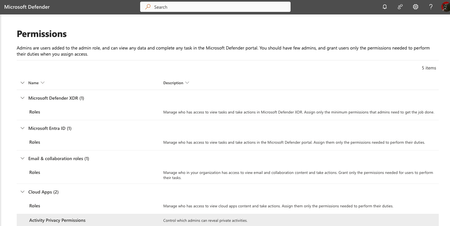
MS 365 Defender - What permissions are needed to move and delete emails in Explorer?
I need a tech with limited permissions to be able to https://learn.microsoft.com/en-us/defender-office-365/remediate-malicious-email-delivered-office-365 These are the options I have in Admin. I tried a bunch of recommended actions, yet I don't seem to have the correct Admin portals as shown https://learn.microsoft.com/en-us/defender-xdr/manage-rbac. For example, I don't have MS 365 Defender Permissions Group shown in the video:5.2KViews1like4Comments
Notification for pending actions
I'm having an issue where Defender isn't notifying me on pending actions like deleting an email and it's not waiting long enough for me to approve actions. Example: An email is delivered at 6pm (after hours) with a malicious URL. Defender detects it and ZAPs the URL automatically and sends me a useless alert "Email messages containing malicious URL removed after delivery". Sometimes this alert requires my intervention, sometimes not but the same alert comes through every time so I have to check every time. The next morning I come in around 8 and see the useless alerts and go to my Actions queue and all the pending actions have now timed out so now I'm hunting to get rid of these messages. If I could get notified when I need to take action I can disable the useless alert telling me it zapped a URL as not every ZAP requires Admin intervention. I could also configure this "admin approval required" alert to text me so I can take action immediately instead of the next time I check my email. I have 2 questions: 1. How do I setup Defender to send me a notification whenever I have pending actions? 2. How can I change the default behavior of the automated investigations? Ideally, if Defender finds a bad URL or attachment I'd rather have it just soft delete without my intervention.
Automate email soft delete Approval
Hello Everyone, our security team creating Email Soft delete actions based on the investigations. An admin needs to approve those soft delete actions. Does anyone know how we can automate the approval of Email Soft delete action ? As of now, Microsoft dont have option to do this2.5KViews0likes2CommentsFastest workflow to block a phished user?
If a user gets phished, or his credentials get leaked - what's the first thing you do, before you start investigating the issue? A few questions concerning this issue: - Is it enough to block the user in the Office 365 Admin Center? - Should I reset his password, or is blocking the user enough? - If the user is blocked, and he still has an active Exchange Online session, can the blocked user still send e-mails?
User Submission - Pending
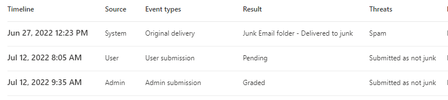
Hi, we have use submission configured that only go to a custom mailbox. We use the Admin submission to submit some messages to Microsoft. Now when I look at the email timeline, I see a Pending User submission. What does that really mean? How can/is this result changed? Thanks, Gunter
MS 365 Defender AIR UI changes
Hello, I've run into an interesting scenario: Changes were noticed within 365 Defender on 8/1/2022. The changes revolve around the way MDO investigations and alerts are displayed in the console. I attached a screenshot showing the changes (left side) and expected navigation (right side). The chart below gives a summary of the attached screenshot. Changes (left side of screen) Expected (right side of screen) Email & collaboration -> Investigations missing visible Incident & alerts -> Alerts -> Filter -> Microsoft Defender for Office 365 missing visible Incident & alerts -> Email & collaboration alerts new navigation option n/a (MDO alerts are visible under Alerts) Looking for an explanation of why this is seen in one tenant but not others. How widespread is this change? Any help or direction would be appreciatedHow to pull a report for detected Phishing, Spam or Malware in Defender for email.
I am trying to pull a report in defender that shows how many phishing emails were detected in the last 30 days. I've tried this in the reports>email and collaboration reports as well as using queries in advanced hunting. I'm getting different numbers every time and starting to think i'm over thinking this. I am trying to see how many of a certain email defender detects and how many our other email security tool detects to see what microsoft is missing. TIA.1.3KViews0likes1CommentHelp me understand why this email was quarantined?
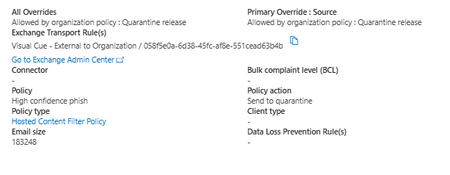
I'm pretty familiar with Defender's Threat Policies. I've probably set them up on 40 tenants. I know the Hosted Content Filter Policy is backend for Anti Spam Inbound policy. I know that, confusingly, the AntiSpam Inbound Policies contain the actions for High Confidence/Normal Confidence Phishing - NOT the AntiPhishing policies (which seem more geared towards impersonation). What I DON'T know is why this was quarantined - and whether the anti-phish policy had anything to do with it. The Policy Type linked is the IB Anti Spam. This tenant is one of the few we have set at a BCL tolerance level of 7 - which shows me that 0 messages in the last 60 days would've been caught for this reason (which would include the email in question). So it was either the SCL or some 'anti phish' component of the anti-spam policy. I have none of the custom 'increase spam score' markers here. I was sure there was a 'evidence' tab within email entity, but i guess not - the only info I have about the detection (now released) is the following: This particular sender does not send reliably over 45 days, but also has been a business partner of this tenant for decades. So rather than the Tenant Allow/Block list which allows a max of 45 days, I want to add it to the offending policy. which SEEMS like it would be the inbound anti-spam - except that it also says it's phishing everywhere. I don't want to bypass both the phishing and spam policies unless I have to - but I don't really know why this got blocked. It's an external address that had sent an email days ago that got through without issue... This one has an attached pdf, but so do they all. Thoughts?Solvedinternal user email quarantined and reason "high confidence phish"
Have you ever seen email quarantined when both sender and recipient are internal organization user and the quarantine reason is high confidence phish by the default built-in anti spam policy? really confused why it happened and how to avoid such false positive..
Keep "bad" mails for analysis but not in users mailbox
Hello, I configured EOP rules. But there are still bad mails which go through the rules and go in the mailboxes of the colleagues. For an analysis I would like to keep these mails. But they should not be in the mailboxes of the users. How can I proceed here? Regards Stefan