instant messaging & presence
81 Topics
Call made to LyncClient Automation BeginStartConversation, callback not received in certain cases
Hello, I have observed that when I restart Windows and then Lync client after sleep/ hibernate, then sometimes the callback is not invoked Here is my code IAsyncResult ar = LyncClient.GetAutomation().BeginStartConversation(AutomationModalities.InstantMessage, ptcpts, _ModalitySettings, ConversationWindowCreatedCallback, null); ConversationWindowCreatedCallback is not invoked . Sometimes Lync signout- sigin is required to get it working. This issue is observed in a customer environment not in development environment.514Views0likes0Comments
Chat history between windows and ios
Hi so here is the current setup Server is Skype for business 2015 on premise and the email is O365 So if i log in on SFB on PC and start a chat with someone, when i go on my IOS APP the chat is not there it's like it never happened Same if i chat on my IOS on PC it shows as it never happened I actived the Conversation history in outlook but it doesn't show in the APP Can i get some assistance please691Views0likes0Comments
Lost OWA integration after renewing OAuth certificate
Hello, I have lost my SfB OWA integration ("online meeting" - Icon and presence status) in the on prem environment (SfB 2015, Exchange 2013) after the OAuth Cert on Exchange side was expired. I instantly renewed it via ECP but still no OWA integration. Even creating a new one via powershell and authorizing it did not the trick. Checked OAuth on Skype side: get-CsOAuthConfiguration Identity : Global PartnerApplications : {Name=Exchange;ApplicationIdentifier=0 0000002-0000-0ff1-ce00-000000000000;Re alm=contoso.com;ApplicationTrustLevel =Full;AcceptSecurityIdentifierInformat ion=False;Enabled=True} OAuthServers : {} Realm : ServiceName : 00000004-0000-0ff1-ce00-000000000000 ClientAuthorizationOAuthServerIdentity : ExchangeAutodiscoverUrl : https://autodiscover.contoso.com/Auto discover/Autodiscover.svc ExchangeAutodiscoverAllowedDomains : Checked connectivity on Exchange side: Test-CsExStorageConnectivity -SipUri "sip:jeff@contoso.com" -Verbose and it passes that test. I am wondering that SfB integration in Outlook 2016 on MAC (!) is not broken although this is doing only https as well. (On PC everything is fine, too). Any ideas on this?Solved1.2KViews0likes1Comment
unable to sign in with auto configuration
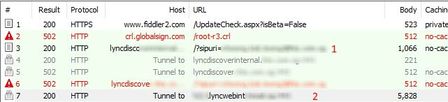
Hi, I am having difficulty to sign in sfb on premises with automatic configuration. Manual works fine. The following gathered from fiddler. We can see it is resolving lyncdiscoverinternal.domain.com (autodiscover) and it was tunnel to lyncwebint.domain.com. However it is not directing to hostname lyncwenint.domain.com. It just stuck on tunneling, failed and continue with other autodiscover method (autodiscover remaining) The fiddler has https decryption enabled. What is the likely cause here? Thanks!1.2KViews0likes3Comments
Shutting Down SFB Remote Site
Hello, I am working with a company that has two distinct geographic locations, one in North America, the other in Europe. They have Front End, SQL and Edge servers in both locations. They would like to power down their Europe location but allow those users to continue to connect to the North American office using their Skype accounts. I have moved all users from our European pools to our American pools. I understand how to delete servers like front end servers from the topology but I'm wondering, if I simply power down the servers in our European office, would the users but automatically routed to our US servers since we have a tunnel between our offices and their users have been moved to the new pools? Does anyone know of a document for going through this process? Thank you!!! P.S. I am not explicitly a UC engineer, this was handed off to me by an outgoing team member so... please bare with me if I don't give the exact details you need initially. Thanks!655Views0likes0Comments
New users not appearing in Skype for Business
Hi We have a Office365 setup, using Skype for Business. We are connected to our local AD using AD Sync. We originally had our users setup with username@domain.CO.UK however we changed this to username@domain.COM. This change worked ok, users can logon using .COM, email is COM, SIP address is .COM However when we search for users in Skype for Business for a user it find a entry that has there old SIP address eg SIP:username@domain.CO.UK The only way to find the users under there new address is to manually type in username@domain.COM. You can them IM the user but still they aren't listed in the directory under this address Anyone any ideas what can be done to remove the old SIP:username@domain.CO.UK users and make the .COM entries searchable?859Views0likes0Comments
SFB client Instant Messaging will initiate a Skype call instead of sending the message
Not sure if anyone of you have encountered this weird behaviour with Skype for Business client. A few of our users reported that when they are about to answer/respond to an Instant Message in Skype for Business, the SFB places/initiated a call to the other party automatically. Previously, I advised them to reboot the computer and it did helped but recently some of them said that even after rebooting the problem persist. For those who have experienced this same problem, please share with us your solution. Thank you.623Views0likes0Comments
Appear offline in Skype for Business
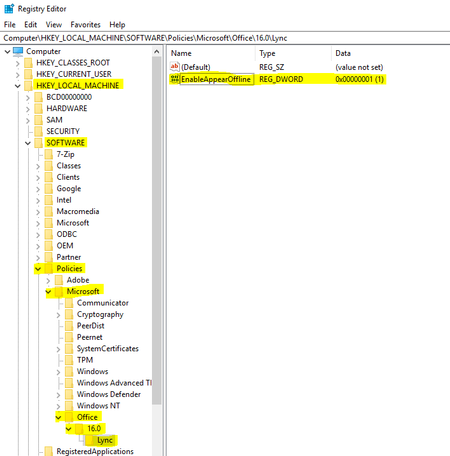
Hello Community, Ever wondered if we can appear Offline in Skype for Business? Well, then you are at the right place. To enable "Appear Offline" add the below registry (create it if not present) [HKEY_LOCAL_MACHINE\SOFTWARE\Policies\Microsoft\Office\16.0\Lync] "EnableAppearOffline"=dword:0000000165KViews1like3CommentsSuppressing information shown to external contacts in Skype for Business Online
I have staff migrated to Skype for Business Online with a Skype Server 2015 on premise. Someone made a poor decision to use the 'Company' field in AD to hold the employment status of staff. This is now visible to federated external contacts in Skype for Business Online as we sync this AD field to Azure AD. I read that by default Skype for Business shares name, title, email address, company, and picture. Is there any way the default can be changed to just reveal name and email address?600Views0likes0Comments