insider risk management
161 TopicsNew Microsoft Purview Deployment Blueprint | Lightweight guide to mitigate data leakage
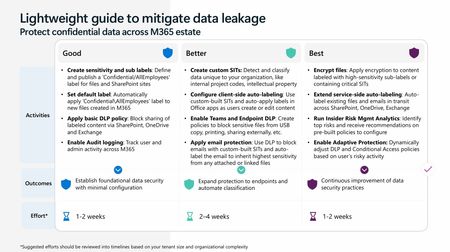
We’re excited to share our latest Data Security deployment blueprint: “Lightweight guide to mitigate data leakage”—a practical resource designed to help organizations quickly enable core data security features across their Microsoft 365 estate with minimal setup. The blueprint follows a good / better / best model that maps protections to your licensing. “Good” highlights foundational features included in Business Premium SKUs, while “Better” and “Best” layer in advanced E5 Compliance capabilities, such as auto-labeling, Endpoint DLP, insider risk signals and much more. With the new E5 Compliance Add-On for Business Premium, this guide shows how organizations can capture quick wins today while building toward stronger, long-term security practices. This blueprint is designed for IT administrators, security teams, and compliance stakeholders tasked with protecting sensitive data – and it’s equally valuable for Microsoft partners and consultants supporting customers on their data security journey. Whether you’re enabling basic safeguards or advancing towards automated protection, this guide provides clear, actionable steps to strengthen your data security posture. Ready to get started? Visit our Purview deployment blueprint page or jump straight to the direct PPT link for a step-by-step walkthrough. Securing your data doesn’t have to be complex – this lightweight blueprint makes it achievable for organizations of any size.
Introducing a faster, more intelligent, end-to-end insider risk investigation experience
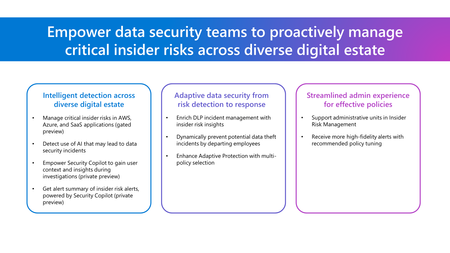
Modern insider risk investigations succeed or fail based on how quickly teams can move from signal to clarity. That’s why the latest Microsoft Purview Insider Risk Management (IRM) investigation enhancements are designed as a progressive 3-step acceleration model, starting with AI‑driven prioritization, followed by faster validation, and easier escalations. Step 1: Accelerate triage with the newly enhanced Data Security Triage Agent The first and most impactful speed improvement happens before analysts even begin reviewing individual activities. The newly enhanced Data Security Triage Agent acts as the front door to investigations, helping teams immediately understand who and what matters most. Instead of manually reviewing raw alerts, the Data Security Triage Agent provides analysts with: Prioritized alerts based on meaningful user and activity risk Behavioral risk patterns that summarize activity into clear investigative themes Critical user context, such as role, employment status (including last working date), and prior alert history, surfaced upfront to inform urgency and scope To make these insights even more actionable, we’re now adding an advanced AI reasoning layer that enables deeper, multi-step analysis across these data signals. This new reasoning layer analyzes the massive quantity of logs received each day to better identify risk patterns within IRM alerts. This further improves analysts’ ability to focus attention where risk is most likely, rather than spending time assembling context across multiple views. Launch details: Public Preview: March 2026 Roadmap ID: 557683 Microsoft Purview Insider Risk Management Alerts page showing a prioritized list of insider risk alerts. The view highlights AI‑generated risk summaries, behavioral patterns, and user context such as role, employment status, and prior alerts to help analysts focus on high‑risk activity. Don't have the data security triage agent deployed yet? Navigate to Purview's Agent tab and turn on the Data Security Triage Agent in Insider Risk Management. Analysts and investigators can also access the Data Security Triage Agent from the Triage Agent toggle in the Alerts tab of Insider Risk Management. To help teams get started more quickly, Security Copilot is being made available to all Microsoft 365 E5 customers. Rollout has already begun and will continue in the upcoming months for all Microsoft 365 E5 customers. Customers will receive advanced notice before activation. Learn more. Step 2: Validate risk instantly with content preview in Activity Explorer Once activity is identified, the next question is immediate and practical: “Is this activity actually risky for our business?” With content preview in Activity Explorer, investigators can validate risk the moment suspicious activity appears, without creating a case or waiting for content to be downloaded. Supported file and message content can be previewed inline, allowing analysts to: Confirm whether sensitive data is present Identify false positives early Decide whether escalation is warranted This turns Activity Explorer into a true triage surface, enabling fast, informed decisions before committing to a full investigation workflow. Launch details: Public preview: April 2026 Roadmap ID: 557189 Activity Explorer displaying a table of file activities with inline content preview. A document preview pane shows file contents and metadata, allowing investigators to quickly assess whether accessed content contains sensitive business information. Step 3: Escalate immediately by creating cases without content download When risk is confirmed, speed matters. With the ability to create cases without content download enabled, teams no longer have to wait for content collection before taking action. Analysts can immediately: Create and escalate a case Assign ownership and measure progress Begin coordination with investigators, legal, or HR Content download can be enabled later while the case remains active, allowing teams to maintain momentum while deciding whether deeper evidence review is required. This also enables scale—supporting up to 2,000 active cases, while prioritizing content access for the subset of investigations that truly need it. Launch details: Public preview: March 2026 Roadmap ID: 554940 Microsoft Purview Insider Risk Management dashboard showing alerts for a single user with options to create and manage investigation cases. The interface illustrates case creation and escalation without requiring content download. The enhanced Insider Risk Management investigation experience isn’t about doing more—it’s about moving faster with confidence. By combining AI‑driven prioritization, early risk validation, and easier escalations with these new enhancements, teams can move from signal to action without losing momentum. Get started with Insider Risk investigations Click this link to get started today! Privacy Statement: Microsoft Purview Insider Risk Management correlates various signals to identify potential malicious or inadvertent insider risks, such as IP theft, data leakage, and security violations. Insider Risk Management enables customers to create policies to manage security and compliance. Built with privacy by design, users are pseudonymized by default, and role-based access controls and audit logs are in place to help ensure user-level privacy.Introducing Security Dashboard for AI (Now in Public Preview)
AI proliferation in the enterprise, combined with the emergence of AI governance committees and evolving AI regulations, leaves CISOs and AI risk leaders needing a clear view of their AI risks, such as data leaks, model vulnerabilities, misconfigurations, and unethical agent actions across their entire AI estate, spanning AI platforms, apps, and agents. 53% of security professionals say their current AI risk management needs improvement, presenting an opportunity to better identify, assess and manage risk effectively. 1 At the same time, 86% of leaders prefer integrated platforms over fragmented tools, citing better visibility, fewer alerts and improved efficiency. 2 To address these needs, we are excited to announce the Security Dashboard for AI, previously announced at Microsoft Ignite, is available in public preview. This unified dashboard aggregates posture and real-time risk signals from Microsoft Defender, Microsoft Entra, and Microsoft Purview - enabling users to see left-to-right across purpose-built security tools from within a single pane of glass. The dashboard equips CISOs and AI risk leaders with a governance tool to discover agents and AI apps, track AI posture and drift, and correlate risk signals to investigate and act across their entire AI ecosystem. Security teams can continue using the tools they trust while empowering security leaders to govern and collaborate effectively. Gain Unified AI Risk Visibility Consolidating risk signals from across purpose-built tools can simplify AI asset visibility and oversight, increase security teams’ efficiency, and reduce the opportunity for human error. The Security Dashboard for AI provides leaders with unified AI risk visibility by aggregating security, identity, and data risk across Defender, Entra, Purview into a single interactive dashboard experience. The Overview tab of the dashboard provides users with an AI risk scorecard, providing immediate visibility to where there may be risks for security teams to address. It also assesses an organization's implementation of Microsoft security for AI capabilities and provides recommendations for improving AI security posture. The dashboard also features an AI inventory with comprehensive views to support AI assets discovery, risk assessments, and remediation actions for broad coverage of AI agents, models, MCP servers, and applications. The dashboard provides coverage for all Microsoft AI solutions supported by Entra, Defender and Purview—including Microsoft 365 Copilot, Microsoft Copilot Studio agents, and Microsoft Foundry applications and agents—as well as third-party AI models, applications, and agents, such as Google Gemini, OpenAI ChatGPT, and MCP servers. This supports comprehensive visibility and control, regardless of where applications and agents are built. Prioritize Critical Risk with Security Copilots AI-Powered Insights Risk leaders must do more than just recognize existing risks—they also need to determine which ones pose the greatest threat to their business. The dashboard provides a consolidated view of AI-related security risks and leverages Security Copilot’s AI-powered insights to help find the most critical risks within an environment. For example, Security Copilot natural language interaction improves agent discovery and categorization, helping leaders identify unmanaged and shadow AI agents to enhance security posture. Furthermore, Security Copilot allows leaders to investigate AI risks and agent activities through prompt-based exploration, putting them in the driver’s seat for additional risk investigation. Drive Risk Mitigation By streamlining risk mitigation recommendations and automated task delegation, organizations can significantly improve the efficiency of their AI risk management processes. This approach can reduce the potential hidden AI risk and accelerate compliance efforts, helping to ensure that risk mitigation is timely and accurate. To address this, the Security Dashboard for AI evaluates how organizations put Microsoft’s AI security features into practice and offers tailored suggestions to strengthen AI security posture. It leverages Microsoft’s productivity tools for immediate action within the practitioner portal, making it easy for administrators to delegate recommendation tasks to designated users. With the Security Dashboard for AI, CISOs and risk leaders gain a clear, consolidated view of AI risks across agents, apps, and platforms—eliminating fragmented visibility, disconnected posture insights, and governance gaps as AI adoption scales. Best of all, the Security Dashboard for AI is included with eligible Microsoft security products customers already use. If an organization is already using Microsoft security products to secure AI, they are already a Security Dashboard for AI customer. Getting Started Existing Microsoft Security customers can start using Security Dashboard for AI today. It is included when a customer has the Microsoft Security products—Defender, Entra and Purview—with no additional licensing required. To begin using the Security Dashboard for AI, visit http://ai.security.microsoft.com or access the dashboard from the Defender, Entra or Purview portals. Learn more about the Security Dashboard for AI at Microsoft Security MS Learn. 1AuditBoard & Ascend2 Research. The Connected Risk Report: Uniting Teams and Insights to Drive Organizational Resilience. AuditBoard, October 2024. 2Microsoft. 2026 Data Security Index: Unifying Data Protection and AI Innovation. Microsoft Security, 2026Building Secure, Enterprise Ready AI Agents with Purview SDK and Agent Framework
At Microsoft Ignite, we announced the public preview of Purview integration with the Agent Framework SDK—making it easier to build AI agents that are secure, compliant, and enterprise‑ready from day one. AI agents are quickly moving from demos to production. They reason over enterprise data, collaborate with other agents, and take real actions. As that happens, one thing becomes non‑negotiable: Governance has to be built in. That’s where Purview SDK comes in. Agentic AI Changes the Security Model Traditional apps expose risks at the UI or API layer. AI agents are different. Agents can: Process sensitive enterprise data in prompts and responses Collaborate with other agents across workflows Act autonomously on behalf of users Without built‑in controls, even a well‑designed agent can create compliance gaps. Purview SDK brings Microsoft’s enterprise data security and compliance directly into the agent runtime, so governance travels with the agent—not after it. What You Get with Purview SDK + Agent Framework This integration delivers a few key things developers and enterprises care about most: Inline Data Protection Evaluate prompts and responses against Data Loss Prevention (DLP) policies in real time. Content can be allowed or blocked automatically. Built‑In Governance Send AI interactions to Purview for audit, eDiscovery, communication compliance, and lifecycle management—without custom plumbing. Enterprise‑Ready by Design Ship agents that meet enterprise security expectations from the start, not as a follow‑up project. All of this is done natively through Agent Framework middleware, so governance feels like part of the platform—not an add‑on. How Enforcement Works (Quickly) When an agent runs: Prompts and responses flow through the Agent Framework pipeline Purview SDK evaluates content against configured policies A decision is returned: allow, redact, or block Governance signals are logged for audit and compliance This same model works for: User‑to‑agent interactions Agent‑to‑agent communication Multi‑agent workflows Try It: Add Purview SDK in Minutes Here’s a minimal Python example using Agent Framework: That’s it! From that point on: Prompts and responses are evaluated against Purview policies setup within the enterprise tenant Sensitive data can be automatically blocked Interactions are logged for governance and audit Designed for Real Agent Systems Most production AI apps aren’t single‑agent systems. Purview SDK supports: Agent‑level enforcement for fine‑grained control Workflow‑level enforcement across orchestration steps Agent‑to‑agent governance to protect data as agents collaborate This makes it a natural fit for enterprise‑scale, multi‑agent architectures. Get Started Today You can start experimenting right away: Try the Purview SDK with Agent Framework Follow the Microsoft Learn docs to configure Purview SDK with Agent Framework. Explore the GitHub samples See examples of policy‑enforced agents in Python and .NET. Secure AI, Without Slowing It Down AI agents are quickly becoming production systems—not experiments. By integrating Purview SDK directly into the Agent Framework, Microsoft is making governance a default capability, not a deployment blocker. Build intelligent agents. Protect sensitive data. Scale with confidence.Microsoft Purview Data Security Investigations is now generally available
Every data security investigation starts with the same question: What data security risks are buried in this data? Exposed credentials in thousands of files across a data estate. Evidence of fraud hidden in vendor communications. Sensitive documents accidentally shared to a large group. Finding these risks manually — reviewing content file by file, message by message — is no longer viable when organizations are managing 220 zettabytes of data[1] and facing over 12,000 confirmed breaches annually[2]. That's why we built Microsoft Purview Data Security Investigations, now generally available. Microsoft Purview Data Security Investigations enables data security teams to identify investigation-relevant data, investigate that data with AI-powered deep content analysis, and mitigate risk — all within one unified solution. Teams can quickly analyze data at scale to surface sensitive data and security risks, then collaborate securely to address them. By streamlining complex, time‑consuming investigative workflows, admins can resolve investigations in hours instead of weeks or months. Proactive and reactive investigation scenarios Organizations are using Data Security Investigations to tackle diverse data security challenges — from reactive incident response to proactive risk assessment. Some of our top use cases from preview include: Data breach and leak: Understand severity, sensitivity, and significance of data that has been leaked or breached, including risks buried in impacted data, to take action and mitigate its impact to the organization. Credentials exposure: Proactively scan thousands of SharePoint sites to identify files containing credentials like passwords, which can give a threat actor prolonged access to an organization's environment. Internal fraud and bribery: Uncover suspicious communications tied to vendor payments or client interactions, uncovering hard-to-find patterns in large volumes of emails and messages. Sensitive data exposure in Teams: Determine who accessed classified documents after accidental sharing — and whether that data was further distributed. Inappropriate content investigations: Quickly find what was posted, where, and by whom, even when teams only know a timeframe or channel name. Investigations that once took weeks — or weren’t possible at all — can now be completed in hours. By eliminating manual effort and surfacing hidden risks across sprawling data estates, Data Security Investigations empowers teams to investigate more efficiently and confidently, making deep, scalable investigations a reality. What Microsoft Purview Data Security Investigations does – and what’s new Since launching public preview, we've listened closely to customer feedback and made significant enhancements to help teams investigate faster, mitigate more effectively, and manage costs with confidence. Data Security Investigations addresses three critical stages of an investigation: Identify impacted data Data Security admins can efficiently identify relevant data by searching their Microsoft 365 data estate to locate emails, Teams messages, Copilot prompts and responses, and documents. Investigators can also launch pre-scoped investigations from a Microsoft Defender XDR incident or a Microsoft Purview Insider Risk Management case. We’ve recently added a new integration that allows admins to launch a Data Security Investigation from Microsoft Purview Data Security Posture Management as well. This capability can help a data security admin investigate an objective, such as preventing data exfiltration. Investigate using deep content analysis Once the investigation is scoped, the solution's generative AI capabilities allow admins to gain deeper insights into the data, analyzing across 95+ languages to uncover critical sensitive data and security risks. Teams can quickly answer three questions: What data security risks exist within the data? Why do they matter? And what actions can be taken to mitigate them? To help answer these questions, two new investigative capabilities, AI search and AI context input, as well as enhancements to existing features were added in November. Data Security Investigations help admins scale their impact and accelerate investigations with the following features: AI search: Using a new AI-powered natural language search experience, admins can find key risks using keywords, metadata, and semantic embeddings — making it easier to locate investigation-relevant content across large data estates. Categorization: By automatically classifying investigation data into meaningful categories, admins can quickly understand incident severity, what types of content is at risk, and trends within an investigation. Vector search: Using semantic search, admins can find contextually related content — even when exact keywords don't match. Risk examination: Using deep content analysis, admins can examine content for sensitive data and security risks, providing a risk score, recommended mitigation steps, and AI-generated rationale for each analyzed asset. AI context input: Admins can now add investigation-specific context before analysis, resulting in more efficient, higher-quality insights tailored to the specific incident. AI search in action, finding credentials present in the dataset being investigated. Mitigate identified risks Investigators can use Data Security Investigations to securely collaborate with partner teams to mitigate identified risks, simplifying tasks that have traditionally been time consuming and complex. In September, we launched an integration with the Microsoft Sentinel graph, the data risk graph, allowing admins to visualize correlations between investigation data, users, and their activities. This automatically combines unified audit logs, Entra audit logs, and threat intelligence, which would otherwise need to be manually correlated, saving time, providing critical context, and allowing investigators to understand all nodes in their investigation. At the start of January 2026, we launched a new mitigation action, purge, that helps admins quickly and efficiently delete sensitive or overshared content directly within the investigation workflow in the product interface. This reduces exposure immediately and keeps incidents from escalating or recurring. Built-in cost management tools To help customers predict and manage costs associated with using Data Security Investigations, we recently released a lightweight cost estimator and usage dashboard. The in-product cost estimator is now available to help analysts model and forecast both storage and compute unit costs based on specific use cases, enabling more accurate budget planning. Additionally, the usage dashboard provides granular breakdowns of billed storage and compute unit usage, empowering data security admins to identify cost-saving opportunities and optimize resource allocation. For detailed guidance on managing costs, see https://aka.ms/DSIcostmanagementtips. Refined business model for general availability These cost management tools are designed to support our updated business model, which offers greater flexibility and transparency. Customers need the freedom to scale investigations without overcommitting resources. To better align with how customers investigate data risk at scale, we refined the Data Security Investigations business model as part of general availability. The product now uses two consumptive meters: Data Security Investigations Storage Meter – For storing investigation-related data, charged by GB Data Security Investigations Compute Meter – For the computational capacity required to complete AI-powered data analysis and actions, charged by Compute Units (CUs) Monthly charges are determined by the amount of data stored and the number of CUs consumed per hour. This pay-as-you-go model ensures customers only pay for what they need when they need it, providing the flexibility, scalability, and cost efficiency needed for both urgent incident response and proactive data security hygiene assessments. Find more information on pricing at aka.ms/purviewpricing. Get started today As data security threats evolve, so must the way we investigate them. Microsoft Purview Data Security Investigations is now generally available, giving organizations a modern, AI-powered approach to uncovering and mitigating risk — without the complexity of disconnected tools or manual workflows. Whether investigating an active breach or proactively hunting for hidden risks, Data Security Investigations gives data security teams the speed and precision needed to act decisively in today's threat landscape. Join for a live Ask Me Anything with the people behind the product on Thursday February 5th at 10am PST, more details here: aka.ms/PurviewDSIAMA2 Learn more about Data Security Investigations at aka.ms/DSIdocs View pricing details at aka.ms/purviewpricing Try Data Security Investigations today! Visit the product https://purview.microsoft.com/dsi and find setup instructions at aka.ms/DSIsetup [1] Worldwide IDC Global DataSphere Forecast, 2025–2029 [2] 2025-dbir-data-breach-investigations-report.pdf
Unlocking the Power of Microsoft Purview for ChatGPT Enterprise
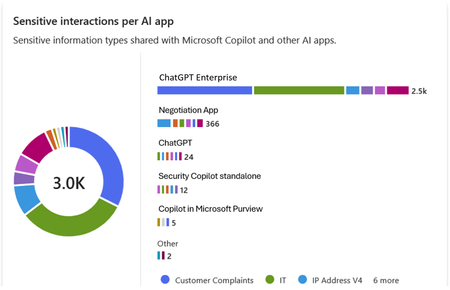
In today's rapidly evolving technology landscape, data security and compliance are key. Microsoft Purview offers a robust solution for managing and securing interactions with AI based solutions. This integration not only enhances data governance but also ensures that sensitive information is handled with the appropriate controls. Let's dive into the benefits of this integration and outline the steps to integrate with ChatGPT Enterprise in specific. The integration works for Entra connected users on the ChatGPT workspace, if you have needs that goes beyond this, please tell us why and how it impacts you. Important update 1: Effective May 1, these capabilities require you to enable pay-as-you-go billing in your organization. Important update 2: From May 19, you are required to create a collection policy to ingest ChatGPT Enterprise information. In DSPM for AI you will find this one click process. Benefits of Integrating ChatGPT Enterprise with Microsoft Purview Enhanced Data Security: By integrating ChatGPT Enterprise with Microsoft Purview, organizations can ensure that interactions are securely captured and stored within their Microsoft 365 tenant. This includes user text prompts and AI app text responses, providing a comprehensive record of communications. Compliance and Governance: Microsoft Purview offers a range of compliance solutions, including Insider Risk Management, eDiscovery, Communication Compliance, and Data Lifecycle & Records Management. These tools help organizations meet regulatory requirements and manage data effectively. Customizable Detection: The integration allows for the detection of built in can custom classifiers for sensitive information, which can be customized to meet the specific needs of the organization. To help ensures that sensitive data is identified and protected. The audit data streams into Advanced Hunting and the Unified Audit events that can generate visualisations of trends and other insights. Seamless Integration: The ChatGPT Enterprise integration uses the Purview API to push data into Compliant Storage, ensuring that external data sources cannot access and push data directly. This provides an additional layer of security and control. Step-by-Step Guide to Setting Up the Integration 1. Get Object ID for the Purview account in Your Tenant: Go to portal.azure.com and search for "Microsoft Purview" in the search bar. Click on "Microsoft Purview accounts" from the search results. Select the Purview account you are using and copy the account name. Go to portal.azure.com and search for “Enterprise" in the search bar. Click on Enterprise applications. Remove the filter for Enterprise Applications Select All applications under manage, search for the name and copy the Object ID. 2. Assign Graph API Roles to Your Managed Identity Application: Assign Purview API roles to your managed identity application by connecting to MS Graph utilizing Cloud Shell in the Azure portal. Open a PowerShell window in portal.azure.com and run the command Connect-MgGraph. Authenticate and sign in to your account. Run the following cmdlet to get the ServicePrincipal ID for your organization for the Purview API app. (Get-MgServicePrincipal -Filter "AppId eq '9ec59623-ce40-4dc8-a635-ed0275b5d58a'").id This command provides the permission of Purview.ProcessConversationMessages.All to the Microsoft Purview Account allowing classification processing. Update the ObjectId to the one retrieved in step 1 for command and body parameter. Update the ResourceId to the ServicePrincipal ID retrieved in the last step. $bodyParam= @{ "PrincipalId"= "{ObjectID}" "ResourceId" = "{ResourceId}" "AppRoleId" = "{a4543e1f-6e5d-4ec9-a54a-f3b8c156163f}" } New-MgServicePrincipalAppRoleAssignment -ServicePrincipalId '{ObjectId}' -BodyParameter $bodyParam It will look something like this from the command line We also need to add the permission for the application to read the user accounts to correctly map the ChatGPT Enterprise user with Entra accounts. First run the following command to get the ServicePrincipal ID for your organization for the GRAPH app. (Get-MgServicePrincipal -Filter "AppId eq '00000003-0000-0000-c000-000000000000'").id The following step adds the permission User.Read.All to the Purview application. Update the ObjectId with the one retrieved in step 1. Update the ResourceId with the ServicePrincipal ID retrieved in the last step. $bodyParam= @{ "PrincipalId"= "{ObjectID}" "ResourceId" = "{ResourceId}" "AppRoleId" = "{df021288-bdef-4463-88db-98f22de89214}" } New-MgServicePrincipalAppRoleAssignment -ServicePrincipalId '{ObjectId}' -BodyParameter $bodyParam 3. Store the ChatGPT Enterprise API Key in Key Vault The steps for setting up Key vault integration for Data Map can be found here Create and manage credentials for scans in the Microsoft Purview Data Map | Microsoft Learn When setup you will see something like this in Key vault. 4. Integrate ChatGPT Enterprise Workspace to Purview: Create a new data source in Purview Data Map that connects to the ChatGPT Enterprise workspace. Go to purview.microsoft.com and select Data Map, search if you do not see it on the first screen. Select Data sources Select Register Search for ChatGPT Enterprise and select Provide your ChatGPT Enterprise ID Create the first scan by selecting Table view and filter on ChatGPT Add your key vault credentials to the scan Test the connection and once complete click continue When you click continue the following screen will show up, if everything is ok click Save and run. Validate the progress by clicking on the name, completion of the first full scan may take an extended period of time. Depending on size it may take more than 24h to complete. If you click on the scan name you expand to all the runs for that scan. When the scan completes you can start to make use of the DSPM for AI experience to review interactions with ChatGPT Enterprise. The mapping to the users is based on the ChatGPT Enterprise connection to Entra, with prompts and responses stored in the user's mailbox. 5. Review and Monitor Data: Please see this article for required permissions and guidance around Microsoft Purview Data Security Posture Management (DSPM) for AI, Microsoft Purview data security and compliance protections for Microsoft 365 Copilot and other generative AI apps | Microsoft Learn Use Purview DSPM for AI analytics and Activity Explorer to review interactions and classifications. You can expand on prompts and responses in ChatGPT Enterprise 6. Microsoft Purview Communication Compliance Communication Compliance (here after CC) is a feature of Microsoft Purview that allows you to monitor and detect inappropriate or risky interactions with ChatGPT Enterprise. You can monitor and detect requests and responses that are inappropriate based on ML models, regular Sensitive Information Types, and other classifiers in Purview. This can help you identify Jailbreak and Prompt injection attacks and flag them to IRM and for case management. Detailed steps to configure CC policies and supported configurations can be found here. 7. Microsoft Purview Insider Risk Management We believe that Microsoft Purview Insider Risk Management (here after IRM) can serve a key role in protecting your AI workloads long term. With its adaptive protection capabilities, IRM dynamically adjusts user access based on evolving risk levels. In the event of heightened risk, IRM can enforce Data Loss Prevention (DLP) policies on sensitive content, apply tailored Entra Conditional Access policies, and initiate other necessary actions to effectively mitigate potential risks. This strategic approach will help you to apply more stringent policies where it matters avoiding a boil the ocean approach to allow your team to get started using AI. To get started use the signals that are available to you including CC signals to raise IRM tickets and enforce adaptive protection. You should create your own custom IRM policy for this. Do include Defender signals as well. Based on elevated risk you may select to block users from accessing certain assets such as ChatGPT Enterprise. Please see this article for more detail Block access for users with elevated insider risk - Microsoft Entra ID | Microsoft Learn. 8. eDiscovery eDiscovery of AI interactions is crucial for legal compliance, transparency, accountability, risk management, and data privacy protection. Many industries must preserve and discover electronic communications and interactions to meet regulatory requirements. Including AI interactions in eDiscovery ensures organizations comply with these obligations and preserves relevant evidence for litigation. This process also helps maintain trust by enabling the review of AI decisions and actions, demonstrating due diligence to regulators. Microsoft Purview eDiscovery solutions | Microsoft Learn 9. Data Lifecycle Management Microsoft Purview offers robust solutions to manage AI data from creation to deletion, including classification, retention, and secure disposal. This ensures that AI interactions are preserved and retrievable for audits, litigation, and compliance purposes. Please see this article for more information Automatically retain or delete content by using retention policies | Microsoft Learn. Closing By following these steps, organizations can leverage the full potential of Microsoft Purview to enhance the security and compliance of their ChatGPT Enterprise interactions. This integration not only provides peace of mind but also empowers organizations to manage their data more effectively. We are still in preview some of the features listed are not fully integrated, please reach out to us if you have any questions or if you have additional requirements.
Artificial Intelligence & Security
Understanding Artificial Intelligence Artificial intelligence (AI) is a computational system that perform human‑intelligence tasks, learning, reasoning, problem‑solving, perception, and language understanding by leveraging algorithmic and statistical methods to analyse data and make informed decisions. Artificial Intelligence (AI) can also be abbreviated as is the simulation of human intelligence through machines programmed to learn, reason, and act. It blends statistics, machine learning, and robotics to deliver following outcomes: Prediction: The application of statistical modelling and machine learning techniques to anticipate future outcomes, such as detecting fraudulent transactions. Automation: The utilisation of robotics and artificial intelligence to streamline and execute routine processes, exemplified by automated invoice processing. Augmentation: The enhancement of human decision-making and operational capabilities through AI-driven tools, for instance, AI-assisted sales enablement. Artificial Intelligence: Core Capabilities and Market Outlook Key capabilities of AI include: Data-driven decision-making: Analysing large datasets to generate actionable insights and optimise outcomes. Anomaly detection: Identifying irregular patterns or deviations in data for risk mitigation and quality assurance. Visual interpretation: Processing and understanding visual inputs such as images and videos for applications like computer vision. Natural language understanding: Comprehending and interpreting human language to enable accurate information extraction and contextual responses. Conversational engagement: Facilitating human-like interactions through chatbots, virtual assistants, and dialogue systems. With the exponential growth of data, ML learning models and computing power. AI is advancing much faster and as According to industry analyst reports breakthroughs in deep learning and neural network architectures have enabled highly sophisticated applications across diverse sectors, including healthcare, finance, manufacturing, and retail. The global AI market is on a trajectory of significant expansion, projected to increase nearly 5X by 2030, from $391 billion in 2025 to $1.81 trillion. This growth corresponds to a compound annual growth rate (CAGR) of 35.9% during the forecast period. These projections are estimates and subject to change as per rapid growth and advancement in the AI Era. AI and Cloud Synergy AI, and cloud computing form a powerful technological mixture. Digital assistants are offering scalable, cloud-powered intelligence. Cloud platforms such as Azure provide pre-trained models and services, enabling businesses to deploy AI solutions efficiently. Core AI Workloads Capabilities Machine Learning Machine learning (ML) underpins most AI systems by enabling models to learn from historical and real-time data to make predictions, classifications, and recommendations. These models adapt over time as they are exposed to new data, improving accuracy and robustness. Example use cases: Credit risk scoring in banking, demand forecasting in retail, and predictive maintenance in manufacturing. Anomaly Detection Anomaly detection techniques identify deviations from expected patterns in data, systems, or processes. This capability is critical for risk management and operational resilience, as it enables early detection of fraud, security breaches, or equipment failures. Example use cases: Fraud detection in financial transactions, network intrusion monitoring in cybersecurity, and quality control in industrial production. Natural Language Processing (NLP) NLP focuses on enabling machines to understand, interpret, and generate human language in both text and speech formats. This capability powers a wide range of applications that require contextual comprehension and semantic accuracy. Example use cases: Sentiment analysis for customer feedback, document summarisation for legal and compliance teams, and multilingual translation for global operations. Principles of Responsible AI To ensure ethical and trustworthy AI, organisations must embrace: Reliability & Safety Privacy & Security Inclusiveness Fairness Transparency Accountability These principles are embedded in frameworks like the Responsible-AI-Standard and reinforced by governance models such as Microsoft AI Governance Framework. Responsible AI Principles and Approach | Microsoft AI AI and Security AI introduces both opportunities and risks. A responsible approach to AI security involves three dimensions: Risk Mitigation: It Is addressing threats from immature or malicious AI applications. Security Applications: These are used to enhance AI security and public safety. Governance Systems: Establishing frameworks to manage AI risks and ensure safe development. Security Risks and Opportunities Due to AI Transformation AI’s transformative nature brings new challenges: Cybersecurity: This brings the opportunities and advancement to track, detect and act against Vulnerabilities in infrastructure and learning models. Data Security: This helps the tool and solutions such as Microsoft Purview to prevent data security by performing assessments, creating Data loss prevention policies applying sensitivity labels. Information Security: The biggest risk is securing the information and due to the AI era of transformation securing IS using various AI security frameworks. These concerns are echoed in The Crucial Role of Data Security Posture Management in the AI Era, which highlights insider threats, generative AI risks, and the need for robust data governance. AI in Security Applications AI’s capabilities in data analysis and decision-making enable innovative security solutions: Network Protection: applications include use of AI algorithms for intrusion detection, malware detection, security situational awareness, and threat early warning, etc. Data Management: applications refer to the use of AI technologies to achieve data protection objectives such as hierarchical classification, leak prevention, and leak traceability. Intelligent Security: applications refer to the use of AI technology to upgrade the security field from passive defence toward the intelligent direction, developing of active judgment and timely early warning. Financial Risk Control: applications use AI technology to improve the efficiency and accuracy of credit assessment, risk management, etc., and assisting governments in the regulation of financial transactions. AI Security Management Effective AI security requires: Regulations & Policies: Establish and safety management laws specifically designed to for governance by regulatory authorities and management policies for key application domains of AI and prominent security risks. Standards & Specifications: Industry-wide benchmarks, along with international and domestic standards can be used to support AI safety. Technological Methods: Early detection with Modern set of tools such as Defender for AI can be used to support to detect and mitigate and remediate AI threats. Security Assessments: Organization should use proper tools and platforms for evaluating AI risks and perform assessments regularly using automated tools approach Conclusion AI is transforming how organizations operate, innovate, and secure their environments. As AI capabilities evolve, integrating security and governance considerations from the outset remains critical. By combining responsible AI principles, effective governance, and appropriate security measures, organizations can work toward deploying AI technologies in a manner that supports both innovation and trust. Industry projections suggest continued growth in AI‑related security investments over the coming years, reflecting increased focus on managing AI risks alongside its benefits. These estimates are subject to change and should be interpreted in the context of evolving technologies and regulatory developments. Disclaimer References to Microsoft products and frameworks are for informational purposes only and do not imply endorsement, guarantee, or contractual commitment. Market projections referenced are based on publicly available industry analyses and are subject to change.Fake Employees, Real Threat: Decentralized Identity to combat Deepfake Hiring?
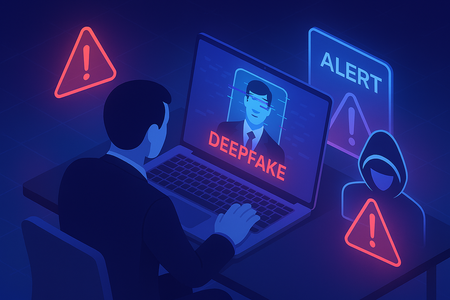
In recent months, cybersecurity experts have sounded the alarm on a surge of fake “employees” – job candidates who are not who they claim to be. These fraudsters use everything from fabricated CVs and stolen identities to AI-generated deepfake videos in interviews to land jobs under false pretenses. It’s a global phenomenon making headlines on LinkedIn and in the press. With the topic surfacing everywhere, I wanted to take a closer look at what’s really going on — and explore the solutions that could help organizations respond to this growing challenge. And as it happens, one solution is finally reaching maturity at exactly the right moment: decentralized identity. Let me walk you through it. But first, let’s look at a few troubling facts: Even tech giants aren’t immune. Amazon’s Chief Security Officer revealed that since April 2024 the company has blocked over 1,800 suspected North Korean scammers from getting hired, and that the volume of such fake applicants jumped 27% each quarter this year (1.1). In fact, a coordinated scheme involving North Korean IT operatives posing as remote workers has infiltrated over 300 U.S. companies since 2020, generating at least $6.8 million in revenue for the regime (2.1). CrowdStrike also reported more than 320 confirmed incidents in the past year alone, marking a 220% surge in activity (2.2). And it’s not just North Korea: organised crime groups globally are adopting similar tactics. This trend is not a small blip; it’s likely a sign of things to come. Gartner predicts that by 2028, one in four job applicant profiles could be fake in some way (3). Think about that – in a few years, 25% of the people applying to your jobs might be bots or impostors trying to trick their way in. We’re not just talking about exaggerated resumes; we’re talking about full-scale deception: people hiring stand-ins for interviews, AI bots filling out assessments, and deepfake avatars smiling through video calls. It’s a hiring manager’s nightmare — no one wants to waste time interviewing bots or deepfakes — and a CISO’s worst-case scenario rolled into one. The Rise of the Deepfake Employee What does a “fake employee” actually do? In many cases, these impostors are part of organized schemes (even state-sponsored) to steal money or data. They might forge impressive résumés and create a minimal but believable online presence. During remote interviews, some have been caught using deepfake video filters – basically digital masks – to appear as someone else. In one case, Amazon investigators noticed an interviewee’s typing did not sync with the on-screen video (the keystrokes had a 110ms lag); it turned out to be a North Korean hacker remotely controlling a fake persona on the video call (1.2). Others refuse video entirely, claiming technical issues, so you only hear a voice. Some even hire proxy interviewees – a real person who interviews in their place. The level of creativity is frightening. Once inside, a fake employee can do serious damage. They gain legitimate access to internal systems, data, and tools. Some have stolen sensitive source code and threatened to leak it unless the company paid a ransom (1). Others quietly set up backdoor access for future cyberattacks. And as noted, if they’re part of a nation-state operation, the salary you pay them is funding adversaries. The U.S. Department of Justice recently warned that many North Korean IT workers send the majority of their pay back to the regime’s illicit weapons programs (1)(2.3). Beyond the financial angle, think of the security breach: a malicious actor is now an “insider” with an access badge. No sector is safe. While tech companies with lots of remote jobs were the first targets, the scam has expanded. According to the World Economic Forum, about half of the companies targeted by these attacks aren’t in the tech industry at all (4). Financial services, healthcare, media, energy – any business that hires remote freelancers or IT staff could be at risk. Many Fortune 500 firms have quietly admitted to Charles Carmakal (Chief Technology Officer at Google Cloud’s Mandiant) that they’ve encountered fake candidates (2.3). Brandon Wales — former Executive Director of the Cybersecurity and Infrastructure Security Agency (CISA) and now VP of Cybersecurity Strategy at SentinelOne — warned that the “scale and speed” of these operations is unlike anything seen before (2.3). Rivka Little, Chief Growth Officer at Socure, put it bluntly: “Every Fortune 100 and potentially Fortune 500 has a pretty high number of risky employees on their books” right now (1). If you’re in charge of security or IT, this should send a chill down your spine. How do you defend against an attack that walks in through your front door (virtually) with HR’s approval? It calls for rethinking some fundamental practices, which leads us to the biggest gap these scams have exposed: identity verification in the hiring process. The Identity Verification Gap in Hiring Let’s face it: traditional hiring and onboarding operate on a lot of trust. You collect a résumé, maybe call some references, do a background check that might catch a criminal record but won’t catch a well-crafted fake identity. You might ask for a copy of a driver’s license or passport to satisfy HR paperwork, but how thoroughly is it checked? And once the person is hired and given an employee account, how often do we re-confirm that person’s identity in the months or years that follow? Almost never. Now let’s look at the situation from the reverse perspective: During your last recruitment, or when you became a new vendor for a client, were you asked to send over a full copy of your ID via email? Most likely, yes. You send a scan of your passport or ID card to an HR representative or a partner’s portal, and you have no idea where that image gets stored, who can see it, or how long it will sit around. It feels uncomfortable, but we do it because we need to prove who we are. In reality, we’re making a leap of faith that the process is secure. This is the identity verification gap. Companies are trusting documents and self-assertions that can be forged, and they rarely have a way to verify those beyond a cursory glance. Fraudsters exploit this gap mercilessly. They provide fake documents that look real, or steal someone else’s identity details to pass background checks. Once they’ve cleared that initial hurdle, the organization treats them as legit. IT sets up accounts, security gives them access, and from then on the “user identity” is assumed to be genuine. Forever. Moreover, once an employee is on board, internal processes often default to trust. Need a password reset? The helpdesk might ask for your birthdate or employee ID – pieces of info a savvy attacker can learn or steal. We don’t usually ask an employee who calls IT to re-prove that they are the same person HR hired months or years ago. All of this stands in contrast to the principle of Zero Trust security that many companies are now adopting. Thanks to John Kindervag (Forrester, 2009), Zero Trust says “never trust, always verify” each access request. But how can you verify if the underlying identity was fake to start with? As part of Microsoft, we often say that “identity is the new perimeter” – meaning the primary defense line is verifying identities, not just securing network walls. If that identity perimeter is built on shaky ground (unverified people), the whole security model is weak. So, what can be done? Security leaders and even the World Economic Forum are advocating for stronger identity proofing in hiring. The WEF specifically recommends “verifiable government ID checks at multiple stages of recruitment and into employment” (4). In other words, don’t just verify once and forget it – verify early, verify often. That might mean an ID and background check when offering the job, another verification during onboarding, and perhaps periodic re-checks or at least on certain events (like when the employee requests elevated privileges). Amazon’s CSO, S. Schmidt, echoed this after battling North Korean fakes; he advised companies to “Implement identity verification at multiple hiring stages and monitor for anomalous technical behavior” as a key defense (1). Of course, doing this manually is tough. You can’t very well ask each candidate to fly in their first day just to show their passport in person, especially with global and remote workforces. That’s where technology is stepping up. Enter the world of Verified ID and decentralized identity. Enter Microsoft Entra Verified ID: proving Identity, not just Checking a Box Imagine if, instead of emailing copies of your passport to every new employer or partner, you could carry a digital identity credential that is already verified and can be trusted by others instantly. That’s the idea behind Microsoft Entra Verified ID. It’s essentially a system for issuing and verifying cryptographically-secure digital identity credentials. Let’s break down what that means in plain terms. At its core, a Verified ID credential is like a digital ID card that lives in an app on your phone. But unlike a photocopy of your driver’s license (which anyone could copy, steal or tamper with), this digital credential is signed with cryptographic keys that make it tamper-proof and verifiable. It’s based on open standards. Microsoft has been heavily involved in the development of Decentralized Identifiers (DID) and W3C Verifiable Credentials standards over the past few years (7). The benefit of standards is that this isn’t a proprietary Microsoft-only thing – it’s part of a broader move toward decentralized identity, where the user is in control of their own credentials. Here’s a real-life analogy: When you go to a bar and need to prove you’re over 18, you show your driver’s license, National ID or Passport. The bouncer checks your birth date and maybe the hologram, but they don’t photocopy your entire ID and keep it; they just verify it and hand it back. You remain in possession of your ID. Now translate that to digital interactions: with Verified ID, you could have a credential on your phone that says “Government ID verified: [Your Name], age 25”. When a verifier (like an employer or service) needs proof, you share that credential through a secure app. The verifier’s system checks the credential’s digital signature to confirm it was issued by a trusted authority (for example, a background check company or a government agency) and that it hasn’t been altered. You don’t have to send over a scan of your actual passport or reveal extra info like your full birthdate or address – the credential can be designed to reveal only the necessary facts (e.g. “is over 18” = yes). This concept is called selective disclosure, and it’s a big win for privacy. Crucially, you decide which credentials to share and with whom. You might have one that proves your legal name and age (from a government issuer), another that proves your employment status (from your employer), another that proves a certification or degree (from a university). And you only share them when needed. They can also have expiration dates or be revoked. For instance, an employment credential could automatically expire when you leave the company. This means if someone tries to use an old credential, it would fail verification – another useful security feature. Now, how do these credentials get issued in the first place? This is where the integration of our Microsoft Partner IDEMIA comes in, which was a highlight of Microsoft Ignite 2025. IDEMIA is a company you might not have heard of, but they’re a huge player in the identity world – they’re the folks behind many government ID and biometric systems (think passport chips, national ID programs, biometric border control, etc.). Microsoft announced that Entra Verified ID now integrate IDEMIA’s identity verification services. In practice, this means when you need a high-assurance credential (like proving your real identity for a job), the system can invoke IDEMIA to do a thorough check. For example, as part of a remote onboarding process, an employer using Verified ID could ask the new hire to verify their identity through IDEMIA. The new hire gets a link or prompt, and is guided to scan their official government ID and take a live selfie video. IDEMIA’s system checks that the ID is authentic (not a forgery) and matches the person’s face, doing so in a privacy-protecting way (for instance, biometric data might be used momentarily to match and then not stored long-term, depending on the service policies). This process confirms “Yes, this is Alice, and we’ve confirmed her identity with a passport and live face check.” At that point, Microsoft Entra Verified ID can issue a credential to Alice, such as “Alice – identity verified by Contoso Corp on [Date]”. Alice stores this credential in her digital wallet (for instance, the Microsoft Authenticator app). Now Alice can present that credential to apps or IT systems to prove it’s really Alice. The employer might require it to activate her accounts, or later if Alice calls IT support, they might ask her to present the credential to prove her identity for a password reset. The verification of the credential is cryptographically secure and instantaneous – the IT system just checks the digital signature. There’s no need to manually pull up Alice’s passport scan from HR files or interrogate her with personal questions. Plus, Alice isn’t repeatedly sending sensitive personal documents; she shared them once with a trusted verifier (IDEMIA via the Verified ID app flow), not with every individual who asks for ID. This reduces the exposure of her personal data. From the company’s perspective, this approach dramatically improves security and streamlines processes. During onboarding, it’s actually faster to have someone go through an automated ID verification flow than to coordinate an in-person verification or trust slow manual checks. Organizations also avoid collecting and storing piles of personal documents, which is a compliance headache and a breach risk. Instead, they get a cryptographic assurance. Think of it like the difference between keeping copies of everyone’s credit card versus using a payment token – the latter is safer and just as effective for the transaction. Microsoft has been laying the groundwork for this for years. Back in 2020 (and even 2017....), Microsoft discussed decentralized identity concepts where users own their identity data and apps verify facts about you through digital attestations (7). Now it’s reality: Entra Verified ID uses those open standards (DID and Verifiable Credentials) under the hood. Plus, the integration with IDEMIA and others means it’s not just theoretical — it’s operational and scalable. As Ankur Patel, one of our product leaders for Microsoft Entra, said about these integrations: it enables “high assurance verification without custom business contracts or technical implementations” (6). In other words, companies can now easily plug this capability in, rather than building their own verification processes from scratch. Before moving on, let’s not forget to include the promised quote from IDEMIA’s exec that really underscores the value: “With more than 40 years of experience in identity issuance, verification and advanced biometrics, our collaboration with Microsoft enables secure authentication with verified identities organizations can rely on to ensure individuals are who they claim to be and critical services can be accessed seamlessly and securely.” – Amit Sharma, Head of Digital Strategy, IDEMIA (6) That quote basically says it all: verified identities that organizations can rely on, enabling seamless and secure access. Now, let’s see how that translates into real-world usage. Use Cases and Benefits: From Onboarding to Recovery How can Verified ID (plus IDEMIA’s) be applied in day-to-day business? There are several high-impact use cases: Remote Employee Onboarding (aka Hire with Confidence): This is the most straightforward scenario. When bringing in a new hire you haven’t met in person, you can integrate an identity verification step. As described earlier, the new employee verifies their government ID and face once, gets a credential, and uses that to start their work. The hiring team can trust that “this person is real and is who they say they are.” This directly prevents many fake-employee scams. In fact, some companies have already tried informal versions of this: The Register reported a story of an identity verification company (ironically) who, after seeing suspicious candidates, told one applicant “next interview we’ll do a document verification, it’s easy, we’ll send you a barcode to scan your ID” – and that candidate never showed up for the next round because they knew they’d be caught (1). With Verified ID, this becomes a standard, automated part of the process, not an ad-hoc test. As a bonus, the employee’s Verified ID credential can also speed up IT onboarding (auto-provisioning accounts when the verified credential is presented) and even simplify things like proving work authorization to other services (think how you often have to send copies of IDs to benefits providers or background screeners – a credential could replace that). The new hire starts faster, and with less anxiety because they know there’s a strong proof attached to their identity, and the company has less risk from day one. Oh, and HR isn’t stuck babysitting sensitive documents – governance and privacy risk go down. Stronger Helpdesk and Support Authentication: Helpdesk fraud is a common way attackers exploit weak verification. Instead of asking employees for their first pet’s name or a short code (which an attacker might phish), support can use Verified ID to confirm the person’s identity. For example, if someone calls IT saying “I’m locked out of my account,” the support portal can send a push notification asking the user to present their Verified Employee credential or do a quick re-verify via the app. If the person on the phone is an impostor, they’ll fail this check. If it’s the real employee, it’s an easy tap on their phone to prove it’s them. This approach secures processes like password resets, unlocking accounts, or granting temporary access. Think of it as caller-ID on steroids. Instead of taking someone’s word that “I am Alice from Finance,” the system actually asks for proof. And because the proof is cryptographically verified, it’s much harder to trick than a human support agent with a sob story. This reduces the burden on support too – less time playing detective with personal questions, more confidence in automating certain requests. Account Recovery and On-Demand Re-Verification: We’ve all dealt with the hassle of account recovery when we lose a password or device. Often it’s a weak link: backup codes, personal Q&A, the support team asking some manager who can’t even tell if it’s really you, or asking for a copy of your ID… With Verified ID, organizations can offer a secure self-service recovery that doesn’t rely on shared secrets. For instance, if you lose access to your multi-factor auth and need to regain entry, you could be prompted to verify your identity with a government ID check through the Verified ID system. Once you pass, you might be allowed to reset your authentication methods. Microsoft is already moving in this direction – there’s talk of replacing security questions with Verified ID checks for Entra ID account recovery (6). The benefit here is you get high assurance that the person recovering the account is the legitimate owner. This is especially important for administrators or other highly privileged users. And it’s still faster for the user than, say, waiting days for IT to manual vet and approve a request. Additionally, companies could have policies where every X months, employees might get a prompt to reaffirm their identity if they’re engaging in sensitive work. It keeps everyone honest and catches any anomalies (like, imagine an attacker somehow compromised an account – when faced with an unexpected ID check, they wouldn’t be able to comply, raising a red flag). Step-Up Authentication for Sensitive Actions: Not every action an employee takes needs this level of verification, but some absolutely do. For example, a finance officer making a $10 million wire transfer, or an engineer pushing code to a production environment, or an HR admin downloading an entire employee database – these could all trigger a step-up authentication that includes verifying the user’s identity credential. In practice, the user might get a pop-up saying “Please present your Verified ID to continue.” It might even ask for a quick fresh selfie depending on the sensitivity, which can be matched against the one on file (using Face Match in a privacy-conscious way). This is like saying: “We know you logged in with your password and MFA earlier, but this action is so critical that we want to double-check you are still the one executing it – not someone who stole your session or is using your computer.” It’s analogous to how some banks send a one-time code for high-value transactions, but instead of just a code (which could be stolen), it’s verifying you. This dramatically reduces the risk of insider threats and account takeovers causing catastrophic damage. And for the user, it’s usually a simple extra step that they’ll understand the importance of, especially in high-stakes fields. It builds trust – both that the company trusts them enough to give access, but also verifies them to ensure no one is impersonating them. In all these cases, Verified ID is adding security without a huge usability cost. In fact, many users might prefer it to the status quo: I’d rather verify my identity once properly than have to answer a bunch of security questions or have an IT person eyeballing my ID over a grainy video call. It also introduces transparency and control. As an employee, if I’m using a Verified ID, I know exactly what credential I’m sharing and why, and I have a log of it. It’s not an opaque process where I send documents into a void. From a governance perspective, using Verified ID means less widespread personal data to protect, and a clearer audit trail of “this action was taken by Alice, whose identity was verified by method X at time Y.” It can even help with regulatory compliance – for instance, proving that you really know who has access to sensitive financial data (important for things like SOX compliance or other audits). And circling back to the theme of fake employees, if such a system is in place, it’s a massive deterrent. The barrier to entry for fraudsters becomes much higher. It’s not impossible (nothing is, and you still need to Assume breach), but now they’d have to fool a top-tier document verification and biometric check – not just an overworked recruiter. That likely requires physical presence and high-quality fake documents, which are riskier and more costly for attackers. The more companies adopt such measures, the less “return on investment” these hiring scams will have for cybercriminals. The Bigger Picture: Verified Identity as the New Security Frontier The convergence of trends here is interesting. On one hand, we have digital transformation and remote work which opened the door to these novel attacks. On the other hand, we have new security philosophies like Zero Trust that emphasize continuous verification of identity and context. Verified ID is essentially Zero Trust for the hiring and identity side of things: “never trust an identity claim, always verify it.” What’s exciting is that this can now be done without turning the enterprise into a surveillance state or creating unbearable friction for legitimate users. It leverages cryptography and user-centric design to raise security and preserve privacy. Microsoft’s involvement in decentralized identity and the integration of partners like IDEMIA signals that this approach is maturing. It’s moving from pilot projects to being built into mainstream products (Entra ID, Microsoft 365, LinkedIn even offers verification badges via Entra Verified ID now (5)). It’s worth noting LinkedIn’s angle here: job seekers can verify where they work or their government ID on their LinkedIn profile, which could also help employers spot fakes (though it’s voluntary and early-stage). For CISOs and identity architects, Verified ID offers a concrete tool to address what was previously a very squishy problem. Instead of just crossing your fingers that employees are who they say they are, you can enforce it. It’s analogous to the evolution of payments security: we moved from signatures (which were rarely checked) to PIN codes and chips, and now to contactless cryptographic payments. Hiring and access management can undergo a similar upgrade from assumption-based to verification-based. Of course, adopting Verified ID or any new identity tech requires planning. Organizations will need to update their onboarding processes, train HR and IT staff on the new procedure, and ensure employees are comfortable with it. Privacy considerations must be addressed (e.g., clarify that biometric data used for verification isn’t stored indefinitely, etc.). But compared to the alternative – doing nothing and hoping to avoid being the next company in a scathing news headline about North Korean fake workers – the effort is worthwhile. In summary, human identity has become the new primary perimeter for cybersecurity. We can build all the firewalls and endpoint protections we want, but if a malicious actor can legitimately log in through the front door as an employee, those defenses may not matter. Verified identity solutions like Microsoft Entra Verified ID (with partners like IDEMIA) provide a way to fortify that perimeter with strong, real-time checks. They bring trust back into remote interactions by shifting from “trust by default” to “trust because verified.” This is not just a theoretical future; it’s happening now. As of late 2025, these tools are generally available and being rolled out in enterprises. Early adopters will likely be those in highly targeted sectors or with regulatory pressures – think defense contractors, financial institutions, and tech companies burned by experience. But I suspect it will trickle into standard best practices over the next few years, much like multi-factor authentication did. The fight against fake employees and deepfake hiring scams will continue, and attackers will evolve new tricks (perhaps trying to fake the verifications themselves). But having this layer in place tilts the balance back in favor of the defenders. It forces attackers to take more risks and expend more resources, which in turn dissuades many from even trying. To end on a practical note: If you’re a security decision-maker, now is a good time to evaluate your organization’s hiring and identity verification practices. Conduct a risk assessment – do you have any way to truly verify a new remote hire’s identity? How confident are you that all your current employees are real? If those questions make you uncomfortable, it’s worth looking into solutions like Verified ID. We’re entering an era where digital identity proofing will be as standard as background checks in HR processes. The technology has caught up to the threat, and embracing it could save your company from a very costly “lesson learned.” Remember: trust is good, but verified trust is better. By making identity verification a seamless part of the employee lifecycle, we can help ensure that the only people on the payroll are the ones we intended to hire. In a world of sophisticated fakes, that confidence is priceless. Sources: (1.1) The Register – Amazon blocked 1,800 suspected North Korean scammers seeking jobs (Dec 18, 2025) – S. Schmidt comments on DPRK fake workers and advises multi-stage identity verification. https://www.theregister.com/2025/12/18/amazon_blocked_fake_dprk_workers ("We believe, at this point, every Fortune 100 and potentially Fortune 500 has a pretty high number of risky employees on their books" Socure Chief Growth Officer Rivka Little) & https://www.linkedin.com/posts/stephenschmidt1_over-the-past-few-years-north-korean-dprk-activity-7407485036142276610-dot7 (“Implement identity verification at multiple hiring stages and monitor for anomalous technical behavior”, Amazon’s CSO, S. Schmidt) | (1.2) Heal Security – Amazon Catches North Korean IT Worker by Tracking Tiny 110ms Keystroke Delays (Dec 19, 2025). https://healsecurity.com/amazon-catches-north-korean-it-worker-by-tracking-tiny-110ms-keystroke-delays/ (2.1) U.S. Department of Justice – “Charges and Seizures Brought in Fraud Scheme Aimed at Denying Revenue for Workers Associated with North Korea” (May 16, 2024). https://www.justice.gov/usao-dc/pr/charges-and-seizures-brought-fraud-scheme-aimed-denying-revenue-workers-associated-north | (2.2) PCMag – “Remote Scammers Infiltrate 300+ Companies” (Aug 4, 2025). https://www.pcmag.com/news/is-your-coworker-a-north-korean-remote-scammers-infiltrate-300-plus-companies | (2.3) POLITICO – Tech companies have a big remote worker problem: North Korean operatives (May 12 2025). https://www.politico.com/news/2025/05/12/north-korea-remote-workers-us-tech-companies-00340208 ("I’ve talked to a lot of CISOs at Fortune 500 companies, and nearly every one that I’ve spoken to about the North Korean IT worker problem has admitted they’ve hired at least one North Korean IT worker, if not a dozen or a few dozen,” Charles Carmakal, Chief Technology Officer at Google Cloud’s Mandiant) & North Koreans posing as remote IT workers infiltrated 136 U.S. companies (Nov 14, 2025). https://www.politico.com/news/2025/11/14/north-korean-remote-work-it-scam-00652866 HR Dive – By 2028, 1 in 4 candidate profiles will be fake, Gartner predicts (Aug 8, 2025) – Gartner research highlighting rising candidate fraud and 25% fake profile forecast. https://www.hrdive.com/news/fake-job-candidates-ai/757126/ World Economic Forum – Unmasking the AI-powered, remote IT worker scams threatening businesses (Dec 15, 2025) – Overview of deepfake hiring threats; recommends government ID checks at multiple hiring stages. https://www.weforum.org/stories/2025/12/unmasking-ai-powered-remote-it-worker-scams-threatening-businesses-worldwide/ The Verge – LinkedIn gets a free verified badge that lets you prove where you work (Apr 2023) – Describes LinkedIn’s integration with Microsoft Entra for profile verification. https://www.theverge.com/2023/4/12/23679998/linkedin-verification-badge-system-clear-microsoft-entra Microsoft Tech Community – Building defense in depth: Simplifying identity security with new partner integrations (Nov 24, 2025 by P. Nrisimha) – Microsoft Entra blog announcing Verified ID GA, includes IDEMIA integration and quotes (Amit Sharma, Ankur Patel). https://techcommunity.microsoft.com/t5/microsoft-entra-blog/building-defense-in-depth-simplifying-identity-security-with-new/ba-p/4468733 & https://www.linkedin.com/posts/idemia-public-security_synced-passkeys-and-high-assurance-account-activity-7407061181879709696-SMi7 & https://www.linkedin.com/posts/4ankurpatel_synced-passkeys-and-high-assurance-account-activity-7406757097578799105-uFZz ("high assurance verification without custom business contracts or technical implementations", Ankur Patel) Microsoft Entra Blog – Building trust into digital experiences with decentralized identities (June 10, 2020 by A. Simons & A. Patel) – Background on Microsoft’s approach to decentralized identity (DID, Verifiable Credentials). https://techcommunity.microsoft.com/t5/microsoft-entra-blog/building-trust-into-digital-experiences-with-decentralized/ba-p/1257362 & Decentralized digital identities and blockchain: The future as we see it. https://www.microsoft.com/en-us/microsoft-365/blog/2018/02/12/decentralized-digital-identities-and-blockchain-the-future-as-we-see-it/ & Partnering for a path to digital identity (Janv 22, 2018) https://blogs.microsoft.com/blog/2018/01/22/partnering-for-a-path-to-digital-identity/ About the Author I'm Samuel Gaston-Raoul, Partner Solution Architect at Microsoft, working across the EMEA region with the diverse ecosystem of Microsoft partners—including System Integrators (SIs) and strategic advisory firms, Independent Software Vendors (ISVs) / Software Development Companies (SDCs), and Startups. I engage with our partners to build, scale, and innovate securely on Microsoft Cloud and Microsoft Security platforms. With a strong focus on cloud and cybersecurity, I help shape strategic offerings and guide the development of security practices—ensuring alignment with market needs, emerging challenges, and Microsoft’s product roadmap. I also engage closely with our product and engineering teams to foster early technical dialogue and drive innovation through collaborative design. Whether through architecture workshops, technical enablement, or public speaking engagements, I aim to evangelize Microsoft’s security vision while co-creating solutions that meet the evolving demands of the AI and cybersecurity era.How business conduct violations can help understand data security risks
Discover how the integration of Communication Compliance and Insider Risk Management enhances understanding of data security risks by providing deeper insights into user intent on potentially risky activities, ultimately aiding proactive management and safeguarding of sensitive assets within organizations.