innovation
17 TopicsAI where and when you need it with Dragon Copilot's ability to focus
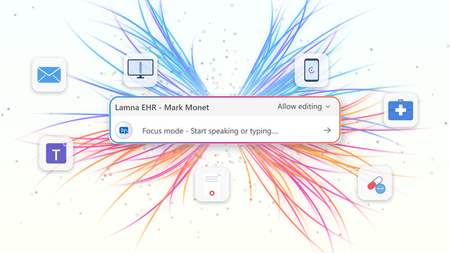
At HIMSS 2026, we showed that the most useful place to apply clinical intelligence is often not in a separate app or side window, but at the cursor, in the field where the clinician is already working. Our last post on this topic described the problem Dragon Copilot's focus capability is designed to solve: clinicians becoming data couriers, moving between windows, copying information from one system into another, and stitching together a day's work across multiple applications. That post looked ahead to what was coming. Now, it's here. What Dragon Copilot's focus capability does Dragon Copilot's focus capability brings AI directly into the text field where clinicians work, whether that's an EHR, a browser, Microsoft Word, SharePoint, or another desktop application. There is no separate application to launch and no workflow to rebuild. Simply place your cursor where you're working, select content if needed, and ask for help using natural language by voice or text. The focus capability works directly within the application you're already using, helping you stay in the flow of work. With focus, Dragon Copilot can: Read content from applications such as an EHR, browser, Microsoft Word, SharePoint, and other desktop applications. Answer questions about selected content and provide responses in context, using information from trusted sources and resources approved by the organization. Surface relevant information and insights without requiring manual searches, copying, or pasting. Generate, edit, and refine text directly where you're working. The experience is conversational and voice-first. Because the focus capability operates directly at the cursor, clinicians can take action without switching applications or rebuilding context. Questions are answered in context using information from the EHR and trusted sources, including resources approved by the organization. Focus in action The following examples illustrate how Dragon Copilot's focus capability helps clinicians read, answer, write, edit and surface information directly within their workflow. Journal and guideline Q&A Highlight a passage from a clinical guideline or journal article and ask: "Summarize the three key takeaways in patient-friendly language for the after-visit summary." The focus capability analyzes the selected content and generates a draft directly where you're working. Answer questions in context Clinicians often have the information they need in front of them but spend valuable time locating or interpreting it. Highlight relevant content and ask: "What does this recommendation mean for a patient with diabetes?" The focus capability reviews the selected information and delivers an answer within the workflow, without requiring clinicians to leave the application. The information is sourced from the EHR, a credible source such as MSD Manual, DailyMed, Medline Plus or from an organization’s internal source. Edit in place Select existing text and ask: "Convert this into a bulleted list." or "Summarize this HPI in two sentences." The focus capability reshapes the content directly where it already exists, helping clinicians refine documentation without disrupting their workflow. Surface relevant information Place your cursor inside a note and ask: "What's the patient's BMI?" The focus capability can retrieve relevant information available in context and return the answer inline, eliminating the need to navigate between screens, search for values, or perform calculations manually. Generate new content Need a referral letter, patient instruction, or summary? Simply ask. The focus capability can generate content directly within the destination field, helping clinicians create documentation where it belongs without copying and pasting between applications. Why this capability matters Bringing AI directly to the cursor is more than a convenience. It's what makes AI practical, visible, and actionable within everyday clinical workflows. Dragon Copilot's focus capability sits in a useful middle ground between ambient AI, which operates largely in the background, and traditional dictation, which requires clinicians to explicitly construct documentation themselves. Outputs are reviewable and editable before being finalized. Actions remain visible within the workflow, providing transparency and control. Clinicians can work without repeatedly navigating between applications or rebuilding context. Because the focus capability operates directly at the cursor, it creates an extensible foundation for future Dragon Copilot experiences and integrations from Microsoft and partners. When Dragon Copilot's focus capability brings AI directly to where clinicians are already working, copying, pasting, and window-switching fall away. Clinicians can access information, generate content, and take action without leaving their workflow, helping them spend less time managing technology and more time focused on patient care. Learn more about Dragon Copilot.Notes and documents – the way clinicians want them
The moment after the visit There is a moment in every patient encounter when the clinical story needs to become something more than a note. It may become a referral letter, a set of patient instructions, a school or work note, or a summary that helps a patient remember what was discussed. These documents matter as much as the note itself. A patient needs clear instructions they can understand and follow. A referring physician needs concise context and clinical reasoning. A specialist needs relevant background. Each audience is different; each document has a different purpose. For clinicians, these documents are not administrative leftovers. They are part of care itself. They carry the reasoning, reassurance, precision, and next steps that help patients and care teams move forward with confidence. And yet, creating them often happens under pressure and requires clinicians to rely on memory, whether they are documenting in between patients or after clinic hours. Introducing custom document templates in Dragon Copilot Dragon Copilot's custom document templates are designed to solve this problem by allowing the clinician to create these documents directly in the workflow. A custom document template is a reusable, AI-generated structure that turns a clinical encounter into the right finished document — a referral letter, after-visit summary, work note, pre-operative instructions — in the format the clinician defines. How it works A clinician describes what they need in plain language: "Create a patient-friendly follow-up letter after a cardiology visit." Dragon Copilot generates a draft template from that description. The clinician can then refine it — by speaking naturally— to adjust the tone, the structure, or the level of clinical detail until it reflects how they communicate. The finished template is saved and reusable, and ready to populate from the next encounter's notes. Templates can be built from scratch with a prompt, from a pasted sample, or from an uploaded file, with a preview before the template is used with real patient data. Built around how each clinician works Imagine a clinician finishing a consultation. The conversation was nuanced. The patient asked thoughtful questions. The next step requires a referral letter that reflects not only the diagnosis, but also the clinical reasoning behind it. Traditionally, that letter may be written later, when the clinician is already thinking about the next patient, the next inbox message, or the next task. With custom documents, the clinician can define the structure they need, save it, and generate the right type of output directly in the workflow. Referral letters are just one example. Clinicians create a wide range of documents every day, each designed for a different audience and purpose. A pediatrician needs parent-friendly discharge instructions — plain language, no jargon, clear next steps. A surgeon needs structured pre-operative guidance that follows a consistent format every time. A general practitioner needs a concise work note that takes seconds, not minutes. A specialist needs a referral response that reflects both the diagnosis and the clinical reasoning behind it. Each of these is a different template, built once, refined in conversation, and reused whenever it is needed. The AI adapts to the clinician's specialty, communication style, and intended audience — not the other way around. Clinical impact in real-world workflows Custom documents can create value where clinicians feel pressure most: in the moments after the encounter, when the clinical conversation needs to become clear, actionable communication. In practice, this means less time spent on repetitive drafting, manual rework, switching between documentation tasks, reconstructing details after the visit, creating routine letters, instructions, or summaries from scratch. Custom documents help make documentation more flexible, reusable, and aligned with how care is delivered. A step toward a more human future Less time spent drafting, reworking, and reconstructing details after the visit. More consistency across documents. And clinical communication that reflects how care was delivered — not a generic approximation of it. Custom documents help turn the conversation in the exam room into the right document for the right moment, with less friction and more consistency The goal is a future where clinicians do not have to choose between being present in the room and being precise in the record. Custom document templates in Dragon Copilot are a step toward that future. ------------- Click here to learn more about Dragon Copilot.364Views2likes0CommentsModel Mondays S2:E6 Understanding Research & Innovation with SeokJin Han and Saumil Shrivastava
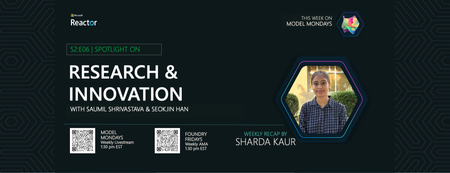
In this week's blog post, we dive into the cutting-edge research happening at Azure AI Foundry Labs. From the MCP Server that makes it easy to experiment with new models and tools, to Magentic-UI that brings human-centered agent workflows to life, there’s a lot to unpack!331Views0likes0CommentsM365 Management
Hi all, Cards on the table—I’m a Product Manager for a solution focused on Microsoft 365 management as well as driving optimisation into innovation. My background is sysadmin-heavy, which led me to building the solution before moving into product. I’m not here to pitch anything but genuinely keen to hear from the community: What are your biggest pain points in managing M365, Azure, Copilot? What challenges do you face with user optimisation, processes etc? Are you using any tools today to help, or is it mostly manual? What is one thing that would make your life so much easier? Would love to hear what’s working (or not working) for you, as it would help me massively! Thanks!395Views0likes1CommentCheck out Surface at Microsoft Ignite 2024
Explore the latest Microsoft Surface innovations at Ignite 2024 in Chicago and online. Discover AI-driven productivity, advanced security, and enhanced collaboration tools in must-attend sessions, hands-on labs, and interactive demos.1KViews2likes0Comments
Matter WakeUp System AI - Intel OpenVino Gestures and local models
Welcome to our blog, where we present our work on the WakeUp System AI, triggers with AI for assisting patients on the bedside. This blog will present the project overview and journey, including the different triggers we developed, the results and outcomes, a section on the evaluation of the system with stakeholders, lessons learned, future development and calls for action. This project is important as it will give patients the ability to have more autonomous control of their environment, reducing the number of calls made to staff, and allowing them to focus more on emergency situations and services. A key part of the project is the integration of Matter, a new application layer connectivity protocol for smart home devices. 1.6KViews0likes0Comments
Microsoft Learn Lance une Nouvelle Série sur l'IA Générative pour les Innovateurs
Explorez l'univers de l'IA générative à travers la nouvelle série dédiée aux entrepreneurs aspirants en IA. Découvrez comment utiliser des outils avancés tels que GPT-4 et DALL-E pour générer des idées innovantes, prototyper des produits, et créer des modèles commerciaux efficaces. Acquérez des compétences précieuses sans prérequis en affaires et augmentez vos chances de remporter Imagine Cup 2024. Participez aux Projets de Démarrage de l'IA pour obtenir un certificat numérique sur Microsoft Learn dès aujourd'hui et préparez-vous à transformer vos idées brillantes en projets de start-up concrets.1.7KViews1like0CommentsMicrosoft Learn Launches a New Series on Generative AI for Innovators
Do you have a great idea for a startup, but don’t know how to turn it into reality? Do you want to learn how to use the latest AI technologies to create innovative products and services? If yes, then you should check out the new series on Microsoft Learn: Generative AI for Innovators. This series will teach you how to use powerful AI tools such as GPT-4 and DALL-E, to generate novel and creative solutions for various domains and challenges. You will also learn how to use AI to quickly prototype and test your product, and how to build a sustainable and profitable business model for your startup. Whether you are a beginner or an expert, this series will help you unleash your entrepreneurial potential and make your startup dreams come true. Don’t miss this opportunity to learn from the best and join the generative AI revolution!12KViews5likes1Comment