infrastructure
267 TopicsAzure OpenAI Landing Zone reference architecture
In this article, delve into the synergy of Azure Landing Zones and Azure OpenAI Service, building a secure and scalable AI environment. Unpack the Azure OpenAI Landing Zone architecture, which integrates numerous Azure services for optimal AI workloads. Explore robust security measures and the significance of monitoring for operational success. This journey of deploying Azure OpenAI evolves alongside Azure's continual innovation.211KViews44likes21CommentsSecurity Best Practices for GenAI Applications (OpenAI) in Azure
This article presents an in-depth guide on security best practices for GenAI applications that use LLM models within the Azure platform. Aimed at developers and system administrators, it explores the essentials for maintaining the confidentiality, integrity, and availability of LLMs such as Azure OpenAI. It delves into practical measures for addressing security challenges, including data breaches, misuse of AI, and regulatory compliance, while also emphasizing the role of a shared responsibility model in cloud security. The guide provides a comprehensive roadmap for implementing layered security strategies, encryption protocols, access controls, and monitoring practices to ensure the robust security of LLM applications in Azure.74KViews20likes0CommentsAzure Course Blueprints
Each Blueprint serves as a 1:1 visual representation of the official Microsoft instructor‑led course (ILT), ensuring full alignment with the learning path. This helps learners: see exactly how topics fit into the broader Azure landscape, map concepts interactively as they progress, and understand the “why” behind each module, not just the “what.” Formats Available: PDF · Visio · Excel · Video Every icon is clickable and links directly to the related Learn module. Layers and Cross‑Course Comparisons For expert‑level certifications like SC‑100 and AZ‑305, the Visio Template+ includes additional layers for each associate-level course. This allows trainers and students to compare certification paths at a glance: 🔐 Security Path SC‑100 side‑by‑side with SC‑200, SC‑300, AZ‑500 🏗️ Infrastructure & Dev Path AZ‑305 alongside AZ‑104, AZ‑204, AZ‑700, AZ‑140 This helps learners clearly identify: prerequisites, skill gaps, overlapping modules, progression paths toward expert roles. Because associate certifications (e.g., SC‑300 → SC‑100 or AZ‑104 → AZ‑305) are often prerequisites or recommended foundations, this comparison layer makes it easy to understand what additional knowledge is required as learners advance. Azure Course Blueprints + Demo Deploy Demos are essential for achieving end‑to‑end understanding of Azure. To reduce preparation overhead, we collaborated with Peter De Tender to align each Blueprint with the official Trainer Demo Deploy scenarios. With a single click, trainers can deploy the full environment and guide learners through practical, aligned demonstrations. https://aka.ms/DemoDeployPDF Benefits for Students 🎯 Defined Goals Learners clearly see the skills and services they are expected to master. 🔍 Focused Learning By spotlighting what truly matters, the Blueprint keeps learners oriented toward core learning objectives. 📈 Progress Tracking Students can easily identify what they’ve already mastered and where more study is needed. 📊 Slide Deck Topic Lists (Excel) A downloadable .xlsx file provides: a topic list for every module, links to Microsoft Learn, prerequisite dependencies. This file helps students build their own study plan while keeping all links organized. Download links Associate Level PDF - Demo Visio Contents AZ-104 Azure Administrator Associate R: 12/14/2023 U: 12/17/2025 Blueprint Demo Video Visio Excel AZ-204 Azure Developer Associate R: 11/05/2024 U: 12/17/2025 Blueprint Demo Visio Excel AZ-500 Azure Security Engineer Associate R: 01/09/2024 U: 10/10/2024 Blueprint Demo Visio+ Excel AZ-700 Azure Network Engineer Associate R: 01/25/2024 U: 12/17/2025 Blueprint Demo Visio Excel SC-200 Security Operations Analyst Associate R: 04/03/2025 U:04/09/2025 Blueprint Demo Visio Excel SC-300 Identity and Access Administrator Associate R: 10/10/2024 Blueprint Demo Excel Specialty PDF Visio AZ-140 Azure Virtual Desktop Specialty R: 01/03/2024 U: 12/17/2025 Blueprint Demo Visio Excel Expert level PDF Visio AZ-305 Designing Microsoft Azure Infrastructure Solutions R: 05/07/2024 U: 12/17/2025 Blueprint Demo Visio+ AZ-104 AZ-204 AZ-700 AZ-140 Excel SC-100 Microsoft Cybersecurity Architect R: 10/10/2024 U: 04/09/2025 Blueprint Demo Visio+ AZ-500 SC-300 SC-200 Excel Skill based Credentialing PDF AZ-1002 Configure secure access to your workloads using Azure virtual networking R: 05/27/2024 Blueprint Visio Excel AZ-1003 Secure storage for Azure Files and Azure Blob Storage R: 02/07/2024 U: 02/05/2024 Blueprint Excel Subscribe if you want to get notified of any update like new releases or updates. Author: Ilan Nyska, Microsoft Technical Trainer My email ilan.nyska@microsoft.com LinkedIn https://www.linkedin.com/in/ilan-nyska/ I’ve received so many kind messages, thank-you notes, and reshares — and I’m truly grateful. But here’s the reality: 💬 The only thing I can use internally to justify continuing this project is your engagement — through this survey https://lnkd.in/gnZ8v4i8 ___ Benefits for Trainers: Trainers can follow this plan to design a tailored diagram for their course, filled with notes. They can construct this comprehensive diagram during class on a whiteboard and continuously add to it in each session. This evolving visual aid can be shared with students to enhance their grasp of the subject matter. Explore Azure Course Blueprints! | Microsoft Community Hub Visio stencils Azure icons - Azure Architecture Center | Microsoft Learn ___ Are you curious how grounding Copilot in Azure Course Blueprints transforms your study journey into smarter, more visual experience: 🧭 Clickable guides that transform modules into intuitive roadmaps 🌐 Dynamic visual maps revealing how Azure services connect ⚖️ Side-by-side comparisons that clarify roles, services, and security models Whether you're a trainer, a student, or just certification-curious, Copilot becomes your shortcut to clarity, confidence, and mastery. Navigating Azure Certifications with Copilot and Azure Course Blueprints | Microsoft Community Hub32KViews14likes17CommentsGetting Started with Reliability on Azure: Ensuring Cloud Applications Stay Up and Running
Looking for uncompromised uptime and steadfast cloud solutions? Azure's architecture promises exceptional reliability, designed to keep your operations smooth around the clock. Delve into the essence of Azure's robustness—where every click matters, every second counts, and resilience is the rule, not the exception.9.5KViews10likes1CommentDemystifying Azure VM Maintenance: A practical guide to minimizing disruptions
Discover the inside world of Azure's virtual machine maintenance in this comprehensive article. Learn about the planned and unplanned maintenance events, the innovative techniques used to apply updates, how Azure minimizes impact during these processes, and how customers can be notified in advance. Plus, find out about how customers can diagnose disruptions to VM availability. Don't miss out on this deep-dive into Azure's advanced maintenance strategies.9.4KViews9likes0CommentsStart Your Cloud Adoption Journey with the New Azure Expert Assessment Offering!
Are you looking for a way to accelerate your cloud journey and optimize your IT infrastructure, data, and applications? If so, you might be interested in the brand new Azure Expert Assessment Offering!8.3KViews9likes2CommentsEmpowering AI: Building and Deploying Azure AI Landing Zones with Terraform
Discover the power of deploying Azure AI Landing Zones with Terraform. Explore best practices, secure connectivity, and streamlined access to Azure AI services. Learn to create a strong cloud foundation, optimize performance, and ensure governance for your AI solutions. Join us on this practical journey to harness the true capabilities of AI.30KViews9likes17CommentsDesigning and Implementing Modern Data Architecture on Azure Cloud.
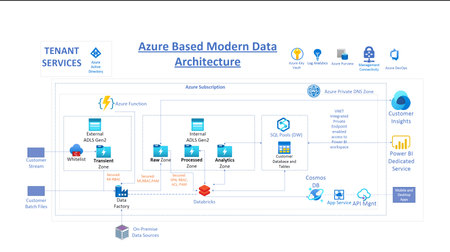
Designing a modern, cloud data architecture is a critical component of the digital transformation journey of any enterprise. In this post, we cover some of the Azure Data Services used to deliver a solution designed to meet the customer's current and evolving future needs.44KViews8likes2Comments
AI Azure Landing Zone: Shared Capabilities and Models to Enable AI as a Platform
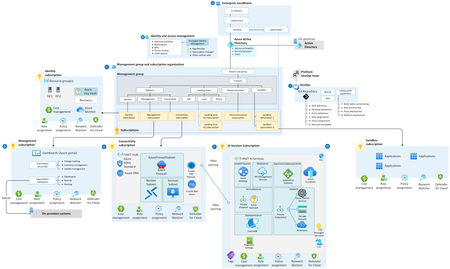
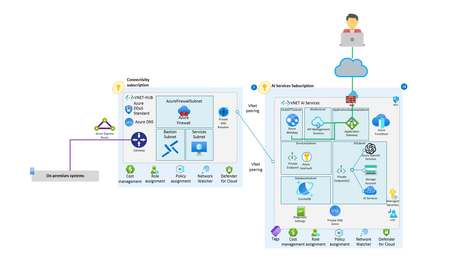
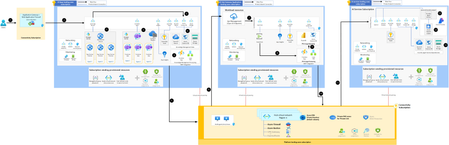
This architecture diagram illustrates a Microsoft Azure AI Landing Zone Pattern — a scalable, secure, and well-governed framework for deploying AI workloads across multiple subscriptions in an enterprise environment. Let's walk through it end-to-end, breaking down each section, the flow, and key Azure services involved. 🧭 Overview: The architecture is split into 4 major landing zones: Connectivity Subscription AI Apps Landing Zone Subscription AI Hub Landing Zone Subscription AI Services Landing Zone Subscription 🔁 Step-by-Step Breakdown 🔹 1. Users → Application Gateway (WAF) Users (e.g., enterprise employees or external users) access the system via the Application Gateway with Web Application Firewall (WAF). This is part of the Connectivity Subscription and provides: Centralized ingress control Zone redundancy Protection against common exploits 🔹 2. Route to AI Apps Landing Zone Subscription Traffic is routed to the AI Apps Landing Zone Subscription via the Application Gateway. This subscription hosts applications that use AI services, typically in a containerized or App Service-based architecture. 🔹 3. AI Apps Workload Components This section includes: App Hosting: Azure App Services Container Apps (with Container Registry) Networking: Private Endpoints Subnets Network Security Groups Monitoring: Log Analytics Workspaces Diagnostic Settings App Agents: Represent container/app service instances (Agent 1, 2, 3) 🔹 4. Integration with AI Services & Secrets Management These apps securely connect to: Azure Key Vault (secrets, credentials) Azure AI Search Azure Cosmos DB Azure Storage Azure OpenAI App Insights is used for application performance monitoring. Logic Apps & Functions handle: Knowledge Management Processing LLM Integration Workflows 🔹 5 & 6. Connectivity to Centralized Services Virtual Network Peering connects AI Apps Landing Zone with: Connectivity Subscription Hub Virtual Network in the Platform Landing Zone Subscription These provide access to shared infrastructure: Azure Firewall Azure Bastion VPN Gateway / ExpressRoute Azure DNS / Private Resolver Azure DDoS Protection 🔹 7. AI Hub Landing Zone Subscription This acts as a centralized workload processing zone with components like: Event Hubs Azure Key Vault App Insights Power BI Cosmos DB API Management (OpenAI Endpoints) Used for: Observability Usage processing API integration 🔹 8 & 9. FTU Usage Processing & Reporting Function Apps & Logic Apps: Process usage data (e.g., for chargebacks, monitoring) FTU = "Fair Tenant Usage" Reporting is done using Power BI and stored in Cosmos DB 🔹 10 & 11. Network Peering to Platform Zone AI Hub connects back to Platform Landing Zone via Virtual Network Peering Provides access to shared DNS zones and network services 🔹 12. AI Services Landing Zone Subscription This is where core AI capabilities live, such as: Azure OpenAI Azure AI Services: Speech Vision Language Machine Learning Foundry Project: OpenAI Agents Agent Service Dependencies Models hosted in Azure (e.g., GPT) This zone is accessed securely via: Private Endpoints Azure Key Vault Network rules 📦 Subscription Vending (All Zones) Each subscription includes a Subscription Vending Framework for: Spoke VNet placement Route configurations Policy/role assignments Defender for Cloud & cost management This ensures a consistent and compliant environment across the enterprise. 📌 Key Architectural Benefits Feature Purpose 🔐 Zero Trust Network Controlled access via WAF, private endpoints 📡 Scalable AI Apps Container Apps & App Services 🧠 Central AI Services Managed in isolated subscriptions 🔍 Monitoring Deep insights via App Insights, Log Analytics 🧾 Governance Role-based access, policy enforcement 🔌 Secure Integration VNet Peering, Azure Key Vault, API Management 🔚 End-to-End Data Flow Summary Users access app through Application Gateway (WAF) Apps in AI Apps Landing Zone process input Apps call AI services (OpenAI, Cognitive) via private endpoints Data usage and insights flow to AI Hub for logging and analysis FTU and usage metrics processed and stored Platform services support routing, DNS, security 🎯 Goal of the User Journey The user interacts with an AI-powered application (e.g., chatbot, document summarizer, recommendation engine) deployed on Azure. The app is secure, scalable, and integrated with advanced Azure AI services (like OpenAI). 👣 User Journey: Step-by-Step Breakdown ✅ 1. User Access (Public Entry Point) The user (browser or mobile app) sends a request (e.g., opens an AI web app or sends a prompt to a chatbot). The request hits the Azure Application Gateway with Web Application Firewall (WAF). ✅ Filters and protects against malicious traffic. ✅ Ensures high availability with zone redundancy. 🧠 Think of it as the front door to the AI platform. ✅ 2. Routing to AI Application The Application Gateway securely routes the request to the AI Apps Landing Zone Subscription. The user request reaches the App Service or Container App hosting the AI-based application logic. Example: A user submits a product question via a chatbot UI hosted here. ✅ 3. Processing the Request (App Logic) The app receives the input and begins processing: App uses App Insights for performance telemetry. Secrets or config (API keys, connection strings) are securely pulled from Azure Key Vault. Based on the business logic, the app needs to call an AI model (e.g., OpenAI). ✅ 4. Calling AI Services (via Private Endpoints) The app securely connects (using private endpoints) to the AI Services Landing Zone to: 🔹 Call Azure OpenAI (e.g., ChatGPT, DALL·E, embeddings) 🔹 Use Azure Cognitive Services (e.g., speech, vision, search) These services are isolated in their own subscription for security, scalability, and cost governance. 🧠 Here’s where the “AI magic” happens. ✅ 5. Retrieval-Augmented Generation (Optional) If the AI needs additional knowledge (RAG pattern), the app can: Query Azure AI Search for documents. Pull knowledge from Azure Cosmos DB or Azure Storage. AI results are processed via Logic Apps / Functions (e.g., post-processing, formatting). ✅ 6. Return the Response to the User The application receives the AI-generated output. It formats the result (e.g., chatbot message, visual, PDF, etc.) and returns it to the user via the original secure path. ✅ 7. Observability & Usage Logging App, AI service usage, and telemetry are logged in: Log Analytics / App Insights Event Hub → Streamed to AI Hub Landing Zone This enables centralized monitoring and analytics (Power BI dashboards, anomaly detection, etc.) ✅ 8. Usage Reporting & Governance Function App & Logic App in the AI Hub Landing Zone process usage logs. Usage is stored in Azure Cosmos DB. FTU (Fair Tenant Usage) policies are enforced and reported via Power BI dashboards. ✅ 9. Admin/Platform Layer All resources and subscriptions are governed via the Platform Landing Zone: Shared services like DNS, security policies, firewalls Cost controls, Defender for Cloud, DDoS protection Subscription vending and network segmentation 🗺️ Visual Recap: User Journey Flow User → App Gateway (WAF) → App in AI Apps Landing Zone → Call to Azure OpenAI / AI Services → (Optional: Knowledge retrieval) → AI Response →Returned to User → Usage logged & monitored → Usage reporting in AI Hub User Workflow 🔐 Security Throughout the Journey Step Security Feature App Gateway Web Application Firewall App Hosting Private Endpoints, Managed Identity Secrets Azure Key Vault Network Virtual Network Peering, NSGs Governance Role-based access, Policy Assignments 🧠 Example: Real-World Use Case Scenario: A doctor uses a medical AI assistant to analyze patient notes. Logs in via secure portal (WAF gateway) Submits patient notes (App Service) App calls OpenAI with prompt: "Summarize this diagnosis." App also queries internal document store (RAG) OpenAI returns result → displayed in UI Usage tracked for audit and reporting 🧭 User Journey Flow Users End users initiate a request (e.g., accessing an AI-powered app). Application Gateway + WAF (Connectivity Subscription) Request is routed through the Application Gateway with Web Application Firewall for security and traffic filtering. AI Apps Landing Zone Subscription Request enters the AI Apps subscription. Workloads run on App Services or Container Apps (Agents 1, 2, 3). Secure Access Application services authenticate and securely retrieve data from Azure Key Vault, Cosmos DB, Azure Storage, and Azure AI Search. Knowledge Management Processing Logic Apps / Function Apps process the request, enabling workflows, integrations, and knowledge enrichment. AI Hub Gateway Application Requests requiring AI services are routed to the AI Hub for centralized management. API Management (OpenAI Endpoints) APIs handle communication with downstream AI services. Event Hub + App Insights Telemetry and logs are captured for monitoring and troubleshooting. Power BI + Cosmos DB Usage data is aggregated and analyzed for reporting (FTU usage tracking). AI Services Subscription API calls are directed to the AI Services subscription. Azure AI Models Execution Requests hit Azure OpenAI, Azure AI Foundry, Cognitive Services (Speech, Vision, Search, etc.). Foundry/Agent services provide additional AI processing. Response back to User Processed AI output is routed back through the pipeline → API → Hub → Apps → Application Gateway → returned to the user. High Level Architecture Diagram Security & Governance Overview AI Landing Zone Lifecycle Workflow URL Reference Architectures: Baseline Azure AI Foundry Chat Reference Architecture in an Azure Landing Zone - Azure Architecture Center | Microsoft Learn Repo Link for AI Landing Zone: https://github.com/Azure/AI-Landing-Zones6.1KViews7likes1Comment