incident response
12 Topics
Did AI Bring Microsoft Down?
Question for Microsoft Engineering: Was Agentic AI Involved in the November 12–13, 2026 Microsoft 365 Outage? The recent widespread Microsoft 365 outage appears to have involved server health-check failures, infrastructure configuration issues and cascading service disruptions. I have a question that I believe deserves a clear technical answer from Microsoft's engineering team. Given the increasing deployment of AI-assisted and agentic systems across cloud infrastructure, automated monitoring, configuration management and incident response: Can Microsoft confirm whether any autonomous AI agent initiated, authorised or materially contributed to the configuration changes preceding this incident? Were AI-driven systems involved in the server health-check mechanisms that resulted in multiple servers being taken offline? Did any autonomous AI-driven recovery or remediation processes contribute to the cascading failure or complicate Microsoft's recovery efforts? Does Microsoft maintain sufficiently detailed audit trails to distinguish between human-authorised changes, conventional automation and autonomous AI-initiated actions? I am not suggesting that AI was necessarily responsible. However, given the growing operational autonomy of AI systems, I believe this is a legitimate question that deserves a transparent answer. Can Microsoft Engineering explicitly confirm whether agentic AI was involved at any stage in the incident, including its initiation, escalation or recovery? I would welcome a technically detailed response rather than a general statement that the incident resulted from a configuration error.
Microsoft Account got hacked
Hello my personal Microsoft account got hacked last week and i have been trying to do anything about it since then but it seems like the stupid AI phone support just understands nothing of what i'm talking to it and the official microsoft help pages for login and account problems also just do not help me at all. So my question is now, where and who can help me ? That account has bought games and apps in the store and so on. It cant be that all that is just gone now. I use 2FA and all that but it did not helped at all and i have no explaining for it. If anyone can help me in any way, it would be nice, thanks126Views0likes1Comment
Microsoft Defender Offline scan: BitLocker recovery prompt and missing scan results on Windows11 Pro
Microsoft Defender Offline scan not completing or recording results — Windows 11 Pro I need help fixing Microsoft Defender Offline and verifying that scans complete successfully. History: Initially, starting an Offline scan rebooted Windows, but no scan screen appeared. The process lasted less than a minute on a laptop with 1 TB of storage. No result appeared in Protection history. SFC and DISM reported no system corruption. Windows repair failed with error 0xC1900101–0x20017; factory reset also failed. During clean installation, a technician changed or repaired something in the BIOS to resolve a storage-partition recognition problem. Windows then installed successfully. BitLocker is enabled on C: and D:. WinRE has since been repaired and enabled. Current behaviour: Defender Offline requests the BitLocker recovery key for C: after reboot. After I enter it, the Defender Antivirus scan screen appears and displays progress. The background also displays “Preparing for recovery.” (?!?!, I ran a scan, not a recovery) Windows starts normally afterward, but no new Offline scan result appears in Protection history. Event Viewer findings (31 October, around 1:52 pm): Event 1000 shows a Quick Scan started by scheduled maintenance. Event 1002 shows the same scan stopped before completion, with reason “RPC connection rundown.” I did not schedule or run a Quick Scan; I initiated only Defender Offline at that time. Other events around the same time include 1150, 1151, 1152, and 5007. Theee is also an event 2030 at 12:51pm, when I ran the offline scan for the first time today. Questions: Why do the events report a scheduled Quick Scan when I initiated Defender Offline? How can I fix this and verify that Offline scans complete successfully? Could BitLocker, WinRE, TPM, Secure Boot, or the previous BIOS repair be involved? I want to resolve this without reinstalling Windows if possible. Microsoft Support case: 7110599710.72Views0likes1Comment
Microsoft confirmed my account was hacked, but says it cannot be recovered
I am looking for guidance from the Microsoft Community or anyone who has experienced a similar account-takeover situation. Microsoft Support investigated my case and confirmed that there was unauthorized access to my Microsoft account. During the takeover, the third party changed the account's security information and enabled 2FA. Microsoft has now told me that because the security information was changed, Customer Support is unable to recover the account. The account has instead been permanently suspended. What I find difficult to understand is that the very security changes made during the confirmed unauthorized takeover now appear to prevent the legitimate account owner from recovering the account. I have already provided evidence supporting my ownership, including: Original Minecraft purchase information/invoice Billing information associated with the purchase My original account details Confirmation that the email address subsequently added to the account does not belong to me Microsoft Support's own investigation confirming unauthorized access I am not asking Microsoft to bypass account-security procedures. I am asking whether there is an escalation or verification process specifically for cases where Microsoft has already determined that an account was compromised. My questions to the community/Microsoft moderators are: Is there a senior Microsoft Account Security, Fraud, or Account Takeover team to which a confirmed-compromise case can be escalated? Can historical account information, previous security information, billing records, purchase history, device/account history, or original game entitlements be used to establish ownership? If the account itself genuinely cannot be restored, is there any process to restore or transfer a legitimately purchased Minecraft entitlement to a new Microsoft account after ownership has been independently verified? Is there any formal review or appeal mechanism available after Support has classified an account as unrecoverable? Has anyone successfully resolved a similar situation where an attacker changed the security information/2FA before the legitimate owner could regain control? I fully appreciate the need for strict account-security controls. However, I would like to exhaust the legitimate escalation and ownership-verification options before accepting that both the account and a legitimately purchased product are permanently lost because of security changes made by an unauthorized third party. Any guidance from Microsoft moderators or community members on the correct escalation channel would be greatly appreciated. Thank you.258Views0likes1CommentCDOC Contact Information - Responses Failing to Reach CDOC Team
Good afternoon, I'm not sure if this is the correct forum to post this but I thought it might be the best place to start. I have been unsuccessfully trying to recover my child's compromised account for almost a month. Each of the 5 times I have followed the same steps, which eventually lead me to receiving an email with and SIR number, and telling me I need to provide more information to verify ownership of the account. When I reply to the email (from email address removed for privacy reasons and email address removed for privacy reasons ) it's like my response are black-holed somewhere. Eventually I get an email saying the following: This is NAME with Microsoft Customer Support again. I hope your day is going well. I wanted to touch base as I have not heard back from you. We want to be able to assist you with your request, but I still need the information that I requested to be able to consider moving forward with a resolution. I apologize in advance for the length of this email, but I wanted to be sure that I included everything. and then : Hello, This is NAME again with Microsoft Support. I initially e-mailed you on DATE with a request for the information required to confirm what your previous [recovery e-mail] was yours. your previous [recovery e-mail] is required before we can assist with your request. As no response was received, we have closed your case and any further replies will go to an unmonitored mailbox. If you still need assistance, please open a new case with us at Recover your Microsoft account | XBOX Support. You will receive an automated e-mail with confirmation that we have received your ticket. Please respond to that e-mail and reference this ticket number. Or Hello, Thank you for reaching out. This case was previously closed as it was either resolved or closed due to non-response after multiple contact attempts. In both situations, a closure email explaining the reason would have been sent to you. If you require further assistance, please open a new case by visiting hxxps://support.microsoft.com/. No matter what I tell the online chat agent, they tell me to be patient and submit the form. There seems to be no way to escalate the fact that my emails are not reaching the CDOC Team. Is there a workaround to reach them so they can receive the information that I'm providing and recover my child account? J229Views0likes0Comments
Microsoft defender is not catching threats before they are put into download folder.
Before I post this, please note that I’m a security researcher trained to investigate malware and other application bugs. my complaint is the following and it's a serious one that should be fixed by Microsoft as soon as possible. When I downloaded several malicious EXE files, Microsoft Defender didn't block or quarantine them during the download. Instead, Defender only detected them after I actually ran or executed the files. I also noticed that online platforms showed Microsoft Defender detecting the threats, so the files were clearly being recognized as malicious by Defender's engine. Has Microsoft changed the way Defender detects malware? Does it now require a malicious file to be executed before it detects it, similar to how some behavioral detection works in Malwarebytes? Or should Defender still be detecting and blocking known malicious EXE files before they are executed/downloaded because it's not at this current time and this is a clean installed system. My system is clean, and I even performed a clean installation of Windows. I also used ConfigureDefender with the settings configured to High, and all of the relevant protection settings appeared to be enabled.I'm trying to understand whether this is normal behavior with the current version of Microsoft Defender or if something might be misconfigured on my system. Before, Microsoft Defender would detect and block malicious files while they were being downloaded, before I had a chance to run or execute them. Now, however, it seems like Defender is allowing the files to finish downloading and only detects them after I execute them. Windows Defender isn't detecting EICAR test files? Mine doesn’t seem to detect them automatically, as shown in my proof. It only detects the file when I right-click it and select “Scan with Microsoft Defender.” Is this normal? It seems pretty crazy that it doesn’t detect the file immediately. it allowed them all to download. It's not even blocking Eicar test files when i bypass edges warning to download it just allows it to download no problem. edge detects it but Microsoft security does not. Please have Microsoft’s threat team investigate why Windows Defender isn’t detecting malicious files when downloaded through Microsoft Edge. When Edge warns about a malicious or suspicious download and those warnings are bypassed, the files aren’t caught or blocked by Defender and end up being saved to the system. This is extremely dangerous and needs to be replicated to confirm the issue.195Views0likes0CommentsAutomating Defender Alerts with CISA KEV and n8n – Has anyone tried similar workflows?
Hi everyone, I’ve been experimenting with n8n automation to improve vulnerability management. I created a workflow that cross-references Microsoft Defender for Endpoint vulnerabilities with the CISA Known Exploited Vulnerabilities (KEV) catalog, and then automatically creates Jira tickets for remediation. The flow takes about 16 seconds to run and prioritizes only the CVEs that are both present in the environment and listed in KEV. Has anyone here built similar automation (maybe with Logic Apps, Power Automate, or Sentinel playbooks)? Would love to hear how others handle vulnerability prioritization or ticket creation!703Views0likes0CommentsAutomação de Alertas do Defender com o Catálogo KEV da CISA usando n8n
Overview Recently, I decided to explore how automation could help simplify daily security operations, especially in vulnerability management. While studying n8n, an open-source automation platform, I saw the opportunity to connect it with Microsoft Defender for Endpoint and the CISA Known Exploited Vulnerabilities (KEV) Catalog. The goal was simple: build an automated workflow that identifies which vulnerabilities detected in Defender are actively exploited in the wild, and then create actionable tickets in Jira for remediation teams — automatically and with full context. Why I Built This Most security teams deal with thousands of vulnerabilities every week, but only a small portion are actually being exploited. I wanted to find a way to prioritize what truly matters without adding more manual work. Defender for Endpoint already provides strong vulnerability data, but by combining it with the CISA KEV catalog, we can instantly highlight high-risk CVEs that need urgent attention. This project was also a great opportunity to test n8n’s flexibility and API-handling capabilities in a real-world cybersecurity scenario.358Views0likes0Comments
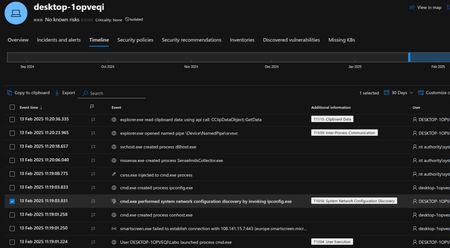
EDR logs explanation
Hello, would it be possible for an expert from this forum to analyze the EDR logs? Could you also explain to me in detail what happened? Furthermore, can you tell me if it is clearly established that the deleted files were deleted by someone physically present on the machine, or if there are other possible explanations? Thanks in advance.297Views0likes0Comments