ignite
79 Topics
Your experience matters: help shape what’s next for Windows Server
Windows Server powers the workloads and services organizations rely on every day. As those environments evolve, so do the priorities behind them—from strengthening security and improving resiliency to making operations more consistent across on-premises, cloud, and edge deployments. Every organization brings a different perspective shaped by its people, workloads, and operating needs. We want to learn from those experiences and build lasting connections with the customers who rely on Windows Server. The Windows Server Technology Adoption Program (TAP) brings customers and the Windows Server product team together to validate preview capabilities and releases before they ship. Through the Windows Server TAP, customers can share their perspectives directly with the Windows Server team, explore areas of mutual interest, and help inform how we build and improve the product. We see TAP as an ongoing conversation: listening to your needs, learning from your feedback, and working together to make Windows Server better for the organizations that depend on it. What is Windows Server TAP? TAP is a structured partnership focused on testing and feedback. Participating customers validate defined scenarios in a test or lab environment isolated from production, share their findings, and work with the product team to identify issues and assess readiness. Depending on the engagement, validation may focus on a particular capability or on broader release-readiness scenarios, such as upgrades and workload compatibility. TAP is a two-way partnership: your team can explore upcoming capabilities in a test environment, share what you learn, and engage directly with the Windows Server product team. Your real-world perspective helps us understand how Windows Server is used across different environments and focus validation on the scenarios that matter to customers. Is your organization a good fit for Windows Server TAP? We're interested in hearing from Windows Server customers who can dedicate technical resources to hands-on validation and regular feedback. You must have a non-production environment where your team can deploy preview builds and run test scenarios from Windows Server features. TAP engagements are focused and selective. The team matches customer interests and environments to available validation opportunities, then discusses participation requirements and next steps. Expressing interest does not enroll your organization or guarantee a place in the program. Learn more about Windows Server TAP Attending Microsoft Ignite? Meet the team at the Windows Server Booth in the Hub (open November 17th – 19th) to learn more about TAP and discuss whether it could be a fit for your organization. Prefer to connect virtually? Fill out the Windows Server TAP interest form and let's chat over Microsoft Teams about your organization's interests and whether TAP could be a fit. Questions? Feel free to reach out to the TAP team at windowsserver-engage@microsoft.com.Windows Server at Microsoft Ignite 2026: Sessions, our booth, and how to join the pre-day
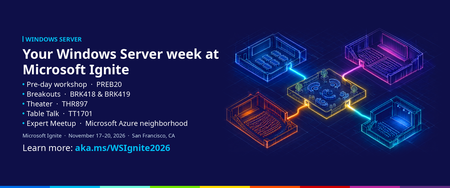
Start early with the Windows Server pre-day Windows Server: Secure, manage, and accelerate with AI (PREB20) Monday, November 16 | 1:00–5:00 PM PT | Moscone Center This is a demo-filled, deep-dive workshop built for Windows Server professionals and led by the engineers and product team who build Windows Server. You'll see how to manage your servers across Azure, hybrid cloud, and on-premises environments, and get an early look at what's coming in the next version of Windows Server, including local AI, security, Hyper-V, Active Directory, networking, and storage. Expect practical tips you can take back to optimize, modernize, and get the most out of your Windows Server fleet. How to sign up The pre-day was added after Ignite registration opened, and it's a paid add-on that you select during registration. That means it doesn't show up when you search the session catalog, and many people who registered early never saw it. Here's how to get a seat. If you haven't registered for Ignite yet: Visit the Microsoft Ignite registration website and select Register. Choose the in-person Conference pass. When you reach the pre-day options, add Windows Server: Secure, manage, and accelerate with AI (PREB20). The pre-day has an additional fee of $325. Finish registration. The pre-day will appear in your confirmation. Already registered for the in-person event? Sign in to your registration using the same account you used to register. Open your registration page and select "Add a Pre-Day pass". Add Windows Server: Secure, manage, and accelerate with AI (PREB20) and complete checkout; additional fee of $325 applies. Watch for an updated confirmation email. If it doesn't arrive, check your junk folder. Seats are limited, and the Windows Server pre-day has sold out in past years, so we recommend adding it soon. Windows Server sessions on Thursday, November 19 All four of our sessions are on Thursday in the Moscone Center area. The venues are close together with 30 to 45 minutes between sessions, so you can catch all of them. Add them to your schedule from the session catalog. Session Speakers What you'll see When and where BRK418 (Breakout): What's new and what's next for Windows Server Neil Hinnant, Elden Christensen The latest release news and a preview of the next version of Windows Server, covering Hyper-V, Active Directory, storage, and networking, and how the next release raises the bar for security, performance, and AI. Thursday, Nov 19 10:15 AM – 11:00 AM BRK419 (Breakout): From VMware to Hyper-V: Hyperscale virtualization in your datacenter Jeff Woolsey, Davanna White How Windows Admin Center Virtualization Mode helps you build cost-effective, cloud-connected on-premises virtualization with Hyper-V in Windows Server. Thursday, Nov 19 1:30 PM – 2:15 PM THR897 (Theater): Cloud management for every Windows Server Theo Tran, Cindy Wan Consistent management with Azure Arc wherever your servers run, plus lower ESU costs, free hotpatching, and SQL Server optimization. Thursday, Nov 19 10:45 AM – 11:10 AM TT1701 (Table talk): On-prem inferencing with Windows Server Dan Cuomo A small-group conversation on running AI workloads on-premises: planning AI-ready server hardware, and thinking through performance, security, and operational consistency. Thursday, Nov 19 9:00 AM – 9:45 AM Come find us at the Windows Server booth Windows Server has its own booth in the Hub, open November 17 to 19. Stop by to see demos, ask the product team your toughest questions, and tell us what you need from Windows Server. Bring your upgrade plans, your hotpatching questions, and your AI ideas. Can't be there in person? The digital pass is free and includes keynotes and a wide range of sessions. Breakouts and Theater sessions will be streamed or available on demand. Table talks and the pre-day are in-person only. Get hands-on before you arrive Want a head start? Join the Windows Server Insider Program to try preview builds of the next version of Windows Server and share feedback with the team. Several features you'll hear about at Ignite are already in Insider builds, and we've covered them here on Tech Community, including Trusted Launch for virtual machines, ReFS boot, and Windows NVMe-over-Fabrics initiator preview. We can't wait to see you in San Francisco. If you have questions about our sessions or the pre-day, refer to the Ignite event page for more information or leave us a comment below.Partner Blog | Microsoft Ignite 2026: Build an agenda that moves your business forward
Bring your customers’ next questions to Microsoft Ignite. Whether you’re joining us in San Francisco or online, use the week to explore new capabilities, learn from Microsoft experts, and connect with partners whose experience can inform your next steps. Microsoft Ignite 2026 takes place November 17–20 at the Moscone Center and online. Register now for the experience that fits your plans. If you’re already registered, review what’s included with your pass and start building your agenda. Make partner programming your starting point Start with the Frontier Transformation Partner keynote on Wednesday, November 18 from 9:00–10:30 AM Pacific Time. Join Nicole Dezen, Judson Althoff, Mala Anand, Ralph Haupter, and Stephen Boyle to explore how organizations are redesigning work, scaling AI adoption, and accelerating customer outcomes. This year, we will also welcome AI scientist, entrepreneur, investor, and thought leader Dr. Rana el Kaliouby to the partner keynote. We will also celebrate our 2026 Microsoft Partner of the Year Awards winners during the keynote. As our partner guide to Microsoft Ignite 2026 explores, Frontier Transformation brings AI and agents into the way customers work and run their businesses. The Frontier Partner specialization gives partners a way to demonstrate AI agent delivery expertise and customers verified evidence to consider when choosing a provider. Open the Partner Business view of the schedule builder and look for sessions such as: Frontier Transformation: The Next Trillion-Dollar Partner Opportunity Enterprise Frontier Transformation: Defining a New Era of Growth Differentiating at the Frontier: Unlocking Opportunities with the Microsoft AI Cloud Partner Program Co-sell at scale with Microsoft Marketplace Partner Skilling as a Growth Lever for Revenues & Profitability Plan to join me for a session on how Microsoft is bringing AI into the partner journey in Your AI-Powered Partnership: The E2E Partner Experience. The end-to-end walkthrough covers agentic co-sell in Partner Center, sales and upsell recommendations, AI-guided benefits and licensing, and a personalized Partner 360 experience. Look for practical guidance on finding opportunities, managing your partnership, and building your own agents. Explore the full session catalog for the technical learning and product insights most relevant to your customers. Check each listing for its time, delivery format, and recording availability and get AI-powered recommendations for sessions, speaker details, and onsite information. Build the rest of your agenda before the event Choose a few priorities, such as an architecture to validate, a capability your team needs to strengthen, or a customer challenge to solve. Filter the catalog by topic, audience, session type, and technical level, then pair product direction with practical learning across Microsoft 365 Copilot and agents, cloud infrastructure, data, and security. If you serve small and medium-sized businesses (SMBs), build on the opportunity to turn AI adoption into recurring revenue by choosing sessions that advance a repeatable service you can deliver and manage. Check reservation requirements as you build your schedule. Some activities like labs require an RSVP. Coordinate with colleagues to cover more topics, identify sessions to attend together, and make time to compare what you learn. If you’re attending in person: Plan your arrival. If your travel schedule allows, collect your badge on Monday, November 16. Before you arrive, check the event website for pickup hours and locations, identification requirements, and security guidance. Get ready for your time onsite. Visit the Microsoft Ignite website and review the latest venue information. Allow time to move between sessions and complete entry procedures. Bring comfortable shoes, a charged device, and a charger. Book certification ahead. If an exam is part of your plan, review the 2026 onsite certification instructions and reserve your slot. Eligible in-person attendees can take one Microsoft or GitHub certification exam at no cost, subject to the offer terms. Registration is required. Continue reading here629Views0likes0CommentsGet ready for Microsoft Ignite 2026
Microsoft Ignite 2026 is coming November 17–20, and it’s time to get ready. Whether you join in person or digitally, Microsoft Ignite is where you can build connections, accelerate customer conversations, and get early product access to shape your 2027 plans. Attending in person? Register now to access exclusive partner programming and experiences, including the Microsoft AI Cloud Partner Program booth, exclusive networking areas, and dedicated partner sessions. Joining online? Access livestreamed and on-demand keynote and breakout sessions, a session scheduler and sponsor directory to plan your experience and connect with other attendees, plus online-exclusive experiences. However you choose to participate, dedicated partner sessions, early product access, and networking spaces give you practical ways to scale your business and lead with AI. Register today and check out the session catalog to start planning your Microsoft Ignite experience. Plus: Exciting benefits news! Buy or renew your partner benefits package today and get even more AI value at Microsoft Ignite. New AI products will automatically unlock at launch—including Microsoft 365 Copilot Business across all three packages—with no increase to your package price. Starting at $350 a year, packages include discounted licenses, Azure credits, and one-on-one support so partners can save, innovate, and grow. Buy today and visit the Microsoft AI Cloud Partner Program booth to learn more.1.6KViews0likes0CommentsPartner Blog | Build what is next: A partner guide to Microsoft Ignite 2026
AI has moved decisively into production, and customer expectations are rising with it. Organizations want measurable business outcomes as they put agents to work across more complex processes and embed intelligence throughout their operations. At the same time, security, governance, and responsible AI must be built in from the start. For partners, this creates practical opportunities to shape strategy, build solutions and services, and guide customers from AI adoption to lasting business value. That is what makes Microsoft Ignite 2026 such an important moment. As Microsoft's flagship annual event, Microsoft Ignite brings together customers, partners, Microsoft leaders, and industry experts to explore the technologies, ideas, and conversations shaping the future of business. This year, it takes place November 17–20, 2026, at the Moscone Center in San Francisco and online. Microsoft Ignite provides a clear view of where customer needs and business priorities are headed, practical insight into the technologies organizations are adopting, and opportunities to connect with Microsoft experts, customers, and peers across the ecosystem. Direct access to Microsoft’s roadmap and product direction informs where you focus, invest, and grow. Registration for in-person and online experiences is open. Secure a spot for your team, then use the partner business view of the schedule builder to start building your agenda. I’m looking forward to connecting with partners throughout Microsoft Ignite and seeing how you are putting Microsoft innovations to work for customers across every segment, industry, and geography. Learn where customer opportunity is headed Frontier Transformation reflects the shift toward AI and agents becoming repeatable, governed capabilities, embedded in how organizations work, serve customers, and run business processes. That shift requires both intelligence and trust. Customers need AI grounded in their data, applications, workflows, and business context. They also need security, governance, management, and measurement built into how AI operates. Partners bring those pieces together. At Microsoft Ignite, you will see the latest product direction across AI, data, and security and decide which capabilities, solutions, and services to build next. Your opportunity is clear in every customer segment. If you serve small and medium-sized businesses (SMBs), your priority is making AI practical and secure through repeatable solutions and services that are easy to adopt and manage. If you work with midmarket and enterprise customers, your focus is reimagining core business processes, modernizing architectures and data estates, and meeting broader security and governance requirements as customers move toward agent-operated workflows. Turn innovation into practical expertise Microsoft Ignite provides access to Microsoft leaders, engineers, and product teams, along with technical sessions, demonstrations, labs, and skilling experiences designed to connect product direction with implementation. One place to bring that perspective together is the Frontier Transformation Partner keynote on Wednesday, November 18, from 9:00–10:00 AM PT. Continue reading here538Views0likes0CommentsMicrosoft's Student Opportunities: A Gateway to Professional Growth
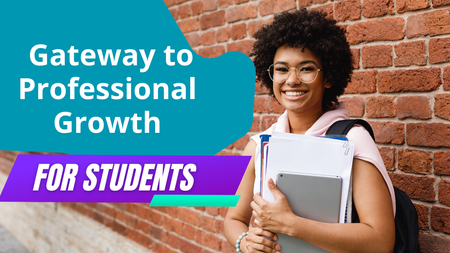
Are you a student looking to give your career in tech a boost? Look no further than Microsoft's student opportunities. From scholarships to internships, Microsoft provides a range of programs designed to help students develop their skills, gain practical experience, and build connections in the industry. In this article, we'll explore Microsoft's opportunities and events, and how they can be the gateway to professional growth for students seeking a career in technology.38KViews3likes7CommentsSecure a high-impact sponsorship for Microsoft Ignite
Become a sponsor at Microsoft Ignite in San Francisco, November 17–20, and showcase your organization to a global audience. Connect with tech leaders, Microsoft experts, partners, and customers. Becoming a sponsor offers you the opportunity to build your brand, generate leads, and announce new innovations through sessions, demos, and experiences. Engage with 25,000 in-person attendees and over 270,000 online. Review the sponsorship preview to learn more.374Views0likes0CommentsWelcome, Purview Lightning Talks audience!
Please log in and then post any of your Data Security (and AI) spillover Purview Lightning Talks questions in the thread below. You can tag them using these hyperlinked handles: Session Title Speaker Tech Community Alias (tag) The Purview Label Engine: Automated Classification, Translation, and Co-Documentation for Enterprise Tenants Michael Kirst Neshva MichaelKirst1970 Stop, Think, Protect: Data Security in Real Life with Purview Oliver Sahlmann Oliver Sahlmann Using Purview to Prevent Oversharing with AI Services Viktor Hedberg headburgh How I Helped My Customers Understand Their AI Usage (and Protect Their Sensitive Data) Bram de Jager Bram de Jager Four Labels Max for Daily Use: Which Ones & Why? Romain Dalle RomainDalle_MVP_MCT Data‑driven Endpoint DLP Solution with Advanced Hunting Tatu Seppälä tseppala The Purview Hack No One Talks About: Container Sensitivity Labels That Fix Oversharing Fast Nikki Chapple nikkichapple Why You Should Create Your Own Sensitive Information Types (SITs) Niels Jakobsen Niels_Jakobsen From Zero to First Signal: Insider Risk Management Prerequisites That Actually Matter Sathish Veerapandian Sathish Veerapandian Securing Data in the Age of AI Júlio César Gonçalves Vasconcelos jcvasconcelos Beyond eDiscovery – Purview DSI for Security Investigation Susantha Silva susanthasilva Elevating Purview DLP with a Real‑World Use Case Victor Wingsing vicwingsing Purview Lightning Talks takes place April 30th at 8am pacific: Webinar Details Full agenda here. Also, you can come here at any time and click "Start a Discussion" to post a topic or question to your Purview Community!269Views2likes0Comments