identity protection
36 Topics
Incorrect Secure Score recommendation - Remove unnecessary replication permissions
Hi, In our environment, we got the "Remove unnecessary replication permissions for Entra Connect AD DS Connector Account" secure score recommendation. Based on the https://learn.microsoft.com/en-us/defender-for-identity/remove-replication-permissions-microsoft-entra-connect replication permission is needed when PHS is in use. We are using PTA, but PHS is also enabled as a fallback. On the Entra Connect server I ran the following: Import-Module ADSyncDiagnostics Invoke-ADSyncDiagnostics -PasswordSync The result is: Password Hash Synchronization cloud configuration is enabled If I remove the replication permission, we soon receive an alert that password hash sync did not occour. Is it normal? I would say that the sensor should be able to detect PHS usage hence not recommending to remove the permissions. Thank you in advance, DanielSolved688Views0likes3Comments
Defender for Identity Certificate Requirements
One of the required certificates for the MDI sensor to run is this certificate: Subject : CN=Baltimore CyberTrust Root, OU=CyberTrust, O=Baltimore, C=IE Issuer : CN=Baltimore CyberTrust Root, OU=CyberTrust, O=Baltimore, C=IE Thumbprint : D4DE20D05E66FC53FE1A50882C78DB2852CAE474 FriendlyName : DigiCert Baltimore Root NotBefore : 5/12/2000 11:46:00 AM NotAfter : 5/12/2025 4:59:00 PM Extensions : {System.Security.Cryptography.Oid, System.Security.Cryptography.Oid, System.Security.Cryptography.Oid} It expires in a little over 2 weeks. I still see it listed as required here: https://learn.microsoft.com/en-us/defender-for-identity/troubleshooting-known-issues Does anyone know if that requirement will be going away and/or will the certificate be updated before this one expires? I haven't been able to find anything related to its replacement through my various searches so I apologize if this has been covered already. Thanks.645Views0likes1Comment
Suspected identity theft (pass-the-ticket) when switching LAN/WiFI
Hi, I see this alert "Suspected identity theft (pass-the-ticket)" when a user switches from LAN to WiFi or back. The laptop's DNS record has both IP addresses. I'm guessing Defender still thinks a different device is using the same Kerberos ticket. How do you deal with that? Can you tune the alert somehow so that doesn't keep alerting? Jan 16, 2025 4:15 PM This Kerberos ticket was first observed on 1/16/25 4:15 PM on [Device Name] (Laptop IP1). Jan 16, 2025 4:57 PM - Jan 16, 2025 4:57 PM [Username] accessed [Server Name] (CIFS) from [Server IP] (Laptop IP2). Thanks for your support1.2KViews0likes1Comment
MDI & gMSA config
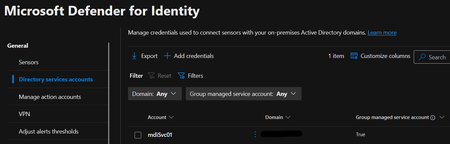
Hi, We have followed the MDI Deployment guide from Microsoft: https://learn.microsoft.com/en-us/defender-for-identity/deploy/deploy-defender-identity We have also cross referenced this guide: https://jeffreyappel.nl/how-to-implement-defender-for-identity-and-configure-all-prerequisites/ The MDI Portal shows the gMSA account. The MDI agents are running fine and reporting to the MDI Portal. However, when we look at Services.msc on the Domain Controllers, the MDI agent runs under the security context of "Local Service" and not the gMSA account. Can anyone advise us on whether this is correct? or should we see the gMSA account in Service.msc console? And what other config may be required to make it run under the gMSA account? Thank you SK (screenshot below)Solved1.1KViews0likes2CommentsMDI Sensor Updates options?
Hi, So far we have noticed that MDI Sensor updates can be "automatic" or "delayed". However, for our Production environment, we'd like these updates to be controlled by our team, once they have done their testing in a TEST Environment (i.e. we do not want them to be "automatic" or "delayed"). How do we therefore change the MDI Sensor update to be "manual", or via SCCM or similar? Thank you, SK1.3KViews0likes3Comments