identity management
629 Topics
Entra ID 53003: How to identify primary authentication when Authentication Details are empty?
We are investigating repeated interactive Microsoft Entra ID sign-ins with the following pattern: - ErrorCode: 53003 (BlockedByConditionalAccess) - isInteractive: true - AppDisplayName: OfficeHome - Authentication requirement: Multifactor authentication Conditional Access correctly blocks these requests because they originate outside our trusted locations. We have already confirmed through controlled testing that the authentication flow can reach 53003 after the correct credentials are provided. Our current problem is different: We need to determine what mechanism satisfied the primary/first authentication factor for the observed 53003 events. For these events, Authentication Details are empty: - Authentication method: empty - Authentication method detail: empty - Result detail: empty Therefore, we cannot determine whether primary authentication was performed using a password, an existing token/session claim, PHS, PTA, federation, Seamless SSO, or another mechanism. Our questions are: 1. Is there any tenant-visible telemetry that can identify the primary authentication mechanism when AuthenticationDetails is empty? 2. Can fields such as AuthenticationProcessingDetails, AuthenticationProtocol, IncomingTokenType, OriginalTransferMethod, or AuthenticationMethodsUsed reliably distinguish between password validation and reuse of an existing authentication/token? 3. If additional authentication infrastructure is used: - can PTA Authentication Agent logs be correlated using RequestId or CorrelationId? - should Seamless SSO generate a corresponding Kerberos 4769 event for AZUREADSSOACC$? - should federated authentication be traceable in AD FS logs? 4. For Password Hash Synchronization, is there any tenant-visible telemetry confirming that Entra ID actually validated the password for a specific sign-in request? 5. If this information is not exposed to the tenant, can Microsoft Support retrieve backend authentication telemetry for a specific Sign-in ID / RequestId / CorrelationId and determine how primary authentication was satisfied? Our goal is not to determine why Conditional Access generated 53003 — that part is already understood. We specifically need to identify what satisfied primary authentication before the Conditional Access evaluation.128Views0likes0CommentsEntra External ID email OTP send event requestType always set to "signIn" regardless of user action
Hi, In a recent workload, I'm assisting a client with implementation of Entra External ID for identity management and app authentication, which includes sending OTP codes with customized email templates. To accomplish this, a custom authentication extension has been created that authorizes the request and then communicates with an email service via an event-driven, loosely coupled architecture. While implementing and testing this feature together with the client, we noticed that it seems like the different modes or states in the user flows are not reflected in the requestType property in the request payload posted to the OnOtpSend auth extension configured. E.g., if a user tries to sign in but has forgotten their password and navigates to the password reset view and requests to send the OTP code to their email address to reset the password, the following payload is sent to the auth extension endpoint (the original payload below was logged with Application Insights, with identifiers below then redacted and formatted, otherwise intact): { "type": "microsoft.graph.authenticationEvent.emailOtpSend", "source": "/tenants/aaaaaaaa-bbbb-cccc-dddd-eeeeeeeeeeee/applications/11111111-2222-3333-4444-555555555555", "data": { "@odata.type": "microsoft.graph.onOtpSendCalloutData", "otpContext": { "identifier": "email address removed for privacy reasons", "oneTimeCode": "<REDACTED>" }, "tenantId": "aaaaaaaa-bbbb-cccc-dddd-eeeeeeeeeeee", "authenticationEventListenerId": "22222222-3333-4444-5555-666666666666", "customAuthenticationExtensionId": "33333333-4444-5555-6666-777777777777", "authenticationContext": { "correlationId": "44444444-5555-6666-7777-888888888888", "client": { "ip": "192.0.2.10", "locale": "en-gb", "market": "en-gb" }, "protocol": "UNDEFINED", "requestType": "signIn", "clientServicePrincipal": { "id": "55555555-6666-7777-8888-999999999999", "appId": "11111111-2222-3333-4444-555555555555", "appDisplayName": "Example Web App", "displayName": "Example Web App" }, "resourceServicePrincipal": { "id": "55555555-6666-7777-8888-999999999999", "appId": "11111111-2222-3333-4444-555555555555", "appDisplayName": "<client-app-name>-Web", "displayName": "<client-app-name>-Web" } } } } The above payload was captured using browser-based authentication (native auth is not used), with the below parameters passed (identifiers, tenant name etc. redacted, otherwise intact): https://example.ciamlogin.com/ aaaaaaaa-bbbb-cccc-dddd-eeeeeeeeeeee/oauth2/v2.0/authorize ?response_type=code &client_id=11111111-2222-3333-4444-555555555555 &redirect_uri=https%3A%2F%2Fexample.com%2Fsignin%2Fcallback%2F &scope=openid+profile+email &state=<REDACTED> &prompt=login &ui_locales=de-DE &mkt=de-DE &nonce=<REDACTED> &code_challenge=<REDACTED> &code_challenge_method=S256 Following having navigated to the authorize endpoint above, the issue can be reproduced by entering an email address or an existing user identity, then on the password entry view, press the “Forgot Password?” link under the password input field, and then press the button/element “Email code to <user-email>”. I have looked at using the requestType in the email OTP send event payload to determine which email template and email content are used as per client requirement, but noted that the requestType seemingly always contains the value "signIn" even if the OTP code was sent as part of a password reset operation. At first glance, it would seem like this property indicates which step in the UI the user is currently at, even though I’m not certain whether that is what the property is actually meant to represent or indicate or not. However, for the above scenario and requirement, some identifier or value indicating the action would be needed in order to tailor the email content. The alternatives to having a reliable context property in the payload to indicate user action would require more or less significant additional components and infrastructure, thus increasing the complexity of the solution. Based on its name and values, it would seem like the requestType property appears be a good candidate to carry a user action context identifier. A suitable alternative solution has been adopted currently, using a generalized OTP template, which works well, but the requirement that it would be preferable to tailor the content based on user context and intent, e.g., whether the request was triggered as part of a password reset action or for another authentication scenario, is still present, ideally via the event payload sent from Entra External ID to the auth extension. If there would be any further/follow-up questions on the above, e.g., to clarify the requirement, or further explain the reproduction steps and behaviour observed, or anything else, please tell, and I'll ensure to get back as soon as possible. Also, would someone have some input on potential other/additional ways to make the requestType include a context identifier, that would be much appreciated as well, thanks! Regards Kristoffer147Views0likes0CommentsAn Entra app credential is expiring. Which workload still uses it?
A credential rotation ticket often starts with three things: an application name, an expiry date and a deadline. That is enough to know something must happen, but not enough to rotate safely. Before touching the credential, I want to know whether that exact key is still requesting tokens, which resources it accesses and where those requests appear to come from. If Microsoft Entra sign-in logs are already connected to Log Analytics or Microsoft Sentinel, KQL can answer most of that without changing anything in the tenant. This is the workflow I use. What needs to be in the workspace The important diagnostic category is ServicePrincipalSignInLogs. In Log Analytics it becomes the AADServicePrincipalSignInLogs table. Normal SigninLogs are for interactive user sign-ins and are not the right data source for an app authenticating with its own secret or certificate. The diagnostic setting is configured under: Microsoft Entra ID > Monitoring & health > Diagnostic settings Make sure ServicePrincipalSignInLogs is being sent to the workspace you are querying. Microsoft documents the available log categories and their purpose here: https://learn.microsoft.com/en-us/entra/identity/monitoring-health/concept-diagnostic-settings-logs-options From the Entra recommendation or the affected application, copy the Application (client) ID. Do not confuse it with the application object ID or the service principal object ID. In the Kusto table: AppId is the Application (client) ID. ServicePrincipalId is the object ID of the service principal in the tenant. ServicePrincipalCredentialKeyId identifies the secret or certificate key used for the token request. ServicePrincipalCredentialThumbprint can help identify a certificate. ResourceDisplayName and ResourceServicePrincipalId identify the target resource. Those fields are part of the documented AADServicePrincipalSignInLogs schema: https://learn.microsoft.com/en-us/azure/azure-monitor/reference/tables/aadserviceprincipalsigninlogs Step 1: See every credential recently used by the application Replace TargetAppId with the Application (client) ID from Entra: let Lookback = 30d; let TargetAppId = "00000000-0000-0000-0000-000000000000"; AADServicePrincipalSignInLogs | where TimeGenerated >= ago(Lookback) | extend SignInTime = coalesce(CreatedDateTime, TimeGenerated) | where SignInTime >= ago(Lookback) | where AppId =~ TargetAppId | extend SignInSucceeded = tostring(ResultType) == "0" | summarize FirstSeen = min(SignInTime), LastSeen = max(SignInTime), Attempts = count(), SuccessfulSignIns = countif(SignInSucceeded), FailedSignIns = countif(SignInSucceeded == false), CredentialTypes = make_set(ClientCredentialType, 10), SourceIPs = make_set(IPAddress, 20), UserAgents = make_set(UserAgent, 10), TargetResources = make_set( strcat(ResourceDisplayName, " [", ResourceServicePrincipalId, "]"), 20 ) by AppId, ServicePrincipalId, ServicePrincipalName, ServicePrincipalCredentialKeyId, ServicePrincipalCredentialThumbprint, FederatedCredentialId | order by LastSeen desc This gives me a short usage map for the application. If the expiring credential's key ID appears in the result, that exact credential was used for at least one recorded token request during the selected lookback period. The target resources show what it requested a token for. Source IPs and user agents usually help narrow down the workload. They are clues, not host identification. A source IP might be a NAT gateway, proxy or shared outbound address, and user-agent strings are neither guaranteed nor trustworthy. I use them to narrow the search in deployment settings, automation jobs, Key Vault references and CI/CD configuration, not as final proof of where the workload runs. Rows with a populated FederatedCredentialId represent workload identity federation. They should not be mistaken for use of the expiring secret or certificate. Step 2: Inspect the exact credential Once the expiring key ID is known, this query shows the individual sign-in records for that key: let Lookback = 30d; let TargetAppId = "00000000-0000-0000-0000-000000000000"; let ExpiringCredentialKeyId = "11111111-1111-1111-1111-111111111111"; AADServicePrincipalSignInLogs | where TimeGenerated >= ago(Lookback) | extend SignInTime = coalesce(CreatedDateTime, TimeGenerated) | where SignInTime >= ago(Lookback) | where AppId =~ TargetAppId | where ServicePrincipalCredentialKeyId =~ ExpiringCredentialKeyId | extend Result = iff(tostring(ResultType) == "0", "Success", "Failure") | project SignInTime, Result, ResultType, ResultDescription, ServicePrincipalName, ServicePrincipalId, ClientCredentialType, ServicePrincipalCredentialKeyId, ServicePrincipalCredentialThumbprint, IPAddress, UserAgent, ResourceDisplayName, ResourceServicePrincipalId, CorrelationId | order by SignInTime desc A successful row is direct evidence that Entra accepted that credential for a token request at that time. Repeated failures can also be useful: they might show an incomplete rotation, an expired credential that is still configured somewhere, or a forgotten workload that keeps retrying. No rows do not mean "safe to delete." They only mean that no matching event exists in the data currently available to this workspace for the selected period. The workload might run monthly, the event might be outside retention, the diagnostic category might have been enabled recently, or the relevant logs might be routed elsewhere. The table also does not contain the application's business owner. I confirm ownership on the application or enterprise application in Entra, or enrich the result from an existing CMDB or Sentinel watchlist. I would not invent an owner from the last source IP or from whoever originally created the app. Step 3: Prove the replacement is actually in use After adding the replacement credential and updating the workload, I use the cutover time plus the old and new key IDs to verify the change: let CutoverTime = datetime(2026-08-26T12:00:00Z); let TargetAppId = "00000000-0000-0000-0000-000000000000"; let OldCredentialKeyId = "11111111-1111-1111-1111-111111111111"; let NewCredentialKeyId = "22222222-2222-2222-2222-222222222222"; AADServicePrincipalSignInLogs | where TimeGenerated >= CutoverTime | extend SignInTime = coalesce(CreatedDateTime, TimeGenerated) | where SignInTime >= CutoverTime | where AppId =~ TargetAppId | where ServicePrincipalCredentialKeyId in~ (OldCredentialKeyId, NewCredentialKeyId) | extend Credential = case( ServicePrincipalCredentialKeyId =~ OldCredentialKeyId, "old", ServicePrincipalCredentialKeyId =~ NewCredentialKeyId, "new", "other" ) | where Credential != "other" | summarize FirstSeen = min(SignInTime), LastSeen = max(SignInTime), Attempts = count(), SuccessfulSignIns = countif(tostring(ResultType) == "0"), FailedSignIns = countif(tostring(ResultType) != "0"), SourceIPs = make_set(IPAddress, 20), TargetResources = make_set(ResourceDisplayName, 20) by Credential, ServicePrincipalCredentialKeyId | order by LastSeen desc Before I remove the old credential, I want to see a successful token request with the new key ID after the cutover. I also run a real operation against the intended resource. A generic process health check is not enough if it never exercises the dependency that uses Entra authentication. Continued sign-ins with the old key after the cutover are a clear sign that another instance, deployment slot or workload still has the old value. An absence of old-key sign-ins becomes meaningful only after the expected workload schedule has been covered and the logs have arrived in the workspace. One final trap is token caching. Service principal sign-in logs show token requests, not every API call made with a token. Removing the old client credential prevents it from obtaining new tokens, but an access token already issued by Microsoft Entra normally remains valid until it expires. The rotation test must therefore force the workload to acquire a fresh token. Access token documentation: https://learn.microsoft.com/en-us/entra/identity-platform/access-tokens My rotation order is simple: Identify the exact old credential and the workload using it. Add the replacement while the old credential is still valid. Deploy the new credential to the workload's secret store. Force a fresh token request and execute a real operation. Confirm the new key ID in AADServicePrincipalSignInLogs. Watch for unexpected use of the old key for an appropriate period. Remove the old credential after the evidence and rollback window are sufficient for that workload. Microsoft Entra's preview recommendations for expiring application credentials and expiring service principal credentials are useful starting points. For me, the KQL correlation is the part that turns the warning into a controlled change instead of a blind rotation. Recommendation documentation: https://learn.microsoft.com/en-us/entra/identity/monitoring-health/recommendation-renew-expiring-application-credential https://learn.microsoft.com/en-us/entra/identity/monitoring-health/recommendation-renew-expiring-service-principal-credential How are you carrying application ownership into Sentinel? A maintained watchlist works, but it can easily become just another stale inventory.235Views0likes0Comments
Need Microsoft support to resolve a historical tenant association with a domain I recently acquired
Hello, I recently became the legitimate and independent registrant of a domain that had previously been owned or used by an unrelated organization. I have no affiliation whatsoever with the previous domain holder or that organization. I have now received a Microsoft Power Platform notification at an email address under my domain concerning a Default environment belonging to the previous organization. The notification includes a Tenant ID and Environment ID, and the environment name corresponds to that organization. I do not own, administer, or have access to this tenant or Power Platform environment, and I am not seeking access to or control over it. My main concern is that there may still be a historical association between my domain or its email addresses and the previous organization's Microsoft tenant or related services. I would like Microsoft to investigate this and, where necessary, properly separate my domain and its email addresses from any unrelated historical Microsoft accounts, tenants, directories, or services. Most importantly, I want to ensure that this historical association will not adversely affect my ability in the future to use my domain and its business email addresses to create, verify, and use my own Microsoft 365, Microsoft Entra, Power Platform, or other Microsoft business services. At present, I do not have a Microsoft business account, Microsoft 365 tenant, or Power Platform tenant of my own. As a result, I appear to be unable to use some of the normal business support channels that require an existing tenant or administrator account. Could someone please advise me on the appropriate way to get this matter reviewed by Microsoft Support? If a Microsoft employee or official support representative can assist or direct me to the appropriate private support channel, I would greatly appreciate it. For privacy and security reasons, I have intentionally not posted the actual domain name, email address, Tenant ID, or Environment ID publicly. I am happy to provide all of the relevant details privately to an authorized Microsoft support representative if required. Thank you for any guidance.452Views0likes1CommentExpected exactly one role management policy assignment but 0 were found
I am getting the following error in Entra when I try to assign a custom role to a user: Expected exactly one role management policy assignment but 0 were found What I have done: entra.microsoft.com → Entra ID: Roles & admins → New custom role Basics * Role name: User Directory Reader * Description: Provides read-only access to user directory information. Intended for security analysts and auditors who require visibility into user identities without modification permissions. Permissions * microsoft.directory/users/standard/read *microsoft.directory/users/memberOf/read *microsoft.directory/users/manager/read When I click + Add assignment I get the error "Expected exactly one role management policy assignment but 0 were found". I have trial license for Privileged Identity Management (Entra ID P2).559Views0likes2Comments
Group-Based Licensing (E3 → Business Premium): MutuallyExclusiveViolation – Months Unresolved
We operate a Microsoft 365 environment with Entra ID, Intune, and Exchange Online. For months, we have been dealing with a critical issue that remains unresolved to this day — despite an active Microsoft Support ticket. The Technical Problem: During the migration of approximately 87 user accounts from Microsoft 365 E3 to Business Premium (SPB) via group-based licensing in Entra ID, all affected accounts receive a MutuallyExclusiveViolation error. Microsoft's backend treats E3 and Business Premium as mutually exclusive, blocking the SPB assignment — despite sufficient licenses being available. A sequential approach (removing E3 first, then assigning Business Premium) is not an acceptable solution: a test run proved that this causes a complete loss of Exchange Online access. For a rollout across 87 productive user accounts, this is not viable. What is required is a seamless, atomic license swap at the backend level — exclusively via group-based licensing. The Support Problem: Two support engineers assigned — zero technical progress. Instead of a substantive solution, we received standard documentation steps that do not address the actual problem. A false resolution notice was issued — the issue had demonstrably not been resolved. Our own PowerShell tests (Get-MgUser, Get-MgSubscribedSku) and CSV exports from the Entra ID portal disproved this conclusively. Committed updates from the Engineering Team were not delivered. Instead, automatically generated follow-up emails were sent with no substantive relation to the ongoing case. An additional unexplained behavior: a test user appears in the error report of a license group they were never added to — a further backend inconsistency that has not been investigated. Current Status: The ticket has been open for months. 87 user accounts cannot be migrated to Business Premium. An escalation to the Team Manager has been initiated. No resolution is in sight. My Question to the Community: Has anyone experienced a similar issue with MutuallyExclusiveViolation in group-based licensing (E3 → Business Premium)? Is there a known workaround or an official Microsoft statement on this? Ticket Reference: #2604241410000669703Views0likes3CommentsUnexpected button behaviour when using the prompt=create parameter in Entra External ID user flows
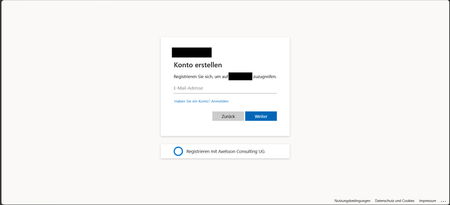
Hi, In a recent workload, I'm assisting a client to implement Entra External ID for streamlined authorization as well as single sign-on for associated registered external facing third-party applications for external customer users through their Entra External ID identity, as well as assisting the client with auth branding and other UI customizations, and preparing Entra ID federation custom OIDC providers and configuration for enabling SSO with organizational internal and remote work- and school accounts etc. The sign-up / create account experience is of importance to the client, as a rather substantial amount of users are expected to sign-up via self-service sign-up following having received an invite via another app. To ensure that the user lands on the create account view, in order to minimize the number of steps and actions the users need to take to get there, the prompt=create parameter is used to pre-select the sign-up/register experience in the user flows UI. Having stress-tested the user flows and experience recently, we noticed that in a specific scenario, some UI elements behave in a manner that could be described as unexpected, and even though a workaround has mitigated it to some extent, the behaviour of some elements could probably be improved a bit to ensure an even more consistent user experience in the built-in user flows. Specifically, if the user flow is invoked with the prompt parameter set, the user lands on the create account screen as expected, however, unless custom CSS modification is applied, the Back button that would typically be there, as if having arrived there from the initial sign-in screen where it’s also displayed. If pressing the Back button displayed on the Create account view when having navigated there with the prompt=create set in the /authorize request, pressing the button seemingly doesn’t have any impact or result in any action, one can click it, but nothing happens. I'd suspect it's perhaps a "remnant" from if the flow is invoked without any prompt parameter set, or with prompt=login set, but when prompt=create is set, there is no state/page history in the UI to navigate back to, as no previous page has been displayed or rendered yet and added to the history, and the Back button click thus doesn’t have any effect. In general, I think buttons that don't have any tangible action should not be displayed, also, if prompt=login is set, the Back button isn't shown then either on the very initial user flow view shown then, so it would seem the built-in user flows actually already follow such approach in fact, but not when the prompt=create has been set, thus causing some inconsistency in the UI that users could notice unless custom CSS styling is applied. The expected behaviour for our business case would be that if prompt=create is set, then, similar to the prompt=login, no Back button should be displayed, or, if shown, it should result in some navigation (perhaps something like javascript.go(-1), but that could/would be dependent on from where the user arrived, e.g., going back a step in the browser history won't work if the user clicked a link from an invite email ) and preferably not be non-actionable. Furthermore, on the topic of the Back button and its behaviour when the prompt=create parameter is set, there is another case at which we observed some unexpected button behaviour as well, that could probably benefit from some attention. At a specific second scenario, it seems that the Continue button is displayed without providing any action, and when clicking the Back button then, clicking it seemingly resets the "create account", state likely set by the prompt=create initially, and instead switches the flow back to the sign-in state, which can at least affect the display text of some subsequent buttons shown in later steps in the UI. The user arrives at a built-in Entra External ID user flow /authorize endpoint, with the prompt=create query parameter set The user triggers the OTP challenge by entering an email address to verify the email address The user receives the OTP code but enters it incorrectly, i.e., doesn't copy the full code length of eight digits, and instead enters/pastes six of the eight code digits. The UI then shows an error message that the code could not be used/validated, and the email address field is displayed again with the email address that was used for the verification attempt prefilled. If the user clicks the Continue button at this stage, nothing happens. If the user clicks the Back button instead (given that it’s not hidden), it shows the same view one more time, with the Back and Continue buttons at the bottom. However, if the user clicks the Continue button this time, it works and a new code is sent. On the next screen, where the newly sent code can be entered, instead of a button named "Continue", it will now instead show a button with the text "Sign-in" (it would seem like the create account state has gotten lost somewhere along the way at this point, perhaps when the back button in the step 5 above was pressed). If one omits the prompt=create parameter, or when using prompt=login, things seem to work fine, the above occurs when the prompt=create is set. The reason why is the prompt=create is used is due to a business requirement to try to minimize the steps, especially in conjunction with the registration/sign-up, as far a possible when signing up. We have opted for the built-in user flows, not the self-hosted native authentication UI pages, for this project, and then as I understand it, it is the prompt=create parameter that can/should be used to enable the user to land directly on the registration page without having to navigate there manually via the sign-up link, that is otherwise shown on the initial sign-in page. It would thus be great if the prompt=create parameter could have some attention (or perhaps if a dedicated sign-up user flow type could be added potentially, even though that would perhaps warrant some update to the user flow app linking as well, as my understanding is that one user flow can be linked to one app registration at a time currently) to avoid that some buttons become unresponsive when the parameter is used, or falls back to sign-in, to improve the built-in user flows further, as the prompt=create fulfils the business requirement well otherwise. If there would be any further/follow-up questions on the above, e.g., to clarify the requirement, or further explain the reproduction steps and behaviour observed, or anything else, please tell, and I'll ensure to get back as soon as possible. Also, would someone have some input on potential other/additional ways to pre-select the create account/sign-up experience, that would naturally be much appreciated as well, thanks! Regards Kristoffer293Views0likes0Comments
Can External ID (CIAM) federate to an Azure AD/Entra ID tenant using SAML?
What I'm trying to achieve I'm setting up SAML federation FROM my External ID tenant (CIAM) TO a partner's Entra ID tenant (regular organizational tenant) for a hybrid CIAM/B2B setup where: Business users authenticate via their corporate accounts (OIDC or SAML) Individual customers use username/password or social providers (OIDC) Tenant details / Terminology: CIAM tenant: External ID tenant for customer-facing applications IdP tenant: Example Partner's organizational Entra ID tenant with business accounts Custom domain: mycustomdomain.com (example domain for the IdP tenant) Configuration steps taken Step 1: IdP Tenant (Entra ID) - Created SAML App Set up Enterprise App with SAML SSO Entity ID: https://login.microsoftonline.com/<CIAM_TENANT_ID>/ Reply URL: https://<CIAM_TENANT_ID>.ciamlogin.com/login.srf NameID: Persistent format Claim mapping: emailaddress → user.mail Step 2: CIAM Tenant (External ID) - Added SAML IdP (Initially imported from the SAML metadata URL from the above setup) Federating domain: mycustomdomain.com Issuer URI: https://sts.windows.net/<IDP_TENANT_ID>/ Passive endpoint: https://login.microsoftonline.com/mycustomdomain.com/saml2 DNS TXT record added: DirectFedAuthUrl=https://login.microsoftonline.com/mycustomdomain.com/saml2 Step 3: Attached to User Flow Added SAML IdP to user flow under "Other identity providers" Saved configuration and waited for propagation The problem It doesn't work. When testing via "Run user flow": No SAML button appears (should display "Sign in with mycustomdomain") Entering email address removed for privacy reasons doesn't trigger federation The SAML provider appears configured but never shows up in the actual flow Also tried using the tenant GUID in the passive endpoint instead of the domain - same result My question Is SAML federation from External ID to regular Entra ID tenants actually possible? I know OIDC federation to Microsoft tenants is (currently, august 2025) explicitly blocked (microsoftonline.com domains are rejected). Is SAML similarly restricted? The portal lets me configure everything without throwing any errors, but it never actually works. Am I missing something in my configuration? The documentation for this use case is limited and I've had to piece together the setup from various sources. Or is this a fundamental limitation where External ID simply can't federate to ANY Microsoft tenant regardless of the protocol used?947Views1like4CommentsLooking for an on-prem MFA solution for Active Directory and RDP
Hi everyone, We're reviewing options for adding MFA to our on-premises Active Directory environment. Most of our users authenticate with Active Directory, while administrators also use RDP for managing Windows servers. Because part of our infrastructure is isolated from the Internet, we'd prefer an on-premises MFA solution instead of relying on a cloud-only service. Has anyone implemented something similar recently? I'm interested in hearing: Which solution did you choose? How difficult was the deployment? Did you run into any compatibility or performance issues? Is there anything you'd do differently if you were deploying it again? Any real-world experience or recommendations would be greatly appreciated. Thanks!685Views1like6CommentsCan the built-in "No account? Create one" link redirect to a custom sign-up page?
I'm using Microsoft Entra External ID with a built-in sign-in/sign-up user flow. On the Microsoft-hosted sign-in page, the "No account? Create one" link always redirects users to the default Entra sign-up page. I already have a custom registration page and would like this built-in link to redirect to my custom URL instead. Is there any supported way to customize the destination of this link in a built-in user flow? If not, could someone confirm whether this behavior is fixed by design? Thanks!448Views0likes2Comments