hybrid
15 Topics
Deploying Logic Apps Hybrid through an Azure DevOps pipeline
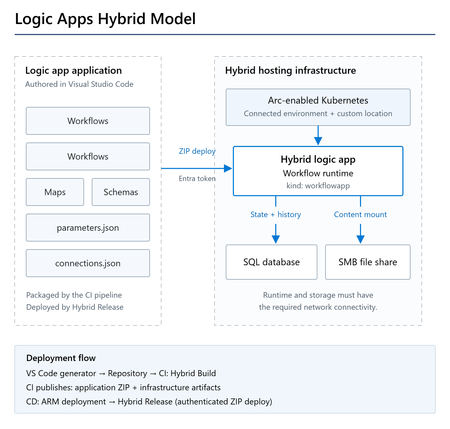
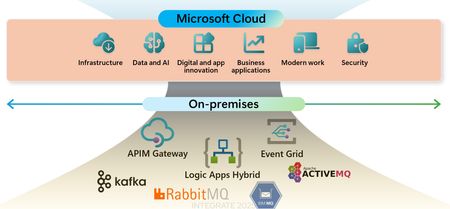
Overview Logic Apps Hybrid runs Standard workflows on your own infrastructure: an Arc-enabled Kubernetes cluster that appears in Azure as a connected environment. You still author and manage the workflows in Azure, but the runtime is yours. Until now, setting up CI/CD for this meant writing the ARM template and the pipeline YAML by hand, and working out a few Hybrid-specific details along the way. The Azure Logic Apps (Standard) extension for Visual Studio Code can now generate all of it for you: the infrastructure template, its parameter file, and both pipelines. A separate Azure DevOps extension supplies the pipeline tasks that do the Hybrid-specific work. This post covers the whole path: generating the assets, what is inside them, the service connections and variables you need to supply, and running both pipelines. Things to consider first Three things work differently in Hybrid than in a cloud-only Standard deployment. The generated assets handle all of them, but the pipelines are much easier to follow once you know what they are. Connections cannot use managed identity Infrastructure as code for Standard normally produces managed API connections that authenticate with ManagedServiceIdentity . That does not work in Hybrid, because the runtime executes inside a container on your own cluster where no Azure managed identity is available. Hybrid connections use ActiveDirectoryOAuth with a Microsoft Entra ID app registration instead. The Hybrid Build task rewrites this at build time, so you do not have to. Any *-Authentication parameter of type ManagedServiceIdentity becomes: { "type": "ActiveDirectoryOAuth", "tenant": "@appsetting('WORKFLOWAPP_AAD_TENANTID')", "clientId": "@appsetting('WORKFLOWAPP_AAD_CLIENTID')", "secret": "@appsetting('WORKFLOWAPP_AAD_CLIENTSECRET')", "audience": "https://management.core.windows.net/" } The @appsetting() references resolve at runtime against Container App environment variables that the infrastructure template sets. The same package can therefore go to any environment; only the app settings change. The runtime runs on your cluster A Hybrid logic app uses Azure Container Apps on Arc-enabled Kubernetes. It is deployed as a Microsoft.App/containerApps resource with kind: workflowapp , tied to your cluster through a custom location. Workflow content lives on an SMB file share mounted at /home/site/wwwroot . Deployment goes through a ZIP deploy endpoint There is no App Service publishing involved. The package is posted to the Hybrid logic app's zipdeploy endpoint, authorized with a bearer token from the client credentials flow. That is why the release task needs its own Hybrid Logic App service connection holding the Entra ID tenant, client ID, and client secret. What you'll build A CI pipeline that packages your workflows and publishes the application ZIP and infrastructure templates, and a CD pipeline that deploys the infrastructure and releases the package to your Hybrid logic app. The runtime runs on your Arc-enabled Kubernetes cluster, with SQL for workflow state and an SMB share for application content. Prerequisites This post assumes the Hybrid environment already exists. If you have not set one up yet, follow the official guide to set up your infrastructure for Standard logic app workflows with hybrid deployment. For an automated AKS-based evaluation environment, you can also use the Azure Arc Jumpstart template, Hybrid deployment for Azure Logic Apps on AKS. Use it for evaluation and validation, not as a production reference architecture. On the Azure side you need: An Arc-enabled Kubernetes cluster with a connected environment ( Microsoft.App/connectedEnvironments ) and a custom location An SMB file share the cluster can reach: host name, share path, user name, and password A SQL Server connection string for the Hybrid runtime state store A Microsoft Entra ID app registration, along with its client ID, object ID, tenant ID, and a client secret On the tooling side: Visual Studio Code with the Azure Logic Apps (Standard) extension, version 3.3.0 or later An Azure DevOps project with a Git repository The Azure Logic Apps Standard Tasks extension installed in your Azure DevOps organization. This extension includes the Hybrid build and release tasks. Install the Azure DevOps extension before you create the pipelines. It provides the pipeline tasks used below as well as the Hybrid Logic App service connection type, and without it the YAML fails validation with an unknown task error. Step 1 — Generate the deployment scripts from VS Code Open your Logic App Standard project in VS Code and work through the wizard: Right-click the project in the Explorer, or open the Command Palette, and choose Generate deployment scripts. For the deployment script type, select Azure DevOps Pipeline. For the deployment target, select Hybrid (Container Apps). Select the subscription and resource group to deploy into. Select the connected environment that hosts your Hybrid runtime. Enter the name for the Hybrid logic app to create in Azure. Launch the wizard from the project context menu in the Explorer. Choose Hybrid (Container Apps) as the deployment target. Only environments in the same region as the selected resource group are listed. A couple of things happen for you here. The connected environment list only shows environments in the same region as the resource group you picked, so you cannot end up with a cross-region mismatch. The environment's resource group is read from its resource ID rather than typed in, which helps because the connected environment often sits in a different resource group from the logic app. Step 2 — Review what was generated The wizard creates a deployment folder in your workspace: deployment/ └── <logic-app-name>/ ├── infrastructure/ │ ├── hybrid-logicapp-template.json │ └── hybrid-logicapp-parameters.json ├── pipelines/ │ ├── CI-pipeline.yml │ ├── CI-pipeline-variables.yml │ ├── CD-pipeline.yml │ └── CD-pipeline-variables.yml └── workflowparameters/ └── parameters.json The generated deployment folder, added to your workspace. The infrastructure template hybrid-logicapp-template.json deploys: Resource Purpose Microsoft.App/connectedEnvironments/storages Registers the SMB file share with the connected environment Microsoft.App/containerApps ( kind: workflowapp ) The Hybrid logic app, pinned to your custom location, with the file share mounted at /home/site/wwwroot It also creates the secrets and app settings the runtime needs, among them: Workflows.Sql.ConnectionString for the runtime state store WORKFLOWAPP_AAD_TENANTID , WORKFLOWAPP_AAD_CLIENTID , WORKFLOWAPP_AAD_CLIENTSECRET and WORKFLOWAPP_AAD_OBJECTID , which the rewritten connection authentication resolves against APP_KIND , FUNCTIONS_EXTENSION_VERSION and IS_ZIP_DEPLOY_ENABLED for runtime configuration The sensitive values ( sqlConnectionString , fileSharePassword , aadClientSecret ) are declared as securestring and passed in by the pipeline at deployment time, so nothing sensitive is committed to the repository. The CI pipeline jobs: - job: logic_app_build displayName: 'Build and publish Hybrid Logic App' steps: - task: AzureLogicAppsHybridBuild@0 displayName: 'Azure Logic Apps Hybrid Build' inputs: sourceFolder: '$(Build.SourcesDirectory)/$(sourceFolderName)' deploymentFolder: '$(System.DefaultWorkingDirectory)/deployment/$(logicAppName)/' archiveFile: '$(Build.ArtifactStagingDirectory)/$(Build.BuildId).zip' - task: PublishPipelineArtifact@1 displayName: 'Publish logic app zip artifact' ... - task: PublishPipelineArtifact@1 displayName: 'Publish infrastructure artifacts' ... The Hybrid Build task copies the project, skipping local-only files such as local.settings.json , applies the authentication rewrite described above, and produces the deployment ZIP. It publishes the application package and the infrastructure templates as separate artifacts, so CD deploys exactly what CI built. The CD pipeline - task: AzureResourceManagerTemplateDeployment@3 displayName: 'Deploy Hybrid Logic App Infrastructure' ... - task: AzureLogicAppsHybridRelease@0 displayName: 'Azure Logic Apps Hybrid Release' ... Task What it does AzureResourceManagerTemplateDeployment@3 Deploys the Hybrid logic app and registers its file share, injecting the three secrets as override parameters AzureLogicAppsHybridRelease@0 Resolves the Hybrid logic app's deployment endpoint, applies runtime settings, acquires an Entra ID token, and deploys the ZIP package Known limitation. The generated CD pipeline also contains a Deploy Managed Connections step, gated by a deployConnections variable. Deploying managed API connections for Hybrid is not supported yet, so leave deployConnections set to false . Create any managed connections your workflows need separately for now. Step 3 — Commit and push Commit the generated deployment folder together with your logic app project and push to your Azure DevOps repository. Both pipelines read their templates and variables from the repo. Step 4 — Create the service connections Hybrid deployment uses two service connections. Both are created under Project settings > Service connections. Azure Resource Manager. Used to deploy the infrastructure and to read and update the Hybrid logic app's configuration. Select your subscription and give it a name, for example azureServiceConnection . Hybrid Logic App. Used to authenticate against the ZIP deploy endpoint. This connection type comes from the Azure DevOps extension. Supply the Entra ID tenant ID, the app registration's client ID, and its client secret, then name it, for example hybridServiceConnection . The Hybrid Logic App service connection type comes from the Azure DevOps extension. Step 5 — Fill in variables and secrets The generated variable files contain placeholders. Replace them with your own values. pipelines/CI-pipeline-variables.yml variables: logicAppName: 'my-hybrid-logicapp' # Folder in the repo that contains the Logic App project (host.json, workflows). # This is the local project name, which can differ from the deployed Logic App name above. sourceFolderName: 'my-project-folder' logicAppCIArtifactName: 'logic-app-artifact' sourceFolderName is the folder in your repository that contains host.json and your workflows. logicAppName is the name of the deployed Hybrid logic app, and it also decides the deployment/<logicAppName>/ folder path. The two are often different, which is why they are separate variables. pipelines/CD-pipeline-variables.yml variables: azureServiceConnection: '<your-azure-service-connection>' hybridServiceConnection: '<your-hybrid-service-connection>' subscriptionId: '<your-subscription-id>' containerAppName: 'my-hybrid-logicapp' resourceGroupName: '<your-resource-group>' location: '<your-location>' logicAppCIArtifactName: 'logic-app-artifact' logicAppEnvironment: 'production' deployConnections: 'false' Set deployConnections to false , as noted in the limitation above. Do not put the secrets in YAML. Add them as secret pipeline variables on the CD pipeline, under Edit > Variables, with Keep this value secret selected: Secret variable Used for sqlConnectionString Hybrid runtime state store fileSharePassword SMB file share authentication aadClientSecret Entra ID app registration secret YAML variables take precedence over pipeline variables, so declaring these in the variables file would quietly override whatever you set in the UI. Keep them in the pipeline UI, a variable group, or Key Vault. All three secrets stored as secret pipeline variables, not in YAML. Last, fill in infrastructure/hybrid-logicapp-parameters.json with your connected environment name and resource group, the custom location ID, the file share details, and the Entra ID identifiers. Most of these are already populated from your wizard selections. Step 6 — Create and run the CI pipeline Go to Pipelines > New pipeline > Azure Repos Git, select your repository, choose Existing Azure Pipelines YAML file, and point it at /deployment/<logic-app-name>/pipelines/CI-pipeline.yml . Then run it. When it finishes you should see two published artifacts: the logic app ZIP and the infrastructure templates. The CI run publishes both the application package and the infrastructure templates. Step 7 — Create and run the CD pipeline Create a second pipeline pointing at CD-pipeline.yml . Before the first run, open the CD YAML and change the pipeline resource to match the name of your CI pipeline: resources: pipelines: - pipeline: cipipeline # TODO: Update with the name of your CI pipeline source: CI Pipeline Then run it. The steps run in order: infrastructure deployment, then release. A successful CD run. The managed connections step is skipped, as expected. Verify the deployment In the Azure portal, open your Logic App (Hybrid) resource. Open the Workflows blade to confirm the workflows are there, then trigger one and check the run history. The deployed workflows, listed and enabled on the Hybrid logic app. Making changes later Which pipeline you need depends on what you changed. You changed Run Workflow definitions or connections CI, then CD ARM template or hybrid-logicapp-parameters.json CI, then CD CD variables or secrets only CD only The middle row is the one that catches people out. CD reads the ARM template from the artifact that CI published, not from the repository: csmFile: '$(Pipeline.Workspace)/cipipeline/infrastructure/hybrid-logicapp-template.json' An infrastructure change that is committed but not rebuilt through CI will not be picked up, so run CI first. Troubleshooting Not found SourceFolder in the Hybrid Build task sourceFolderName does not match the folder in your repository that contains host.json . Remember it is the project folder, not the deployed logic app name. <path>/workflowparameters does not exist The deployment/<logicAppName>/ path is derived from logicAppName . If you rename the logic app, rename the generated folder to match, otherwise the build will not find the deployment assets. Failed to check the resource group status. Error: {"statusCode":400} Usually a placeholder left behind in subscriptionId . A malformed subscription value produces an invalid ARM URL, and the request fails with a 400 before authentication is even attempted. AADSTS7000222: The provided client secret keys for app '...' are expired The client secret behind the service connection has expired. Create a new secret on the app registration and update the service connection. If you would rather not track expiry dates at all, use workload identity federation for the ARM connection. Unknown task AzureLogicAppsHybridBuild@0 The Azure DevOps extension is not installed in the organization, or the pipeline is running in a different organization than the one it was installed into. Wrapping up The generated pipelines package your workflows, deploy the Hybrid logic app infrastructure, and publish the application through its authenticated ZIP deploy endpoint. With the environment details and service connections configured, you can use the same process for subsequent deployments. If you try this out and hit something we have not covered, let us know in the comments. References Azure Logic Apps documentation: learn.microsoft.com/azure/logic-apps Connect to Microsoft Azure with an ARM service connection: learn.microsoft.com/azure/devops/pipelines/library/connect-to-azure Set up your infrastructure for Standard logic app workflows with hybrid deployment Azure Arc Jumpstart: Hybrid deployment for Azure Logic Apps on AKS Azure Logic Apps Standard Tasks extension on Visual Studio MarketplaceLogic Apps Aviators Newsletter - September 2026
In this issue: Ace Aviator of the Month News from our product group News from our community Ace Aviator of the Month September 2026's Ace Aviator: Parth Talaviya What's your role and title? What are your responsibilities? AI-Powered Azure/.NET Solution Architect I work as an Azure/.NET Solution Architect, combining technical leadership with building a Microsoft-focused boutique company. My work mainly revolves around application modernization and migration, cloud architecture, integrations, and team leadership. I also stay hands-on with development, architecture reviews, production troubleshooting, and mentoring developers. Can you give us some insights into your day-to-day activities and what a typical day in your role looks like? My day usually starts with thinking about how we can add more value to our clients' businesses. It includes reviewing project priorities, solving technical challenges, discussing architecture, supporting developers, and collaborating with stakeholders. I mainly work across .NET, Azure, APIs, integrations, DevOps, and AI automation, so every day brings something new to learn and solve. What motivates and inspires you to be an active member of the Aviators/Microsoft community? What really motivates me is how active and supportive the Microsoft community is. People are genuinely willing to help each other, share experiences, and solve problems together. Being able to use my own experience to help someone overcome a challenge genuinely makes my day, while learning from others keeps me motivated to continuously improve. Looking back, what advice do you wish you had been given earlier that you'd now share with those looking to get into STEM/technology? You don’t have to do everything alone. In technology, especially when you are stuck on a very specific problem, it can sometimes feel that way. Asking questions, learning from the community, and collaborating with others can make a huge difference. I would also say: embrace AI early, but use it wisely. Don’t use AI only to generate code. Use it to understand concepts, challenge your thinking, explore better approaches, review your work, and become a better problem-solver. What has helped you grow professionally? Continuous learning and solving real-world challenges have helped me grow the most. Working on legacy modernization, cloud architecture, large-scale data systems, automation, and AI has taught me to think beyond writing code and understand the broader business impact. Being part of a strong technical community has also helped significantly. Whenever you are stuck, there is often someone who has faced a similar challenge and is willing to share their experience. If you had a magic wand that could create a feature in Logic Apps, what would it be and why? I would create an AI-powered Copilot troubleshooting and self-healing assistant for Logic Apps. It could analyze failed workflows, understand the execution context, identify the likely root cause, suggest a fix, and provide safe recovery options. For complex integrations, this could save significant troubleshooting time and allow developers to focus more on building solutions rather than spending hours finding where something went wrong. News from our product group Use connectors with Managed Identity in the Logic Apps Standard extension Managed Identity is Azure's built-in way to authenticate to Microsoft Entra-protected resources without storing credentials, secrets, or connection strings. Deployed Logic Apps have supported it for some time, and this post explains connector support in the Logic Apps Standard extension. Introducing dependency telemetry in Application Insights for Azure API Management policies Running API platforms at scale requires both handling load and understanding where inefficiencies occur. This post introduces dependency telemetry in Application Insights for Azure API Management policies to help teams identify performance bottlenecks. Power Azure SRE Agent with the tools it needs Azure SRE Agent is an AI-powered service designed to reduce operational toil. Teams can use it to investigate incidents, identify probable causes, and automate health-related operational work using connected tools. Give your Copilot agents real tools, without hand-wiring MCP GitHub Copilot coding agents can work independently on branches, but some tasks require access to external systems. This post shows how to equip agents with real tools without manually wiring Model Context Protocol integrations. Zonal redundancy in API management Standard v2 APIs power modern mobile experiences, microservices, AI-driven applications, and business-critical integrations. This post explains zonal redundancy in Azure API Management Standard v2 for improving resilience as customers modernize their API platforms. BizTalk Server 2020 End-of-Sale Announcement Microsoft announces that BizTalk Server 2020 and Host Integration Server 2020 sales are expected to end on March 31, 2027. Existing licensed deployments can continue to be used, while mainstream support for BizTalk Server 2020 is scheduled through April 12, 2028. An optional paid extended-mainstream support offering is planned for eligible customers through April 10, 2030, with final terms to be published later. The post recommends beginning migration planning now, evaluating Azure Logic Apps Standard or Azure Logic Apps Hybrid, inventorying dependencies, and using the Logic Apps Migration Agent to assess and convert supported workloads. Logic App Storage Inspector Logic App Storage Inspector is a read-only Kudu site extension for examining storage used by an Azure Logic App Standard application. It supports searching workflow action and trigger history by workflow, date, or text, with results exportable as CSV or JSON. Users can browse and compare workflow-definition versions, review table and queue information, and monitor health indicators and refresh status. The extension isolates access to the current Logic App site, uses asynchronous paged operations for large storage accounts, and can be installed from Kudu Site Extensions. News from our community Azure Logic Apps Automation – A Practical Infrastructure Lab with Agentic Remediation Post by João Paulo Costa João Paulo Costa tests Azure Logic Apps Automation through an after-hours virtual-machine remediation lab. The workflow uses an agent to inspect VM metadata, tags, and runtime state, then apply guardrails before deciding whether to deallocate the resource, leave it unchanged, or request review. The article contrasts agentic decision-making with deterministic workflows, documents tool and connector choices, and examines preview limitations such as runtime-state retrieval and managed-identity support. It also emphasizes constrained permissions, explicit policies, verification after actions, and negative testing for production, exemptions, missing ownership, and disabled remediation. Agentic Integration: Non-Deterministic Experience, Solid Core Post by Massimo Crippa Massimo Crippa examines whether agentic capabilities make enterprise integration non-deterministic. He separates an agent’s variable decision-making from the predictable integration layer that executes selected capabilities. The article highlights durable messaging, reliable contracts, idempotency, transactional boundaries, retries, compensation, governance, and observability as continuing requirements. It presents tools as the boundary between reasoning and execution: agents determine what should happen, while integration platforms control how operations are performed safely. Azure Logic Apps is positioned as both a deterministic integration foundation and a platform that can expose governed capabilities to emerging agentic experiences. Build AI Agents in Azure Logic Apps (Conversational + Autonomous) Video by Rafsan Huseynov Rafsan Huseynov presents a video on building conversational and autonomous AI agents with Azure Logic Apps. The session describes Logic Apps as more than a background integration layer, covering orchestration, managed identities, agent loops, and the use of workflows as MCP tools. Demonstrations explore connections with Document Intelligence, Blob Storage, Microsoft Foundry, and Copilot Studio workflows, alongside conversational and autonomous agent patterns. The video also introduces a separate low-code automation experience with scoped permissions, while noting that the demonstrations use synthetic data and that the experience remains in preview. BizTalk to Logic Apps migration (three things, everyone gets wrong) Post by Brajesh Sinha Brajesh Sinha explains why simple counts of BizTalk orchestrations and maps produce unreliable Logic Apps migration estimates. One orchestration can fan out into several Azure resources, supposedly simple maps may hide substantial transformation complexity, and operational requirements are often omitted from statements of work. The article highlights the architecture, mapping, and production-readiness effort that teams frequently underestimate. It encourages migration planners to assess actual behavior and dependencies rather than relying on inventory totals, helping create more realistic timelines, scope, and delivery expectations. Hybrid Logic Apps on RKE2: a self-managed cluster with MetalLB Post by Sonny Gillissen Sonny Gillissen demonstrates how to run Azure Logic Apps Hybrid on a self-managed RKE2 Kubernetes cluster. Because RKE2 does not include a native load balancer, the walkthrough uses MetalLB to assign the ingress IP required by the deployment. It covers creating the cluster, configuring networking, connecting the environment to Azure Arc, and handling the platform-specific details needed for Logic Apps. The article provides a practical alternative for teams evaluating hybrid integration workloads outside managed Kubernetes services, extending earlier guidance for OpenShift environments. An Introduction to Logic Apps Standard SDK Video by Marcel Medina Marcel Medina shares a Coding Night ANZ recording introducing the Logic Apps Standard SDK. The session shows how the SDK brings a modern, code-first .NET development experience to Azure Logic Apps while retaining the platform’s connectors, triggers, monitoring, and managed runtime. It is aimed at developers who want familiar tooling and stronger source-driven workflow development without giving up managed integration capabilities. The post also thanks the community for its questions and participation and provides the complete session recording for anyone who missed the live event. Managed Identity in Logic Apps Standard: A Zero Trust Read Post by Steef-Jan Wiggers Steef-Jan Wiggers examines new Managed Identity support for connectors in the Logic Apps Standard local development experience. Developers can now use a consistent authentication model from development through production instead of swapping connection strings before deployment, removing a common source of unmanaged secrets. The article frames this improvement through Zero Trust while stressing that authentication alone does not replace disciplined RBAC. A working azd sample demonstrates the setup and highlights a critical application setting whose absence causes the otherwise correctly configured connection, access policy, and role assignment to fail.707Views0likes0CommentsMicrosoft BizTalk Server Product Lifecycle Update
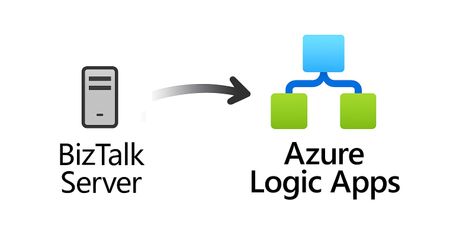
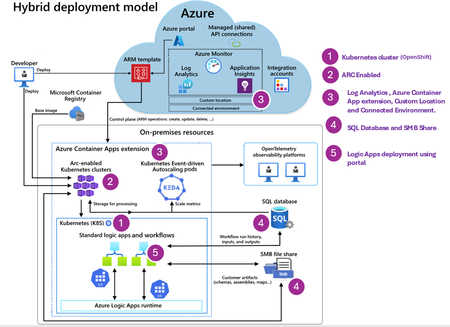
For more than 25 years, Microsoft BizTalk Server has supported mission-critical integration workloads for organizations around the world. From business process automation and B2B messaging to connectivity across industries such as financial services, healthcare, manufacturing, and government, BizTalk Server has played a foundational role in enterprise integration strategies. To help customers plan confidently for the future, Microsoft is sharing an update to the BizTalk Server product lifecycle and long-term support timelines. BizTalk Server 2020 will be the final version of BizTalk Server. Guidance to support long-term planning for mission-critical workloads This announcement does not change existing support commitments. Customers can continue to rely on BizTalk Server for many years ahead, with a clear and predictable runway to plan modernization at a pace that aligns with their business and regulatory needs. Lifecycle Phase End Date What’s Included Mainstream Support April 11, 2028 Security + non-security updates and Customer Service & Support (CSS) support Extended Support April 9, 2030 CSS support, Security updates, and paid support for fixes (*) End of Support April 10, 2030 No further updates or support (*) Paid Extended Support will be available for BizTalk Server 2020 between April 2028 and April 2030 for customers requiring hotfixes for non-security updates. CSS will continue providing their typical support. BizTalk Server 2016 is already out of mainstream support, and we recommend those customers evaluate a direct modernization path to Azure Logic Apps. Continued Commitment to Enterprise Integration Microsoft remains fully committed to supporting mission-critical integration, including hybrid connectivity, future-ready orchestration, and B2B/EDI modernization. Azure Logic Apps, part of Azure Integration Services — which includes API Management, Service Bus, and Event Grid — delivers the comprehensive integration platform for the next decade of enterprise connectivity. Host Integration Server: Continued Support for Mainframe Workloads Host Integration Server (HIS) has long provided essential connectivity for organizations with mainframe and midrange systems. To ensure continued support for those workloads, Host Integration Server 2028 will ship as a standalone product with its own lifecycle, decoupled from BizTalk Server. This provides customers with more flexibility and a longer planning horizon. Recognizing Mainframe modernization customers might be looking to integrate with their mainframes from Azure, Microsoft provides Logic Apps connectors for mainframe and midrange systems, and we are keen on adding more connectors in this space. Let us know about your HIS plans, and if you require specific features for Mainframe and midranges integration from Logic Apps at: https://aka.ms/lamainframe Azure Logic Apps: The Successor to BizTalk Server Azure Logic Apps, part of Azure Integration Services, is the modern integration platform that carries forward what customers value in BizTalk while unlocking new innovation, scale, and intelligence. With 1,400+ out-of-box connectors supporting enterprise, SaaS, legacy, and mainframe systems, organizations can reuse existing BizTalk maps, schemas, rules, and custom code to accelerate modernization while preserving prior investments including B2B/EDI and healthcare transactions. Logic Apps delivers elastic scalability, enterprise-grade security and compliance, and built-in cost efficiency without the overhead of managing infrastructure. Modern DevOps tooling, Visual Studio Code support, and infrastructure-as-code (ARM/Bicep) ensure consistent, governed deployments with end-to-end observability using Azure Monitor and OpenTelemetry. Modernizing Logic Apps also unlocks agentic business processes, enabling AI-driven routing, predictive insights, and context-aware automation without redesigning existing integrations. Logic Apps adapts to business and regulatory needs, running fully managed in Azure, hybrid via Arc-enabled Kubernetes, or evaluated for air-gapped environments. Throughout this lifecycle transition, customers can continue to rely on the BizTalk investments they have made while moving toward a platform ready for the next decade of integration and AI-driven business. Charting Your Modernization Path Microsoft remains fully committed to supporting customers through this transition. We recognize that BizTalk systems support highly customized and mission-critical business operations. Modernization requires time, planning, and precision. We hope to provide: Proven guidance and recommended design patterns A growing ecosystem of tooling supporting artifact reuse Unified Support engagements for deep migration assistance A strong partner ecosystem specializing in BizTalk modernization Potential incentive programs to help facilitate migration for eligible customers (details forthcoming) Customers can take a phased approach — starting with new workloads while incrementally modernizing existing BizTalk deployments. We’re Here to Help Migration resources are available today: Overview: https://aka.ms/btmig Best practices: https://aka.ms/BizTalkServerMigrationResources Video series: https://aka.ms/btmigvideo Feature request survey: https://aka.ms/logicappsneeds Reactor session: Modernizing BizTalk: Accelerate Migration with Logic Apps - YouTube Migration Agent (Complete refactoring from BizTalk to Logic Apps): Bringing all your Integration workloads to Logic Apps Standard | Microsoft Community Hub We encourage customers to engage their Microsoft accounts team early to assess readiness, identify modernization opportunities, and explore assistance programs. Your Modernization Journey Starts Now BizTalk Server has played a foundational role in enterprise integration success for more than two decades. As you plan ahead, Microsoft is here to partner with you every step of the way, ensuring operational continuity today while unlocking innovation tomorrow. To begin your transition, please contact your Microsoft account team or visit our migration hub. Thank you for your continued trust in Microsoft and BizTalk Server. We look forward to partnering closely with you as you plan the future of your integration platforms. Frequently Asked Questions Do I need to migrate now? No. BizTalk Server 2020 is fully supported through April 11, 2028, with paid Extended Support available through April 9, 2030, for non-security hotfixes. CSS will continue providing their typical support. You have a long and predictable runway to plan your transition. Will there be a new BizTalk Server version? No. BizTalk Server 2020 is the final version of the product. What happens after April 9, 2030? BizTalk Server will reach End of Support, and security updates or technical assistance will no longer be provided. Workloads will continue running but without Microsoft servicing. Is paid support available past 2028? Yes. Paid extended support will be available through April 2030 for BizTalk Server 2020 customers looking for non-security hotfixes. CSS will continue to provide the typical support. What is the end of sale date for BizTalk Server? We will announce an end of sale date for BizTalk Server on July 2026. What about BizTalk Server 2016 or earlier versions? Those versions are already out of mainstream support. We strongly encourage moving directly to Logic Apps rather than upgrading to BizTalk Server 2020. Will Host Integration Server continue? Yes. Host Integration Server (HIS) 2028 will be released as a standalone product with its own lifecycle and support commitments. Can I reuse BizTalk Server artifacts in Logic Apps? Yes. Most of BizTalk maps, schemas, rules, assemblies, and custom code can be reused with minimal effort using Microsoft and partner migration tooling. We welcome feature requests here: https://aka.ms/logicappsneeds Does modernization require moving fully to the cloud? No. Logic Apps supports hybrid deployments for scenarios requiring local processing or regulatory compliance, and fully disconnected environments are under evaluation. More information of the Hybrid deployment model here: https://aka.ms/lahybrid. Does modernization unlock AI capabilities? Yes. Logic Apps enables AI-driven automations through Agent Loop, improving routing, decisioning, and operational intelligence. Where do I get planning support? Your Microsoft account team can assist with assessment and planning. Migration resources are also linked in this announcement to help you get started. Microsoft CorporationHybrid Logic Apps Deployment on Red Hat OpenShift
What makes OpenShift different? If you've done this on K3s or AKS, most of the flow is identical as mentioned in Set up your own infrastructure for Standard logic app workflows - Azure Logic Apps | Microsoft Learn. Two OpenShift specifics are worth flagging up front. First, SCCs: the default restricted-v2 policy blocks the elevated permissions the runtime and CSI driver need, so you grant the right SCCs before installing (Step 2). Second, DNS: OpenShift runs DNS through the openshift-dns operator rather than the kube-system/coredns you'd find on AKS, so the DNS setup targets that instead (Step 7). Prerequisites Requirement Notes Azure subscription With rights to create Arc resources, custom locations, and connected environments. Azure CLI Latest, with the connectedk8s, k8s-extension, customlocation, and containerapp extensions. OpenShift cluster Self-managed OpenShift (bare metal, datacenter, or Single-Node OpenShift), or ARO. oc logged in as a cluster-admin. Newer OCP is better (some storage options are GA only on 4.18+). Don't have one yet? See the install links under References section below A SMB file share a SMB file share discoverable from the cluster to store workflow artifacts Ingress / load balancer On self-managed OpenShift you provide the ingress IP yourself: an in-cluster LB (MetalLB or similar) or an external L4 LB in front of a NodePort. See Choose your ingress path below. (ARO provides it automatically.) Install/confirm the CLI extensions: az extension add --name connectedk8s az extension add --name k8s-extension az extension add --name customlocation az extension add --name containerapp Choose your ingress path (self-managed) Every app is reached through one shared Envoy ingress, and that ingress needs an IP clients can hit. A self-managed cluster has no cloud load balancer to hand one out, so this is the piece you provide. Two options work well; pick whichever fits your environment: Option How it works You set up Best when In-cluster load balancer A bare-metal LoadBalancer controller gives the envoy LoadBalancer service an IP from a pool on your node subnet. MetalLB is the common pick; kube-vip, Cilium, and OpenELB work the same way Install the controller + an address pool; envoy.serviceType=LoadBalancer You have a spare IP range on the node network and want a self-contained cluster External LB + NodePort Any external L4 load balancer forwards to a NodePort on every node. That can be an appliance (F5, NetScaler, HAProxy, a hardware VIP…) or an Azure Standard Load Balancer when your nodes are Azure VMs in the same region envoy.serviceType=NodePort; wire your LB → NodePort You already run a datacenter load balancer, or your cluster runs on Azure VMs Your choice affects exactly two later steps: the envoy.serviceType value in Step 4, and which IP you pass to --static-ip in Step 6. Nothing else changes. On ARO you can skip this section. Leave envoy.serviceType=LoadBalancer and the cloud controller assigns the EXTERNAL-IP for you; the rest of the guide is unchanged. Step 1: Connect your OpenShift cluster to Azure Arc Log in to OpenShift and confirm you're cluster-admin: oc login <api-url> -u kubeadmin oc whoami # should be able to run cluster-admin actions Connect the cluster to Arc: az connectedk8s connect --name <cluster> --resource-group <rg> Step 2: Install the SMB CSI driver helm repo add csi-driver-smb https://raw.githubusercontent.com/kubernetes-csi/csi-driver-smb/master/charts helm repo update helm install csi-driver-smb csi-driver-smb/csi-driver-smb \ --namespace kube-system --version v1.16.0 \ --set image.smb.repository=mcr.microsoft.com/oss/kubernetes-csi/csi-driver-smb Step 3: Grant the required SCCs (OpenShift-specific) The extension installs with Helm --atomic, so if any pod is denied byrestricted-v2 the entire install rolls back. Grant the SCCs to the install namespace's service accounts before installing: oc create namespace logicapps-aca-ns oc adm policy add-scc-to-group anyuid system:serviceaccounts:logicapps-aca-ns oc adm policy add-scc-to-group privileged system:serviceaccounts:logicapps-aca-ns oc adm policy add-scc-to-group hostnetwork system:serviceaccounts:logicapps-aca-ns Step 4: Install the Container Apps extension Now install the extension that turns the cluster into a Logic Apps host. The command is the same for every cluster; the only line that depends on your ingress choice is the last one, envoy.serviceType: az k8s-extension create \ --resource-group <rg> --cluster-name <cluster> \ --cluster-type connectedClusters --name logicapps-aca-extension \ --extension-type Microsoft.App.Environment \ --release-train stable --auto-upgrade-minor-version true --scope cluster \ --release-namespace logicapps-aca-ns \ --configuration-settings "Microsoft.CustomLocation.ServiceAccount=default" \ --configuration-settings "appsNamespace=logicapps-aca-ns" \ --configuration-settings "clusterName=<env-name>" \ --configuration-settings "keda.enabled=true" \ --configuration-settings "keda.logicAppsScaler.enabled=true" \ --configuration-settings "keda.logicAppsScaler.replicaCount=1" \ --configuration-settings "containerAppController.api.functionsServerEnabled=true" \ --configuration-settings "functionsProxyApiConfig.enabled=true" \ --configuration-settings "Azure.Cluster.Distribution=openshift" \ --configuration-settings "coreDNSVersion=1.8.6" \ --configuration-settings "envoy.serviceType=LoadBalancer" The two OpenShift-specific settings: Setting Why Azure.Cluster.Distribution=openshift Renders the chart's OpenShift branch with the privileged security contexts OpenShift requires. coreDNSVersion=1.8.6 Makes the DNS config the setup generates compatible with OpenShift's resolver so app hostnames resolve. Keep this value. Ingress setting, per your path: In-cluster LB (e.g. MetalLB) → envoy.serviceType=LoadBalancer (as above); the LB controller assigns the EXTERNAL-IP from your pool. External LB (on-prem) → envoy.serviceType=NodePort plus envoy.nodeHttpsPort=30443 and envoy.nodeHttpPort=30080, then point your external L4 LB at those NodePorts. ARO → leave envoy.serviceType=LoadBalancer; Azure assigns the EXTERNAL-IP automatically. Wait for the extension and read the ingress IP: az k8s-extension show -g <rg> --cluster-name <cluster> \ --cluster-type connectedClusters --name logicapps-aca-extension \ --query provisioningState -o tsv # -> Succeeded oc get svc microsoft-app-environment-k8se-envoy -n logicapps-aca-ns # LoadBalancer: EXTERNAL-IP | NodePort: 80:30080, 443:30443 (EXTERNAL-IP stays <none>) Step 5: Create a custom location EXT_ID=$(az k8s-extension show -g <rg> --cluster-name <cluster> \ --cluster-type connectedClusters --name logicapps-aca-extension --query id -o tsv) CC_ID=$(az connectedk8s show -g <rg> -n <cluster> --query id -o tsv) az customlocation create \ --resource-group <rg> --name <custom-location> \ --location <arc-region> --host-resource-id $CC_ID \ --namespace logicapps-aca-ns --cluster-extension-ids $EXT_ID Step 6: Create the connected environment The connected environment is the Logic Apps environment your apps live in. Whether you set --static-ip depends on your ingress: External LB + NodePort: pass --static-ip <your LB VIP>. The envoy service is a NodePort with no EXTERNAL-IP, so the platform can't discover the ingress IP on its own; you give it the LB VIP explicitly. In-cluster LB (MetalLB) or ARO: you can omit --static-ip. The platform uses the EXTERNAL-IP already assigned to the envoy LoadBalancer service. CL_ID=$(az customlocation show -g <rg> -n <custom-location> --query id -o tsv) az containerapp connected-env create \ --resource-group <rg> --name <env-name> \ --location <arc-region> --custom-location $CL_ID \ --static-ip <your-lb-vip> # external LB + NodePort; omit for in-cluster LB / ARO When you do set --static-ip, it's create-only. You can't patch it later; to change it you delete and recreate the environment. Step 7: Configure cluster DNS So that app hostnames resolve to the Envoy ingress inside the cluster, run the DNS setup with the OpenShift flag: az containerapp arc setup-core-dns --distro=openshift --verbose This creates a small coredns-custom service and adds a zone-scoped forward in OpenShift's DNS Operator that covers only the environment's domain. Every other name (internet, *.svc.cluster.local, your own domains) is left alone. Step 8: Create and deploy a Logic App You can now target the connected environment from the portal or CLI, exactly like any Logic App Standard. In the portal, choose Logic App (Standard) → Hybrid, pick your connected environment, point storage at your SMB share, and create. Once the logic app is ready, you are now ready to author and test workflows hosted in your openshift cluster. Troubleshooting common issues Symptom Cause & fix Extension install fails and rolls back with SCC/PodSecurity denials SCCs not granted before install. Grant anyuid + privileged + hostnetwork to the install namespace (Step 2), then retry. UnauthorizedNamespaceError / 401 during onboarding Custom-locations RBAC incomplete. Re-run enable-features … --custom-locations-oid <oid>; ensure the caller has Contributor/Azure Arc Kubernetes Cluster Admin. App pods stuck ContainerCreating, PVC Pending SMB driver missing/misregistered. Confirm a smb.csi.k8s.io CSIDriver exists and its pods are Running. Install one driver only. Envoy has no EXTERNAL-IP on bare metal No LoadBalancer provider. Install an in-cluster LB (MetalLB or similar) or front NodePort with an external LB (ARO does this automatically). References Setting up an OpenShift cluster Install OpenShift on bare metal Install Single-Node OpenShift (SNO) Create an Azure Red Hat OpenShift (ARO) cluster OpenShift Local (run a cluster on your laptop) Logic Apps Hybrid Set up Logic Apps Hybrid deployment447Views0likes0CommentsAnnouncing the General Availability of the RabbitMQ Connector
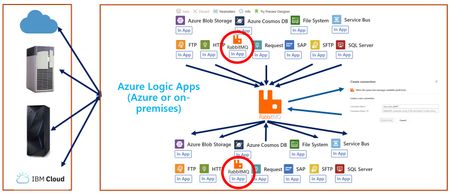
We are pleased to announce the general availability of the RabbitMQ Connector in Logic Apps (Standard) which allows you to both send and receive messages between Logic Apps and RabbitMQ. RabbitMQ is a robust, open-source message broker widely used for building reliable, scalable, and flexible messaging solutions. It is trusted across industries such as financial services, e-commerce, IoT, telecommunications, and cloud-native microservices. Our RabbitMQ connector allows messaging scenarios on-premises using Logic Apps hybrid. Benefits of Using RabbitMQ Reliability: RabbitMQ ensures message delivery with strong durability and acknowledgment mechanisms. Flexible Routing: Supports complex routing logic via exchanges (direct, topic, fanout, headers). Clustering & High Availability: Offers clustering and mirrored queues for fault tolerance. Management & Monitoring: Provides a user-friendly management UI and extensive monitoring capabilities. Extensibility: Supports plugins for authentication, federation, and more. Our current connector offering supports both triggers (receive) and sending (publish) within Logic Apps. Receiving Messages To enable a trigger, we need to search for the RabbitMQ connector within our designer. We will discover an operation called When the queue has messages from RabbitMQ show up as a built-in connector. We also have a peek lock operation for non-destructive reads. Search for Trigger and click on this operation to add the trigger to your design surface. Configure the trigger by providing the Queue Name. You can use the payload from your trigger in downstream actions. For example, you might place the payload within a Compose action for further processing. Publishing Messages To send a message, search for the RabbitMQ connector in your design experience. You’ll find an operation called Send a message. Add this operation to your design surface and Provide the following: Queue Name Message Body Exchange Name (if routing is required) Routing Key Once configured, you can run messages through your solution. To see this in action, refer to the demonstration video below. Completing Messages To Complete messages, in scenarios using peek-lock, search for the RabbitMQ connector within the Logic Apps designer. You’ll find an operation called Complete message as a built-in connector. Search for the action and click on this operation to add the action to your design surface. Provide: Delivery tag Consumer tag Acknowledgment (Complete or Reject) You can use the payload from your trigger in downstream actions. For example, you might place the payload within a Compose action for further processing. You can also create queues as well, with the Create a queue action. Please see the following video with further details on the configuration of this connector: Supported Regions We are rolling out this connector worldwide, with some regions receiving it before others.299Views1like0CommentsIntroducing the RabbitMQ Connector (Public Preview)
We are pleased to announce the introduction of the RabbitMQ Connector in Logic Apps (Standard) which allows you to both send and receive messages between Logic Apps and RabbitMQ. RabbitMQ is a robust, open-source message broker widely used for building reliable, scalable, and flexible messaging solutions. It is trusted across industries such as financial services, e-commerce, IoT, telecommunications, and cloud-native microservices. Our RabbitMQ connector allows messaging scenarios on-premises using Logic Apps hybrid. Benefits of Using RabbitMQ Reliability: RabbitMQ ensures message delivery with strong durability and acknowledgment mechanisms. Flexible Routing: Supports complex routing logic via exchanges (direct, topic, fanout, headers). Clustering & High Availability: Offers clustering and mirrored queues for fault tolerance. Management & Monitoring: Provides a user-friendly management UI and extensive monitoring capabilities. Extensibility: Supports plugins for authentication, federation, and more. Our current connector offering supports both triggers (receive) and sending (publish) within Logic Apps. Receiving Messages To enable a trigger, we need to search for the RabbitMQ connector within our designer. We will discover an operation called When the queue has messages from RabbitMQ show up as a built-in connector. We also have a peek lock operation for non-destructive reads. Search for Trigger and click on this operation to add the trigger to your design surface. Configure the trigger by providing the Queue Name. You can use the payload from your trigger in downstream actions. For example, you might place the payload within a Compose action for further processing. Publishing Messages To send a message, search for the RabbitMQ connector in your design experience. You’ll find an operation called Send a message. Add this operation to your design surface and Provide the following: Queue Name Message Body Exchange Name (if routing is required) Routing Key Once configured, you can run messages through your solution. To see this in action, refer to the demonstration video (No link found). Completing Messages To Complete messages, in scenarios using peek-lock, search for the RabbitMQ connector within the Logic Apps designer. You’ll find an operation called Complete message as a built-in connector. Search for the action and click on this operation to add the action to your design surface. Provide: Delivery tag Consumer tag Acknowledgment (Complete or Reject) You can use the payload from your trigger in downstream actions. For example, you might place the payload within a Compose action for further processing. You can also create queues as well, with the Create a queue action. Please see the following video with further details on the configuration of this connector: Supported Regions We are rolling out this connector worldwide, with some regions receiving it before others.790Views1like0CommentsLogic Apps Aviators Newsletter - August 25
In this issue: Ace Aviator of the Month News from our product group News from our community Ace Aviator of the Month August Ace Aviator: Jenny Anderson What's your role and title? What are your responsibilities? I’m an Integration Architect at Tietoevry Tech Services, where I work with large enterprise customers to develop integration solutions. For the past two years my main focus has been on cloud and hybrid integrations. I design integration architectures, advise on best practices including security and the chosen architecture, and collaborate closely with development teams to implement and maintain these solutions. Can you give us some insights into your day-to-day activities and what a typical day in your role looks like? My days usually start with scrum meetings across ongoing projects, which help me stay updated on progress, align with teams and prioritize my tasks for the day. After that, I often have customer meetings where I advise on integration strategies, provide architectural guidance or work on pre-sales engagements to scope out potential solutions. Recently, a big focus has been on BizTalk migrations, helping customers modernize their integration platforms by moving to Azure-based solutions. I try to dedicate my afternoons to hands-on technical work, which I really enjoy. Lately, that’s involved working with the new hybrid capabilities in Logic Apps. It’s a great mix of strategic consulting and deep technical implementation, which keeps the role dynamic and rewarding. What motivates and inspires you to be an active member of the Aviators/Microsoft community? I’ve always received a lot of support from the community especially when I was starting out in my career and I still benefit from it today. That generosity and openness made a big impact on me, so I feel it’s important to give back whenever I can. For me it’s a way to pay it forward and stay connected to a network that has helped me grow both technically and professionally. Looking back, what advice do you wish you had been given earlier that you'd now share with those looking to get into STEM/technology? Don’t overthink it, just start doing! In the beginning of my career, I assumed that everyone else knew everything, and that I couldn’t contribute or be part of certain areas because I didn’t know enough. But the truth is, no one knows everything, and that’s completely okay. The best way to learn is by doing and taking on challenges, making mistakes and growing from experience. I believe confidence comes from action, not from waiting until you feel “ready.” What has helped you grow professionally? One thing that has really helped me grow is surrounding myself with people who have different experiences or areas of expertise, whether at work, in communities, or through networking. I’ve learned a lot simply by asking questions, even the ones that might seem obvious. I also try to say yes to new opportunities, especially when they push me outside my comfort zone. Being an overthinker, I’ve developed a personal mantra: “Think 40%, do 60%.” It reminds me not to get stuck in planning or doubt, but to take action and learn along the way. That mindset has really helped me move forward. If you had a magic wand that could create a feature in Logic Apps, what would it be and why? If I could use a bit of magic in Logic Apps, I’d want AI to automagically handle all the data mappings. It’s honestly my least favorite part of integration work. It takes forever, it’s a bit dull and yet it’s always important. So, if AI could just step in and quietly take care of it, I wouldn’t complain. I’ve also heard a few customers ask for a disconnected control plane that can be hosted on-premises. That would be a big win for scenarios where cloud access is limited or compliance rules are extra strict. News from our product group Logic Apps Live July 2025 Missed Logic Apps Live in July? You can watch it here. We had a sneak peek into Logic Apps MCP Servers and Python support for Agent loop. Excinting topics and worth a watch! Troubleshoot Az Module within Logic App Standard Learn how to resolve Az Module installation failures in Logic Apps due to network restrictions or storage limits. Quick tests and fixes included to keep your workflows running smoothly. Introducing API Management Support in the Azure SRE Agent Azure’s SRE Agent now supports API Management, offering real-time diagnostics, backend health visualization, and intelligent remediation to keep your APIs reliable and scalable. Launch Your Private MCP Registry with Azure API Center. Discover how to create a secure, governed, and enterprise-ready MCP registry using Azure API Center—empowering AI innovation while maintaining control and visibility. Perform video analysis by using Azure Machine Learning and Computer Vision Replace manual video review with a scalable, AI-powered pipeline using Azure Machine Learning, Logic Apps, and Computer Vision. Boost accuracy and efficiency across industries like agriculture, traffic control, and manufacturing. Bringing Azure Logic Apps to on-prem, private, or public cloud with new Hybrid model | Azure Friday In this video Scott Hanselman and Harold Campos discuss the new Logic Apps Hybrid deployment model that allows customers to run their integration workloads in their own Kubernetes environments. This is ideal for customers initiating their journey to the cloud and hosting multiple on-premises workloads, who need to meet industry regulations, who wants to reuse their own Kubernetes infrastructure, or to avoid the natural latency introduced in hybrid configurations. News from our community Exposing Logic Apps as MCP Server in Azure API Management Video by Kent Weare On top of his PM work, Kent also finds time to keep his personal YouTube channel quite active. This time, he shows a walkthrough of creating an MCP Server using Logic Apps and API Management. The initial explanation of MCP and the various protocols alone make this video a great watch! Integration Love Story - Divya Swarnkar Video by Ahmed Bayoumy and Robin Wilde In this short episode of Integration Love Story, Ahmed and Robin chat with our own Divya Swarnkar, Product Manager at Microsoft who's been on an incredible journey from using Logic Apps as a customer to now helping build the product with the team behind the scenes. From BizTalk to Azure: A Guide for the Slightly Terrified Post by Sandro Pereira Explore the risks, timelines, and migration strategies as BizTalk nears end-of-life. Sandro shares the webinar recording – another tool to help you decide whether to stay or move to Azure Integration Services—without losing sleep. Azure Logic Apps Naming Conventions whitepaper Post by Sandro Pereira Boost clarity, scalability, and collaboration in Azure Logic Apps with this whitepaper. Learn best practices for naming triggers, actions, variables, and more - essential for automation, CI/CD, and long-term maintainability. You can create and use your own personal templates in Azure Logic Apps Post by Sandro Pereira It is not a newsletter, without at least a Friday Fact from Sandro! In this post, you can learn how to build, manage, and share reusable templates for consistent, efficient integration across projects. Speed up automation and standardize workflows you’re your own personal templates in Logic Apps.653Views0likes0CommentsLogic Apps Aviators Newsletter - July 25
In this issue: Ace Aviator of the Month News from our product group News from our community Ace Aviator of the Month July’s Ace Aviator: Şahin Özdemir What's your role and title? What are your responsibilities? I currently work for Rubicon Cloud Advisor, a Dutch company specialized in digital transformations, cloud adoption and AI implementation. At Rubicon I fulfil the role of Application and Integration architect, while also being a Professional Scrum Trainer at Scrum.org. Even though this sounds like two completely different roles, in practice both go closely hand in hand. I firmly believe that good architecture, a strong development process, and application of best practices are key pillars for delivering high-quality solutions to my clients. Therefore, both roles come in handy in my day-to-day job (combined with my strong background in software development).\ I work closely with companies and their teams in making their journey to Azure - especially Azure Integration Services - successful. Most of the time this journey starts with a business need or challenge, and I work with my clients to get a deeper understanding of their needs. This results in further analysis, capturing requirements, defining architecture, solution design, setting the stage for development (ALM) and being involved in quality assurance. At the same time, I think it’s important to stay relevant from a technical perspective. That’s why I also like being involved with implementing the solution. This way, I hear the technical struggles teams face and I can help them to find the right solution. Can you give us some insights into your day-to-day activities and what a typical day in your role looks like? Not a single day is the same, although there are some recurring activities. Specific parts of my day (or sprint) are dedicated to Scrum-related activities - whether it's participating in the daily scrum, having sprint reviews with stakeholders, planning the next sprint, or refining the backlog with the team or just aligning with the PO or stakeholders. I’m frequently involved in cross-organizational meetings focused on projects at scale. I contribute from the perspective of architecture, technical expertise, and integration strategy. In my role as a solution architect, I'm engaged in designing and implementing a critical integration platform for my client. This platform connects and exchanges data between many internal departments and external vendors - an effort that requires frequent alignment and collaboration. I’m always looking for opportunities to expand our Hybrid Integration Platform itself. Exploring how Azure resources may add value to our platform and working closely with the team to realize such improvements to the platform’s capabilities is something I enjoy. Outside of the regular meetings, I often focus on designing new integrations. Having working sessions with stakeholders to understand what they want. Based on these discussions, I assess the technical and architectural aspects of the solution. Every integration that lands on the platform is measured against both architectural and development principles and guidelines. I contribute to reviewing the solutions that have been developed. Ensuring that each integration is high-quality, consistent, easy to understand, and maintainable. I support the platform team with, and whenever possible. And if time permits, I develop parts of the solution myself – I see this as a great way to stay relevant from a technological perspective. All the spare time I have, I spend on writing technical articles that may help others. What motivates and inspires you to be an active member of the Aviators/Microsoft community? Because I enjoy helping others. Every day I work with a team of smart professionals on integration solutions and custom code within the Azure platform. Along the way, we regularly encounter challenges, limitations, or issues. In those moments, it's incredibly helpful to find solutions online or to have a community that can think along with you. Over the past few years, there have been many occasions where I just couldn’t find a solution online for a technical problem with Logic Apps. In these cases, we either came up with a creative solution ourselves or received support from Microsoft. When the integration community faces a similar challenge, it’s pretty much wasteful to tackle the same hurdles again. By documenting an approach or solution, others may be saving their invaluable time looking for a solution. Looking back, what advice do you wish you had been given earlier that you'd now share with those looking to get into STEM/technology? It is ok that you don’t know everything. Just start doing, experiment, stay curious, challenge yourself, don’t be afraid to ask questions, fail, learn and keep going! What has helped you grow professionally? I have spent a fair amount of my career at a big consulting firm. I started off as a software engineer all the way up to senior manager and architect. A long journey like that gives great and well-dosed opportunities and learning experiences to focus on your technical (in-depth) skillset first, continued by working on you soft skills like consulting, guiding and leading teams, solutioning and architecture. If I had not followed this path at that company, I would not be the person I am now professionally. Be ok with the fact that growth doesn’t happen overnight -no shortcuts, no magic pills. It's like a good red wine that needs time to mature. So do many challenging projects, become all-round and then choose a specialization, ask for constructive feedback, fail many times and take your time to reflect and learn. And don’t forget to have a strong work ethic and ongoing curiosity to learn new things. In the end I found that - from a technological perspective-, quality attributes (the “-illities”), enterprise application integration and scrum made my heart skip a beat. So my advice is to always pursue what brings you joy! If you had a magic wand that could create a feature in Logic Apps, what would it be and why? Overall, I must say that I’m happy with the current state of Logic Apps. Nevertheless, if I had a magic wand: I would like to see that the service plans for Logic App standard would be in line with Function Apps. The plans for Function apps have way better tiers from both memory, cores and pricing perspective. And being able to scale out and in based on specific metrics is more flexible than Logic App Standard currently offers. Having more CPU/memory available in the plans would also improve the overall performance of Logic Apps in general, even though performance optimizations of many actions would also be more than welcome. What I currently really miss in the HTTP connector (and possibly others) is the ability to have better control over the request timeouts. Even though the setting is there, it is capped to 4 minutes max. In practice, we need to deliver data to external APIs that work synchronously and take more time to complete. Giving better control on these timeouts would make the usability of workflows even better! Even though some nice additions to the initialization of variables have been made recently, I would like to see the ability to initialize variables at any point in the workflow. E.g. the foreach loop can be executed in parallel, and therefore the current global variables are not thread-safe, which leads to unexpected behavior. News from our product group Logic Apps Live June 2025 Missed Logic Apps Live in June? You can watch it here. We focused on the Logic Apps big announcements from Integrate 2025. There are a lot of great things to check! Feedback Opportunity: SRE Agent + Logic Apps Discover the new Applications feature in Azure API Management, enabling OAuth-based access to APIs and products. Streamline secure API access with built-in OAuth 2.0 application-based authorization. Configure SQL Storage for Standard Logic Apps Azure Logic Apps traditionally rely on Azure Storage to manage workflow states and runtime data. However, with the introduction of SQL as a storage provider (currently in preview), developers now have a compelling alternative that offers greater control, flexibility, and integration with existing SQL infrastructure. This post explores the benefits, configuration steps, and considerations for using SQL storage with Standard Logic Apps. Announcing General Availability: Azure Logic Apps Standard Automated Test Framework We’re excited to announce the General Availability (GA) of the Azure Logic Apps Standard Automated Test Framework—a major step forward in enabling developers to build, test, and maintain enterprise-grade workflows with confidence and agility. Announcing General Availability: Azure Logic Apps Standard Custom Code with .NET 8 We’re excited to announce the General Availability (GA) of Custom Code support in Azure Logic Apps Standard with .NET 8. This release marks a significant step forward in enabling developers to build more powerful, flexible, and maintainable integration workflows using familiar .NET tools and practices. With this capability, developers can now embed custom .NET 8 code directly within their Logic Apps Standard workflows. This unlocks advanced logic scenarios, promotes code reuse, and allows seamless integration with existing .NET libraries and services—making it easier than ever to build enterprise-grade solutions on Azure. Business Process Tracking Reaches General Availability Business Process Tracking provides key insights to business stakeholders from your Logic Apps (Standard) implementation in an efficient and timely manner. Today, we are pleased to announce the General Availability of this capability, allowing customers to leverage in their production workloads. Announcement: General Availability of Logic Apps Hybrid Deployment Model We’re excited to announce the Public Preview of two major integrations that bring the power of Azure Logic Apps to AI Agents in Foundry – Logic Apps as Tools and AI Agent Service Connector. Learn more on our announcement post! Announcing Public Preview: Organizational Templates in Azure Logic Apps We’re excited to announce the Public Preview of Organizational Templates in Azure Logic Apps— empowering teams to author, share, and reuse automation patterns across their organization. With this release, we’re also rolling out a brand-new UI experience to easily create templates directly from your workflows—no manual packaging required! OpenTelemetry in Azure Logic Apps (Standard and Hybrid) OpenTelemetry provides a unified, vendor-agnostic framework for collecting telemetry data—logs, metrics, and traces—across different services and infrastructure layers. It simplifies monitoring and makes it easier to integrate with a variety of observability backends such as Azure Monitor, Grafana Tempo, Jaeger, and others. For Logic Apps—especially when deployed in hybrid or on-premises scenarios—OpenTelemetry is a powerful addition that elevates diagnostic capabilities beyond the default Application Insights telemetry. Logic App Standard - When High Memory / CPU usage strikes and what to do Monitoring your applications is essential, as it ensures that you know what's happening and you are not caught by surprise when something happens. One possible event is the performance of your application starting to decrease and processing becomes slower than usual. This may happen due to various reasons, and in this blog post, we will be discussing the High Memory and CPU usage and why it affects your Logic App. We will also observe some possibilities that we've seen that have been deemed as the root cause for some customers. Introducing Agent in a Day Agent in a Day represents a fantastic opportunity for customers to participate in hackathon-style contests where attendees learn how to build agents and then can apply them to their unique business use cases. For Partners, Agent in a Day represents a great way to engage your customers by building agents with them and uncovering new use cases. Introducing Confluent Kafka Connector (Public Preview) We are pleased to announce the introduction of the Confluent Kafka Connector in Logic Apps (Standard) which allows you to both send and receive messages between Logic Apps and Confluent Kafka. Confluent Kafka is a distributed streaming platform for building real-time data pipelines and streaming applications. It is used across many industries including financial services, Omnichannel retail, autonomous cars, fraud detection services, microservices and IoT deployments. Our current connector offering supports both triggers (receive) and sending (publish) within Logic Apps. News from our community Logic App Standard: Throw exceptions like a pro! Post by Şahin Özdemir Learn how to throw exceptions in Logic App Standard using a simple Compose action—no code needed, just clever workflow design. Azure Logic Apps: are you handling large blobs? Keep memory usage under control. Post by Stefano Demiliani Struggling with large blob files in Logic Apps? Learn how to keep memory usage under control and avoid out-of-memory errors with smart workflow design and a few performance-boosting tricks De SOAPing Services SOAP to REST using Azure API Management Video by Stephen W Thomas Struggling with legacy SOAP integrations from BizTalk to Azure? Check out this video on simplifying SOAP-to-REST conversions using Azure API Management and learn how easily you can manage SOAP envelopes and streamline your Logic Apps integrations! Integrating Entra ID and AI Agent workflows in Azure Logic Apps Post by Brian Veldman Discover how to build AI-powered workflows in Azure Logic Apps that interact with Entra ID, automate tasks, and adapt dynamically using agentic tools and OpenAI models. Advanced KQL Queries for Logic Apps in Application Insights: A Practical Guide Post by Dieter Gobeyn Boost Logic App performance with advanced KQL queries in Application Insights—spot bottlenecks, analyze slow actions, and optimize workflows without upgrading your hosting plan. How to Build an AI Agent with Azure Logic Apps Post by Cameron McKay Learn how to build your first AI Agent in Azure Logic Apps using Agent Loop—connect to OpenAI, design smart prompts, and automate tasks like weather reporting with low-code workflows. You Can Now Initialize All Your Variables In One Single Action Post by Luis Rigueira You can now initialize multiple variables in Logic Apps with a single action—making your workflows cleaner, faster, and easier to manage. It is a Friday Fact, brought to you by Luis Rigueira! Integration Insights Podcast: The Future of Integration Video by Sagar Sharma and Jochen Toelen In this two-part episode of the Integration Insights podcast, Sagar, Joechen and Kent dive into how integration is evolving in a cloud-first world. From BizTalk migrations to hybrid deployments with Azure Arc, they share practical insights and best practices to future-proof your integration strategy. A must-listen! You can watch part 2 here. Event Grid vs Service Bus vs Event Hubs vs Storage Queues: Choosing the Right Messaging Backbone in Azure Post by Prashant Singh Confused by Azure’s messaging options? This guide breaks down Event Grid, Service Bus, Event Hubs, and Storage Queues—helping you choose the right tool for real-time events, telemetry, enterprise workflows, or lightweight tasks. IntelliSense in Logic Apps Just Got Smarter – Matching Brackets in the Expression Editor! Post by Sandro Pereira Logic Apps just got a lot friendlier—bracket matching in the expression editor now highlights pairs as you type, making it easier to write and debug complex expressions.A Friday Fact from Sandro Pereira. How to Build Resilient Integrations for Mission-Critical Systems Post by Lilan Sameera Learn how to build resilient integrations for mission-critical systems using Logic Apps, Service Bus, and Event Hub—ensuring reliable data delivery, smart retries, and clean outputs even under pressure.800Views2likes0Comments
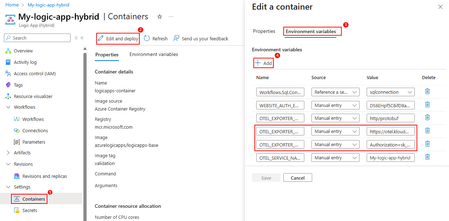
OpenTelemetry in Azure Logic Apps (Standard and Hybrid)
Why OpenTelemetry? As modern applications become more distributed and complex, robust observability is no longer optional—it is essential. Organizations need a consistent way to understand how workflows are performing, trace failures, and optimize end-to-end execution. OpenTelemetry provides a unified, vendor-agnostic framework for collecting telemetry data—logs, metrics, and traces—across different services and infrastructure layers. It simplifies monitoring and makes it easier to integrate with a variety of observability backends such as Azure Monitor, Grafana Tempo, Jaeger, and others. For Logic Apps—especially when deployed in hybrid or on-premises scenarios—OpenTelemetry is a powerful addition that elevates diagnostic capabilities beyond the default Application Insights telemetry. What is OpenTelemetry? OpenTelemetry (OTel) is an open-source observability framework under the Cloud Native Computing Foundation (CNCF) that provides a unified standard for generating, collecting, and exporting telemetry data such as logs, metrics, and traces. By abstracting away vendor-specific instrumentation and enabling interoperability across various tools and platforms, OpenTelemetry empowers developers and operators to gain deep visibility into distributed systems—regardless of the underlying infrastructure or language stack. In the context of Azure Logic Apps, OpenTelemetry support enables standardized, traceable telemetry that can integrate seamlessly with a wide range of observability solutions. This helps teams monitor, troubleshoot, and optimize workflows with more precision and flexibility. How to Configure from Visual Studio Code? To configure OpenTelemetry for a Logic App (Standard) project from Visual Studio Code: Locate the host.json file in the root of your Logic App project. Enable OpenTelemetry by adding "telemetryMode": "OpenTelemetry" at the root level of the file. { "version": "2.0", "extensionBundle": { "id": "Microsoft.Azure.Functions.ExtensionBundle.Workflows", "version": "[1.*, 2.0.0)" }, "telemetryMode": "OpenTelemetry" } Define the following application settings in local.settings.json or within your CI/CD deployment pipeline: OTEL_EXPORTER_OTLP_ENDPOINT: The OTLP exporter endpoint URL where the telemetry data should be sent. OTEL_EXPORTER_OTLP_HEADERS (optional): A list of headers to apply to all outgoing data. This is commonly used to pass authentication keys or tokens to your observability backend. If your endpoint requires additional OpenTelemetry-related settings, include those in the application settings as well. Refer to the official OTLP Exporter Configuration documentation for details. How to Configure OpenTelemetry from Azure Portal? – Standard Logic Apps To enable OpenTelemetry support for a Standard Logic App hosted using either a Workflow Standard Plan or App Service Environment v3, follow the steps below: 1. Update the host.json File In the Azure portal, navigate to your Standard Logic App resource. In the left-hand menu, under Development Tools, select Advanced Tools > Go. This opens the Kudu console. In Kudu, from the Debug Console menu, select CMD, and navigate to: site > wwwroot Locate and open the host.json file in a text editor. Add the following configuration at the root level of the file to enable OpenTelemetry, then save and close the editor. { "version": "2.0", "extensionBundle": { "id": "Microsoft.Azure.Functions.ExtensionBundle.Workflows", "version": "[1.*, 2.0.0)" }, "telemetryMode": "OpenTelemetry" } 2. Configure App Settings for Telemetry Export Still within your Logic App resource, go to Settings > Environment Variables and select App settings. Add the following key-value pairs: App Setting Description OTEL_EXPORTER_OTLP_ENDPOINT The OTLP (OpenTelemetry Protocol) endpoint URL where telemetry data will be exported. For example: https://otel.your-observability-platform.com OTEL_EXPORTER_OTLP_HEADERS (Optional) Any custom headers required by your telemetry backend, such as an Authorization token (e.g., Authorization=Bearer <key>). Select Apply to save the configuration. How to Configure OpenTelemetry from Azure Portal? – Hybrid Logic Apps To enable OpenTelemetry support for a Standard Logic App using the Hybrid hosting option, follow the steps below. This configuration enables telemetry collection and export from an on-premises deployment, using environment variables and local file system access. 1. Modify host.json on the SMB Share On your on-premises file share (SMB), navigate to the root directory of your Logic App project. Locate the host.json file. Add the following configuration to enable OpenTelemetry and save the file. { "version": "2.0", "extensionBundle": { "id": "Microsoft.Azure.Functions.ExtensionBundle.Workflows", "version": "[1.*, 2.0.0)" }, "telemetryMode": "OpenTelemetry" } 2. Configure Environment Variables in Azure Portal Go to the Azure Portal and navigate to your Standard Logic App (Hybrid) resource. From the left-hand menu, select Settings > Containers, then click on Edit and deploy. In the Edit a container pane, select Environment variables, and then click Add to define the following: Name Source Value Description OTEL_EXPORTER_OTLP_ENDPOINT Manual <OTLP-endpoint-URL> The OTLP exporter endpoint URL where telemetry should be sent. Example: https://otel.yourbackend.com OTEL_EXPORTER_OTLP_HEADERS (Optional) Manual <OTLP-headers> Custom headers (e.g., Authorization=Bearer <token>) required by your observability backend. Once you've added all necessary settings, click Save. Example of Endpoint Configuration & How to Check Logs To export telemetry data using OpenTelemetry, configure the following environment variables in your Logic App’s application settings or container environment: Name Source Value Description OTEL_EXPORTER_OTLP_ENDPOINT Manual Entry https://otel.kloudmate.com:4318 The OTLP receiver endpoint for your observability backend. OTEL_EXPORTER_OTLP_HEADERS Manual Entry Authorization=<your-api-key> Used to authenticate requests to the telemetry backend. OTEL_EXPORTER_OTLP_PROTOCOL Manual Entry http/protobuf Protocol used for exporting telemetry (KloudMate supports gRPC/HTTP). In this example, we are using KloudMate as the destination for telemetry data. Once correctly configured, your Logic App will begin exporting telemetry data to KloudMate as shown below: Limitations and Troubleshooting Steps Current Limitations Supported trigger types for OpenTelemetry in Logic Apps are: HTTP Service Bus Event Hub Exporting metrics is not currently supported. Troubleshooting Steps No traces received: Validate OTEL_EXPORTER_OTLP_ENDPOINT URL and port availability. Ensure outbound traffic to observability backend is permitted. Authentication issues: Review and correct header values in OTEL_EXPORTER_OTLP_HEADERS. References Set up and view enhanced telemetry for Standard workflows - Azure Logic Apps | Microsoft Learn2.1KViews10likes2CommentsAnnouncement: General Availability of Logic Apps Hybrid Deployment Model
We are thrilled to announce the General Availability of the Logic Apps Hybrid Deployment Model, a groundbreaking feature that offers unparalleled flexibility and control to our customers. This innovative deployment model allows you to run Logic Apps workloads on customer-managed infrastructure, providing you with the option to host your integration solutions on-premises, in a private cloud, or even in a third-party public cloud. With the Logic Apps Hybrid Deployment Model, you can tailor your integration solutions to meet your specific needs, whether it's for regulatory compliance, data privacy, or network restrictions. This model ensures that you have the freedom to choose the best environment for your workflows, while still leveraging the powerful capabilities of Azure Logic Apps. The Hybrid Deployment Model supports a semi-connected architecture, offering local processing of workflows, local storage, and local network access. This means that the data processed by the workflows remains in your local SQL Server, and you have the ability to connect to local networks. Additionally, the built-in connectors will execute in your local compute, giving you access to local data sources and higher throughput. Since we launched the public preview, we have received an overwhelmingly positive response from customers across various industries. Many customers, including those looking to migrate from BizTalk Server, have expressed interest in this offering due to its ability to co-locate integration platforms near key lines of business systems, avoiding dependencies on public internet to process transactions. Journey of the Hybrid Deployment Model Feature At the Integrate 2024 event, we announced the early access preview of the Hybrid Deployment model for Logic Apps Standard. This initial phase allowed interested parties to nominate themselves for early access and provided valuable feedback on the model's functionality and benefits. Following the private preview, we launched the public preview, which empowered our customers with additional flexibility and control. This phase allowed customers to build and deploy workflows on customer-managed infrastructure, offering the option to run Logic Apps on-premises, in a private cloud, or in a third-party public cloud. The public preview also introduced the semi-connected architecture, enabling local processing of workflows and access to local data sources. In October 2024, we refreshed the public preview and received an overwhelmingly positive response from customers across various industries. This feedback highlighted the model's ability to meet specific use cases, such as migrating from BizTalk Server and co-locating integration platforms near key lines of business systems. The public preview refresh also emphasized the model's alignment with our promise of providing customers with more options to meet their business needs. We are excited to see how our customers will leverage the Logic Apps Hybrid Deployment Model to meet their business needs and drive innovation. Thank you for your continued support and feedback. New features in the GA release: Open Telemetry support: Open telemetry is a vendor-neutral open-source Observability framework for instrumenting, generating, collecting, and exporting telemetry data. The support for Open Telemetry in Hybrid deployment model ensures the seamless logging in the semi-connected scenarios and provides the ability to choose any observability platform as a telemetry endpoint. More details here. To set up Open Telemetry capability from Azure portal, follow these steps: Open the host.json in the root directory of SMB file share path configured in your logic app. In the host.json file, at the root level, add the following telemetryMode setting with the OpenTelemetry value, for example: { "version": "2.0", "extensionBundle": { "id": "Microsoft.Azure.Functions.ExtensionBundle.Workflows", "version": "[1.*, 2.0.0)" }, "telemetryMode": "OpenTelemetry" } When you enable Open Telemetry in the host.json file, your logic app exports telemetry based on the Open Telemetry-supported app settings that you define in the environment. Add below app settings from portal by navigating to Containers-->Environment variables-->edit and deploy. App setting Description OTEL_EXPORTER_OTLP_ENDPOINT The online transaction processing (OTLP) exporter endpoint URL for where to send the telemetry data. OTEL_EXPORTER_OTLP_HEADERS (optional) A list of headers to apply to all outgoing data. Commonly used to pass authentication keys or tokens to your observability backend. If your Open Telemetry endpoint requires other Open Telemetry related settings, include these settings in the app settings too. Support for Zip deployment through VSCode: The support for Zip deployment in VSCode deployment has enhanced the deployment experience with more reliability. This feature uses Azure Entra authentication for deployment, hence the VSCode machine doesn’t require to have permissions on the SMB share and the user need not to provide SMB credentials in subsequent deployments. To use Zip deployment, follow below steps: create an app registration. In the VSCode deployment, provide Client ID, Object ID and Client secret values. If there are any concerns with creating App registration, you can continue to use SMB deployment option by choosing "Use SMBDeployment For Hybrid" in the Extensions configuration of VSCode If you would like to use zip deployment in an existing Logic App, you will need to manually add the app settings as indicated here. The Zip deployment APIs can be used in CI/CD pipelines as well for DevOps deployment. We will be publishing another blog with detailed steps on the DevOps process. Support for more regions: We are pleased to announce the expansion of our hybrid deployment support to additional regions, in response to valuable customer feedback. This enhancement aims to better meet the diverse geographic and operational requirements of your businesses. The hybrid deployment is now available in the following regions: Central US, East Asia, East US, North Central US, Southeast Asia, Sweden Central, UK South, West Europe, and West US. Logic Apps Rules Engine Support on Linux containers: In this release, we have added support for Azure Logic Apps Rules Engine to run on Linux containers which enables customers to use the Rules Engine capabilities in Hybrid Logic Apps. Improvements for Effective Scaling and Performance: We have introduced few improvements in the runtime storage and the scaling behaviour aimed at improving the performance and achieving effective scaling. Please refer to the following articles: Scaling mechanism in hybrid deployment model for Azure Logic Apps Standard | Microsoft Community Hub Hybrid deployment model for Logic Apps- Performance Analysis and Optimization recommendations | Microsoft Community Hub Diagnostic tool: To assist with troubleshooting the environment configuration issues, we have created a troubleshooting tool, which will help you review the health of all the components of the hybrid deployment and provide insights. You can find the script in our GitHub repository. Select the troubleshoot.ps1 file and copy it to a folder and run the script using PowerShell. This script should be run where you have access to kubectl. References: Create Standard logic app workflows for hybrid deployment - Azure Logic Apps | Microsoft Learn Set up your own infrastructure for Standard logic app workflows - Azure Logic Apps | Microsoft Learn Set up and view enhanced telemetry for Standard workflows - Azure Logic Apps | Microsoft Learn2.5KViews1like0Comments