hybrid
152 TopicsEvolving Stretch Clustering for Azure Local
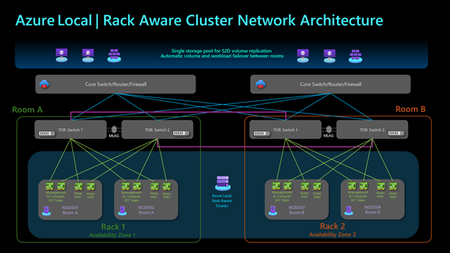
Stretched clusters in Azure Local, version 22H2 (formerly Azure Stack HCI, version 22H2) entail a specific technical implementation of storage replication that spans a cluster across two sites. Azure Local, version 23H2 has evolved from a cloud-connected operating system to an Arc-enabled solution with Arc Resource Bridge, Arc VM, and AKS enabled by Azure Arc. Azure Local, version 23H2 expands the requirements for multi-site scenarios beyond the OS layer, while Stretched clusters do not encompass the entire solution stack. Based on customer feedback, the new Azure Local release will replace the Stretched clusters defined in version 22H2 with new high availability and disaster recovery options. For Short Distance Rack Aware Cluster is a new cluster option which spans two separate racks or rooms within the same Layer-2 network at a single location, such as a manufacturing plant or a campus. Each rack functions as a local availability zone across layers from OS to Arc management including Arc VMs and AKS enabled by Azure Arc, providing fault isolation and workload placement within the cluster. The solution is configured with one storage pool to reduce additional storage replication and enhance storage efficiency. This solution delivers the same Azure deployment and management experience as a standard cluster. This setup is suitable for edge locations and can scale up to 8 nodes, with 4 nodes in each rack. Rack Aware Cluster is currently in private preview and is slated to public preview and general release in 2025. For Long Distance Azure Site Recovery can be used to replicate on-premises Azure Local virtual machines into Azure and protect business-critical workloads. This allows Azure cloud to serve as a disaster recovery site, enabling critical VMs to be failed over to Azure in case of a local cluster disaster, and then failed back to the on-premises cluster when it becomes operational again. If you cannot fail over certain workloads to cloud and require long distance of disaster recovery, like in two different cities, you can leverage Hyper-V Replica to replicate Arc VMs to the secondary site. Those VMs will become Hyper-V VMs on the secondary site, they will become Arc VMs once they fail back to the original cluster on the first site. Additional Options beyond Azure Local If the above solutions in Azure Local do not cover your needs, you can fully customize your solution with Windows Server 2025 which introduces several advanced hybrid cloud capabilities designed to enhance operational flexibility and connectivity across various environments. Additionally, it offers various replication technologies like Hyper-V Replica, Storage Replica and external SAN replication that enable the development of tailored datacenter disaster recovery solutions. Learn more from the Windows Server 2025 now generally available, with advanced security, improved performance, and cloud agility - Microsoft Windows Server Blog What to do with existing Stretched clusters on version 22H2 Stretched clusters and Storage Replica are not supported in Azure Local, version 23H2 and beyond. However, version 22H2 stretched clusters can stay in supported state in version 23H2 by performing the first step of operating system upgrade as shown in the following diagram to 23H2 OS. The second step of the solution upgrade to Azure Local is not applicable to stretched clusters. This provides extra time to assess the most suitable future solution for your needs. Please refer to the About Azure Local upgrade to version 23H2 - Azure Local | Microsoft Learn for more information on the 23H2 upgrade. Refer the blog on Upgrade from Azure Stack HCI, version 22H2 to Azure Local | Microsoft Community Hub. Conclusion We are excited to be bringing Rack Aware Clusters and Azure Site Recovery to Azure Local. These high availability and disaster recovery options allow customers to address various scenarios with a modern cloud experience and simplified management.16KViews16likes0Comments
Simplified access to Hotpatching enabled by Azure Arc for Windows Server 2025
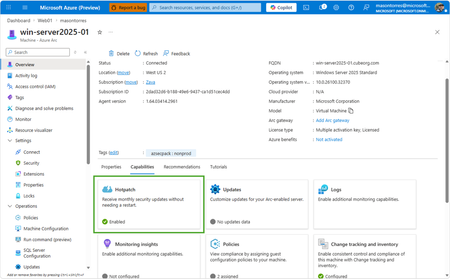
With Windows Server 2025, we introduced hotpatch enabled by Azure Arc, delivering security updates to Windows Server across hybrid and multicloud environments – minimizing downtime (no reboot), accelerating protection, and unifying patch management. We know that keeping your servers updated with the latest patches is one of the critical tasks that IT teams perform day-to-day. We want to make it simpler to install the latest operating system (OS) updates without rebooting machines after every installation. The resounding feedback we have received from you underscored the criticality of this feature in the lifecycle management and security of your infrastructure. We are now taking it one step further to reduce the friction to deploying these critical updates: hotpatch enabled by Azure Arc is now available at no additional cost for Windows Server 2025. Which machines are eligible for this offer? To use hotpatch for Windows Servers running on-premises or in multicloud environments, you must be using Windows Server 2025 Standard or Datacenter, and your server must be connected to Azure Arc. With this announcement, enabling and usage of the hotpatching service is available at no additional charge. Please take note that there are no charges for customers running on Azure IaaS, or Azure Local, wherein hotpatching is available as part of the functionality of Windows Server Datacenter: Azure Edition. This feature is already included both with Windows Server 2022 Datacenter: Azure Edition and Windows Server 2025 Datacenter: Azure Edition. How do I manage hotpatches enabled by Azure Arc for Windows Server 2025? If your Windows Server 2025 machines aren't already connected to Azure Arc, install the Azure Connected Machine agent — it takes just a few minutes per server and supports at-scale rollout via Group Policy, service principal, or Terraform. Once connected, enable Hotpatch from the Azure portal, Azure PowerShell, Azure CLI, or the REST API — just confirm Virtualization-based security (VBS is enabled) first. From there, use Azure Update Manager to schedule and monitor rollouts at scale. For instructions on how to enable hotpatch for Azure Arc-enabled machines using group policy or scripts, learn more here: https://aka.ms/ws-hotpatch For patch orchestration at scale, you can use Azure Update Manager to deliver hotpatches enabled by Azure Arc for Windows server 2025 machines. This enables greater uptime with fewer reboots and faster deployment of updates with easy patch orchestration. Alternatively, you can use APIs or other management tools to manage hotpatches. Centralized management of hotpatch updates across hybrid and multicloud environments enabled by Azure Arc Once your machines are connected to Azure Arc, you can also use the cloud-native services from Azure to manage your windows machines running on-prem. Azure Arc enables you to standardize security and governance across a wide range of resources so you can easily organize, govern and secure Windows, Linux, SQL servers, and Kubernetes clusters running across data centers, edge, and multi-cloud environments – using Azure services such as Azure Policy, Azure Monitor, Microsoft Defender and more. At no additional cost for machines attached to Azure Arc Basic inventory across on-prem and multi-cloud Tag your resources, organize them into resource groups, subscriptions, and management groups, and query at scale with Azure Resource Graph to unify your environments. Infra as Code (Bicep, Terraform) Infra as code for provisioning and management of resources. VM Self Service Perform lifecycle management such as (create, resize, update and delete) and power cycle operations such as (start, stop, and restart on VMware vCenter and System Center Virtual Machine Manager Virtual Machines. Hotpatch for Windows Server 2025 NEW Windows Server hot patching enables you to apply security updates without rebooting, keeping systems secure while maintaining continuous uptime. VM Management Administrate your servers anywhere using SSH for Azure Arc, Run Command, and Custom Script Extension. Mgmt. Services included for no additional costs with Windows Server Software Assurance or Extended Security Updates Azure Update Manager Provides a unified, centralized service to monitor, orchestrate, and automate patching across Azure, on‑prem, and multi‑cloud environments ensuring security, compliance, and minimal downtime at scale. Azure Machine Configuration (Policy) Policy‑driven auditing and enforcement of OS and application settings as code across Azure and hybrid machines—ensuring consistent, compliant state at scale. Including compliance policies like CIS Benchmark and WinRE Change Tracking & Inventory Real‑time visibility into configuration changes and system state across your fleet enabling faster troubleshooting, improved security, and continuous compliance at scale. VM insights from Azure Monitor Delivers a unified, pre‑built observability experience that provides real‑time performance, health, and dependency visibility across VMs—enabling faster troubleshooting, optimization, and capacity planning at scale. Windows Admin Center Unified, browser‑based management plane to securely manage Windows servers, VMs, and hybrid infrastructure from anywhere—simplifying operations and improving efficiency at scale. Best Practices Assessment Continuously evaluation your server configurations against Microsoft-recommended standards to proactively identify risks and provide actionable remediation guidance—improving security, performance, and operational health at scale. Frequently Asked Questions What are hotpatch updates? Hotpatch updates are monthly security updates that take effect without requiring you to restart the device. They contain a full set of security updates equivalent to the standard updates released the same day. What is the hotpatch update cycle? All eligible Windows Server 2025 machines enrolled in hotpatch are offered up to 8 monthly hotpatch updates in a calendar year in a quarterly cycle: Baseline month: In January, April, July, and October, devices install the monthly cumulative security update and must restart for the update to take effect. This update includes the latest security fixes, cumulative new features, and enhancements since the last baseline. Subsequent two months: Devices receive hotpatch updates, which only include security updates and don't require a restart for the update to take effect. These devices will catch up on features and enhancements with the next cumulative baseline month (quarterly). Will billing be stopped for existing enrolled machines? Yes, as of 15 th May 2026 all billing for hotpatch has been stopped for all existing machines enrolled in hotpatch. What action do we need to take if we have machines enrolled in hotpatch already? There is no additional action needed for machines that are currently enrolled in hotpatch. These machines will remain enrolled in hotpatch and receive hotpatch updates when available. I want all my Windows Server 2025 machines to get hotpatches. How do I do it? If you have Windows Server 2025 machines on-premises or on cloud (other than Azure) then you can enable hotpatch on them. To do so, ensure these machines have Virtualization Based Security enabled and are connected to Azure Arc and then you can use Azure Arc portal, Azure Update manager or APIs to enable hotpatch. Learn more: https://aka.ms/ws-hotpatch Is anything changing for Hotpatching on Azure? Hotpatch continues to be available on Azure for your Windows Server 2022 and Windows Server 2025 VMs when using Azure Edition. There is no fee associated with Hotpatching on Azure. Learn more here. Is there a community forum for Arc? Yes, you can join the Azure Arc Monthly Forum here: aka.ms/ArcServerForumSignup6.7KViews10likes5CommentsAnnouncing General Availability: Windows Server Management enabled by Azure Arc
Windows Server Management enabled by Azure Arc offers customers with Windows Server licenses that have active Software Assurances or Windows Server licenses that are active subscription licenses the following key benefits: Azure Update Manager Azure Change Tracking and Inventory Azure Machine Configuration Windows Admin Center in Azure for Arc Remote Support Network HUD Best Practices Assessment Azure Site Recovery (Configuration Only) Upon attestation, customers receive access to the following at no additional cost beyond associated networking, compute, storage, and log ingestion charges. These same capabilities are also available for customers enrolled in Windows Server 2025 Pay as you Go licensing enabled by Azure Arc. Learn more at Windows Server Management enabled by Azure Arc - Azure Arc | Microsoft Learn or watch Video: Free Azure Services for Non-Azure Windows Servers Covered by SA Powered by Azure Arc! To get started, connect your servers to Azure Arc, attest for these benefits, and deploy management services as you modernize to Azure's AI-enabled set of server management capabilities across your hybrid, multi-cloud, and edge infrastructure!20KViews10likes10CommentsAnnouncing Preview of Run Command on Arc-enabled servers
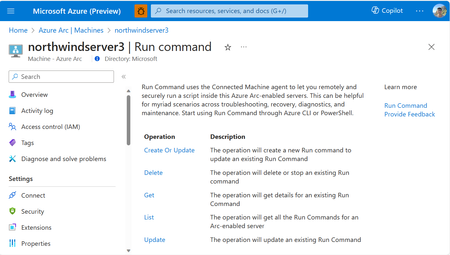
We are excited to announce the Public Preview of Run Command on Azure Arc-enabled servers. This feature is a game-changer for remotely and securely managing your Azure Arc-enabled servers. You can start using Azure CLI or API for Run Command today, without requiring any additional extensions or configurations, and at no additional cost.6.9KViews9likes0CommentsAnnouncing Public Preview: Simplified Machine Provisioning for Azure Local
Deploying infrastructure at the edge has always been challenging. Whether it’s retail stores, factories, branch offices, or remote sites, getting servers racked, configured, and ready for workloads often require skilled IT staff on-site. That process is slow, expensive, and error-prone, especially when deployments need to happen at scale. To address this, we’re introducing Public Preview of Simplified Machine Provisioning for Azure Local - a new way to provision Azure Local hardware with minimal onsite interaction, while maintaining centralized control through Azure. This new approach enables customers to provision hardware by racking, powering on, and letting Azure do the rest. New Machine Provisioning Simplified machine provisioning shifts configuration to Azure, reducing the need for technical expertise on-site. Instead of manually configuring each server locally, IT teams can now: Define provisioning configuration centrally in Azure Securely complete provisioning remotely with minimal steps Automate provisioning workflows using ARM templates and ensure consistency across sites Built on Open Standards Simplified machine provisioning on Azure Local is based on the FIDO Device Onboarding (FDO) specification, an industry-standard approach for securely onboarding devices at scale. FDO enables: Secure device identity and ownership transfer protecting machines with zero trust supply chain security A consistent onboarding model across device classes, this foundation can extend beyond servers to broader edge scenarios. Centralized Site-Based Configuration in Azure Arc The new machine provisioning flow uses Azure Arc Site, allowing customers to define configuration once and apply it consistently across multiple machines. In Azure Arc, a site represents a physical business location (store/factory/campus) and the set of resources associated with it. It enables targeted operations and configuration at a per‑site level (or across many sites) for consistent management at scale. With site-based configuration, customers can: Create and manage machine provisioning settings centrally in the Azure portal Define networking and environment configuration at the site level Reuse the same configuration as new machines are added Minimal Onsite Interaction Simplified provisioning is designed to minimize onsite effort. The on-site staff only rack and power on the hardware and insert the prepared USB. No deep infrastructure or Azure expertise required. After exporting the ownership voucher and sharing it with IT, the remaining provisioning is completed remotely by IT teams through Azure. The prepared USB is created using a first‑party Microsoft USB Preparation Tool that comes with the maintenance environment* package available through the Azure portal, enabling consistent, repeatable creation of bootable installation media. *Maintenance environment - a lightweight bootstrap OS that connects the machine to Azure, installs required Azure Arc extensions, and then downloads and installs the Azure Local operating system. End-to-End visibility into Deployment Customers get visibility into deployment progress which helps in quickly identifying where a deployment is in the process and respond faster when issues arise. They can look into the status using Provisioning experience in Azure portal or using Configurator app. Seamless Transition to Cluster Creation and Workloads Once provisioning is complete, machines created through this flow are ready for Azure Local cluster creation. Customers can proceed with cluster setup and workload deployment. How it works? At a high level, this simpler way of machine provisioning looks like this: Minimal onsite setup Prepare a USB drive using machine provisioning software Insert the prepared USB drive & boot the machine Share the machine ownership voucher with IT team. Provision remotely Create an Azure Arc site Configure networking, subscription, and deployment settings Download provisioning artifacts from the Azure portal Deploy Azure Local cluster using existing flows in Azure Arc. Once provisioning is complete, the environment is ready for cluster creation and workload deployment on Azure Local. Status and progress are visible in both the Azure portal, and the Configurator app. IT teams can monitor, troubleshoot, and complete provisioning remotely. Available Now in Public Preview This new experience empowers organizations to deploy Azure Local infrastructure faster, more consistently, and at scale, while minimizing on-site complexity. We invite customers and partners to explore the preview and help us shape the future of edge infrastructure deployment. Try it at https://aka.ms/provision/tryit. Refer documentation for more details.3.4KViews8likes4CommentsSimplify certificate management of on-prem IIS server with Azure Arc & Azure Key Vault VM extension
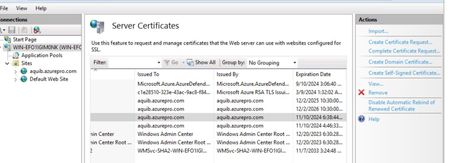
One common question which I’ve come across is certificate management for web servers. Usually when servers are hosted on Azure there are ways like storing certificates and secrets in Azure Key vault is a viable solution. I’ve come across customers who’re running servers in hybrid and few servers would still remain on-premises because of dependencies. For these web servers managing certificates is a costly affair. Common practice which I’ve seen is admin sharing the certificate with application team on some file share. This has few disadvantages. Storing the certificate in file share or on email. Based on the number of application team a lot of team gets access to certificates. Manually applying updated certificates once the expiry is near also finding which all servers this certificate is being used is a pain if you’ve a big environment with lots of web service. One better way to handle this scenario is to Store certificate in Azure Key vault centrally and Arc Enable the web server. One last step which will do the magic is Azure Key vault VM Extension. Which can be enabled on Arc Server as extension. This setup provides the advantages below. All the certificates are stored centrally in Azure Key Vault which is protected. No application team has got manual access to certificates, on-prem server will pull the certificate based on the managed identity assigned via Azure Arc. Once the cert expiry is near Admin/app team need to just goto Azure Key Vault and update the certificate with the latest version. Azure Key vault VM Extension will pull the latest certificate and apply the same to the website. $Settings = @{ secretsManagementSettings = @{ observedCertificates = @( "https://keyvaultname.vault.azure.net/secrets/certificatename" # Add more here in a comma separated list ) certificateStoreLocation = "LocalMachine" certificateStoreName = "My" pollingIntervalInS = "3600" # every hour } authenticationSettings = @{ # Don't change this line, it's required for Arc enabled servers msiEndpoint = "http://localhost:40342/metadata/identity" } } $ResourceGroup = "ARC_SERVER_RG_NAME" $ArcMachineName = "ARC_SERVER_NAME" $Location = "ARC_SERVER_LOCATION (e.g. eastus2)" New-AzConnectedMachineExtension -ResourceGroupName $ResourceGroup -MachineName $ArcMachineName -Name "KeyVaultForWindows" -Location $Location -Publisher "Microsoft.Azure.KeyVault" -ExtensionType "KeyVaultForWindows" -Setting (ConvertTo-Json $Settings) For auto renewal of certificate, we’ll need to enable IIS Rebind. This is how Arc VM Extension looks like when it’s enabled. Assigning permission to Arc server to fetch the certificate from keyvault. You can use access policy on Keyvault as well, it’s supported. Versions of the certificate/new certificate can be uploaded from key vault certificate blade and looks like below. If you’re renewing certificates and wanted to see if certificates are getting pulled down properly or not you can check error logs located here. C:\ProgramData\Guestconfig\extension_logs\Microsoft.Azure.Keyvault.keyvaultforwindows If you’re running Azure VM similar thing can be achieved : https://learn.microsoft.com/en-us/azure/virtual-machines/extensions/key-vault-windows Cert Rebind in IIS: https://learn.microsoft.com/en-us/iis/get-started/whats-new-in-iis-85/certificate-rebind-in-iis85 Visit my Blog: https://www.azuredoctor.com/ Public blogpost: https://www.azuredoctor.com/posts/arc-keyvault/11KViews8likes5CommentsCloud infrastructure for disconnected environments enabled by Azure Arc
Organizations in highly regulated industries such as government, defense, financial services, healthcare, and energy often operate under strict security and compliance requirements and across distributed locations, some with limited or no connectivity to public cloud. Leveraging advanced capabilities, including AI, in the face of this complexity can be time-consuming and resource intensive. Azure Local, enabled by Azure Arc, offers simplicity. Azure Local’s distributed infrastructure extends cloud services and security across distributed locations, including customer-owned on-premises environments. Through Azure Arc, customers benefit from a single management experience and full operational control that is consistent from cloud to edge. Available in preview to pre-qualified customers, Azure Local with disconnected operations extends these capabilities even further – enabling organizations to deploy, manage, and operate cloud-native infrastructure and services in completely disconnected or air-gapped networks. What is disconnected operations? Disconnected operations is an add-on capability of Azure Local, delivered as a virtual appliance, that enables the deployment and lifecycle management of your Azure Local infrastructure and Arc-enabled services, without any dependency on a continuous cloud connection. Key Benefits Consistent Azure Experience: You can operate your disconnected environment using the same tools you already know - Azure Portal, Azure CLI and ARM Templates extended through a local control plane. Built-in Azure Services: Through Azure Arc, you can deploy, update, and manage Azure services such as Azure Local VMs, Azure Kubernetes Service (AKS), etc. Data Residency and Control: You can govern and keep data within your organization's physical and legal jurisdiction to meet data residency, operational autonomy, and technological isolation requirements. Key Use Cases Azure Local with disconnected operations unlocks a range of impactful use cases for regulated industries: Government and Defense: Running sensitive government workloads and classified data more securely in air-gapped and tactical environments with familiar Azure management and operations. Manufacturing: Deploying and managing mission-critical applications like industrial process automation and control systems for real-time optimizations in more highly secure environments with zero connectivity. Financial Services: Enhanced protection of sensitive financial data with real time data analytics and decision making, while ensuring compliance with strict regulations in isolated networks. Healthcare: Running critical workloads with a need for real-time processing, storing and managing sensitive patient data with the increased levels of privacy and security in disconnected environments Energy: Operating critical infrastructure in isolated environments, such as electrical production and distribution facilities, oil rigs, or remote pipelines. Here is an example of how disconnected operations for Azure Local can provide mission critical emergency response and recovery efforts by providing essential services when critical infrastructure and networks are unavailable. Core Features and capabilities Simplified Deployment and Management Download and deploy the disconnected operations virtual appliance on Azure Local Premier Solutions through a streamlined user interface. Create and manage Azure Local instances using the local control plane, with the same tooling experience as Azure. Offline Updates The monthly update package includes all the essential components: the appliance, Azure Local software, AKS, and Arc-enabled service agents. You can update and manage the entire Azure Local instance using the local control plane without an internet connection. Monitoring Integration You can monitor your Azure Local instances and VMs using external monitoring solutions like SCOM by installing custom management packs and monitor AKS Clusters through 3 rd party open-source solutions like Prometheus and Grafana. Run Mission-Critical Workloads – Anytime, Anywhere Azure Local VMs You can run VMs with flexible sizing, support for custom VM images, and high availability through storage replication and automatic failover – all managed through the local Azure interface. AI & Containers with AKS You can use disconnected AI containers with Azure Kubernetes Service (AKS) on Azure Local to deploy and manage AI applications in disconnected scenarios where data residency and operational autonomy is required. AKS enables the deployment and management of containerized applications such as AI agents and models, deep learning frameworks, and related tools, which can be leveraged for inferencing, fine-tuning, and training in isolated networks. AKS also automates resource scaling, allowing for the dynamic addition and removal of container instances to more efficiently utilize hardware resources, including GPUs, which are critical for AI workloads. This provides consistent Azure experience in managing Kubernetes clusters and AI workloads with the same tooling and processes in connected environments. Get Started: Resources and Next Steps Microsoft is excited to announce the upcoming preview of Disconnected Operations for Azure Local in Q3 ‘CY25 for both Commercial and Government Cloud customers. To Learn more, please visit Disconnected operations for Azure Local overview (preview) - Azure Local Ready to participate? Get Qualified! or contact your Microsoft account team. Please also check out this session at Microsoft Build https://build.microsoft.com/en-US/sessions/BRK195 by Mark Russinovich, one of the most influential minds in cloud computing. His insights into the latest Azure innovations, the future of cloud architecture and computing, is a must-watch event!4.4KViews7likes3CommentsExtending Azure's AI Platform with an adaptive cloud approach
Authored by Derek Bogardus and Sanjana Mohan, Azure Edge AI Product Management Ignite 2024 is here, and nothing is more top of mind for customers than the potential to transform their businesses with AI wherever they operate. Today, we are excited to announce the preview of two new Arc-enabled services that extend the power of Azure’s AI platform to on-premises and edge environments. Sign up to join the previews here! An adaptive cloud approach to AI The goal of Azure’s adaptive cloud approach is to extend just enough Azure to customers’ distributed environments. For many of these customers, valuable data is generated and stored locally, outside of the hyperscale cloud, whether due to regulation, latency, business continuity, or simply the large volume of data being generated in real time. AI inferencing can only occur where the data exists. So, while the cloud has become the environment of choice for training models, we see a tremendous need to extend inferencing services beyond the cloud to enable complete cloud-to-edge AI scenarios. Search on-premises data with generative AI Over the past couple of years, generative AI has come to the forefront of AI innovation. Language models give any user the ability to interact with large, complex data sets in natural language. Public tools like ChatGPT are great for queries about general knowledge, but they can’t answer questions about private enterprise data on which they were not trained. Retrieval Augmented Generation, or "RAG", helps address this need by augmenting language models with private data. Cloud services like Azure AI Search and Azure AI Foundry simplify how customers can use RAG to ground language models in their enterprise data. Today, we are announcing the preview of a new service that brings generative AI and RAG to your data at the edge. Within minutes, customers can deploy an Arc extension that contains everything needed to start asking questions about their on-premises data, including: Popular small and large language models running locally with support for both CPU and GPU hardware A turnkey data ingestion and RAG pipeline that keeps all data completely local, with RBAC controls to prevent unauthorized access An out-of-the-box prompt engineering and evaluation tool to find the best settings for a particular dataset Azure-consistent APIs to integrate into business applications, as well as a pre-packaged UI to get started quickly This service is available now in gated private preview for customers running Azure Local infrastructure, and we plan to make it available on other Arc-enabled infrastructure platforms in the near future. Sign up here! Deploy curated open-source AI models via Azure Arc Another great thing about Azure’s AI platform is that it provides a catalog of curated AI models that are ready to deploy and provide consistent inferencing endpoints that can be integrated directly into customer applications. This not only makes deployment easy, but customers can also be confident that the models are secure and validated These same needs exist on the edge as well, which is why we are now making a set of curated models deployable directly from the Azure Portal. These models have been selected, packaged, and tested specifically for edge deployments, and are currently available on Azure Local infrastructure. Phi-3.5 Mini (3.8 billion parameter language model) Mistral 7B (7.3 billion parameter language model) MMDetection YOLO (object detection) OpenAI Whisper Large (speech to text) Google T5 Base (translation) Models can be deployed from a familiar Azure Portal wizard to an Arc AKS cluster running on premises. All available models today can be run on just a CPU. Phi-3.5 and Mistral 7B also have GPU versions available for better performance. Once complete, the deployment can be managed directly in Azure ML Studio, and an inferencing endpoint is available on your local network. Wrap up Sign up now to join either of the previews at the link below or stop by and visit us in person in the Azure Arc and Azure Local Expert Meet Up station in the Azure Infrastructure neighborhood at Ignite. We’re excited to get these new capabilities into our customers’ hands and hear from you how it’s going. Sign up to join the previews here6.1KViews7likes2Comments
Azure Local expands SAN capabilities with iSCSI support
As organizations modernize datacenters and accelerate migration from legacy virtualization platforms, flexibility in storage architecture has become a key requirement. Customers increasingly want to reuse existing storage investments, scale infrastructure independently, and choose the connectivity model that best fits their environment. Building on the general availability of Fibre Channel (FC) SAN support, Azure Local now introduces iSCSI SAN integration, extending disaggregated architecture support to IP-based storage networks. With support for both Fibre Channel and iSCSI, Azure Local provides customers greater flexibility in how they modernize and scale their infrastructure while maintaining an Azure-consistent management experience. Expanding disaggregated infrastructure iSCSI support enables organizations to: Leverage existing IP-based storage networks Deploy cost-efficient disaggregated architectures without FC dependency Scale compute and storage independently Maintain an Azure-consistent management experience Architecture and deployment Azure Local supports 6-adapter configurations to balance cost, performance, and resiliency: 6 adapters: enhanced performance and redundancy with dedicated iSCSI paths. Today, iSCSI follows a manual configuration flow during deployment. Azure Local Deployment Azure Local supports two SAN deployment approaches: Hybrid deployments (S2D + SAN) Customers can attach external SAN storage to existing Azure Local deployments while continuing to use Storage Spaces Direct (S2D) for platform storage. This approach enables organizations to incrementally adopt SAN while reusing existing storage investments. Disaggregated deployments (SAN-only) Customers can also deploy Azure Local using external SAN storage as the primary storage platform for both infrastructure and workloads. This enables: Independent scaling of compute and storage Fibre Channel or iSCSI connectivity Larger-scale infrastructure deployments Connected and disconnected deployment models Manage rising disk costs associated with hyperconverged architectures Additionally, customers can create local availability zones to align VM placement with physical infrastructure boundaries and support more granular workload placement. The deployment also validates connected SAN arrays against the supported vendor ecosystem, helping ensure a streamlined and fully supported experience. Accelerating infrastructure modernization Azure Migrate now supports migration to Azure Local deployments that use external SAN storage, including NTFS-based volumes. This allows organizations to modernize compute infrastructure while preserving existing storage investments. Customers can: Reuse existing SAN arrays and operational processes Minimize disruption during modernization projects Retain familiar storage architectures while adopting Azure Local Simplify migration from existing virtualization environments What's next iSCSI support represents another step in our broader vision for external storage on Azure Local. Our goal is to provide a comprehensive storage platform that spans deployment, operations, protection, and recovery. Looking ahead, we are investing in: Integration of iSCSI node configuration into cluster deployment to simplify the initial setup. Business Continuity and Disaster Recovery (BCDR) for SAN-backed workloads, including replication, failover, and failback capabilities between two external SAN attached or disaggregated Azure local clusters. Day-N storage management experiences that simplify monitoring, troubleshooting, and operational workflows. Replication management capabilities that provide visibility into recovery readiness, replication health, and workload mobility across environments. Expanding enterprise storage vendors ecosystem for Azure Local, helping customers adopt Azure Local while preserving their existing storage investments. Together, these investments will extend Azure Local beyond SAN connectivity and deployment to deliver a unified storage management experience across a broad ecosystem of enterprise storage solutions. Summary With iSCSI support, Azure Local now delivers a more complete SAN strategy—giving customers the flexibility to choose Fibre Channel or iSCSI, deploy hybrid or fully disaggregated architectures, and modernize infrastructure without abandoning existing storage investments. As we continue to invest in SAN management, replication, and disaster recovery, Azure Local is evolving into a comprehensive platform for enterprise storage and infrastructure modernization—from edge deployments to sovereign-scale datacenters.928Views6likes2Comments