horizondb
4 TopicsFrom RAG to agents: Build AI pipelines inside Azure HorizonDB
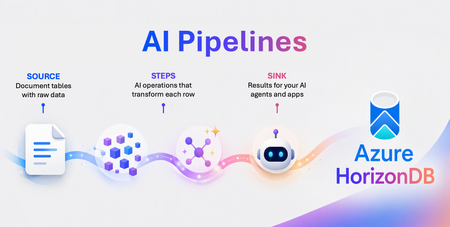
By Abe Omorogbe, Navya Teja Gajula, Binnur Gorer, B Harsha Kashyap, Krishnakumar Ravi (KK) from Microsoft PostgreSQL AI team If you’ve ever shipped a RAG app, this will feel familiar. Your data lives in Postgres. But the pipeline that turns that data into vectors lives somewhere else, spread across external services, queues, and retry logic. And when the embedding API hiccups mid-batch? That’s a 2 a.m. production incident. You didn’t set out to build your own embedding service. You just wanted to search your documents. And RAG is only the beginning. The moment AI works on your data: extraction, summarization, reranking, keeping embeddings fresh, or powering agent, you’re back to stitching together more services, queues, and glue code, all outside the database. AI pipelines in Azure HorizonDB (Preview) removes that entire stack. Define your workflows steps like chunking, embeding, extracting, and generating in SQL, and HorizonDB runs them as AI pipelines next to your data. No orchestrator. No glue code. Just Postgres. In this post we'll cover: The external-orchestrator issue that every AI on Postgres team eventually hits What AI pipelines are, and the four-part anatomy that makes them click Use cases worth trying: semantic search, knowledge extraction, content generation, smarter reranking, and always-fresh embeddings How to watch your pipelines run as live graphs in VS Code How to spin up HorizonDB and run your first pipeline today 🚀 Try it on Azure HorizonDB. AI pipelines are built into Microsoft's new PostgreSQL cloud service, no extra infrastructure to stand up. Write ai.create_pipeline(...), call ai.run(...), and it runs. Get started in HorizonDB → AI preprocessing runs outside the database, far from your data The standard way to get data into a vector store looks reasonable on a whiteboard: a service reads source rows, calls an embedding API, and writes chunks back to Postgres. However, some interesting issues often occur in production. The embedding API fails mid-batch, and there's no shared checkpoint showing which rows were completed. You rerun the job, and the extra API calls increases cost. A worker crashes after writing chunks but before flipping the parent row's processed flag. Now your embeddings are quietly inconsistent, and nobody knows. Every one of these is the same missing primitive: durable, checkpointed execution that lives where your data lives. External orchestrators can do it, but now you're operating a second service just to feed the first one. AI pipelines move that logic into HorizonDB itself. The source, the steps, the sink, and the full run history are all SQL protected by the same transactions, backups, and point-in-time restore your data already has. The database is already where your data commits. It's a natural place for the pipeline to live too. Anatomy of an AI pipeline in HorizonDB are optional and can be adjusted as needed. A pipeline has four parts: Source: where rows come from. A table_source(...) over a HorizonDB table, optionally with an incremental_column so the pipeline skips rows it already processed. Steps: the AI operations that transform each row, in order. Each step appends columns to the in-flight batch. Sink: where results land, ready for use by your AI apps or agent. Trigger: 'on_change' (run automatically when source rows change) or 'manual' (run only when you call ai.run()). Those four parts give the pipeline its shape. The steps are where you define the AI work itself, using composable building blocks: Step What it does ai.chunk() Split long text into overlapping chunks ai.embed() Generate vector embeddings ai.extract() Pull structured fields out of text with an LLM ai.generate() Generate text from a prompt (i.e content generation, classify, summarize and more) ai.rank() Score documents against a query How the pieces fit together. The ai.* API gives you the AI pipeline shape: sources define where data comes from, steps define the AI work to perform, sinks define where results land, and triggers define when the pipeline runs. Under the covers, HorizonDB turns that definition into a durable execution graph, where each step can be checkpointed, retried, and resumed if something fails. Built on open source. That durability isn't magic, every AI pipeline compiles down to a graph that runs on pg_durable, Microsoft's open-source durable-execution engine for PostgreSQL (built on the duroxide Rust runtime). The ai.* API is the AI-shaped surface (sources, steps, sinks, triggers) and pg_durable is the general-purpose engine underneath that handles checkpointing, retries, and crash recovery. So, your pipelines stand on a transparent, inspectable foundation you can read, and run on any Postgres 17 & 18. No black box, no lock-in. Use case 1: Semantic search over your data This is one of the most popular use cases. Turn a table of documents into searchable vectors, durably, and keep them fresh as the data changes. That last part matters: in production, documents are edited, added, and deleted constantly, and every change needs the right chunks and embeddings updated without reprocessing the entire corpus or leaving stale vectors behind. With AI pipelines, HorizonDB can track those incremental updates for you. Chunk the body, embed each chunk, and land the result in a DiskANN-indexed table. -- Define the pipeline: source -> chunk -> embed -> sink. SELECT ai.create_pipeline( name => 'rag_pipeline', source => ai.table_source(table_name => 'documents'), steps => ARRAY[ ai.chunk(input => 'content', chunk_size => 512, overlap => 64), ai.embed(model => 'default-embedding', input => 'chunk_text', dimensions => 1536) ], trigger => 'on_change', -- re-embed automatically as rows change sink => ai.table_sink('rag_pipeline_output') ); -- Run it SELECT ai.run('rag_pipeline'); -- Search your data SELECT chunk_text, embedding <=> azure_openai.create_embeddings('text-embedding-3-small', 'how does vector search work?')::vector AS distance FROM rag_pipeline_output ORDER BY distance LIMIT 3; 📘 Read more details in the AI Pipelines documentation That's the entire ingestion layer; chunking, embedding, checkpointing, retries, and sink writes in one definition. Because trigger => 'on_change', the pipeline updates embeddings whenever source rows change, processing only what is new or modified instead of redoing the whole corpus. Your vectors stay in sync with your data, and your ingestion work stays efficient as the dataset grows. Point a query at the DiskANN index and you've got production semantic search without a single line of application glue. That's the whole loop: define, run, inspect. The embedding service you were about to build the queue, the workers, the retry logic, the checkpoint table, the 2 a.m. production incident doesn't happens. Why it's better than an external service: a failure in ai.embed() never re-runs ai.chunk(), each step is a durable node. If the database restarts mid-run, it resumes from the last checkpointed batch, not row zero. Use case 2: Turn unstructured text into structured metadata Support tickets, contracts, product reviews, research papers are full of structure that's locked inside unstructured documents. ai.extract() pulls named fields out of text and merges them into the metadata JSONB column, so you can filter and aggregate on things an LLM read for you. SELECT ai.create_pipeline( name => 'extraction_pipeline', source => ai.table_source(table_name => 'documents'), steps => ARRAY[ ai.chunk(input => 'content'), ai.extract( input => 'chunk_text', data => ARRAY['topics: string - the main topics discussed', 'entities: string - named people, products, or places'] model => 'my-gpt' -- optional, the default model when AI model management is activate ) ], sink => ai.table_sink('extraction_pipeline_output') ); SELECT ai.run('extraction_pipeline'); -- Now query the structured fields the LLM extracted: SELECT doc_id, metadata->'topics' AS topics, metadata->'entities' AS entities FROM extraction_pipeline_output; 📘 Read more details in the AI Pipelines documentation You describe each field as a label: description string in the ai.extract step, and HorizonDB does the rest durably, in bulk, with the same retry-and-resume guarantees. Each field is a label, either a bare name like product, or the detailed form name: type - description (for example `sentiment: number - sentiment score from 1 to 5`). HorizonDB does the rest, durably, in bulk, with the same retry-and-resume guarantees. Use case 3: Summarize and rewrite content at scale ai.generate() runs an LLM prompt against every row, perfect for bulk summarization, classification, tone normalization, or generating titles. Because it's a pipeline, "summarize 4 million documents" becomes a job that survives restarts instead of a script you have to monitor overnight. SELECT ai.create_pipeline( name => 'summary_pipeline', source => ai.table_source(table_name => 'documents'), steps => ARRAY[ ai.chunk(input => 'content'), ai.generate( input => 'chunk_text', system_prompt => 'Create a concise summary in 50 words or fewer.' model => 'my-gpt' -- optional, the default model when AI model management is activate ) ], sink => ai.table_sink('generation_pipeline_output') ); SELECT ai.run('summary_pipeline'); -- Now query the generated text: SELECT doc_id, left(generated_text, 100) AS summary_preview FROM generation_pipeline_output WHERE generated_text IS NOT NULL LIMIT 5; 📘 Read more details in the AI Pipelines documentation Swap the system_prompt and the same shape becomes a classifier ("Label this ticket as billing, bug, or feature request"), a translator, or a headline generator. The instruction goes in system_prompt; the result lands in generated_text. Use case 4: Keep embeddings fresh, and re-embed cleanly when the model changes This is where AI pipelines become especially useful. In a real AI app, two things change constantly: your data and your model. AI pipelines are designed to handle both changes directly. Your data changes. Set incremental_column and an on_change trigger, and the pipeline only embeds new or changed rows, automatically, forever, until you pause or drop it. SELECT ai.create_pipeline( name => 'rag_pipeline', source => ai.table_source( table_name => 'documents', incremental_column => 'updated_at' -- only process what changed ), steps => ARRAY[ ai.chunk(input => 'content'), ai.embed(model => 'default-embedding', input => 'chunk_text', dimensions => 1536) ], trigger => 'on_change', sink => ai.table_sink('rag_pipeline_output') ); Your model changes. Bump the model or the dimensions, then run a single, resumable backfill, no migration script, no babysitting: TRUNCATE rag_pipeline_output; SELECT ai.backfill('rag_pipeline'); 📘 Read more details in the AI Pipelines documentation The backfill runs as one durable instance. If the database restarts mid-backfill, it picks up from the last checkpointed batch instead of starting over. The painful "re-embed everything" migration becomes a one-liner you can actually trust. Watch your pipelines run as live graphs in VS Code A pipeline you can see is a pipeline you can trust. Install the PostgreSQL extension for VS Code, connect to HorizonDB, then right-click your database and open Pipelines & Workflows → AI Pipelines. Select any run and the center pane renders the execution as a color-coded graph: Blue 🔵 : source and sink (where data enters and exits) Green 🟢 : processing steps (chunk, embed, extract, generate, rank) Pink 🟣 : external model and service calls For each run you can read the status (completed, running, failed), the run ID for traceability, start time and duration for performance, and a link back to the pipeline definition. When a run fails, open the graph and jump straight to the step where execution stopped, no log spelunking. Get Started: Try It Now We have a few demoes of AI pipelines in action: Resource Link Microsoft Build AI Pipeline Demo Simplify app dev with cloud-native PostgreSQL in Azure HorizonDB | DEM364 Microsoft Build AI Pipeline GitHub AI Pipelines Demo GitHub Repo | DEM364 Microsoft Mechanic Demo AI Pipeline Demo on Microsoft Mechanic Documentation AI pipelines on HorizonDB Enabling AI pipelines takes minutes: enable to azure_ai, pg_durable, vector and pg_diskann extensions and you can get started. -- On Azure HorizonDB — the extensions are built in. CREATE EXTENSION IF NOT EXISTS pg_durable; CREATE EXTENSION IF NOT EXISTS azure_ai; CREATE EXTENSION IF NOT EXISTS vector; CREATE EXTENSION IF NOT EXISTS pg_diskann; That's it, your PostgreSQL database can now run AI pipelines Learn more MS Learn AI pipelines on HorizonDB: Azure HorizonDB Preview pg_durable on GitHub (open source) MS Learn Durable Functions on HorizonDB Scalable vector search with DiskANN PostgreSQL extension for VS Code423Views2likes1CommentSELECT * FROM build2026_sessions WHERE postgres = true;
Microsoft Build 2026 is around the corner, and this year it’s shaping up to be a big one for PostgreSQL experts and enthusiasts. If you’re a developer working with Postgres, or just love exploring new database technology, there's plenty to get excited about. Microsoft’s new cloud-first evolution of PostgreSQL, Azure HorizonDB, alongside sessions featuring Azure Database for PostgreSQL, will highlight how Postgres is powering the next wave of AI-driven applications. A new horizon in Postgres Build 2026 arrives at a time when the role of databases in modern apps is evolving rapidly. From enabling AI model integration to scaling seamlessly across the cloud, PostgreSQL developers today are dealing with more complex demands than ever. That’s why Azure HorizonDB – Microsoft’s new cloud-native PostgreSQL service – is generating so much buzz ahead of Build. What is Azure HorizonDB? In short, it’s a reimagined version of PostgreSQL designed for cloud-scale performance and AI-era workloads. Azure HorizonDB, introduces a distributed architecture that decouples compute and storage, delivering sub-millisecond latencies and three times the throughput of self-managed Postgres at massive scale. It aims to preserve Postgres’s beloved features and SQL ecosystem while adding next-generation capabilities: built-in vector indexing for high-speed AI/ML retrieval, the ability to run AI models and vector operations directly in the database, and multi-zone replication for resilience. For Postgres developers, this means less time stitching together external data stores or machine learning services – and more time building powerful apps on a unified platform that’s both familiar and built for the future. The bottom line: Microsoft Build 2026 is an ideal opportunity for developers to see Azure HorizonDB in action, learn best practices for modern PostgreSQL architectures, and understand how to leverage Postgres in new scenarios like generative AI and multi-agent applications. Read on for a rundown of sessions covering these topics, complete with what you’ll learn from each one. Top sessions for PostgreSQL databases on Azure Below are key sessions tailored for PostgreSQL users and those interested in Azure HorizonDB, with session types and highlights of what you’ll gain by attending. 🎤 Breakout: From Rows to Reasoning: Designing Databases for AI Apps and Agents (BRK223, 45 min, in-person and digital options) Discover how to architect databases that can power tomorrow’s intelligent applications. This technical breakout will show how AI-ready databases can move beyond plain transactions. You’ll see live demos of integrating transactional, analytical, and vector data in one unified platform, with Azure’s new database capabilities, including Azure HorizonDB. Learn how to simplify your stack by eliminating separate analytics engines or vector stores. The session will highlight patterns that reduce data movement and latency so your apps can efficiently reason over live data with minimal complexity. 🧪 Hands-on lab: Create Advanced Postgres-Powered Agentic Apps with Azure HorizonDB (LAB511, 75 min, in person and digital options) Roll up your sleeves and get hands-on building a real multi-agent AI application with Postgres. In this advanced lab, you’ll create a production-ready AI agent powered by Azure HorizonDB as an all-in-one data, search, and intelligence layer. Experiment with retrieval-augmented generation (RAG) by combining semantic vector search (DiskANN) with traditional SQL queries right inside the database. Implement hybrid search and agent workflows without resorting to external vector databases or glue code – thanks to HorizonDB’s built-in vector indexing and in-database AI model capabilities. This lab is perfect for developers who want to experience how HorizonDB can simplify your stack and boost performance for AI-driven apps. Multiple hands-on labs are offered to suite your schedule. 💻 Demo: Simplify App Dev with Cloud-Native PostgreSQL in Azure HorizonDB (DEM364, 25 min, in-person and digital options) See how to cut your development time and complexity with built-in AI and search features in Postgres. This fast-paced demo shows how Azure HorizonDB helps eliminate the need for separate search engines and AI services by pulling those capabilities straight into PostgreSQL. Expect to learn how you can run hybrid vector + keyword queries using SQL, integrate AI models directly from within the database, and apply full-text search (BM25) and semantic ranking to get smarter results. If you’re eager to deliver intelligent apps faster, with fewer moving parts, this session will show how HorizonDB simplifies your architecture without sacrificing performance. ⚡Lightning Talk: Cloud-Native PostgreSQL, Rebuilt for Scale: Azure HorizonDB (LTG413, 15 min, in-person only) Get a rapid-fire introduction to the architecture behind HorizonDB’s eye-popping performance. This short talk dives into how HorizonDB re-architects core PostgreSQL to deliver effortless scale out and blazing speed. Learn how decoupled compute and storage, predictive caching, and multi-region replication combine to achieve sub-millisecond query latencies and 3× higher throughput than standard Postgres. If you care about performance tuning and high-scale database design, don’t miss this quick primer on the tech under HorizonDB’s hood. 👥 Interactive Table Talk: Scaling PostgreSQL for AI Apps: Patterns and Tradeoffs (TT622, 45 min, in-person only) Bring your questions and ideas to this collaborative discussion. In this open round-table session with community and Microsoft experts, you’ll explore architecture patterns for scaling PostgreSQL to meet the demands of agent-based and AI-driven applications. Discuss real-world strategies for handling vector embeddings in Postgres, unifying relational and document data, integrating with AI models, and more. Compare the trade-offs between different scaling approaches – from monolithic to microservices, sharding strategies, and new technologies like HorizonDB – and learn where each design shines or struggles in production. Come ready to share your experiences and learn from others in the room. ▶️ On-Demand: Smarter PostgreSQL Migrations to Power Modern, Intelligent Apps (OD822, 30 min, digital only) Planning to migrate to Postgres or move your databases to Azure? Start here. This on-demand session focuses on new tools and proven strategies to migrate large-scale databases to Azure Database for PostgreSQL quickly and safely. You’ll see AI-assisted migration tools in action that minimize downtime and risk when moving terabytes of data. Just as importantly, you’ll learn how migrating to Azure unlocks advanced capabilities – from boosted performance and enhanced security to AI-ready features – helping you turn your newly migrated data into intelligent apps and services. On-demand session will be available to stream on the first day of Build. Meet the team: PostgreSQL expert meetups If you’re attending Build in person, stop by the Expert Meetup (EMU) area and head to the relational cloud databases booth. This is your chance to talk directly with the engineers and product teams behind PostgreSQL on Azure. Bring your questions about architecture decisions, scaling patterns, migrations, AI workloads, or anything else on your mind. Whether you want to sanity-check a design, dig deeper into something you saw in a session, or give direct feedback, the EMU space is designed for exactly that convo. How to get the most out of Build (and what to do next) With so much great content lined up, how do you decide where to start? It really depends on what you’re most excited about: Curious about AI and agentic apps: Start with From Rows to Reasoning, then go deeper with the Simplify App Dev with HorizonDB demo or get hands-on at the Azure HorizonDB labs to see how these ideas work in practice. Performance and scale are your focus: The short Lightning Talk on HorizonDB’s cloud-native architecture and the Table Talk on scaling Postgres will both provide unique insights and pro tips for running Postgres at massive scale. Planning a migration to PostgreSQL on Azure: Watch the Smarter PostgreSQL Migrations on-demand session to learn how to migrate large workloads with minimal downtime, and the benefits you can unlock after moving to Azure. Looking for real answers to your specific questions: Make time for the PostgreSQL Expert Meetup area to connect directly with the team. No matter which sessions you choose, Build 2026 promises to be an exciting event for the PostgreSQL developer community. Browse the session catalog, save the sessions that match your interests, and we’ll see you at Build.825Views2likes0CommentsAlphaLife Sciences powers regulatory-compliant AI workflows with PostgreSQL on Azure
by: Maxim Lukiyanov, PhD, Principal PM Manager and Sharon Chen, CEO and Founder at AlphaLife Sciences In life sciences, every document is deeply interconnected and highly regulated. Each clinical trial, regulatory submission, safety report, or protocol amendment is expected to stand up to rigorous audit. For AlphaLife Sciences, that challenge became an opportunity to rethink how AI could support expert human judgment. At Microsoft Ignite, AlphaLife Sciences CEO and Founder Sharon Chen shared how her team is building an AI-powered content authoring platform on top of Azure Database for PostgreSQL, designed specifically for the demands of regulated life sciences workflows. She also explained why the team is excited about Azure HorizonDB as a new PostgreSQL service that is built to meet the needs of modern enterprise workloads. This post explores how AlphaLife Sciences uses PostgreSQL as more than a data store. It’s a semantic foundation for compliant, auditable AI agents. Bringing AI into regulated workflows Life sciences organizations are under constant pressure. R&D pipelines are growing and patent windows are shrinking. A single clinical study report can take six months or more to complete, involving multiple teams and hundreds of source documents. Building efficiency into these processes is critical, but only if it doesn’t compromise accuracy, traceability, or compliance. That’s where many AI solutions fall short. Generating text is one thing, but generating verifiable, version-controlled, regulation-aware content is another. AlphaLife Sciences needed agents that could: Work across massive volumes of structured and unstructured data (Word, PDF, Excel, PowerPoint) Maintain full traceability from generated content back to source documents Support audits, amendments, and regulatory review Minimize hallucinations in a zero-tolerance environment Integrate naturally into the tools writers already use Bringing data, search, and AI together in one system At the core of AlphaLife Sciences’ platform is Azure Database for PostgreSQL. The team chose it for flexibility, extensibility, and for how well it supports modern AI workloads. Instead of stitching together separate systems for SQL queries, vector search, text indexing, and metadata tracking, AlphaLife Sciences consolidated everything into PostgreSQL. One of its flagship use cases is clinical trial protocol authoring, a process that typically involves: Designing trial objectives and endpoints Pulling references from previous studies Writing and revising hundreds of pages of structured content Managing multiple rounds of amendments and regulatory feedback With AI agents backed by PostgreSQL, that workflow changes dramatically. When a writer generates a protocol section, the system can automatically retrieve relevant references from a centralized document pool, using semantic search rather than manual lookup. Writers select the sources they want, apply rules or prompts, and let AI draft the section - complete with citations tied back to the original documents. Reviewers can inspect the source, adjust the output, or insert it directly into the document. For protocol amendments, the platform allows teams to upload inputs (Word or Excel), analyze which sections are affected, and generate structured suggestions. Changes are clearly highlighted, compared against previous versions, and summarized in amendment tables. AI agents that respect the rules A recurring theme in Chen’s talk was restraint. “We don’t just need AI that can write,” she said. “We need intelligent agents that understand data structures, follow regulatory laws, and manage version control.” This is where PostgreSQL-backed AI agents shine. By grounding AI behavior in structured schemas, controlled access, and auditable records, automation works hand-in-hand with human experts. AI accelerates first drafts, consistency checks, discrepancy detection, and cross-document analysis, but final accountability stays firmly with professionals. In some cases, the time to complete processes has been reduced by more than 50%. Azure Database for PostgreSQL has become more than a database for AlphaLife Sciences. It’s a semantic knowledge base that supports: Structured and unstructured data Vector similarity search Metadata-driven traceability Compliance, security, and auditability AI agents operating safely inside enterprise constraints By grounding AI agents directly in the database, reasoning, retrieval, and generation all operate against the same governed source of truth. “AI agents are not here to replace human beings,” said Chen. “They extend structured, compliant, and auditable thinking.” What’s next for AlphaLife Sciences with PostgreSQL on Azure Looking ahead, Chen shared her excitement about Azure HorizonDB and the capabilities it brings to PostgreSQL on Azure. Features like in-database AI model management, semantic operators for classification and summarization, and faster vector search with DiskANN align closely with AlphaLife Sciences’ needs as their platform continues to scale. “We’re extremely happy to see the launch of Azure HorizonDB and the more powerful tools coming with it,” Chen said. “By putting everything together in PostgreSQL, we don’t have to rely on different systems for vector search, text indexing, or SQL queries. Everything happens in one streamlined system. The code becomes cleaner, efficiency improves, and the AI agents perform much more elegantly.” Learn more AlphaLife Sciences’ journey was featured during the Microsoft Ignite session “The Blueprint for Intelligent AI Agents Backed by PostgreSQL.” Watch the session to learn more and see a demo of how Azure Database for PostgreSQL transforms the protocol and protocol amendment process. When AI is anchored in a strong PostgreSQL foundation, innovation and compliance don’t have to compete - they can reinforce each other.868Views4likes0CommentsBuild Smarter with Azure HorizonDB
By: Maxim Lukiyanov, PhD, Principal PM Manager; Abe Omorogbe, Senior Product Manager; Shreya R. Aithal, Product Manager II; Swarathmika Kakivaya, Product Manager II Today, at Microsoft Ignite, we are announcing a new PostgreSQL database service - Azure HorizonDB. You can read the announcement here, and in this blog you can learn more about HorizonDB’s AI features and development tools. Azure HorizonDB is designed for the full spectrum of modern database needs - from quickly building new AI applications, to scaling enterprise workloads to unprecedented levels of performance and availability, to managing your databases efficiently and securely. To help with building new AI applications we are introducing 3 features: DiskANN Advanced Filtering, built-in AI model management, and integration with Microsoft Foundry. To help with database management we are introducing a set of new capabilities in PostgreSQL extension for Visual Studio Code, as well as announcing General Availability of the extension. Let’s dive into AI features first. DiskANN Advanced Filtering We are excited to announce a new enhancement in the Microsoft’s state of the art vector indexing algorithm DiskANN – DiskANN Advanced Filtering. Advanced Filtering addresses a common problem in vector search – combining vector search with filtering. In real-world applications where queries often include constraints like price ranges, ratings, or categories, traditional vector search approaches, such as pgvector’s HNSW, rely on multiple step retrieval and post-filtering, which can make search extremely slow. DiskANN Advanced Filtering solves this by combining filter and search into one operation - while the graph of vectors is traversed during the vector search, each vector is also checked for filter predicate match, ensuring that only the correct vectors are retrieved. Under the hood, it works in a 3-step process: first creating a bitmap of relevant rows using indexes on attributes such as price or rating, then performing a filter-aware graph traversal against the bitmap, and finally, validating and ordering the results for accuracy. This integrated approach delivers dramatically faster and more efficient filtered vector searches. Initial benchmarks show that enabling Advanced Filtering on DiskANN reduces query latency by up to 3x, depending on filter selectivity. AI Model Management Another exciting feature of HorizonDB is AI Model Management. This feature automates Microsoft Foundry model provisioning during database deployment and instantly activates database semantic operators. This eliminates tens of setup and configuration steps and simplifies the development of new AI apps and agents. AI Model Management elevates the experience of using semantic operators within PostgreSQL. When activated, it provisions key models for embedding, semantic ranking and generation via Foundry, installs and configures the azure_ai extension to enable the operators, establishes secure connections, integrates model management, monitoring and cost management within HorizonDB. What would otherwise require significant manual effort and context-switching between Foundry and PostgreSQL for configuration, management, and monitoring is now possible with just a few clicks, all without leaving the PostgreSQL environment. You can also continue to bring your own Foundry models, with a simplified and enhanced process for registering your custom model endpoints in the azure_ai extension. Microsoft Foundry Integration Microsoft Foundry offers a comprehensive technology stack for building AI apps and agents. But building modern agents capable of reasoning, acting, and collaborating is impossible without connection to data. To facilitate that connection, we are excited to announce a new PostgreSQL connector in Microsoft Foundry. The connector is designed using a new standard in data connectivity – Model Context Protocol (MCP). It enables Foundry agents to interact with HorizonDB securely and intelligently, using natural language instead of SQL, and leveraging Microsoft Entra ID to ensure secure connection. In addition to HorizonDB this connector also supports Azure Database for PostgreSQL (ADP). This integration allows Foundry agents to perform tasks like: Exploring database schemas Retrieving records and insights Performing analytical queries Executing vector similarity searches for semantic search use cases All through natural language, without compromising enterprise security or compliance. To get started with Foundry Integration, follow these setup steps to deploy your own HorizonDB (requires participation in Private Preview) or ADP and connect it to Foundry in just a few steps. PostgreSQL extension for VS Code is Generally Available We’re excited to announce that the PostgreSQL extension for Visual Studio Code is now Generally Available. This extension garnered significant popularity within the PostgreSQL community since it’s preview in May’25 reaching more than 200K installs. It is the easiest way to connect to a PostgreSQL database from your favorite editor, manage your databases, and take advantage of built-in AI capabilities without ever leaving VS Code. The extension works with any PostgreSQL whether it's on-premises or in the cloud, and also supports unique features of Azure HorizonDB and Azure Database for PostgreSQL (ADP). One of the key new capabilities is Metrics Intelligence, which uses Copilot and real-time telemetry of HorizonDB or ADP to help you diagnose and fix performance issues in seconds. Instead of digging through logs and query plans, you can open the Performance Dashboard, see a CPU spike, and ask Copilot to investigate. The extension sends a rich prompt that tells Copilot to analyze live metrics, identify the root cause, and propose an actionable fix. For example, Copilot might find a full table scan on a large table, recommend a composite index on the filter columns, create that index, and confirm the query plan now uses it. The result is dramatic: you can investigate and resolve the CPU spike in seconds, with no manual scripting or guesswork, and with no prior PostgreSQL expertise required. The extension also makes it easier to work with graph data. HorizonDB and ADP support open-source graph extension Apache AGE. This turns these services into fully managed graph databases. You can run graph queries against HorizonDB and immediately visualize the results as an interactive graph inside VS Code. This helps you understand relationships in your data faster, whether you’re exploring customer journeys, network topologies, or knowledge graphs - all without switching tools. In Conclusion Azure HorizonDB brings together everything teams need to build, run, and manage modern, AI-powered applications on PostgreSQL. With DiskANN Advanced Filtering, you can deliver low-latency, filtered vector search at scale. With built-in AI Model Management and Microsoft Foundry integration, you can provision models, wire up semantic operators, and connect agents to your data with far fewer steps and far less complexity. And with the PostgreSQL extension for Visual Studio Code, you get an intuitive, AI-assisted experience for performance tuning and graph visualization, right inside the tools you already use. HorizonDB is now available in private preview. If you’re interested in building AI apps and agents on a fully managed, PostgreSQL-compatible service with built-in AI and rich developer tooling, sign-up for Private Preview: https://aka.ms/PreviewHorizonDB.1.8KViews4likes0Comments