hls
24 TopicsShelly's Take on… new MS Teams Firstline workers features for Healthcare
The recent announcements by Emma Williams, Corp Vise President of Modern Workplace Verticals, around new Firstline Worker features in MS Teams, is exciting for many organization and industries across the country, but I wanted to call out a few features that are revolutionary for Health Providers. To see the full original post, please read here.6.9KViews6likes7CommentsShelly's Take on... How Health Providers can Close the Communication Gap Around Care
I hope that you got a chance to read my last blog, if not please check it out here as it talks about all the latest and greatest announcements from MS Ignite. MS Teams is adding features and capabilities at lightning speed and many of these are benefiting Health and Life Sciences customers. Features like secure messaging, image annotation and care coordination templates.2.4KViews4likes0CommentsAI where and when you need it with Dragon Copilot's ability to focus
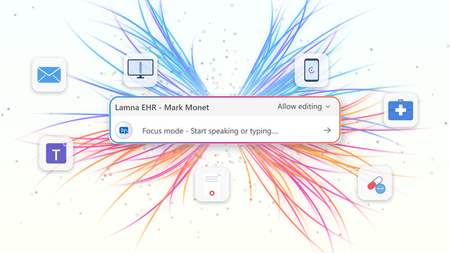
At HIMSS 2026, we showed that the most useful place to apply clinical intelligence is often not in a separate app or side window, but at the cursor, in the field where the clinician is already working. Our last post on this topic described the problem Dragon Copilot's focus capability is designed to solve: clinicians becoming data couriers, moving between windows, copying information from one system into another, and stitching together a day's work across multiple applications. That post looked ahead to what was coming. Now, it's here. What Dragon Copilot's focus capability does Dragon Copilot's focus capability brings AI directly into the text field where clinicians work, whether that's an EHR, a browser, Microsoft Word, SharePoint, or another desktop application. There is no separate application to launch and no workflow to rebuild. Simply place your cursor where you're working, select content if needed, and ask for help using natural language by voice or text. The focus capability works directly within the application you're already using, helping you stay in the flow of work. With focus, Dragon Copilot can: Read content from applications such as an EHR, browser, Microsoft Word, SharePoint, and other desktop applications. Answer questions about selected content and provide responses in context, using information from trusted sources and resources approved by the organization. Surface relevant information and insights without requiring manual searches, copying, or pasting. Generate, edit, and refine text directly where you're working. The experience is conversational and voice-first. Because the focus capability operates directly at the cursor, clinicians can take action without switching applications or rebuilding context. Questions are answered in context using information from the EHR and trusted sources, including resources approved by the organization. Focus in action The following examples illustrate how Dragon Copilot's focus capability helps clinicians read, answer, write, edit and surface information directly within their workflow. Journal and guideline Q&A Highlight a passage from a clinical guideline or journal article and ask: "Summarize the three key takeaways in patient-friendly language for the after-visit summary." The focus capability analyzes the selected content and generates a draft directly where you're working. Answer questions in context Clinicians often have the information they need in front of them but spend valuable time locating or interpreting it. Highlight relevant content and ask: "What does this recommendation mean for a patient with diabetes?" The focus capability reviews the selected information and delivers an answer within the workflow, without requiring clinicians to leave the application. The information is sourced from the EHR, a credible source such as MSD Manual, DailyMed, Medline Plus or from an organization’s internal source. Edit in place Select existing text and ask: "Convert this into a bulleted list." or "Summarize this HPI in two sentences." The focus capability reshapes the content directly where it already exists, helping clinicians refine documentation without disrupting their workflow. Surface relevant information Place your cursor inside a note and ask: "What's the patient's BMI?" The focus capability can retrieve relevant information available in context and return the answer inline, eliminating the need to navigate between screens, search for values, or perform calculations manually. Generate new content Need a referral letter, patient instruction, or summary? Simply ask. The focus capability can generate content directly within the destination field, helping clinicians create documentation where it belongs without copying and pasting between applications. Why this capability matters Bringing AI directly to the cursor is more than a convenience. It's what makes AI practical, visible, and actionable within everyday clinical workflows. Dragon Copilot's focus capability sits in a useful middle ground between ambient AI, which operates largely in the background, and traditional dictation, which requires clinicians to explicitly construct documentation themselves. Outputs are reviewable and editable before being finalized. Actions remain visible within the workflow, providing transparency and control. Clinicians can work without repeatedly navigating between applications or rebuilding context. Because the focus capability operates directly at the cursor, it creates an extensible foundation for future Dragon Copilot experiences and integrations from Microsoft and partners. When Dragon Copilot's focus capability brings AI directly to where clinicians are already working, copying, pasting, and window-switching fall away. Clinicians can access information, generate content, and take action without leaving their workflow, helping them spend less time managing technology and more time focused on patient care. Learn more about Dragon Copilot.
When "Wrong" Looks “Right”: The Challenge of Evaluating AI in Healthcare
Choosing the right evaluation metrics is crucial for ensuring patient safety and clinical accuracy when integrating AI into healthcare. Traditional text comparison metrics like F1, BLEU, ROUGE, and METEOR often fail to distinguish between clinically accurate and inaccurate responses. Advanced methods such as BERTScore, ClinicalBERT, and MoverScore, show better results but still have limitations. In this blogpost, we present a compelling case for investing in more advanced evaluation methods, even when they require additional computational resources. When patient safety is at stake, the ability to reliably distinguish between clinically accurate and inaccurate content isn't just nice to have—it's essential.2.4KViews3likes0CommentsHow MS Teams Helps Reduce the Average Length of Stay!
By reducing the average length of stay or eliminating avoidable days everyone wins! Patients get to go home to be with their families faster, nurses can free up a bed for someone who really needs it, and hospital systems can reduce the cost of care!5.5KViews3likes3CommentsNotes and documents – the way clinicians want them
The moment after the visit There is a moment in every patient encounter when the clinical story needs to become something more than a note. It may become a referral letter, a set of patient instructions, a school or work note, or a summary that helps a patient remember what was discussed. These documents matter as much as the note itself. A patient needs clear instructions they can understand and follow. A referring physician needs concise context and clinical reasoning. A specialist needs relevant background. Each audience is different; each document has a different purpose. For clinicians, these documents are not administrative leftovers. They are part of care itself. They carry the reasoning, reassurance, precision, and next steps that help patients and care teams move forward with confidence. And yet, creating them often happens under pressure and requires clinicians to rely on memory, whether they are documenting in between patients or after clinic hours. Introducing custom document templates in Dragon Copilot Dragon Copilot's custom document templates are designed to solve this problem by allowing the clinician to create these documents directly in the workflow. A custom document template is a reusable, AI-generated structure that turns a clinical encounter into the right finished document — a referral letter, after-visit summary, work note, pre-operative instructions — in the format the clinician defines. How it works A clinician describes what they need in plain language: "Create a patient-friendly follow-up letter after a cardiology visit." Dragon Copilot generates a draft template from that description. The clinician can then refine it — by speaking naturally— to adjust the tone, the structure, or the level of clinical detail until it reflects how they communicate. The finished template is saved and reusable, and ready to populate from the next encounter's notes. Templates can be built from scratch with a prompt, from a pasted sample, or from an uploaded file, with a preview before the template is used with real patient data. Built around how each clinician works Imagine a clinician finishing a consultation. The conversation was nuanced. The patient asked thoughtful questions. The next step requires a referral letter that reflects not only the diagnosis, but also the clinical reasoning behind it. Traditionally, that letter may be written later, when the clinician is already thinking about the next patient, the next inbox message, or the next task. With custom documents, the clinician can define the structure they need, save it, and generate the right type of output directly in the workflow. Referral letters are just one example. Clinicians create a wide range of documents every day, each designed for a different audience and purpose. A pediatrician needs parent-friendly discharge instructions — plain language, no jargon, clear next steps. A surgeon needs structured pre-operative guidance that follows a consistent format every time. A general practitioner needs a concise work note that takes seconds, not minutes. A specialist needs a referral response that reflects both the diagnosis and the clinical reasoning behind it. Each of these is a different template, built once, refined in conversation, and reused whenever it is needed. The AI adapts to the clinician's specialty, communication style, and intended audience — not the other way around. Clinical impact in real-world workflows Custom documents can create value where clinicians feel pressure most: in the moments after the encounter, when the clinical conversation needs to become clear, actionable communication. In practice, this means less time spent on repetitive drafting, manual rework, switching between documentation tasks, reconstructing details after the visit, creating routine letters, instructions, or summaries from scratch. Custom documents help make documentation more flexible, reusable, and aligned with how care is delivered. A step toward a more human future Less time spent drafting, reworking, and reconstructing details after the visit. More consistency across documents. And clinical communication that reflects how care was delivered — not a generic approximation of it. Custom documents help turn the conversation in the exam room into the right document for the right moment, with less friction and more consistency The goal is a future where clinicians do not have to choose between being present in the room and being precise in the record. Custom document templates in Dragon Copilot are a step toward that future. ------------- Click here to learn more about Dragon Copilot.381Views2likes0Comments
A specialty-specific approach with Microsoft Dragon Copilot
Clinicians are at the heart of patient care, and the documentation they create shapes how that care is delivered, interpreted, and continued. Nearly 70% of the global medical workforce—around 9 million practitioners, according to recent World Health Organization data—are specialists whose work spans a wide range of disciplines and care settings. As these specialties evolve, so do their documentation needs to ensure the highest quality and accurate care. Each specialty brings its own documentation requirements. Orthopedics relies heavily on imaging reports, physical exam findings, and procedural notes. Preventive Medicine, on the other hand, focuses on understanding the breadth of the patient’s conditions and proactive measures to promote health. Across care settings—from outpatient clinics to emergency departments to inpatient units—documentation also varies in its requirements. Accurate, specialty-specific documentation supports not only improved patient outcomes but also the broader healthcare ecosystem—from ensuring appropriate reimbursement to enabling clinical research and the development of more targeted treatments. When designed to meet the needs of specialists, documentation becomes more than a requirement—it becomes a tool for delivering better care. Purpose-built with clinicians Microsoft Dragon Copilot enhances the clinician experience by streamlining the creation of medical notes tailored to each specialty’s unique requirements. Powered by advanced natural language processing, Dragon Copilot recognizes and adapts to the specific needs of disparate medical fields. This enables clinicians to focus more on patient care and less on administrative work, enhancing both efficiency and satisfaction. Built for continuous learning and adaptation, Dragon Copilot helps specialists keep pace with the evolving clinical guidelines, medical standards, and billing requirements with Microsoft’s dedicated team of medical professionals including MD’s (Doctor of Medicine), RN’s (Registered Nurse), and APP’s (Advanced Practice Provider). In a field shaped by constant change, this agility helps to ensure documentation stays accurate and relevant. At the core of this innovation is Microsoft’s deep, daily engagement with clinicians using Dragon Copilot. Through a diverse network—physicians, advanced care practitioners, coders, and other healthcare professionals—Microsoft works directly with those on the front line of care. This network, and other early access participants, work alongside Microsoft’s in-house clinical experts and researchers to co-design, test, and refine Dragon Copilot. This close partnership brings real-world insight into the development process, helping us ensure Dragon Copilot aligns with the practical, specialty-specific needs of medical professionals. By embedding clinical knowledge and clinician feedback into each iteration, we deliver a solution that is not only clinically accurate but also intuitive and trusted. This is about more than building a better product experience—it is about fostering trust and ownership among clinicians with technology that fits naturally into their everyday practice, supports their expertise, and helps them deliver the highest quality care. The power of a specialty-optimized approach Dragon Copilot is built on a trusted core medical model, fine-tuned on millions of real-world patient encounters. From this core medical foundation, the model is then adapted and optimized for each specialty—integrating clinical experts’ knowledge and research, national association recommendations, and feedback from clinicians. This layered approach supports outputs that are not only medically accurate but also aligned with the documentation standards and workflows clinicians depend on in their daily practice. The system evolves with changes in clinical guidelines and inputs from practicing specialists. This iterative process keeps Dragon Copilot current, relevant, and reflective of both specialty-specific requirements and real-world practice. By aligning note content with specialty-specific standards, Dragon Copilot helps reduce cognitive load, minimize documentation errors, and shorten the time needed to complete and sign notes. The result is a more efficient workflow that enhances both the quality of care and patient data processing. “By teaming up with specialty providers, Microsoft has elevated the quality and accuracy of notes—making my documentation clearer, more robust yet concise, and significantly improving readability for both patients and fellow providers. Additionally, this update also greatly improved the capture of physical exam findings.” Eric Alford, M.D. Baylor Scott & White Health Consider ophthalmology: clinical guidelines in this specialty require documentation of complex decision-making—such as discussing lens implant options in a way that balances clinical appropriateness with individual patient preferences. Dragon Copilot helps to capture both, generating documentation that is structured and personalized to each unique patient encounter. Or take psychiatry: the mental status exam is a crucial component of the evaluation for informed decisions about the patient's treatment. Dragon Copilot supports by capturing this comprehensive assessment essential for tracking the patient's progress over time. Customization that reflects the art of medicine Specialty-specific notes are only part of the solution—clinician satisfaction and adoption rely on meaningful customization. Documentation is personal, and no two clinicians document the same way. Microsoft Dragon Copilot is designed with that in mind, offering customizable templates and flexible styles that align with individual preferences and workflows. “I think the potential of Dragon Copilot is going to be even greater as we start to bring in local vernacular, and the ability to help each doctor tune their note to their appropriate desires because one person's note that is too brief is another one that's too long for someone else”- R. Hal Baker, MD, SVP and CIO, Wellspan Health This level of personalization preserves each clinician’s unique voice while enhancing the accuracy, completeness, and efficiency of documentation. By bridging standardized requirements with specialty-specific content and individual style, Dragon Copilot supports a more seamless and effective documentation experience. Tailoring technology to meet the diverse needs of clinicians not only enhances satisfaction and adoption but contributes to better care delivery across the healthcare system. Trustworthy AI by design Microsoft Dragon Copilot is built on a secure data estate and incorporates healthcare-adapted clinical, chat and compliance safeguards for accurate and safe AI outputs. Dragon Copilot also aligns to Microsoft’s responsible AI principles to help guide AI development and use — transparency, reliability and safety, fairness, inclusiveness, accountability, privacy, and security. We invest in technical performance through regular assessments, building trust with medical professionals. This process looks for potential biases and errors, enabling timely corrections and continuous improvements across specialties. With a strong focus on inclusiveness, Dragon Copilot supports a wide range of medical practices and specialties, reflecting the diverse needs of clinicians and patients. By upholding these principles, Microsoft drives innovation while helping to safeguard the interests of both patients and healthcare providers. These commitments set a high standard for trustworthy AI in healthcare. Looking ahead Clinical documentation should tell the complete story of a patient’s care—clearly and comprehensively—for the stakeholders involved. We are excited to keep innovating around specialty-specific clinical documentation and beyond—and we want you to be part of it. Your feedback fuels our progress. Together, we can improve clinician well-being and keep the focus where it belongs: on patient care. Learn more Watch an on-demand demo Take a deeper look at Dragon Copilot Explore the latest with our new health AI models and integrationsShelly's Take on… New MS Teams Firstline Workers Features but for Clinicians
The recent announcements by Emma Williams, Corp Vise President of Modern Workplace Verticals, about how 8 new MS Teams features can empower Firstline Workers is exciting for many organization and industries across the country, but I wanted to call out a few features that are revolutionary for Health Providers. To see the full original post, please read here.3.7KViews2likes0Comments