hls-appinnovation-csa
7 TopicsAzure OpenAI GPT model to review Pull Requests for Azure DevOps
In recent months, the use of Generative Pre-trained Transformer (GPT) models for natural language processing (NLP) has gained significant traction. GPT models, which are based on the Transformer architecture, can generate text from arbitrary sources of input data and can be trained to identify errors and detect anomalies in text. As such, GPT models are increasingly being used for a variety of applications, ranging from natural language understanding to text summarization and question-answering. In the software development world, developers use pull requests to submit proposed changes to a codebase. However, reviews by other developers can sometimes take a long time and not accurate, and in some cases, these reviews can introduce new bugs and issues. In order to reduce this risk, During my research I found the integration of GPT models is possible and we can add Azure OpenAI service as pull request reviewers for Azure Pipelines service. The GPT models are trained on developer codebases and are able to detect potential coding issues such as typos, syntax errors, style inconsistencies and code smells. In addition, they can also assess code structure and suggest improvements to the overall code quality. Once the GPT models have been trained, they can be integrated into the Azure Pipelines service so that they can automatically review pull requests and provide feedback. This helps to reduce the time taken for code reviews, as well as reduce the likelihood of introducing bugs and issues.49KViews4likes13Comments
Utilizing Azure Key vault with Private link in DevOps
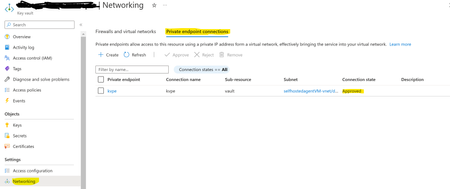
Azure Key Vault is a cloud service that provides secure storage and access to secrets such as API keys, passwords, certificates, or cryptographic keys. To enhance security and disable public access, Azure Key Vault can be integrated with Private Endpoint powered by Azure Private Link. This private endpoint uses a private IP address from your VNet and brings the service into your VNet, effectively eliminating exposure from the public Internet by traversing traffic between your virtual network and the service over the Microsoft backbone network.OpenAI’s GPT-3 to Triage Azure DevOps Bugs
OpenAI’s GPT-3 is a game-changer in the bug hunting industry. Its ability to generate natural language content with high accuracy and coherence makes it an invaluable tool for identifying potential security vulnerabilities in software applications. In this article, I will explain how you can implement an automation solution to triage a bug and best practices in Azure DevOps.5.8KViews2likes0CommentsUnlocking the Power of Open AI – Azure DevOps Backlogs from Images/PDFs
In today's digital world, the need to convert images and PDFs to text is becoming increasingly important. However, the process of manually transcribing images and PDFs can be time-consuming and error-prone. Fortunately, there is a better way. With the Azure Open AI service, you can easily and quickly convert images and PDFs to text.4.9KViews4likes0CommentsRestricting Azure Cognitive Search & Azure OpenAI Output with Azure Entra Security Groups
Azure Cognitive Search & OpenAI Output can be effectively restricted with the help of Azure Entra Security Groups. With Azure Entra Security Groups, organizations can limit access to an Azure search instance or an OpenAI Output instance based on group membership of the user. This ensures that users only have access to the data within the scope of their job responsibilities. Azure Entra Security Groups also provide advanced authentication and authorization services for Azure services, offering additional layers of security for organizations to protect their data.2.6KViews0likes0CommentsAzure Logic App AI-Powered Monitoring Solution: Automate, Analyze, and Act on Your Azure Data
Introduction In today’s cloud-driven world, monitoring and analyzing application health is critical for business continuity and operational excellence. However, the sheer volume of monitoring data can make it challenging to extract actionable insights quickly. Enter the Azure Logic App AI-Powered Monitoring Solution—an intelligent, serverless pipeline that leverages Azure Logic Apps and Azure OpenAI to automate monitoring, analyze data, and deliver comprehensive reports right to your inbox. This solution is ideal for organizations seeking to modernize their monitoring workflows, reduce manual analysis, and empower teams with AI-driven insights for faster decision-making. What Does This Solution Accomplish? The Azure Logic App AI-Powered Monitoring Solution creates an automated pipeline that: Extracts monitoring data from Azure Log Analytics using KQL queries. Analyzes data with AI using the Azure OpenAI GPT-4o model. Generates intelligent reports and sends them via email. Runs automatically on a daily schedule. Uses managed identity for secure authentication across Azure services. Business Case Solved Automated Monitoring: No more manual log reviews—let AI do the heavy lifting. Actionable Insights: Receive daily, AI-generated summaries highlighting system health, key metrics, potential issues, and recommendations. Operational Efficiency: Reduce time-to-insight and empower teams to act faster on critical events. Secure and Scalable: Built on Azure’s serverless and identity-driven architecture. Key Features Serverless Architecture: Built on Azure Logic Apps Standard for scalability and cost efficiency. AI-Powered Insights: Uses Azure OpenAI for advanced data analysis and summarization. Infrastructure as Code: Deployable via Bicep templates for reproducibility and automation. Secure by Design: Managed identity and Azure RBAC ensure secure access. Cost Effective: Pay-per-execution model with optimized resource usage. Customizable: Easily modify KQL queries and AI prompts to fit your monitoring needs. Solution Architecture Technologies Involved Azure Logic Apps Standard: Orchestrates the workflow. Azure OpenAI Service (GPT-4o): Performs AI-powered data analysis and summarization. Azure Log Analytics: Source for monitoring data, queried via KQL. Application Insights: Monitors workflow execution and telemetry. Azure Storage Account: Stores Logic App runtime data. Managed Identity: Secures authentication across Azure services. Infrastructure as Code (Bicep): Enables automated, repeatable deployments. Office 365 Connector: Sends email notifications. Support Documentation: https://docs.microsoft.com/en-us/azure/logic-apps/ Issues: https://github.com/vinod-soni-microsoft/logicapp-ai-summarize/issues Star this repository if you find it helpful!1.7KViews0likes0CommentsModernizing radiology reporting—without disrupting care: A practical path to PowerScribe One
With growing imaging volumes, increasing complexity, and the rapid emergence of AI, healthcare organizations are reevaluating how their reporting environments support clinicians and strengthen operational performance. They are faced with how to modernize without interrupting the work that matters most. We developed our PowerScribe One solution and implementation approach with that reality in mind. In active production across a wide range of healthcare environments (including large integrated delivery networks, academic medical centers, independent radiology practices, and community hospitals), PowerScribe One reflects a solution that is both proven in practice and designed for what comes next. Over 250 organizations and 10,000+ radiologists use PowerScribe One to generate millions of reports each month. This scale is significant; it’s validation of what we bring through our solution and support. It reflects a system and team tested across diverse environments, integration landscapes, and operational models, performing reliably in real-world conditions. Combining the strength of our solutions with an experienced Microsoft team, we deliver a seamless implementation that minimizes disruption. Redefining the migration experience As I’ve worked with customers modernizing their reporting environments, I’ve noticed a consistent pattern of concern: how to modernize without disrupting the workflows teams rely on or the care they deliver. In my experience, even when a solution offers meaningful capabilities, customers still worry about the potential downsides of a prolonged migration. I understand that perspective. Many have worked with vendors who promise a “lift-and-shift” implementation but fall short of that expectation. Migrations can introduce real challenges, including downtime, retraining, and workflow disruption. Over time, we’ve seen that successful transformation is driven not only by the strength of the technology, but also by how effectively the transition is managed. With years of experience supporting PowerScribe environments, we’ve taken those insights and applied them to our approach. We defined what a successful PowerScribe One implementation looks like and developed a migration model designed to reduce risk while supporting adoption. Rather than viewing migration as a single milestone, PowerScribe One transitions are designed as a structured journey with clearly defined phases and timing: Discovery: Align on goals, workflows, and integration requirements Build: Preparing the technical and operational foundation Testing: Validating workflows end to end and addressing issues proactively Production: Supporting go-live with a focus on stability and adoption Each phase includes checkpoints and shared accountability to increase transparency and reduce uncertainty. Our Microsoft team works closely with our customers to build a project timeline that fits their needs while existing PowerScribe 360 workflows and content are leveraged, eliminating the need to rebuild from scratch. I’d also like to highlight at the center of this migration model is a parallel transition strategy. We enable PowerScribe 360 and PowerScribe One to operate side-by-side during our customer’s migration period. This approach provides organizations with the flexibility to: Introduce PowerScribe One to early adopters Validate workflows and integrations in a live environment Phase adoption across teams Maintain continuity throughout the transition In this measured approach, our customers can move forward with confidence, ensuring that systems, workflows, and teams are ready for successful adoption. The result is a model that is both repeatable and adaptable, capable of supporting organizations with varying levels of complexity. Our efforts to center our implementation process on the customer experience shows how migration work is not simply a technical capability proposition. This focus reflects our broader philosophy: transformation should be deliberate, not disruptive. From implementation to enablement Minimizing disruption doesn’t end with implementation. It extends into how teams are supported, trained, and enabled in their day-to-day workflows. Our focus on enablement is especially important in radiology, where even small workflow disruptions can have outsized impacts on productivity and the radiologist experience. With PowerScribe One, organizations not only gain access to a modern reporting solution but also support from teams with deep experience in radiology workflows, integrations, and large-scale deployments. With that in mind, I’ve seen firsthand how the healthcare landscape has radically changed over the last six years. Our customers tell us how workforce shifts in radiology means they are adapting their staffing models and workflows to include telework. With these changes in the workforce, organizations benefit from training and support models that are flexible, digital, and accessible remotely. We made live expert access (known to our customers as “drop-in help”) easily accessible through a simple QR code. It can be an ad hoc or scheduled engagement which ensures the offering aligns with a radiologist’s schedule. The feedback on this level of access we’ve received has been extremely positive and is resonating strongly with customers. I know that for any healthcare solution deployment to be successful, it requires a learning and support model that aligns with clinical schedules and operational realities. Modernizing radiology reporting is both a technical and operational effort with its success depending on advancing capability without disrupting clinical continuity. The transition to PowerScribe One shows this balance is achievable through phased adoption, low-disruption deployment, and strong user readiness. Organizations can modernize without affecting day-to-day care delivery with our structured approach, proven expertise and a focus on provider experience and patient outcomes. If you want to learn more about our approach or PowerScribe One, I’ll be at SIIM26, June 10-12, please stop by the Microsoft booth at 630-632. You can also discover how we partner with our customers why they decided to move to PowerScribe One by reading our Industry Blog.