high availability
4 Topics
Announcing Azure Infrastructure Resiliency Manager Public Preview
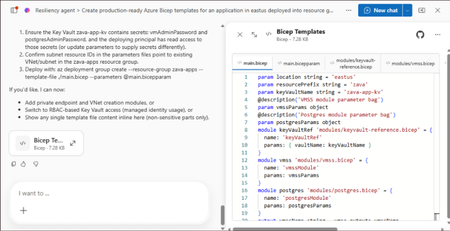
At Microsoft Build 2026, we are thrilled to announce that Azure Infrastructure Resiliency Manager is now available in public preview, open to all Azure customers. Azure Infrastructure Resiliency Manager is not a replacement for individual Azure resiliency features; it is the unifying layer that connects them into a coherent, goal-driven workflow. It leverages and complements Availability Zones, Azure Advisor, Azure Chaos Studio, Azure Monitor, and Azure Copilot, adding purposeful orchestration that turns isolated capabilities into a complete resiliency strategy. The preview already covers a broad range of Azure resource types and zone-redundant configurations, from virtual machines and databases to AKS clusters and networking with continued expansion planned. The new platform is built on a foundational belief: achieving application resilience is a continuous journey, not a one-time configuration task. That journey is organized into three actionable phases: Start Resilient, Get Resilient, and Stay Resilient. Each phase delivers measurable customer value such as reduced downtime risk, faster recovery, and greater operational confidence. Start resilient: Embedding resiliency from day one Starting resilient means treating resiliency as a fundamental architectural requirement, not an afterthought. Azure Infrastructure Resiliency Manager makes it straightforward to design zone-resilient applications from the outset, eliminating costly retrofits and reducing risk before your first deployment. Resiliency Agent: Your AI-powered architecture advisor The standout capability in this preview is the Resiliency Agent, a conversational, AI-powered assistant embedded directly in the Azure Portal. Designed for architects and developers, the Resiliency Agent allows teams to validate and refine resiliency strategies using plain language. For example, you might enter a prompt such as "I'm designing a three-tier web app with VMs, a Flexible PostgreSQL database, and a Standard Load Balancer" and ask the agent what zone-resiliency requirements apply. The Resiliency Agent analyzes your plan, identifies single points of failure, and recommends specific changes: enabling zone redundancy for the database, deploying VMs across zones, or upgrading to zone-redundant load balancers. It delivers a structured, per-resource summary that makes the path to resiliency explicit and actionable. Infrastructure-as-Code generation and validation Beyond design guidance, Infrastructure Resiliency Manager accelerates implementation. You can ask the Resiliency Agent to generate Infrastructure-as-Code (IaC) templates (ARM, Bicep, or Terraform) with all resiliency configurations pre-built and ready to deploy. A generated Bicep template, for example, automatically includes zone-redundant settings for databases, VMs, and load balancers aligned to your stated goals. The agent also validates existing IaC templates: upload a template and receive a natural language assessment of resiliency gaps, complete with targeted suggestions and code snippets to close them. This eliminates manual review overhead and ensures every new deployment starts with a resilient foundation by embedding resiliency into the design and deployment lifecycle from day one, organizations avoid expensive redesigns, accelerate time-to-market, and bring new services to production already meeting high-availability standards. Get resilient: Closing gaps in existing applications Most Azure customers have workloads built over months or years that may not fully meet today's resiliency requirements. Infrastructure Resiliency Manager delivers a centralized, goal-driven view of your current environment's resilience posture, along with prioritized, actionable recommendations to close every gap. Goal-driven resiliency posture Define what constitutes your application by grouping resources across regions, subscriptions, or resource groups, including tag-based grouping, using Service Groups. Once your application boundary is established, assign a resiliency goal: for example, zone-failure tolerance for all components, or specific data replication requirements for critical services. The platform assesses every resource against that goal and presents a clear, single-pane-of-glass resiliency posture showing which resources meet the goal, which are non-resilient, and which remain unevaluated. This goal-driven model ensures that all subsequent guidance is precisely calibrated to your target state, not generic best practices. Actionable, prioritized recommendations For every resource that falls short of the defined goal, Infrastructure Resiliency Manager generates targeted remediation recommendations powered by Azure Advisor. If a virtual machine lacks zone redundancy, the platform recommends converting it to an availability zone deployment. If a database is not zone-redundant, the recommendation specifies exactly how to enable it. Critically, every recommendation includes contextual decision-making information: impacted resources, implementation steps, and qualitative cost indicators (High, Medium, Low) that flag whether a fix requires additional service spend, downtime, or redeployment. This allows engineering teams to plan remediation in a business-informed, prioritized manner. Looking ahead, the platform will also integrate application health with infrastructure health, correlating Azure Monitor SLIs and Azure Health Model insights to surface resiliency gaps with even greater precision. Guided remediation with the resiliency agent Azure Advisor identifies resiliency gaps and surfaces prioritized recommendations. Infrastructure Resiliency Manager builds on this by making those recommendations actionable. Instead of stopping at insights, the platform provides guided execution. Each recommendation includes step-by-step portal flows, dependencies, and readiness checks required for remediation. The Resiliency Agent acts as the interactive layer on top, helping you interpret and act on these recommendations in context. For example, you can ask whether an App Service can be moved to zone-redundant storage, what downtime to expect, or what prerequisites are required and receive clear, workload-aware answers tailored to their environment. On request, the agent can generate remediation scripts or IaC snippets to implement specific changes, such as validating an existing Terraform template against Azure resiliency best practices. Importantly, the agent never makes changes autonomously: it provides information and code, while you retain full control over execution. This human-in-the-loop model accelerates remediation without sacrificing governance. The result: a curated, goal-oriented to-do list that replaces generic advice with targeted action, weighted by cost and feasibility - giving engineering leaders clear visibility into which investments will yield the greatest resilience gains. Stay resilient: Continuous validation and recovery Readiness Resilience is not just a configuration milestone; it is an ongoing operational discipline. The "Stay Resilient" phase ensures the resilience you've built performs under pressure and that your teams are prepared to respond when real incidents occur. Azure Infrastructure Resiliency Manager delivers resiliency drills and recovery orchestration to support continuous readiness. Resiliency drills enabled by Azure Chaos Studio A highlight of this public preview is the introduction of availability zone failure drills, enabled by Azure Chaos Studio. These drills simulate zone outages for your application in a controlled, safe environment: shutting down VMs in a target availability zone, forcing failover for zone-redundant databases, or stopping AKS node pools. Every fault action is based on Azure-recommended patterns for each supported resource type, providing a realistic approximation of an actual zone failure. Because Infrastructure Resiliency Manager understands which resources are intended to be zone-resilient, it automatically determines which fault actions to apply, eliminating manual configuration. For scenarios not covered out of the box, custom fault logic via Azure Automation runbooks is supported, providing the flexibility required for complex environments. Recovery orchestration Resiliency drills in the platform go beyond fault injection. It integrates with recovery plan to orchestrate the complete recovery sequence automatically after injecting faults: fault injection → failover → reprotection → failback. This full-cycle simulation measures the maximum potential downtime your application could experience during a zone outage and surfaces any recovery steps that did not execute as expected. Real-time health monitoring and drill insights Throughout each drill, the Infrastructure Resiliency Manager provides live health monitoring powered by Azure Monitor. A built-in metrics dashboard tracks each resource's health in real time revealing whether your application remains available and how performance holds under simulated stress. This immediate feedback surfaces resilience gaps that may not have been visible through static analysis. After each drill, the platform logs the results along with team notes and attestations, building a historical record of all resilience tests. Over time, this record demonstrates measurable improvement and supports compliance with organizational and regulatory resiliency requirements. "Stay Resilient" converts assumptions into evidence. When an actual zone outage occurs, your teams will not be executing a failover for the first time; they would have rehearsed it. The result is a culture of proactive resilience, and the organizational confidence that your systems will deliver on their availability commitments. Get started with the public preview Starting today, the public preview of Azure Infrastructure Resiliency Manager is open to all Azure customers. Access the new platform through the Azure Portal by searching for "Resiliency". We encourage you to evaluate it against a test application or a production workload to gain immediate visibility into your current resiliency posture. To get the most from Infrastructure Resiliency Manager, we recommend these three starting actions: Define a resiliency goal for a critical application and review the posture insights the platform surfaces; you may uncover gaps that were previously invisible. Engage the Resiliency Agent to tackle a few recommendations and experience firsthand how AI-guided remediation accelerates your team's workflow. Run a zone-down drill in a non-production environment to validate your failover and recovery processes under realistic conditions. We believe this holistic approach will help organizations achieve a new level of operational excellence, making resiliency actionable, measurable, and deeply embedded in cloud practices. As Infrastructure Resiliency Manager moves toward general availability, we will continue incorporating your feedback and expanding capabilities to meet the demands of real-world cloud architectures. Azure Infrastructure Resiliency Manager gives you the tools to reduce downtime risk, gain clarity over your resiliency posture, and build genuine readiness for the unexpected. Join the public preview today and take the next step toward applications that don't just survive disruptions; they thrive through them. Resources Azure Infrastructure Resiliency Manager — Overview Get Started with Service Groups — Microsoft Learn Introduction to Azure Advisor — Microsoft Learn What is Azure Chaos Studio? — Microsoft Learn What's New in Azure Monitor — Microsoft Learn Modern Azure Resilience with Mark Russinovich — Tech Community3.5KViews8likes0Comments
Autoscaling Now Available in Azure API Management v2 Tiers
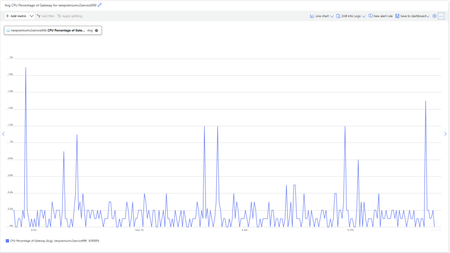
Gateway-Level Metrics: Deep Insight into Performance Azure API Management now exposes fine-grained metrics for each Azure API management v2 gateway instance, giving you more control and observability. These enhancements give you deeper visibility into your infrastructure and the ability to scale automatically based on real-time usage—without manual effort. Key Gateway Metrics CPU Percentage of Gateway – Available in Basic v2, Standard v2, and Premium v2 Memory Percentage of Gateway – Available in Basic v2 and Standard v2 These metrics are essential for performance monitoring, diagnostics, and intelligent scaling. Native Autoscaling: Adaptive, Metric-Driven Scaling With gateway-level metrics in place, Azure Monitor autoscale rules can now drive automatic scaling of Azure API Management v2 gateways. How It Works You define scaling rules that automatically increase or decrease gateway instances based on: CPU percentage Memory percentage (for Basic v2 and Standard v2) Autoscale evaluates these metrics against your thresholds and acts accordingly, eliminating the need for manual scaling or complex scripts. Benefits of Autoscaling in Azure API management v2 tiers Autoscaling in Azure API Management brings several critical benefits for operational resilience, efficiency, and cost control: Reliability Maintain consistent performance by automatically scaling out during periods of high traffic. Your APIs stay responsive and available—even under sudden load spikes. Operational Efficiency Automated scaling eliminates manual, error-prone intervention. This allows teams to focus on innovation, not infrastructure management. Cost Optimization When traffic drops, auto scale automatically scales in to reduce the number of gateway instances—helping you save on infrastructure costs without sacrificing performance. Use Case Highlights Autoscaling is ideal for: APIs with unpredictable or seasonal traffic Enterprise systems needing automated resiliency Teams seeking cost control and governance Premium environments that demand always-on performance Get Started Today Enabling autoscaling is easy via the Azure Portal: Open your API Management instance Go to Settings > Scale out (Autoscale) Enable autoscaling and define rules using gateway metrics Monitor performance in real time via Azure Monitor Configuration walkthrough: Autoscale your Azure API Management v2 instanceIncrease availability at scale with Azure Virtual Machine Scale Sets flexible orchestration mode
Today customers can deploy and manage their stateful and stateless applications on Azure using Availability Sets and/or Virtual Machine Scale Sets. Availability sets provide fault isolation guarantees and the ability to manage VMs individually, whereas Virtual Machine Scale Sets simplifies large-scale deployments and provide rich application runtime features. In various situations, large scale customers must choose between scale or high availability. However, availability sets only offer up to 200 VMs making it hard for customers to scale and meet customer demands, whereas VM scale sets can scale up to 1000 VMs but offer individual access to VMs or their resources for customization (if required). VMs created within a VM scale set also have a slightly different resource model compared to individual VMs provisioned individually outside of a scale set, additionally VMs cannot be attached or detached to the VM Scale Sets. As more workloads move to the cloud - like open-source databases, large-scale web services, stateful or stateless workloads, batch processing etc. - customers require high scale, autoscaling, agility, high availability, elasticity, in addition to greater ease of management and configuration, rich app management tools to successfully meet an ever-changing environment. Virtual Machine Scale Sets flexible orchestration mode We are thrilled to announce the evolution of Azure Virtual Machine Scale Sets with a new orchestration mode, now in public preview, that delivers a richer and more powerful platform for customers to easily run a variety of workloads at high scale and with high availability. The new Virtual Machine Scale Sets flexible orchestration mode or VMSS-flex offer new capabilities and can provide best in class experience for Quorum-based workloads Open-Source databases Stateful applications Services which require high availability and large scale Services which want to mix virtual machine types, or leverage Spot and on-demand VMs together. Existing Availability Set applications We recognize that a lot of customers have been using Virtual Machine Scale Sets to successfully run their applications. Customers will still be able to access/create/manage their existing scale sets using the existing APIs with the current orchestration mode now called “uniform orchestration mode” which is Generally Available and remains the default. Both uniform and flexible orchestration modes will move forward and will be supported. By selecting the Uniform Orchestration mode, customers can continue using VMSS without disruption. The preview announced today for Virtual Machine Scale Sets flexible orchestration mode (VMSS-flex) provides high availability guarantees and large scale up to 1000 VMs per AZ. You can chose to deploy your VMs across fault domains in a region or within an Availability Zone. This enables you to scale seamlessly along with fault isolation constraints to achieve High Availability, which are essential to run quorum-based or stateful workloads. In addition, scale sets also offer ‘sticky’ Fault Domains i.e. Fault Domains that do not change during a VM’s lifecycle until the VM is deleted. You can also specify a Fault Domain as part of a VM deployment, which makes it simpler to replace VMs without impacting workload configurations. This is specifically relevant for open-source databases like Cassandra or other quorum-based applications. E.g. az vm create –vmss “myVMSS” –-platform_fault_domain 1 We are also unifying the VM experience across our offerings. VMs which are created with VMSS-flex are Azure Resource Manager (ARM) based VMs. The VM and its resources are individually addressable like any other VM unlike the existing uniform orchestration mode. This enables far more flexibility for you to manage your infrastructure either as a set with VMSS-flex or individually. Here are more details about today’s preview: Supported VM series: General purpose: B, Dsv3, Dv3, Dasv4, Dav4, DSv2, Dv2, Av2, DC, DCv2, Dv4, Dsv4, Ddv4, Ddsv4 Compute Optimized: F, Fs, Fsv2 Memory Optimized: Esv3, Ev3, Easv4, Eav4, Ev4, Esv4, Edv4, Edsv4, DSv2, Dv2 Remaining series like memory optimized Mv2, M, storage optimized (Lsv2), GPU (NC, NCv2, NCv3, NCasT4_v3 (Preview), ND, NDv2 (Preview), NV, NVv3, NVv4) and high-performance compute (HB, HBv2, HC, H) are not supported and will be added to VMSS-flex in the future. Fault Domain availability: same as region provides. 1 when deployed in an Availability Zone Since VMSS-flex is unlocking significant value for you and providing high availability at large scale. To provide a more complete picture and transparency regarding future product enhancements, I’m happy to pre-announce some of the upcoming features that will be added to Virtual Machine Scale Sets flexible orchestration mode. In the near future VMSS-flex will also offer: Elasticity profile – ability to provide VM configuration and set instance count Ability to mix Spot and On-demand VMs in the same scale set Metrics based autoscaling – ability to automatically scale out or scale in based on aggregate CPU usage, disk IO performance, etc. Instance repair – automatically remove and replace instances with unhealthy application state Terminate notification – receive instance termination notifications and set a pre-defined delay timeout to the terminate operation Resources to get you started Virtual Machine Scale Sets Learn how to deploy and manage VMSS Flex8.6KViews1like0Comments